20CSE525J
DIGITALIMAGE PROCESSING
UNIT-1
UNIT-1 Topic 2:
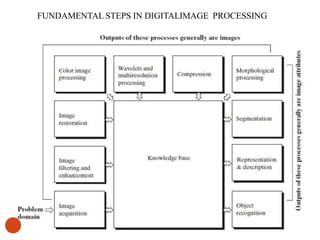
FUNDAMENTAL STEPS IN DIGITALIMAGE PROCESSING
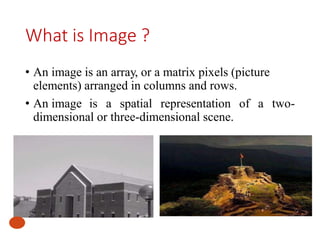
What is Image ?
• An image is an array, or a matrix pixels (picture
elements) arranged in columns and rows.
• An image is a spatial representation of a two-
dimensional or three-dimensional scene.
Image Types
• RGB
• 3 Arrays - RED , GREEN ,BLUE
• Combination RGB formed other colors.
• Range (0- 255) 8 bits
• INDEXED
• Only one index array
• Similar to Text book index
• One index number which holds RGB levels
• GRAY SCALE
• Only one array
• It is seen in XRAYS,SCAN,CT etc which is used in Image Processing
• Range (0 -255 ) ,only Gray shades.
• BW
• Range (0,1) or (0-255)
• 0 – BLACK
• 1 - WHITE
WHY…..digital image processing…???
• Improvement of pictorial information for human
interpretation
• Processing of image data for storage, transmission,
and representation for autonomous machine
perception
FUNDAMENTAL STEPS IN DIGITALIMAGE PROCESSING
6
Steps involved in image processing
(1) Image Acquisition
- retrieving an image from some source, usually
hardware based source for processing
- Image acquisition involves pre-processing
such as scaling.
(2) Image Enhancement
- To improve the quality of the image for future
processing
(3) Image Restoration
-To restore the image which is affected by noise
Steps involved in image processing
(4) Color image processing
- it is gaining importance as there is significant increase in
the use of digital image
(5) Wavelets and multi resolution processing
- Representation of images in various degrees of
resolution
(6) Compression
- Techniques required for reducing the storage required to
save an image and bandwidth required to transmit.
(7) Morphological Processing
-Deals with tools for extracting image components
Steps involved in image processing
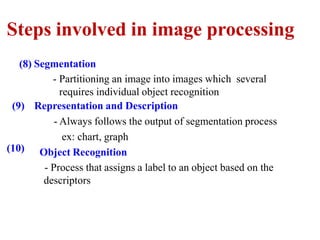
(8) Segmentation
(10)
- Partitioning an image into images which several
requires individual object recognition
(9) Representation and Description
- Always follows the output of segmentation process
ex: chart, graph
Object Recognition
- Process that assigns a label to an object based on the
descriptors
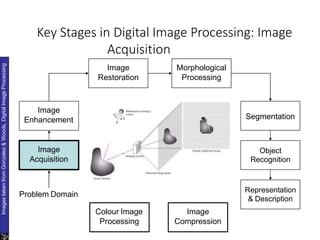
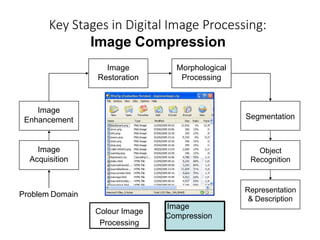
Key Stages in Digital Image Processing: Image
Acquisition
Image
Acquisition
Image
Restoration
Morphological
Processing
Segmentation
Representation
& Description
Image
Enhancement
Object
Recognition
Problem Domain
Colour Image
Processing
Image
Compression
Images
taken
from
Gonzalez
&
Woods,
Digital
Image
Processing
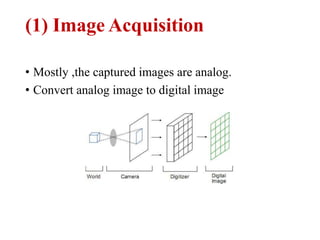
(1) Image Acquisition
• Mostly ,the captured images are analog.
• Convert analog image to digital image
Sampling & Quantization
12
Sampling
• Digitizing the coordinate values is called
sampling
• Measuring the brightness information only at a
discrete spatial location
Quantization
• Digitizing the amplitude values is called
quantization
• involves representing the sampled data by a
finite number of levels based on some criteria such
as minimization of quantizer distortion.
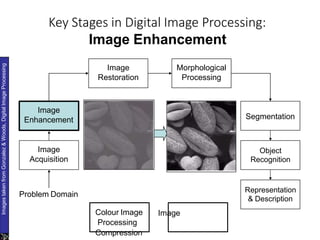
Key Stages in Digital Image Processing:
Image Enhancement
Image
Acquisition
Image
Restoration
Morphological
Processing
Segmentation
Representation
& Description
Image
Enhancement
Object
Recognition
Problem Domain
Colour Image
Processing
Image
Compression
Images
taken
from
Gonzalez
&
Woods,
Digital
Image
Processing
(2) Image Enhancement
i. Image Enhancement : Process of
manipulating an image so that the result
is more suitable than the original image
for a specific application.
ii. (i.e.) It is Application Specific.
iii. (i.e.) Enhancement Techniques are
problem oriented.
iv. Viewer is the ultimate judge for image
enhancement techniques.
Image Enhancement
• It includes
• sharpening of images
• Brightness
• Contrast adjustment
• Removal of noise
• It is “subjective” in nature, for example ,some
people like high saturation images and some people
like natural colors
Enhancement Techniques :Spatial Domain
• Gray level Transformation
• Histogram Processing
• Spatial Filtering
– Smoothing Filters
– Sharpening Filters
Enhancement Techniques :Frequency Domain
•Fourier Transform
•Smoothing Frequency Domain Filters
•Sharpening Filters
•Homomorphic Filtering
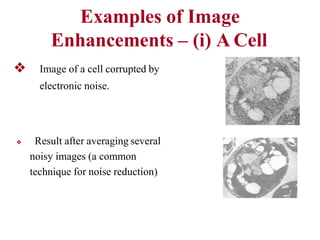
Examples of Image
Enhancements – (i) A Cell
❖ Image of a cell corrupted by
electronic noise.
❖ Result after averaging several
noisy images (a common
technique for noise reduction)
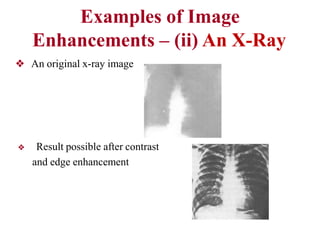
Examples of Image
Enhancements – (ii) An X-Ray
❖ An original x-ray image
❖ Result possible after contrast
and edge enhancement
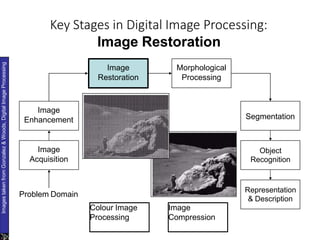
Key Stages in Digital Image Processing:
Image Restoration
Image
Acquisition
Image
Restoration
Morphological
Processing
Segmentation
Representation
& Description
Image
Enhancement
Object
Recognition
Problem Domain
Colour Image
Processing
Image
Compression
Images
taken
from
Gonzalez
&
Woods,
Digital
Image
Processing
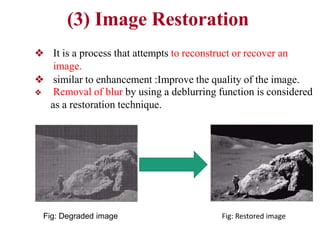
(3) Image Restoration
❖ It is a process that attempts to reconstruct or recover an
image.
❖ similar to enhancement :Improve the quality of the image.
❖ Removal of blur by using a deblurring function is considered
as a restoration technique.
Fig: Restored image
Fig: Degraded image
Image Degradation
To estimate Degradation function H for the image restoration,
1.Observation
2.Exprementation
3.Mathematical Modeling
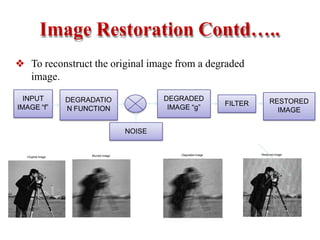
Image Restoration Contd…..
❖ To reconstruct the original image from a degraded
image.
INPUT
IMAGE “f”
DEGRADATIO
N FUNCTION
NOISE
DEGRADED
IMAGE “g”
FILTER RESTORED
IMAGE
Blurred Image Degraded image Restored image
Original Image
What is Image Restoration?
24
• The purpose of image restoration is to restore a
degraded/distorted image to its original content and
quality.
• Ultimate goal of image restoration techniques
– To improve an image in some predefined sense
– To obtain an estimate of the original image
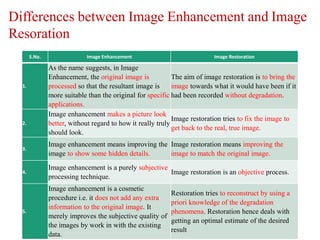
Differences between Image Enhancement and Image
Resoration
S.No. Image Enhancement Image Restoration
1.
As the name suggests, in Image
Enhancement, the original image is
processed so that the resultant image is
more suitable than the original for specific
applications.
The aim of image restoration is to bring the
image towards what it would have been if it
had been recorded without degradation.
2.
Image enhancement makes a picture look
better, without regard to how it really truly
should look.
Image restoration tries to fix the image to
get back to the real, true image.
3.
Image enhancement means improving the
image to show some hidden details.
Image restoration means improving the
image to match the original image.
4.
Image enhancement is a purely subjective
processing technique.
Image restoration is an objective process.
5.
Image enhancement is a cosmetic
procedure i.e. it does not add any extra
information to the original image. It
merely improves the subjective quality of
the images by work in with the existing
data.
Restoration tries to reconstruct by using a
priori knowledge of the degradation
phenomena. Restoration hence deals with
getting an optimal estimate of the desired
result
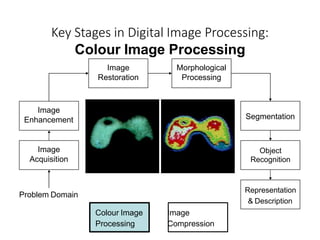
Key Stages in Digital Image Processing:
Colour Image Processing
Image
Acquisition
Image
Restoration
Morphological
Processing
Segmentation
Image
Enhancement
Object
Recognition
Representation
& Description
Problem Domain
Colour Image
Processing
Image
Compression
(4) Color Image Processing
• Color is used as the basis for extracting features of
interest in an image
• Color image processing is an area that has been
gaining its importance because of the significant
increase in the use digital image.
(5) Wavelets and Multiresolution
Processing
• Wavelets are the foundations for representing
images in various degree of resolution.
Key Stages in Digital Image Processing:
Image Compression
Image
Acquisition
Image
Restoration
Morphological
Processing
Segmentation
Representation
& Description
Image
Enhancement
Object
Recognition
Problem Domain
Image
Compression
Colour Image
Processing
❖ Compression techniques are used to reduce the redundant
information in the image data in order to facilitate the storage,
transmission and distribution of images (e.g. GIF, TIFF, PNG,
JPEG)
❖ Storage and transmission of digital multimedia systems is a
major problem
❖ High quality image data requires large amount of storage space
and transmission bandwidth
❖ One best solution is to compress the information
(6) Image Compression
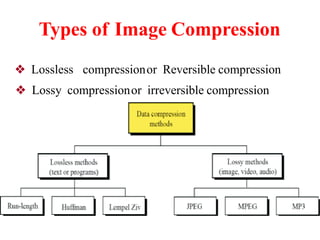
Types of Image Compression
❖ Lossless compressionor Reversible compression
❖ Lossy compressionor irreversible compression
Lossless Compression
❖ Image after compression and decompression is identical to the
original image
Lossless compression doesn’t reduce the quality of the file at
all.
❖ Every bit of information is preserved during decompression
❖ But compression ratio is less
❖ Preferred in medical image compression
Lossy Compression
❖ Reconstructed image contains degradation with respect to
original image
Once a file has been compressed using lossy compression, the
discarded data cannot be retrieved again.
❖ High compression ratio is achieved
❖ Preferred in multimedia applications
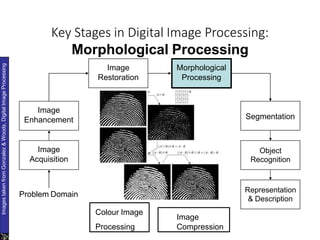
Key Stages in Digital Image Processing:
Morphological Processing
Image
Acquisition
Image
Restoration
Morphological
Processing
Segmentation
Representation
& Description
Image
Enhancement
Object
Recognition
Problem Domain
Colour Image
Image
Images
taken
from
Gonzalez
&
Woods,
Digital
Image
Processing
Processing Compression
(7) Morphological Processing
• Extract image components that are useful in the
representation and description of region shape.
• Morphological operations apply a structuring
element to an input image, creating an output
image of the same size.
Morphological Processing
• The basic morphological operations are
dilation and erosion.
• Dilation adds pixels to the boundaries of
objects in an image, while erosion
removes pixels on object boundaries.
• The number of pixels added or removed
from the objects in an image depends on
the size and shape of the structuring
element used to process the image.
Morphological Operations
• In the morphological dilation and erosion
operations, the state of any given pixel in
the output image is determined by
applying a rule to the corresponding pixel
and its neighbors in the input image.
• The rule used to process the pixels
defines the operation as a dilation or an
erosion.
Rules for Dilation
• The value of the output pixel is the
maximum value of all the pixels in the
input pixel's neighborhood.
• In a binary image, if any of the pixels is set
to the value 1, the output pixel is set to 1.
Rules for Erosion
• The value of the output pixel is the
minimum value of all the pixels in the input
pixel's neighbourhood.
• In a binary image, if any of the pixels is set
to the value 0, the output pixel is set to 0.
Key Stages in Digital Image Processing:
Segmentation
Image
Acquisition
Image
Restoration
Morphological
Processing
Segmentation
Representation
& Description
Image
Enhancement
Object
Recognition
Problem Domain
Colour Image
Image
Images
taken
from
Gonzalez
&
Woods,
Digital
Image
Processing
Processing Compression
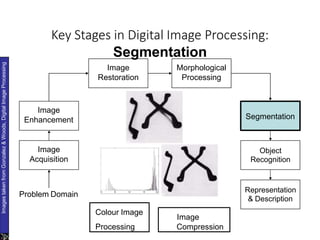
(5) Segmentation
• It is the process of partitioning a digital image into
multiple segments.
• Used to locate objects and boundaries in an image
• Autonomous segmentation is one of the most
difficult task in image processing
Key Stages in Digital Image Processing:
Object Recognition
Image
Acquisition
Image
Restoration
Morphological
Processing
Segmentation
Representation
& Description
Image
Enhancement
Object
Recognition
Problem Domain
Colour Image
Image
Images
taken
from
Gonzalez
&
Woods,
Digital
Image
Processing
Processing
Compression
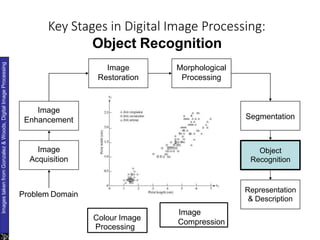
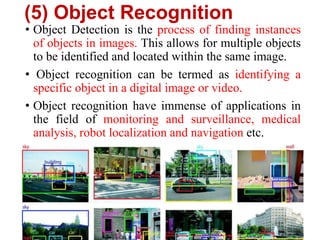
(5) Object Recognition
• Object Detection is the process of finding instances
of objects in images. This allows for multiple objects
to be identified and located within the same image.
• Object recognition can be termed as identifying a
specific object in a digital image or video.
• Object recognition have immense of applications in
the field of monitoring and surveillance, medical
analysis, robot localization and navigation etc.
Key Stages in Digital Image Processing:
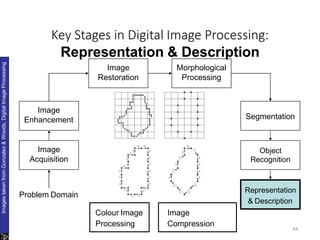
Representation & Description
44
Image
Acquisition
Image
Restoration
Morphological
Processing
Segmentation
Image
Enhancement
Object
Recognition
Images
taken
from
Gonzalez
&
Woods,
Digital
Image
Processing
Representation
& Description
Problem Domain
Colour Image
Processing
Image
Compression
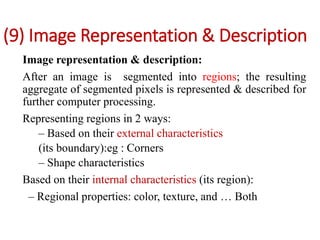
(9) Image Representation & Description
Image representation & description:
After an image is segmented into regions; the resulting
aggregate of segmented pixels is represented & described for
further computer processing.
Representing regions in 2 ways:
– Based on their external characteristics
(its boundary):eg : Corners
– Shape characteristics
Based on their internal characteristics (its region):
– Regional properties: color, texture, and … Both
(9) Image Representation & Description
• Description deals with extracting attributes that
results in some quantitative information of interest.
• It is used for differentiating one class of objects
from others.
Image Processing Applications
47
❖ Medical field: X-ray (or other biomedical)
image enhancement.
❖ Aerial and satellite image enhancement:
agriculture, weather and military
❖ Industrial applications: computer-based product inspection.
❖ Law enforcement:
fingerprint processing, surveillance camera processing
• Space applications
• Remote Earth resources observations
• Astronomy
• CAT
• X-rays
• Biological sciences
• Nuclear medicine
Image Processing Applications
THANK YOU

Fundamental steps in image processing

  • 1.
  • 2.
    UNIT-1 Topic 2: FUNDAMENTALSTEPS IN DIGITALIMAGE PROCESSING
  • 3.
    What is Image? • An image is an array, or a matrix pixels (picture elements) arranged in columns and rows. • An image is a spatial representation of a two- dimensional or three-dimensional scene.
  • 4.
    Image Types • RGB •3 Arrays - RED , GREEN ,BLUE • Combination RGB formed other colors. • Range (0- 255) 8 bits • INDEXED • Only one index array • Similar to Text book index • One index number which holds RGB levels • GRAY SCALE • Only one array • It is seen in XRAYS,SCAN,CT etc which is used in Image Processing • Range (0 -255 ) ,only Gray shades. • BW • Range (0,1) or (0-255) • 0 – BLACK • 1 - WHITE
  • 5.
    WHY…..digital image processing…??? •Improvement of pictorial information for human interpretation • Processing of image data for storage, transmission, and representation for autonomous machine perception
  • 6.
    FUNDAMENTAL STEPS INDIGITALIMAGE PROCESSING 6
  • 7.
    Steps involved inimage processing (1) Image Acquisition - retrieving an image from some source, usually hardware based source for processing - Image acquisition involves pre-processing such as scaling. (2) Image Enhancement - To improve the quality of the image for future processing (3) Image Restoration -To restore the image which is affected by noise
  • 8.
    Steps involved inimage processing (4) Color image processing - it is gaining importance as there is significant increase in the use of digital image (5) Wavelets and multi resolution processing - Representation of images in various degrees of resolution (6) Compression - Techniques required for reducing the storage required to save an image and bandwidth required to transmit. (7) Morphological Processing -Deals with tools for extracting image components
  • 9.
    Steps involved inimage processing (8) Segmentation (10) - Partitioning an image into images which several requires individual object recognition (9) Representation and Description - Always follows the output of segmentation process ex: chart, graph Object Recognition - Process that assigns a label to an object based on the descriptors
  • 10.
    Key Stages inDigital Image Processing: Image Acquisition Image Acquisition Image Restoration Morphological Processing Segmentation Representation & Description Image Enhancement Object Recognition Problem Domain Colour Image Processing Image Compression Images taken from Gonzalez & Woods, Digital Image Processing
  • 11.
    (1) Image Acquisition •Mostly ,the captured images are analog. • Convert analog image to digital image
  • 12.
    Sampling & Quantization 12 Sampling •Digitizing the coordinate values is called sampling • Measuring the brightness information only at a discrete spatial location Quantization • Digitizing the amplitude values is called quantization • involves representing the sampled data by a finite number of levels based on some criteria such as minimization of quantizer distortion.
  • 13.
    Key Stages inDigital Image Processing: Image Enhancement Image Acquisition Image Restoration Morphological Processing Segmentation Representation & Description Image Enhancement Object Recognition Problem Domain Colour Image Processing Image Compression Images taken from Gonzalez & Woods, Digital Image Processing
  • 14.
    (2) Image Enhancement i.Image Enhancement : Process of manipulating an image so that the result is more suitable than the original image for a specific application. ii. (i.e.) It is Application Specific. iii. (i.e.) Enhancement Techniques are problem oriented. iv. Viewer is the ultimate judge for image enhancement techniques.
  • 15.
    Image Enhancement • Itincludes • sharpening of images • Brightness • Contrast adjustment • Removal of noise • It is “subjective” in nature, for example ,some people like high saturation images and some people like natural colors
  • 16.
    Enhancement Techniques :SpatialDomain • Gray level Transformation • Histogram Processing • Spatial Filtering – Smoothing Filters – Sharpening Filters
  • 17.
    Enhancement Techniques :FrequencyDomain •Fourier Transform •Smoothing Frequency Domain Filters •Sharpening Filters •Homomorphic Filtering
  • 18.
    Examples of Image Enhancements– (i) A Cell ❖ Image of a cell corrupted by electronic noise. ❖ Result after averaging several noisy images (a common technique for noise reduction)
  • 19.
    Examples of Image Enhancements– (ii) An X-Ray ❖ An original x-ray image ❖ Result possible after contrast and edge enhancement
  • 20.
    Key Stages inDigital Image Processing: Image Restoration Image Acquisition Image Restoration Morphological Processing Segmentation Representation & Description Image Enhancement Object Recognition Problem Domain Colour Image Processing Image Compression Images taken from Gonzalez & Woods, Digital Image Processing
  • 21.
    (3) Image Restoration ❖It is a process that attempts to reconstruct or recover an image. ❖ similar to enhancement :Improve the quality of the image. ❖ Removal of blur by using a deblurring function is considered as a restoration technique. Fig: Restored image Fig: Degraded image
  • 22.
    Image Degradation To estimateDegradation function H for the image restoration, 1.Observation 2.Exprementation 3.Mathematical Modeling
  • 23.
    Image Restoration Contd….. ❖To reconstruct the original image from a degraded image. INPUT IMAGE “f” DEGRADATIO N FUNCTION NOISE DEGRADED IMAGE “g” FILTER RESTORED IMAGE Blurred Image Degraded image Restored image Original Image
  • 24.
    What is ImageRestoration? 24 • The purpose of image restoration is to restore a degraded/distorted image to its original content and quality. • Ultimate goal of image restoration techniques – To improve an image in some predefined sense – To obtain an estimate of the original image
  • 25.
    Differences between ImageEnhancement and Image Resoration S.No. Image Enhancement Image Restoration 1. As the name suggests, in Image Enhancement, the original image is processed so that the resultant image is more suitable than the original for specific applications. The aim of image restoration is to bring the image towards what it would have been if it had been recorded without degradation. 2. Image enhancement makes a picture look better, without regard to how it really truly should look. Image restoration tries to fix the image to get back to the real, true image. 3. Image enhancement means improving the image to show some hidden details. Image restoration means improving the image to match the original image. 4. Image enhancement is a purely subjective processing technique. Image restoration is an objective process. 5. Image enhancement is a cosmetic procedure i.e. it does not add any extra information to the original image. It merely improves the subjective quality of the images by work in with the existing data. Restoration tries to reconstruct by using a priori knowledge of the degradation phenomena. Restoration hence deals with getting an optimal estimate of the desired result
  • 26.
    Key Stages inDigital Image Processing: Colour Image Processing Image Acquisition Image Restoration Morphological Processing Segmentation Image Enhancement Object Recognition Representation & Description Problem Domain Colour Image Processing Image Compression
  • 27.
    (4) Color ImageProcessing • Color is used as the basis for extracting features of interest in an image • Color image processing is an area that has been gaining its importance because of the significant increase in the use digital image.
  • 28.
    (5) Wavelets andMultiresolution Processing • Wavelets are the foundations for representing images in various degree of resolution.
  • 29.
    Key Stages inDigital Image Processing: Image Compression Image Acquisition Image Restoration Morphological Processing Segmentation Representation & Description Image Enhancement Object Recognition Problem Domain Image Compression Colour Image Processing
  • 30.
    ❖ Compression techniquesare used to reduce the redundant information in the image data in order to facilitate the storage, transmission and distribution of images (e.g. GIF, TIFF, PNG, JPEG) ❖ Storage and transmission of digital multimedia systems is a major problem ❖ High quality image data requires large amount of storage space and transmission bandwidth ❖ One best solution is to compress the information (6) Image Compression
  • 31.
    Types of ImageCompression ❖ Lossless compressionor Reversible compression ❖ Lossy compressionor irreversible compression
  • 32.
    Lossless Compression ❖ Imageafter compression and decompression is identical to the original image Lossless compression doesn’t reduce the quality of the file at all. ❖ Every bit of information is preserved during decompression ❖ But compression ratio is less ❖ Preferred in medical image compression
  • 33.
    Lossy Compression ❖ Reconstructedimage contains degradation with respect to original image Once a file has been compressed using lossy compression, the discarded data cannot be retrieved again. ❖ High compression ratio is achieved ❖ Preferred in multimedia applications
  • 34.
    Key Stages inDigital Image Processing: Morphological Processing Image Acquisition Image Restoration Morphological Processing Segmentation Representation & Description Image Enhancement Object Recognition Problem Domain Colour Image Image Images taken from Gonzalez & Woods, Digital Image Processing Processing Compression
  • 35.
    (7) Morphological Processing •Extract image components that are useful in the representation and description of region shape. • Morphological operations apply a structuring element to an input image, creating an output image of the same size.
  • 36.
    Morphological Processing • Thebasic morphological operations are dilation and erosion. • Dilation adds pixels to the boundaries of objects in an image, while erosion removes pixels on object boundaries. • The number of pixels added or removed from the objects in an image depends on the size and shape of the structuring element used to process the image.
  • 37.
    Morphological Operations • Inthe morphological dilation and erosion operations, the state of any given pixel in the output image is determined by applying a rule to the corresponding pixel and its neighbors in the input image. • The rule used to process the pixels defines the operation as a dilation or an erosion.
  • 38.
    Rules for Dilation •The value of the output pixel is the maximum value of all the pixels in the input pixel's neighborhood. • In a binary image, if any of the pixels is set to the value 1, the output pixel is set to 1.
  • 39.
    Rules for Erosion •The value of the output pixel is the minimum value of all the pixels in the input pixel's neighbourhood. • In a binary image, if any of the pixels is set to the value 0, the output pixel is set to 0.
  • 40.
    Key Stages inDigital Image Processing: Segmentation Image Acquisition Image Restoration Morphological Processing Segmentation Representation & Description Image Enhancement Object Recognition Problem Domain Colour Image Image Images taken from Gonzalez & Woods, Digital Image Processing Processing Compression
  • 41.
    (5) Segmentation • Itis the process of partitioning a digital image into multiple segments. • Used to locate objects and boundaries in an image • Autonomous segmentation is one of the most difficult task in image processing
  • 42.
    Key Stages inDigital Image Processing: Object Recognition Image Acquisition Image Restoration Morphological Processing Segmentation Representation & Description Image Enhancement Object Recognition Problem Domain Colour Image Image Images taken from Gonzalez & Woods, Digital Image Processing Processing Compression
  • 43.
    (5) Object Recognition •Object Detection is the process of finding instances of objects in images. This allows for multiple objects to be identified and located within the same image. • Object recognition can be termed as identifying a specific object in a digital image or video. • Object recognition have immense of applications in the field of monitoring and surveillance, medical analysis, robot localization and navigation etc.
  • 44.
    Key Stages inDigital Image Processing: Representation & Description 44 Image Acquisition Image Restoration Morphological Processing Segmentation Image Enhancement Object Recognition Images taken from Gonzalez & Woods, Digital Image Processing Representation & Description Problem Domain Colour Image Processing Image Compression
  • 45.
    (9) Image Representation& Description Image representation & description: After an image is segmented into regions; the resulting aggregate of segmented pixels is represented & described for further computer processing. Representing regions in 2 ways: – Based on their external characteristics (its boundary):eg : Corners – Shape characteristics Based on their internal characteristics (its region): – Regional properties: color, texture, and … Both
  • 46.
    (9) Image Representation& Description • Description deals with extracting attributes that results in some quantitative information of interest. • It is used for differentiating one class of objects from others.
  • 47.
    Image Processing Applications 47 ❖Medical field: X-ray (or other biomedical) image enhancement. ❖ Aerial and satellite image enhancement: agriculture, weather and military ❖ Industrial applications: computer-based product inspection. ❖ Law enforcement: fingerprint processing, surveillance camera processing
  • 48.
    • Space applications •Remote Earth resources observations • Astronomy • CAT • X-rays • Biological sciences • Nuclear medicine Image Processing Applications
  • 49.