eLearning @ GRCC An Overview of the Blackboard Experience at  Grand Rapids Community College Eric Kunnen Coordinator of Instructional Technologies The Learning Academy  Grand Rapids Community College Grand Rapids, Michigan [email_address] 616-234-3415 www.grcc.edu
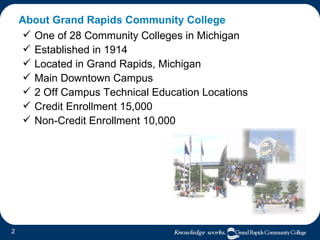
About Grand Rapids Community College One of 28 Community Colleges in Michigan Established in 1914 Located in Grand Rapids, Michigan Main Downtown Campus 2 Off Campus Technical Education Locations Credit Enrollment 15,000 Non-Credit Enrollment 10,000
Issues & Needs Faculty and students are  driving  instructional technology applications. The  education experience … campus activity is more than just what happens in the classroom (physical or virtual). Increasingly, campus communication, sharing, and collaboration extends  beyond the physical boundaries  of the institution. With multiple campus sites, multiple course delivery formats,  and a high population of part time students, there was a need for an  easy-to-use, unifying, scalable elearning and course management system…
Blackboard’s Academic Suite
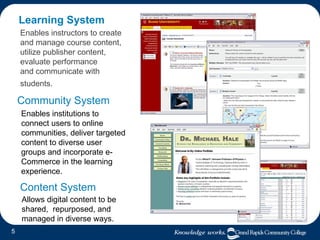
Learning System Enables institutions to connect users to online communities, deliver targeted content to diverse user groups and incorporate e-Commerce in the learning experience. Enables instructors to create and manage course content, utilize publisher content,  evaluate performance  and communicate with students.   Community System Content System Allows digital content to be shared,  repurposed, and managed in diverse ways.
Blackboard @ GRCC
From Basic to Enterprise... Timeline Basic CourseInfo/Learning System August 1999 - Blackboard CourseInfo 4 April 2001 - Blackboard 5 Level 1 Enterprise Learning System January 2003 - Blackboard 6 Learning System and Community Portal System Current Deployment - Blackboard 7.1 Learning System,  Community System, and eCommerce System ?
From Basic to Enterprise Course Management System Requirements Scalable (Mission Critical,  Enterprise  Level System) Integration  with SIS and other systems for Automation Usability ( Ease of Use ) Flexibility Customizable Effortless  & Efficient (Administrative and Faculty) Indispensable Role and Value to e-Education ( Relative Advantage ) Contributes to the  Enhancement  of Teaching and Learning
Blackboard @ GRCC  Blackboard is… An  online classroom  for our online and hybrid courses. A  course web site  for traditional courses. A web-based environment for  student organizations  to share materials and communicate. A resource for college employees to  communicate and share  materials. A college wide  professional development  resource. A  survey  and assessment tool. An  ecommerce  system for parking, printing, door access, etc. Blackboard Components Learning System  (Courses) Community System  (Organizations) eCommerce/Transaction System  (Cards)  Content System Outcome System (Beta)
Learning System - Online Courses Bb is the Classroom 30+ Courses Offered + 1 Non-Credit Workshop Instructors Required to Attend Online Training Delivered with Bb Orientation Course
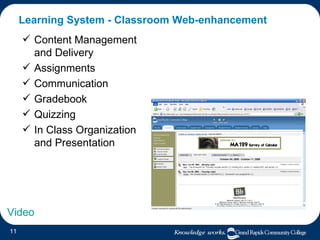
Learning System - Classroom Web-enhancement Content Management and Delivery  Assignments Communication  Gradebook Quizzing In Class Organization and Presentation Video
Learning System – Training, Support, and Professional Development Training and Support Online Course Development Training Faculty Support Tutoring/Department Communication Student Technology Help Desk Learning Academy (Professional Development via Portal/Course) Training, Employee Orientation, FERPA, Blood Borne Pathogen etc.
Community System - Departments, Teams, & Committees Content/Document & Idea sharing Communication Easy-to-use Web Publishing Tracking Off Campus Access  to Information & Documents A Few Examples Academic Senate Strategy Team Faculty Laptop Project Developmental Communication FIPSE Grant Registrar – Training Materials and Reference Business Department – sharing materials, ideas, activities English – communication, material/idea sharing Video
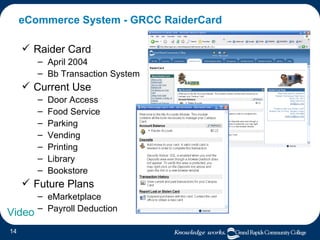
eCommerce System - GRCC RaiderCard Raider Card April 2004 Bb Transaction System Current Use Door Access Food Service Parking Vending Printing Library Bookstore Future Plans eMarketplace Payroll Deduction Video
Blackboard’s  Most Commonly Used  Features
Announcements Enables instructors to post important information.
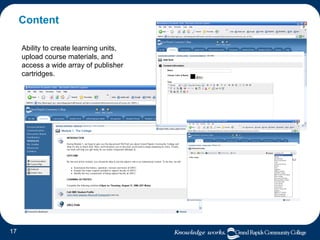
Content Ability to create learning units, upload course materials, and access a wide array of publisher cartridges.
Communication Ability to send email, create discussion boards, instant message, grou pages, chat, etc.
Discussion Board
Other DB Features Built-in discussion forum & thread  grading . A  Rate  postings option allows users to rate posts in the forum on a scale of one to five stars (peer review potential). Users can save  drafts  until ready for posting. The  Subscribe  to Thread option notifies users via email each time a new post is added. Instructors can  copy forums  within and between courses and select whether the entire forum or only its settings should be copied to the new location.  Forums have an  availability  option that replaces the “archive” forum feature. Moderation  capability is available.
Assignments Send and receive electronic assignments with feedback. Download all submissions or only ungraded.
Gradebook & Multiple Attempt Tracking Grading is managed in the gradebook. Ability to turn off gradebook averages. Overrides & Extra Credit Instructors have the option to clear (or delete) the last/first/highest/lowest attempt or all attempts within a specified date range.
Control Panel & Quick Edit
Blackboard’s  Enhanced  Features
What’s New Module  This module alerts students of any key changes or updates since the last time they logged in. Examples include: new announcements, new assignments, new discussion board posts, etc.
Review Status  Content items include a setting that allows students to mark those items as “Reviewed”.  The User Progress page reports which students have reviewed the content item.
Adaptive Release  Provides the ability for an instructor to create custom learning paths through course content and activities. Content items, discussions, assessments, assignments, or other activities can be released to students based on a set of criteria including: date/time, specific  individuals , group  membership , institutional role,  grade  on a particular test or assignment, or  Review Status .
Assessment Questions  Allows the creation of additional questions types within assessments.  Calculated Formula   Calculated Numeric File Upload Hotspot Either/Or Fill in Multiple Blanks Jumbled Sentence Opinion Scale/Likert Quiz Bowl Short Answer
Performance Dashboard  A course tool that allows instructors to see key information and outcomes for all course users.  The Performance Dashboard displays the last time each user logged in, their course role, Adaptive Release criteria, Review Status for content items, and grades.  Instructors can sort the information by multiple criteria.
Additional Tools
Extending Blackboard  With Building Blocks
Building Blocks Blackboard Open Source Community Sharing & 3 rd  Party Integration Science Toolkit  Advanced Group Management Discussion Grader Link Checker RSS Merlot Podcasting Photo Roster Horizon Wimba Voice Tools Respondus StudyMate Securexam SafeAssignment Learning Objects Campus Pack (Blogs & Wikis) Instant Messaging (Pronto) And more…
iTunesU, Podcasting, and MP3s
Instant Messaging & Voice Chat - Pronto!
Blackboard Backpack Blackboard OFFline Blackboard ONline
Community & Collaboration
Conferences, Client to Client Connection, and Collaboration
And Beyond…
Blackboard Beyond Initiative 5 initial Web Services  Based on Web 2.0 Social Networking & XML & Tags  Connecting Users across Institutions New Scholar.com  Student Research Tools  Collaborative Benchmarking  Global Learning Object Catalog ePortfolios for Life
Thank You! Questions  Comments Eric Kunnen Coordinator of Instructional Technologies Learning Academy for Faculty & Staff Grand Rapids Community College Grand Rapids, Michigan [email_address] 616-234-3415

TRENDS Presentation - eLearning @ GRCC with Blackboard

  • 1.
    eLearning @ GRCCAn Overview of the Blackboard Experience at Grand Rapids Community College Eric Kunnen Coordinator of Instructional Technologies The Learning Academy Grand Rapids Community College Grand Rapids, Michigan [email_address] 616-234-3415 www.grcc.edu
  • 2.
    About Grand RapidsCommunity College One of 28 Community Colleges in Michigan Established in 1914 Located in Grand Rapids, Michigan Main Downtown Campus 2 Off Campus Technical Education Locations Credit Enrollment 15,000 Non-Credit Enrollment 10,000
  • 3.
    Issues & NeedsFaculty and students are driving instructional technology applications. The education experience … campus activity is more than just what happens in the classroom (physical or virtual). Increasingly, campus communication, sharing, and collaboration extends beyond the physical boundaries of the institution. With multiple campus sites, multiple course delivery formats, and a high population of part time students, there was a need for an easy-to-use, unifying, scalable elearning and course management system…
  • 4.
  • 5.
    Learning System Enablesinstitutions to connect users to online communities, deliver targeted content to diverse user groups and incorporate e-Commerce in the learning experience. Enables instructors to create and manage course content, utilize publisher content, evaluate performance and communicate with students. Community System Content System Allows digital content to be shared, repurposed, and managed in diverse ways.
  • 6.
  • 7.
    From Basic toEnterprise... Timeline Basic CourseInfo/Learning System August 1999 - Blackboard CourseInfo 4 April 2001 - Blackboard 5 Level 1 Enterprise Learning System January 2003 - Blackboard 6 Learning System and Community Portal System Current Deployment - Blackboard 7.1 Learning System, Community System, and eCommerce System ?
  • 8.
    From Basic toEnterprise Course Management System Requirements Scalable (Mission Critical, Enterprise Level System) Integration with SIS and other systems for Automation Usability ( Ease of Use ) Flexibility Customizable Effortless & Efficient (Administrative and Faculty) Indispensable Role and Value to e-Education ( Relative Advantage ) Contributes to the Enhancement of Teaching and Learning
  • 9.
    Blackboard @ GRCC Blackboard is… An online classroom for our online and hybrid courses. A course web site for traditional courses. A web-based environment for student organizations to share materials and communicate. A resource for college employees to communicate and share materials. A college wide professional development resource. A survey and assessment tool. An ecommerce system for parking, printing, door access, etc. Blackboard Components Learning System (Courses) Community System (Organizations) eCommerce/Transaction System (Cards) Content System Outcome System (Beta)
  • 10.
    Learning System -Online Courses Bb is the Classroom 30+ Courses Offered + 1 Non-Credit Workshop Instructors Required to Attend Online Training Delivered with Bb Orientation Course
  • 11.
    Learning System -Classroom Web-enhancement Content Management and Delivery Assignments Communication Gradebook Quizzing In Class Organization and Presentation Video
  • 12.
    Learning System –Training, Support, and Professional Development Training and Support Online Course Development Training Faculty Support Tutoring/Department Communication Student Technology Help Desk Learning Academy (Professional Development via Portal/Course) Training, Employee Orientation, FERPA, Blood Borne Pathogen etc.
  • 13.
    Community System -Departments, Teams, & Committees Content/Document & Idea sharing Communication Easy-to-use Web Publishing Tracking Off Campus Access to Information & Documents A Few Examples Academic Senate Strategy Team Faculty Laptop Project Developmental Communication FIPSE Grant Registrar – Training Materials and Reference Business Department – sharing materials, ideas, activities English – communication, material/idea sharing Video
  • 14.
    eCommerce System -GRCC RaiderCard Raider Card April 2004 Bb Transaction System Current Use Door Access Food Service Parking Vending Printing Library Bookstore Future Plans eMarketplace Payroll Deduction Video
  • 15.
    Blackboard’s MostCommonly Used Features
  • 16.
    Announcements Enables instructorsto post important information.
  • 17.
    Content Ability tocreate learning units, upload course materials, and access a wide array of publisher cartridges.
  • 18.
    Communication Ability tosend email, create discussion boards, instant message, grou pages, chat, etc.
  • 19.
  • 20.
    Other DB FeaturesBuilt-in discussion forum & thread grading . A Rate postings option allows users to rate posts in the forum on a scale of one to five stars (peer review potential). Users can save drafts until ready for posting. The Subscribe to Thread option notifies users via email each time a new post is added. Instructors can copy forums within and between courses and select whether the entire forum or only its settings should be copied to the new location. Forums have an availability option that replaces the “archive” forum feature. Moderation capability is available.
  • 21.
    Assignments Send andreceive electronic assignments with feedback. Download all submissions or only ungraded.
  • 22.
    Gradebook & MultipleAttempt Tracking Grading is managed in the gradebook. Ability to turn off gradebook averages. Overrides & Extra Credit Instructors have the option to clear (or delete) the last/first/highest/lowest attempt or all attempts within a specified date range.
  • 23.
    Control Panel &Quick Edit
  • 24.
  • 25.
    What’s New Module This module alerts students of any key changes or updates since the last time they logged in. Examples include: new announcements, new assignments, new discussion board posts, etc.
  • 26.
    Review Status Content items include a setting that allows students to mark those items as “Reviewed”. The User Progress page reports which students have reviewed the content item.
  • 27.
    Adaptive Release Provides the ability for an instructor to create custom learning paths through course content and activities. Content items, discussions, assessments, assignments, or other activities can be released to students based on a set of criteria including: date/time, specific individuals , group membership , institutional role, grade on a particular test or assignment, or Review Status .
  • 28.
    Assessment Questions Allows the creation of additional questions types within assessments. Calculated Formula Calculated Numeric File Upload Hotspot Either/Or Fill in Multiple Blanks Jumbled Sentence Opinion Scale/Likert Quiz Bowl Short Answer
  • 29.
    Performance Dashboard A course tool that allows instructors to see key information and outcomes for all course users. The Performance Dashboard displays the last time each user logged in, their course role, Adaptive Release criteria, Review Status for content items, and grades. Instructors can sort the information by multiple criteria.
  • 30.
  • 31.
    Extending Blackboard With Building Blocks
  • 32.
    Building Blocks BlackboardOpen Source Community Sharing & 3 rd Party Integration Science Toolkit Advanced Group Management Discussion Grader Link Checker RSS Merlot Podcasting Photo Roster Horizon Wimba Voice Tools Respondus StudyMate Securexam SafeAssignment Learning Objects Campus Pack (Blogs & Wikis) Instant Messaging (Pronto) And more…
  • 33.
  • 34.
    Instant Messaging &Voice Chat - Pronto!
  • 35.
    Blackboard Backpack BlackboardOFFline Blackboard ONline
  • 36.
  • 37.
    Conferences, Client toClient Connection, and Collaboration
  • 38.
  • 39.
    Blackboard Beyond Initiative5 initial Web Services Based on Web 2.0 Social Networking & XML & Tags Connecting Users across Institutions New Scholar.com Student Research Tools Collaborative Benchmarking Global Learning Object Catalog ePortfolios for Life
  • 40.
    Thank You! Questions Comments Eric Kunnen Coordinator of Instructional Technologies Learning Academy for Faculty & Staff Grand Rapids Community College Grand Rapids, Michigan [email_address] 616-234-3415

Editor's Notes

  • #2 Thank you very much for inviting me, I feel honored to be included among some very advanced users. Essentially I’m going to share the GRCC experience with you regarding Bb and our progression in transitioning to an enterprise system. Also known as the Academic Suite.