Interaction Diagram
Dr. P. Victer Paul, Indian Institute of Information Technology Kottayam
1
2
Interactions
 In every interesting system, objects don't just sit idle; they
interact with one another by passing messages.
 An interaction is a behavior that comprises a set of messages
exchanged among a set of objects within a context to accomplish
a purpose
 A message is a specification of a communication between objects
 Graphically, a message is rendered as a directed line and always
includes the name of its operation.
 You may find an interaction wherever objects are linked to one another.
Dr. P. Victer Paul, Indian Institute of Information Technology Kottayam
3
Contents
 Objects and Roles
 Links
 Messages
Dr. P. Victer Paul, Indian Institute of Information Technology Kottayam
4
Objects and Roles
 The objects that participate in an interaction are either concrete
things or prototypical things.
 As a concrete thing, an object represents something in the real
world. For example, p, an instance of the class Person, might
denote a particular human.
 Alternately, as a prototypical thing, p might represent any
instance of Person.
 In the context of an interaction, you may find instances of classes,
components, nodes, and use cases.
Dr. P. Victer Paul, Indian Institute of Information Technology Kottayam
5
Messages
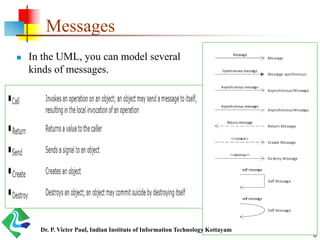
 In the UML, you can model several kinds of messages.
 A message is shown by an arrow from one lifeline to another.
 The arrowhead points to the receiver.
 If the message is synchronous (a call), the line has a filled
triangular arrowhead.
 If the message is asynchronous, the line has a stick arrowhead.
 A reply to a synchronous message (a return from a call) is
shown by a dashed arrow with a stick arrowhead.
 The return message may be omitted, as there is an implicit
return after any call, but it is often useful for showing return
values.
Dr. P. Victer Paul, Indian Institute of Information Technology Kottayam
6
Messages
 In the UML, you can model several
kinds of messages.
Dr. P. Victer Paul, Indian Institute of Information Technology Kottayam
7
Interaction Diagram
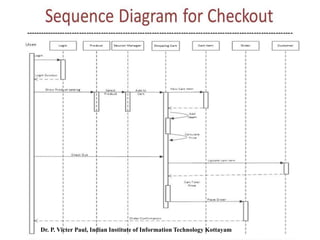
 An interaction diagram shows an interaction, consisting of a set
of objects and their relationships, including the messages that
may be dispatched among them.
 Sequence diagrams and collaboration diagrams - both are called
as interaction diagrams
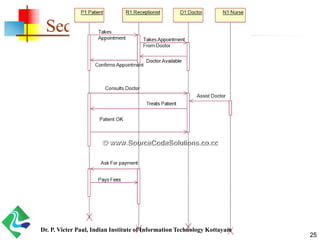
 A sequence diagram is an interaction diagram that emphasizes the
time ordering of messages.
 Graphically, a sequence diagram is a table that shows objects arranged
along the X axis and messages, ordered in increasing time, along the Y
axis.
 A collaboration diagram is an interaction diagram that
emphasizes the structural organization of the objects that send
and receive messages.
 Graphically, a collaboration diagram is a collection of vertices and arcs.Dr. P. Victer Paul, Indian Institute of Information Technology Kottayam
8
Sequence Diagram
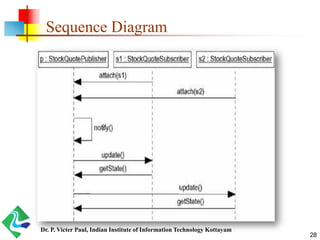
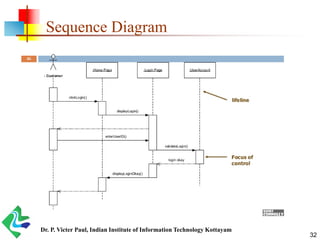
 A sequence diagram emphasizes the time ordering of messages.
 As below figure shows, you form a sequence diagram by first
placing the objects that participate in the interaction at the top of
your diagram, across the X axis.
 Typically, you place the object that initiates the interaction at the
left, and increasingly more subordinate objects to the right.
 Next, you place the messages that these objects send and receive
along the Y axis, in order of increasing time from top to bottom.
 Two important features,
 the object lifeline
 the focus of control
Dr. P. Victer Paul, Indian Institute of Information Technology Kottayam
9
object lifeline
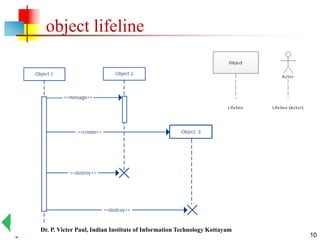
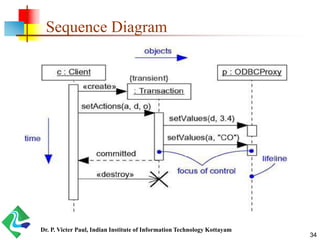
 An object lifeline is the vertical dashed line that represents the
existence of an object over a period of time.
 Most objects that appear in an interaction diagram will be in
existence for the duration of the interaction, so these objects are
all aligned at the top of the diagram, with their lifelines drawn
from the top of the diagram to the bottom.
 Objects may be created during the interaction.
 Their lifelines start with the receipt of the message stereotyped as create.
 Objects may be destroyed during the interaction.
 Their lifelines end with the receipt of the message stereotyped as destroy
(and are given the visual cue of a large X, marking the end of their lives).
Dr. P. Victer Paul, Indian Institute of Information Technology Kottayam
10
object lifeline
Dr. P. Victer Paul, Indian Institute of Information Technology Kottayam
11
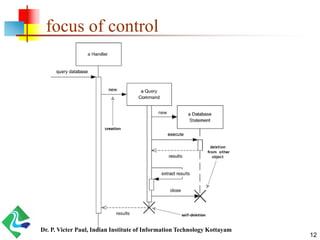
focus of control
 The focus of control is a tall, thin rectangle that shows the period
of time during which an object is performing an action, either
directly or through a subordinate procedure.
 The top of the rectangle is aligned with the start of the action; the
bottom is aligned with its completion (and can be marked by a
return message).
 You can show the nesting of a focus of control (caused by
recursion, a call to a self-operation, or by a callback from another
object) by stacking another focus of control slightly to the right of
its parent (and can do so to an arbitrary depth).
Dr. P. Victer Paul, Indian Institute of Information Technology Kottayam
12
focus of control
Dr. P. Victer Paul, Indian Institute of Information Technology Kottayam
13
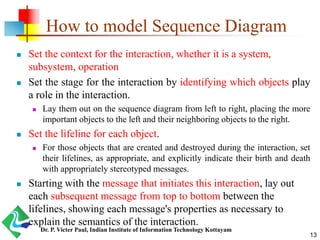
How to model Sequence Diagram
 Set the context for the interaction, whether it is a system,
subsystem, operation
 Set the stage for the interaction by identifying which objects play
a role in the interaction.
 Lay them out on the sequence diagram from left to right, placing the more
important objects to the left and their neighboring objects to the right.
 Set the lifeline for each object.
 For those objects that are created and destroyed during the interaction, set
their lifelines, as appropriate, and explicitly indicate their birth and death
with appropriately stereotyped messages.
 Starting with the message that initiates this interaction, lay out
each subsequent message from top to bottom between the
lifelines, showing each message's properties as necessary to
explain the semantics of the interaction.
Dr. P. Victer Paul, Indian Institute of Information Technology Kottayam
14
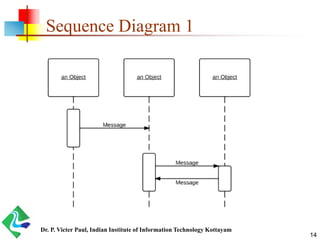
Sequence Diagram 1
Dr. P. Victer Paul, Indian Institute of Information Technology Kottayam
15
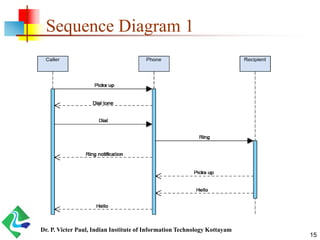
Sequence Diagram 1
Dr. P. Victer Paul, Indian Institute of Information Technology Kottayam
16
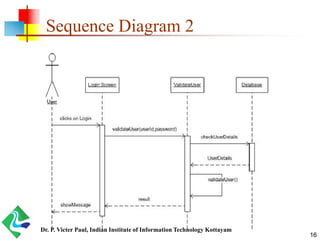
Sequence Diagram 2
Dr. P. Victer Paul, Indian Institute of Information Technology Kottayam
17
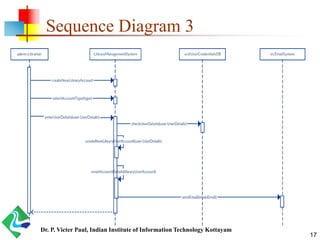
Sequence Diagram 3
Dr. P. Victer Paul, Indian Institute of Information Technology Kottayam
18
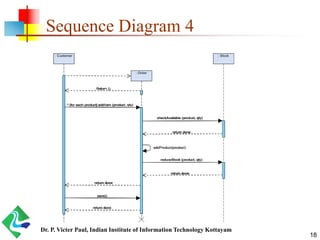
Sequence Diagram 4
Dr. P. Victer Paul, Indian Institute of Information Technology Kottayam
19
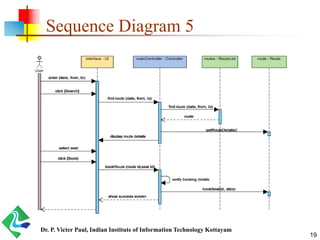
Sequence Diagram 5
Dr. P. Victer Paul, Indian Institute of Information Technology Kottayam
20
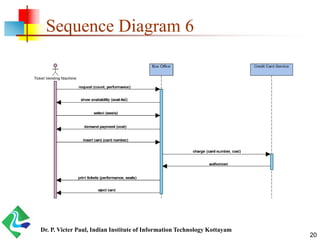
Sequence Diagram 6
Dr. P. Victer Paul, Indian Institute of Information Technology Kottayam
21
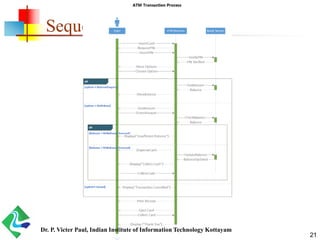
Sequence Diagram 6
Dr. P. Victer Paul, Indian Institute of Information Technology Kottayam
22
Sequence Diagram
Dr. P. Victer Paul, Indian Institute of Information Technology Kottayam
23
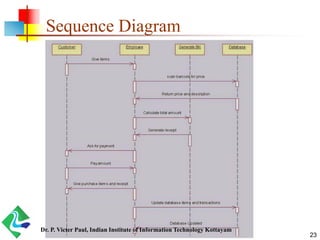
Sequence Diagram
Dr. P. Victer Paul, Indian Institute of Information Technology Kottayam
24
Sequence Diagram
Dr. P. Victer Paul, Indian Institute of Information Technology Kottayam
25
Sequence Diagram
Dr. P. Victer Paul, Indian Institute of Information Technology Kottayam
26
Communication Diagram
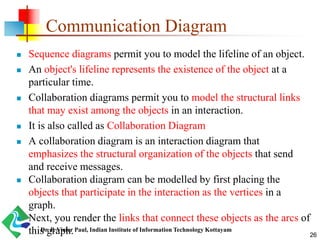
 Sequence diagrams permit you to model the lifeline of an object.
 An object's lifeline represents the existence of the object at a
particular time.
 Collaboration diagrams permit you to model the structural links
that may exist among the objects in an interaction.
 It is also called as Collaboration Diagram
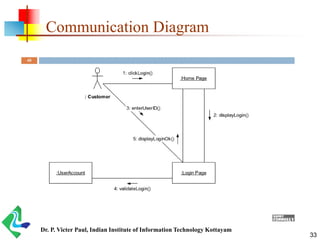
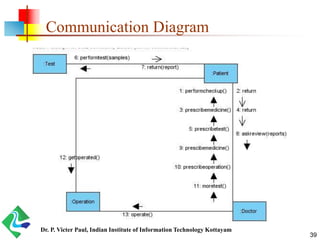
 A collaboration diagram is an interaction diagram that
emphasizes the structural organization of the objects that send
and receive messages.
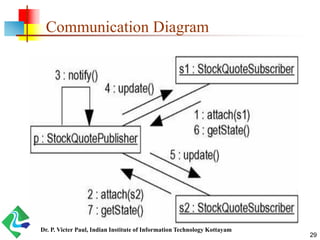
 Collaboration diagram can be modelled by first placing the
objects that participate in the interaction as the vertices in a
graph.
 Next, you render the links that connect these objects as the arcs of
this graph.Dr. P. Victer Paul, Indian Institute of Information Technology Kottayam
27
How to model Communication Diagram
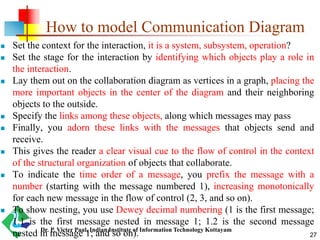
 Set the context for the interaction, it is a system, subsystem, operation?
 Set the stage for the interaction by identifying which objects play a role in
the interaction.
 Lay them out on the collaboration diagram as vertices in a graph, placing the
more important objects in the center of the diagram and their neighboring
objects to the outside.
 Specify the links among these objects, along which messages may pass
 Finally, you adorn these links with the messages that objects send and
receive.
 This gives the reader a clear visual cue to the flow of control in the context
of the structural organization of objects that collaborate.
 To indicate the time order of a message, you prefix the message with a
number (starting with the message numbered 1), increasing monotonically
for each new message in the flow of control (2, 3, and so on).
 To show nesting, you use Dewey decimal numbering (1 is the first message;
1.1 is the first message nested in message 1; 1.2 is the second message
nested in message 1; and so on).Dr. P. Victer Paul, Indian Institute of Information Technology Kottayam
28
Sequence Diagram
Dr. P. Victer Paul, Indian Institute of Information Technology Kottayam
29
Communication Diagram
Dr. P. Victer Paul, Indian Institute of Information Technology Kottayam
30
Semantic Equivalence
 Because they both derive from the same information in the UML's
metamodel, sequence diagrams and collaboration diagrams are
semantically equivalent.
 As a result, you can take a diagram in one form and convert it to the
other without any loss of information, as you can see in the previous
two figures, which are semantically equivalent.
 However, this does not mean that both diagrams will explicitly
visualize the same information.
Dr. P. Victer Paul, Indian Institute of Information Technology Kottayam
31
Differences between diagrams
Sequence Diagrams Collaboration Diagrams
The sequence diagram represents the
UML, which is used to visualize the
sequence of calls in a system that is used
to perform a specific functionality.
The collaboration diagram also comes
under the UML representation which is
used to visualize the organization of the
objects and their interaction.
The sequence diagram are used to
represent the sequence of messages that
are flowing from one object to another.
The collaboration diagram are used to
represent the structural organization of
the system and the messages that are
sent and received.
The sequence diagram is used when
time sequence is main focus.
The collaboration dagram is used when
object organization is main focus.
The sequence diagrams are better suited
of analysis activities.
The collaboration diagrams are better
suited for depicting simpler interactions
of the smaller number of objects.
Dr. P. Victer Paul, Indian Institute of Information Technology Kottayam
32
Sequence Diagram
Dr. P. Victer Paul, Indian Institute of Information Technology Kottayam
33
Communication Diagram
Dr. P. Victer Paul, Indian Institute of Information Technology Kottayam
34
Sequence Diagram
Dr. P. Victer Paul, Indian Institute of Information Technology Kottayam
35
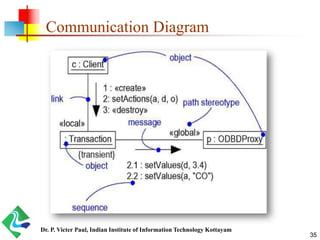
Communication Diagram
Dr. P. Victer Paul, Indian Institute of Information Technology Kottayam
36
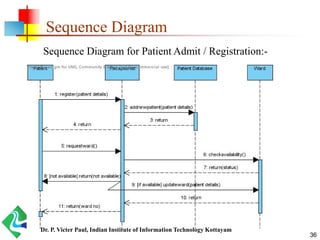
Sequence Diagram
Sequence Diagram for Patient Admit / Registration:-
Dr. P. Victer Paul, Indian Institute of Information Technology Kottayam
37
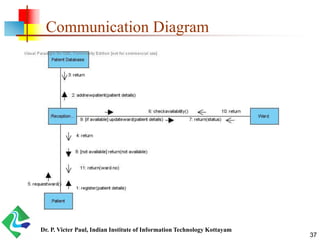
Communication Diagram
Dr. P. Victer Paul, Indian Institute of Information Technology Kottayam
38
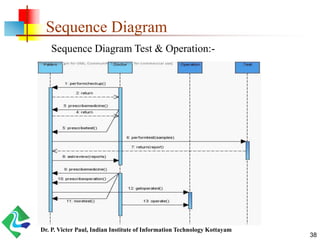
Sequence Diagram
Sequence Diagram Test & Operation:-
Dr. P. Victer Paul, Indian Institute of Information Technology Kottayam
39
Communication Diagram
Dr. P. Victer Paul, Indian Institute of Information Technology Kottayam
40
Sequence Diagram
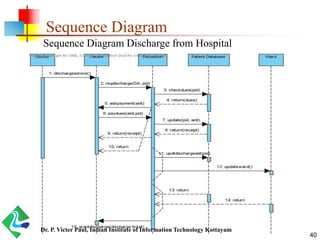
Sequence Diagram Discharge from Hospital
Dr. P. Victer Paul, Indian Institute of Information Technology Kottayam
41
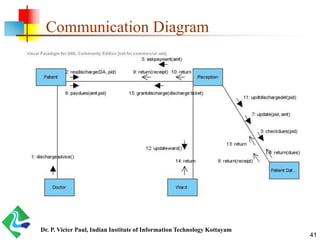
Communication Diagram
Dr. P. Victer Paul, Indian Institute of Information Technology Kottayam
The End…
42
Dr. P. Victer Paul, Indian Institute of Information Technology Kottayam

OOAD - UML - Sequence and Communication Diagrams - Lab

  • 1.
    Interaction Diagram Dr. P.Victer Paul, Indian Institute of Information Technology Kottayam 1
  • 2.
    2 Interactions  In everyinteresting system, objects don't just sit idle; they interact with one another by passing messages.  An interaction is a behavior that comprises a set of messages exchanged among a set of objects within a context to accomplish a purpose  A message is a specification of a communication between objects  Graphically, a message is rendered as a directed line and always includes the name of its operation.  You may find an interaction wherever objects are linked to one another. Dr. P. Victer Paul, Indian Institute of Information Technology Kottayam
  • 3.
    3 Contents  Objects andRoles  Links  Messages Dr. P. Victer Paul, Indian Institute of Information Technology Kottayam
  • 4.
    4 Objects and Roles The objects that participate in an interaction are either concrete things or prototypical things.  As a concrete thing, an object represents something in the real world. For example, p, an instance of the class Person, might denote a particular human.  Alternately, as a prototypical thing, p might represent any instance of Person.  In the context of an interaction, you may find instances of classes, components, nodes, and use cases. Dr. P. Victer Paul, Indian Institute of Information Technology Kottayam
  • 5.
    5 Messages  In theUML, you can model several kinds of messages.  A message is shown by an arrow from one lifeline to another.  The arrowhead points to the receiver.  If the message is synchronous (a call), the line has a filled triangular arrowhead.  If the message is asynchronous, the line has a stick arrowhead.  A reply to a synchronous message (a return from a call) is shown by a dashed arrow with a stick arrowhead.  The return message may be omitted, as there is an implicit return after any call, but it is often useful for showing return values. Dr. P. Victer Paul, Indian Institute of Information Technology Kottayam
  • 6.
    6 Messages  In theUML, you can model several kinds of messages. Dr. P. Victer Paul, Indian Institute of Information Technology Kottayam
  • 7.
    7 Interaction Diagram  Aninteraction diagram shows an interaction, consisting of a set of objects and their relationships, including the messages that may be dispatched among them.  Sequence diagrams and collaboration diagrams - both are called as interaction diagrams  A sequence diagram is an interaction diagram that emphasizes the time ordering of messages.  Graphically, a sequence diagram is a table that shows objects arranged along the X axis and messages, ordered in increasing time, along the Y axis.  A collaboration diagram is an interaction diagram that emphasizes the structural organization of the objects that send and receive messages.  Graphically, a collaboration diagram is a collection of vertices and arcs.Dr. P. Victer Paul, Indian Institute of Information Technology Kottayam
  • 8.
    8 Sequence Diagram  Asequence diagram emphasizes the time ordering of messages.  As below figure shows, you form a sequence diagram by first placing the objects that participate in the interaction at the top of your diagram, across the X axis.  Typically, you place the object that initiates the interaction at the left, and increasingly more subordinate objects to the right.  Next, you place the messages that these objects send and receive along the Y axis, in order of increasing time from top to bottom.  Two important features,  the object lifeline  the focus of control Dr. P. Victer Paul, Indian Institute of Information Technology Kottayam
  • 9.
    9 object lifeline  Anobject lifeline is the vertical dashed line that represents the existence of an object over a period of time.  Most objects that appear in an interaction diagram will be in existence for the duration of the interaction, so these objects are all aligned at the top of the diagram, with their lifelines drawn from the top of the diagram to the bottom.  Objects may be created during the interaction.  Their lifelines start with the receipt of the message stereotyped as create.  Objects may be destroyed during the interaction.  Their lifelines end with the receipt of the message stereotyped as destroy (and are given the visual cue of a large X, marking the end of their lives). Dr. P. Victer Paul, Indian Institute of Information Technology Kottayam
  • 10.
    10 object lifeline Dr. P.Victer Paul, Indian Institute of Information Technology Kottayam
  • 11.
    11 focus of control The focus of control is a tall, thin rectangle that shows the period of time during which an object is performing an action, either directly or through a subordinate procedure.  The top of the rectangle is aligned with the start of the action; the bottom is aligned with its completion (and can be marked by a return message).  You can show the nesting of a focus of control (caused by recursion, a call to a self-operation, or by a callback from another object) by stacking another focus of control slightly to the right of its parent (and can do so to an arbitrary depth). Dr. P. Victer Paul, Indian Institute of Information Technology Kottayam
  • 12.
    12 focus of control Dr.P. Victer Paul, Indian Institute of Information Technology Kottayam
  • 13.
    13 How to modelSequence Diagram  Set the context for the interaction, whether it is a system, subsystem, operation  Set the stage for the interaction by identifying which objects play a role in the interaction.  Lay them out on the sequence diagram from left to right, placing the more important objects to the left and their neighboring objects to the right.  Set the lifeline for each object.  For those objects that are created and destroyed during the interaction, set their lifelines, as appropriate, and explicitly indicate their birth and death with appropriately stereotyped messages.  Starting with the message that initiates this interaction, lay out each subsequent message from top to bottom between the lifelines, showing each message's properties as necessary to explain the semantics of the interaction. Dr. P. Victer Paul, Indian Institute of Information Technology Kottayam
  • 14.
    14 Sequence Diagram 1 Dr.P. Victer Paul, Indian Institute of Information Technology Kottayam
  • 15.
    15 Sequence Diagram 1 Dr.P. Victer Paul, Indian Institute of Information Technology Kottayam
  • 16.
    16 Sequence Diagram 2 Dr.P. Victer Paul, Indian Institute of Information Technology Kottayam
  • 17.
    17 Sequence Diagram 3 Dr.P. Victer Paul, Indian Institute of Information Technology Kottayam
  • 18.
    18 Sequence Diagram 4 Dr.P. Victer Paul, Indian Institute of Information Technology Kottayam
  • 19.
    19 Sequence Diagram 5 Dr.P. Victer Paul, Indian Institute of Information Technology Kottayam
  • 20.
    20 Sequence Diagram 6 Dr.P. Victer Paul, Indian Institute of Information Technology Kottayam
  • 21.
    21 Sequence Diagram 6 Dr.P. Victer Paul, Indian Institute of Information Technology Kottayam
  • 22.
    22 Sequence Diagram Dr. P.Victer Paul, Indian Institute of Information Technology Kottayam
  • 23.
    23 Sequence Diagram Dr. P.Victer Paul, Indian Institute of Information Technology Kottayam
  • 24.
    24 Sequence Diagram Dr. P.Victer Paul, Indian Institute of Information Technology Kottayam
  • 25.
    25 Sequence Diagram Dr. P.Victer Paul, Indian Institute of Information Technology Kottayam
  • 26.
    26 Communication Diagram  Sequencediagrams permit you to model the lifeline of an object.  An object's lifeline represents the existence of the object at a particular time.  Collaboration diagrams permit you to model the structural links that may exist among the objects in an interaction.  It is also called as Collaboration Diagram  A collaboration diagram is an interaction diagram that emphasizes the structural organization of the objects that send and receive messages.  Collaboration diagram can be modelled by first placing the objects that participate in the interaction as the vertices in a graph.  Next, you render the links that connect these objects as the arcs of this graph.Dr. P. Victer Paul, Indian Institute of Information Technology Kottayam
  • 27.
    27 How to modelCommunication Diagram  Set the context for the interaction, it is a system, subsystem, operation?  Set the stage for the interaction by identifying which objects play a role in the interaction.  Lay them out on the collaboration diagram as vertices in a graph, placing the more important objects in the center of the diagram and their neighboring objects to the outside.  Specify the links among these objects, along which messages may pass  Finally, you adorn these links with the messages that objects send and receive.  This gives the reader a clear visual cue to the flow of control in the context of the structural organization of objects that collaborate.  To indicate the time order of a message, you prefix the message with a number (starting with the message numbered 1), increasing monotonically for each new message in the flow of control (2, 3, and so on).  To show nesting, you use Dewey decimal numbering (1 is the first message; 1.1 is the first message nested in message 1; 1.2 is the second message nested in message 1; and so on).Dr. P. Victer Paul, Indian Institute of Information Technology Kottayam
  • 28.
    28 Sequence Diagram Dr. P.Victer Paul, Indian Institute of Information Technology Kottayam
  • 29.
    29 Communication Diagram Dr. P.Victer Paul, Indian Institute of Information Technology Kottayam
  • 30.
    30 Semantic Equivalence  Becausethey both derive from the same information in the UML's metamodel, sequence diagrams and collaboration diagrams are semantically equivalent.  As a result, you can take a diagram in one form and convert it to the other without any loss of information, as you can see in the previous two figures, which are semantically equivalent.  However, this does not mean that both diagrams will explicitly visualize the same information. Dr. P. Victer Paul, Indian Institute of Information Technology Kottayam
  • 31.
    31 Differences between diagrams SequenceDiagrams Collaboration Diagrams The sequence diagram represents the UML, which is used to visualize the sequence of calls in a system that is used to perform a specific functionality. The collaboration diagram also comes under the UML representation which is used to visualize the organization of the objects and their interaction. The sequence diagram are used to represent the sequence of messages that are flowing from one object to another. The collaboration diagram are used to represent the structural organization of the system and the messages that are sent and received. The sequence diagram is used when time sequence is main focus. The collaboration dagram is used when object organization is main focus. The sequence diagrams are better suited of analysis activities. The collaboration diagrams are better suited for depicting simpler interactions of the smaller number of objects. Dr. P. Victer Paul, Indian Institute of Information Technology Kottayam
  • 32.
    32 Sequence Diagram Dr. P.Victer Paul, Indian Institute of Information Technology Kottayam
  • 33.
    33 Communication Diagram Dr. P.Victer Paul, Indian Institute of Information Technology Kottayam
  • 34.
    34 Sequence Diagram Dr. P.Victer Paul, Indian Institute of Information Technology Kottayam
  • 35.
    35 Communication Diagram Dr. P.Victer Paul, Indian Institute of Information Technology Kottayam
  • 36.
    36 Sequence Diagram Sequence Diagramfor Patient Admit / Registration:- Dr. P. Victer Paul, Indian Institute of Information Technology Kottayam
  • 37.
    37 Communication Diagram Dr. P.Victer Paul, Indian Institute of Information Technology Kottayam
  • 38.
    38 Sequence Diagram Sequence DiagramTest & Operation:- Dr. P. Victer Paul, Indian Institute of Information Technology Kottayam
  • 39.
    39 Communication Diagram Dr. P.Victer Paul, Indian Institute of Information Technology Kottayam
  • 40.
    40 Sequence Diagram Sequence DiagramDischarge from Hospital Dr. P. Victer Paul, Indian Institute of Information Technology Kottayam
  • 41.
    41 Communication Diagram Dr. P.Victer Paul, Indian Institute of Information Technology Kottayam
  • 42.
    The End… 42 Dr. P.Victer Paul, Indian Institute of Information Technology Kottayam