Cloud Reference Model

   Ramkumar Lakshminarayanan
Several aspects of selecting a cloud
           architecture


  Levels of cloud architecture
  Issues in providing compute services
  Issues in providing storage services
  Considerations for network services
  Cloud operations management
  Service layers and adapting IT operations to
  infrastructures
Levels of Cloud Architecture


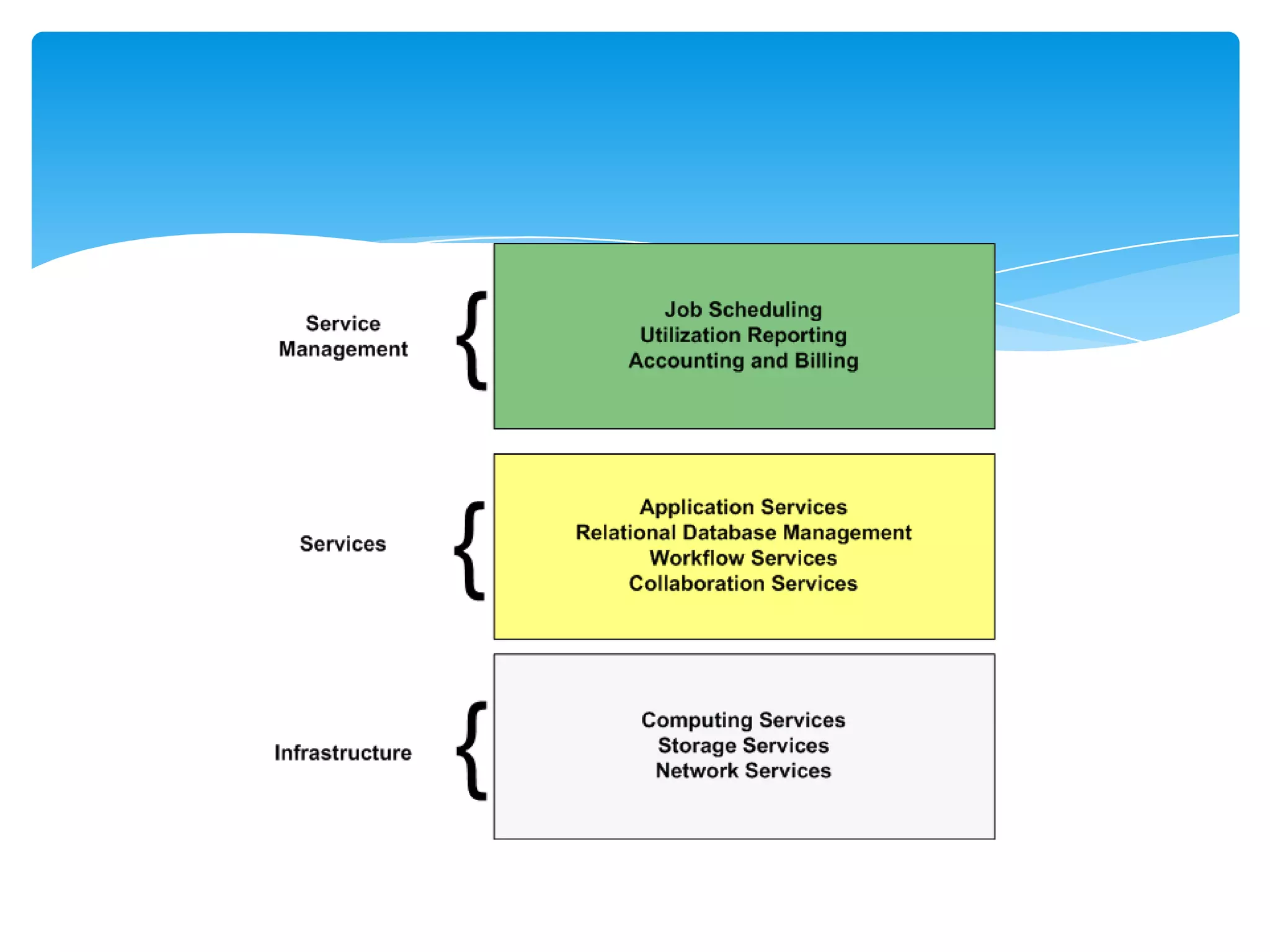
Cloud architectures can be thought of in terms of
layers of services in which each layer depends on
services provided by the next lower layer.
As with other layered models of abstraction in
software engineering, layers in a cloud control the
potential complexity of cloud design by following a
few basic principles:
         Let us have a look on it

Services are provided as logical abstractions that hide
implementation details.
When a program needs to allocate additional storage,
for example, it makes a call to a storage service
requesting a particular amount of space.
There is no need to delve into details about directory
structures, files systems, or disk configurations.
Services are isolated to appropriate layers in the
architecture.
An application programming interface (API) for storage
allocation may make calls to additional services that are
not available outside of the storage system.
For example, when allocating new storage, an API
procedure might call an isolated procedure to add the
allocated disk blocks to a list of blocks that are replicated
to storage devices for backup and performance reasons.
Services are provided at a functional level appropriate
to the users or services that consume the services.
The higher up the stack of services we go, the
broader and more business oriented the services.
Although lower‐level services might operate on
storage blocks, upper level services might initiate
business process workflows.
Three coarse‐grained levels of services in a cloud
architecture:
Virtualization of resources
Services layer
Server management processes
Virtualization of Resources


The ability to hide implementation details without
adversely affecting services is essential to providing
cloud computing.
Virtualization is especially important for efficiently
using computing and storage infrastructure.
Logical Units of Computing
           Resources


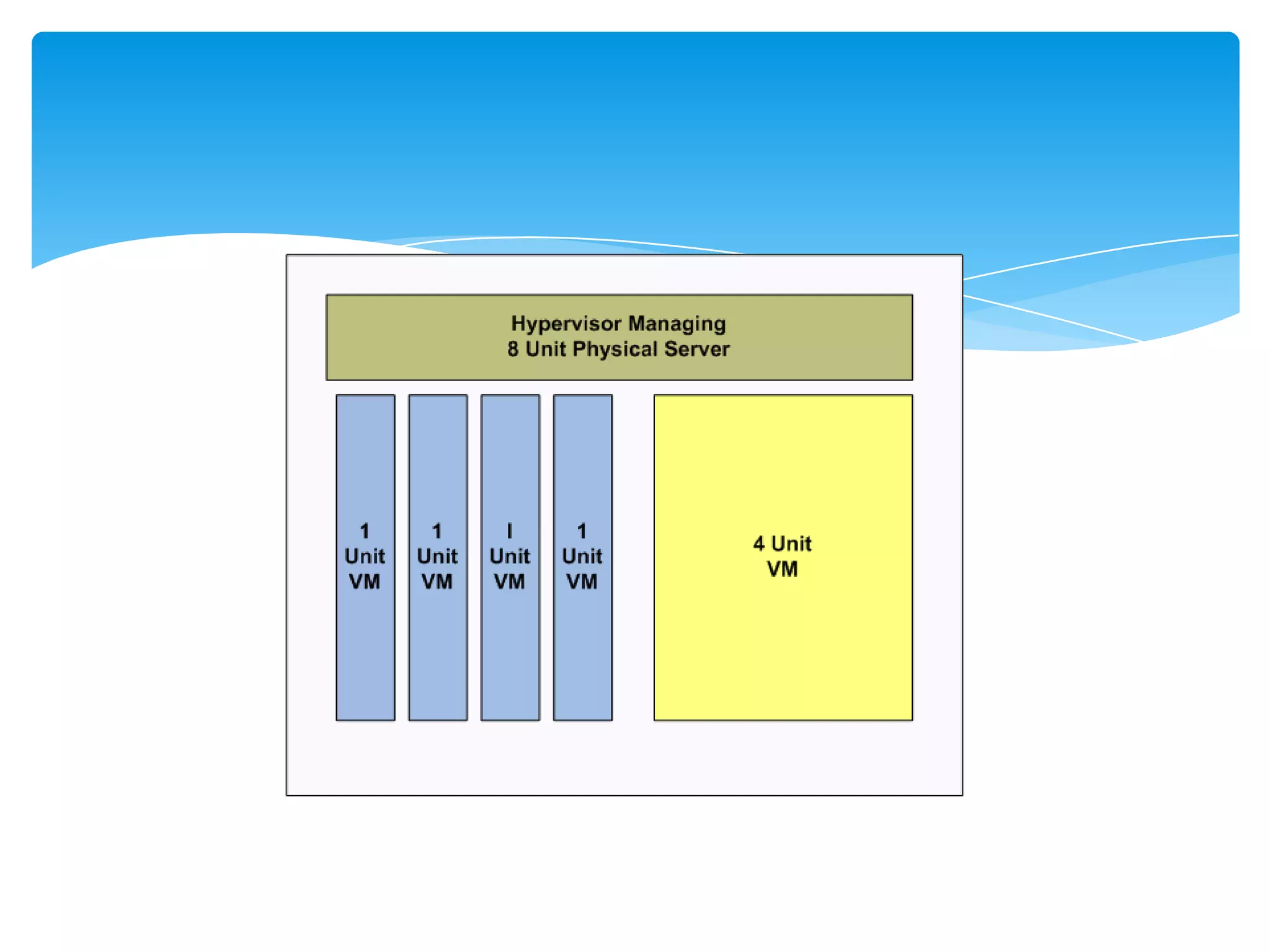
By decoupling how we allocate computing resources
from the underlying hardware that provides those
resources, we gain flexibility in managing how we
consume compute services and manage them.
Hardware Independence


Another advantage of virtualization for cloud service
providers is hardware independence.
Cloud consumers can allocate the level of computing
resources they need without having to worry about
whether a particular physical server is a 2, 4, or 8 core
server.
Services Layer


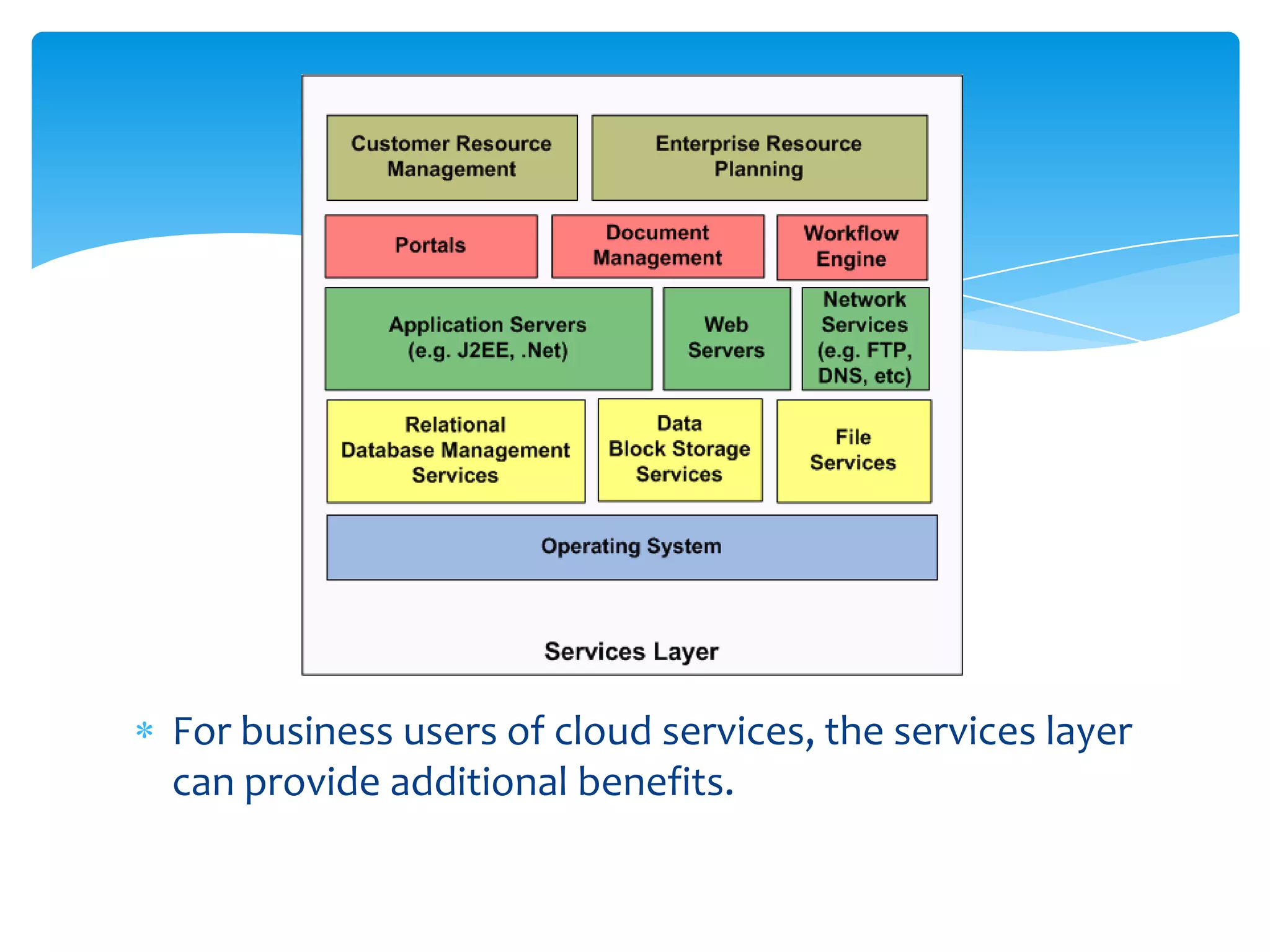
The services layer is another common characteristic
of cloud architectures. At this level, we work with not
just virtualized hardware but also operating system
(OS) and application services.
For business users of cloud services, the services layer
can provide additional benefits.
OSs of course are included in the virtual machine images,
but other services might be independent of virtual
machine instances.
Persistent storage services, such as block storage and
relational database services, might be available as services
available to all virtual machine instances running in the
cloud.
Higher‐level services, such as application servers, portals,
and workflow engines, might be embedded within virtual
machine instances along with other software stack
components.
At the highest levels, business applications such as
CRMs and ERPs may be provided as Web applications
that run in the cloud.
At this level, service consumers are completely
divorced from implementation details and are solely
concerned with business‐related functionality.
Service Management Processes


 A third major aspect of cloud architectures are the service
 management processes that support the delivery of
 services.
 These include:
 Virtual machine image management
 Image deployment
 Job scheduling
 Usage accounting
 Management reporting
Providing Compute Services


Should Consider
  Hardware selection
  Implementing virtualization
  Failover and redundancy
  Management reporting
Failover and Redundancy


Clouds are inherently redundant. If a physical server
fails for any reason, it can be removed from the pool
of available resources.
 Virtual machine images are deployed to other
physical servers until the failure is corrected. This type
of failover and redundancy is at the server level, not
the application level.
If a physical server were to fail while an application
were running on it, recovery would depend on the
application.
For example, if the application provided stateless
Web services, it could be restarted on another virtual
machine instance on another physical server and start
responding to service requests again.
In cases where the application writes state
information to persistent storage and checks for prior
execution information each time the application
starts, the application could also recover fairly
robustly on another virtual machine.
Cloud service consumers can use reports detailing for
Number of virtual servers allocated to a job and the time
the servers ran
Peak and average utilization rates of servers
Amount of data stored persistently
Amount of data transferred across the network
Charges for compute, storage, and network services
Detailed utilization information will help business process
owners optimize their applications.
Providing computing services in a private or hybrid
cloud requires a combination of hardware,
virtualization management and deployment systems,
a server configuration that supports failover and
redundancy, as well as robust management reporting.
Providing Storage Services


If a business moves forward with providing private
cloud computing services, it will have to provide
storage services as well. This would require additional
support services:
Storage virtualization
Backup or other redundant storage
Disaster recovery
Storage Virtualization


Storage virtualization, like server virtualization,
abstracts the services provided by hardware.
Consumers of these services can allocate resources
without concern for implementation details.
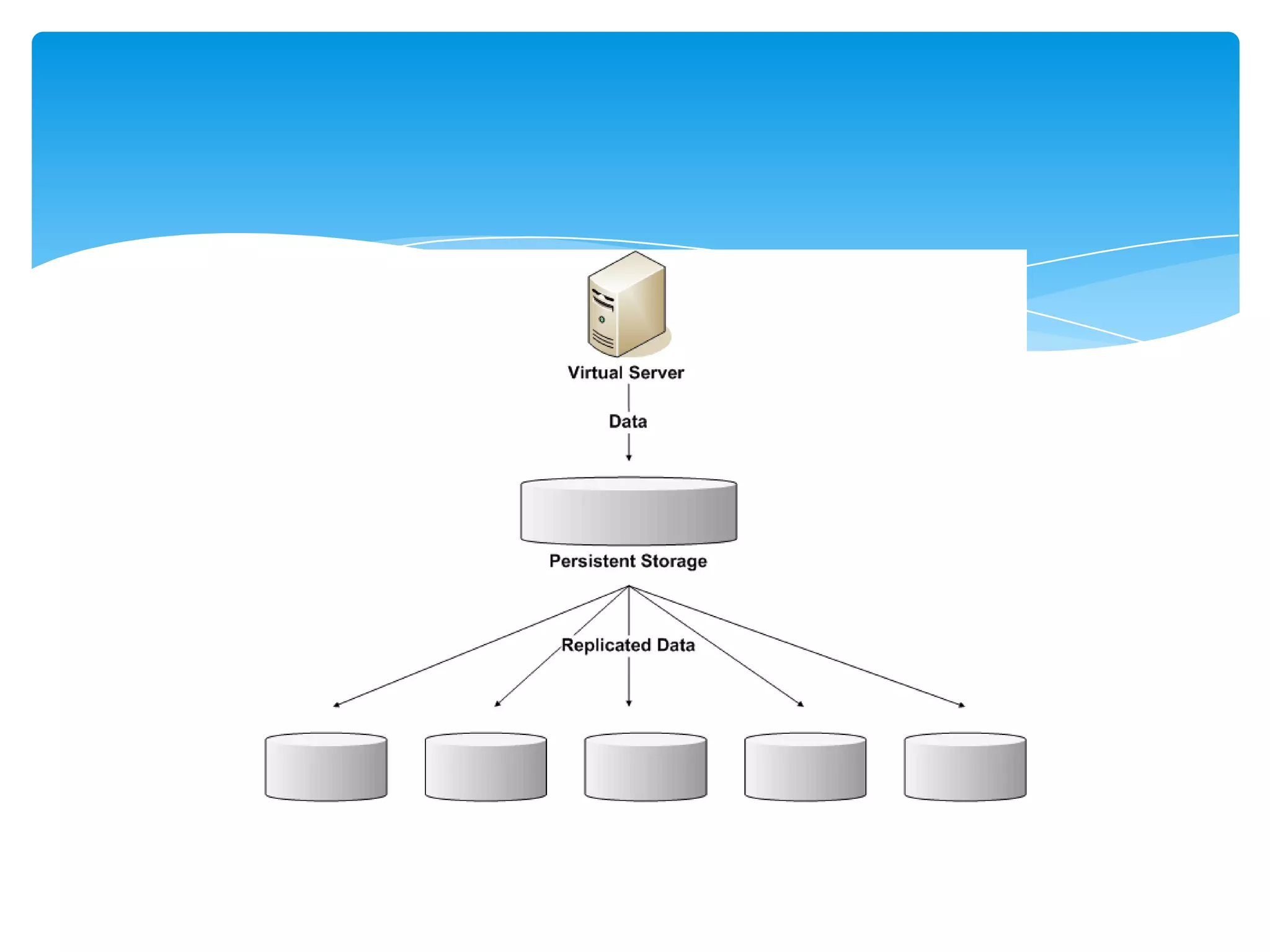
One of the advantages of virtualized storage is the
ability to provide large amounts of storage through a
single logical device—the storage cloud. Behind the
scenes, of course, we have multiple disk arrays
possibly located in different facilities.
This setup creates an opportunity to replicate data
across multiple storage arrays to improve reliability
and performance.
Reliability is preserved because multiple copies of data are
available.
If a storage device should fail, there is no need to restore
from backup tape; the data is immediately available from
another device.
Replication can be done asynchronously so that I/O
operations return as soon as data is written to the primary
storage device. A background replication process can add
new or changed blocks to a queue of blocks that will be
copied to devices.
Backups and Cloud Storage


Backup services are generally specified in terms of
recovery point objectives (RPOs) and recovery time
objectives (RTOs).
An RPO defines points of time in history that can be
restored; examples include previous day at midnight,
previous end of week, or in the case of highly volatile
databases, a previous time in the same day.
RTOs define the maximum period of time between request
of a restore operation and the time the restore operation
completes.
Management Reporting for Storage
        Virtualization


  Businesses that deploy shared disk arrays will
  probably have a storage reporting system in place
  that provides much of the needed functionality:
  Reporting on storage used by project, department, or
  other billable unit
  Cost of storage by type, such as primary storage
  versus archival storage
  Trending reports on growth in storage use
Network Services for Cloud
        Computing


Networking can be the most resource constrained
part of cloud infrastructure.
Public cloud providers are necessarily dependent on
public Internet providers for connectivity between
their data centers and their customers.
The key issues we must consider when evaluating
different cloud architecture options are:
Capacity
Redundancy
Management reporting
Capacity


Network capacity limits the amount of data that can
move between data centers and between cloud
service consumers and the cloud. This directly affects
a number of services within the cloud.
Redundancy in the Network


Both computing and storage services in the cloud use
redundancy to mitigate the risk of failures.
When servers fail, they are removed from the pool of
available resources.
When storage devices fail, data is retrieved from
another device with a redundant copy of the data.
Network services require similar redundancy to avoid
a single point of failure.
Management Reporting


Cloud service users will be interested in network use
reporting as a means to control costs and to monitor
trends in network usage.
Questions ?

Cloud Reference Model

  • 1.
    Cloud Reference Model Ramkumar Lakshminarayanan
  • 2.
    Several aspects ofselecting a cloud architecture Levels of cloud architecture Issues in providing compute services Issues in providing storage services Considerations for network services Cloud operations management Service layers and adapting IT operations to infrastructures
  • 3.
    Levels of CloudArchitecture Cloud architectures can be thought of in terms of layers of services in which each layer depends on services provided by the next lower layer. As with other layered models of abstraction in software engineering, layers in a cloud control the potential complexity of cloud design by following a few basic principles: Let us have a look on it

  • 5.
    Services are providedas logical abstractions that hide implementation details. When a program needs to allocate additional storage, for example, it makes a call to a storage service requesting a particular amount of space. There is no need to delve into details about directory structures, files systems, or disk configurations.
  • 6.
    Services are isolatedto appropriate layers in the architecture. An application programming interface (API) for storage allocation may make calls to additional services that are not available outside of the storage system. For example, when allocating new storage, an API procedure might call an isolated procedure to add the allocated disk blocks to a list of blocks that are replicated to storage devices for backup and performance reasons.
  • 7.
    Services are providedat a functional level appropriate to the users or services that consume the services. The higher up the stack of services we go, the broader and more business oriented the services. Although lower‐level services might operate on storage blocks, upper level services might initiate business process workflows.
  • 8.
    Three coarse‐grained levelsof services in a cloud architecture: Virtualization of resources Services layer Server management processes
  • 9.
    Virtualization of Resources Theability to hide implementation details without adversely affecting services is essential to providing cloud computing. Virtualization is especially important for efficiently using computing and storage infrastructure.
  • 10.
    Logical Units ofComputing Resources By decoupling how we allocate computing resources from the underlying hardware that provides those resources, we gain flexibility in managing how we consume compute services and manage them.
  • 12.
    Hardware Independence Another advantageof virtualization for cloud service providers is hardware independence. Cloud consumers can allocate the level of computing resources they need without having to worry about whether a particular physical server is a 2, 4, or 8 core server.
  • 13.
    Services Layer The serviceslayer is another common characteristic of cloud architectures. At this level, we work with not just virtualized hardware but also operating system (OS) and application services.
  • 14.
    For business usersof cloud services, the services layer can provide additional benefits.
  • 15.
    OSs of courseare included in the virtual machine images, but other services might be independent of virtual machine instances. Persistent storage services, such as block storage and relational database services, might be available as services available to all virtual machine instances running in the cloud. Higher‐level services, such as application servers, portals, and workflow engines, might be embedded within virtual machine instances along with other software stack components.
  • 16.
    At the highestlevels, business applications such as CRMs and ERPs may be provided as Web applications that run in the cloud. At this level, service consumers are completely divorced from implementation details and are solely concerned with business‐related functionality.
  • 17.
    Service Management Processes A third major aspect of cloud architectures are the service management processes that support the delivery of services. These include: Virtual machine image management Image deployment Job scheduling Usage accounting Management reporting
  • 18.
    Providing Compute Services ShouldConsider Hardware selection Implementing virtualization Failover and redundancy Management reporting
  • 19.
    Failover and Redundancy Cloudsare inherently redundant. If a physical server fails for any reason, it can be removed from the pool of available resources. Virtual machine images are deployed to other physical servers until the failure is corrected. This type of failover and redundancy is at the server level, not the application level.
  • 20.
    If a physicalserver were to fail while an application were running on it, recovery would depend on the application. For example, if the application provided stateless Web services, it could be restarted on another virtual machine instance on another physical server and start responding to service requests again.
  • 21.
    In cases wherethe application writes state information to persistent storage and checks for prior execution information each time the application starts, the application could also recover fairly robustly on another virtual machine.
  • 22.
    Cloud service consumerscan use reports detailing for Number of virtual servers allocated to a job and the time the servers ran Peak and average utilization rates of servers Amount of data stored persistently Amount of data transferred across the network Charges for compute, storage, and network services Detailed utilization information will help business process owners optimize their applications.
  • 23.
    Providing computing servicesin a private or hybrid cloud requires a combination of hardware, virtualization management and deployment systems, a server configuration that supports failover and redundancy, as well as robust management reporting.
  • 24.
    Providing Storage Services Ifa business moves forward with providing private cloud computing services, it will have to provide storage services as well. This would require additional support services: Storage virtualization Backup or other redundant storage Disaster recovery
  • 25.
    Storage Virtualization Storage virtualization,like server virtualization, abstracts the services provided by hardware. Consumers of these services can allocate resources without concern for implementation details.
  • 27.
    One of theadvantages of virtualized storage is the ability to provide large amounts of storage through a single logical device—the storage cloud. Behind the scenes, of course, we have multiple disk arrays possibly located in different facilities. This setup creates an opportunity to replicate data across multiple storage arrays to improve reliability and performance.
  • 28.
    Reliability is preservedbecause multiple copies of data are available. If a storage device should fail, there is no need to restore from backup tape; the data is immediately available from another device. Replication can be done asynchronously so that I/O operations return as soon as data is written to the primary storage device. A background replication process can add new or changed blocks to a queue of blocks that will be copied to devices.
  • 29.
    Backups and CloudStorage Backup services are generally specified in terms of recovery point objectives (RPOs) and recovery time objectives (RTOs). An RPO defines points of time in history that can be restored; examples include previous day at midnight, previous end of week, or in the case of highly volatile databases, a previous time in the same day. RTOs define the maximum period of time between request of a restore operation and the time the restore operation completes.
  • 30.
    Management Reporting forStorage Virtualization Businesses that deploy shared disk arrays will probably have a storage reporting system in place that provides much of the needed functionality: Reporting on storage used by project, department, or other billable unit Cost of storage by type, such as primary storage versus archival storage Trending reports on growth in storage use
  • 31.
    Network Services forCloud Computing Networking can be the most resource constrained part of cloud infrastructure. Public cloud providers are necessarily dependent on public Internet providers for connectivity between their data centers and their customers.
  • 32.
    The key issueswe must consider when evaluating different cloud architecture options are: Capacity Redundancy Management reporting
  • 33.
    Capacity Network capacity limitsthe amount of data that can move between data centers and between cloud service consumers and the cloud. This directly affects a number of services within the cloud.
  • 34.
    Redundancy in theNetwork Both computing and storage services in the cloud use redundancy to mitigate the risk of failures. When servers fail, they are removed from the pool of available resources. When storage devices fail, data is retrieved from another device with a redundant copy of the data. Network services require similar redundancy to avoid a single point of failure.
  • 35.
    Management Reporting Cloud serviceusers will be interested in network use reporting as a means to control costs and to monitor trends in network usage.
  • 36.