Packages
Dr. P. Victer Paul, Indian Institute of Information Technology Kottayam
2
Packages and Interfaces
 Two of Java’s most innovative features:
 packages and interfaces
Dr. P. Victer Paul, Indian Institute of Information Technology Kottayam
3
Packages
 In general, a unique name had to be used for each class to
avoid name collisions
 After a while, without some way to manage the name
space, you could run out of convenient, descriptive names
for individual classes.
 Java provides a mechanism for partitioning the class name
space into more manageable chunks. - Package
 A package in Java is used to group related classes.
 Think of it as a folder in a file directory. We use packages
to avoid name conflicts, and to write a better
maintainable code.
 The package is both a naming and a visibility control
mechanism. --- HOW??
Dr. P. Victer Paul, Indian Institute of Information Technology Kottayam
4
Uses
 Packages are used for:
 A Preventing naming conflicts.
 For example there can be two classes with name
Employee in two packages,
 college.staff.cse.Employee and
college.staff.ee.Employee
 Providing controlled access:
 protected and default have package level access
control. A protected member is accessible by classes in
the same package and its subclasses. A default member
(without any access specifier) is accessible by classes
in the same package only.
Dr. P. Victer Paul, Indian Institute of Information Technology Kottayam
5
Defining a Package
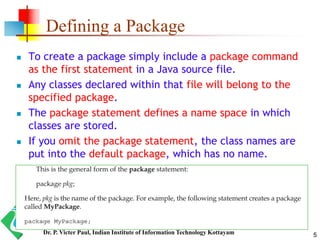
 To create a package simply include a package command
as the first statement in a Java source file.
 Any classes declared within that file will belong to the
specified package.
 The package statement defines a name space in which
classes are stored.
 If you omit the package statement, the class names are
put into the default package, which has no name.
Dr. P. Victer Paul, Indian Institute of Information Technology Kottayam
6
Defining a Package
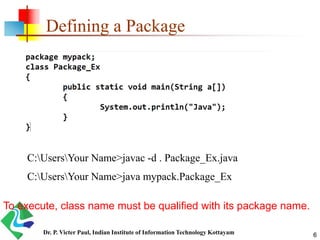
C:UsersYour Name>javac -d . Package_Ex.java
C:UsersYour Name>java mypack.Package_Ex
To execute, class name must be qualified with its package name.
Dr. P. Victer Paul, Indian Institute of Information Technology Kottayam
Defining a Package
 This forces the compiler to create the "mypack" package.
 The -d keyword specifies the destination for where to
save the class file.
 You can use any directory name, like c:/user (windows),
or, if you want to keep the package within the same
directory, you can use the dot sign ".", like in the example
above.
 Note: The package name should be written in lower case
to avoid conflict with class names.
7Dr. P. Victer Paul, Indian Institute of Information Technology Kottayam
Access Protection
 Classes and packages are both means of encapsulating and
containing the name space and scope of variables and
methods.
 Classes act as containers for data and code.
 The class is Java’s smallest unit of abstraction.
 Packages act as containers for classes and other
subordinate packages.
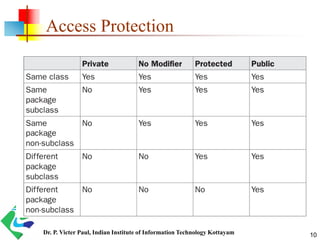
 Java addresses four categories of visibility for class
members:
 Subclasses in the same package
 Non-subclasses in the same package
 Subclasses in different packages
 Classes that are neither in the same package nor subclasses
8Dr. P. Victer Paul, Indian Institute of Information Technology Kottayam
Access Protection
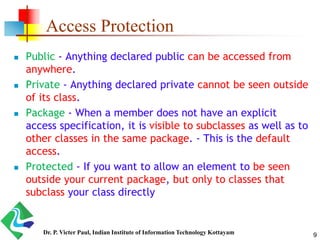
 Public - Anything declared public can be accessed from
anywhere.
 Private - Anything declared private cannot be seen outside
of its class.
 Package - When a member does not have an explicit
access specification, it is visible to subclasses as well as to
other classes in the same package. - This is the default
access.
 Protected - If you want to allow an element to be seen
outside your current package, but only to classes that
subclass your class directly
9Dr. P. Victer Paul, Indian Institute of Information Technology Kottayam
Access Protection
10Dr. P. Victer Paul, Indian Institute of Information Technology Kottayam
Access within Same Package
Demo
11Dr. P. Victer Paul, Indian Institute of Information Technology Kottayam
Access from other Package
 Importing Packages
 Java includes the import statement to bring certain
classes, or entire packages, into visibility.
 Once imported, a class can be referred to directly, using
only its name.
 In a Java source file, import statements occur
immediately following the package statement (if it exists)
and before any class definitions.
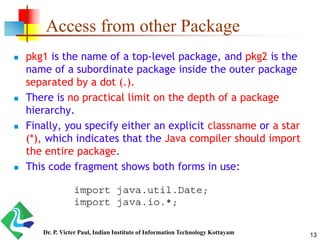
 This is the general form of the import statement:
12Dr. P. Victer Paul, Indian Institute of Information Technology Kottayam
Access from other Package
 pkg1 is the name of a top-level package, and pkg2 is the
name of a subordinate package inside the outer package
separated by a dot (.).
 There is no practical limit on the depth of a package
hierarchy.
 Finally, you specify either an explicit classname or a star
(*), which indicates that the Java compiler should import
the entire package.
 This code fragment shows both forms in use:
13Dr. P. Victer Paul, Indian Institute of Information Technology Kottayam
Accessing Classes in a Package
 Fully Qualified class name:
Example:
java.util.Scanner s=new java.util.Scanner(System.in);
 import packagename.classname;
Example: import java.util. Scanner;
or
import packagename.*;
Example: import java.util.*;
Import statement must appear at the top of the file, before
any class declaration.
14Dr. P. Victer Paul, Indian Institute of Information Technology Kottayam
Info bits!!!!
 The star form may increase compilation time—especially if you
import several large packages.
 For this reason it is a good idea to explicitly name the classes
that you want to use rather than importing whole packages.
 However, the star form has absolutely no effect on the run-time
performance or size of your classes.
 All of the standard Java classes included with Java are stored in
a package called java.
 The basic language functions are stored in a package inside of
the java package called java.lang.
 Normally, you have to import every package or class that you
want to use, but since Java is useless without much of the
functionality in java.lang, it is implicitly imported by the
compiler for all programs.
15Dr. P. Victer Paul, Indian Institute of Information Technology Kottayam
Package Types
 Packages are divided into two categories:
 Built-in Packages (packages from the Java API)
 User-defined Packages (create your own packages)
 Built-in Packages
 The Java API is a library of prewritten classes, that are free to use,
included in the Java Development Environment.
 The complete list can be found at Oracles website:
https://docs.oracle.com/javase/8/docs/api/.
 User-defined Packages
 These are the packages that are defined by the user.
 To create your own package, you need to understand that Java
uses a file system directory to store them. Just like folders on your
computer
16Dr. P. Victer Paul, Indian Institute of Information Technology Kottayam
Example Built-in Packages
 1) java.lang: Contains language support classes(e.g classed
which defines primitive data types, math operations). This
package is automatically imported.
 2) java.io: Contains classed for supporting input / output
operations.
 3) java.util: Contains utility classes which implement data
structures like Linked List, Dictionary and support ; for Date /
Time operations.
 4) java.applet: Contains classes for creating Applets.
 5) java.awt: Contain classes for implementing the components
for graphical user interfaces (like button , ;menus etc).
 6) java.net: Contain classes for supporting networking
operations.
17Dr. P. Victer Paul, Indian Institute of Information Technology Kottayam
Example1-Package
package p1;
public class ClassA
{
public void displayA( )
{
System.out.println(“Class A”);
}
}
import p1.*;
Class testclass
{
public static void main(String str[])
{
ClassA obA=new ClassA();
obA.displayA();
}
}
18Dr. P. Victer Paul, Indian Institute of Information Technology Kottayam
Example2-Package
package p2;
public class ClassB
{
protected int m =10;
public void displayB()
{
System.out.println(“Class B”);
System.out.println(“m= “+m);
}
}
import p1.*;
import p2.*;
class PackageTest2
{
public static void main(String str[])
{
ClassA obA=new ClassA();
Classb obB=new ClassB();
obA.displayA();
obB.displayB();
}
}
19Dr. P. Victer Paul, Indian Institute of Information Technology Kottayam
Example 3- Package
import p2.ClassB;
class ClassC extends ClassB
{
int n=20;
void displayC()
{
System.out.println(“Class C”);
System.out.println(“m= “+m);
System.out.println(“n= “+n);
}
}
class PackageTest3
{
public static void main(String args[])
{
ClassC obC = new ClassC();
obC.displayB();
obC.displayC();
}
}
20Dr. P. Victer Paul, Indian Institute of Information Technology Kottayam
The End…
21Dr. P. Victer Paul, Indian Institute of Information Technology Kottayam

Java - Packages Concepts

  • 1.
    Packages Dr. P. VicterPaul, Indian Institute of Information Technology Kottayam
  • 2.
    2 Packages and Interfaces Two of Java’s most innovative features:  packages and interfaces Dr. P. Victer Paul, Indian Institute of Information Technology Kottayam
  • 3.
    3 Packages  In general,a unique name had to be used for each class to avoid name collisions  After a while, without some way to manage the name space, you could run out of convenient, descriptive names for individual classes.  Java provides a mechanism for partitioning the class name space into more manageable chunks. - Package  A package in Java is used to group related classes.  Think of it as a folder in a file directory. We use packages to avoid name conflicts, and to write a better maintainable code.  The package is both a naming and a visibility control mechanism. --- HOW?? Dr. P. Victer Paul, Indian Institute of Information Technology Kottayam
  • 4.
    4 Uses  Packages areused for:  A Preventing naming conflicts.  For example there can be two classes with name Employee in two packages,  college.staff.cse.Employee and college.staff.ee.Employee  Providing controlled access:  protected and default have package level access control. A protected member is accessible by classes in the same package and its subclasses. A default member (without any access specifier) is accessible by classes in the same package only. Dr. P. Victer Paul, Indian Institute of Information Technology Kottayam
  • 5.
    5 Defining a Package To create a package simply include a package command as the first statement in a Java source file.  Any classes declared within that file will belong to the specified package.  The package statement defines a name space in which classes are stored.  If you omit the package statement, the class names are put into the default package, which has no name. Dr. P. Victer Paul, Indian Institute of Information Technology Kottayam
  • 6.
    6 Defining a Package C:UsersYourName>javac -d . Package_Ex.java C:UsersYour Name>java mypack.Package_Ex To execute, class name must be qualified with its package name. Dr. P. Victer Paul, Indian Institute of Information Technology Kottayam
  • 7.
    Defining a Package This forces the compiler to create the "mypack" package.  The -d keyword specifies the destination for where to save the class file.  You can use any directory name, like c:/user (windows), or, if you want to keep the package within the same directory, you can use the dot sign ".", like in the example above.  Note: The package name should be written in lower case to avoid conflict with class names. 7Dr. P. Victer Paul, Indian Institute of Information Technology Kottayam
  • 8.
    Access Protection  Classesand packages are both means of encapsulating and containing the name space and scope of variables and methods.  Classes act as containers for data and code.  The class is Java’s smallest unit of abstraction.  Packages act as containers for classes and other subordinate packages.  Java addresses four categories of visibility for class members:  Subclasses in the same package  Non-subclasses in the same package  Subclasses in different packages  Classes that are neither in the same package nor subclasses 8Dr. P. Victer Paul, Indian Institute of Information Technology Kottayam
  • 9.
    Access Protection  Public- Anything declared public can be accessed from anywhere.  Private - Anything declared private cannot be seen outside of its class.  Package - When a member does not have an explicit access specification, it is visible to subclasses as well as to other classes in the same package. - This is the default access.  Protected - If you want to allow an element to be seen outside your current package, but only to classes that subclass your class directly 9Dr. P. Victer Paul, Indian Institute of Information Technology Kottayam
  • 10.
    Access Protection 10Dr. P.Victer Paul, Indian Institute of Information Technology Kottayam
  • 11.
    Access within SamePackage Demo 11Dr. P. Victer Paul, Indian Institute of Information Technology Kottayam
  • 12.
    Access from otherPackage  Importing Packages  Java includes the import statement to bring certain classes, or entire packages, into visibility.  Once imported, a class can be referred to directly, using only its name.  In a Java source file, import statements occur immediately following the package statement (if it exists) and before any class definitions.  This is the general form of the import statement: 12Dr. P. Victer Paul, Indian Institute of Information Technology Kottayam
  • 13.
    Access from otherPackage  pkg1 is the name of a top-level package, and pkg2 is the name of a subordinate package inside the outer package separated by a dot (.).  There is no practical limit on the depth of a package hierarchy.  Finally, you specify either an explicit classname or a star (*), which indicates that the Java compiler should import the entire package.  This code fragment shows both forms in use: 13Dr. P. Victer Paul, Indian Institute of Information Technology Kottayam
  • 14.
    Accessing Classes ina Package  Fully Qualified class name: Example: java.util.Scanner s=new java.util.Scanner(System.in);  import packagename.classname; Example: import java.util. Scanner; or import packagename.*; Example: import java.util.*; Import statement must appear at the top of the file, before any class declaration. 14Dr. P. Victer Paul, Indian Institute of Information Technology Kottayam
  • 15.
    Info bits!!!!  Thestar form may increase compilation time—especially if you import several large packages.  For this reason it is a good idea to explicitly name the classes that you want to use rather than importing whole packages.  However, the star form has absolutely no effect on the run-time performance or size of your classes.  All of the standard Java classes included with Java are stored in a package called java.  The basic language functions are stored in a package inside of the java package called java.lang.  Normally, you have to import every package or class that you want to use, but since Java is useless without much of the functionality in java.lang, it is implicitly imported by the compiler for all programs. 15Dr. P. Victer Paul, Indian Institute of Information Technology Kottayam
  • 16.
    Package Types  Packagesare divided into two categories:  Built-in Packages (packages from the Java API)  User-defined Packages (create your own packages)  Built-in Packages  The Java API is a library of prewritten classes, that are free to use, included in the Java Development Environment.  The complete list can be found at Oracles website: https://docs.oracle.com/javase/8/docs/api/.  User-defined Packages  These are the packages that are defined by the user.  To create your own package, you need to understand that Java uses a file system directory to store them. Just like folders on your computer 16Dr. P. Victer Paul, Indian Institute of Information Technology Kottayam
  • 17.
    Example Built-in Packages 1) java.lang: Contains language support classes(e.g classed which defines primitive data types, math operations). This package is automatically imported.  2) java.io: Contains classed for supporting input / output operations.  3) java.util: Contains utility classes which implement data structures like Linked List, Dictionary and support ; for Date / Time operations.  4) java.applet: Contains classes for creating Applets.  5) java.awt: Contain classes for implementing the components for graphical user interfaces (like button , ;menus etc).  6) java.net: Contain classes for supporting networking operations. 17Dr. P. Victer Paul, Indian Institute of Information Technology Kottayam
  • 18.
    Example1-Package package p1; public classClassA { public void displayA( ) { System.out.println(“Class A”); } } import p1.*; Class testclass { public static void main(String str[]) { ClassA obA=new ClassA(); obA.displayA(); } } 18Dr. P. Victer Paul, Indian Institute of Information Technology Kottayam
  • 19.
    Example2-Package package p2; public classClassB { protected int m =10; public void displayB() { System.out.println(“Class B”); System.out.println(“m= “+m); } } import p1.*; import p2.*; class PackageTest2 { public static void main(String str[]) { ClassA obA=new ClassA(); Classb obB=new ClassB(); obA.displayA(); obB.displayB(); } } 19Dr. P. Victer Paul, Indian Institute of Information Technology Kottayam
  • 20.
    Example 3- Package importp2.ClassB; class ClassC extends ClassB { int n=20; void displayC() { System.out.println(“Class C”); System.out.println(“m= “+m); System.out.println(“n= “+n); } } class PackageTest3 { public static void main(String args[]) { ClassC obC = new ClassC(); obC.displayB(); obC.displayC(); } } 20Dr. P. Victer Paul, Indian Institute of Information Technology Kottayam
  • 21.
    The End… 21Dr. P.Victer Paul, Indian Institute of Information Technology Kottayam