Presto as a Service
Tips for operation and monitoring
Taro L. Saito
Treasure Data, Inc.
leo@treasure-data.com
January 20, 2015
Presto Meetup Japan @ FreakOut, Roppongi
About Me: @taroleo
•  2007 University of Tokyo. Ph.D.
–  XML DBMS, Transaction Processing
•  Relational-Style XML Query. ACM SIGMOD 2008
•  ~ 2014 Assistant Professor at University of Tokyo
–  Genome Science Research
•  Distributed Computing
•  2014.3月~ Treasure Data
–  Software Engineer, MPP Team Leader
2
My Open Source Projects
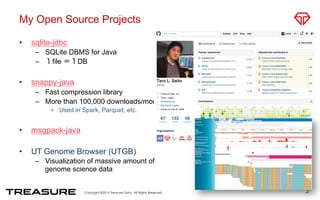
•  sqlite-jdbc
–  SQLite DBMS for Java
–  1file =1DB
•  snappy-java
–  Fast compression library
–  More than 100,000 downloads/month
•  Used in Spark, Parquet, etc.
•  msgpack-java
•  UT Genome Browser (UTGB)
–  Visualization of massive amount of
genome science data
3
Topics
•  Presto as a Service in Treasure Data
–  Error Recovery
–  Presto Deployment
•  Tips for Monitoring Presto
–  JSON API
–  Presto + Fluentd
4
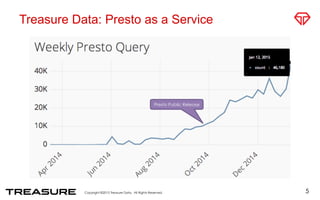
Treasure Data: Presto as a Service
5
Presto Public Release
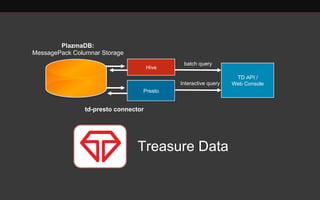
Hive
TD API /
Web ConsoleInteractive query
batch query
Presto
Treasure Data
PlazmaDB:
MessagePack Columnar Storage
td-presto connector
Deployment
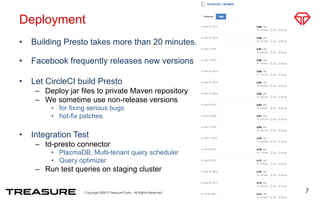
•  Building Presto takes more than 20 minutes.
•  Facebook frequently releases new versions
•  Let CircleCI build Presto
–  Deploy jar files to private Maven repository
–  We sometime use non-release versions
•  for fixing serious bugs
•  hot-fix patches
•  Integration Test
–  td-presto connector
•  PlazmaDB, Multi-tenant query scheduler
•  Query optimizer
–  Run test queries on staging cluster
7
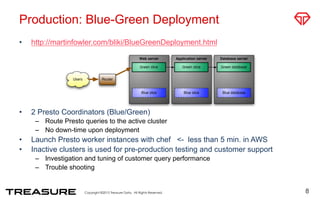
Production: Blue-Green Deployment
•  http://martinfowler.com/bliki/BlueGreenDeployment.html
•  2 Presto Coordinators (Blue/Green)
–  Route Presto queries to the active cluster
–  No down-time upon deployment
•  Launch Presto worker instances with chef <- less than 5 min. in AWS
•  Inactive clusters is used for pre-production testing and customer support
–  Investigation and tuning of customer query performance
–  Trouble shooting
8
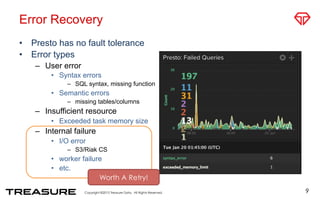
Error Recovery
•  Presto has no fault tolerance
•  Error types
–  User error
•  Syntax errors
–  SQL syntax, missing function
•  Semantic errors
–  missing tables/columns
–  Insufficient resource
•  Exceeded task memory size
–  Internal failure
•  I/O error
–  S3/Riak CS
•  worker failure
•  etc.
9
Worth A Retry!
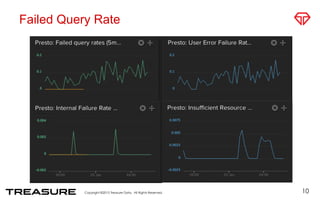
Failed Query Rate
10
11
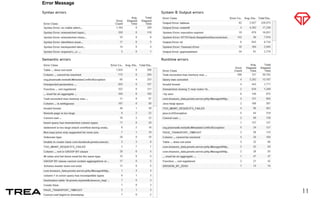
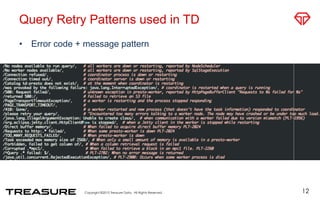
Query Retry Patterns used in TD
•  Error code + message pattern
12
Monitoring Presto
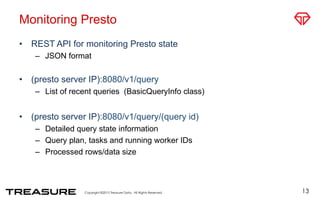
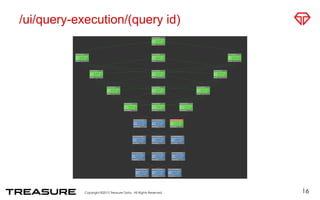
•  REST API for monitoring Presto state
–  JSON format
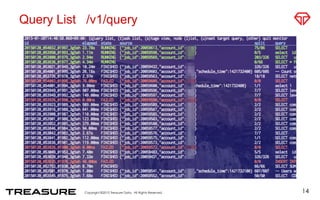
•  (presto server IP):8080/v1/query
–  List of recent queries (BasicQueryInfo class)
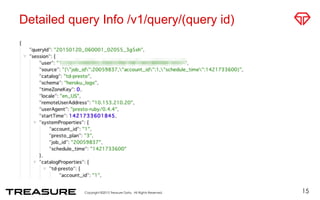
•  (presto server IP):8080/v1/query/(query id)
–  Detailed query state information
–  Query plan, tasks and running worker IDs
–  Processed rows/data size
13
Query List /v1/query
14
Detailed query Info /v1/query/(query id)
15
/ui/query-execution/(query id)
16
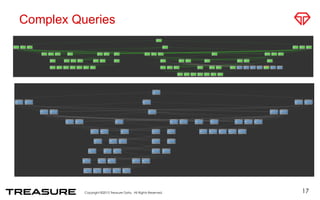
Complex Queries
17
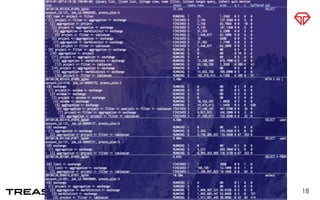
18
Presto Coordinator
•  Organizes query execution pipelines
–  Coordinates presto workers
•  Retrieves table partition and split location from connectors
–  Creates distributed query plans
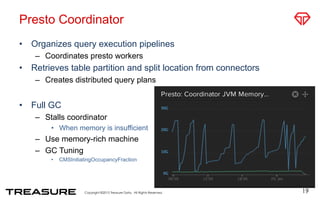
•  Full GC
–  Stalls coordinator
•  When memory is insufficient
–  Use memory-rich machine
–  GC Tuning
•  CMSInitiatingOccupancyFraction
19
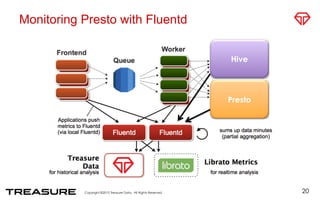
Monitoring Presto with Fluentd
20
Hive
Presto
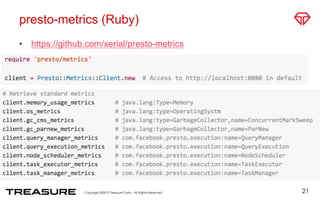
presto-metrics (Ruby)
•  https://github.com/xerial/presto-metrics
21
22
23
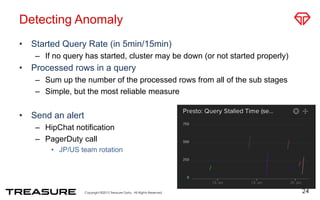
Detecting Anomaly
•  Started Query Rate (in 5min/15min)
–  If no query has started, cluster may be down (or not started properly)
•  Processed rows in a query
–  Sum up the number of the processed rows from all of the sub stages
–  Simple, but the most reliable measure
•  Send an alert
–  HipChat notification
–  PagerDuty call
•  JP/US team rotation
24
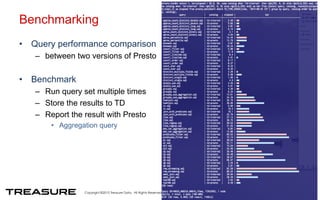
Benchmarking
•  Query performance comparison
–  between two versions of Presto
•  Benchmark
–  Run query set multiple times
–  Store the results to TD
–  Report the result with Presto
•  Aggregation query
25
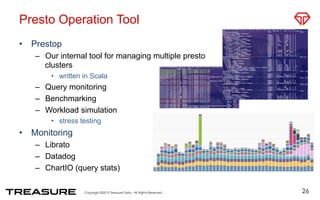
Presto Operation Tool
•  Prestop
–  Our internal tool for managing multiple presto
clusters
•  written in Scala
–  Query monitoring
–  Benchmarking
–  Workload simulation
•  stress testing
•  Monitoring
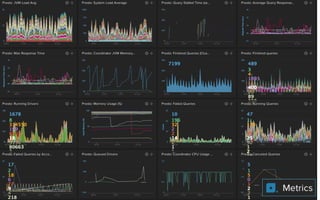
–  Librato
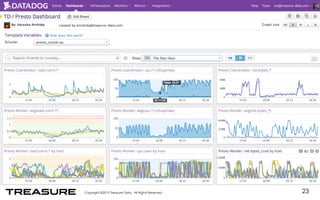
–  Datadog
–  ChartIO (query stats)
26
WE ARE HIRING!
27
Check: www.treasuredata.com

Presto as a Service - Tips for operation and monitoring

  • 1.
    Presto as aService Tips for operation and monitoring Taro L. Saito Treasure Data, Inc. leo@treasure-data.com January 20, 2015 Presto Meetup Japan @ FreakOut, Roppongi
  • 2.
    About Me: @taroleo • 2007 University of Tokyo. Ph.D. –  XML DBMS, Transaction Processing •  Relational-Style XML Query. ACM SIGMOD 2008 •  ~ 2014 Assistant Professor at University of Tokyo –  Genome Science Research •  Distributed Computing •  2014.3月~ Treasure Data –  Software Engineer, MPP Team Leader 2
  • 3.
    My Open SourceProjects •  sqlite-jdbc –  SQLite DBMS for Java –  1file =1DB •  snappy-java –  Fast compression library –  More than 100,000 downloads/month •  Used in Spark, Parquet, etc. •  msgpack-java •  UT Genome Browser (UTGB) –  Visualization of massive amount of genome science data 3
  • 4.
    Topics •  Presto asa Service in Treasure Data –  Error Recovery –  Presto Deployment •  Tips for Monitoring Presto –  JSON API –  Presto + Fluentd 4
  • 5.
    Treasure Data: Prestoas a Service 5 Presto Public Release
  • 6.
    Hive TD API / WebConsoleInteractive query batch query Presto Treasure Data PlazmaDB: MessagePack Columnar Storage td-presto connector
  • 7.
    Deployment •  Building Prestotakes more than 20 minutes. •  Facebook frequently releases new versions •  Let CircleCI build Presto –  Deploy jar files to private Maven repository –  We sometime use non-release versions •  for fixing serious bugs •  hot-fix patches •  Integration Test –  td-presto connector •  PlazmaDB, Multi-tenant query scheduler •  Query optimizer –  Run test queries on staging cluster 7
  • 8.
    Production: Blue-Green Deployment • http://martinfowler.com/bliki/BlueGreenDeployment.html •  2 Presto Coordinators (Blue/Green) –  Route Presto queries to the active cluster –  No down-time upon deployment •  Launch Presto worker instances with chef <- less than 5 min. in AWS •  Inactive clusters is used for pre-production testing and customer support –  Investigation and tuning of customer query performance –  Trouble shooting 8
  • 9.
    Error Recovery •  Prestohas no fault tolerance •  Error types –  User error •  Syntax errors –  SQL syntax, missing function •  Semantic errors –  missing tables/columns –  Insufficient resource •  Exceeded task memory size –  Internal failure •  I/O error –  S3/Riak CS •  worker failure •  etc. 9 Worth A Retry!
  • 10.
  • 11.
  • 12.
    Query Retry Patternsused in TD •  Error code + message pattern 12
  • 13.
    Monitoring Presto •  RESTAPI for monitoring Presto state –  JSON format •  (presto server IP):8080/v1/query –  List of recent queries (BasicQueryInfo class) •  (presto server IP):8080/v1/query/(query id) –  Detailed query state information –  Query plan, tasks and running worker IDs –  Processed rows/data size 13
  • 14.
  • 15.
    Detailed query Info/v1/query/(query id) 15
  • 16.
  • 17.
  • 18.
  • 19.
    Presto Coordinator •  Organizesquery execution pipelines –  Coordinates presto workers •  Retrieves table partition and split location from connectors –  Creates distributed query plans •  Full GC –  Stalls coordinator •  When memory is insufficient –  Use memory-rich machine –  GC Tuning •  CMSInitiatingOccupancyFraction 19
  • 20.
    Monitoring Presto withFluentd 20 Hive Presto
  • 21.
  • 22.
  • 23.
  • 24.
    Detecting Anomaly •  StartedQuery Rate (in 5min/15min) –  If no query has started, cluster may be down (or not started properly) •  Processed rows in a query –  Sum up the number of the processed rows from all of the sub stages –  Simple, but the most reliable measure •  Send an alert –  HipChat notification –  PagerDuty call •  JP/US team rotation 24
  • 25.
    Benchmarking •  Query performancecomparison –  between two versions of Presto •  Benchmark –  Run query set multiple times –  Store the results to TD –  Report the result with Presto •  Aggregation query 25
  • 26.
    Presto Operation Tool • Prestop –  Our internal tool for managing multiple presto clusters •  written in Scala –  Query monitoring –  Benchmarking –  Workload simulation •  stress testing •  Monitoring –  Librato –  Datadog –  ChartIO (query stats) 26
  • 27.
    WE ARE HIRING! 27 Check:www.treasuredata.com