

Autoscaling with
Apache Flink
Robert Metzger
Staff Engineer @ decodable, Committer and PMC Chair @ Flink
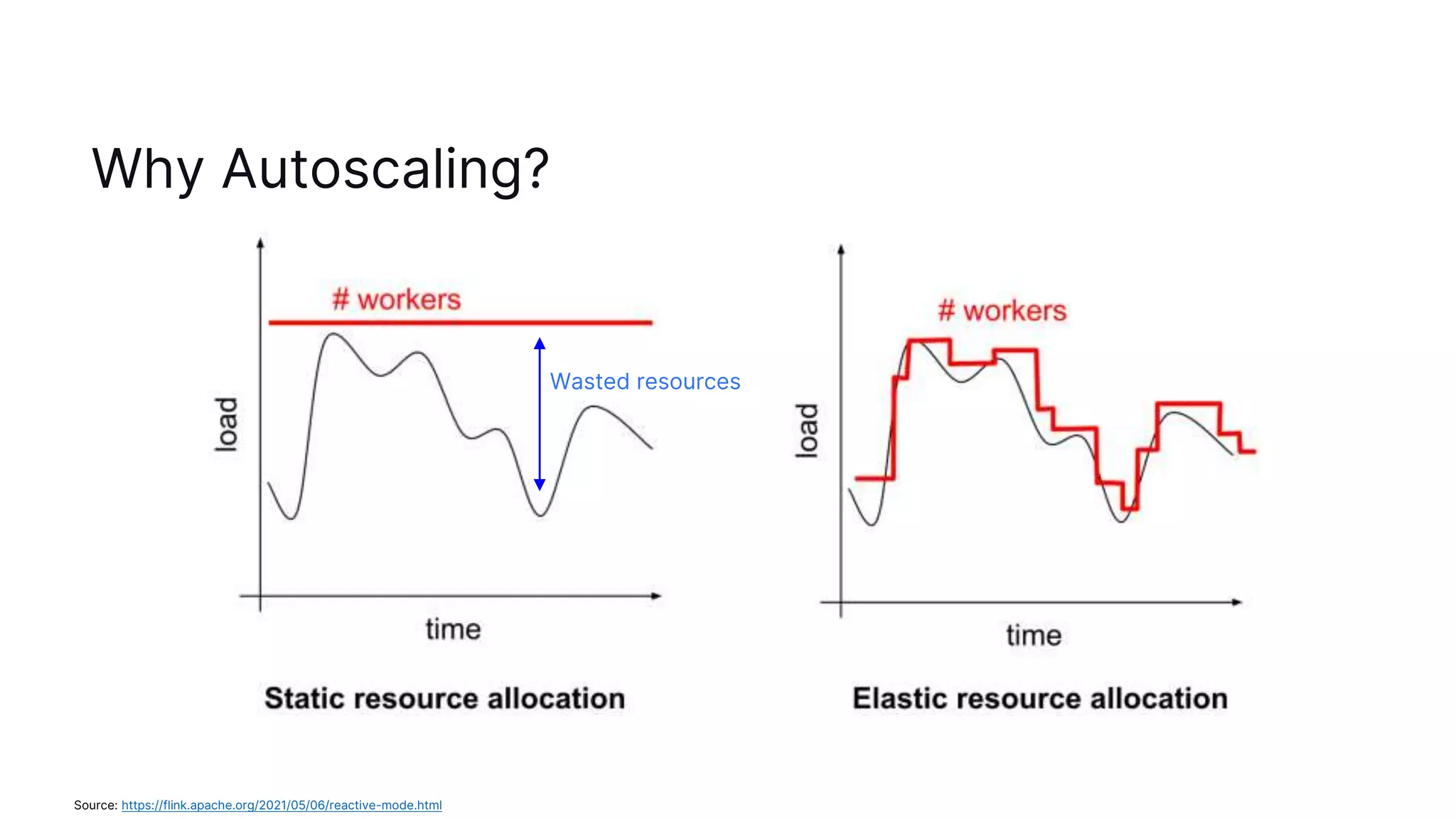
Why Autoscaling?
Source: https://flink.apache.org/2021/05/06/reactive-mode.html
Wasted resources
Reasons for changing loads
- Seasonality:
- day / night
- weekend / weekday
- Product popularity: new feature launches, ad campaigns
- Upstream system outages: load spikes during recovery
Solutions in Flink to Rescale
- Flink 1.2 (2017): Rescalable State
- Flink can restore from a savepoint with a different parallelism, so no data will be lost, all
computations will stay correct
- When used for scaling: requires custom tooling to orchestrate operations, and
bookkeeping
- Flink 1.13 (2021): Reactive Mode (beta)
- Flink automatically adjusts when TaskManagers are added or removed
- Requires outside entity to decide on # TaskManagers
- Since Flink 1.15 (2022): Reactive Mode is out of beta
Further reading: https://flink.apache.org/features/2017/07/04/flink-rescalable-state.html
How to use Reactive Mode?
- Reactive Mode works with all standalone deployments
- E.g. Kubernetes, Docker or via the provided deployment scripts
- Set the configuration:
scheduler-mode=reactive
- Start the JobManager, and add as many TaskManagers as you need
- (optionally) Use a service to determine the number of TaskManagers
- Kubernetes Horizontal Pod Autoscaler
- AWS AutoScaling Groups
- Google Cloud Managed Instance Groups
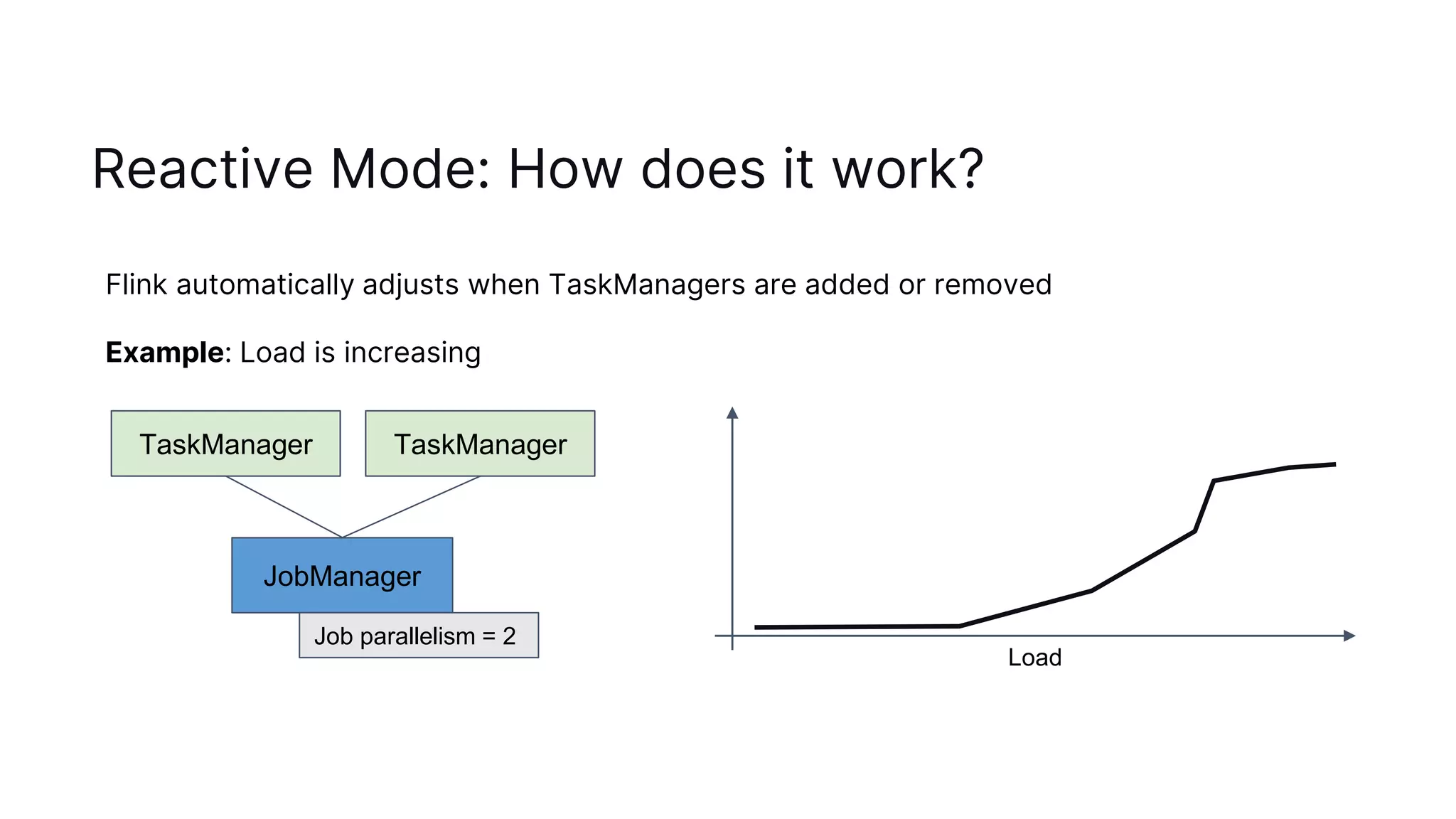
Reactive Mode: How does it work?
JobManager
TaskManager
Job parallelism = 2
TaskManager
Flink automatically adjusts when TaskManagers are added or removed
Example: Load is increasing
Load
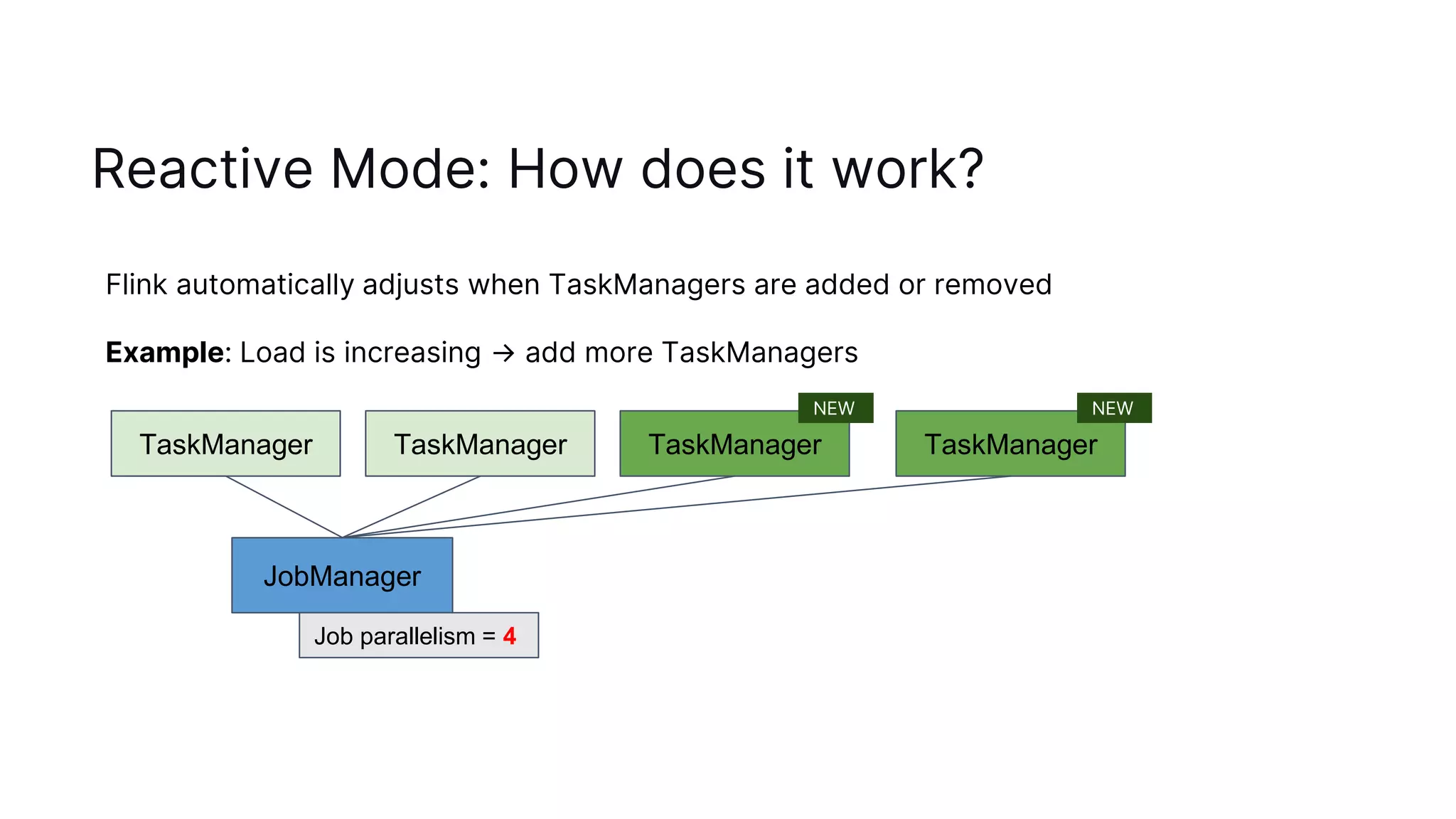
Reactive Mode: How does it work?
JobManager
TaskManager
Job parallelism = 4
TaskManager
Flink automatically adjusts when TaskManagers are added or removed
Example: Load is increasing → add more TaskManagers
TaskManager TaskManager
NEW NEW
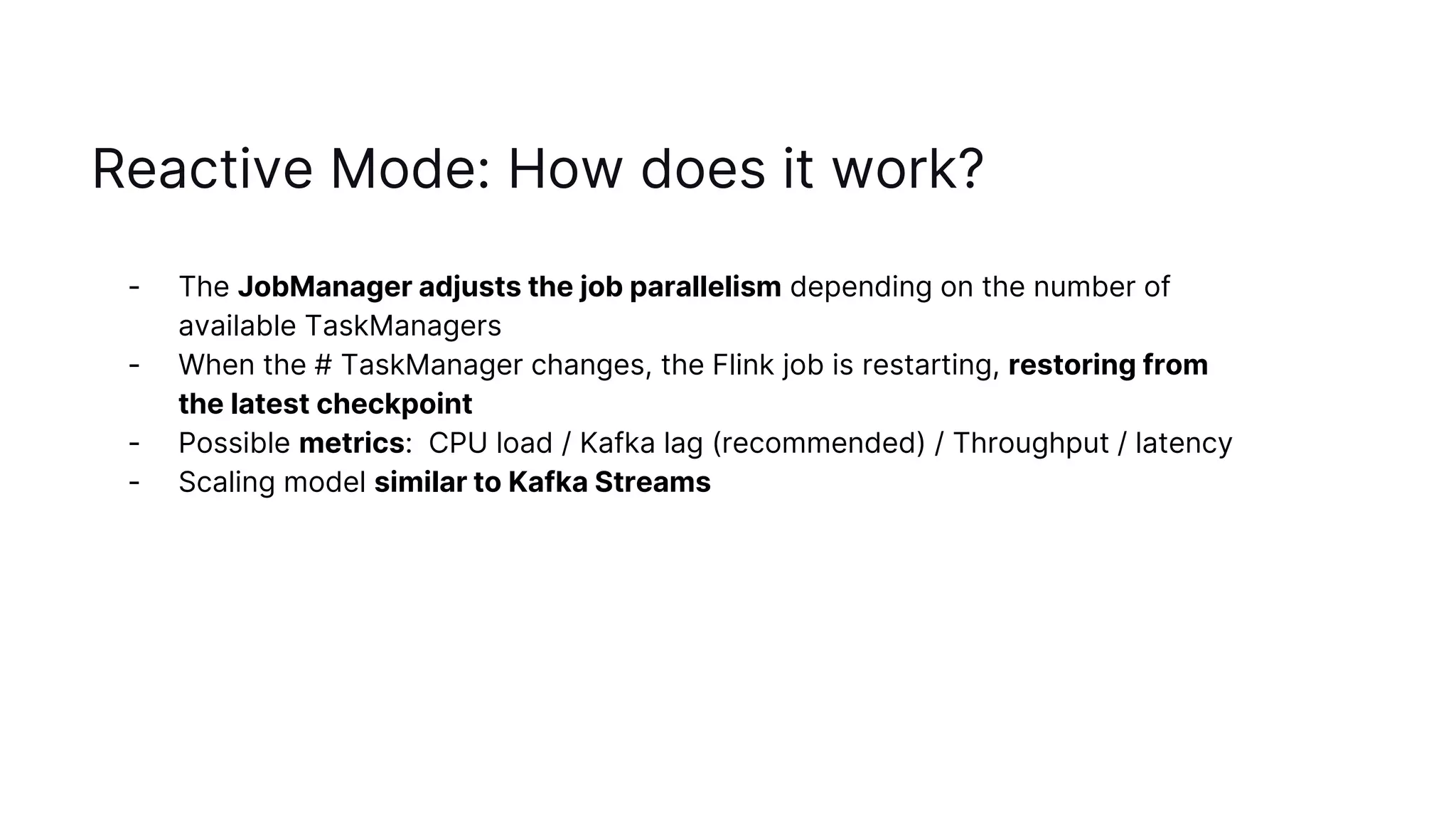
Reactive Mode: How does it work?
- The JobManager adjusts the job parallelism depending on the number of
available TaskManagers
- When the # TaskManager changes, the Flink job is restarting, restoring from
the latest checkpoint
- Possible metrics: CPU load / Kafka lag (recommended) / Throughput / latency
- Scaling model similar to Kafka Streams
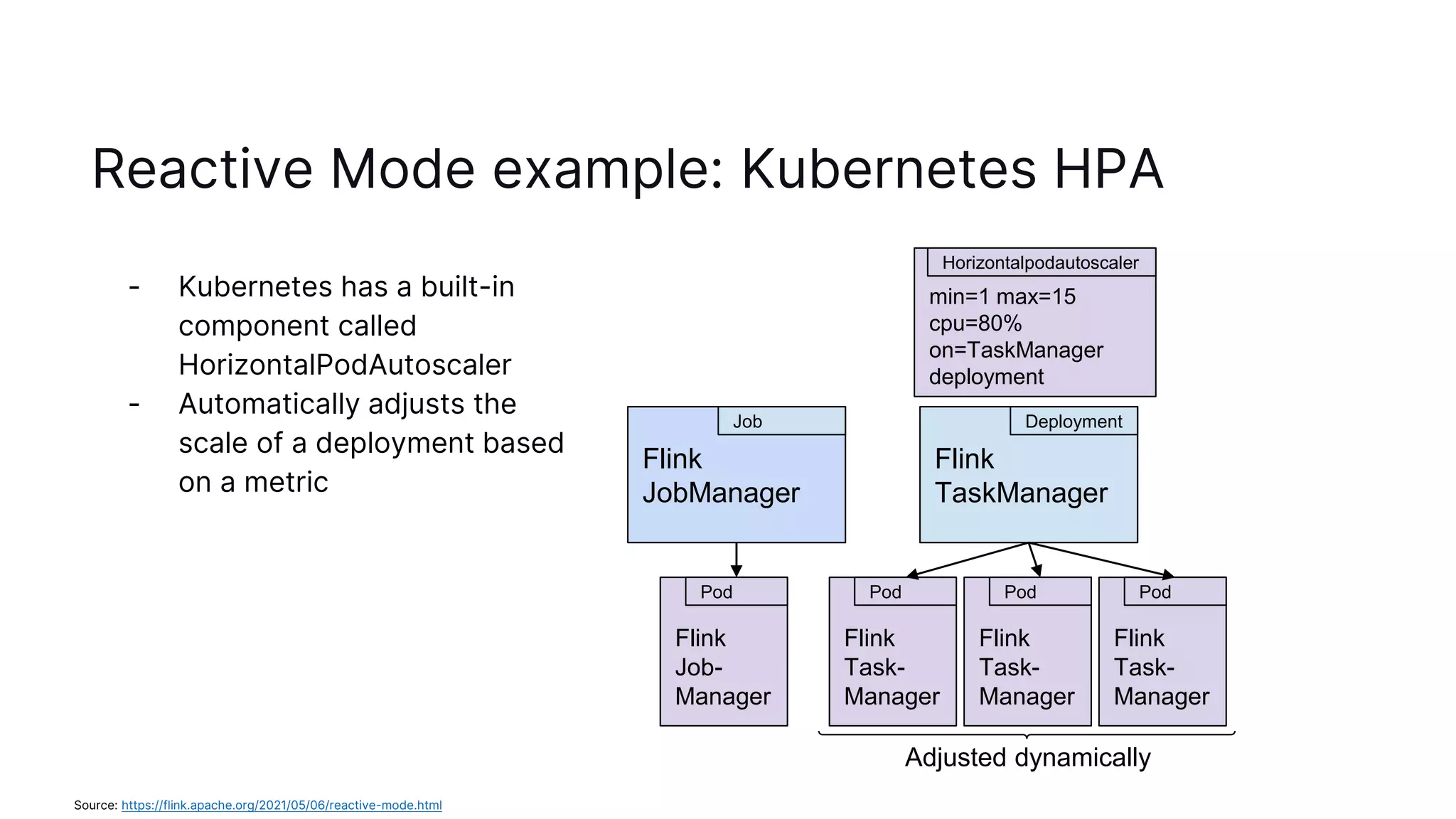
Reactive Mode example: Kubernetes HPA
- Kubernetes has a built-in
component called
HorizontalPodAutoscaler
- Automatically adjusts the
scale of a deployment based
on a metric
Flink
TaskManager
Deployment
Flink
JobManager
Job
Flink
Job-
Manager
Pod
Flink
Task-
Manager
Pod
Flink
Task-
Manager
Pod
Flink
Task-
Manager
Pod
min=1 max=15
cpu=80%
on=TaskManager
deployment
Horizontalpodautoscaler
Adjusted dynamically
Source: https://flink.apache.org/2021/05/06/reactive-mode.html
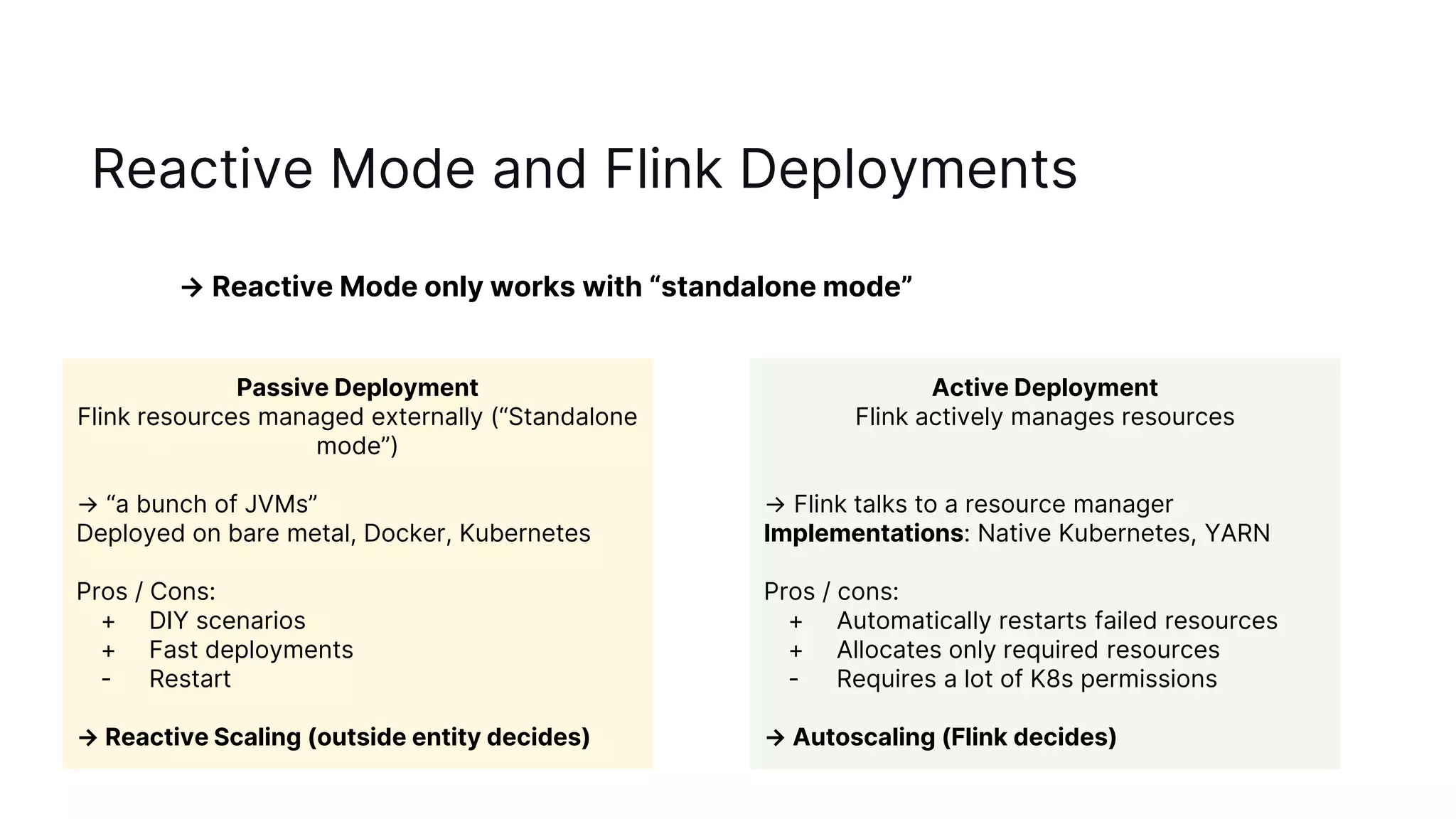
Reactive Mode and Flink Deployments
→ Reactive Mode only works with “standalone mode”
Passive Deployment
Flink resources managed externally (“Standalone
mode”)
→ “a bunch of JVMs”
Deployed on bare metal, Docker, Kubernetes
Pros / Cons:
+ DIY scenarios
+ Fast deployments
- Restart
→ Reactive Scaling (outside entity decides)
Active Deployment
Flink actively manages resources
→ Flink talks to a resource manager
Implementations: Native Kubernetes, YARN
Pros / cons:
+ Automatically restarts failed resources
+ Allocates only required resources
- Requires a lot of K8s permissions
→ Autoscaling (Flink decides)
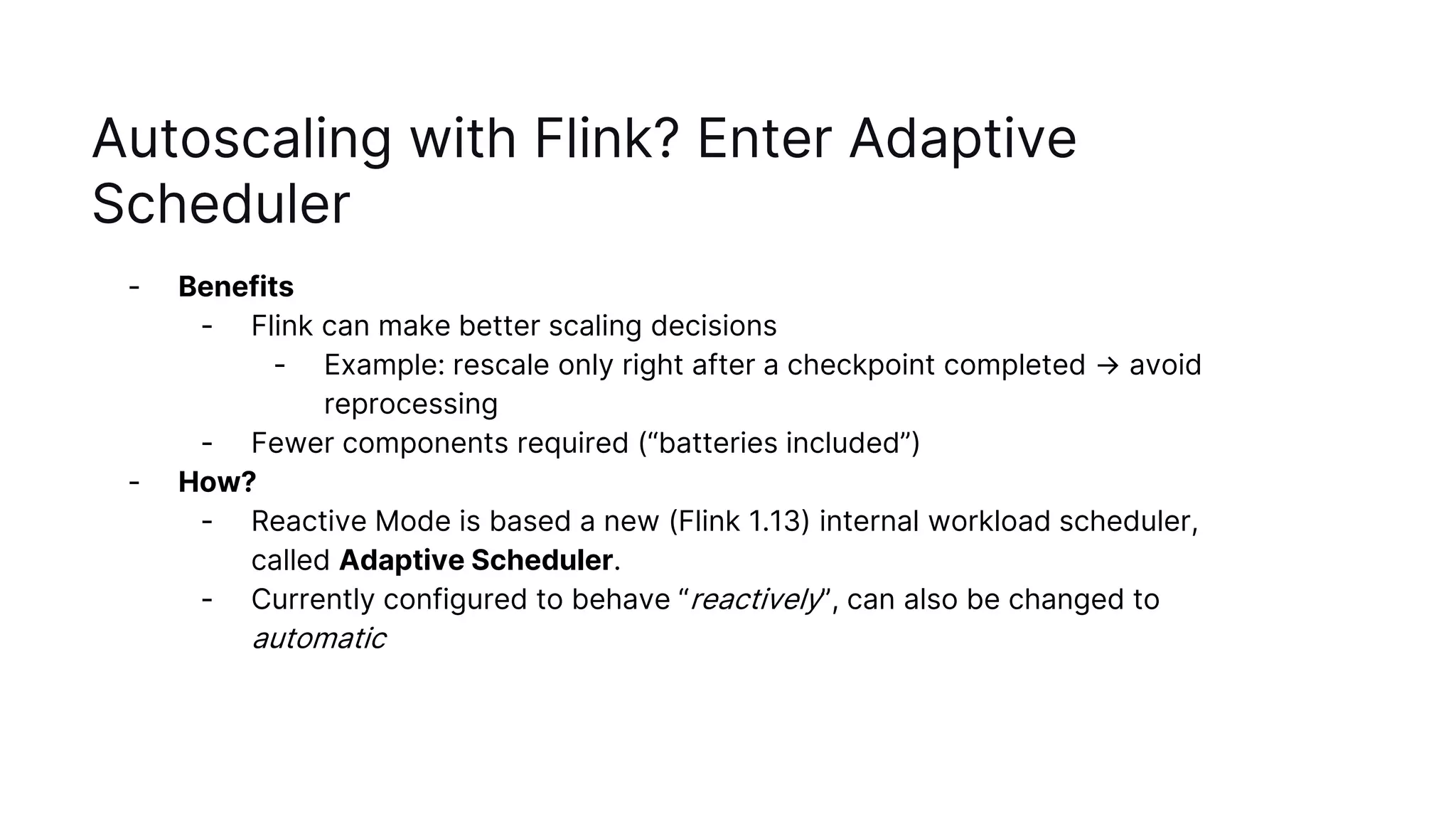
Autoscaling with Flink? Enter Adaptive
Scheduler
- Benefits
- Flink can make better scaling decisions
- Example: rescale only right after a checkpoint completed → avoid
reprocessing
- Fewer components required (“batteries included”)
- How?
- Reactive Mode is based a new (Flink 1.13) internal workload scheduler,
called Adaptive Scheduler.
- Currently configured to behave “reactively”, can also be changed to
automatic
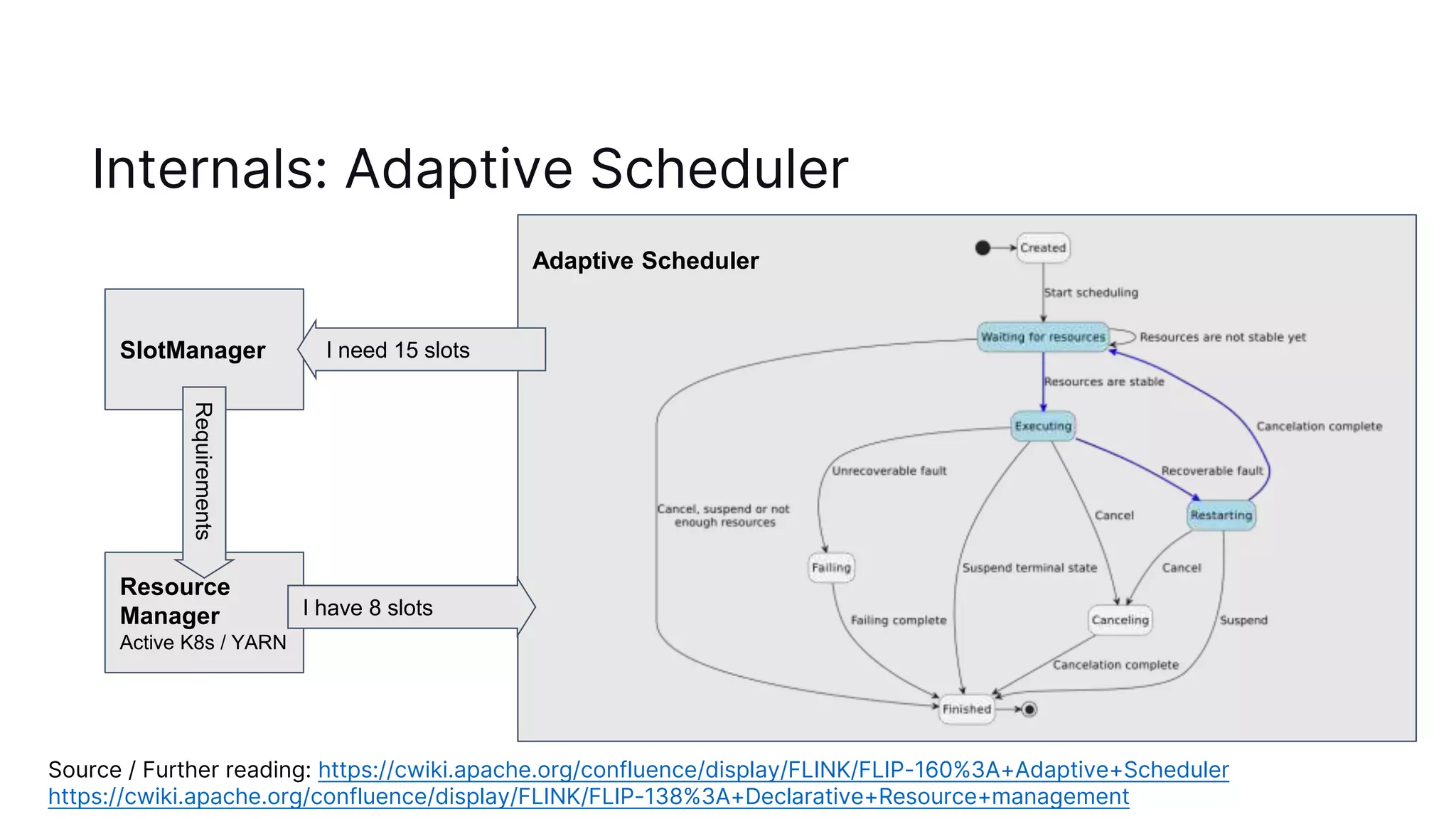
Internals: Adaptive Scheduler
Source / Further reading: https://cwiki.apache.org/confluence/display/FLINK/FLIP-160%3A+Adaptive+Scheduler
https://cwiki.apache.org/confluence/display/FLINK/FLIP-138%3A+Declarative+Resource+management
SlotManager
Resource
Manager
Active K8s / YARN
Requirements
Adaptive Scheduler
I need 15 slots
I have 8 slots
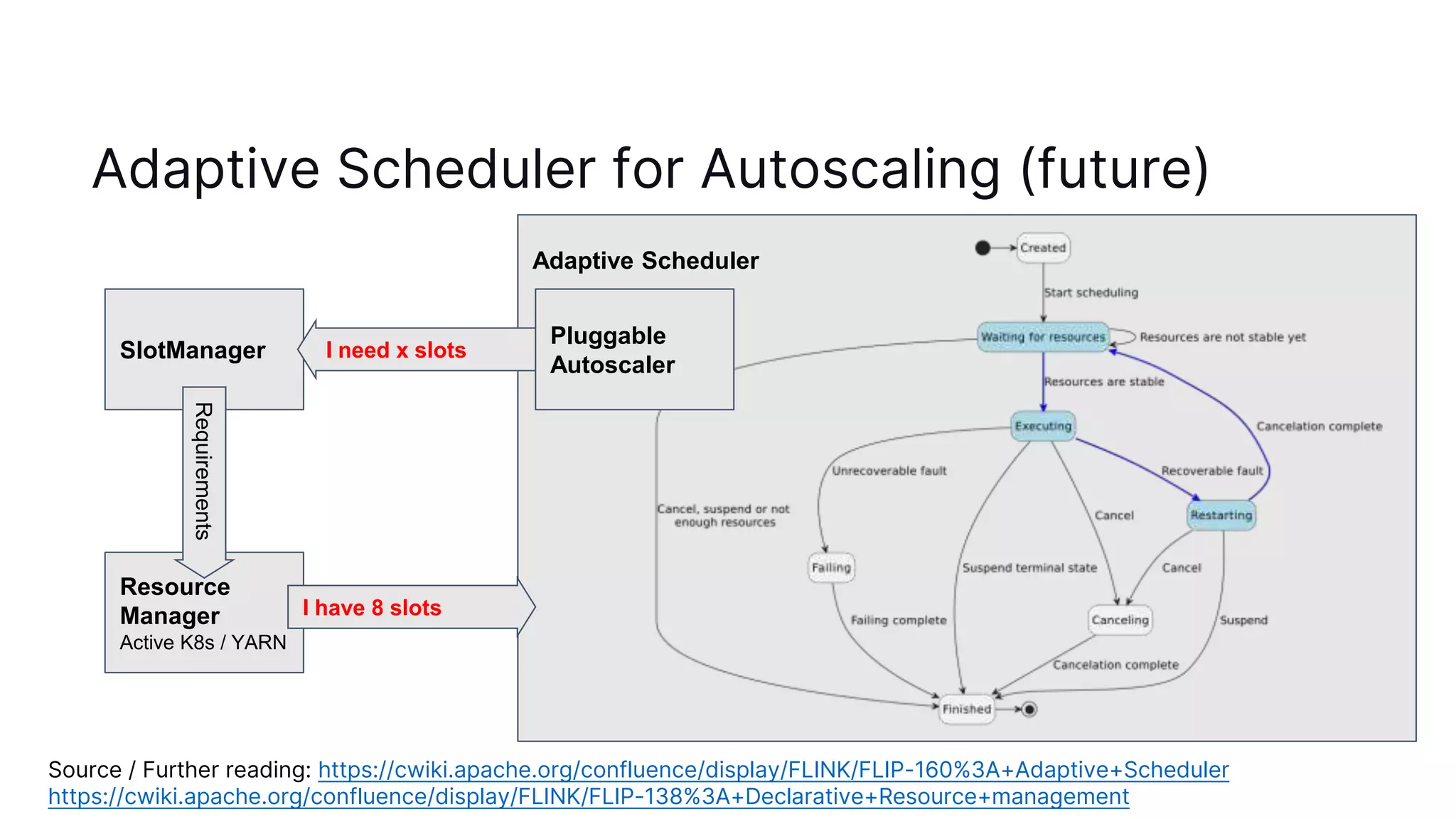
Adaptive Scheduler for Autoscaling (future)
Source / Further reading: https://cwiki.apache.org/confluence/display/FLINK/FLIP-160%3A+Adaptive+Scheduler
https://cwiki.apache.org/confluence/display/FLINK/FLIP-138%3A+Declarative+Resource+management
SlotManager
Resource
Manager
Active K8s / YARN
Requirements
Adaptive Scheduler
I need x slots
I have 8 slots
Pluggable
Autoscaler
Ideas for autoscaler implementations
- REST Interface
- Set desired parallelism via REST call to JobManager
- Either for entire job (and let JM decide on per-operator parallelism) or per-
operator
- User Code + provided autoscaling strategies
- User provides Flink with a custom scaling logic with access to metrics
- Problem: we want to avoid user-code on the JobManager
- JobGraph configuration
- Users configure min, target, max parallelism per operator
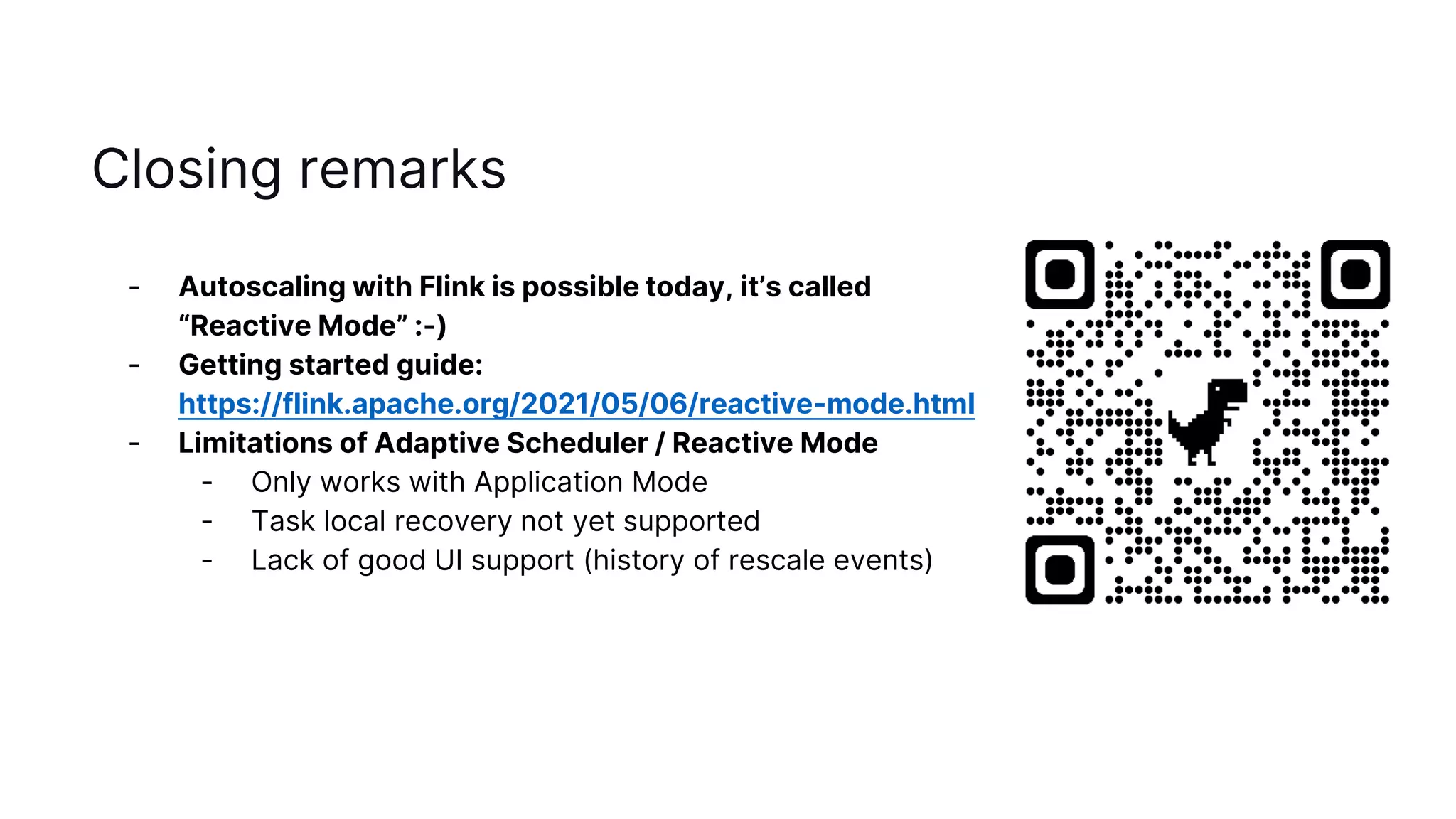
Closing remarks
- Autoscaling with Flink is possible today, it’s called
“Reactive Mode” :-)
- Getting started guide:
https://flink.apache.org/2021/05/06/reactive-mode.html
- Limitations of Adaptive Scheduler / Reactive Mode
- Only works with Application Mode
- Task local recovery not yet supported
- Lack of good UI support (history of rescale events)
Questions?
rmetzger@decodable.co / rmetzger@apache.org
@rmetzger_
2022
Build real-time data apps &
services. Fast.
decodable.co

Autoscaling Flink with Reactive Mode

  • 1.
    Autoscaling with Apache Flink RobertMetzger Staff Engineer @ decodable, Committer and PMC Chair @ Flink
  • 2.
  • 3.
    Reasons for changingloads - Seasonality: - day / night - weekend / weekday - Product popularity: new feature launches, ad campaigns - Upstream system outages: load spikes during recovery
  • 4.
    Solutions in Flinkto Rescale - Flink 1.2 (2017): Rescalable State - Flink can restore from a savepoint with a different parallelism, so no data will be lost, all computations will stay correct - When used for scaling: requires custom tooling to orchestrate operations, and bookkeeping - Flink 1.13 (2021): Reactive Mode (beta) - Flink automatically adjusts when TaskManagers are added or removed - Requires outside entity to decide on # TaskManagers - Since Flink 1.15 (2022): Reactive Mode is out of beta Further reading: https://flink.apache.org/features/2017/07/04/flink-rescalable-state.html
  • 5.
    How to useReactive Mode? - Reactive Mode works with all standalone deployments - E.g. Kubernetes, Docker or via the provided deployment scripts - Set the configuration: scheduler-mode=reactive - Start the JobManager, and add as many TaskManagers as you need - (optionally) Use a service to determine the number of TaskManagers - Kubernetes Horizontal Pod Autoscaler - AWS AutoScaling Groups - Google Cloud Managed Instance Groups
  • 6.
    Reactive Mode: Howdoes it work? JobManager TaskManager Job parallelism = 2 TaskManager Flink automatically adjusts when TaskManagers are added or removed Example: Load is increasing Load
  • 7.
    Reactive Mode: Howdoes it work? JobManager TaskManager Job parallelism = 4 TaskManager Flink automatically adjusts when TaskManagers are added or removed Example: Load is increasing → add more TaskManagers TaskManager TaskManager NEW NEW
  • 8.
    Reactive Mode: Howdoes it work? - The JobManager adjusts the job parallelism depending on the number of available TaskManagers - When the # TaskManager changes, the Flink job is restarting, restoring from the latest checkpoint - Possible metrics: CPU load / Kafka lag (recommended) / Throughput / latency - Scaling model similar to Kafka Streams
  • 9.
    Reactive Mode example:Kubernetes HPA - Kubernetes has a built-in component called HorizontalPodAutoscaler - Automatically adjusts the scale of a deployment based on a metric Flink TaskManager Deployment Flink JobManager Job Flink Job- Manager Pod Flink Task- Manager Pod Flink Task- Manager Pod Flink Task- Manager Pod min=1 max=15 cpu=80% on=TaskManager deployment Horizontalpodautoscaler Adjusted dynamically Source: https://flink.apache.org/2021/05/06/reactive-mode.html
  • 10.
    Reactive Mode andFlink Deployments → Reactive Mode only works with “standalone mode” Passive Deployment Flink resources managed externally (“Standalone mode”) → “a bunch of JVMs” Deployed on bare metal, Docker, Kubernetes Pros / Cons: + DIY scenarios + Fast deployments - Restart → Reactive Scaling (outside entity decides) Active Deployment Flink actively manages resources → Flink talks to a resource manager Implementations: Native Kubernetes, YARN Pros / cons: + Automatically restarts failed resources + Allocates only required resources - Requires a lot of K8s permissions → Autoscaling (Flink decides)
  • 11.
    Autoscaling with Flink?Enter Adaptive Scheduler - Benefits - Flink can make better scaling decisions - Example: rescale only right after a checkpoint completed → avoid reprocessing - Fewer components required (“batteries included”) - How? - Reactive Mode is based a new (Flink 1.13) internal workload scheduler, called Adaptive Scheduler. - Currently configured to behave “reactively”, can also be changed to automatic
  • 12.
    Internals: Adaptive Scheduler Source/ Further reading: https://cwiki.apache.org/confluence/display/FLINK/FLIP-160%3A+Adaptive+Scheduler https://cwiki.apache.org/confluence/display/FLINK/FLIP-138%3A+Declarative+Resource+management SlotManager Resource Manager Active K8s / YARN Requirements Adaptive Scheduler I need 15 slots I have 8 slots
  • 13.
    Adaptive Scheduler forAutoscaling (future) Source / Further reading: https://cwiki.apache.org/confluence/display/FLINK/FLIP-160%3A+Adaptive+Scheduler https://cwiki.apache.org/confluence/display/FLINK/FLIP-138%3A+Declarative+Resource+management SlotManager Resource Manager Active K8s / YARN Requirements Adaptive Scheduler I need x slots I have 8 slots Pluggable Autoscaler
  • 14.
    Ideas for autoscalerimplementations - REST Interface - Set desired parallelism via REST call to JobManager - Either for entire job (and let JM decide on per-operator parallelism) or per- operator - User Code + provided autoscaling strategies - User provides Flink with a custom scaling logic with access to metrics - Problem: we want to avoid user-code on the JobManager - JobGraph configuration - Users configure min, target, max parallelism per operator
  • 15.
    Closing remarks - Autoscalingwith Flink is possible today, it’s called “Reactive Mode” :-) - Getting started guide: https://flink.apache.org/2021/05/06/reactive-mode.html - Limitations of Adaptive Scheduler / Reactive Mode - Only works with Application Mode - Task local recovery not yet supported - Lack of good UI support (history of rescale events)
  • 16.
  • 17.
    2022 Build real-time dataapps & services. Fast. decodable.co

Editor's Notes

  • #3 Space between actual load and # of workers == wasted resources You want your resource allocation to be close to actual load
  • #5 Rescalable state: stop with savepoint, restore Good when scaling manually and very rarely Reactive Mode == Kafka Streams deployment model
  • #6 Rescalable state: stop with savepoint, restore Good when scaling manually and very rarely Reactive Mode == Kafka Streams deployment model
  • #7 How does Reactive Mode work?
  • #8 “Just add more hardware”
  • #9 Rescaling same operation as failure: restore from latest checkpoint Can be expensive with large state … only rescale rarely!
  • #10 Example implementation in Kubernetes, the most popular deployment option of Flink at the moment
  • #11 Relationship of scaling and deployment modes. Passive deployment: manually launch the flink components (K8s HA also works here!) Active deployment: flink takes care of launch itself (mostly)
  • #13 Blue line / states: interesting path Source code: hide empty description skinparam monochrome false skinparam defaultFontSize 15 [*] -> Created Created --> Waiting : Start scheduling state "Waiting for resources" as Waiting #lightblue state Executing #lightblue state Restarting #lightblue Waiting --> Waiting : Resources are not stable yet Waiting -[#blue,bold]-> Executing : Resources are stable Waiting --> Finished : Cancel, suspend or not \nenough resources Executing --> Canceling : Cancel Executing --> Failing : Unrecoverable fault Executing --> Finished : Suspend terminal state Executing -[#blue,bold]-> Restarting : Recoverable fault Restarting --> Finished : Suspend Restarting --> Canceling : Cancel Restarting -[#blue,bold]-> Waiting : Cancelation complete Canceling --> Finished : Cancelation complete Failing --> Finished : Failing complete Finished -> [*] https://www.planttext.com/?text=RPB1RiCW38RlF8NLOxM-m0wxLEi3h9fsw7PmYTim4OZ0JEtRpoHbB2YdHFYp_zy_zAOZe67aEtGKTJ0Z6--KEcs_OFS2-q38rAd75tPoze66ZRl2CnmP0qFKFNN9of6AB1Hi2d7n0G95duAck06CfLSLOZdlhR20WS1vcSrujWHtuaNBwurqMcsQ6nRmmJWJnQAmUtIQx1F454To7OY_h4BEfsiFd-xFx6ITYeggUddWF6LMd_yRu83cKNwNaTh_K9ZMk62otBBLtR6w-lPdIGvpii0K1kFGmfHkqoxRvqieKRHQ_yhhOYsnibj3rEkQwvWV36W_Z9R4NXsmcdr3bwGQjXnNhjI4awVv2m00
  • #14 Source code: hide empty description skinparam monochrome false skinparam defaultFontSize 15 [*] -> Created Created --> Waiting : Start scheduling state "Waiting for resources" as Waiting #lightblue state Executing #lightblue state Restarting #lightblue Waiting --> Waiting : Resources are not stable yet Waiting -[#blue,bold]-> Executing : Resources are stable Waiting --> Finished : Cancel, suspend or not \nenough resources Executing --> Canceling : Cancel Executing --> Failing : Unrecoverable fault Executing --> Finished : Suspend terminal state Executing -[#blue,bold]-> Restarting : Recoverable fault Restarting --> Finished : Suspend Restarting --> Canceling : Cancel Restarting -[#blue,bold]-> Waiting : Cancelation complete Canceling --> Finished : Cancelation complete Failing --> Finished : Failing complete Finished -> [*] https://www.planttext.com/?text=RPB1RiCW38RlF8NLOxM-m0wxLEi3h9fsw7PmYTim4OZ0JEtRpoHbB2YdHFYp_zy_zAOZe67aEtGKTJ0Z6--KEcs_OFS2-q38rAd75tPoze66ZRl2CnmP0qFKFNN9of6AB1Hi2d7n0G95duAck06CfLSLOZdlhR20WS1vcSrujWHtuaNBwurqMcsQ6nRmmJWJnQAmUtIQx1F454To7OY_h4BEfsiFd-xFx6ITYeggUddWF6LMd_yRu83cKNwNaTh_K9ZMk62otBBLtR6w-lPdIGvpii0K1kFGmfHkqoxRvqieKRHQ_yhhOYsnibj3rEkQwvWV36W_Z9R4NXsmcdr3bwGQjXnNhjI4awVv2m00