Pallavi Singh
Software Consultant
Knoldus Software LLP
Geetika Gupta
Software Consultant
Knoldus Software LLP
Agenda:
 Query Engine
 Query Engine vs Database
 Big data Analytics
 Interactive Analytics
 What is Presto?
 Brief History of Presto
 Presto users in Production
 Architecture of Presto
 Connectors
 Presto vs Hive
 Setup
 Setting Up a Cluster
 Demo
Agenda:
 Query Engine
 Query Engine vs Database
 Big data Analytics
 Interactive Analytics
 What is Presto?
 Brief History of Presto
 Presto users in Production
 Architecture of Presto
 Connectors
 Presto vs Hive
 Setup
 Setting Up a Cluster
 Demo
Query Engine
● A software component positioned on the top of a data server that is
in charge of implementing query functionalities against DB data and
providing answers to users/applications.
● Query Engine is responsible for translating user queries into
efficient data retrieval and processing operations, as well as
executing these operations on single or multiple nodes in order to
find query answers.
● The efficiency of query engine is primarily counted on its speed and
insight seeing capabilities.
Query Engine v/s Databases
● Databases often bundle the query engine and storage into a single
tightly coupled system.
● This coupling provides certain optimizations but hampers the
flexibility and agility.
● Query engines decouple the storage and engine. They operate
independent of the data storage.
Big data Analytics
● Big data analytics are techniques that are used to analyze large
datasets in order to extract patterns, trends, correlations and
summaries.
● The insights drawn by running big data analytics depend primarily
on the capabilities of the underlying query engine.
● Use cases of Big Data Analytics are network monitoring, risk
management and fraud detection, transaction cost analysis and
pricing analytics, algorithmic trading, intelligence and surveillance
Interactive Analytics
● The ability to run complex queries across complex data landscapes where
we have the complexity intelligence to visit thousands of nodes in real time.
● Current tools are able to synthesize multiple streams of rapidly flowing data
and perform complex operations on them using the traditional ETL methods.
But the missing lead is ability to explore the data by issuing different types of
queries and drilling down until a specific insight is uncovered.
Example :
Impala and Redshift, considered to be some of the world’s fastest big data
compute engines, took an average of 1.5 minutes to refresh the Tableau
dashboard for a mere 3 billion rows. Which is far from real-time by any
measure, and does not allow analysts to perform interactive exploration of
the data.
Presto
● Presto is an open source distributed SQL query engine for running
interactive analytic queries against data sources of all sizes ranging
from gigabytes to petabytes.
● Developed at Facebook, later contributed to open source
● Hive, Impala, HAWQ, IBM Big SQL, Drill, Tajo, Pig,DryadLINQ, Jaql
● Presto is designed to handle data warehousing and analytics: data
analysis, aggregating large amounts of data and producing reports.
● Presto is ANSI SQL Compliant
● Presto has all the major build in core functionalities – like parser, sql
functions and monitoring capabilities.
Key Differentiators
● Support for Cross platform query capabilities
● Support for federated queries
● Performance and Scale
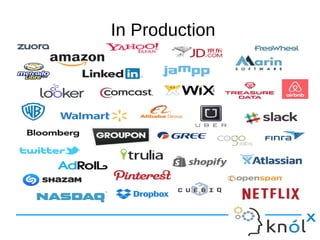
● Used in production at many well known web-scale companies
● Storage independent
● A vast list of pluggable extensions
What Presto is not !
● Presto is not a database
● Presto is not storage dependent
● Presto understands SQL but does not provide features of standard
databases.
● Not a general purpose relational database
● Not a replacement for MySQL, PostgreSQL or Oracle
● It is not designated to handle OLTP
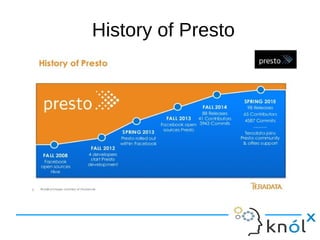
History of Presto
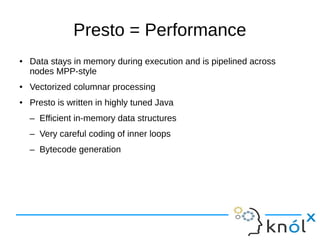
Presto = Performance
● Data stays in memory during execution and is pipelined across
nodes MPP-style
● Vectorized columnar processing
● Presto is written in highly tuned Java
– Efficient in-memory data structures
– Very careful coding of inner loops
– Bytecode generation
In Production
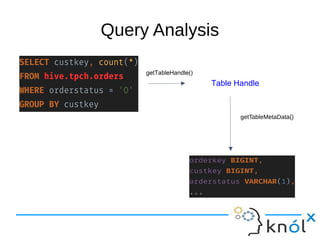
Query Analysis
getTableHandle()
Table Handle
getTableMetaData()
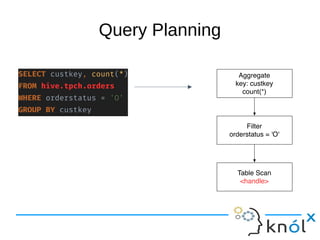
Query Planning
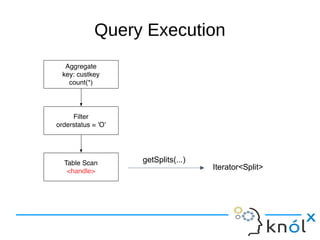
Query ExecutionQuery Execution
getSplits(...)
Iterator<Split>
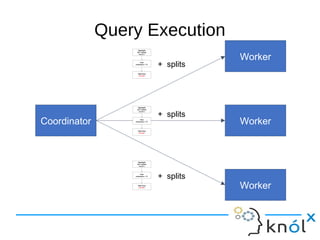
Query Execution
Coordinator
Worker
Worker
Worker
+ splits
+ splits
+ splits
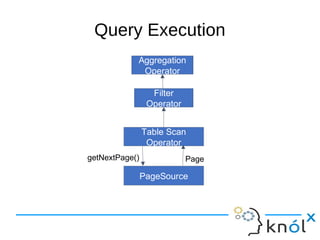
Query Execution
getNextPage()
Table Scan
Operator
PageSource
Page
Filter
Operator
Aggregation
Operator
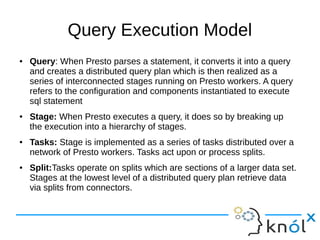
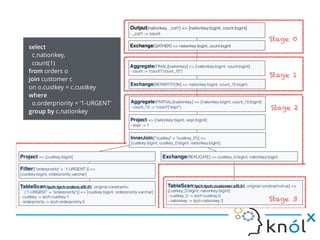
Query Execution Model
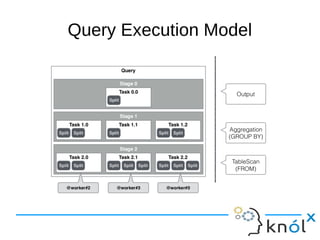
● Query: When Presto parses a statement, it converts it into a query
and creates a distributed query plan which is then realized as a
series of interconnected stages running on Presto workers. A query
refers to the configuration and components instantiated to execute
sql statement
● Stage: When Presto executes a query, it does so by breaking up
the execution into a hierarchy of stages.
● Tasks: Stage is implemented as a series of tasks distributed over a
network of Presto workers. Tasks act upon or process splits.
● Split:Tasks operate on splits which are sections of a larger data set.
Stages at the lowest level of a distributed query plan retrieve data
via splits from connectors.
Query Execution Model
Connectors
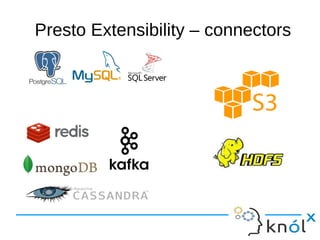
● Connectors are storage plugins that allow access to different data
sources.
● Need to provide interfaces for fetching metadata, getting data
locations and accessing the data.
● Presto provides a wide variety of plugins to access various data
sources.
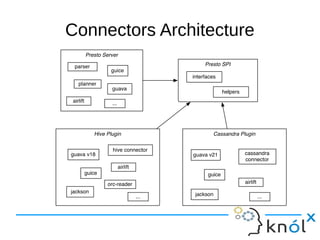
Presto Extensibility – connectors
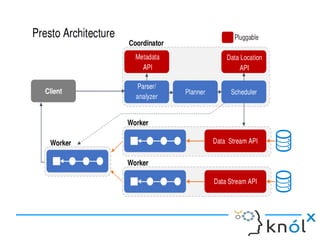
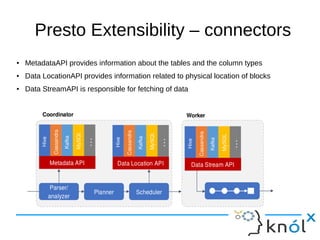
● MetadataAPI provides information about the tables and the column types
● Data LocationAPI provides information related to physical location of blocks
● Data StreamAPI is responsible for fetching of data
Connectors Architecture
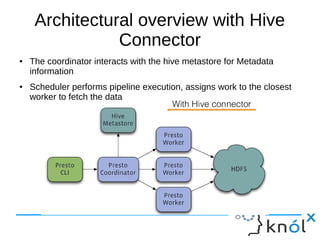
Architectural overview with Hive
Connector
● The coordinator interacts with the hive metastore for Metadata
information
● Scheduler performs pipeline execution, assigns work to the closest
worker to fetch the data
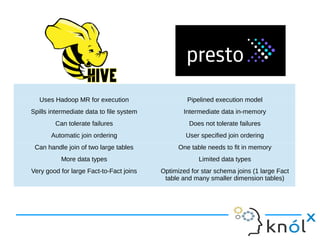
Uses Hadoop MR for execution Pipelined execution model
Spills intermediate data to file system Intermediate data in-memory
Can tolerate failures Does not tolerate failures
Automatic join ordering User specified join ordering
Can handle join of two large tables One table needs to fit in memory
More data types Limited data types
Very good for large Fact-to-Fact joins Optimized for star schema joins (1 large Fact
table and many smaller dimension tables)
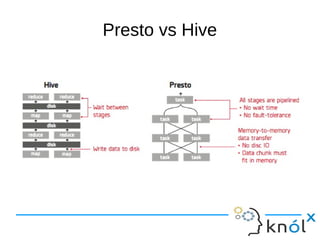
Presto vs Hive
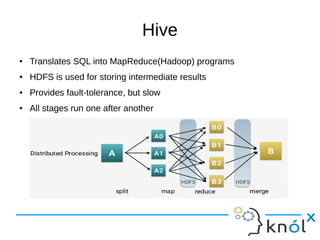
Hive
● Translates SQL into MapReduce(Hadoop) programs
● HDFS is used for storing intermediate results
● Provides fault-tolerance, but slow
● All stages run one after another
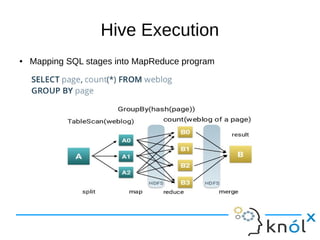
Hive Execution
● Mapping SQL stages into MapReduce program
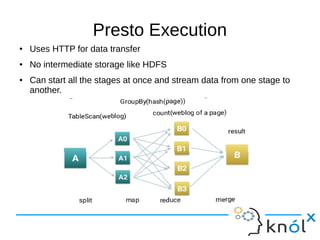
Presto Execution
● Uses HTTP for data transfer
● No intermediate storage like HDFS
● Can start all the stages at once and stream data from one stage to
another.
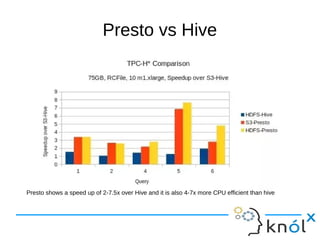
Presto vs Hive
Presto shows a speed up of 2-7.5x over Hive and it is also 4-7x more CPU efficient than hive
Set up
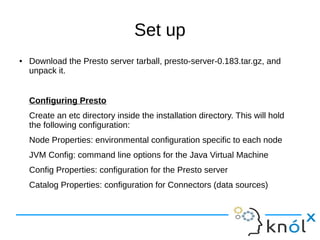
● Download the Presto server tarball, presto-server-0.183.tar.gz, and
unpack it.
Configuring Presto
Create an etc directory inside the installation directory. This will hold
the following configuration:
Node Properties: environmental configuration specific to each node
JVM Config: command line options for the Java Virtual Machine
Config Properties: configuration for the Presto server
Catalog Properties: configuration for Connectors (data sources)
Set up
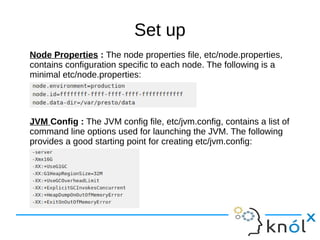
Node Properties : The node properties file, etc/node.properties,
contains configuration specific to each node. The following is a
minimal etc/node.properties:
JVM Config : The JVM config file, etc/jvm.config, contains a list of
command line options used for launching the JVM. The following
provides a good starting point for creating etc/jvm.config:
Set up
Config Properties
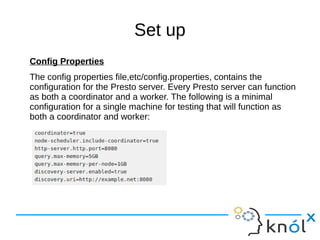
The config properties file,etc/config.properties, contains the
configuration for the Presto server. Every Presto server can function
as both a coordinator and a worker. The following is a minimal
configuration for a single machine for testing that will function as
both a coordinator and worker:
Set up
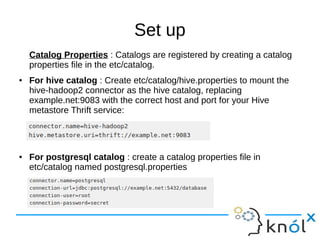
Catalog Properties : Catalogs are registered by creating a catalog
properties file in the etc/catalog.
● For hive catalog : Create etc/catalog/hive.properties to mount the
hive-hadoop2 connector as the hive catalog, replacing
example.net:9083 with the correct host and port for your Hive
metastore Thrift service:
● For postgresql catalog : create a catalog properties file in
etc/catalog named postgresql.properties
Set up
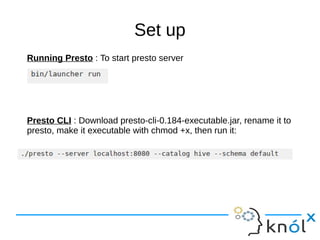
Running Presto : To start presto server
Presto CLI : Download presto-cli-0.184-executable.jar, rename it to
presto, make it executable with chmod +x, then run it:
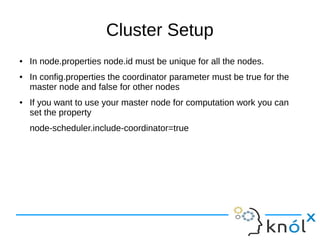
Cluster Setup
● In node.properties node.id must be unique for all the nodes.
● In config.properties the coordinator parameter must be true for the
master node and false for other nodes
● If you want to use your master node for computation work you can
set the property
node-scheduler.include-coordinator=true
References
● Official Website : https://prestodb.io/
● https://github.com/prestodb/presto
● http://www.teradata.co.uk/products-and-services/Presto/Presto-Download
● https://github.com/Teradata/presto
● Installing and Running Presto
● Getting Introduced with Presto
● Connecting To Presto via JDBC
Thank YouThank You

Presto

  • 1.
    Pallavi Singh Software Consultant KnoldusSoftware LLP Geetika Gupta Software Consultant Knoldus Software LLP
  • 2.
    Agenda:  Query Engine Query Engine vs Database  Big data Analytics  Interactive Analytics  What is Presto?  Brief History of Presto  Presto users in Production  Architecture of Presto  Connectors  Presto vs Hive  Setup  Setting Up a Cluster  Demo Agenda:  Query Engine  Query Engine vs Database  Big data Analytics  Interactive Analytics  What is Presto?  Brief History of Presto  Presto users in Production  Architecture of Presto  Connectors  Presto vs Hive  Setup  Setting Up a Cluster  Demo
  • 3.
    Query Engine ● Asoftware component positioned on the top of a data server that is in charge of implementing query functionalities against DB data and providing answers to users/applications. ● Query Engine is responsible for translating user queries into efficient data retrieval and processing operations, as well as executing these operations on single or multiple nodes in order to find query answers. ● The efficiency of query engine is primarily counted on its speed and insight seeing capabilities.
  • 4.
    Query Engine v/sDatabases ● Databases often bundle the query engine and storage into a single tightly coupled system. ● This coupling provides certain optimizations but hampers the flexibility and agility. ● Query engines decouple the storage and engine. They operate independent of the data storage.
  • 5.
    Big data Analytics ●Big data analytics are techniques that are used to analyze large datasets in order to extract patterns, trends, correlations and summaries. ● The insights drawn by running big data analytics depend primarily on the capabilities of the underlying query engine. ● Use cases of Big Data Analytics are network monitoring, risk management and fraud detection, transaction cost analysis and pricing analytics, algorithmic trading, intelligence and surveillance
  • 6.
    Interactive Analytics ● Theability to run complex queries across complex data landscapes where we have the complexity intelligence to visit thousands of nodes in real time. ● Current tools are able to synthesize multiple streams of rapidly flowing data and perform complex operations on them using the traditional ETL methods. But the missing lead is ability to explore the data by issuing different types of queries and drilling down until a specific insight is uncovered. Example : Impala and Redshift, considered to be some of the world’s fastest big data compute engines, took an average of 1.5 minutes to refresh the Tableau dashboard for a mere 3 billion rows. Which is far from real-time by any measure, and does not allow analysts to perform interactive exploration of the data.
  • 7.
    Presto ● Presto isan open source distributed SQL query engine for running interactive analytic queries against data sources of all sizes ranging from gigabytes to petabytes. ● Developed at Facebook, later contributed to open source ● Hive, Impala, HAWQ, IBM Big SQL, Drill, Tajo, Pig,DryadLINQ, Jaql ● Presto is designed to handle data warehousing and analytics: data analysis, aggregating large amounts of data and producing reports. ● Presto is ANSI SQL Compliant ● Presto has all the major build in core functionalities – like parser, sql functions and monitoring capabilities.
  • 8.
    Key Differentiators ● Supportfor Cross platform query capabilities ● Support for federated queries ● Performance and Scale ● Used in production at many well known web-scale companies ● Storage independent ● A vast list of pluggable extensions
  • 9.
    What Presto isnot ! ● Presto is not a database ● Presto is not storage dependent ● Presto understands SQL but does not provide features of standard databases. ● Not a general purpose relational database ● Not a replacement for MySQL, PostgreSQL or Oracle ● It is not designated to handle OLTP
  • 10.
  • 11.
    Presto = Performance ●Data stays in memory during execution and is pipelined across nodes MPP-style ● Vectorized columnar processing ● Presto is written in highly tuned Java – Efficient in-memory data structures – Very careful coding of inner loops – Bytecode generation
  • 12.
  • 16.
  • 17.
  • 18.
  • 19.
  • 20.
  • 21.
    Query Execution Model ●Query: When Presto parses a statement, it converts it into a query and creates a distributed query plan which is then realized as a series of interconnected stages running on Presto workers. A query refers to the configuration and components instantiated to execute sql statement ● Stage: When Presto executes a query, it does so by breaking up the execution into a hierarchy of stages. ● Tasks: Stage is implemented as a series of tasks distributed over a network of Presto workers. Tasks act upon or process splits. ● Split:Tasks operate on splits which are sections of a larger data set. Stages at the lowest level of a distributed query plan retrieve data via splits from connectors.
  • 22.
  • 24.
    Connectors ● Connectors arestorage plugins that allow access to different data sources. ● Need to provide interfaces for fetching metadata, getting data locations and accessing the data. ● Presto provides a wide variety of plugins to access various data sources.
  • 25.
  • 26.
    Presto Extensibility –connectors ● MetadataAPI provides information about the tables and the column types ● Data LocationAPI provides information related to physical location of blocks ● Data StreamAPI is responsible for fetching of data
  • 27.
  • 28.
    Architectural overview withHive Connector ● The coordinator interacts with the hive metastore for Metadata information ● Scheduler performs pipeline execution, assigns work to the closest worker to fetch the data
  • 29.
    Uses Hadoop MRfor execution Pipelined execution model Spills intermediate data to file system Intermediate data in-memory Can tolerate failures Does not tolerate failures Automatic join ordering User specified join ordering Can handle join of two large tables One table needs to fit in memory More data types Limited data types Very good for large Fact-to-Fact joins Optimized for star schema joins (1 large Fact table and many smaller dimension tables)
  • 30.
  • 31.
    Hive ● Translates SQLinto MapReduce(Hadoop) programs ● HDFS is used for storing intermediate results ● Provides fault-tolerance, but slow ● All stages run one after another
  • 32.
    Hive Execution ● MappingSQL stages into MapReduce program
  • 33.
    Presto Execution ● UsesHTTP for data transfer ● No intermediate storage like HDFS ● Can start all the stages at once and stream data from one stage to another.
  • 34.
    Presto vs Hive Prestoshows a speed up of 2-7.5x over Hive and it is also 4-7x more CPU efficient than hive
  • 35.
    Set up ● Downloadthe Presto server tarball, presto-server-0.183.tar.gz, and unpack it. Configuring Presto Create an etc directory inside the installation directory. This will hold the following configuration: Node Properties: environmental configuration specific to each node JVM Config: command line options for the Java Virtual Machine Config Properties: configuration for the Presto server Catalog Properties: configuration for Connectors (data sources)
  • 36.
    Set up Node Properties: The node properties file, etc/node.properties, contains configuration specific to each node. The following is a minimal etc/node.properties: JVM Config : The JVM config file, etc/jvm.config, contains a list of command line options used for launching the JVM. The following provides a good starting point for creating etc/jvm.config:
  • 37.
    Set up Config Properties Theconfig properties file,etc/config.properties, contains the configuration for the Presto server. Every Presto server can function as both a coordinator and a worker. The following is a minimal configuration for a single machine for testing that will function as both a coordinator and worker:
  • 38.
    Set up Catalog Properties: Catalogs are registered by creating a catalog properties file in the etc/catalog. ● For hive catalog : Create etc/catalog/hive.properties to mount the hive-hadoop2 connector as the hive catalog, replacing example.net:9083 with the correct host and port for your Hive metastore Thrift service: ● For postgresql catalog : create a catalog properties file in etc/catalog named postgresql.properties
  • 39.
    Set up Running Presto: To start presto server Presto CLI : Download presto-cli-0.184-executable.jar, rename it to presto, make it executable with chmod +x, then run it:
  • 40.
    Cluster Setup ● Innode.properties node.id must be unique for all the nodes. ● In config.properties the coordinator parameter must be true for the master node and false for other nodes ● If you want to use your master node for computation work you can set the property node-scheduler.include-coordinator=true
  • 41.
    References ● Official Website: https://prestodb.io/ ● https://github.com/prestodb/presto ● http://www.teradata.co.uk/products-and-services/Presto/Presto-Download ● https://github.com/Teradata/presto ● Installing and Running Presto ● Getting Introduced with Presto ● Connecting To Presto via JDBC
  • 42.