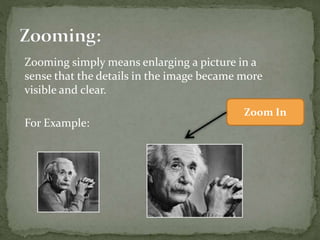

Zooming simply means enlarging a picture in a
sense that the details in the image became more
visible and clear.
For Example:
Zoom In
There are two types of Zooming are supported by
the cameras.
1. Optical Zoom
1. Digital Zoom
 This step includes zooming before taking an particular
image. This is known as pre processing zoom.
 The optical zoom is achieved using the movement of the
lens of your camera.
 The optical zoom is achieved using the movement of the
lens of your camera. An optical zoom is actually a true
zoom. The result of the optical zoom is far better then that
of digital zoom. In optical zoom, an image is magnified by
the lens in such a way that the objects in the image appear
to be closer to the camera. In optical zoom the lens is
physically extend to zoom or magnify an object.
 This step is to zoom once an image has been captured. It is
done through many different algorithms in which we
manipulate pixels to zoom in the required portion.
 Digital zoom is basically image processing within a camera.
During a digital zoom, the center of the image is magnified
and the edges of the picture got crop out. Due to magnified
center, it looks like that the object is closer to you.
 During a digital zoom, the pixels got expand , due to which
the quality of the image is compromised.
Pixel replication or (Nearest neighbor interpolation)
Zero order hold method
Zooming K times
 In this method, we just replicate the neighboring
pixels.
 In this method we create new pixels form the
already given pixels. Each pixel is replicated in this
method
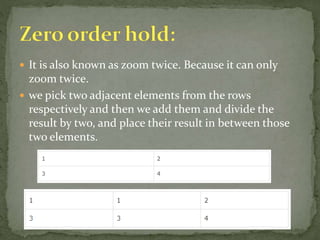
 It is also known as zoom twice. Because it can only
zoom twice.
 we pick two adjacent elements from the rows
respectively and then we add them and divide the
result by two, and place their result in between those
two elements.
 First of all, you have to take two adjacent pixels as you
did in the zooming twice. Then you have to subtract
the smaller from the greater one. We call this output
(OP).
 Divide the output(OP) with the zooming factor(K).
Now you have to add the result to the smaller value
and put the result in between those two values.
Zooming and Its Types

Zooming and Its Types

  • 2.
    Zooming simply meansenlarging a picture in a sense that the details in the image became more visible and clear. For Example: Zoom In
  • 4.
    There are twotypes of Zooming are supported by the cameras. 1. Optical Zoom 1. Digital Zoom
  • 5.
     This stepincludes zooming before taking an particular image. This is known as pre processing zoom.  The optical zoom is achieved using the movement of the lens of your camera.  The optical zoom is achieved using the movement of the lens of your camera. An optical zoom is actually a true zoom. The result of the optical zoom is far better then that of digital zoom. In optical zoom, an image is magnified by the lens in such a way that the objects in the image appear to be closer to the camera. In optical zoom the lens is physically extend to zoom or magnify an object.
  • 7.
     This stepis to zoom once an image has been captured. It is done through many different algorithms in which we manipulate pixels to zoom in the required portion.  Digital zoom is basically image processing within a camera.  Digital zoom is basically image processing within a camera. During a digital zoom, the center of the image is magnified and the edges of the picture got crop out. Due to magnified center, it looks like that the object is closer to you.  During a digital zoom, the pixels got expand , due to which the quality of the image is compromised.
  • 9.
    Pixel replication or(Nearest neighbor interpolation) Zero order hold method Zooming K times
  • 10.
     In thismethod, we just replicate the neighboring pixels.  In this method we create new pixels form the already given pixels. Each pixel is replicated in this method
  • 11.
     It isalso known as zoom twice. Because it can only zoom twice.  we pick two adjacent elements from the rows respectively and then we add them and divide the result by two, and place their result in between those two elements.
  • 12.
     First ofall, you have to take two adjacent pixels as you did in the zooming twice. Then you have to subtract the smaller from the greater one. We call this output (OP).  Divide the output(OP) with the zooming factor(K). Now you have to add the result to the smaller value and put the result in between those two values.