B A S I C S O F I M A G E A N D V I D E O P R O C E S S I N G
Introduction
Gamma transformation
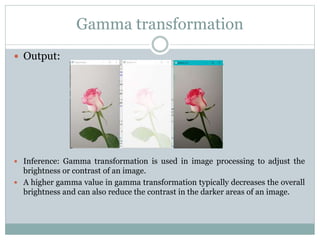
 Output:
 Inference: Gamma transformation is used in image processing to adjust the
brightness or contrast of an image.
 A higher gamma value in gamma transformation typically decreases the overall
brightness and can also reduce the contrast in the darker areas of an image.
Plotting Histogram of image
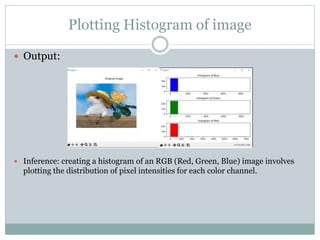
 Output:
 Inference: creating a histogram of an RGB (Red, Green, Blue) image involves
plotting the distribution of pixel intensities for each color channel.
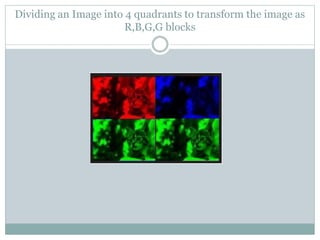
Dividing an Image into 4 quadrants to transform the image as
R,B,G,G blocks
Operations to achieve image enhancement:
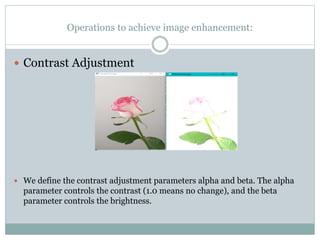
 Contrast Adjustment
 We define the contrast adjustment parameters alpha and beta. The alpha
parameter controls the contrast (1.0 means no change), and the beta
parameter controls the brightness.
Histogram Equalization
 Histogram Equalization
 Histogram Equalization is a computer image processing technique used to
improve contrast in images. It accomplishes this by effectively spreading out
the most frequent intensity values, i.e. stretching out the intensity range of the
image.
Neighbourhood operations to achieve image enhancement:
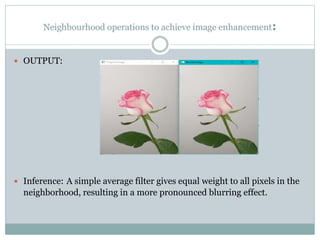
 OUTPUT:
 Inference: A simple average filter gives equal weight to all pixels in the
neighborhood, resulting in a more pronounced blurring effect.
A weighted average filter (Gaussian filter)
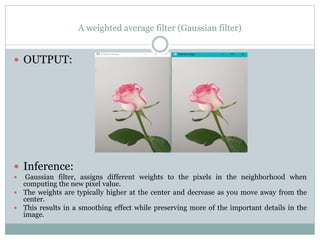
 OUTPUT:
 Inference:
 Gaussian filter, assigns different weights to the pixels in the neighborhood when
computing the new pixel value.
 The weights are typically higher at the center and decrease as you move away from the
center.
 This results in a smoothing effect while preserving more of the important details in the
image.
Image to realize high pass, median, gaussian filters
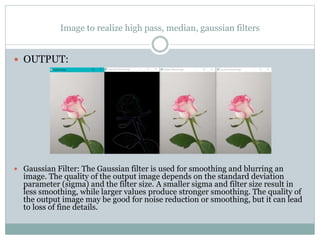
 OUTPUT:
 Median Filter: The median filter is effective at removing salt-and-pepper noise and
other types of impulse noise. It smooths the image while preserving edges. The quality of
the output image depends on the type and amount of noise in the input image. It is often
used for noise reduction.
Image to realize high pass, median, gaussian filters
 OUTPUT:
 Gaussian Filter: The Gaussian filter is used for smoothing and blurring an
image. The quality of the output image depends on the standard deviation
parameter (sigma) and the filter size. A smaller sigma and filter size result in
less smoothing, while larger values produce stronger smoothing. The quality of
the output image may be good for noise reduction or smoothing, but it can lead
to loss of fine details.
High boost filtering and unsharp masking
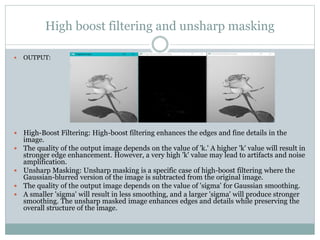
 OUTPUT:
 High-Boost Filtering: High-boost filtering enhances the edges and fine details in the
image.
 The quality of the output image depends on the value of 'k.' A higher 'k' value will result in
stronger edge enhancement. However, a very high 'k' value may lead to artifacts and noise
amplification.
 Unsharp Masking: Unsharp masking is a specific case of high-boost filtering where the
Gaussian-blurred version of the image is subtracted from the original image.
 The quality of the output image depends on the value of 'sigma' for Gaussian smoothing.
 A smaller 'sigma' will result in less smoothing, and a larger 'sigma' will produce stronger
smoothing. The unsharp masked image enhances edges and details while preserving the
overall structure of the image.
8 bit image set any of the bitplanes to zero, and
reconstructing the image
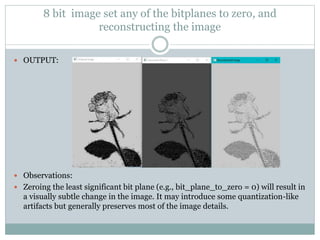
 OUTPUT:
 Observations:
 Zeroing the least significant bit plane (e.g., bit_plane_to_zero = 0) will result in
a visually subtle change in the image. It may introduce some quantization-like
artifacts but generally preserves most of the image details.
8 bit image set any of the bitplanes to zero, and
reconstructing the image
 Observations:
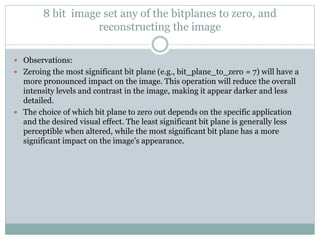
 Zeroing the most significant bit plane (e.g., bit_plane_to_zero = 7) will have a
more pronounced impact on the image. This operation will reduce the overall
intensity levels and contrast in the image, making it appear darker and less
detailed.
 The choice of which bit plane to zero out depends on the specific application
and the desired visual effect. The least significant bit plane is generally less
perceptible when altered, while the most significant bit plane has a more
significant impact on the image's appearance.
Perform zooming operation through pixel replication and its
challenges
Observations:
 Performing zooming via pixel replication involves duplicating pixels to increase
the image size, which can cause some challenges:
 Pixelation: This method can result in a loss of image quality, causing the
image to appear pixelated or blocky, especially when zooming in significantly.
 Loss of Detail: Duplicating pixels doesn't add new information; it merely
repeats existing data. This can lead to a loss of fine details and sharpness in the
image.
 Artifacts and Blurriness: When the replication factor is too high, the image
might appear blurry or contain artifacts due to the enlarged pixels.
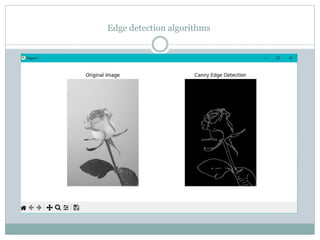
Edge detection algorithms
Thank You

Simple concepts of Image Processing.pptx

  • 1.
    B A SI C S O F I M A G E A N D V I D E O P R O C E S S I N G Introduction
  • 2.
    Gamma transformation  Output: Inference: Gamma transformation is used in image processing to adjust the brightness or contrast of an image.  A higher gamma value in gamma transformation typically decreases the overall brightness and can also reduce the contrast in the darker areas of an image.
  • 3.
    Plotting Histogram ofimage  Output:  Inference: creating a histogram of an RGB (Red, Green, Blue) image involves plotting the distribution of pixel intensities for each color channel.
  • 4.
    Dividing an Imageinto 4 quadrants to transform the image as R,B,G,G blocks
  • 5.
    Operations to achieveimage enhancement:  Contrast Adjustment  We define the contrast adjustment parameters alpha and beta. The alpha parameter controls the contrast (1.0 means no change), and the beta parameter controls the brightness.
  • 6.
    Histogram Equalization  HistogramEqualization  Histogram Equalization is a computer image processing technique used to improve contrast in images. It accomplishes this by effectively spreading out the most frequent intensity values, i.e. stretching out the intensity range of the image.
  • 7.
    Neighbourhood operations toachieve image enhancement:  OUTPUT:  Inference: A simple average filter gives equal weight to all pixels in the neighborhood, resulting in a more pronounced blurring effect.
  • 8.
    A weighted averagefilter (Gaussian filter)  OUTPUT:  Inference:  Gaussian filter, assigns different weights to the pixels in the neighborhood when computing the new pixel value.  The weights are typically higher at the center and decrease as you move away from the center.  This results in a smoothing effect while preserving more of the important details in the image.
  • 9.
    Image to realizehigh pass, median, gaussian filters  OUTPUT:  Median Filter: The median filter is effective at removing salt-and-pepper noise and other types of impulse noise. It smooths the image while preserving edges. The quality of the output image depends on the type and amount of noise in the input image. It is often used for noise reduction.
  • 10.
    Image to realizehigh pass, median, gaussian filters  OUTPUT:  Gaussian Filter: The Gaussian filter is used for smoothing and blurring an image. The quality of the output image depends on the standard deviation parameter (sigma) and the filter size. A smaller sigma and filter size result in less smoothing, while larger values produce stronger smoothing. The quality of the output image may be good for noise reduction or smoothing, but it can lead to loss of fine details.
  • 11.
    High boost filteringand unsharp masking  OUTPUT:  High-Boost Filtering: High-boost filtering enhances the edges and fine details in the image.  The quality of the output image depends on the value of 'k.' A higher 'k' value will result in stronger edge enhancement. However, a very high 'k' value may lead to artifacts and noise amplification.  Unsharp Masking: Unsharp masking is a specific case of high-boost filtering where the Gaussian-blurred version of the image is subtracted from the original image.  The quality of the output image depends on the value of 'sigma' for Gaussian smoothing.  A smaller 'sigma' will result in less smoothing, and a larger 'sigma' will produce stronger smoothing. The unsharp masked image enhances edges and details while preserving the overall structure of the image.
  • 12.
    8 bit imageset any of the bitplanes to zero, and reconstructing the image  OUTPUT:  Observations:  Zeroing the least significant bit plane (e.g., bit_plane_to_zero = 0) will result in a visually subtle change in the image. It may introduce some quantization-like artifacts but generally preserves most of the image details.
  • 13.
    8 bit imageset any of the bitplanes to zero, and reconstructing the image  Observations:  Zeroing the most significant bit plane (e.g., bit_plane_to_zero = 7) will have a more pronounced impact on the image. This operation will reduce the overall intensity levels and contrast in the image, making it appear darker and less detailed.  The choice of which bit plane to zero out depends on the specific application and the desired visual effect. The least significant bit plane is generally less perceptible when altered, while the most significant bit plane has a more significant impact on the image's appearance.
  • 14.
    Perform zooming operationthrough pixel replication and its challenges Observations:  Performing zooming via pixel replication involves duplicating pixels to increase the image size, which can cause some challenges:  Pixelation: This method can result in a loss of image quality, causing the image to appear pixelated or blocky, especially when zooming in significantly.  Loss of Detail: Duplicating pixels doesn't add new information; it merely repeats existing data. This can lead to a loss of fine details and sharpness in the image.  Artifacts and Blurriness: When the replication factor is too high, the image might appear blurry or contain artifacts due to the enlarged pixels.
  • 15.
  • 16.