PHASER5400TECH

              Technical Instructions                      Printers                    OEM Info                                      Tools   1
       CORPORATE                                                                                           Tools & Supplies Needed:
       LOS ANGELES, USA                Xerox    Phaser   5400/B      113R00495                             Tools required:
                                                                     Black                                 #1 Phillips Screwdriver
       US 1 800 394.9900               Xerox    Phaser   5400/N                                            Small Flat Blade Screwdriver
       Int’l +1 818 837.8100                                         (Standard Capacity – 20K pages)
       FAX 1 800 394.9910
                                       Xerox    Phaser   5400/DT                                           HP2600PINREMTOOL
                                                                                                           Spring Hook
       Int’l +1 818 838.7047           Xerox    Phaser   5400/DX                                           Needle-nose Pliers.

                                                                                                           Supplies Required:
       ATLANTA, USA                                                                                        Padding Powder
       US 1 877 676.4223                                                                                   Soft Lint-Free Cloth
       Int’l +1 678 919.1189                                                                               Cotton Swabs
       FAX 1 877 337.7976                                                                                  Conductive Grease
       Int’l +1 770 516.7794                                                                               Anhydrous Isopropyl Alcohol
                                                                                                           MAGCLEANER
                                                                                                           Vacuum or dry Compressed Air.
       KANSAS CITY, USA
       US 1 913 871.1700
       FAX 1 913 888.0626
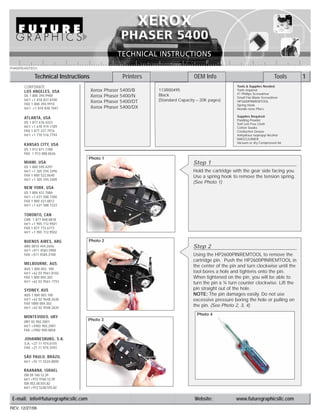
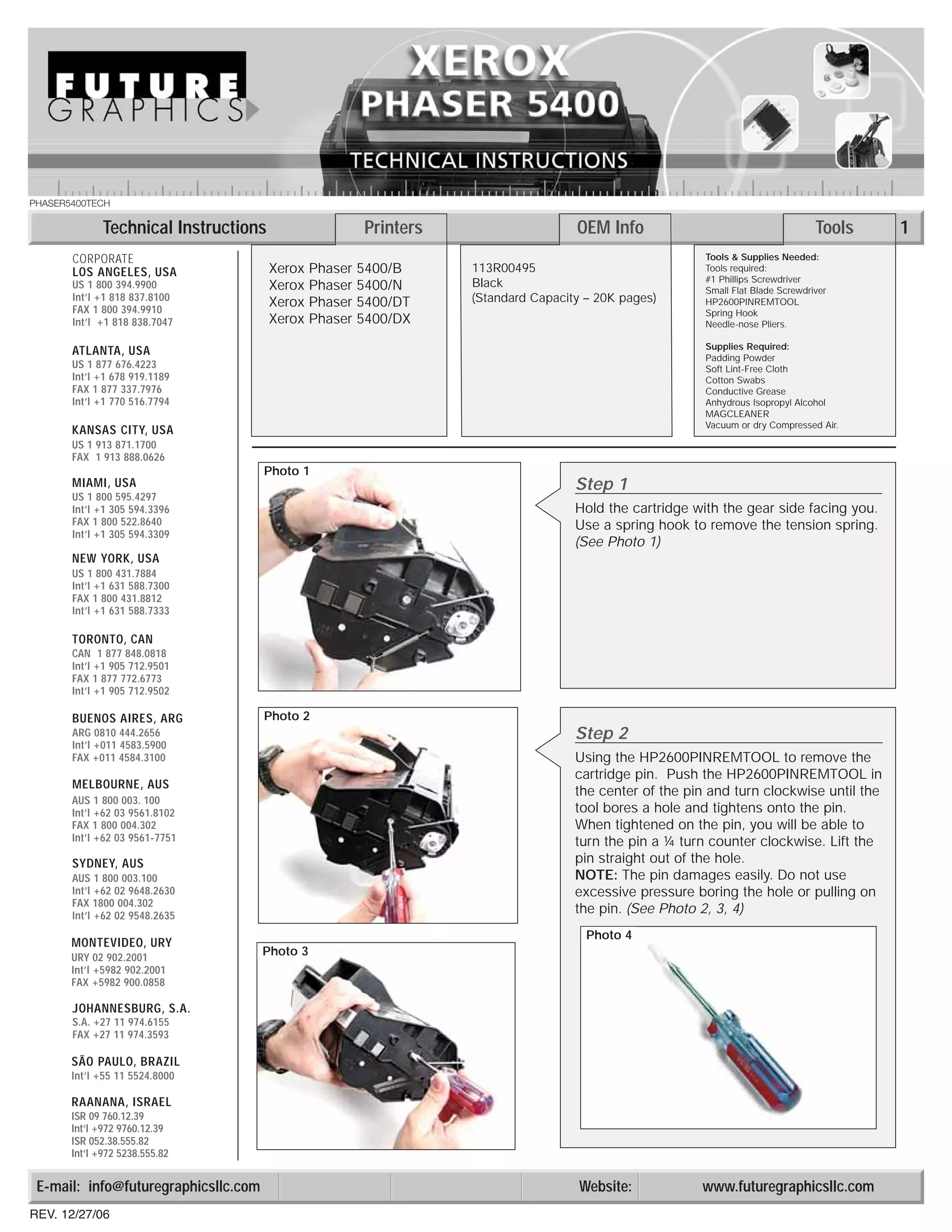
                                      Photo 1
       MIAMI, USA                                                                     Step 1
       US 1 800 595.4297
       Int’l +1 305 594.3396                                                          Hold the cartridge with the gear side facing you.
       FAX 1 800 522.8640                                                             Use a spring hook to remove the tension spring.
       Int’l +1 305 594.3309
                                                                                      (See Photo 1)
       NEW YORK, USA
       US 1 800 431.7884
       Int’l +1 631 588.7300
       FAX 1 800 431.8812
       Int’l +1 631 588.7333

       TORONTO, CAN
       CAN 1 877 848.0818
       Int’l +1 905 712.9501
       FAX 1 877 772.6773
       Int’l +1 905 712.9502

       BUENOS AIRES, ARG              Photo 2
       ARG 0810 444.2656                                                              Step 2
       Int’l +011 4583.5900
       FAX +011 4584.3100                                                             Using the HP2600PINREMTOOL to remove the
                                                                                      cartridge pin. Push the HP2600PINREMTOOL in
       MELBOURNE, AUS
                                                                                      the center of the pin and turn clockwise until the
       AUS 1 800 003. 100
       Int’l +62 03 9561.8102                                                         tool bores a hole and tightens onto the pin.
       FAX 1 800 004.302                                                              When tightened on the pin, you will be able to
       Int’l +62 03 9561-7751                                                         turn the pin a ¼ turn counter clockwise. Lift the
       SYDNEY, AUS                                                                    pin straight out of the hole.
       AUS 1 800 003.100                                                              NOTE: The pin damages easily. Do not use
       Int’l +62 02 9648.2630                                                         excessive pressure boring the hole or pulling on
       FAX 1800 004.302
       Int’l +62 02 9548.2635
                                                                                      the pin. (See Photo 2, 3, 4)
                                                                                        Photo 4
       MONTEVIDEO, URY
       URY 02 902.2001
                                      Photo 3
       Int’l +5982 902.2001
       FAX +5982 900.0858

       JOHANNESBURG, S.A.
       S.A. +27 11 974.6155
       FAX +27 11 974.3593

       SÃO PAULO, BRAZIL
       Int’l +55 11 5524.8000

       RAANANA, ISRAEL
       ISR 09 760.12.39
       Int’l +972 9760.12.39
       ISR 052.38.555.82
       Int’l +972 5238.555.82


 E-mail: info@futuregraphicsllc.com                                                    Website:           www.futuregraphicsllc.com
REV. 12/27/06
2                                                    PHASER 5400 Technical Instructions

                                        Photo 8
                                                   Step 5
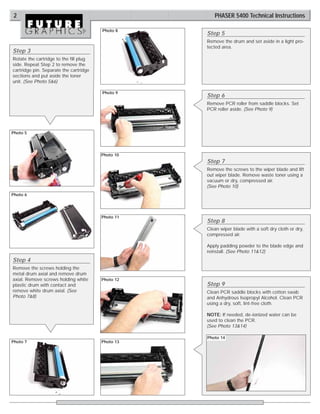
                                                   Remove the drum and set aside in a light pro-
                                                   tected area.
Step 3
Rotate the cartridge to the fill plug
side. Repeat Step 2 to remove the
cartridge pin. Separate the cartridge
sections and put aside the toner
unit. (See Photo 5&6)

                                        Photo 9
                                                   Step 6
                                                   Remove PCR roller from saddle blocks. Set
                                                   PCR roller aside. (See Photo 9)


Photo 5


                                        Photo 10
                                                   Step 7
                                                   Remove the screws to the wiper blade and lift
                                                   out wiper blade. Remove waste toner using a
                                                   vacuum or dry, compressed air.
                                                   (See Photo 10)
Photo 6


                                        Photo 11
                                                   Step 8
                                                   Clean wiper blade with a soft dry cloth or dry,
                                                   compressed air.

                                                   Apply padding powder to the blade edge and
                                                   reinstall. (See Photo 11&12)
Step 4
Remove the screws holding the
metal drum axial and remove drum
axial. Remove screws holding white      Photo 12
plastic drum with contact and                      Step 9
remove white drum axial. (See                      Clean PCR saddle blocks with cotton swab
Photo 7&8)                                         and Anhydrous Isopropyl Alcohol. Clean PCR
                                                   using a dry, soft, lint-free cloth.

                                                   NOTE: If needed, de-ionized water can be
                                                   used to clean the PCR.
                                                   (See Photo 13&14)

                                                   Photo 14
Photo 7                                 Photo 13
PHASER 5400 Technical Instructions                                                                                           3

Photo 15
                                      Step 10
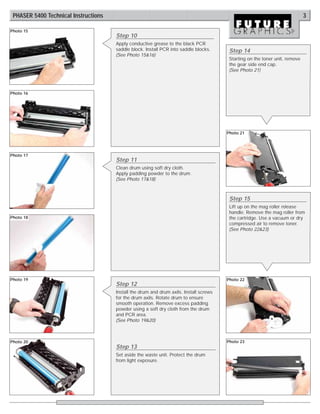
                                      Apply conductive grease to the black PCR
                                      saddle block. Install PCR into saddle blocks.      Step 14
                                      (See Photo 15&16)
                                                                                         Starting on the toner unit, remove
                                                                                         the gear side end cap.
                                                                                         (See Photo 21)


Photo 16


                                                                                        Photo 21


Photo 17
                                      Step 11
                                      Clean drum using soft dry cloth.
                                      Apply padding powder to the drum.
                                      (See Photo 17&18)


                                                                                         Step 15
                                                                                         Lift up on the mag roller release
                                                                                         handle. Remove the mag roller from
Photo 18                                                                                 the cartridge. Use a vacuum or dry
                                                                                         compressed air to remove toner.
                                                                                         (See Photo 22&23)


Photo 19                                                                                Photo 22
                                      Step 12
                                      Install the drum and drum axils. Install screws
                                      for the drum axils. Rotate drum to ensure
                                      smooth operation. Remove excess padding
                                      powder using a soft dry cloth from the drum
                                      and PCR area.
                                      (See Photo 19&20)


Photo 20                                                                                Photo 23
                                      Step 13
                                      Set aside the waste unit. Protect the drum
                                      from light exposure.
4                                                    PHASER 5400 Technical Instructions

                                       Photo 26
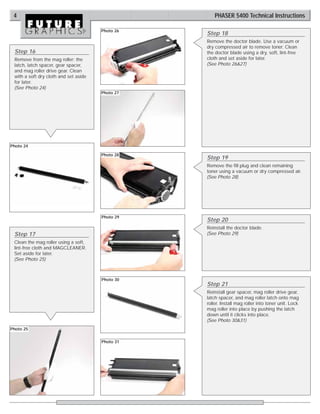
                                                  Step 18
                                                  Remove the doctor blade. Use a vacuum or
                                                  dry compressed air to remove toner. Clean
 Step 16                                          the doctor blade using a dry, soft, lint-free
 Remove from the mag roller: the                  cloth and set aside for later.
 latch, latch spacer, gear spacer,                (See Photo 26&27)
 and mag roller drive gear. Clean
 with a soft dry cloth and set aside
 for later.
 (See Photo 24)
                                       Photo 27


Photo 24

                                       Photo 28
                                                  Step 19
                                                  Remove the fill plug and clean remaining
                                                  toner using a vacuum or dry compressed air.
                                                  (See Photo 28)


                                       Photo 29
                                                  Step 20
                                                  Reinstall the doctor blade.
 Step 17                                          (See Photo 29)
 Clean the mag roller using a soft,
 lint-free cloth and MAGCLEANER.
 Set aside for later.
 (See Photo 25)


                                       Photo 30
                                                  Step 21
                                                  Reinstall gear spacer, mag roller drive gear,
                                                  latch spacer, and mag roller latch onto mag
                                                  roller. Install mag roller into toner unit. Lock
                                                  mag roller into place by pushing the latch
                                                  down until it clicks into place.
                                                  (See Photo 30&31)
Photo 25


                                       Photo 31
PHASER 5400 Technical Instructions                                                                                            5

Photo 32
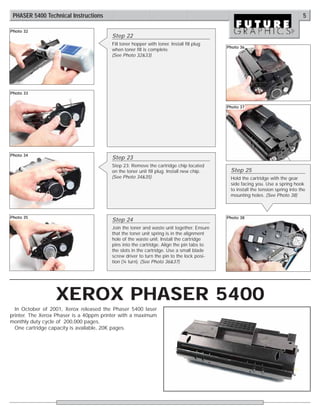
                                        Step 22
                                        Fill toner hopper with toner. Install fill plug
                                                                                          Photo 36
                                        when toner fill is complete.
                                        (See Photo 32&33)


Photo 33


                                                                                          Photo 37


Photo 34
                                        Step 23
                                        Step 23: Remove the cartridge chip located
                                        on the toner unit fill plug. Install new chip.     Step 25
                                        (See Photo 34&35)                                  Hold the cartridge with the gear
                                                                                           side facing you. Use a spring hook
                                                                                           to install the tension spring into the
                                                                                           mounting holes. (See Photo 38)


Photo 35                                                                                  Photo 38
                                        Step 24
                                        Join the toner and waste unit together. Ensure
                                        that the toner unit spring is in the alignment
                                        hole of the waste unit. Install the cartridge
                                        pins into the cartridge. Align the pin tabs to
                                        the slots in the cartridge. Use a small blade
                                        screw driver to turn the pin to the lock posi-
                                        tion (¼ turn). (See Photo 36&37)


                  XEROX PHASER 5400
  In October of 2001, Xerox released the Phaser 5400 laser
printer. The Xerox Phaser is a 40ppm printer with a maximum
monthly duty cycle of 200,000 pages.
  One cartridge capacity is available, 20K pages.

Manual de Recarga Xerox Phaser 5400 13R495

  • 1.
    PHASER5400TECH Technical Instructions Printers OEM Info Tools 1 CORPORATE Tools & Supplies Needed: LOS ANGELES, USA Xerox Phaser 5400/B 113R00495 Tools required: Black #1 Phillips Screwdriver US 1 800 394.9900 Xerox Phaser 5400/N Small Flat Blade Screwdriver Int’l +1 818 837.8100 (Standard Capacity – 20K pages) FAX 1 800 394.9910 Xerox Phaser 5400/DT HP2600PINREMTOOL Spring Hook Int’l +1 818 838.7047 Xerox Phaser 5400/DX Needle-nose Pliers. Supplies Required: ATLANTA, USA Padding Powder US 1 877 676.4223 Soft Lint-Free Cloth Int’l +1 678 919.1189 Cotton Swabs FAX 1 877 337.7976 Conductive Grease Int’l +1 770 516.7794 Anhydrous Isopropyl Alcohol MAGCLEANER Vacuum or dry Compressed Air. KANSAS CITY, USA US 1 913 871.1700 FAX 1 913 888.0626 Photo 1 MIAMI, USA Step 1 US 1 800 595.4297 Int’l +1 305 594.3396 Hold the cartridge with the gear side facing you. FAX 1 800 522.8640 Use a spring hook to remove the tension spring. Int’l +1 305 594.3309 (See Photo 1) NEW YORK, USA US 1 800 431.7884 Int’l +1 631 588.7300 FAX 1 800 431.8812 Int’l +1 631 588.7333 TORONTO, CAN CAN 1 877 848.0818 Int’l +1 905 712.9501 FAX 1 877 772.6773 Int’l +1 905 712.9502 BUENOS AIRES, ARG Photo 2 ARG 0810 444.2656 Step 2 Int’l +011 4583.5900 FAX +011 4584.3100 Using the HP2600PINREMTOOL to remove the cartridge pin. Push the HP2600PINREMTOOL in MELBOURNE, AUS the center of the pin and turn clockwise until the AUS 1 800 003. 100 Int’l +62 03 9561.8102 tool bores a hole and tightens onto the pin. FAX 1 800 004.302 When tightened on the pin, you will be able to Int’l +62 03 9561-7751 turn the pin a ¼ turn counter clockwise. Lift the SYDNEY, AUS pin straight out of the hole. AUS 1 800 003.100 NOTE: The pin damages easily. Do not use Int’l +62 02 9648.2630 excessive pressure boring the hole or pulling on FAX 1800 004.302 Int’l +62 02 9548.2635 the pin. (See Photo 2, 3, 4) Photo 4 MONTEVIDEO, URY URY 02 902.2001 Photo 3 Int’l +5982 902.2001 FAX +5982 900.0858 JOHANNESBURG, S.A. S.A. +27 11 974.6155 FAX +27 11 974.3593 SÃO PAULO, BRAZIL Int’l +55 11 5524.8000 RAANANA, ISRAEL ISR 09 760.12.39 Int’l +972 9760.12.39 ISR 052.38.555.82 Int’l +972 5238.555.82 E-mail: info@futuregraphicsllc.com Website: www.futuregraphicsllc.com REV. 12/27/06
  • 2.
    2 PHASER 5400 Technical Instructions Photo 8 Step 5 Remove the drum and set aside in a light pro- tected area. Step 3 Rotate the cartridge to the fill plug side. Repeat Step 2 to remove the cartridge pin. Separate the cartridge sections and put aside the toner unit. (See Photo 5&6) Photo 9 Step 6 Remove PCR roller from saddle blocks. Set PCR roller aside. (See Photo 9) Photo 5 Photo 10 Step 7 Remove the screws to the wiper blade and lift out wiper blade. Remove waste toner using a vacuum or dry, compressed air. (See Photo 10) Photo 6 Photo 11 Step 8 Clean wiper blade with a soft dry cloth or dry, compressed air. Apply padding powder to the blade edge and reinstall. (See Photo 11&12) Step 4 Remove the screws holding the metal drum axial and remove drum axial. Remove screws holding white Photo 12 plastic drum with contact and Step 9 remove white drum axial. (See Clean PCR saddle blocks with cotton swab Photo 7&8) and Anhydrous Isopropyl Alcohol. Clean PCR using a dry, soft, lint-free cloth. NOTE: If needed, de-ionized water can be used to clean the PCR. (See Photo 13&14) Photo 14 Photo 7 Photo 13
  • 3.
    PHASER 5400 TechnicalInstructions 3 Photo 15 Step 10 Apply conductive grease to the black PCR saddle block. Install PCR into saddle blocks. Step 14 (See Photo 15&16) Starting on the toner unit, remove the gear side end cap. (See Photo 21) Photo 16 Photo 21 Photo 17 Step 11 Clean drum using soft dry cloth. Apply padding powder to the drum. (See Photo 17&18) Step 15 Lift up on the mag roller release handle. Remove the mag roller from Photo 18 the cartridge. Use a vacuum or dry compressed air to remove toner. (See Photo 22&23) Photo 19 Photo 22 Step 12 Install the drum and drum axils. Install screws for the drum axils. Rotate drum to ensure smooth operation. Remove excess padding powder using a soft dry cloth from the drum and PCR area. (See Photo 19&20) Photo 20 Photo 23 Step 13 Set aside the waste unit. Protect the drum from light exposure.
  • 4.
    4 PHASER 5400 Technical Instructions Photo 26 Step 18 Remove the doctor blade. Use a vacuum or dry compressed air to remove toner. Clean Step 16 the doctor blade using a dry, soft, lint-free Remove from the mag roller: the cloth and set aside for later. latch, latch spacer, gear spacer, (See Photo 26&27) and mag roller drive gear. Clean with a soft dry cloth and set aside for later. (See Photo 24) Photo 27 Photo 24 Photo 28 Step 19 Remove the fill plug and clean remaining toner using a vacuum or dry compressed air. (See Photo 28) Photo 29 Step 20 Reinstall the doctor blade. Step 17 (See Photo 29) Clean the mag roller using a soft, lint-free cloth and MAGCLEANER. Set aside for later. (See Photo 25) Photo 30 Step 21 Reinstall gear spacer, mag roller drive gear, latch spacer, and mag roller latch onto mag roller. Install mag roller into toner unit. Lock mag roller into place by pushing the latch down until it clicks into place. (See Photo 30&31) Photo 25 Photo 31
  • 5.
    PHASER 5400 TechnicalInstructions 5 Photo 32 Step 22 Fill toner hopper with toner. Install fill plug Photo 36 when toner fill is complete. (See Photo 32&33) Photo 33 Photo 37 Photo 34 Step 23 Step 23: Remove the cartridge chip located on the toner unit fill plug. Install new chip. Step 25 (See Photo 34&35) Hold the cartridge with the gear side facing you. Use a spring hook to install the tension spring into the mounting holes. (See Photo 38) Photo 35 Photo 38 Step 24 Join the toner and waste unit together. Ensure that the toner unit spring is in the alignment hole of the waste unit. Install the cartridge pins into the cartridge. Align the pin tabs to the slots in the cartridge. Use a small blade screw driver to turn the pin to the lock posi- tion (¼ turn). (See Photo 36&37) XEROX PHASER 5400 In October of 2001, Xerox released the Phaser 5400 laser printer. The Xerox Phaser is a 40ppm printer with a maximum monthly duty cycle of 200,000 pages. One cartridge capacity is available, 20K pages.