BR1240TECHDRUM

           Technical Instructions                       Printers                                      OEM Info                                              Tools         1
                                Brother HL-1240/1440/1450/                        Part Number: DR400                                Phillips Screwdriver
           CORPORATE            1470N/P2500 MFP                                   Yield: 20,000 pgs                                 Small Flat Blade Screwdriver
       LOS ANGELES, USA         Intellifax 4750/5750/8350P/                                                                         Soft Lint-Free Cloth
       US 1 800 394.9900        8750P
       Int’l +1 818 837.8100                                                                                                        Cotton Swabs
       FAX 1 800 394.9910       MFC-2500/8300/8500/8600/                                                                            Anhydrous Isopropyl Alcohol
       Int’l +1 818 838.7047    8700/8750P/8750P-NLT/
       ATLANTA, USA             9600/9650/9650N/9660/
       US 1 877 676.4223        9660N/9750/9750LT/9850/
       Int’l +1 770 516.9488    9870/9870LT/9870NLT/9880/
       FAX 1 877 337.7976
       Int’l +1 770 516.7794
                                9880N/P2500
                                PB1630/PPF4650/PPF5750
       DALLAS, USA
       US 1 877 499.4989
       Int’l +1 972 840.4989     Photo 1
       FAX 1 877 774.1750
       Int’l +1 972 840.1750
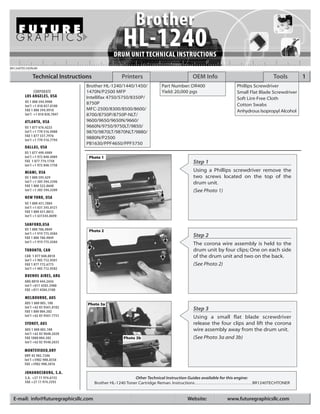
                                                                                                       Step 1
       MIAMI, USA                                                                                      Using a Phillips screwdriver remove the
       US 1 800 595.429                                                                                two screws located on the top of the
       Int’l +1 305 594.3396                                                                           drum unit.
       FAX 1 800 522.8640
       Int’l +1 305 594.3309                                                                           (See Photo 1)
       NEW YORK, USA
       US 1 800 431.7884
       Int’l +1 631 345.0121
       FAX 1 800 431.8812
       Int’l +1 631345.0690

       SANFORD,USA
       US 1 800 786.9049         Photo 2
       Int’l +1 919 775.4584
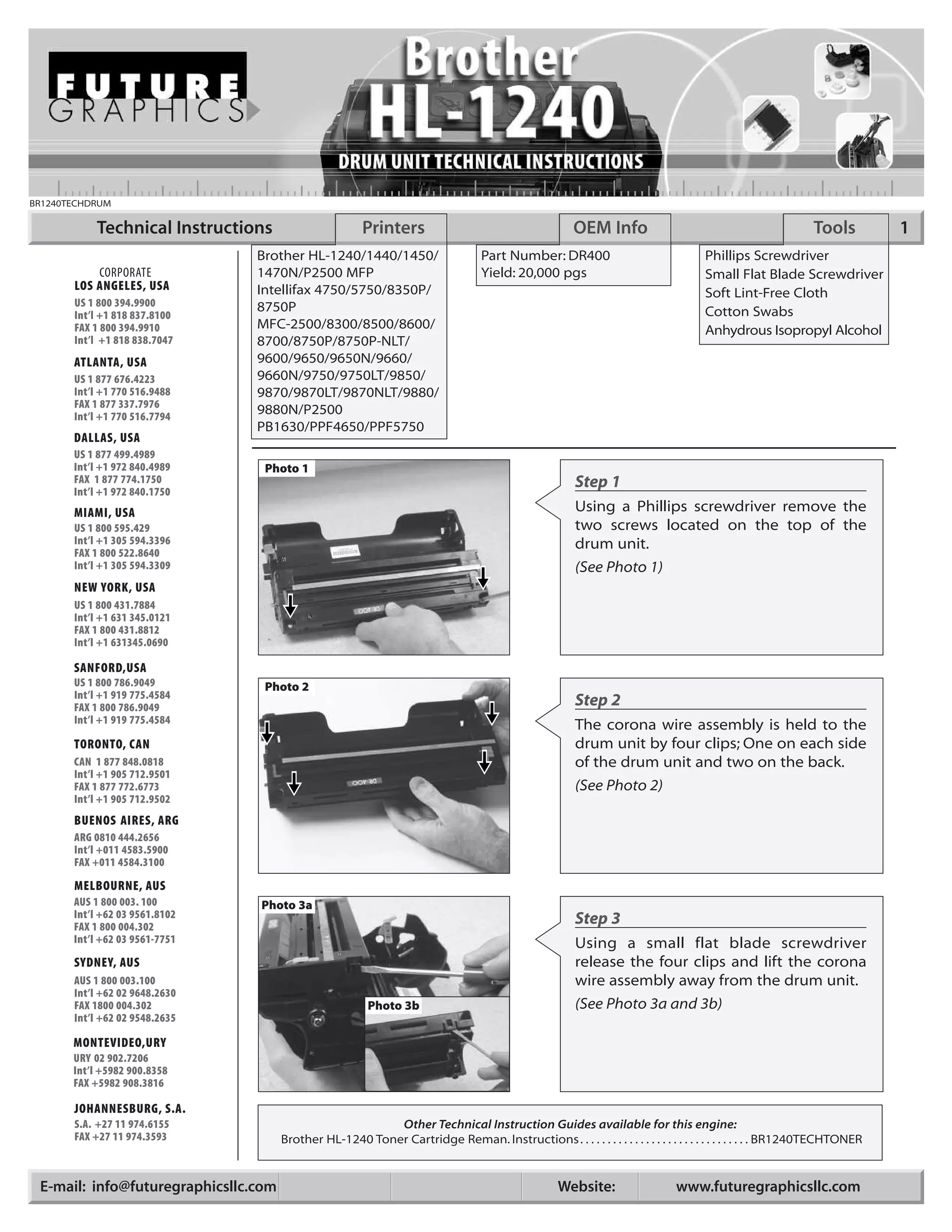
       FAX 1 800 786.9049                                                                              Step 2
       Int’l +1 919 775.4584
                                                                                                       The corona wire assembly is held to the
       TORONTO, CAN                                                                                    drum unit by four clips; One on each side
       CAN 1 877 848.0818                                                                              of the drum unit and two on the back.
       Int’l +1 905 712.9501
       FAX 1 877 772.6773                                                                              (See Photo 2)
       Int’l +1 905 712.9502
       BUENOS AIRES, ARG
       ARG 0810 444.2656
       Int’l +011 4583.5900
       FAX +011 4584.3100

       MELBOURNE, AUS
       AUS 1 800 003. 100       Photo 3a
       Int’l +62 03 9561.8102                                                                          Step 3
       FAX 1 800 004.302
       Int’l +62 03 9561-7751                                                                          Using a small flat blade screwdriver
       SYDNEY, AUS                                                                                     release the four clips and lift the corona
       AUS 1 800 003.100                                                                               wire assembly away from the drum unit.
       Int’l +62 02 9648.2630
       FAX 1800 004.302                                  Photo 3b                                      (See Photo 3a and 3b)
       Int’l +62 02 9548.2635

       MONTEVIDEO,URY
       URY 02 902.7206
       Int’l +5982 900.8358
       FAX +5982 908.3816

       JOHANNESBURG, S.A.
       S.A. +27 11 974.6155                               Other Technical Instruction Guides available for this engine:
       FAX +27 11 974.3593            Brother HL-1240 Toner Cartridge Reman. Instructions . . . . . . . . . . . . . . . . . . . . . . . . . . . . . . . BR1240TECHTONER


 E-mail: info@futuregraphicsllc.com                                                                Website:                  www.futuregraphicsllc.com
2                                                     Brother HL-1240 Drum Unit Technical Instructions

                                            Photo 4
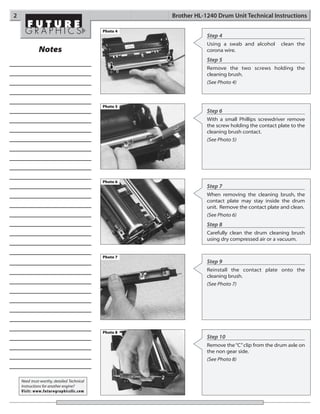
                                                                  Step 4
                                                                  Using a swab and alcohol       clean the
              Notes                                               corona wire.
                                                                  Step 5
                                                                  Remove the two screws holding the
                                                                  cleaning brush.
                                                                  (See Photo 4)


                                            Photo 5
                                                                  Step 6
                                                                  With a small Phillips screwdriver remove
                                                                  the screw holding the contact plate to the
                                                                  cleaning brush contact.
                                                                  (See Photo 5)


                                            Photo 6
                                                                  Step 7
                                                                  When removing the cleaning brush, the
                                                                  contact plate may stay inside the drum
                                                                  unit. Remove the contact plate and clean.
                                                                  (See Photo 6)
                                                                  Step 8
                                                                  Carefully clean the drum cleaning brush
                                                                  using dry compressed air or a vacuum.


                                            Photo 7
                                                                  Step 9
                                                                  Reinstall the contact plate onto the
                                                                  cleaning brush.
                                                                  (See Photo 7)


                                            Photo 8
                                                                  Step 10
                                                                  Remove the “C” clip from the drum axle on
                                                                  the non gear side.
                                                                  (See Photo 8)


    Need trust-worthy, detailed Technical
    Instructions for another engine?
    Visit: www.futuregraphicsllc.com
Brother HL-1240 Drum Unit Technical Instructions                                                                                  3

Photo 9
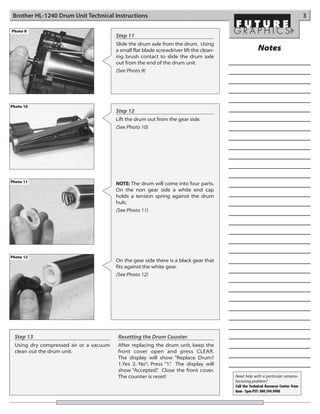
                                        Step 11
                                        Slide the drum axle from the drum. Using
                                        a small flat blade screwdriver lift the clean-                Notes
                                        ing brush contact to slide the drum axle
                                        out from the end of the drum unit.
                                        (See Photo 9)


Photo 10
                                        Step 12
                                        Lift the drum out from the gear side.
                                        (See Photo 10)


Photo 11                                NOTE: The drum will come into four parts.
                                        On the non gear side a white end cap
                                        holds a tension spring against the drum
                                        hub.
                                        (See Photo 11)


Photo 12
                                        On the gear side there is a black gear that
                                        fits against the white gear.
                                        (See Photo 12)


 Step 13                                 Resetting the Drum Counter
 Using dry compressed air or a vacuum    After replacing the drum unit, keep the
 clean out the drum unit.                front cover open and press CLEAR.
                                         The display will show “Replace Drum?
                                         1.Yes 2. No”; Press “1” The display will
                                                               .
                                         show “Accepted” Close the front cover.
                                                          .
                                         The counter is reset!                           Need help with a particular remanu-
                                                                                         facturing problem?
                                                                                         Call the Technical Resource Center from
                                                                                         8am - 5pm PST: 800 394.9900
4                                                                                              Brother HL-1240 Drum Unit Technical Instructions

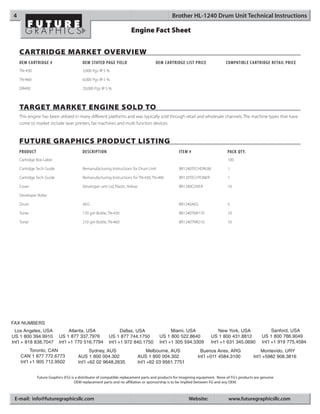
                                                                        Engine Fact Sheet

    CARTRIDGE MARKET OVERVIEW
    OEM CARTRIDGE #                      OEM STATED PAGE YIELD                         OEM CARTRIDGE LIST PRICE               COMPATIBLE CARTRIDGE RETAIL PRICE
    TN-430                               3,000 Pgs @ 5 %

    TN-460                               6,000 Pgs @ 5 %

    DR400                                20,000 Pgs @ 5 %


    TARGET MARKET ENGINE SOLD TO
    This engine has been utilized in many different platforms and was typically sold through retail and wholesale channels. The machine types that have
    come to market include laser printers, fax machines and multi function devices.


    FUTURE GRAPHICS PRODUCT LISTING
    PRODUCT                              DESCRIPTION                                              ITEM #                       PACK QT Y.
    Cartridge Box Label                                                                                                        100

    Cartridge Tech Guide                 Remanufacturing Instructions for Drum Unit               BR1240TECHDRUM               1

    Cartridge Tech Guide                 Remanufacturing Instructions for TN-430, TN-460          BR120TECHTONER               1

    Cover                                Developer unit Lid, Plastic, Yellow                      BR1240COVER                  10

    Developer Roller

    Drum                                 AEG                                                      BR1240AEG                    5

    Toner                                170 gm Bottle, TN-430                                    BR1240TNR170                 10

    Toner                                210 gm Bottle, TN-460                                    BR1240TNR210                 10


FAX NUMBERS
  Los Angeles, USA               Atlanta, USA                   Dallas, USA                     Miami, USA                New York, USA                   Sanford, USA
US 1 800 394.9910          US 1 877 337.7976             US 1 877 744.1750               US 1 800 522.8640           US 1 800 431.8812              US 1 800 786.9049
Int’l + 818 838.7047       Int’l +1 770 516.7794         Int’l +1 972 840.1750           Int’l +1 305 594.3309       Int’l +1 631 345.0690          Int’l +1 919 775.4584
          Toronto, CAN                       Sydney, AUS                             Melbourne, AUS           Buenos Aires, ARG                    Montevido, URY
    CAN 1 877 772.6773                AUS 1 800 004.302                        AUS 1 800 004.302             Int’l +011 4584.3100             Int’l +5982 908.3816
    Int’l +1 905 712.9502             Int’l +62 02 9648.2635                   Int’l +62 03 9561.7751


              Future Graphics (FG) is a distributor of compatible replacement parts and products for imagining equipment. None of FG's products are genuine
                                     OEM replacement parts and no affiliation or sponsorship is to be implied between FG and any OEM.


 E-mail: info@futuregraphicsllc.com                                                                     Website:                www.futuregraphicsllc.com

Brother hl 1240 drum

  • 1.
    BR1240TECHDRUM Technical Instructions Printers OEM Info Tools 1 Brother HL-1240/1440/1450/ Part Number: DR400 Phillips Screwdriver CORPORATE 1470N/P2500 MFP Yield: 20,000 pgs Small Flat Blade Screwdriver LOS ANGELES, USA Intellifax 4750/5750/8350P/ Soft Lint-Free Cloth US 1 800 394.9900 8750P Int’l +1 818 837.8100 Cotton Swabs FAX 1 800 394.9910 MFC-2500/8300/8500/8600/ Anhydrous Isopropyl Alcohol Int’l +1 818 838.7047 8700/8750P/8750P-NLT/ ATLANTA, USA 9600/9650/9650N/9660/ US 1 877 676.4223 9660N/9750/9750LT/9850/ Int’l +1 770 516.9488 9870/9870LT/9870NLT/9880/ FAX 1 877 337.7976 Int’l +1 770 516.7794 9880N/P2500 PB1630/PPF4650/PPF5750 DALLAS, USA US 1 877 499.4989 Int’l +1 972 840.4989 Photo 1 FAX 1 877 774.1750 Int’l +1 972 840.1750 Step 1 MIAMI, USA Using a Phillips screwdriver remove the US 1 800 595.429 two screws located on the top of the Int’l +1 305 594.3396 drum unit. FAX 1 800 522.8640 Int’l +1 305 594.3309 (See Photo 1) NEW YORK, USA US 1 800 431.7884 Int’l +1 631 345.0121 FAX 1 800 431.8812 Int’l +1 631345.0690 SANFORD,USA US 1 800 786.9049 Photo 2 Int’l +1 919 775.4584 FAX 1 800 786.9049 Step 2 Int’l +1 919 775.4584 The corona wire assembly is held to the TORONTO, CAN drum unit by four clips; One on each side CAN 1 877 848.0818 of the drum unit and two on the back. Int’l +1 905 712.9501 FAX 1 877 772.6773 (See Photo 2) Int’l +1 905 712.9502 BUENOS AIRES, ARG ARG 0810 444.2656 Int’l +011 4583.5900 FAX +011 4584.3100 MELBOURNE, AUS AUS 1 800 003. 100 Photo 3a Int’l +62 03 9561.8102 Step 3 FAX 1 800 004.302 Int’l +62 03 9561-7751 Using a small flat blade screwdriver SYDNEY, AUS release the four clips and lift the corona AUS 1 800 003.100 wire assembly away from the drum unit. Int’l +62 02 9648.2630 FAX 1800 004.302 Photo 3b (See Photo 3a and 3b) Int’l +62 02 9548.2635 MONTEVIDEO,URY URY 02 902.7206 Int’l +5982 900.8358 FAX +5982 908.3816 JOHANNESBURG, S.A. S.A. +27 11 974.6155 Other Technical Instruction Guides available for this engine: FAX +27 11 974.3593 Brother HL-1240 Toner Cartridge Reman. Instructions . . . . . . . . . . . . . . . . . . . . . . . . . . . . . . . BR1240TECHTONER E-mail: info@futuregraphicsllc.com Website: www.futuregraphicsllc.com
  • 2.
    2 Brother HL-1240 Drum Unit Technical Instructions Photo 4 Step 4 Using a swab and alcohol clean the Notes corona wire. Step 5 Remove the two screws holding the cleaning brush. (See Photo 4) Photo 5 Step 6 With a small Phillips screwdriver remove the screw holding the contact plate to the cleaning brush contact. (See Photo 5) Photo 6 Step 7 When removing the cleaning brush, the contact plate may stay inside the drum unit. Remove the contact plate and clean. (See Photo 6) Step 8 Carefully clean the drum cleaning brush using dry compressed air or a vacuum. Photo 7 Step 9 Reinstall the contact plate onto the cleaning brush. (See Photo 7) Photo 8 Step 10 Remove the “C” clip from the drum axle on the non gear side. (See Photo 8) Need trust-worthy, detailed Technical Instructions for another engine? Visit: www.futuregraphicsllc.com
  • 3.
    Brother HL-1240 DrumUnit Technical Instructions 3 Photo 9 Step 11 Slide the drum axle from the drum. Using a small flat blade screwdriver lift the clean- Notes ing brush contact to slide the drum axle out from the end of the drum unit. (See Photo 9) Photo 10 Step 12 Lift the drum out from the gear side. (See Photo 10) Photo 11 NOTE: The drum will come into four parts. On the non gear side a white end cap holds a tension spring against the drum hub. (See Photo 11) Photo 12 On the gear side there is a black gear that fits against the white gear. (See Photo 12) Step 13 Resetting the Drum Counter Using dry compressed air or a vacuum After replacing the drum unit, keep the clean out the drum unit. front cover open and press CLEAR. The display will show “Replace Drum? 1.Yes 2. No”; Press “1” The display will . show “Accepted” Close the front cover. . The counter is reset! Need help with a particular remanu- facturing problem? Call the Technical Resource Center from 8am - 5pm PST: 800 394.9900
  • 4.
    4 Brother HL-1240 Drum Unit Technical Instructions Engine Fact Sheet CARTRIDGE MARKET OVERVIEW OEM CARTRIDGE # OEM STATED PAGE YIELD OEM CARTRIDGE LIST PRICE COMPATIBLE CARTRIDGE RETAIL PRICE TN-430 3,000 Pgs @ 5 % TN-460 6,000 Pgs @ 5 % DR400 20,000 Pgs @ 5 % TARGET MARKET ENGINE SOLD TO This engine has been utilized in many different platforms and was typically sold through retail and wholesale channels. The machine types that have come to market include laser printers, fax machines and multi function devices. FUTURE GRAPHICS PRODUCT LISTING PRODUCT DESCRIPTION ITEM # PACK QT Y. Cartridge Box Label 100 Cartridge Tech Guide Remanufacturing Instructions for Drum Unit BR1240TECHDRUM 1 Cartridge Tech Guide Remanufacturing Instructions for TN-430, TN-460 BR120TECHTONER 1 Cover Developer unit Lid, Plastic, Yellow BR1240COVER 10 Developer Roller Drum AEG BR1240AEG 5 Toner 170 gm Bottle, TN-430 BR1240TNR170 10 Toner 210 gm Bottle, TN-460 BR1240TNR210 10 FAX NUMBERS Los Angeles, USA Atlanta, USA Dallas, USA Miami, USA New York, USA Sanford, USA US 1 800 394.9910 US 1 877 337.7976 US 1 877 744.1750 US 1 800 522.8640 US 1 800 431.8812 US 1 800 786.9049 Int’l + 818 838.7047 Int’l +1 770 516.7794 Int’l +1 972 840.1750 Int’l +1 305 594.3309 Int’l +1 631 345.0690 Int’l +1 919 775.4584 Toronto, CAN Sydney, AUS Melbourne, AUS Buenos Aires, ARG Montevido, URY CAN 1 877 772.6773 AUS 1 800 004.302 AUS 1 800 004.302 Int’l +011 4584.3100 Int’l +5982 908.3816 Int’l +1 905 712.9502 Int’l +62 02 9648.2635 Int’l +62 03 9561.7751 Future Graphics (FG) is a distributor of compatible replacement parts and products for imagining equipment. None of FG's products are genuine OEM replacement parts and no affiliation or sponsorship is to be implied between FG and any OEM. E-mail: info@futuregraphicsllc.com Website: www.futuregraphicsllc.com