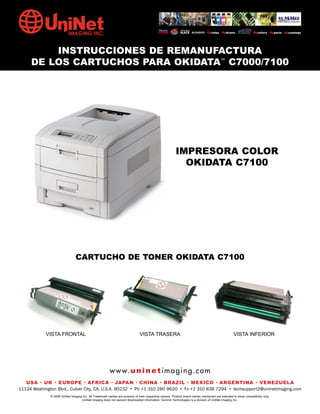
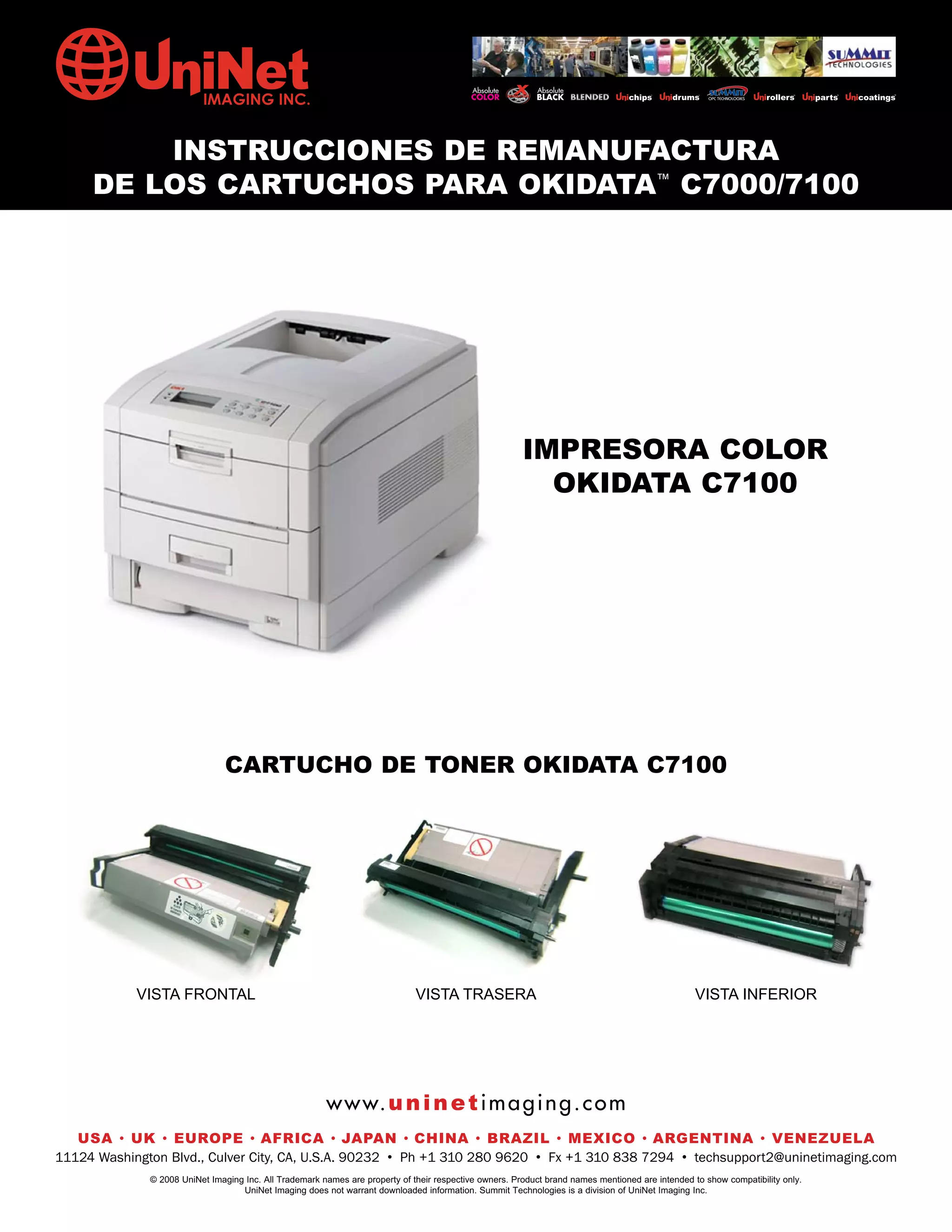
INSTRUCCIONES DE REMANUFACTURA
     DE LOS CARTUCHOS PARA OKIDATA™ C7000/7100


                                                                                                        IMPRESORA COLOR
                                                                                                          OKIDATA C7100


                                CARTUCHO DE TONER OKIDATA C7100


            VISTA FRONTAL                                                     VISTA TRASERA                                                       VISTA INFERIOR


                                                        w w w. u n i n e t i m a g i n g . c o m
   USA • UK • EUROPE • AFRICA • JAPAN • CHINA • BRAZIL • MEXICO • ARGENTINA • VENEZUELA
11124 Washington Blvd., Culver City, CA, U.S.A. 90232 • Ph +1 310 280 9620 • Fx +1 310 838 7294 • techsupport2@uninetimaging.com
              © 2008 UniNet Imaging Inc. All Trademark names are property of their respective owners. Product brand names mentioned are intended to show compatibility only.
                                   UniNet Imaging does not warrant downloaded information. Summit Technologies is a division of UniNet Imaging Inc.
UNINET IMAGING INC. •INC. • • BROTHER REMANUFACTURA•DE DISASSEMBLINGTHE TONER CARTRIDGE7100
           UNINET IMAGING INSTRUCCIONES DE 1240/1650 • LOS CARTUCHOS PARA OKIDATA CARTRIDGE
             UNINET IMAGING INC.        BROTHER 1240/1650        ASSEMBLING THE TONER C7000 /


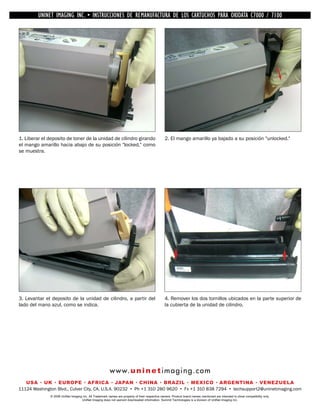
1. Liberar el deposito de toner de la unidad de cilindro girando                                2. El mango amarillo ya bajado a su posición "unlocked."
el mango amarillo hacia abajo de su posición "locked," como
se muestra.


3. Levantar el deposito de la unidad de cilindro, a partir del                                  4. Remover los dos tornillos ubicados en la parte superior de
lado del mano azul, como se indica.                                                             la cubierta de la unidad de cilindro.


                                                        w w w. u n i n e t i m a g i n g . c o m
   USA • UK • EUROPE • AFRICA • JAPAN • CHINA • BRAZIL • MEXICO • ARGENTINA • VENEZUELA
11124 Washington Blvd., Culver City, CA, U.S.A. 90232 • Ph +1 310 280 9620 • Fx +1 310 838 7294 • techsupport2@uninetimaging.com
              © 2008 UniNet Imaging Inc. All Trademark names are property of their respective owners. Product brand names mentioned are intended to show compatibility only.
                                   UniNet Imaging does not warrant downloaded information. Summit Technologies is a division of UniNet Imaging Inc.
UNINET IMAGING INC. •INC. • • BROTHER REMANUFACTURA•DE DISASSEMBLINGTHE TONER CARTRIDGE7100
          UNINET IMAGING INSTRUCCIONES DE 1240/1650 • LOS CARTUCHOS PARA OKIDATA CARTRIDGE
            UNINET IMAGING INC.        BROTHER 1240/1650        ASSEMBLING THE TONER C7000 /


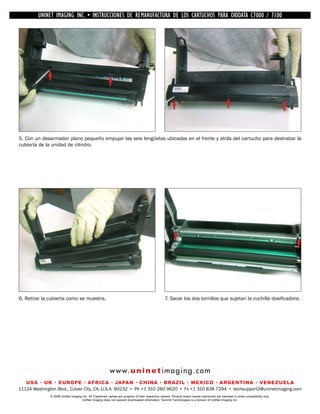
5. Con un desarmador plano pequeño empujar las seis lengüetas ubicadas en el frente y atrás del cartucho para destrabar la
cubierta de la unidad de cilindro.


6. Retirar la cubierta como se muestra.                                                         7. Sacar los dos tornillos que sujetan la cuchilla dosificadora.


                                                        w w w. u n i n e t i m a g i n g . c o m
   USA • UK • EUROPE • AFRICA • JAPAN • CHINA • BRAZIL • MEXICO • ARGENTINA • VENEZUELA
11124 Washington Blvd., Culver City, CA, U.S.A. 90232 • Ph +1 310 280 9620 • Fx +1 310 838 7294 • techsupport2@uninetimaging.com
              © 2008 UniNet Imaging Inc. All Trademark names are property of their respective owners. Product brand names mentioned are intended to show compatibility only.
                                   UniNet Imaging does not warrant downloaded information. Summit Technologies is a division of UniNet Imaging Inc.
UNINET IMAGING INC. •INC. • • BROTHER REMANUFACTURA•DE DISASSEMBLINGTHE TONER CARTRIDGE7100
          UNINET IMAGING INSTRUCCIONES DE 1240/1650 • LOS CARTUCHOS PARA OKIDATA CARTRIDGE
            UNINET IMAGING INC.        BROTHER 1240/1650        ASSEMBLING THE TONER C7000 /


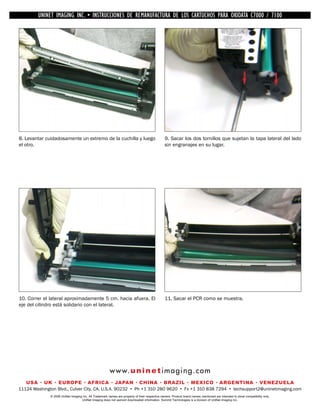
8. Levantar cuidadosamente un extremo de la cuchilla y luego                                    9. Sacar los dos tornillos que sujetan la tapa lateral del lado
el otro.                                                                                        sin engranajes en su lugar.


10. Correr el lateral aproximadamente 5 cm. hacia afuera. El                                    11. Sacar el PCR como se muestra.
eje del cilindro está solidario con el lateral.


                                                        w w w. u n i n e t i m a g i n g . c o m
   USA • UK • EUROPE • AFRICA • JAPAN • CHINA • BRAZIL • MEXICO • ARGENTINA • VENEZUELA
11124 Washington Blvd., Culver City, CA, U.S.A. 90232 • Ph +1 310 280 9620 • Fx +1 310 838 7294 • techsupport2@uninetimaging.com
              © 2008 UniNet Imaging Inc. All Trademark names are property of their respective owners. Product brand names mentioned are intended to show compatibility only.
                                   UniNet Imaging does not warrant downloaded information. Summit Technologies is a division of UniNet Imaging Inc.
UNINET IMAGING INC. •INC. • • BROTHER REMANUFACTURA•DE DISASSEMBLINGTHE TONER CARTRIDGE7100
          UNINET IMAGING INSTRUCCIONES DE 1240/1650 • LOS CARTUCHOS PARA OKIDATA CARTRIDGE
            UNINET IMAGING INC.        BROTHER 1240/1650        ASSEMBLING THE TONER C7000 /


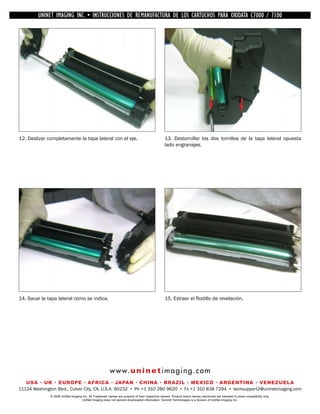
12. Deslizar completamente la tapa lateral con el eje.                                          13. Destornillar los dos tornillos de la tapa lateral opuesta
                                                                                                lado engranajes.


14. Sacar la tapa lateral como se indica.                                                       15. Extraer el Rodillo de revelación.


                                                        w w w. u n i n e t i m a g i n g . c o m
   USA • UK • EUROPE • AFRICA • JAPAN • CHINA • BRAZIL • MEXICO • ARGENTINA • VENEZUELA
11124 Washington Blvd., Culver City, CA, U.S.A. 90232 • Ph +1 310 280 9620 • Fx +1 310 838 7294 • techsupport2@uninetimaging.com
              © 2008 UniNet Imaging Inc. All Trademark names are property of their respective owners. Product brand names mentioned are intended to show compatibility only.
                                   UniNet Imaging does not warrant downloaded information. Summit Technologies is a division of UniNet Imaging Inc.
UNINET IMAGING INC. •INC. • • BROTHER REMANUFACTURA•DE DISASSEMBLINGTHE TONER CARTRIDGE7100
          UNINET IMAGING INSTRUCCIONES DE 1240/1650 • LOS CARTUCHOS PARA OKIDATA CARTRIDGE
            UNINET IMAGING INC.        BROTHER 1240/1650        ASSEMBLING THE TONER C7000 /


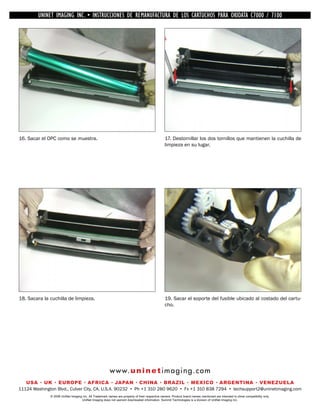
16. Sacar el OPC como se muestra.                                                               17. Destornillar los dos tornillos que mantienen la cuchilla de
                                                                                                limpieza en su lugar.


18. Sacara la cuchilla de limpieza.                                                             19. Sacar el soporte del fusible ubicado al costado del cartu-
                                                                                                cho.


                                                        w w w. u n i n e t i m a g i n g . c o m
   USA • UK • EUROPE • AFRICA • JAPAN • CHINA • BRAZIL • MEXICO • ARGENTINA • VENEZUELA
11124 Washington Blvd., Culver City, CA, U.S.A. 90232 • Ph +1 310 280 9620 • Fx +1 310 838 7294 • techsupport2@uninetimaging.com
              © 2008 UniNet Imaging Inc. All Trademark names are property of their respective owners. Product brand names mentioned are intended to show compatibility only.
                                   UniNet Imaging does not warrant downloaded information. Summit Technologies is a division of UniNet Imaging Inc.
UNINET IMAGING INC. •INC. • • BROTHER REMANUFACTURA•DE DISASSEMBLINGTHE TONER CARTRIDGE7100
          UNINET IMAGING INSTRUCCIONES DE 1240/1650 • LOS CARTUCHOS PARA OKIDATA CARTRIDGE
            UNINET IMAGING INC.        BROTHER 1240/1650        ASSEMBLING THE TONER C7000 /
                                                                                                       NOTAS


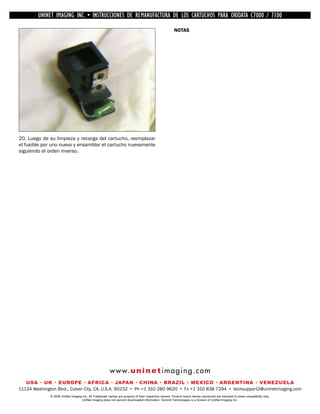
20. Luego de su limpieza y recarga del cartucho, reemplazar
el fusible por uno nuevo y ensamblar el cartucho nuevamente
siguiendo el orden inverso.


                                                        w w w. u n i n e t i m a g i n g . c o m
   USA • UK • EUROPE • AFRICA • JAPAN • CHINA • BRAZIL • MEXICO • ARGENTINA • VENEZUELA
11124 Washington Blvd., Culver City, CA, U.S.A. 90232 • Ph +1 310 280 9620 • Fx +1 310 838 7294 • techsupport2@uninetimaging.com
              © 2008 UniNet Imaging Inc. All Trademark names are property of their respective owners. Product brand names mentioned are intended to show compatibility only.
                                   UniNet Imaging does not warrant downloaded information. Summit Technologies is a division of UniNet Imaging Inc.

Manual de Recarga Okidata 7100 Espanhol.

  • 1.
    INSTRUCCIONES DE REMANUFACTURA DE LOS CARTUCHOS PARA OKIDATA™ C7000/7100 IMPRESORA COLOR OKIDATA C7100 CARTUCHO DE TONER OKIDATA C7100 VISTA FRONTAL VISTA TRASERA VISTA INFERIOR w w w. u n i n e t i m a g i n g . c o m USA • UK • EUROPE • AFRICA • JAPAN • CHINA • BRAZIL • MEXICO • ARGENTINA • VENEZUELA 11124 Washington Blvd., Culver City, CA, U.S.A. 90232 • Ph +1 310 280 9620 • Fx +1 310 838 7294 • techsupport2@uninetimaging.com © 2008 UniNet Imaging Inc. All Trademark names are property of their respective owners. Product brand names mentioned are intended to show compatibility only. UniNet Imaging does not warrant downloaded information. Summit Technologies is a division of UniNet Imaging Inc.
  • 2.
    UNINET IMAGING INC.•INC. • • BROTHER REMANUFACTURA•DE DISASSEMBLINGTHE TONER CARTRIDGE7100 UNINET IMAGING INSTRUCCIONES DE 1240/1650 • LOS CARTUCHOS PARA OKIDATA CARTRIDGE UNINET IMAGING INC. BROTHER 1240/1650 ASSEMBLING THE TONER C7000 / 1. Liberar el deposito de toner de la unidad de cilindro girando 2. El mango amarillo ya bajado a su posición "unlocked." el mango amarillo hacia abajo de su posición "locked," como se muestra. 3. Levantar el deposito de la unidad de cilindro, a partir del 4. Remover los dos tornillos ubicados en la parte superior de lado del mano azul, como se indica. la cubierta de la unidad de cilindro. w w w. u n i n e t i m a g i n g . c o m USA • UK • EUROPE • AFRICA • JAPAN • CHINA • BRAZIL • MEXICO • ARGENTINA • VENEZUELA 11124 Washington Blvd., Culver City, CA, U.S.A. 90232 • Ph +1 310 280 9620 • Fx +1 310 838 7294 • techsupport2@uninetimaging.com © 2008 UniNet Imaging Inc. All Trademark names are property of their respective owners. Product brand names mentioned are intended to show compatibility only. UniNet Imaging does not warrant downloaded information. Summit Technologies is a division of UniNet Imaging Inc.
  • 3.
    UNINET IMAGING INC.•INC. • • BROTHER REMANUFACTURA•DE DISASSEMBLINGTHE TONER CARTRIDGE7100 UNINET IMAGING INSTRUCCIONES DE 1240/1650 • LOS CARTUCHOS PARA OKIDATA CARTRIDGE UNINET IMAGING INC. BROTHER 1240/1650 ASSEMBLING THE TONER C7000 / 5. Con un desarmador plano pequeño empujar las seis lengüetas ubicadas en el frente y atrás del cartucho para destrabar la cubierta de la unidad de cilindro. 6. Retirar la cubierta como se muestra. 7. Sacar los dos tornillos que sujetan la cuchilla dosificadora. w w w. u n i n e t i m a g i n g . c o m USA • UK • EUROPE • AFRICA • JAPAN • CHINA • BRAZIL • MEXICO • ARGENTINA • VENEZUELA 11124 Washington Blvd., Culver City, CA, U.S.A. 90232 • Ph +1 310 280 9620 • Fx +1 310 838 7294 • techsupport2@uninetimaging.com © 2008 UniNet Imaging Inc. All Trademark names are property of their respective owners. Product brand names mentioned are intended to show compatibility only. UniNet Imaging does not warrant downloaded information. Summit Technologies is a division of UniNet Imaging Inc.
  • 4.
    UNINET IMAGING INC.•INC. • • BROTHER REMANUFACTURA•DE DISASSEMBLINGTHE TONER CARTRIDGE7100 UNINET IMAGING INSTRUCCIONES DE 1240/1650 • LOS CARTUCHOS PARA OKIDATA CARTRIDGE UNINET IMAGING INC. BROTHER 1240/1650 ASSEMBLING THE TONER C7000 / 8. Levantar cuidadosamente un extremo de la cuchilla y luego 9. Sacar los dos tornillos que sujetan la tapa lateral del lado el otro. sin engranajes en su lugar. 10. Correr el lateral aproximadamente 5 cm. hacia afuera. El 11. Sacar el PCR como se muestra. eje del cilindro está solidario con el lateral. w w w. u n i n e t i m a g i n g . c o m USA • UK • EUROPE • AFRICA • JAPAN • CHINA • BRAZIL • MEXICO • ARGENTINA • VENEZUELA 11124 Washington Blvd., Culver City, CA, U.S.A. 90232 • Ph +1 310 280 9620 • Fx +1 310 838 7294 • techsupport2@uninetimaging.com © 2008 UniNet Imaging Inc. All Trademark names are property of their respective owners. Product brand names mentioned are intended to show compatibility only. UniNet Imaging does not warrant downloaded information. Summit Technologies is a division of UniNet Imaging Inc.
  • 5.
    UNINET IMAGING INC.•INC. • • BROTHER REMANUFACTURA•DE DISASSEMBLINGTHE TONER CARTRIDGE7100 UNINET IMAGING INSTRUCCIONES DE 1240/1650 • LOS CARTUCHOS PARA OKIDATA CARTRIDGE UNINET IMAGING INC. BROTHER 1240/1650 ASSEMBLING THE TONER C7000 / 12. Deslizar completamente la tapa lateral con el eje. 13. Destornillar los dos tornillos de la tapa lateral opuesta lado engranajes. 14. Sacar la tapa lateral como se indica. 15. Extraer el Rodillo de revelación. w w w. u n i n e t i m a g i n g . c o m USA • UK • EUROPE • AFRICA • JAPAN • CHINA • BRAZIL • MEXICO • ARGENTINA • VENEZUELA 11124 Washington Blvd., Culver City, CA, U.S.A. 90232 • Ph +1 310 280 9620 • Fx +1 310 838 7294 • techsupport2@uninetimaging.com © 2008 UniNet Imaging Inc. All Trademark names are property of their respective owners. Product brand names mentioned are intended to show compatibility only. UniNet Imaging does not warrant downloaded information. Summit Technologies is a division of UniNet Imaging Inc.
  • 6.
    UNINET IMAGING INC.•INC. • • BROTHER REMANUFACTURA•DE DISASSEMBLINGTHE TONER CARTRIDGE7100 UNINET IMAGING INSTRUCCIONES DE 1240/1650 • LOS CARTUCHOS PARA OKIDATA CARTRIDGE UNINET IMAGING INC. BROTHER 1240/1650 ASSEMBLING THE TONER C7000 / 16. Sacar el OPC como se muestra. 17. Destornillar los dos tornillos que mantienen la cuchilla de limpieza en su lugar. 18. Sacara la cuchilla de limpieza. 19. Sacar el soporte del fusible ubicado al costado del cartu- cho. w w w. u n i n e t i m a g i n g . c o m USA • UK • EUROPE • AFRICA • JAPAN • CHINA • BRAZIL • MEXICO • ARGENTINA • VENEZUELA 11124 Washington Blvd., Culver City, CA, U.S.A. 90232 • Ph +1 310 280 9620 • Fx +1 310 838 7294 • techsupport2@uninetimaging.com © 2008 UniNet Imaging Inc. All Trademark names are property of their respective owners. Product brand names mentioned are intended to show compatibility only. UniNet Imaging does not warrant downloaded information. Summit Technologies is a division of UniNet Imaging Inc.
  • 7.
    UNINET IMAGING INC.•INC. • • BROTHER REMANUFACTURA•DE DISASSEMBLINGTHE TONER CARTRIDGE7100 UNINET IMAGING INSTRUCCIONES DE 1240/1650 • LOS CARTUCHOS PARA OKIDATA CARTRIDGE UNINET IMAGING INC. BROTHER 1240/1650 ASSEMBLING THE TONER C7000 / NOTAS 20. Luego de su limpieza y recarga del cartucho, reemplazar el fusible por uno nuevo y ensamblar el cartucho nuevamente siguiendo el orden inverso. w w w. u n i n e t i m a g i n g . c o m USA • UK • EUROPE • AFRICA • JAPAN • CHINA • BRAZIL • MEXICO • ARGENTINA • VENEZUELA 11124 Washington Blvd., Culver City, CA, U.S.A. 90232 • Ph +1 310 280 9620 • Fx +1 310 838 7294 • techsupport2@uninetimaging.com © 2008 UniNet Imaging Inc. All Trademark names are property of their respective owners. Product brand names mentioned are intended to show compatibility only. UniNet Imaging does not warrant downloaded information. Summit Technologies is a division of UniNet Imaging Inc.