HP4500TECHBLACK

            Technical Instructions                     Printers                                     OEM Info                                            Tools         1
                                HP4500/4550                                     Part Number: C4171A                             Cartridge Clip Remover
                                HP4500N/4550N                                   Yield @ 5%: 9,000 pages                         #1 Phillips Head Screwdriver
           CORPORATE
                                                                                PPM: 4 Color/ 16 Black                          Small Flat Blade Screwdriver
       LOS ANGELES, USA         HP4500DN/4550DN                                                                                 Phillips Head Jeweler’s Screwdriver
       US 1 800 394.9900                                                        Resolution: 600dpi
       Int’l +1 818 837.8100                                                                                                    Soft Cleaning Wipes
                                                                                (HP ImageRET 2400)
       FAX 1 800 394.9910                                                                                                       Needle Nose Pliers
       Int’l +1 818 838.7047                                                                                                    Vacuum or Compressed Air
       ATLANTA, USA                                                                                                             Mag Roller SLeeve Cleaner
       US 1 877 676.4223
       Int’l +1 770 516.9488
       FAX 1 877 337.7976
       Int’l +1 770 516.7794
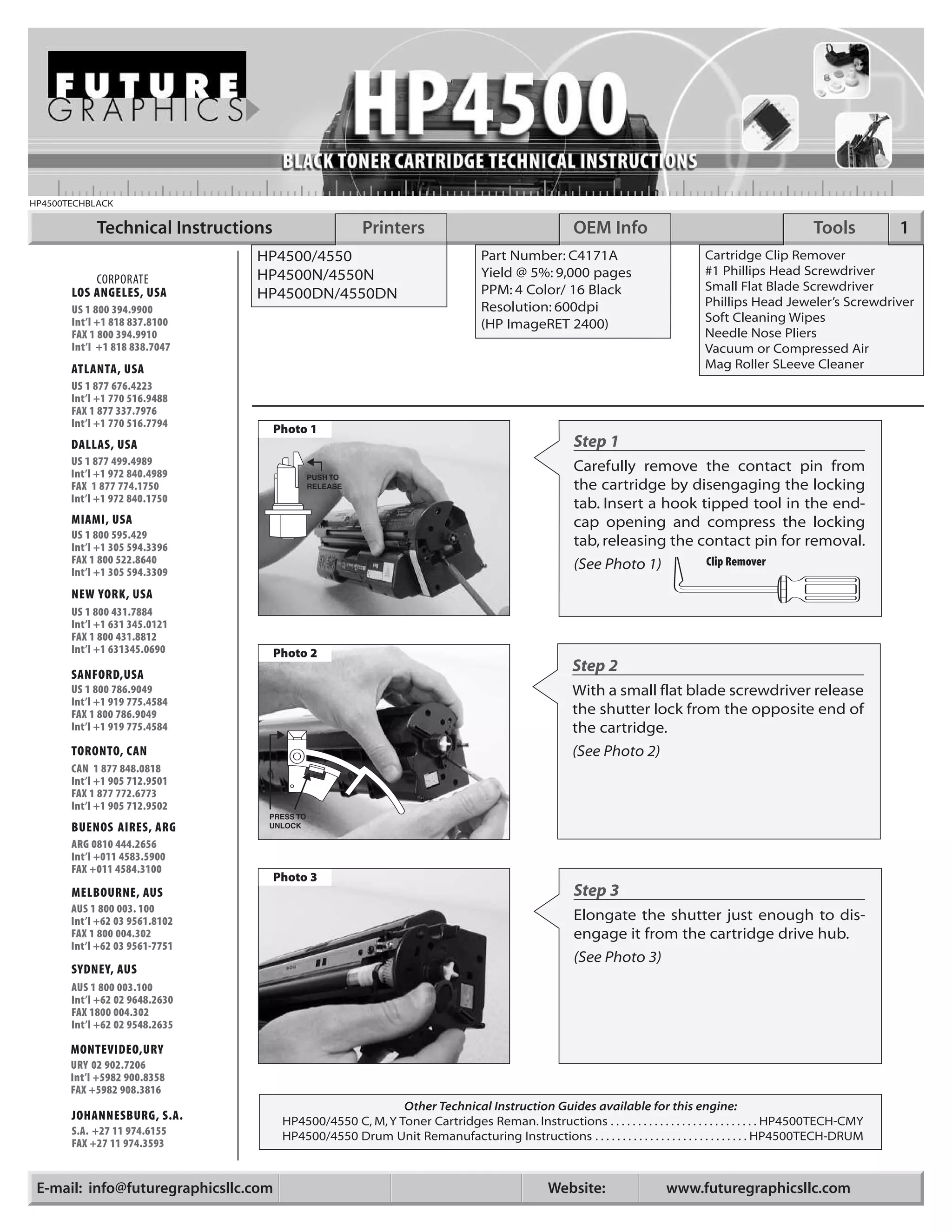
                                     Photo 1
       DALLAS, USA                                                                                  Step 1
       US 1 877 499.4989
       Int’l +1 972 840.4989
                                                                                                    Carefully remove the contact pin from
       FAX 1 877 774.1750                                                                           the cartridge by disengaging the locking
       Int’l +1 972 840.1750
                                                                                                    tab. Insert a hook tipped tool in the end-
       MIAMI, USA                                                                                   cap opening and compress the locking
       US 1 800 595.429
       Int’l +1 305 594.3396                                                                        tab, releasing the contact pin for removal.
       FAX 1 800 522.8640                                                                           (See Photo 1)                Clip Remover
       Int’l +1 305 594.3309
       NEW YORK, USA
       US 1 800 431.7884
       Int’l +1 631 345.0121
       FAX 1 800 431.8812
       Int’l +1 631345.0690          Photo 2
       SANFORD,USA
                                                                                                    Step 2
       US 1 800 786.9049                                                                            With a small flat blade screwdriver release
       Int’l +1 919 775.4584
       FAX 1 800 786.9049                                                                           the shutter lock from the opposite end of
       Int’l +1 919 775.4584                                                                        the cartridge.
       TORONTO, CAN                                                                                 (See Photo 2)
       CAN 1 877 848.0818
       Int’l +1 905 712.9501
       FAX 1 877 772.6773
       Int’l +1 905 712.9502
       BUENOS AIRES, ARG
       ARG 0810 444.2656
       Int’l +011 4583.5900
       FAX +011 4584.3100
                                     Photo 3
       MELBOURNE, AUS                                                                               Step 3
       AUS 1 800 003. 100
       Int’l +62 03 9561.8102                                                                       Elongate the shutter just enough to dis-
       FAX 1 800 004.302                                                                            engage it from the cartridge drive hub.
       Int’l +62 03 9561-7751
                                                                                                    (See Photo 3)
       SYDNEY, AUS
       AUS 1 800 003.100
       Int’l +62 02 9648.2630
       FAX 1800 004.302
       Int’l +62 02 9548.2635

       MONTEVIDEO,URY
       URY 02 902.7206
       Int’l +5982 900.8358
       FAX +5982 908.3816
                                                           Other Technical Instruction Guides available for this engine:
       JOHANNESBURG, S.A.             HP4500/4550 C, M, Y Toner Cartridges Reman. Instructions . . . . . . . . . . . . . . . . . . . . . . . . . . . HP4500TECH-CMY
       S.A. +27 11 974.6155           HP4500/4550 Drum Unit Remanufacturing Instructions . . . . . . . . . . . . . . . . . . . . . . . . . . . . HP4500TECH-DRUM
       FAX +27 11 974.3593


 E-mail: info@futuregraphicsllc.com                                                            Website:                 www.futuregraphicsllc.com
2                                                           HP4500 Technical Instructions

                                            Photo 4
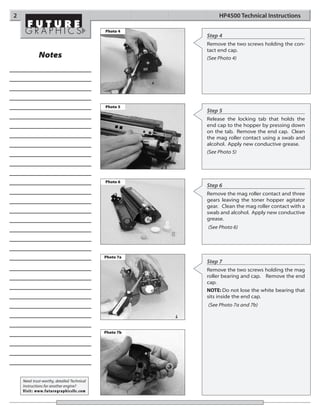
                                                       Step 4
                                                       Remove the two screws holding the con-
                                                       tact end cap.
             Notes                                     (See Photo 4)


                                            Photo 5
                                                       Step 5
                                                       Release the locking tab that holds the
                                                       end cap to the hopper by pressing down
                                                       on the tab. Remove the end cap. Clean
                                                       the mag roller contact using a swab and
                                                       alcohol. Apply new conductive grease.
                                                       (See Photo 5)


                                            Photo 6
                                                       Step 6
                                                       Remove the mag roller contact and three
                                                       gears leaving the toner hopper agitator
                                                       gear. Clean the mag roller contact with a
                                                       swab and alcohol. Apply new conductive
                                                       grease.
                                                       (See Photo 6)


                                            Photo 7a
                                                       Step 7
                                                       Remove the two screws holding the mag
                                                       roller bearing and cap. Remove the end
                                                       cap.
                                                       NOTE: Do not lose the white bearing that
                                                       sits inside the end cap.
                                                       (See Photo 7a and 7b)


                                            Photo 7b


    Need trust-worthy, detailed Technical
    Instructions for another engine?
    Visit: www.futuregraphicsllc.com
HP4500 Technical Instructions                                                                                           3

Photo 8a
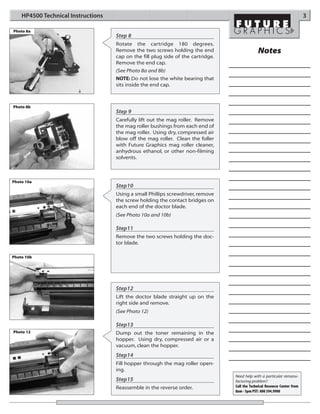
                                    Step 8
                                    Rotate the cartridge 180 degrees.
                                    Remove the two screws holding the end                      Notes
                                    cap on the fill plug side of the cartridge.
                                    Remove the end cap.
                                    (See Photo 8a and 8b)
                                    NOTE: Do not lose the white bearing that
                                    sits inside the end cap.


Photo 8b
                                    Step 9
                                    Carefully lift out the mag roller. Remove
                                    the mag roller bushings from each end of
                                    the mag roller. Using dry, compressed air
                                    blow off the mag roller. Clean the foller
                                    with Future Graphics mag roller cleaner,
                                    anhydrous ethanol, or other non-filming
                                    solvents.


Photo 10a
                                    Step10
                                    Using a small Phillips screwdriver, remove
                                    the screw holding the contact bridges on
                                    each end of the doctor blade.
                                    (See Photo 10a and 10b)

                                    Step11
                                    Remove the two screws holding the doc-
                                    tor blade.

Photo 10b


                                    Step12
                                    Lift the doctor blade straight up on the
                                    right side and remove.
                                    (See Photo 12)

                                    Step13
Photo 12                            Dump out the toner remaining in the
                                    hopper. Using dry, compressed air or a
                                    vacuum, clean the hopper.
                                    Step14
                                    Fill hopper through the mag roller open-
                                    ing.
                                                                                  Need help with a particular remanu-
                                    Step15                                        facturing problem?
                                    Reassemble in the reverse order.              Call the Technical Resource Center from
                                                                                  8am - 5pm PST: 800 394.9900
4                                                                                                                          HP4500 Technical Instructions

                                                                                  Engine Fact Sheet

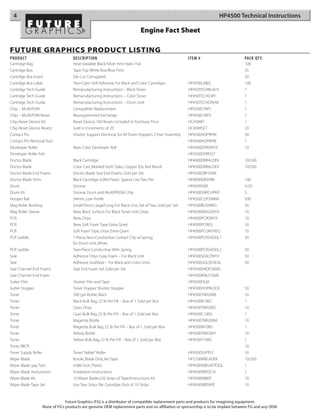
FUTURE GRAPHICS PRODUCT LISTING
PRODUCT                                DESCRIPTION                                                          ITEM #                    PACK QT Y.
Cartridge Bag                          Heat-Sealable Black/Silver Anti-Static Foil                                                    100
Cartridge Box                          Tape-Top White Box/Blue Print                                                                  25
Cartridge Box Insert                   Die Cut Corrugated                                                                             50
Cartridge Box Label                    Two-Color Self-Adhesive, For Black and Color Cartridges              HP4500LABEL               100
Cartridge Tech Guide                   Remanufacturing Instructions – Black Toner                           HP450TECHBLACK            1
Cartridge Tech Guide                   Remanufacturing Instructions – Color Toner                           HP450TECHCMY              1
Cartridge Tech Guide                   Remanufacturing Instructions – Drum Unit                             HP450TECHDRUM             1
Chip – MultEPOM                        Compatible Replacement                                               HP4500CHIPC               1
Chip – MultEPOM Reset                  Reprogrammed Exchange                                                HP4500CHIPX               1
Chip Reset Device Kit                  Reset Device, 100 Resets included in Purchase Price                  HC458KIT                  1
Chip Reset Device Resets               Sold in Increments of 20                                             HC458RSET                 20
Contact Pin                            Shutter Support Electrical, for All Toner Hoppers, 2-Part Assembly   HP4500HOPRPIN             50
Contact Pin Removal Tool                                                                                    HP4500HOPRPIN             1
Developer Roller                       New, Color Developer Roll                                            HP4500DVRONYX             10
Developer Roller Felt                                                                                       HP4500DVRFELT
Doctor Blade                           Black Cartridge                                                      HP4000DRBALDEK            10/240
Doctor Blade                           Color Cart, Molded both Sides, Copper (Do Not Bend)                  HP4500DRBALDEK            10/200
Doctor Blade End Foams                 Doctor Blade Seal End Foams, Sold per Set                            HP4500DBFOAM
Doctor Blade Shim                      Black Cartridge, 0.004 Plastic Spacer, Use Two Per                   HP4000DBSHIM              100
Drum                                   Sinonar                                                              HP4500SNR                 5/25
Drum Kit                               Sinonar Drum and MultEPROM Chip                                      HP4500SNRCHPKIT           5
Hooper Rail                            34mm, Low Profile                                                    HP4500CLIP34MM            500
Mag Roller Bushing                     Small/Short, Large/Long, For Black Unit, Set of Two, Sold per Set    HP4500BUSHING             50
Mag Roller Sleeve                      New, Black Surface, For Black Toner Unit, Onyx                       HP4500MAGONYX             10
PCR                                    New, Onyx                                                            HP4000PCRONYX             10
PCR                                    New, Soft Foam Type, Extra Quiet                                     HP4000PCREQ               10
PCR                                    Soft Foam Type, Onyx, Extra Quiet                                    HP4000PCONYXEQ            10
PCR Saddle                             1-Piece, Non-Conductive Contact Clip w/Spring,                       HP4500PCRSADDL1           50
                                       for Drum Unit, White
PCR Saddle                             Two-Piece Conductive, With Spring                                    HP4500PCRSADDL2           50
Seal                                   Adhesive Onyx Gray, Foam – For Black Unit                            HP4500SEALONYX            50
Seal                                   Adhesive GoldSeal – For Black and Color Units                        HP4500GOLSDSEAL           50
Seal Channel End Foams                 Seal End Foam Set, Sold per Set                                      HP4500ENDFOAMS
Seal Channel End Foam                                                                                       HP4500RAILFOAM
Sutter Film                            Shutter Film and Tape                                                HP4500FILM
Sutter Stopper                         Toner Hopper Shutter Stopper                                         HP4500HOPRLOCK            50
Toner                                  390 gm Bottle, Black                                                 HP4500TNR390B             10
Toner                                  Black Bulk Bag, 22 lb Per-Fill – Box of 1, Sold per Box              HP4500B10KG               1
Toner                                  Cyan, Onyx                                                           HP4500TNR200C             10
Toner                                  Cyan Bulk Bag, 22 lb Per-Fill – Box of 1, Sold per Box               HP4500C10KG               1
Toner                                  Magenta, Bottle                                                      HP4500TNR200M             10
Toner                                  Magenta Bulk Bag, 22 lb Per-Fill – Box of 1, Sold per Box            HP4500M10KG               1
Toner                                  Yellow, Bottle                                                       HP4500TNR200Y             10
Toner                                  Yellow Bulk Bag, 22 lb Per-Fill – Box of 1, Sold per Box             HP4500Y10KG               1
Toner, MICR                                                                                                                           10
Toner Supply Roller                    Toner “Adder” Roller                                                 HP4500SUPPLY              10
Wiper Blade                            Kuroki, Blade Only, No Tape                                          HP2100WBLADEK             10/200
Wiper Blade gap Tool                   0.080 Inch, Plastic                                                  HP4500WBGAPTOOL           1
Wiper Blade Instructions               Installation Instructions                                            HP4500WBTECH              1
Wiper Blade Kit                        10 Wiper Blades/20 Strips of Tape/Instructions Kit                   HP4500WBKIT               10
Wiper Blade Tape Set                   Use Two Strips Per Cartridge, Pack of 10 Strips                      HP4500WBTAPE              10


                                   Future Graphics (FG) is a distributor of compatible replacement parts and products for imagining equipment.
                      None of FG's products are genuine OEM replacement parts and no affiliation or sponsorship is to be implied between FG and any OEM.

Hp 4500 black

  • 1.
    HP4500TECHBLACK Technical Instructions Printers OEM Info Tools 1 HP4500/4550 Part Number: C4171A Cartridge Clip Remover HP4500N/4550N Yield @ 5%: 9,000 pages #1 Phillips Head Screwdriver CORPORATE PPM: 4 Color/ 16 Black Small Flat Blade Screwdriver LOS ANGELES, USA HP4500DN/4550DN Phillips Head Jeweler’s Screwdriver US 1 800 394.9900 Resolution: 600dpi Int’l +1 818 837.8100 Soft Cleaning Wipes (HP ImageRET 2400) FAX 1 800 394.9910 Needle Nose Pliers Int’l +1 818 838.7047 Vacuum or Compressed Air ATLANTA, USA Mag Roller SLeeve Cleaner US 1 877 676.4223 Int’l +1 770 516.9488 FAX 1 877 337.7976 Int’l +1 770 516.7794 Photo 1 DALLAS, USA Step 1 US 1 877 499.4989 Int’l +1 972 840.4989 Carefully remove the contact pin from FAX 1 877 774.1750 the cartridge by disengaging the locking Int’l +1 972 840.1750 tab. Insert a hook tipped tool in the end- MIAMI, USA cap opening and compress the locking US 1 800 595.429 Int’l +1 305 594.3396 tab, releasing the contact pin for removal. FAX 1 800 522.8640 (See Photo 1) Clip Remover Int’l +1 305 594.3309 NEW YORK, USA US 1 800 431.7884 Int’l +1 631 345.0121 FAX 1 800 431.8812 Int’l +1 631345.0690 Photo 2 SANFORD,USA Step 2 US 1 800 786.9049 With a small flat blade screwdriver release Int’l +1 919 775.4584 FAX 1 800 786.9049 the shutter lock from the opposite end of Int’l +1 919 775.4584 the cartridge. TORONTO, CAN (See Photo 2) CAN 1 877 848.0818 Int’l +1 905 712.9501 FAX 1 877 772.6773 Int’l +1 905 712.9502 BUENOS AIRES, ARG ARG 0810 444.2656 Int’l +011 4583.5900 FAX +011 4584.3100 Photo 3 MELBOURNE, AUS Step 3 AUS 1 800 003. 100 Int’l +62 03 9561.8102 Elongate the shutter just enough to dis- FAX 1 800 004.302 engage it from the cartridge drive hub. Int’l +62 03 9561-7751 (See Photo 3) SYDNEY, AUS AUS 1 800 003.100 Int’l +62 02 9648.2630 FAX 1800 004.302 Int’l +62 02 9548.2635 MONTEVIDEO,URY URY 02 902.7206 Int’l +5982 900.8358 FAX +5982 908.3816 Other Technical Instruction Guides available for this engine: JOHANNESBURG, S.A. HP4500/4550 C, M, Y Toner Cartridges Reman. Instructions . . . . . . . . . . . . . . . . . . . . . . . . . . . HP4500TECH-CMY S.A. +27 11 974.6155 HP4500/4550 Drum Unit Remanufacturing Instructions . . . . . . . . . . . . . . . . . . . . . . . . . . . . HP4500TECH-DRUM FAX +27 11 974.3593 E-mail: info@futuregraphicsllc.com Website: www.futuregraphicsllc.com
  • 2.
    2 HP4500 Technical Instructions Photo 4 Step 4 Remove the two screws holding the con- tact end cap. Notes (See Photo 4) Photo 5 Step 5 Release the locking tab that holds the end cap to the hopper by pressing down on the tab. Remove the end cap. Clean the mag roller contact using a swab and alcohol. Apply new conductive grease. (See Photo 5) Photo 6 Step 6 Remove the mag roller contact and three gears leaving the toner hopper agitator gear. Clean the mag roller contact with a swab and alcohol. Apply new conductive grease. (See Photo 6) Photo 7a Step 7 Remove the two screws holding the mag roller bearing and cap. Remove the end cap. NOTE: Do not lose the white bearing that sits inside the end cap. (See Photo 7a and 7b) Photo 7b Need trust-worthy, detailed Technical Instructions for another engine? Visit: www.futuregraphicsllc.com
  • 3.
    HP4500 Technical Instructions 3 Photo 8a Step 8 Rotate the cartridge 180 degrees. Remove the two screws holding the end Notes cap on the fill plug side of the cartridge. Remove the end cap. (See Photo 8a and 8b) NOTE: Do not lose the white bearing that sits inside the end cap. Photo 8b Step 9 Carefully lift out the mag roller. Remove the mag roller bushings from each end of the mag roller. Using dry, compressed air blow off the mag roller. Clean the foller with Future Graphics mag roller cleaner, anhydrous ethanol, or other non-filming solvents. Photo 10a Step10 Using a small Phillips screwdriver, remove the screw holding the contact bridges on each end of the doctor blade. (See Photo 10a and 10b) Step11 Remove the two screws holding the doc- tor blade. Photo 10b Step12 Lift the doctor blade straight up on the right side and remove. (See Photo 12) Step13 Photo 12 Dump out the toner remaining in the hopper. Using dry, compressed air or a vacuum, clean the hopper. Step14 Fill hopper through the mag roller open- ing. Need help with a particular remanu- Step15 facturing problem? Reassemble in the reverse order. Call the Technical Resource Center from 8am - 5pm PST: 800 394.9900
  • 4.
    4 HP4500 Technical Instructions Engine Fact Sheet FUTURE GRAPHICS PRODUCT LISTING PRODUCT DESCRIPTION ITEM # PACK QT Y. Cartridge Bag Heat-Sealable Black/Silver Anti-Static Foil 100 Cartridge Box Tape-Top White Box/Blue Print 25 Cartridge Box Insert Die Cut Corrugated 50 Cartridge Box Label Two-Color Self-Adhesive, For Black and Color Cartridges HP4500LABEL 100 Cartridge Tech Guide Remanufacturing Instructions – Black Toner HP450TECHBLACK 1 Cartridge Tech Guide Remanufacturing Instructions – Color Toner HP450TECHCMY 1 Cartridge Tech Guide Remanufacturing Instructions – Drum Unit HP450TECHDRUM 1 Chip – MultEPOM Compatible Replacement HP4500CHIPC 1 Chip – MultEPOM Reset Reprogrammed Exchange HP4500CHIPX 1 Chip Reset Device Kit Reset Device, 100 Resets included in Purchase Price HC458KIT 1 Chip Reset Device Resets Sold in Increments of 20 HC458RSET 20 Contact Pin Shutter Support Electrical, for All Toner Hoppers, 2-Part Assembly HP4500HOPRPIN 50 Contact Pin Removal Tool HP4500HOPRPIN 1 Developer Roller New, Color Developer Roll HP4500DVRONYX 10 Developer Roller Felt HP4500DVRFELT Doctor Blade Black Cartridge HP4000DRBALDEK 10/240 Doctor Blade Color Cart, Molded both Sides, Copper (Do Not Bend) HP4500DRBALDEK 10/200 Doctor Blade End Foams Doctor Blade Seal End Foams, Sold per Set HP4500DBFOAM Doctor Blade Shim Black Cartridge, 0.004 Plastic Spacer, Use Two Per HP4000DBSHIM 100 Drum Sinonar HP4500SNR 5/25 Drum Kit Sinonar Drum and MultEPROM Chip HP4500SNRCHPKIT 5 Hooper Rail 34mm, Low Profile HP4500CLIP34MM 500 Mag Roller Bushing Small/Short, Large/Long, For Black Unit, Set of Two, Sold per Set HP4500BUSHING 50 Mag Roller Sleeve New, Black Surface, For Black Toner Unit, Onyx HP4500MAGONYX 10 PCR New, Onyx HP4000PCRONYX 10 PCR New, Soft Foam Type, Extra Quiet HP4000PCREQ 10 PCR Soft Foam Type, Onyx, Extra Quiet HP4000PCONYXEQ 10 PCR Saddle 1-Piece, Non-Conductive Contact Clip w/Spring, HP4500PCRSADDL1 50 for Drum Unit, White PCR Saddle Two-Piece Conductive, With Spring HP4500PCRSADDL2 50 Seal Adhesive Onyx Gray, Foam – For Black Unit HP4500SEALONYX 50 Seal Adhesive GoldSeal – For Black and Color Units HP4500GOLSDSEAL 50 Seal Channel End Foams Seal End Foam Set, Sold per Set HP4500ENDFOAMS Seal Channel End Foam HP4500RAILFOAM Sutter Film Shutter Film and Tape HP4500FILM Sutter Stopper Toner Hopper Shutter Stopper HP4500HOPRLOCK 50 Toner 390 gm Bottle, Black HP4500TNR390B 10 Toner Black Bulk Bag, 22 lb Per-Fill – Box of 1, Sold per Box HP4500B10KG 1 Toner Cyan, Onyx HP4500TNR200C 10 Toner Cyan Bulk Bag, 22 lb Per-Fill – Box of 1, Sold per Box HP4500C10KG 1 Toner Magenta, Bottle HP4500TNR200M 10 Toner Magenta Bulk Bag, 22 lb Per-Fill – Box of 1, Sold per Box HP4500M10KG 1 Toner Yellow, Bottle HP4500TNR200Y 10 Toner Yellow Bulk Bag, 22 lb Per-Fill – Box of 1, Sold per Box HP4500Y10KG 1 Toner, MICR 10 Toner Supply Roller Toner “Adder” Roller HP4500SUPPLY 10 Wiper Blade Kuroki, Blade Only, No Tape HP2100WBLADEK 10/200 Wiper Blade gap Tool 0.080 Inch, Plastic HP4500WBGAPTOOL 1 Wiper Blade Instructions Installation Instructions HP4500WBTECH 1 Wiper Blade Kit 10 Wiper Blades/20 Strips of Tape/Instructions Kit HP4500WBKIT 10 Wiper Blade Tape Set Use Two Strips Per Cartridge, Pack of 10 Strips HP4500WBTAPE 10 Future Graphics (FG) is a distributor of compatible replacement parts and products for imagining equipment. None of FG's products are genuine OEM replacement parts and no affiliation or sponsorship is to be implied between FG and any OEM.