BRDR200TECH

 Technical Instructions          Machine Compatibility                 OEM Info                          Tools         1
                                  See page 8             Part Number: DR-200            Phillips Screwdriver
            CORPORATE                                    Yield @ 20,000 pgs             Small flat blade Screwdriver
        LOS ANGELES, USA
                                                         Pages/Min.: 6
        US 1 800 394.9900                                                               Supplies R equired:
        Int’l +1 818 837.8100                            Resolution: 600x600 dpi
        FAX 1 800 394.9910                                                              Cotton Swab
        Int’l +1 818 838.7047                                                           99% Alcohol
        ATLANTA, USA                                                                    Replacement Drum
        US 1 877 676.4223
        Int’l +1 770 516.9488
        FAX 1 877 337.7976
        Int’l +1 770 516.7794
        DALLAS, USA
        US 1 877 499.4989
        Int’l +1 972 840.4989
        FAX 1 877 774.1750
        Int’l +1 972 840.1750
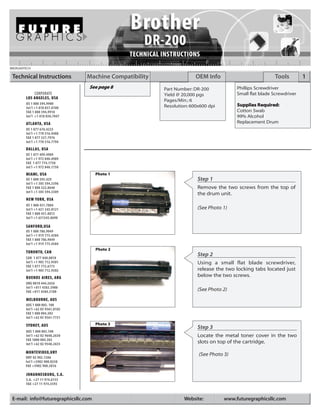
        MIAMI, USA                    Photo 1
        US 1 800 595.429                                                Step 1
        Int’l +1 305 594.3396
        FAX 1 800 522.8640                                              Remove the two screws from the top of
        Int’l +1 305 594.3309
                                                                        the drum unit.
        NEW YORK, USA
        US 1 800 431.7884
        Int’l +1 631 345.0121                                           (See Photo 1)
        FAX 1 800 431.8812
        Int’l +1 631345.0690

        SANFORD,USA
        US 1 800 786.9049
        Int’l +1 919 775.4584
        FAX 1 800 786.9049
        Int’l +1 919 775.4584
                                      Photo 2
        TORONTO, CAN
                                                                        Step 2
        CAN 1 877 848.0818
        Int’l +1 905 712.9501                                           Using a small flat blade screwdriver,
        FAX 1 877 772.6773
        Int’l +1 905 712.9502                                           release the two locking tabs located just
        BUENOS AIRES, ARG                                               below the two screws.
        ARG 0810 444.2656
        Int’l +011 4583.5900
        FAX +011 4584.3100                                              (See Photo 2)
        MELBOURNE, AUS
        AUS 1 800 003. 100
        Int’l +62 03 9561.8102
        FAX 1 800 004.302
        Int’l +62 03 9561-7751

        SYDNEY, AUS                   Photo 3
                                                                        Step 3
        AUS 1 800 003.100
        Int’l +62 02 9648.2630                                          Locate the metal toner cover in the two
        FAX 1800 004.302
        Int’l +62 02 9548.2635                                          slots on top of the cartridge.
        MONTEVIDEO,URY                                                  (See Photo 3)
        URY 02 902.7206
        Int’l +5982 900.8358
        FAX +5982 908.3816

        JOHANNESBURG, S.A.
        S.A. +27 11 974.6155
        FAX +27 11 974.3593


 E-mail: info@futuregraphicsllc.com                               Website:         www.futuregraphicsllc.com
2                                                    Brother DR-200 Technical Instructions

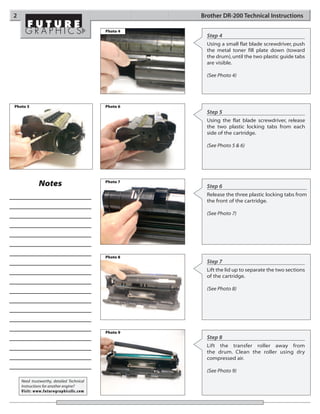
                                           Photo 4
                                                       Step 4
                                                       Using a small flat blade screwdriver, push
                                                       the metal toner fill plate down (toward
                                                       the drum), until the two plastic guide tabs
                                                       are visible.

                                                       (See Photo 4)


Photo 5                                    Photo 6
                                                       Step 5
                                                       Using the flat blade screwdriver, release
                                                       the two plastic locking tabs from each
                                                       side of the cartridge.

                                                       (See Photo 5 & 6)


             Notes                         Photo 7
                                                       Step 6
                                                       Release the three plastic locking tabs from
                                                       the front of the cartridge.

                                                       (See Photo 7)


                                           Photo 8
                                                       Step 7
                                                       Lift the lid up to separate the two sections
                                                       of the cartridge.

                                                       (See Photo 8)


                                           Photo 9
                                                       Step 8
                                                       Lift the transfer roller away from
                                                       the drum. Clean the roller using dry
                                                       compressed air.

                                                       (See Photo 9)
    Need trustworthy, detailed Technical
    Instructions for another engine?
    Visit: www.futuregraphicsllc.com
Brother DR-200 Technical Instruction                                                                                     3

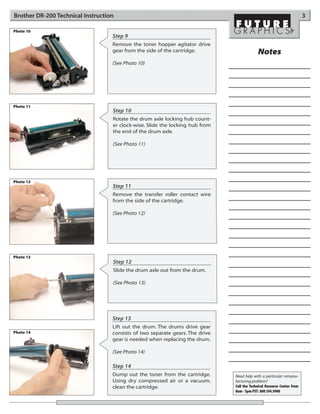
Photo 10
                                   Step 9
                                   Remove the toner hopper agitator drive
                                   gear from the side of the cartridge.                     Notes
                                   (See Photo 10)


Photo 11
                                   Step 10
                                   Rotate the drum axle locking hub count-
                                   er clock-wise. Slide the locking hub from
                                   the end of the drum axle.

                                   (See Photo 11)


Photo 12
                                   Step 11
                                   Remove the transfer roller contact wire
                                   from the side of the cartridge.

                                   (See Photo 12)


Photo 13
                                   Step 12
                                   Slide the drum axle out from the drum.

                                   (See Photo 13)


                                   Step 13
                                   Lift out the drum. The drums drive gear
Photo 14                           consists of two separate gears. The drive
                                   gear is needed when replacing the drum.

                                   (See Photo 14)

                                   Step 14
                                   Dump out the toner from the cartridge.      Need help with a particular remanu-
                                   Using dry compressed air or a vacuum,       facturing problem?
                                   clean the cartridge.                        Call the Technical Resource Center from
                                                                               8am - 5pm PST: 800 394.9900
4                                                     Brother DR-200 Technical Instructions

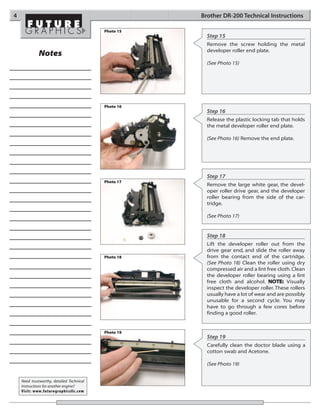
                                           Photo 15
                                                        Step 15
                                                        Remove the screw holding the metal
                                                        developer roller end plate.
             Notes
                                                        (See Photo 15)


                                           Photo 16
                                                        Step 16
                                                        Release the plastic locking tab that holds
                                                        the metal developer roller end plate.

                                                        (See Photo 16) Remove the end plate.


                                                        Step 17
                                           Photo 17
                                                        Remove the large white gear, the devel-
                                                        oper roller drive gear, and the developer
                                                        roller bearing from the side of the car-
                                                        tridge.

                                                        (See Photo 17)


                                                        Step 18
                                                        Lift the developer roller out from the
                                                        drive gear end, and slide the roller away
                                           Photo 18     from the contact end of the cartridge.
                                                        (See Photo 18) Clean the roller using dry
                                                        compressed air and a lint free cloth. Clean
                                                        the developer roller bearing using a lint
                                                        free cloth and alcohol. NOTE: Visually
                                                        inspect the developer roller. These rollers
                                                        usually have a lot of wear and are possibly
                                                        unusable for a second cycle. You may
                                                        have to go through a few cores before
                                                        finding a good roller.


                                           Photo 19
                                                        Step 19
                                                        Carefully clean the doctor blade using a
                                                        cotton swab and Acetone.

                                                        (See Photo 19)


    Need trustworthy, detailed Technical
    Instructions for another engine?
    Visit: www.futuregraphicsllc.com
Brother DR-200 Technical Instruction                                                                                         5

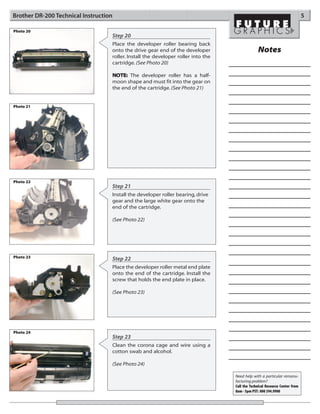
Photo 20
                                   Step 20
                                   Place the developer roller bearing back
                                   onto the drive gear end of the developer                     Notes
                                   roller. Install the developer roller into the
                                   cartridge. (See Photo 20)

                                   NOTE: The developer roller has a half-
                                   moon shape and must fit into the gear on
                                   the end of the cartridge. (See Photo 21)


Photo 21


Photo 22
                                   Step 21
                                   Install the developer roller bearing, drive
                                   gear and the large white gear onto the
                                   end of the cartridge.

                                   (See Photo 22)


Photo 23                           Step 22
                                   Place the developer roller metal end plate
                                   onto the end of the cartridge. Install the
                                   screw that holds the end plate in place.

                                   (See Photo 23)


Photo 24
                                   Step 23
                                   Clean the corona cage and wire using a
                                   cotton swab and alcohol.

                                   (See Photo 24)

                                                                                   Need help with a particular remanu-
                                                                                   facturing problem?
                                                                                   Call the Technical Resource Center from
                                                                                   8am - 5pm PST: 800 394.9900
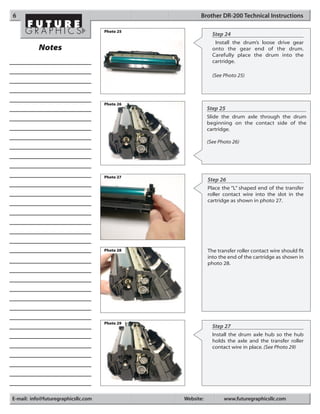
6                                                     Brother DR-200 Technical Instructions

                                     Photo 25
                                                             Step 24
                                                              Install the drum’s loose drive gear
           Notes                                             onto the gear end of the drum.
                                                             Carefully place the drum into the
                                                             cartridge.

                                                             (See Photo 25)


                                     Photo 26
                                                           Step 25
                                                           Slide the drum axle through the drum
                                                           beginning on the contact side of the
                                                           cartridge.

                                                           (See Photo 26)


                                     Photo 27
                                                           Step 26
                                                           Place the “L” shaped end of the transfer
                                                           roller contact wire into the slot in the
                                                           cartridge as shown in photo 27.


                                     Photo 28              The transfer roller contact wire should fit
                                                           into the end of the cartridge as shown in
                                                           photo 28.


                                     Photo 29
                                                             Step 27
                                                             Install the drum axle hub so the hub
                                                             holds the axle and the transfer roller
                                                             contact wire in place. (See Photo 29)


E-mail: info@futuregraphicsllc.com              Website:          www.futuregraphicsllc.com
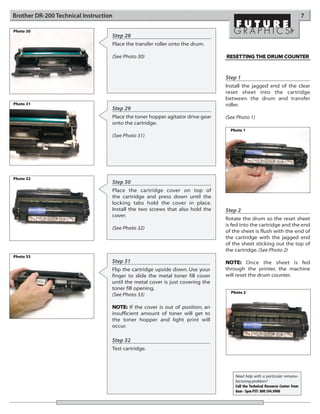
Brother DR-200 Technical Instruction                                                                                          7

Photo 30
                                   Step 28
                                   Place the transfer roller onto the drum.

                                   (See Photo 30)                               RESET TING THE DRUM COUNTER


                                                                                Step 1
                                                                                Install the jagged end of the clear
                                                                                reset sheet into the cartridge
                                                                                between the drum and transfer
Photo 31                                                                        roller.
                                   Step 29
                                   Place the toner hopper agitator drive gear   (See Photo 1)
                                   onto the cartridge.
                                                                                  Photo 1
                                   (See Photo 31)


Photo 32
                                   Step 30
                                   Place the cartridge cover on top of
                                   the cartridge and press down until the
                                   locking tabs hold the cover in place.
                                   Install the two screws that also hold the    Step 2
                                   cover.
                                                                                Rotate the drum so the reset sheet
                                                                                is fed into the cartridge and the end
                                   (See Photo 32)
                                                                                of the sheet is flush with the end of
                                                                                the cartridge with the jagged end
                                                                                of the sheet sticking out the top of
                                                                                the cartridge. (See Photo 2)
Photo 33
                                   Step 31                                      NOTE: Once the sheet is fed
                                   Flip the cartridge upside down. Use your     through the printer, the machine
                                   finger to slide the metal toner fill cover   will reset the drum counter.
                                   until the metal cover is just covering the
                                   toner fill opening.
                                                                                  Photo 2
                                   (See Photo 33)

                                   NOTE: If the cover is out of position, an
                                   insufficient amount of toner will get to
                                   the toner hopper and light print will
                                   occur.

                                   Step 32
                                   Test cartridge.


                                                                                    Need help with a particular remanu-
                                                                                    facturing problem?
                                                                                    Call the Technical Resource Center from
                                                                                    8am - 5pm PST: 800 394.9900
8                                                                                                         Brother DR-200 Technical Instructions


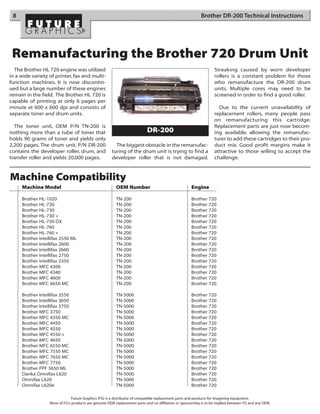
 Remanufacturing the Brother 720 Drum Unit
  The Brother HL 720 engine was utilized                                                                           Streaking caused by worn developer
in a wide variety of printer, fax and multi-                                                                       rollers is a constant problem for those
function machines. It is now discontin-                                                                            who remanufacture the DR-200 drum
ued but a large number of these engines                                                                            units. Multiple cores may need to be
remain in the field. The Brother HL 720 is                                                                         screened in order to find a good roller.
capable of printing at only 6 pages per
minute at 600 x 600 dpi and consists of                                                                              Due to the current unavailability of
separate toner and drum units.                                                                                     replacement rollers, many people pass
                                                                                                                   on remanufacturing this cartridge.
  The toner unit, OEM P/N TN-200 is                                                                                Replacement parts are just now becom-
nothing more than a tube of toner that                                     DR-200                                  ing available, allowing the remanufac-
holds 90 grams of toner and yields only                                                                            turer to add these cartridges to their pro-
2,200 pages. The drum unit, P/N DR-200                  The biggest obstacle in the remanufac-                     duct mix. Good profit margins make it
contains the developer roller, drum, and              turing of the drum unit is trying to find a                  attractive to those willing to accept the
transfer roller and yields 20,000 pages.              developer roller that is not damaged.                        challenge.


Machine Compatibility
     Machine Model                                       OEM Number                                  Engine

     Brother HL-1020                                     TN-200                                      Brother 720
     Brother HL-720                                      TN-200                                      Brother 720
     Brother HL-730                                      TN-200                                      Brother 720
     Brother HL-730 +                                    TN-200                                      Brother 720
     Brother HL-730 DX                                   TN-200                                      Brother 720
     Brother HL-760                                      TN-200                                      Brother 720
     Brother HL-760 +                                    TN-200                                      Brother 720
     Brother Intellifax 2550 ML                          TN-200                                      Brother 720
     Brother Intellifax 2600                             TN-200                                      Brother 720
     Brother Intellifax 2660                             TN-200                                      Brother 720
     Brother Intellifax 2750                             TN-200                                      Brother 720
     Brother Intellifax 3350                             TN-200                                      Brother 720
     Brother MFC 4300                                    TN-200                                      Brother 720
     Brother MFC 4340                                    TN-200                                      Brother 720
     Brother MFC 4600                                    TN-200                                      Brother 720
     Brother MFC 6650 MC                                 TN-200                                      Brother 720

     Brother Intellifax 3550                             TN-5000                                     Brother 720
     Brother Intellifax 3650                             TN-5000                                     Brother 720
     Brother Intellifax 3750                             TN-5000                                     Brother 720
     Brother MFC 3750                                    TN-5000                                     Brother 720
     Brother MFC 4350 MC                                 TN-5000                                     Brother 720
     Brother MFC 4450                                    TN-5000                                     Brother 720
     Brother MFC 4550                                    TN-5000                                     Brother 720
     Brother MFC 4550 +                                  TN-5000                                     Brother 720
     Brother MFC 4650                                    TN-5000                                     Brother 720
     Brother MFC 6550 MC                                 TN-5000                                     Brother 720
     Brother MFC 7550 MC                                 TN-5000                                     Brother 720
     Brother MFC 7650 MC                                 TN-5000                                     Brother 720
     Brother MFC 7750                                    TN-5000                                     Brother 720
     Brother PPF 3650 ML                                 TN-5000                                     Brother 720
     Danka Omnifax L620                                  TN-5000                                     Brother 720
     Omnifax L620                                        TN-5000                                     Brother 720
     Omnifax L620e                                       TN-5000                                     Brother 720

                               Future Graphics (FG) is a distributor of compatible replacement parts and products for imagining equipment.
                  None of FG's products are genuine OEM replacement parts and no affiliation or sponsorship is to be implied between FG and any OEM.

Brother 720 dr 200

  • 1.
    BRDR200TECH Technical Instructions Machine Compatibility OEM Info Tools 1 See page 8 Part Number: DR-200 Phillips Screwdriver CORPORATE Yield @ 20,000 pgs Small flat blade Screwdriver LOS ANGELES, USA Pages/Min.: 6 US 1 800 394.9900 Supplies R equired: Int’l +1 818 837.8100 Resolution: 600x600 dpi FAX 1 800 394.9910 Cotton Swab Int’l +1 818 838.7047 99% Alcohol ATLANTA, USA Replacement Drum US 1 877 676.4223 Int’l +1 770 516.9488 FAX 1 877 337.7976 Int’l +1 770 516.7794 DALLAS, USA US 1 877 499.4989 Int’l +1 972 840.4989 FAX 1 877 774.1750 Int’l +1 972 840.1750 MIAMI, USA Photo 1 US 1 800 595.429 Step 1 Int’l +1 305 594.3396 FAX 1 800 522.8640 Remove the two screws from the top of Int’l +1 305 594.3309 the drum unit. NEW YORK, USA US 1 800 431.7884 Int’l +1 631 345.0121 (See Photo 1) FAX 1 800 431.8812 Int’l +1 631345.0690 SANFORD,USA US 1 800 786.9049 Int’l +1 919 775.4584 FAX 1 800 786.9049 Int’l +1 919 775.4584 Photo 2 TORONTO, CAN Step 2 CAN 1 877 848.0818 Int’l +1 905 712.9501 Using a small flat blade screwdriver, FAX 1 877 772.6773 Int’l +1 905 712.9502 release the two locking tabs located just BUENOS AIRES, ARG below the two screws. ARG 0810 444.2656 Int’l +011 4583.5900 FAX +011 4584.3100 (See Photo 2) MELBOURNE, AUS AUS 1 800 003. 100 Int’l +62 03 9561.8102 FAX 1 800 004.302 Int’l +62 03 9561-7751 SYDNEY, AUS Photo 3 Step 3 AUS 1 800 003.100 Int’l +62 02 9648.2630 Locate the metal toner cover in the two FAX 1800 004.302 Int’l +62 02 9548.2635 slots on top of the cartridge. MONTEVIDEO,URY (See Photo 3) URY 02 902.7206 Int’l +5982 900.8358 FAX +5982 908.3816 JOHANNESBURG, S.A. S.A. +27 11 974.6155 FAX +27 11 974.3593 E-mail: info@futuregraphicsllc.com Website: www.futuregraphicsllc.com
  • 2.
    2 Brother DR-200 Technical Instructions Photo 4 Step 4 Using a small flat blade screwdriver, push the metal toner fill plate down (toward the drum), until the two plastic guide tabs are visible. (See Photo 4) Photo 5 Photo 6 Step 5 Using the flat blade screwdriver, release the two plastic locking tabs from each side of the cartridge. (See Photo 5 & 6) Notes Photo 7 Step 6 Release the three plastic locking tabs from the front of the cartridge. (See Photo 7) Photo 8 Step 7 Lift the lid up to separate the two sections of the cartridge. (See Photo 8) Photo 9 Step 8 Lift the transfer roller away from the drum. Clean the roller using dry compressed air. (See Photo 9) Need trustworthy, detailed Technical Instructions for another engine? Visit: www.futuregraphicsllc.com
  • 3.
    Brother DR-200 TechnicalInstruction 3 Photo 10 Step 9 Remove the toner hopper agitator drive gear from the side of the cartridge. Notes (See Photo 10) Photo 11 Step 10 Rotate the drum axle locking hub count- er clock-wise. Slide the locking hub from the end of the drum axle. (See Photo 11) Photo 12 Step 11 Remove the transfer roller contact wire from the side of the cartridge. (See Photo 12) Photo 13 Step 12 Slide the drum axle out from the drum. (See Photo 13) Step 13 Lift out the drum. The drums drive gear Photo 14 consists of two separate gears. The drive gear is needed when replacing the drum. (See Photo 14) Step 14 Dump out the toner from the cartridge. Need help with a particular remanu- Using dry compressed air or a vacuum, facturing problem? clean the cartridge. Call the Technical Resource Center from 8am - 5pm PST: 800 394.9900
  • 4.
    4 Brother DR-200 Technical Instructions Photo 15 Step 15 Remove the screw holding the metal developer roller end plate. Notes (See Photo 15) Photo 16 Step 16 Release the plastic locking tab that holds the metal developer roller end plate. (See Photo 16) Remove the end plate. Step 17 Photo 17 Remove the large white gear, the devel- oper roller drive gear, and the developer roller bearing from the side of the car- tridge. (See Photo 17) Step 18 Lift the developer roller out from the drive gear end, and slide the roller away Photo 18 from the contact end of the cartridge. (See Photo 18) Clean the roller using dry compressed air and a lint free cloth. Clean the developer roller bearing using a lint free cloth and alcohol. NOTE: Visually inspect the developer roller. These rollers usually have a lot of wear and are possibly unusable for a second cycle. You may have to go through a few cores before finding a good roller. Photo 19 Step 19 Carefully clean the doctor blade using a cotton swab and Acetone. (See Photo 19) Need trustworthy, detailed Technical Instructions for another engine? Visit: www.futuregraphicsllc.com
  • 5.
    Brother DR-200 TechnicalInstruction 5 Photo 20 Step 20 Place the developer roller bearing back onto the drive gear end of the developer Notes roller. Install the developer roller into the cartridge. (See Photo 20) NOTE: The developer roller has a half- moon shape and must fit into the gear on the end of the cartridge. (See Photo 21) Photo 21 Photo 22 Step 21 Install the developer roller bearing, drive gear and the large white gear onto the end of the cartridge. (See Photo 22) Photo 23 Step 22 Place the developer roller metal end plate onto the end of the cartridge. Install the screw that holds the end plate in place. (See Photo 23) Photo 24 Step 23 Clean the corona cage and wire using a cotton swab and alcohol. (See Photo 24) Need help with a particular remanu- facturing problem? Call the Technical Resource Center from 8am - 5pm PST: 800 394.9900
  • 6.
    6 Brother DR-200 Technical Instructions Photo 25 Step 24 Install the drum’s loose drive gear Notes onto the gear end of the drum. Carefully place the drum into the cartridge. (See Photo 25) Photo 26 Step 25 Slide the drum axle through the drum beginning on the contact side of the cartridge. (See Photo 26) Photo 27 Step 26 Place the “L” shaped end of the transfer roller contact wire into the slot in the cartridge as shown in photo 27. Photo 28 The transfer roller contact wire should fit into the end of the cartridge as shown in photo 28. Photo 29 Step 27 Install the drum axle hub so the hub holds the axle and the transfer roller contact wire in place. (See Photo 29) E-mail: info@futuregraphicsllc.com Website: www.futuregraphicsllc.com
  • 7.
    Brother DR-200 TechnicalInstruction 7 Photo 30 Step 28 Place the transfer roller onto the drum. (See Photo 30) RESET TING THE DRUM COUNTER Step 1 Install the jagged end of the clear reset sheet into the cartridge between the drum and transfer Photo 31 roller. Step 29 Place the toner hopper agitator drive gear (See Photo 1) onto the cartridge. Photo 1 (See Photo 31) Photo 32 Step 30 Place the cartridge cover on top of the cartridge and press down until the locking tabs hold the cover in place. Install the two screws that also hold the Step 2 cover. Rotate the drum so the reset sheet is fed into the cartridge and the end (See Photo 32) of the sheet is flush with the end of the cartridge with the jagged end of the sheet sticking out the top of the cartridge. (See Photo 2) Photo 33 Step 31 NOTE: Once the sheet is fed Flip the cartridge upside down. Use your through the printer, the machine finger to slide the metal toner fill cover will reset the drum counter. until the metal cover is just covering the toner fill opening. Photo 2 (See Photo 33) NOTE: If the cover is out of position, an insufficient amount of toner will get to the toner hopper and light print will occur. Step 32 Test cartridge. Need help with a particular remanu- facturing problem? Call the Technical Resource Center from 8am - 5pm PST: 800 394.9900
  • 8.
    8 Brother DR-200 Technical Instructions Remanufacturing the Brother 720 Drum Unit The Brother HL 720 engine was utilized Streaking caused by worn developer in a wide variety of printer, fax and multi- rollers is a constant problem for those function machines. It is now discontin- who remanufacture the DR-200 drum ued but a large number of these engines units. Multiple cores may need to be remain in the field. The Brother HL 720 is screened in order to find a good roller. capable of printing at only 6 pages per minute at 600 x 600 dpi and consists of Due to the current unavailability of separate toner and drum units. replacement rollers, many people pass on remanufacturing this cartridge. The toner unit, OEM P/N TN-200 is Replacement parts are just now becom- nothing more than a tube of toner that DR-200 ing available, allowing the remanufac- holds 90 grams of toner and yields only turer to add these cartridges to their pro- 2,200 pages. The drum unit, P/N DR-200 The biggest obstacle in the remanufac- duct mix. Good profit margins make it contains the developer roller, drum, and turing of the drum unit is trying to find a attractive to those willing to accept the transfer roller and yields 20,000 pages. developer roller that is not damaged. challenge. Machine Compatibility Machine Model OEM Number Engine Brother HL-1020 TN-200 Brother 720 Brother HL-720 TN-200 Brother 720 Brother HL-730 TN-200 Brother 720 Brother HL-730 + TN-200 Brother 720 Brother HL-730 DX TN-200 Brother 720 Brother HL-760 TN-200 Brother 720 Brother HL-760 + TN-200 Brother 720 Brother Intellifax 2550 ML TN-200 Brother 720 Brother Intellifax 2600 TN-200 Brother 720 Brother Intellifax 2660 TN-200 Brother 720 Brother Intellifax 2750 TN-200 Brother 720 Brother Intellifax 3350 TN-200 Brother 720 Brother MFC 4300 TN-200 Brother 720 Brother MFC 4340 TN-200 Brother 720 Brother MFC 4600 TN-200 Brother 720 Brother MFC 6650 MC TN-200 Brother 720 Brother Intellifax 3550 TN-5000 Brother 720 Brother Intellifax 3650 TN-5000 Brother 720 Brother Intellifax 3750 TN-5000 Brother 720 Brother MFC 3750 TN-5000 Brother 720 Brother MFC 4350 MC TN-5000 Brother 720 Brother MFC 4450 TN-5000 Brother 720 Brother MFC 4550 TN-5000 Brother 720 Brother MFC 4550 + TN-5000 Brother 720 Brother MFC 4650 TN-5000 Brother 720 Brother MFC 6550 MC TN-5000 Brother 720 Brother MFC 7550 MC TN-5000 Brother 720 Brother MFC 7650 MC TN-5000 Brother 720 Brother MFC 7750 TN-5000 Brother 720 Brother PPF 3650 ML TN-5000 Brother 720 Danka Omnifax L620 TN-5000 Brother 720 Omnifax L620 TN-5000 Brother 720 Omnifax L620e TN-5000 Brother 720 Future Graphics (FG) is a distributor of compatible replacement parts and products for imagining equipment. None of FG's products are genuine OEM replacement parts and no affiliation or sponsorship is to be implied between FG and any OEM.