Virtualization 101
INF1503
Michael Adams, VMware, Inc
Disclaimer
•  This presentation may contain product features that are currently under development.
•  This overview of new technology represents no commitment from VMware to deliver these
features in any generally available product.
•  Features are subject to change, and must not be included in contracts, purchase orders, or
sales agreements of any kind.
•  Technical feasibility and market demand will affect final delivery.
•  Pricing and packaging for any new technologies or features discussed or presented have not
been determined.
CONFIDENTIAL 2
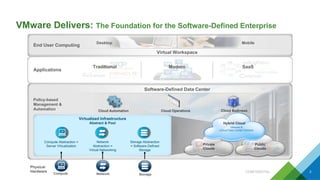
VMware Delivers: The Foundation for the Software-Defined Enterprise
3Compute
Physical
Hardware
Policy-based
Management &
Automation Cloud Automation Cloud Operations Cloud Business
Software-Defined Data Center
Private
Clouds
Public
Clouds
Hybrid Cloud
VMware &
vCloud Data Center Partners
Virtualized Infrastructure
Abstract & Pool
Compute Abstraction =
Server Virtualization
Network
Network
Abstraction =
Virtual Networking
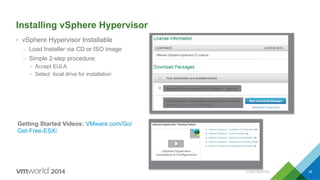
Storage
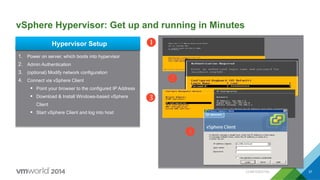
Storage Abstraction
= Software-Defined
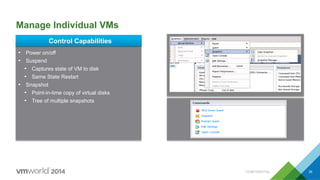
Storage
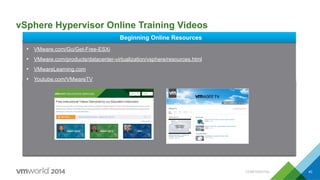
Applications
End User Computing
Desktop Mobile
Virtual Workspace
Modern SaaSTraditional
CONFIDENTIAL
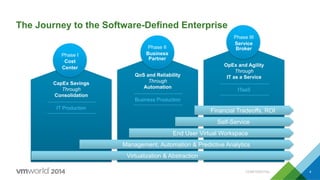
The Journey to the Software-Defined Enterprise
IT Production
CapEx Savings
Through
Consolidation
Business Production
QoS and Reliability
Through
Automation
ITaaS
OpEx and Agility
Through
IT as a Service
Phase II
Business
Partner
Phase III
Service
Broker
Phase I
Cost
Center
Virtualization & Abstraction
Management, Automation & Predictive Analytics
End User Virtual Workspace
Self-Service
Financial Tradeoffs, ROI
CONFIDENTIAL 4
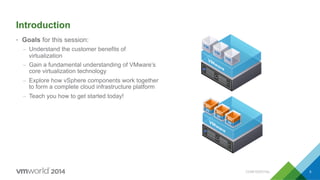
Introduction
•  Goals for this session:
–  Understand the customer benefits of
virtualization
–  Gain a fundamental understanding of VMware’s
core virtualization technology
–  Explore how vSphere components work together
to form a complete cloud infrastructure platform
–  Teach you how to get started today!
CONFIDENTIAL 5
Agenda
1 Business and IT Priorities
2 What Exactly is Virtualization?
3 How Will Virtualization Help Me Achieve My Goals?
4 Where Does VMware Fit In?
5 Getting Started: vSphere Hypervisor
6 Going Farther: vSphere Platform
7 Next Steps on Your Journey
CONFIDENTIAL 6
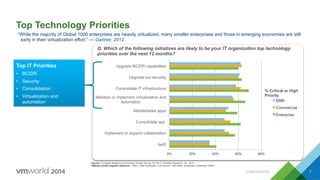
Source: Forrsights Budgets And Priorities Tracker Survey, Q2 2012, Forrester Research, Inc, 2012
VMware market segment definition: SMB: 1-999 employees, Commercial: 1000-4999 employees, Enterprise: 5000+
Top Technology Priorities
Q. Which of the following initiatives are likely to be your IT organization top technology
priorities over the next 12 months?
0% 20% 40% 60% 80%
IaaS
Implement or expand collaboration
Consolidate app
Mobile/tablet apps
Maintain or implement virtualization and
automation
Consolidate IT infrastructure
Upgrade our security
Upgrade BC/DR capabilities
SMB
Commercial
Enterprise
% Critical or High
Priority
Top IT Priorities
•  BC/DR
•  Security
•  Consolidation
•  Virtualization and
automation
“While the majority of Global 1000 enterprises are heavily virtualized, many smaller enterprises and those in emerging economies are still
early in their virtualization effort.” — Gartner, 2012
CONFIDENTIAL 7
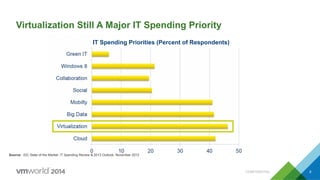
Virtualization Still A Major IT Spending Priority
IT Spending Priorities (Percent of Respondents)
Source: IDC State of the Market: IT Spending Review & 2013 Outlook, November 2012
CONFIDENTIAL 8
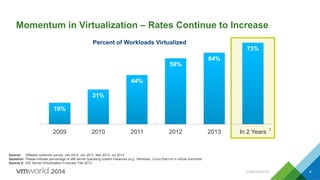
Momentum in Virtualization – Rates Continue to Increase
Source: VMware customer survey, Jan 2010, Jun 2011, Mar 2012, Jul 2013
Question: Please indicate percentage of x86 server operating system instances (e.g., Windows, Linux) that run in virtual machines
Source 2: IDC Server Virtualization Forecast, Feb 2013
19%
31%
44%
59%
64%
73%
2009 2010 2011 2012 2013 In 2 Years
2
Percent of Workloads Virtualized
CONFIDENTIAL 9
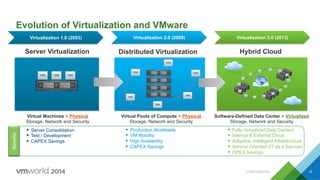
Server Virtualization Distributed Virtualization Hybrid Cloud
Virtual Pools of Compute + Physical
Storage, Network and Security
Virtual Machines + Physical
Storage, Network and Security
Evolution of Virtualization and VMware
Software-Defined Data Center + Virtualized
Storage, Network and Security
Virtualization 1.0 (2003) Virtualization 2.0 (2008) Virtualization 3.0 (2013)
§  Server Consolidation
§  Test / Development
§  CAPEX Savings
§  Production Workloads
§  VM Mobility
§  High Availability
§  CAPEX Savings
§  Fully Virtualized Data Centers
§  Internal & External Cloud
§  Adaptive, Intelligent Infrastructure
§  Service Oriented (IT as a Service)
§  OPEX Savings
BenefitsBenefitsBenefits
CONFIDENTIAL 10
Agenda
1 Business and IT Priorities
2 What Exactly is Virtualization?
3 How Will Virtualization Help Me Achieve My Goals?
4 Where Does VMware Fit In?
5 Getting Started: vSphere Hypervisor
6 Going Farther: vSphere Platform
7 Next Steps on Your Journey
CONFIDENTIAL 11
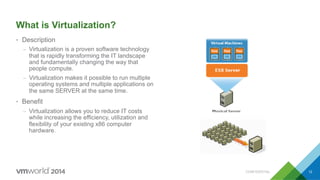
What is Virtualization?
•  Description
–  Virtualization is a proven software technology
that is rapidly transforming the IT landscape
and fundamentally changing the way that
people compute.
–  Virtualization makes it possible to run multiple
operating systems and multiple applications on
the same SERVER at the same time.
•  Benefit
–  Virtualization allows you to reduce IT costs
while increasing the efficiency, utilization and
flexibility of your existing x86 computer
hardware.
CONFIDENTIAL 12
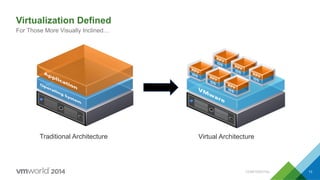
Virtualization Defined
For Those More Visually Inclined…
13CONFIDENTIAL
Traditional Architecture Virtual Architecture
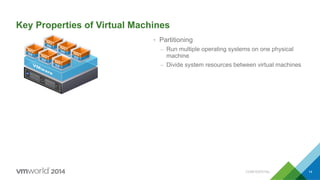
Key Properties of Virtual Machines
•  Partitioning
–  Run multiple operating systems on one physical
machine
–  Divide system resources between virtual machines
CONFIDENTIAL 14
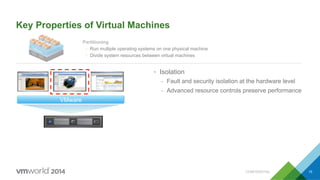
Key Properties of Virtual Machines
•  Isolation
–  Fault and security isolation at the hardware level
–  Advanced resource controls preserve performance
Partitioning
Ÿ  Run multiple operating systems on one physical machine
Ÿ  Divide system resources between virtual machines
VMware
CONFIDENTIAL 15
VMware
Key Properties of Virtual Machines
Partitioning
Ÿ  Run multiple operating systems on one physical machine
Ÿ  Divide system resources between virtual machines
Isolation
Ÿ  Fault and security isolation at the hardware level
Ÿ  Advanced resource controls preserve performance
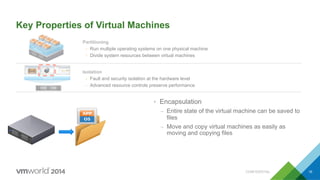
•  Encapsulation
–  Entire state of the virtual machine can be saved to
files
–  Move and copy virtual machines as easily as
moving and copying files
CONFIDENTIAL 16
VMware
Key Properties of Virtual Machines
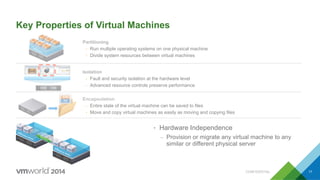
•  Hardware Independence
–  Provision or migrate any virtual machine to any
similar or different physical server
Encapsulation
Ÿ  Entire state of the virtual machine can be saved to files
Ÿ  Move and copy virtual machines as easily as moving and copying files
Partitioning
Ÿ  Run multiple operating systems on one physical machine
Ÿ  Divide system resources between virtual machines
Isolation
Ÿ  Fault and security isolation at the hardware level
Ÿ  Advanced resource controls preserve performance
CONFIDENTIAL 17
OS
Exchange
Operating System
Virtualization
OS
SAP ERP
Operating System
Virtualization
OS
File/Print
Operating System
Virtualization
OS
Oracle CRM
Operating System
Virtualization
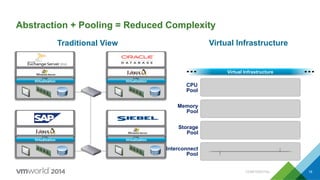
Virtual Infrastructure
Interconnect
Pool
CPU
Pool
Memory
Pool
Storage
Pool
Traditional View Virtual Infrastructure
Abstraction + Pooling = Reduced Complexity
CONFIDENTIAL 18
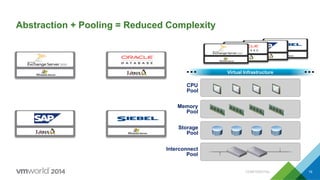
Abstraction + Pooling = Reduced Complexity
Oracle CRM
Operating System
SAP ERP
Operating System
File/Print
Operating System
Exchange
Operating System Virtual Infrastructure
Interconnect
Pool
CPU
Pool
Memory
Pool
Storage
Pool
CONFIDENTIAL 19
Agenda
1 Business and IT Priorities
2 What Exactly is Virtualization?
3 How Will Virtualization Help Me Achieve My Goals?
4 Where Does VMware Fit In?
5 Getting Started: vSphere Hypervisor
6 Going Farther: vSphere Platform
7 Next Steps on Your Journey
CONFIDENTIAL 20
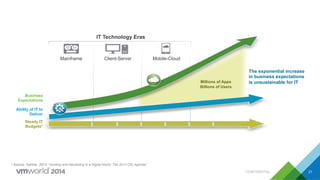
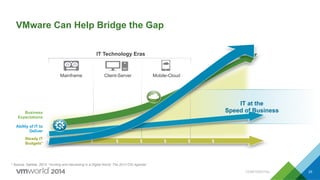
Mobile-Cloud
IT Technology Eras
Mainframe Client-Server
The exponential increase
in business expectations
is unsustainable for ITMillions of Apps
Billions of Users
* Source: Gartner, 2013: “Hunting and Harvesting in a Digital World: The 2013 CIO Agenda”
$ $ $ $ $ $
Ability of IT to
Deliver
Steady IT
Budgets*
Business
Expectations
21CONFIDENTIAL
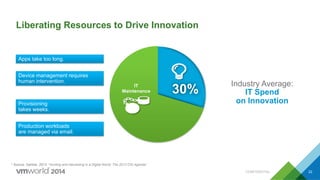
Liberating Resources to Drive Innovation
22
Provisioning
takes weeks.
Apps take too long.
Production workloads
are managed via email.
Device management requires
human intervention.
Industry Average:
IT Spend
on Innovation
30%IT
Maintenance
* Source: Gartner, 2013: “Hunting and Harvesting in a Digital World: The 2013 CIO Agenda”
CONFIDENTIAL
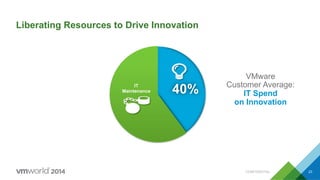
Liberating Resources to Drive Innovation
23
VMware
Customer Average:
IT Spend
on Innovation
40%IT
Maintenance
CONFIDENTIAL
Liberating Resources to Drive Innovation
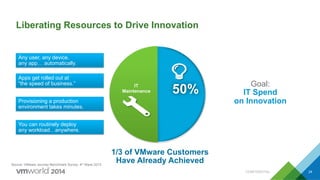
24
Any user, any device,
any app… automatically.
You can routinely deploy
any workload…anywhere.
Apps get rolled out at
“the speed of business.”
Provisioning a production
environment takes minutes.
Goal:
IT Spend
on Innovation
1/3 of VMware Customers
Have Already Achieved
IT
Maintenance 50%
Source: VMware Journey Benchmark Survey, 4th Wave 2013
CONFIDENTIAL
IT at the
Speed of Business
VMware Can Help Bridge the Gap
25
* Source: Gartner, 2013: “Hunting and Harvesting in a Digital World: The 2013 CIO Agenda”
IT Technology Eras
Mainframe Client-Server Mobile-Cloud
$ $ $ $ $ $
Ability of IT to
Deliver
Steady IT
Budgets*
Business
Expectations
CONFIDENTIAL
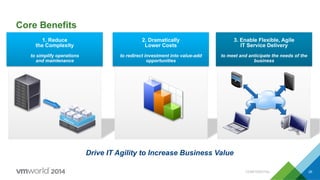
Drive IT Agility to Increase Business Value
Core Benefits
1. Reduce
the Complexity
to simplify operations
and maintenance
2. Dramatically
Lower Costs
to redirect investment into value-add
opportunities
3. Enable Flexible, Agile
IT Service Delivery
to meet and anticipate the needs of the
business
CONFIDENTIAL 26
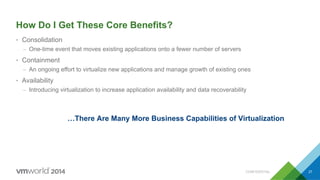
How Do I Get These Core Benefits?
•  Consolidation
–  One-time event that moves existing applications onto a fewer number of servers
•  Containment
–  An ongoing effort to virtualize new applications and manage growth of existing ones
•  Availability
–  Introducing virtualization to increase application availability and data recoverability
…There Are Many More Business Capabilities of Virtualization
CONFIDENTIAL 27
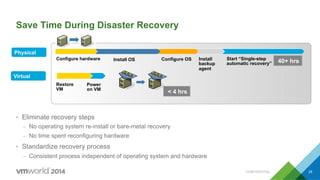
Save Time During Disaster Recovery
•  Eliminate recovery steps
–  No operating system re-install or bare-metal recovery
–  No time spent reconfiguring hardware
•  Standardize recovery process
–  Consistent process independent of operating system and hardware
Configure hardware Install OS Configure OS Install
backup
agent
Start “Single-step
automatic recovery”
Restore
VM
Power
on VM
Physical
Virtual
40+ hrs
< 4 hrs
CONFIDENTIAL 28
Agenda
1 Business and IT Priorities
2 What Exactly is Virtualization?
3 How Will Virtualization Help Me Achieve My Goals?
4 Where Does VMware Fit In?
5 Getting Started: vSphere Hypervisor
6 Going Farther: vSphere Platform
7 Next Steps on Your Journey
CONFIDENTIAL 29
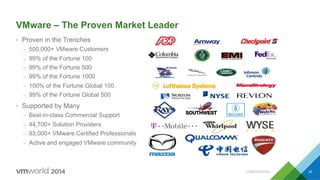
VMware – The Proven Market Leader
•  Proven in the Trenches
–  500,000+ VMware Customers
–  99% of the Fortune 100
–  99% of the Fortune 500
–  99% of the Fortune 1000
–  100% of the Fortune Global 100
–  99% of the Fortune Global 500
•  Supported by Many
–  Best-in-class Commercial Support
–  44,700+ Solution Providers
–  93,000+ VMware Certified Professionals
–  Active and engaged VMware community
CONFIDENTIAL 30
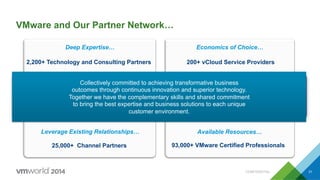
2,200+ Technology and Consulting Partners
Deep Expertise…
200+ vCloud Service Providers
Economics of Choice…
25,000+ Channel Partners
Leverage Existing Relationships…
93,000+ VMware Certified Professionals
Available Resources…
VMware and Our Partner Network…
Collectively committed to achieving transformative business
outcomes through continuous innovation and superior technology.
Together we have the complementary skills and shared commitment
to bring the best expertise and business solutions to each unique
customer environment.
CONFIDENTIAL 31
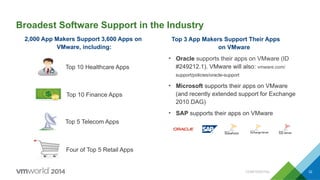
Broadest Software Support in the Industry
Top 3 App Makers Support Their Apps
on VMware
•  Oracle supports their apps on VMware (ID
#249212.1). VMware will also: vmware.com/
support/policies/oracle-support
•  Microsoft supports their apps on VMware
(and recently extended support for Exchange
2010 DAG)
•  SAP supports their apps on VMware
Top 10 Healthcare Apps
Top 10 Finance Apps
Four of Top 5 Retail Apps
Top 5 Telecom Apps
2,000 App Makers Support 3,600 Apps on
VMware, including:
CONFIDENTIAL 32
Agenda
1 Business and IT Priorities
2 What Exactly is Virtualization?
3 How Will Virtualization Help Me Achieve My Goals?
4 Where Does VMware Fit In?
5 Getting Started: vSphere Hypervisor
6 Going Farther: vSphere Platform
7 Next Steps on Your Journey
CONFIDENTIAL 33
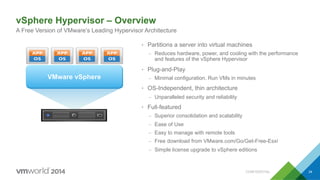
vSphere Hypervisor – Overview
A Free Version of VMware’s Leading Hypervisor Architecture
34CONFIDENTIAL
•  Partitions a server into virtual machines
–  Reduces hardware, power, and cooling with the performance
and features of the vSphere Hypervisor
•  Plug-and-Play
–  Minimal configuration. Run VMs in minutes
•  OS-Independent, thin architecture
–  Unparalleled security and reliability
•  Full-featured
–  Superior consolidation and scalability
–  Ease of Use
–  Easy to manage with remote tools
–  Free download from VMware.com/Go/Get-Free-Esxi
–  Simple license upgrade to vSphere editions
VMware vSphere
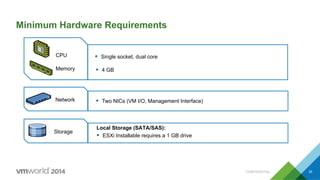
Minimum Hardware Requirements
35
CPU
Memory
Network
Storage
§  Single socket, dual core
§  4 GB
§  Two NICs (VM I/O, Management Interface)
Local Storage (SATA/SAS):
§  ESXi Installable requires a 1 GB drive
CONFIDENTIAL
Installing vSphere Hypervisor
•  vSphere Hypervisor Installable
–  Load Installer via CD or ISO image
–  Simple 2-step procedure:
•  Accept EULA
•  Select local drive for installation
36
VMware	
  vSphere	
  Hypervisor	
  5.5	
  Update	
  1	
  -­‐	
  Binaries	
  
ESXi	
  5.5	
  Update	
  1	
  ISO	
  image	
  (Includes	
  VMware	
  Tools)	
  
2013-­‐08-­‐24	
  |	
  5.5.0	
  U1	
  |	
  305M	
  |	
  iso	
  
Getting Started Videos: VMware.com/Go/
Get-Free-ESXi
CONFIDENTIAL
vSphere Hypervisor: Get up and running in Minutes
37
Œ
Ž

Hypervisor Setup
1.  Power on server, which boots into hypervisor
2.  Admin Authentication
3.  (optional) Modify network configuration
4.  Connect via vSphere Client
§  Point your browser to the configured IP Address
§  Download & Install Windows-based vSphere
Client
§  Start vSphere Client and log into host

CONFIDENTIAL
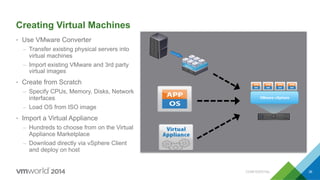
Creating Virtual Machines
•  Use VMware Converter
–  Transfer existing physical servers into
virtual machines
–  Import existing VMware and 3rd party
virtual images
•  Create from Scratch
–  Specify CPUs, Memory, Disks, Network
interfaces
–  Load OS from ISO image
•  Import a Virtual Appliance
–  Hundreds to choose from on the Virtual
Appliance Marketplace
–  Download directly via vSphere Client
and deploy on host
38
VMware vSphere
CONFIDENTIAL
Manage Individual VMs
39
Control Capabilities
•  Power on/off
•  Suspend
•  Captures state of VM to disk
•  Same State Restart
•  Snapshot
•  Point-in-time copy of virtual disks
•  Tree of multiple snapshots
CONFIDENTIAL
vSphere Hypervisor Online Training Videos
•  VMware.com/Go/Get-Free-ESXi
•  VMware.com/products/datacenter-virtualization/vsphere/resources.html
•  VMwareLearning.com
•  Youtube.com/VMwareTV
Beginning Online Resources
CONFIDENTIAL 40
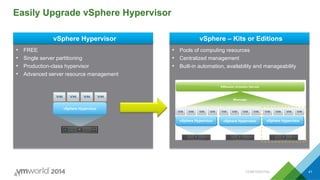
Easily Upgrade vSphere Hypervisor
•  FREE
•  Single server partitioning
•  Production-class hypervisor
•  Advanced server resource management
•  Pools of computing resources
•  Centralized management
•  Built-in automation, availability and manageability
vSphere Hypervisor vSphere – Kits or Editions
41
vSphere Hypervisor
vSphere Hypervisor vSphere Hypervisor vSphere Hypervisor
CONFIDENTIAL 41
Agenda
1 Business and IT Priorities
2 What Exactly is Virtualization?
3 How Will Virtualization Help Me Achieve My Goals?
4 Where Does VMware Fit In?
5 Getting Started: vSphere Hypervisor
6 Going Farther: vSphere Platform
7 Next Steps on Your Journey
CONFIDENTIAL 42
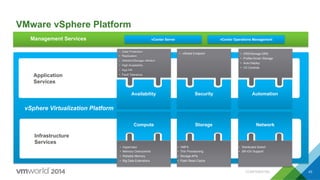
VMware vSphere Platform
Application
Services
Infrastructure
Services
Automation
vSphere Virtualization Platform
Security
•  DRS/Storage DRS
•  Profile-Driven Storage
•  Auto Deploy
•  I/O Controls
•  Data Protection
•  Replication
•  vMotion/Storage vMotion
•  High Availability
•  App HA
•  Fault Tolerance
Availability
NetworkStorage
•  Distributed Switch
•  SR-IOV Support
•  VMFS
•  Thin Provisioning
•  Storage APIs
•  Flash Read Cache
•  Hypervisor
•  Memory Overcommit
•  Reliable Memory
•  Big Data Extensions
Compute
Management Services
•  vShield Endpoint
vCenter Server vCenter Operations Management
CONFIDENTIAL 43
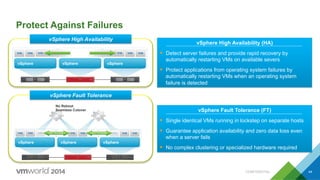
Protect Against Failures
vSphere vSphere vSphere
No Reboot
Seamless Cutover
vSphere vSphere vSphere
vSphere Fault Tolerance (FT)
§  Single identical VMs running in lockstep on separate hosts
§  Guarantee application availability and zero data loss even
when a server fails
§  No complex clustering or specialized hardware required
vSphere High Availability (HA)
§  Detect server failures and provide rapid recovery by
automatically restarting VMs on available severs
§  Protect applications from operating system failures by
automatically restarting VMs when an operating system
failure is detected
vSphere High Availability
vSphere Fault Tolerance
CONFIDENTIAL 44
vSphere
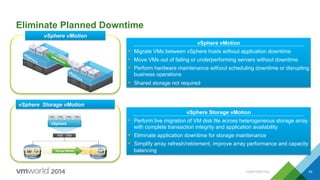
vSphere vMotion
§  Migrate VMs between vSphere hosts without application downtime
§  Move VMs out of failing or underperforming servers without downtime
§  Perform hardware maintenance without scheduling downtime or disrupting
business operations
§  Shared storage not required
Eliminate Planned Downtime
vSphere vMotion
vSphere Storage vMotion
§  Perform live migration of VM disk file across heterogeneous storage array
with complete transaction integrity and application availability
§  Eliminate application downtime for storage maintenance
§  Simplify array refresh/retirement, improve array performance and capacity
balancing
CONFIDENTIAL 45
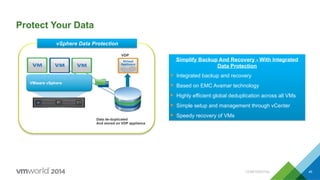
VMware vSphere
Data de-duplicated
And stored on VDP appliance
VDP
Protect Your Data
vSphere Data Protection
Simplify Backup And Recovery - With Integrated
Data Protection
§  Integrated backup and recovery
§  Based on EMC Avamar technology
§  Highly efficient global deduplication across all VMs
§  Simple setup and management through vCenter
§  Speedy recovery of VMs
CONFIDENTIAL 46
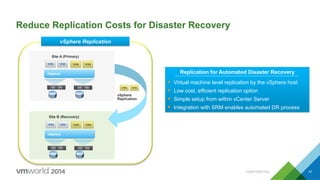
Reduce Replication Costs for Disaster Recovery
vSphere
vSphere
Replication
Site A (Primary)
vSphere
Site B (Recovery)
vSphere Replication
Replication for Automated Disaster Recovery
§  Virtual machine level replication by the vSphere host
§  Low cost, efficient replication option
§  Simple setup from within vCenter Server
§  Integration with SRM enables automated DR process
CONFIDENTIAL 47
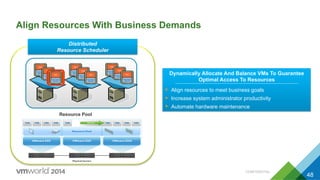
Align Resources With Business Demands
Resource Pool
Dynamically Allocate And Balance VMs To Guarantee
Optimal Access To Resources
§  Align resources to meet business goals
§  Increase system administrator productivity
§  Automate hardware maintenance
Distributed
Resource Scheduler
CONFIDENTIAL
48
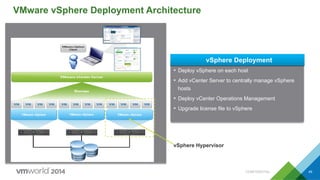
VMware vSphere Deployment Architecture
VMware vSphere VMware vSphere VMware vSphere
•  Deploy vSphere on each host
•  Add vCenter Server to centrally manage vSphere
hosts
•  Deploy vCenter Operations Management
•  Upgrade license file to vSphere
vSphere Deployment
vSphere Hypervisor
CONFIDENTIAL 49
vSphere vCenter Server
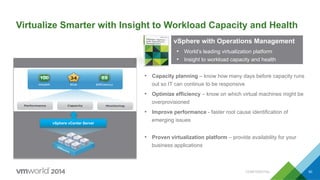
•  Proven virtualization platform – provide availability for your
business applications
Virtualize Smarter with Insight to Workload Capacity and Health
•  Capacity planning – know how many days before capacity runs
out so IT can continue to be responsive
•  Optimize efficiency – know on which virtual machines might be
overprovisioned
•  Improve performance - faster root cause identification of
emerging issuesvSphere vCenter Server
•  Proven virtualization platform – provide availability for your
business applications
VMware vSphere
The proven compute
virtualization platform
vSphere with Operations Management
•  World’s leading virtualization platform
•  Insight to workload capacity and health
CONFIDENTIAL 50
In Summary
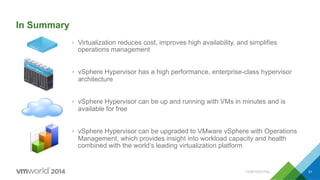
•  Virtualization reduces cost, improves high availability, and simplifies
operations management
•  vSphere Hypervisor has a high performance, enterprise-class hypervisor
architecture
•  vSphere Hypervisor can be up and running with VMs in minutes and is
available for free
•  vSphere Hypervisor can be upgraded to VMware vSphere with Operations
Management, which provides insight into workload capacity and health
combined with the world’s leading virtualization platform
CONFIDENTIAL 51
Agenda
1 Business and IT Priorities
2 What Exactly is Virtualization?
3 How Will Virtualization Help Me Achieve My Goals?
4 Where Does VMware Fit In?
5 Getting Started: vSphere Hypervisor
6 Going Farther: vSphere Platform
7 Next Steps on Your Journey
CONFIDENTIAL 52
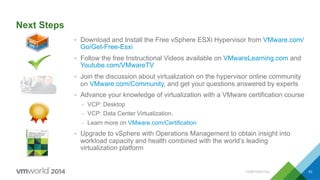
Next Steps
•  Download and Install the Free vSphere ESXi Hypervisor from VMware.com/
Go/Get-Free-Esxi
•  Follow the free Instructional Videos available on VMwareLearning.com and
Youtube.com/VMwareTV
•  Join the discussion about virtualization on the hypervisor online community
on VMware.com/Community, and get your questions answered by experts
•  Advance your knowledge of virtualization with a VMware certification course
–  VCP: Desktop
–  VCP: Data Center Virtualization.
–  Learn more on VMware.com/Certification
•  Upgrade to vSphere with Operations Management to obtain insight into
workload capacity and health combined with the world’s leading
virtualization platform
CONFIDENTIAL 53
Questions?
Thank You
Fill out a survey
Every completed survey is entered into a
drawing for a $25 VMware company store
gift certificate
Virtualization 101
INF1503
Michael Adams, VMware, Inc

VMworld 2014: Virtualization 101

  • 1.
  • 2.
    Disclaimer •  This presentationmay contain product features that are currently under development. •  This overview of new technology represents no commitment from VMware to deliver these features in any generally available product. •  Features are subject to change, and must not be included in contracts, purchase orders, or sales agreements of any kind. •  Technical feasibility and market demand will affect final delivery. •  Pricing and packaging for any new technologies or features discussed or presented have not been determined. CONFIDENTIAL 2
  • 3.
    VMware Delivers: TheFoundation for the Software-Defined Enterprise 3Compute Physical Hardware Policy-based Management & Automation Cloud Automation Cloud Operations Cloud Business Software-Defined Data Center Private Clouds Public Clouds Hybrid Cloud VMware & vCloud Data Center Partners Virtualized Infrastructure Abstract & Pool Compute Abstraction = Server Virtualization Network Network Abstraction = Virtual Networking Storage Storage Abstraction = Software-Defined Storage Applications End User Computing Desktop Mobile Virtual Workspace Modern SaaSTraditional CONFIDENTIAL
  • 4.
    The Journey tothe Software-Defined Enterprise IT Production CapEx Savings Through Consolidation Business Production QoS and Reliability Through Automation ITaaS OpEx and Agility Through IT as a Service Phase II Business Partner Phase III Service Broker Phase I Cost Center Virtualization & Abstraction Management, Automation & Predictive Analytics End User Virtual Workspace Self-Service Financial Tradeoffs, ROI CONFIDENTIAL 4
  • 5.
    Introduction •  Goals forthis session: –  Understand the customer benefits of virtualization –  Gain a fundamental understanding of VMware’s core virtualization technology –  Explore how vSphere components work together to form a complete cloud infrastructure platform –  Teach you how to get started today! CONFIDENTIAL 5
  • 6.
    Agenda 1 Business andIT Priorities 2 What Exactly is Virtualization? 3 How Will Virtualization Help Me Achieve My Goals? 4 Where Does VMware Fit In? 5 Getting Started: vSphere Hypervisor 6 Going Farther: vSphere Platform 7 Next Steps on Your Journey CONFIDENTIAL 6
  • 7.
    Source: Forrsights BudgetsAnd Priorities Tracker Survey, Q2 2012, Forrester Research, Inc, 2012 VMware market segment definition: SMB: 1-999 employees, Commercial: 1000-4999 employees, Enterprise: 5000+ Top Technology Priorities Q. Which of the following initiatives are likely to be your IT organization top technology priorities over the next 12 months? 0% 20% 40% 60% 80% IaaS Implement or expand collaboration Consolidate app Mobile/tablet apps Maintain or implement virtualization and automation Consolidate IT infrastructure Upgrade our security Upgrade BC/DR capabilities SMB Commercial Enterprise % Critical or High Priority Top IT Priorities •  BC/DR •  Security •  Consolidation •  Virtualization and automation “While the majority of Global 1000 enterprises are heavily virtualized, many smaller enterprises and those in emerging economies are still early in their virtualization effort.” — Gartner, 2012 CONFIDENTIAL 7
  • 8.
    Virtualization Still AMajor IT Spending Priority IT Spending Priorities (Percent of Respondents) Source: IDC State of the Market: IT Spending Review & 2013 Outlook, November 2012 CONFIDENTIAL 8
  • 9.
    Momentum in Virtualization– Rates Continue to Increase Source: VMware customer survey, Jan 2010, Jun 2011, Mar 2012, Jul 2013 Question: Please indicate percentage of x86 server operating system instances (e.g., Windows, Linux) that run in virtual machines Source 2: IDC Server Virtualization Forecast, Feb 2013 19% 31% 44% 59% 64% 73% 2009 2010 2011 2012 2013 In 2 Years 2 Percent of Workloads Virtualized CONFIDENTIAL 9
  • 10.
    Server Virtualization DistributedVirtualization Hybrid Cloud Virtual Pools of Compute + Physical Storage, Network and Security Virtual Machines + Physical Storage, Network and Security Evolution of Virtualization and VMware Software-Defined Data Center + Virtualized Storage, Network and Security Virtualization 1.0 (2003) Virtualization 2.0 (2008) Virtualization 3.0 (2013) §  Server Consolidation §  Test / Development §  CAPEX Savings §  Production Workloads §  VM Mobility §  High Availability §  CAPEX Savings §  Fully Virtualized Data Centers §  Internal & External Cloud §  Adaptive, Intelligent Infrastructure §  Service Oriented (IT as a Service) §  OPEX Savings BenefitsBenefitsBenefits CONFIDENTIAL 10
  • 11.
    Agenda 1 Business andIT Priorities 2 What Exactly is Virtualization? 3 How Will Virtualization Help Me Achieve My Goals? 4 Where Does VMware Fit In? 5 Getting Started: vSphere Hypervisor 6 Going Farther: vSphere Platform 7 Next Steps on Your Journey CONFIDENTIAL 11
  • 12.
    What is Virtualization? • Description –  Virtualization is a proven software technology that is rapidly transforming the IT landscape and fundamentally changing the way that people compute. –  Virtualization makes it possible to run multiple operating systems and multiple applications on the same SERVER at the same time. •  Benefit –  Virtualization allows you to reduce IT costs while increasing the efficiency, utilization and flexibility of your existing x86 computer hardware. CONFIDENTIAL 12
  • 13.
    Virtualization Defined For ThoseMore Visually Inclined… 13CONFIDENTIAL Traditional Architecture Virtual Architecture
  • 14.
    Key Properties ofVirtual Machines •  Partitioning –  Run multiple operating systems on one physical machine –  Divide system resources between virtual machines CONFIDENTIAL 14
  • 15.
    Key Properties ofVirtual Machines •  Isolation –  Fault and security isolation at the hardware level –  Advanced resource controls preserve performance Partitioning Ÿ  Run multiple operating systems on one physical machine Ÿ  Divide system resources between virtual machines VMware CONFIDENTIAL 15
  • 16.
    VMware Key Properties ofVirtual Machines Partitioning Ÿ  Run multiple operating systems on one physical machine Ÿ  Divide system resources between virtual machines Isolation Ÿ  Fault and security isolation at the hardware level Ÿ  Advanced resource controls preserve performance •  Encapsulation –  Entire state of the virtual machine can be saved to files –  Move and copy virtual machines as easily as moving and copying files CONFIDENTIAL 16
  • 17.
    VMware Key Properties ofVirtual Machines •  Hardware Independence –  Provision or migrate any virtual machine to any similar or different physical server Encapsulation Ÿ  Entire state of the virtual machine can be saved to files Ÿ  Move and copy virtual machines as easily as moving and copying files Partitioning Ÿ  Run multiple operating systems on one physical machine Ÿ  Divide system resources between virtual machines Isolation Ÿ  Fault and security isolation at the hardware level Ÿ  Advanced resource controls preserve performance CONFIDENTIAL 17
  • 18.
    OS Exchange Operating System Virtualization OS SAP ERP OperatingSystem Virtualization OS File/Print Operating System Virtualization OS Oracle CRM Operating System Virtualization Virtual Infrastructure Interconnect Pool CPU Pool Memory Pool Storage Pool Traditional View Virtual Infrastructure Abstraction + Pooling = Reduced Complexity CONFIDENTIAL 18
  • 19.
    Abstraction + Pooling= Reduced Complexity Oracle CRM Operating System SAP ERP Operating System File/Print Operating System Exchange Operating System Virtual Infrastructure Interconnect Pool CPU Pool Memory Pool Storage Pool CONFIDENTIAL 19
  • 20.
    Agenda 1 Business andIT Priorities 2 What Exactly is Virtualization? 3 How Will Virtualization Help Me Achieve My Goals? 4 Where Does VMware Fit In? 5 Getting Started: vSphere Hypervisor 6 Going Farther: vSphere Platform 7 Next Steps on Your Journey CONFIDENTIAL 20
  • 21.
    Mobile-Cloud IT Technology Eras MainframeClient-Server The exponential increase in business expectations is unsustainable for ITMillions of Apps Billions of Users * Source: Gartner, 2013: “Hunting and Harvesting in a Digital World: The 2013 CIO Agenda” $ $ $ $ $ $ Ability of IT to Deliver Steady IT Budgets* Business Expectations 21CONFIDENTIAL
  • 22.
    Liberating Resources toDrive Innovation 22 Provisioning takes weeks. Apps take too long. Production workloads are managed via email. Device management requires human intervention. Industry Average: IT Spend on Innovation 30%IT Maintenance * Source: Gartner, 2013: “Hunting and Harvesting in a Digital World: The 2013 CIO Agenda” CONFIDENTIAL
  • 23.
    Liberating Resources toDrive Innovation 23 VMware Customer Average: IT Spend on Innovation 40%IT Maintenance CONFIDENTIAL
  • 24.
    Liberating Resources toDrive Innovation 24 Any user, any device, any app… automatically. You can routinely deploy any workload…anywhere. Apps get rolled out at “the speed of business.” Provisioning a production environment takes minutes. Goal: IT Spend on Innovation 1/3 of VMware Customers Have Already Achieved IT Maintenance 50% Source: VMware Journey Benchmark Survey, 4th Wave 2013 CONFIDENTIAL
  • 25.
    IT at the Speedof Business VMware Can Help Bridge the Gap 25 * Source: Gartner, 2013: “Hunting and Harvesting in a Digital World: The 2013 CIO Agenda” IT Technology Eras Mainframe Client-Server Mobile-Cloud $ $ $ $ $ $ Ability of IT to Deliver Steady IT Budgets* Business Expectations CONFIDENTIAL
  • 26.
    Drive IT Agilityto Increase Business Value Core Benefits 1. Reduce the Complexity to simplify operations and maintenance 2. Dramatically Lower Costs to redirect investment into value-add opportunities 3. Enable Flexible, Agile IT Service Delivery to meet and anticipate the needs of the business CONFIDENTIAL 26
  • 27.
    How Do IGet These Core Benefits? •  Consolidation –  One-time event that moves existing applications onto a fewer number of servers •  Containment –  An ongoing effort to virtualize new applications and manage growth of existing ones •  Availability –  Introducing virtualization to increase application availability and data recoverability …There Are Many More Business Capabilities of Virtualization CONFIDENTIAL 27
  • 28.
    Save Time DuringDisaster Recovery •  Eliminate recovery steps –  No operating system re-install or bare-metal recovery –  No time spent reconfiguring hardware •  Standardize recovery process –  Consistent process independent of operating system and hardware Configure hardware Install OS Configure OS Install backup agent Start “Single-step automatic recovery” Restore VM Power on VM Physical Virtual 40+ hrs < 4 hrs CONFIDENTIAL 28
  • 29.
    Agenda 1 Business andIT Priorities 2 What Exactly is Virtualization? 3 How Will Virtualization Help Me Achieve My Goals? 4 Where Does VMware Fit In? 5 Getting Started: vSphere Hypervisor 6 Going Farther: vSphere Platform 7 Next Steps on Your Journey CONFIDENTIAL 29
  • 30.
    VMware – TheProven Market Leader •  Proven in the Trenches –  500,000+ VMware Customers –  99% of the Fortune 100 –  99% of the Fortune 500 –  99% of the Fortune 1000 –  100% of the Fortune Global 100 –  99% of the Fortune Global 500 •  Supported by Many –  Best-in-class Commercial Support –  44,700+ Solution Providers –  93,000+ VMware Certified Professionals –  Active and engaged VMware community CONFIDENTIAL 30
  • 31.
    2,200+ Technology andConsulting Partners Deep Expertise… 200+ vCloud Service Providers Economics of Choice… 25,000+ Channel Partners Leverage Existing Relationships… 93,000+ VMware Certified Professionals Available Resources… VMware and Our Partner Network… Collectively committed to achieving transformative business outcomes through continuous innovation and superior technology. Together we have the complementary skills and shared commitment to bring the best expertise and business solutions to each unique customer environment. CONFIDENTIAL 31
  • 32.
    Broadest Software Supportin the Industry Top 3 App Makers Support Their Apps on VMware •  Oracle supports their apps on VMware (ID #249212.1). VMware will also: vmware.com/ support/policies/oracle-support •  Microsoft supports their apps on VMware (and recently extended support for Exchange 2010 DAG) •  SAP supports their apps on VMware Top 10 Healthcare Apps Top 10 Finance Apps Four of Top 5 Retail Apps Top 5 Telecom Apps 2,000 App Makers Support 3,600 Apps on VMware, including: CONFIDENTIAL 32
  • 33.
    Agenda 1 Business andIT Priorities 2 What Exactly is Virtualization? 3 How Will Virtualization Help Me Achieve My Goals? 4 Where Does VMware Fit In? 5 Getting Started: vSphere Hypervisor 6 Going Farther: vSphere Platform 7 Next Steps on Your Journey CONFIDENTIAL 33
  • 34.
    vSphere Hypervisor –Overview A Free Version of VMware’s Leading Hypervisor Architecture 34CONFIDENTIAL •  Partitions a server into virtual machines –  Reduces hardware, power, and cooling with the performance and features of the vSphere Hypervisor •  Plug-and-Play –  Minimal configuration. Run VMs in minutes •  OS-Independent, thin architecture –  Unparalleled security and reliability •  Full-featured –  Superior consolidation and scalability –  Ease of Use –  Easy to manage with remote tools –  Free download from VMware.com/Go/Get-Free-Esxi –  Simple license upgrade to vSphere editions VMware vSphere
  • 35.
    Minimum Hardware Requirements 35 CPU Memory Network Storage § Single socket, dual core §  4 GB §  Two NICs (VM I/O, Management Interface) Local Storage (SATA/SAS): §  ESXi Installable requires a 1 GB drive CONFIDENTIAL
  • 36.
    Installing vSphere Hypervisor • vSphere Hypervisor Installable –  Load Installer via CD or ISO image –  Simple 2-step procedure: •  Accept EULA •  Select local drive for installation 36 VMware  vSphere  Hypervisor  5.5  Update  1  -­‐  Binaries   ESXi  5.5  Update  1  ISO  image  (Includes  VMware  Tools)   2013-­‐08-­‐24  |  5.5.0  U1  |  305M  |  iso   Getting Started Videos: VMware.com/Go/ Get-Free-ESXi CONFIDENTIAL
  • 37.
    vSphere Hypervisor: Getup and running in Minutes 37 Œ Ž  Hypervisor Setup 1.  Power on server, which boots into hypervisor 2.  Admin Authentication 3.  (optional) Modify network configuration 4.  Connect via vSphere Client §  Point your browser to the configured IP Address §  Download & Install Windows-based vSphere Client §  Start vSphere Client and log into host  CONFIDENTIAL
  • 38.
    Creating Virtual Machines • Use VMware Converter –  Transfer existing physical servers into virtual machines –  Import existing VMware and 3rd party virtual images •  Create from Scratch –  Specify CPUs, Memory, Disks, Network interfaces –  Load OS from ISO image •  Import a Virtual Appliance –  Hundreds to choose from on the Virtual Appliance Marketplace –  Download directly via vSphere Client and deploy on host 38 VMware vSphere CONFIDENTIAL
  • 39.
    Manage Individual VMs 39 ControlCapabilities •  Power on/off •  Suspend •  Captures state of VM to disk •  Same State Restart •  Snapshot •  Point-in-time copy of virtual disks •  Tree of multiple snapshots CONFIDENTIAL
  • 40.
    vSphere Hypervisor OnlineTraining Videos •  VMware.com/Go/Get-Free-ESXi •  VMware.com/products/datacenter-virtualization/vsphere/resources.html •  VMwareLearning.com •  Youtube.com/VMwareTV Beginning Online Resources CONFIDENTIAL 40
  • 41.
    Easily Upgrade vSphereHypervisor •  FREE •  Single server partitioning •  Production-class hypervisor •  Advanced server resource management •  Pools of computing resources •  Centralized management •  Built-in automation, availability and manageability vSphere Hypervisor vSphere – Kits or Editions 41 vSphere Hypervisor vSphere Hypervisor vSphere Hypervisor vSphere Hypervisor CONFIDENTIAL 41
  • 42.
    Agenda 1 Business andIT Priorities 2 What Exactly is Virtualization? 3 How Will Virtualization Help Me Achieve My Goals? 4 Where Does VMware Fit In? 5 Getting Started: vSphere Hypervisor 6 Going Farther: vSphere Platform 7 Next Steps on Your Journey CONFIDENTIAL 42
  • 43.
    VMware vSphere Platform Application Services Infrastructure Services Automation vSphereVirtualization Platform Security •  DRS/Storage DRS •  Profile-Driven Storage •  Auto Deploy •  I/O Controls •  Data Protection •  Replication •  vMotion/Storage vMotion •  High Availability •  App HA •  Fault Tolerance Availability NetworkStorage •  Distributed Switch •  SR-IOV Support •  VMFS •  Thin Provisioning •  Storage APIs •  Flash Read Cache •  Hypervisor •  Memory Overcommit •  Reliable Memory •  Big Data Extensions Compute Management Services •  vShield Endpoint vCenter Server vCenter Operations Management CONFIDENTIAL 43
  • 44.
    Protect Against Failures vSpherevSphere vSphere No Reboot Seamless Cutover vSphere vSphere vSphere vSphere Fault Tolerance (FT) §  Single identical VMs running in lockstep on separate hosts §  Guarantee application availability and zero data loss even when a server fails §  No complex clustering or specialized hardware required vSphere High Availability (HA) §  Detect server failures and provide rapid recovery by automatically restarting VMs on available severs §  Protect applications from operating system failures by automatically restarting VMs when an operating system failure is detected vSphere High Availability vSphere Fault Tolerance CONFIDENTIAL 44
  • 45.
    vSphere vSphere vMotion §  MigrateVMs between vSphere hosts without application downtime §  Move VMs out of failing or underperforming servers without downtime §  Perform hardware maintenance without scheduling downtime or disrupting business operations §  Shared storage not required Eliminate Planned Downtime vSphere vMotion vSphere Storage vMotion vSphere Storage vMotion §  Perform live migration of VM disk file across heterogeneous storage array with complete transaction integrity and application availability §  Eliminate application downtime for storage maintenance §  Simplify array refresh/retirement, improve array performance and capacity balancing CONFIDENTIAL 45
  • 46.
    VMware vSphere Data de-duplicated Andstored on VDP appliance VDP Protect Your Data vSphere Data Protection Simplify Backup And Recovery - With Integrated Data Protection §  Integrated backup and recovery §  Based on EMC Avamar technology §  Highly efficient global deduplication across all VMs §  Simple setup and management through vCenter §  Speedy recovery of VMs CONFIDENTIAL 46
  • 47.
    Reduce Replication Costsfor Disaster Recovery vSphere vSphere Replication Site A (Primary) vSphere Site B (Recovery) vSphere Replication Replication for Automated Disaster Recovery §  Virtual machine level replication by the vSphere host §  Low cost, efficient replication option §  Simple setup from within vCenter Server §  Integration with SRM enables automated DR process CONFIDENTIAL 47
  • 48.
    Align Resources WithBusiness Demands Resource Pool Dynamically Allocate And Balance VMs To Guarantee Optimal Access To Resources §  Align resources to meet business goals §  Increase system administrator productivity §  Automate hardware maintenance Distributed Resource Scheduler CONFIDENTIAL 48
  • 49.
    VMware vSphere DeploymentArchitecture VMware vSphere VMware vSphere VMware vSphere •  Deploy vSphere on each host •  Add vCenter Server to centrally manage vSphere hosts •  Deploy vCenter Operations Management •  Upgrade license file to vSphere vSphere Deployment vSphere Hypervisor CONFIDENTIAL 49
  • 50.
    vSphere vCenter Server • Proven virtualization platform – provide availability for your business applications Virtualize Smarter with Insight to Workload Capacity and Health •  Capacity planning – know how many days before capacity runs out so IT can continue to be responsive •  Optimize efficiency – know on which virtual machines might be overprovisioned •  Improve performance - faster root cause identification of emerging issuesvSphere vCenter Server •  Proven virtualization platform – provide availability for your business applications VMware vSphere The proven compute virtualization platform vSphere with Operations Management •  World’s leading virtualization platform •  Insight to workload capacity and health CONFIDENTIAL 50
  • 51.
    In Summary •  Virtualizationreduces cost, improves high availability, and simplifies operations management •  vSphere Hypervisor has a high performance, enterprise-class hypervisor architecture •  vSphere Hypervisor can be up and running with VMs in minutes and is available for free •  vSphere Hypervisor can be upgraded to VMware vSphere with Operations Management, which provides insight into workload capacity and health combined with the world’s leading virtualization platform CONFIDENTIAL 51
  • 52.
    Agenda 1 Business andIT Priorities 2 What Exactly is Virtualization? 3 How Will Virtualization Help Me Achieve My Goals? 4 Where Does VMware Fit In? 5 Getting Started: vSphere Hypervisor 6 Going Farther: vSphere Platform 7 Next Steps on Your Journey CONFIDENTIAL 52
  • 53.
    Next Steps •  Downloadand Install the Free vSphere ESXi Hypervisor from VMware.com/ Go/Get-Free-Esxi •  Follow the free Instructional Videos available on VMwareLearning.com and Youtube.com/VMwareTV •  Join the discussion about virtualization on the hypervisor online community on VMware.com/Community, and get your questions answered by experts •  Advance your knowledge of virtualization with a VMware certification course –  VCP: Desktop –  VCP: Data Center Virtualization. –  Learn more on VMware.com/Certification •  Upgrade to vSphere with Operations Management to obtain insight into workload capacity and health combined with the world’s leading virtualization platform CONFIDENTIAL 53
  • 54.
  • 55.
  • 56.
    Fill out asurvey Every completed survey is entered into a drawing for a $25 VMware company store gift certificate
  • 57.