Capito, Aberdeen  December 2008 Iain Blyfield Territory Manager – UK North [email_address] 07776 350 166
Agenda Setting the scene  VMware the story so far – solution overview Beyond VI3 – VMware strategy for 2009
2009 – Gartner’s top 10 Strategic Developments 1. Virtualization 2. Business Intelligence 3. Cloud Computing 4. Green IT 5. Unified Communications 6. Social Software and Social Networking 7. Web Oriented Architecture 8. Enterprise Mashups 9. Specialized Systems 10. Servers – Beyond Blades  Gartner Inc.  has ranked virtualization as the No. 1 strategic technology for next year, not for its "tremendously obvious" ability to virtualize servers, but for its increasing capability to virtualize just about everything else in a data center
Trends and Challenges Facing IT  Address Technological Complexity Better Support the Business Cut Power Consumption Reduce Operating Costs Make IT  More Secure Get a Better Return on Investments Today’s IT Dept.
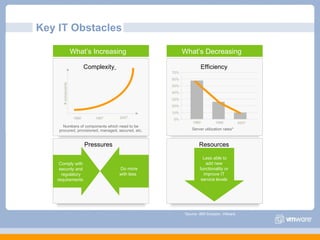
Key IT Obstacles *Source: IBM Scorpion, VMware What’s Increasing  What’s Decreasing  0% 10% 20% 30% 40% 50% 60% 70% 1980 1990 2007 Server utilization rates* Efficiency  1990 1997 2007 # components Numbers of components which need to be procured, provisioned, managed, secured, etc. Complexity   Pressures  Do more with less  Comply with security and regulatory requirements  Resources  Less able to add new functionality or improve IT service levels
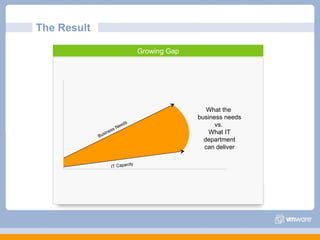
The Result  Growing Gap Business Needs IT Capacity What the  business needs vs.  What IT department can deliver
The ‘physical’ Data-centre Server Provisioning Times  Technology Developments (CPU, RAM, I/O) Number of servers, reliance of IT to the business Electricity Costs  Physical Space Business Continuity - Planned Downtime - Unplanned Downtime   IT being asked to do more with less and improve SLA’s,  typical budget:  - 80% Maintenance - 20% Innovation
The Virtual Data-centre Flexibility Rapid provisioning Disaster Recovery High Availability Automation Virtual Desktops
Challenge: Server Proliferation  Consolidate servers Increase utilization Reduce hardware, power, cooling Server Sprawl  Low Utilization  High Power Consumption  Avg. utilization rate/server Higher Utilization  % CPU Busy (8 LCPVs w/HT)  0 100 200 300 400 500 600 700 800 725 MW MegaWatts consumed:  100 servers per year Lower Consumption 0 100 200 300 400 500 600 700 800 725 MW 104 MW
The size of the problem – real customer data * Industry average 6-8%
VMware Infrastructure – Key Solutions / Use Cases Server Consolidation and Containment  – Eliminate server sprawl by deploying systems into virtual machines Test and Development  – Rapidly provision and re-provision test and development servers; store libraries of pre-configured test machines Enterprise Desktop  – Secure unmanaged PCs.  Alternatively, provide standardized enterprise desktop environments hosted on servers.  Business Continuity  – Reduce the cost and complexity of business continuity by encapsulating entire systems files that can be replicated and restored onto any target server Infrastructure Provisioning  – Reduce the time for provisioning new infrastructure to minutes with sophisticated automation capabilities.  Legacy Application Re-hosting  – Migrate legacy operating systems and software applications to virtual machines running on new hardware for better reliability
Solution Overview
Centralized Management with VirtualCenter Provision and boot  virtual machines Monitor  system availability and performance Automated  notifications and email alerting Integrate  SDK with existing management tools Secure  the environment with robust access control
ESX Server 3i Server boot to running virtual machines in minutes Simplified management No Linux command line skills required No user accounts or passwords to create and maintain No OS security hardening, antivirus, or backup effort required Integrated, standards-based CIM providers for hardware management Integration in hardware eliminates installation Intuitive wizard driven start up experience dramatically reduces deployment time Standards-based management of the underlying hardware
Benefits: Migrate workloads to maximize resource utilization Zero downtime  for planned server maintenance Proactively migrate applications away from failing hardware Workload Management with VMotion VMotion technology lets you move running, stateful virtual machines from one physical system to another while maintaining continuous service availability
VMware HA Automatic restart of virtual machines in case of server failure No need for dedicated stand-by hardware None of the cost and complexity of clustering Cost effective high availability for all servers Resource Pool X
VMware DRS Align IT resources with business priorities   Dynamically allocate resource to virtual machines. Dramatically increase system administrator productivity   Enable system administrators to manage more resources Automate hardware maintenance Maintenance mode automatically migrates all virtual machines to other physical servers. Dynamic and intelligent allocation of hardware resources to the highest priority virtual machines to ensure optimal alignment between business and IT Resource Pool
Distributed Power Management (DPM) Resource Pool Business Demand Power Off Consolidates workloads onto fewer servers when the cluster needs fewer resources Places unneeded servers in standby mode Brings servers back online as workload needs increase Minimizes power consumption while guaranteeing service levels No disruption or downtime to virtual machines
Simplifies and automates disaster recovery workflows: Setup, testing, failover Provides central management of recovery plans from VirtualCenter Turns manual recovery processes into automated recovery plans Simplifies integration with 3 rd -party storage replication VMware Site Recovery Manager Site Recovery Manager leverages VMware Infrastructure to transform disaster recovery Makes disaster recovery rapid, reliable, manageable, affordable
Current VMware VDI Solution Overview Extended Win32 client Browser on Linux, Mac Direct from thin clients RDP/ HTTPS RDP Windows XP Windows Vista Automated provisioning and desktop management DMZ deployment option Integrated solution including: VMware VI3 Enterprise Virtual Desktop Manager 2.1 Optional integration with RSA SecurID
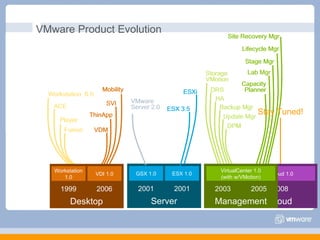
GSX 1.0 ESX 1.0 Server 2001 2001 VMware Product Evolution vCloud 1.0 Cloud 2008 Workstation 1.0 VDI 1.0 Desktop 1999 2006 VirtualCenter 1.0 (with w/VMotion) Management 2003 2005 Stay Tuned! Workstation  5.0 ACE Player Fusion VDM ThinApp SVI Mobility Workstation 1.0 VDI 1.0 Desktop 1999 2006 VMware Server 2.0 ESXi ESX 3.5 GSX 1.0 ESX 1.0 Server 2001 2001 Storage VMotion DRS HA Backup Mgr Update Mgr DPM Capacity Planner Lab Mgr Stage Mgr Lifecycle Mgr Site Recovery Mgr Virtual Center 1.0 (with w/VMotion) Management 2003 2005 Workstation  6.0 ACE Player Fusion VDM ThinApp SVI Mobility VMware Server 2.0 ESXi ESX 3.5 Storage VMotion DRS HA Backup Mgr Update Mgr DPM Capacity Planner Lab Mgr Stage Mgr Lifecycle Mgr Site Recovery Mgr
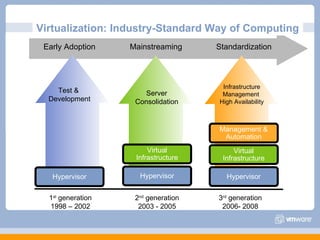
Virtualization: Industry-Standard Way of Computing  Hypervisor Virtual Infrastructure Management & Automation Hypervisor Virtual Infrastructure Hypervisor Test &  Development Early Adoption Mainstreaming Standardization Server Consolidation Infrastructure Management  High Availability 3 rd  generation 2006- 2008 2 nd  generation 2003 - 2005 1 st  generation 1998 – 2002
The Next Generation of Virtualization The Virtual DataCenter Operating System (VDC OS) VMware Infrastructure is extended to “Virtual DataCenter OS “in 2009 A Virtual DataCenter OS: Aggregates server, storage and network hardware into a shared resource or ‘internal cloud’ Allocates this shared resource among applications precisely and efficiently Provides built in services to ALL applications such as availability, security and performance scalability Federates with external clouds so cloud computing is easily accessible for enterprises VDC OS is to the entire datacenter what  Windows and Linux are to a single server
The virtual datacenter OS from VMware vCloud vCenter On-premise Infrastructure VMware Infrastructure -> Virtual DataCenter OS SaaS Linux Windows J2EE .Net Web 2.0 … Application  vServices Scalability Security Availability Infrastructure  vServices vNetwork vStorage vCompute Cloud  vServices
Highest Single Server Resource Efficiency Storage Networking Virtual Machines CPU  Memory  Virtual hardware scale out  Virtual hardware  scale out 128 cores and 512 GB of physical RAM Hardware Scale Out Lowest CPU overhead  HW Assist Purpose Built Scheduler Maximum memory efficiency HW Assist Page Sharing Ballooning Wirespeed (9Gb today) network access  VMDirectPath Offload Greater than 200k iops  per second Lower than 2 ms latency VMDirectPath Para-virtualized SCSI ESX Server App OS App OS App OS App OS App OS 8-way vSMP and 256 GB of RAM per VM
Very Large VMs, Powerful Performance % of Applications Application’s Performance Requirements IOPS Memory CPU PAST < 100 at peak  < 4 MB at peak 1 to 2 CPUs 1. Source: VMware Capacity Planner assessments CURRENT 100,000 64 GB per VM 4 VCPUs FUTURE 200,000 256 GB per VM  8 VCPUs
Infrastructure vServices and Cloud vServices VMware Infrastructure -> Virtual Datacenter OS Cloud  vServices vStorage Thin Provisioning Linked clones Reduce storage costs by up to 50% vNetwork Distributed Switch Aggregates network configuration to a datacenter level and enables 3 rd  parties such as  Cisco to provide VM level enforcement of qos and policies Existing technologies virtualize CPU/memory with the lowest overhead and greatest efficiency (over 100k iops and less than 0.2 ms latency) DRS aggregates resources across servers and provides non disruptive dynamic load balancing vCloud  The vCloud will connect internal datacenters and external service provider offerings together seamlessly enabling enterprises to adopt cloud-based services Resource  Abstraction Resource  Aggregation &  Allocation Infrastructure  vServices vNetwork vStorage vCompute
vNetwork Distributed Switch Aggregated view of virtual networking Datacenter level networking  (versus host level) Historical statistics follow the VM A unified infrastructure for networking services (monitoring, filtering, mgmt  via PVLANs) Simplified setup and change; seamless addition of capacity Easy troubleshooting, monitoring and debugging Enables new security services vSwitch vSwitch vSwitch App OS App OS App OS App OS App OS vNetwork Distributed Switch
Ecosystem Enablement Enterprise networking vendors can provide proprietary networking features in a VMware environment Enables networking solutions to monitor, control and manage virtual networks Networking/security solutions can understand/ be aware of mobile, dynamic virtual infrastructure Simplicity and transparency for network administrators Unified management framework for physical and virtual networks App OS App OS App OS App OS App OS Third Party Virtual Switch
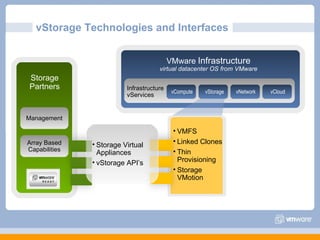
vStorage Technologies and Interfaces VMware  Infrastructure virtual datacenter OS from VMware Infrastructure  vServices vNetwork vStorage vCompute vCloud VMFS Linked Clones Thin Provisioning Storage VMotion Storage Partners Management Array Based Capabilities Storage Virtual Appliances vStorage API’s
vStorage Thin Provisioning  Significantly improve storage utilization Eliminate need to over-provision virtual disks Reduce storage costs by up to 50% Virtual machine disks consume only the amount of physical space in use Virtual machine sees full logical disk size at all times Full reporting and alerting on allocation and consumption Physical Storage Virtual Disks 10GB 20GB 40GB 100GB 20GB 40GB ESX 30GB 70GB App OS App OS App OS 10GB 10GB
vStorage linked clones  Multiple virtual machines share common base disk Each virtual machine has own disk that stores its writes to disk Patches applies to base disk are seen by all linked clones Reduce storage costs for Virtual Desktop Infrastructure by up to 90% Improve storage utilization Simplify patch process Base Disk OS App OS App OS App OS App
Virtual is Simply Better Than Physical for All Applications CURRENT NEW VMware VMsafe  provides fine-grained visibility into virtual machines to proactively detect and stop previously undetectable viruses, rootkits and malware IBM, McAfee, Checkpoint, Radware announce products that use VMsafe to provide complete surround protection for VMs Hot add of virtual CPU, memory and network  devices to virtual machines enables applications to scale non disruptively Very large virtual machines  8-virtual CPUs and 256 GB of RAM  meet the requirements of the most intense applications VMware Infrastructure -> Virtual Datacenter OS Application  vServices Scalability Security Availability …… . VMware Fault Tolerance , provides  zero downtime, zero data loss  availability to all applications against hardware failures vCenter Data Recovery  provides quick, simple and cost effective backup and recovery for all applications. DRS shares and reservations allow apps to shrink and grow ESXi -32 MB of code, locked down interfaces, no general purpose OS dependence HA, VMotion, Storage VMotion, NIC/HBA teaming provide resiliency to downtime
VMware Fault Tolerance X X Zero downtime, zero data loss No complex clustering or specialized hardware required Single common mechanism for all applications and OS-es Single identical VMs running in lockstep on separate hosts Zero downtime, zero data loss failover for all virtual machines in case of hardware failures Integrated with VMware HA/DRS FT HA HA App OS App OS App OS App OS App OS App OS App OS X VMware ESX VMware ESX Availability
vCenter Data Recovery VirtualCenter VirtualCenter Agent-less, disk-based backup and recovery of your VMs  VM or file level restore Incremental backups and data  de-dupe to save disk space Quick, simple and complete data protection for your VMs  Centralized Management through VirtualCenter  Cost Effective Storage Management  1. Backup 2. Restore VM goes down Select VM images/files  to recover Restore…VM running  in seconds Schedule backups via VC Snapshots taken Data de-duped and stored De-duplicated Storage X VirtualCenter X VirtualCenter Availability
Simplified Management – What’s New vCenter Application Mgmt Quality of Service Management for Applications vCenter AppSpeed:  real-time performance monitoring and remediation guarantee service levels Infrastructure Mgmt Proactive Management of Virtual Infrastructure vCenter Orchestrator  automates repetitive IT processes with a robust workflow engine vCenter CapacityIQ  provides proactive capacity planning for VMs, clusters and entire VI environment vCenter Chargeback  automates chargeback modeling for greater visibility and control of IT costs vCenter ConfigControl  a utomates discovery and tracking of configuration items for better visibility, compliance and remediation Host Profiles  simplify setup and ensure standardization
Monitor and Control QoS with vCenter AppSpeed Policies (SLA) Quality of Service 99.9% Uptime Fault Protection Encryption Enabled Monitor application performance from end-user perspective Collect and correlate across tiers and in VI Automated SLA management Enables proactive detection of end user performance issues Integration with VI enables root cause and remediation 55 Users 2 Servers 1 Database ü ü ü 75 Users 4 Servers Application Mgmt
Transparent Chargeback Automate chargeback modeling based on resource utilization Improve decision making with end user visibility to cost of service levels Simplify management, tracking and control over IT service costs  Costs based on service levels, underlying infrastructure and custom definitions of fixed costs  Chargeback tied to organizational structure Integrated with vCenter Resource Usage Reporting Costing Model Chargeback Engine vCenter $ vCenter Chargeback Infrastructure Mgmt
Enjoy rapid ROI – payback in 60-90 days Reduce TCO of server infrastructure Cut hardware costs by up to 30-50% Decrease operational costs by 30-70% Slash overall costs by 30-70% Manage computing resources strategically Optimize existing server resources Deploy new services more efficiently Virtual Infrastructure Return on Investment

Capito Ardoe House VMWare Presentation

  • 1.
    Capito, Aberdeen December 2008 Iain Blyfield Territory Manager – UK North [email_address] 07776 350 166
  • 2.
    Agenda Setting thescene VMware the story so far – solution overview Beyond VI3 – VMware strategy for 2009
  • 3.
    2009 – Gartner’stop 10 Strategic Developments 1. Virtualization 2. Business Intelligence 3. Cloud Computing 4. Green IT 5. Unified Communications 6. Social Software and Social Networking 7. Web Oriented Architecture 8. Enterprise Mashups 9. Specialized Systems 10. Servers – Beyond Blades Gartner Inc. has ranked virtualization as the No. 1 strategic technology for next year, not for its &quot;tremendously obvious&quot; ability to virtualize servers, but for its increasing capability to virtualize just about everything else in a data center
  • 4.
    Trends and ChallengesFacing IT Address Technological Complexity Better Support the Business Cut Power Consumption Reduce Operating Costs Make IT More Secure Get a Better Return on Investments Today’s IT Dept.
  • 5.
    Key IT Obstacles*Source: IBM Scorpion, VMware What’s Increasing What’s Decreasing 0% 10% 20% 30% 40% 50% 60% 70% 1980 1990 2007 Server utilization rates* Efficiency 1990 1997 2007 # components Numbers of components which need to be procured, provisioned, managed, secured, etc. Complexity Pressures Do more with less Comply with security and regulatory requirements Resources Less able to add new functionality or improve IT service levels
  • 6.
    The Result Growing Gap Business Needs IT Capacity What the business needs vs. What IT department can deliver
  • 7.
    The ‘physical’ Data-centreServer Provisioning Times Technology Developments (CPU, RAM, I/O) Number of servers, reliance of IT to the business Electricity Costs Physical Space Business Continuity - Planned Downtime - Unplanned Downtime IT being asked to do more with less and improve SLA’s, typical budget: - 80% Maintenance - 20% Innovation
  • 8.
    The Virtual Data-centreFlexibility Rapid provisioning Disaster Recovery High Availability Automation Virtual Desktops
  • 9.
    Challenge: Server Proliferation Consolidate servers Increase utilization Reduce hardware, power, cooling Server Sprawl Low Utilization High Power Consumption Avg. utilization rate/server Higher Utilization % CPU Busy (8 LCPVs w/HT) 0 100 200 300 400 500 600 700 800 725 MW MegaWatts consumed: 100 servers per year Lower Consumption 0 100 200 300 400 500 600 700 800 725 MW 104 MW
  • 10.
    The size ofthe problem – real customer data * Industry average 6-8%
  • 11.
    VMware Infrastructure –Key Solutions / Use Cases Server Consolidation and Containment – Eliminate server sprawl by deploying systems into virtual machines Test and Development – Rapidly provision and re-provision test and development servers; store libraries of pre-configured test machines Enterprise Desktop – Secure unmanaged PCs. Alternatively, provide standardized enterprise desktop environments hosted on servers. Business Continuity – Reduce the cost and complexity of business continuity by encapsulating entire systems files that can be replicated and restored onto any target server Infrastructure Provisioning – Reduce the time for provisioning new infrastructure to minutes with sophisticated automation capabilities. Legacy Application Re-hosting – Migrate legacy operating systems and software applications to virtual machines running on new hardware for better reliability
  • 12.
  • 13.
    Centralized Management withVirtualCenter Provision and boot virtual machines Monitor system availability and performance Automated notifications and email alerting Integrate SDK with existing management tools Secure the environment with robust access control
  • 14.
    ESX Server 3iServer boot to running virtual machines in minutes Simplified management No Linux command line skills required No user accounts or passwords to create and maintain No OS security hardening, antivirus, or backup effort required Integrated, standards-based CIM providers for hardware management Integration in hardware eliminates installation Intuitive wizard driven start up experience dramatically reduces deployment time Standards-based management of the underlying hardware
  • 15.
    Benefits: Migrate workloadsto maximize resource utilization Zero downtime for planned server maintenance Proactively migrate applications away from failing hardware Workload Management with VMotion VMotion technology lets you move running, stateful virtual machines from one physical system to another while maintaining continuous service availability
  • 16.
    VMware HA Automaticrestart of virtual machines in case of server failure No need for dedicated stand-by hardware None of the cost and complexity of clustering Cost effective high availability for all servers Resource Pool X
  • 17.
    VMware DRS AlignIT resources with business priorities Dynamically allocate resource to virtual machines. Dramatically increase system administrator productivity Enable system administrators to manage more resources Automate hardware maintenance Maintenance mode automatically migrates all virtual machines to other physical servers. Dynamic and intelligent allocation of hardware resources to the highest priority virtual machines to ensure optimal alignment between business and IT Resource Pool
  • 18.
    Distributed Power Management(DPM) Resource Pool Business Demand Power Off Consolidates workloads onto fewer servers when the cluster needs fewer resources Places unneeded servers in standby mode Brings servers back online as workload needs increase Minimizes power consumption while guaranteeing service levels No disruption or downtime to virtual machines
  • 19.
    Simplifies and automatesdisaster recovery workflows: Setup, testing, failover Provides central management of recovery plans from VirtualCenter Turns manual recovery processes into automated recovery plans Simplifies integration with 3 rd -party storage replication VMware Site Recovery Manager Site Recovery Manager leverages VMware Infrastructure to transform disaster recovery Makes disaster recovery rapid, reliable, manageable, affordable
  • 20.
    Current VMware VDISolution Overview Extended Win32 client Browser on Linux, Mac Direct from thin clients RDP/ HTTPS RDP Windows XP Windows Vista Automated provisioning and desktop management DMZ deployment option Integrated solution including: VMware VI3 Enterprise Virtual Desktop Manager 2.1 Optional integration with RSA SecurID
  • 21.
    GSX 1.0 ESX1.0 Server 2001 2001 VMware Product Evolution vCloud 1.0 Cloud 2008 Workstation 1.0 VDI 1.0 Desktop 1999 2006 VirtualCenter 1.0 (with w/VMotion) Management 2003 2005 Stay Tuned! Workstation 5.0 ACE Player Fusion VDM ThinApp SVI Mobility Workstation 1.0 VDI 1.0 Desktop 1999 2006 VMware Server 2.0 ESXi ESX 3.5 GSX 1.0 ESX 1.0 Server 2001 2001 Storage VMotion DRS HA Backup Mgr Update Mgr DPM Capacity Planner Lab Mgr Stage Mgr Lifecycle Mgr Site Recovery Mgr Virtual Center 1.0 (with w/VMotion) Management 2003 2005 Workstation 6.0 ACE Player Fusion VDM ThinApp SVI Mobility VMware Server 2.0 ESXi ESX 3.5 Storage VMotion DRS HA Backup Mgr Update Mgr DPM Capacity Planner Lab Mgr Stage Mgr Lifecycle Mgr Site Recovery Mgr
  • 22.
    Virtualization: Industry-Standard Wayof Computing Hypervisor Virtual Infrastructure Management & Automation Hypervisor Virtual Infrastructure Hypervisor Test & Development Early Adoption Mainstreaming Standardization Server Consolidation Infrastructure Management High Availability 3 rd generation 2006- 2008 2 nd generation 2003 - 2005 1 st generation 1998 – 2002
  • 23.
    The Next Generationof Virtualization The Virtual DataCenter Operating System (VDC OS) VMware Infrastructure is extended to “Virtual DataCenter OS “in 2009 A Virtual DataCenter OS: Aggregates server, storage and network hardware into a shared resource or ‘internal cloud’ Allocates this shared resource among applications precisely and efficiently Provides built in services to ALL applications such as availability, security and performance scalability Federates with external clouds so cloud computing is easily accessible for enterprises VDC OS is to the entire datacenter what Windows and Linux are to a single server
  • 24.
    The virtual datacenterOS from VMware vCloud vCenter On-premise Infrastructure VMware Infrastructure -> Virtual DataCenter OS SaaS Linux Windows J2EE .Net Web 2.0 … Application vServices Scalability Security Availability Infrastructure vServices vNetwork vStorage vCompute Cloud vServices
  • 25.
    Highest Single ServerResource Efficiency Storage Networking Virtual Machines CPU Memory Virtual hardware scale out Virtual hardware scale out 128 cores and 512 GB of physical RAM Hardware Scale Out Lowest CPU overhead HW Assist Purpose Built Scheduler Maximum memory efficiency HW Assist Page Sharing Ballooning Wirespeed (9Gb today) network access VMDirectPath Offload Greater than 200k iops per second Lower than 2 ms latency VMDirectPath Para-virtualized SCSI ESX Server App OS App OS App OS App OS App OS 8-way vSMP and 256 GB of RAM per VM
  • 26.
    Very Large VMs,Powerful Performance % of Applications Application’s Performance Requirements IOPS Memory CPU PAST < 100 at peak < 4 MB at peak 1 to 2 CPUs 1. Source: VMware Capacity Planner assessments CURRENT 100,000 64 GB per VM 4 VCPUs FUTURE 200,000 256 GB per VM 8 VCPUs
  • 27.
    Infrastructure vServices andCloud vServices VMware Infrastructure -> Virtual Datacenter OS Cloud vServices vStorage Thin Provisioning Linked clones Reduce storage costs by up to 50% vNetwork Distributed Switch Aggregates network configuration to a datacenter level and enables 3 rd parties such as Cisco to provide VM level enforcement of qos and policies Existing technologies virtualize CPU/memory with the lowest overhead and greatest efficiency (over 100k iops and less than 0.2 ms latency) DRS aggregates resources across servers and provides non disruptive dynamic load balancing vCloud The vCloud will connect internal datacenters and external service provider offerings together seamlessly enabling enterprises to adopt cloud-based services Resource Abstraction Resource Aggregation & Allocation Infrastructure vServices vNetwork vStorage vCompute
  • 28.
    vNetwork Distributed SwitchAggregated view of virtual networking Datacenter level networking (versus host level) Historical statistics follow the VM A unified infrastructure for networking services (monitoring, filtering, mgmt via PVLANs) Simplified setup and change; seamless addition of capacity Easy troubleshooting, monitoring and debugging Enables new security services vSwitch vSwitch vSwitch App OS App OS App OS App OS App OS vNetwork Distributed Switch
  • 29.
    Ecosystem Enablement Enterprisenetworking vendors can provide proprietary networking features in a VMware environment Enables networking solutions to monitor, control and manage virtual networks Networking/security solutions can understand/ be aware of mobile, dynamic virtual infrastructure Simplicity and transparency for network administrators Unified management framework for physical and virtual networks App OS App OS App OS App OS App OS Third Party Virtual Switch
  • 30.
    vStorage Technologies andInterfaces VMware Infrastructure virtual datacenter OS from VMware Infrastructure vServices vNetwork vStorage vCompute vCloud VMFS Linked Clones Thin Provisioning Storage VMotion Storage Partners Management Array Based Capabilities Storage Virtual Appliances vStorage API’s
  • 31.
    vStorage Thin Provisioning Significantly improve storage utilization Eliminate need to over-provision virtual disks Reduce storage costs by up to 50% Virtual machine disks consume only the amount of physical space in use Virtual machine sees full logical disk size at all times Full reporting and alerting on allocation and consumption Physical Storage Virtual Disks 10GB 20GB 40GB 100GB 20GB 40GB ESX 30GB 70GB App OS App OS App OS 10GB 10GB
  • 32.
    vStorage linked clones Multiple virtual machines share common base disk Each virtual machine has own disk that stores its writes to disk Patches applies to base disk are seen by all linked clones Reduce storage costs for Virtual Desktop Infrastructure by up to 90% Improve storage utilization Simplify patch process Base Disk OS App OS App OS App OS App
  • 33.
    Virtual is SimplyBetter Than Physical for All Applications CURRENT NEW VMware VMsafe provides fine-grained visibility into virtual machines to proactively detect and stop previously undetectable viruses, rootkits and malware IBM, McAfee, Checkpoint, Radware announce products that use VMsafe to provide complete surround protection for VMs Hot add of virtual CPU, memory and network devices to virtual machines enables applications to scale non disruptively Very large virtual machines 8-virtual CPUs and 256 GB of RAM meet the requirements of the most intense applications VMware Infrastructure -> Virtual Datacenter OS Application vServices Scalability Security Availability …… . VMware Fault Tolerance , provides zero downtime, zero data loss availability to all applications against hardware failures vCenter Data Recovery provides quick, simple and cost effective backup and recovery for all applications. DRS shares and reservations allow apps to shrink and grow ESXi -32 MB of code, locked down interfaces, no general purpose OS dependence HA, VMotion, Storage VMotion, NIC/HBA teaming provide resiliency to downtime
  • 34.
    VMware Fault ToleranceX X Zero downtime, zero data loss No complex clustering or specialized hardware required Single common mechanism for all applications and OS-es Single identical VMs running in lockstep on separate hosts Zero downtime, zero data loss failover for all virtual machines in case of hardware failures Integrated with VMware HA/DRS FT HA HA App OS App OS App OS App OS App OS App OS App OS X VMware ESX VMware ESX Availability
  • 35.
    vCenter Data RecoveryVirtualCenter VirtualCenter Agent-less, disk-based backup and recovery of your VMs VM or file level restore Incremental backups and data de-dupe to save disk space Quick, simple and complete data protection for your VMs Centralized Management through VirtualCenter Cost Effective Storage Management 1. Backup 2. Restore VM goes down Select VM images/files to recover Restore…VM running in seconds Schedule backups via VC Snapshots taken Data de-duped and stored De-duplicated Storage X VirtualCenter X VirtualCenter Availability
  • 36.
    Simplified Management –What’s New vCenter Application Mgmt Quality of Service Management for Applications vCenter AppSpeed: real-time performance monitoring and remediation guarantee service levels Infrastructure Mgmt Proactive Management of Virtual Infrastructure vCenter Orchestrator automates repetitive IT processes with a robust workflow engine vCenter CapacityIQ provides proactive capacity planning for VMs, clusters and entire VI environment vCenter Chargeback automates chargeback modeling for greater visibility and control of IT costs vCenter ConfigControl a utomates discovery and tracking of configuration items for better visibility, compliance and remediation Host Profiles simplify setup and ensure standardization
  • 37.
    Monitor and ControlQoS with vCenter AppSpeed Policies (SLA) Quality of Service 99.9% Uptime Fault Protection Encryption Enabled Monitor application performance from end-user perspective Collect and correlate across tiers and in VI Automated SLA management Enables proactive detection of end user performance issues Integration with VI enables root cause and remediation 55 Users 2 Servers 1 Database ü ü ü 75 Users 4 Servers Application Mgmt
  • 38.
    Transparent Chargeback Automatechargeback modeling based on resource utilization Improve decision making with end user visibility to cost of service levels Simplify management, tracking and control over IT service costs Costs based on service levels, underlying infrastructure and custom definitions of fixed costs Chargeback tied to organizational structure Integrated with vCenter Resource Usage Reporting Costing Model Chargeback Engine vCenter $ vCenter Chargeback Infrastructure Mgmt
  • 39.
    Enjoy rapid ROI– payback in 60-90 days Reduce TCO of server infrastructure Cut hardware costs by up to 30-50% Decrease operational costs by 30-70% Slash overall costs by 30-70% Manage computing resources strategically Optimize existing server resources Deploy new services more efficiently Virtual Infrastructure Return on Investment