Harold Wong
Sr. IT Pro Evangelist
blogs.technet.com/haroldwong
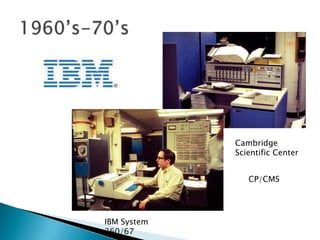
Cambridge
             Scientific Center


                CP/CMS


IBM System
360/67
   Type 1 (or native, bare metal) hypervisors run
    directly on the host's hardware to control the
    hardware and to monitor guest operating
    systems. A guest operating system thus runs
    on another level above the hypervisor.
   Type 2 (or hosted) hypervisors Run within a
    conventional operating system environment.
    With the hypervisor layer as a distinct second
    software level, guest operating systems run
    at the third level above the hardware.
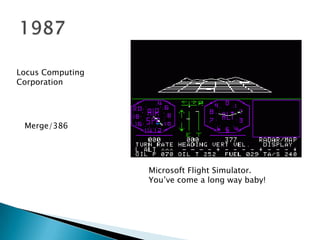
Locus Computing
Corporation


 Merge/386


                  Microsoft Flight Simulator.
                  You’ve come a long way baby!
October 26, 1998, VMware filed for a patent on
their techniques, which is granted as U.S. Patent
6,397,242.

February 8, 1999, VMware introduced VMware
Virtual Platform for the Intel IA-32 architecture.
◦ February 18, 2003, Microsoft acquired virtualization
  technologies (Virtual PC and unreleased product
  called "Virtual Server") from Connectix Corporation.
◦ Late 2003, EMC acquired VMware for $635 million.
◦ November 10, 2003 Microsoft releases Microsoft
  Virtual PC, which is machine-level virtualization
  technology, to ease the transition to Windows XP.
July 12, 2006 VMware releases VMware Server, a free
machine-level virtualization product for the server
market.
Microsoft Virtual PC 2006 is released as a free
program, also in July.
July 12, 2006 VMware releases VMware Server, a free
machine-level virtualization product for the server
market.
Microsoft Virtual PC 2006 is released as a free
program, also in July.
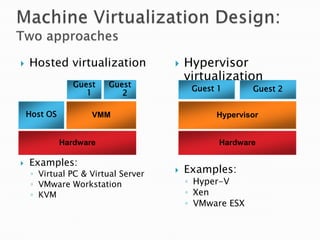
   Hosted virtualization               Hypervisor
                                         virtualization
                 Guest   Guest
                                          Guest 1       Guest 2
                    1       2

    Host OS          VMM                       Hypervisor


              Hardware                          Hardware

   Examples:
     ◦ Virtual PC & Virtual Server      Examples:
     ◦ VMware Workstation                ◦ Hyper-V
     ◦ KVM                               ◦ Xen
                                         ◦ VMware ESX
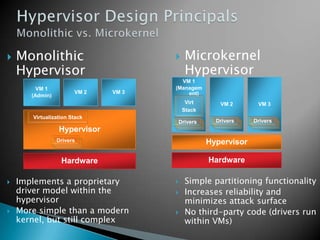
   Monolithic                          Microkernel
    Hypervisor                           Hypervisor
                                       VM 1
         VM 1                        (Managem
                       VM 2   VM 3       ent)
       (Admin)
                                          Virt      VM 2       VM 3
                                         Stack
       Virtualization Stack
                                     Drivers       Drivers    Drivers
                 Hypervisor
                 Drivers                         Hypervisor

                  Hardware                       Hardware

   Implements a proprietary            Simple partitioning functionality
    driver model within the             Increases reliability and
    hypervisor                           minimizes attack surface
   More simple than a modern           No third-party code (drivers run
    kernel, but still complex            within VMs)
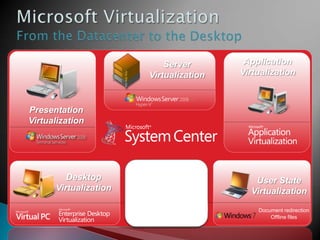
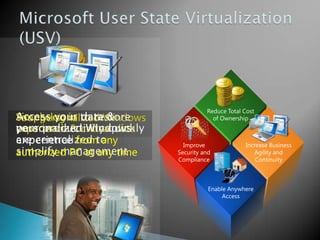
Server               Application
                             Virtualization          Virtualization


Presentation
Virtualization


                       “Having one vendor for the
                           hypervisor, operating
         Desktop         system, and much of our        User State
      Virtualization     application software was
                       very appealing to us from a     Virtualization
                             support and cost
                               perspective.”
                          Bert Van Pottelberghe,         Document redirection
                        Sales Director, Hostbasket           Offline files
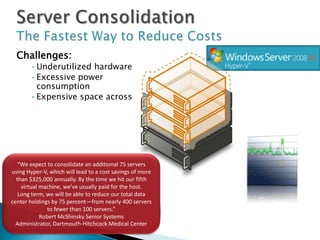
Challenges:
       •Underutilized hardware
       •Excessive power
        consumption
       •Expensive space across
        datacenter and branch
        offices


   “We expect to consolidate an additional 75 servers
using Hyper-V, which will lead to a cost savings of more
  than $325,000 annually. By the time we hit our fifth
    virtual machine, we’ve usually paid for the host.
   Long term, we will be able to reduce our total data
center holdings by 75 percent—from nearly 400 servers       Server
              to fewer than 100 servers.”
            Robert McShinsky Senior Systems
                                                           Utilization
  Administrator, Dartmouth-Hitchcock Medical Center
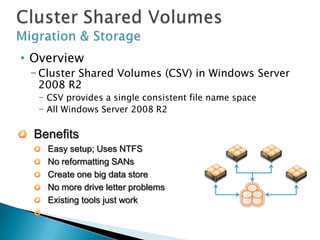
• Overview
 − Cluster Shared Volumes (CSV) in Windows Server
   2008 R2
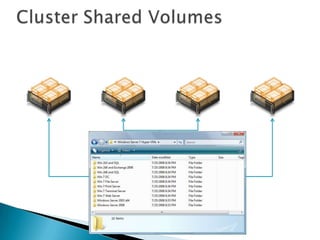
  − CSV provides a single consistent file name space
  − All Windows Server 2008 R2 Server servers see the same
    storage
  Benefits
    Easy setup; Uses NTFS
    No reformatting SANs
    Create one big data store
    No more drive letter problems
    Existing tools just work
    Highly recommended for live migration scenarios
All servers “see” the same storage
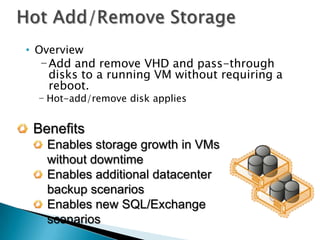
• Overview
   − Add and remove VHD and pass-through
     disks to a running VM without requiring a
     reboot.
  − Hot-add/remove disk applies to VHDs and pass-
    through disks attached to the virtual SCSI controller

 Benefits
   Enables storage growth in VMs
   without downtime
   Enables additional datacenter
   backup scenarios
   Enables new SQL/Exchange
   scenarios
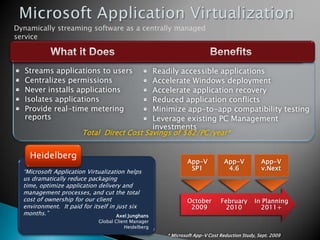
Dynamically streaming software as a centrally managed
service


   Streams applications to users            Readily accessible applications
   Centralizes permissions                  Accelerate Windows deployment
   Never installs applications              Accelerate application recovery
   Isolates applications                    Reduced application conflicts
   Provide real-time metering               Minimize app-to-app compatibility testing
   reports                                  Leverage existing PC Management
                                            investments
                        Total Direct Cost Savings of $82/PC/year*


    Heidelberg
                                                              App-V            App-V           App-V
                                                               SP1              4.6            v.Next
  “Microsoft Application Virtualization helps
  us dramatically reduce packaging
  time, optimize application delivery and
  management processes, and cut the total
  cost of ownership for our client
  environment. It paid for itself in just six
  months.”                           Axel Junghans
                              Global Client Manager
                                         Heidelberg
                                                      * Microsoft App-V Cost Reduction Study, Sept. 2009
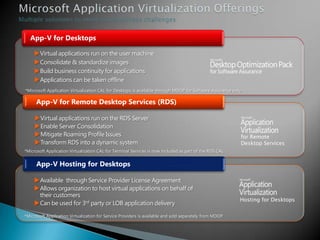
App-V for Desktops

     Virtual applications run on the user machine
     Consolidate & standardize images
     Build business continuity for applications
     Applications can be taken offline
*Microsoft Application Virtualization CAL for Desktops is available through MDOP for Software Assurance only.

      App-V for Remote Desktop Services (RDS)

     Virtual applications run on the RDS Server
     Enable Server Consolidation
     Mitigate Roaming Profile Issues                                                                       for Remote
     Transform RDS into a dynamic system                                                                   Desktop Services
*Microsoft Application Virtualization CAL for Terminal Services is now included as part of the RDS CAL


      App-V Hosting for Desktops

    Available through Service Provider License Agreement
    Allows organization to host virtual applications on behalf of
     their customers
                                                                                                            Hosting for Desktops
    Can be used for 3rd party or LOB application delivery
*Microsoft Application Virtualization for Service Providers is available and sold separately from MDOP
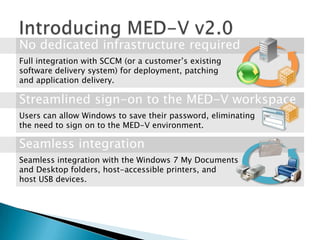
Full integration with SCCM (or a customer’s existing
software delivery system) for deployment, patching
and application delivery.


Users can allow Windows to save their password, eliminating
the need to sign on to the MED-V environment.


Seamless integration with the Windows 7 My Documents
and Desktop folders, host-accessible printers, and
host USB devices.
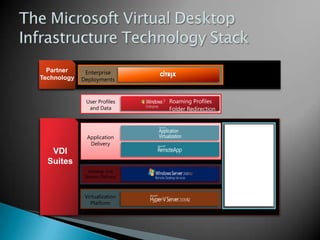
Partner     Enterprise         Partners
Technology   Deployments         such as


              User Profiles                 Roaming Profiles
               and Data                     Folder Redirection


               Application
                Delivery
   VDI
  Suites
               Desktop and
              Session Delivery


              Virtualization
                Platform
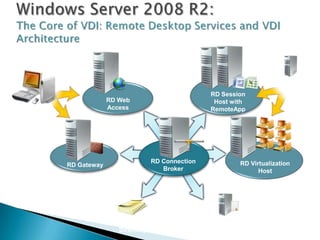
System
                                                                        Center and
                                                     RD Session
                         RD Web                                           App-V
                                                      Host with
                         Access                      RemoteApp
RD Client


                                     RD Connection           RD Virtualization
            RD Gateway
                                        Broker                     Host


                              Active                 Licensing
                            Directory®                 Server
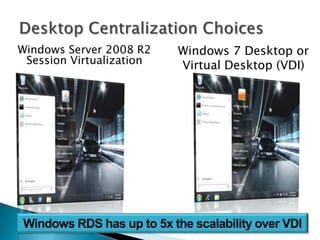
Windows Server 2008 R2    Windows 7 Desktop or
 Session Virtualization   Virtual Desktop (VDI)
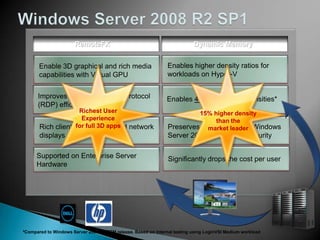
RemoteFX                                             Dynamic Memory


                        Richest User                                          15% higher density
                         Experience                                                than the
                       for full 3D apps                                         market leader


*Compared to Windows Server 2008 R2 RTM release. Based on internal testing using LoginVSI Medium workload
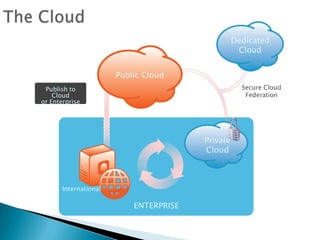
Dedicated
                                                   Cloud


                       Public Cloud
 Publish to                                         Secure Cloud
    Cloud                                            Federation
or Enterprise


                                        Private
                                        Cloud


       International

                           ENTERPRISE
• Trial Software Downloads
  −Windows Server 2008 R2
  −Hyper-V Server 2008 R2
  −Configuration Manager 2007 R3
  −Operations Manager 2007 R2
  −Virtual Machine Manager 2008 R2
  −Service Manager 2010
  −Opalis
  −System Center 2012 Release Candidates /
   Betas

Get ready for tomorrow, today!

  • 1.
    Harold Wong Sr. ITPro Evangelist blogs.technet.com/haroldwong
  • 3.
    Cambridge Scientific Center CP/CMS IBM System 360/67
  • 4.
    Type 1 (or native, bare metal) hypervisors run directly on the host's hardware to control the hardware and to monitor guest operating systems. A guest operating system thus runs on another level above the hypervisor.  Type 2 (or hosted) hypervisors Run within a conventional operating system environment. With the hypervisor layer as a distinct second software level, guest operating systems run at the third level above the hardware.
  • 5.
    Locus Computing Corporation Merge/386 Microsoft Flight Simulator. You’ve come a long way baby!
  • 6.
    October 26, 1998,VMware filed for a patent on their techniques, which is granted as U.S. Patent 6,397,242. February 8, 1999, VMware introduced VMware Virtual Platform for the Intel IA-32 architecture.
  • 7.
    ◦ February 18,2003, Microsoft acquired virtualization technologies (Virtual PC and unreleased product called "Virtual Server") from Connectix Corporation. ◦ Late 2003, EMC acquired VMware for $635 million. ◦ November 10, 2003 Microsoft releases Microsoft Virtual PC, which is machine-level virtualization technology, to ease the transition to Windows XP.
  • 8.
    July 12, 2006VMware releases VMware Server, a free machine-level virtualization product for the server market. Microsoft Virtual PC 2006 is released as a free program, also in July.
  • 9.
    July 12, 2006VMware releases VMware Server, a free machine-level virtualization product for the server market. Microsoft Virtual PC 2006 is released as a free program, also in July.
  • 10.
    Hosted virtualization  Hypervisor virtualization Guest Guest Guest 1 Guest 2 1 2 Host OS VMM Hypervisor Hardware Hardware  Examples: ◦ Virtual PC & Virtual Server  Examples: ◦ VMware Workstation ◦ Hyper-V ◦ KVM ◦ Xen ◦ VMware ESX
  • 11.
    Monolithic  Microkernel Hypervisor Hypervisor VM 1 VM 1 (Managem VM 2 VM 3 ent) (Admin) Virt VM 2 VM 3 Stack Virtualization Stack Drivers Drivers Drivers Hypervisor Drivers Hypervisor Hardware Hardware  Implements a proprietary  Simple partitioning functionality driver model within the  Increases reliability and hypervisor minimizes attack surface  More simple than a modern  No third-party code (drivers run kernel, but still complex within VMs)
  • 12.
    Server Application Virtualization Virtualization Presentation Virtualization “Having one vendor for the hypervisor, operating Desktop system, and much of our User State Virtualization application software was very appealing to us from a Virtualization support and cost perspective.” Bert Van Pottelberghe, Document redirection Sales Director, Hostbasket Offline files
  • 13.
    Challenges: •Underutilized hardware •Excessive power consumption •Expensive space across datacenter and branch offices “We expect to consolidate an additional 75 servers using Hyper-V, which will lead to a cost savings of more than $325,000 annually. By the time we hit our fifth virtual machine, we’ve usually paid for the host. Long term, we will be able to reduce our total data center holdings by 75 percent—from nearly 400 servers Server to fewer than 100 servers.” Robert McShinsky Senior Systems Utilization Administrator, Dartmouth-Hitchcock Medical Center
  • 14.
    • Overview −Cluster Shared Volumes (CSV) in Windows Server 2008 R2 − CSV provides a single consistent file name space − All Windows Server 2008 R2 Server servers see the same storage Benefits Easy setup; Uses NTFS No reformatting SANs Create one big data store No more drive letter problems Existing tools just work Highly recommended for live migration scenarios
  • 15.
    All servers “see”the same storage
  • 16.
    • Overview − Add and remove VHD and pass-through disks to a running VM without requiring a reboot. − Hot-add/remove disk applies to VHDs and pass- through disks attached to the virtual SCSI controller Benefits Enables storage growth in VMs without downtime Enables additional datacenter backup scenarios Enables new SQL/Exchange scenarios
  • 18.
    Dynamically streaming softwareas a centrally managed service Streams applications to users Readily accessible applications Centralizes permissions Accelerate Windows deployment Never installs applications Accelerate application recovery Isolates applications Reduced application conflicts Provide real-time metering Minimize app-to-app compatibility testing reports Leverage existing PC Management investments Total Direct Cost Savings of $82/PC/year* Heidelberg App-V App-V App-V SP1 4.6 v.Next “Microsoft Application Virtualization helps us dramatically reduce packaging time, optimize application delivery and management processes, and cut the total cost of ownership for our client environment. It paid for itself in just six months.” Axel Junghans Global Client Manager Heidelberg * Microsoft App-V Cost Reduction Study, Sept. 2009
  • 19.
    App-V for Desktops Virtual applications run on the user machine Consolidate & standardize images Build business continuity for applications Applications can be taken offline *Microsoft Application Virtualization CAL for Desktops is available through MDOP for Software Assurance only. App-V for Remote Desktop Services (RDS) Virtual applications run on the RDS Server Enable Server Consolidation Mitigate Roaming Profile Issues for Remote Transform RDS into a dynamic system Desktop Services *Microsoft Application Virtualization CAL for Terminal Services is now included as part of the RDS CAL App-V Hosting for Desktops Available through Service Provider License Agreement Allows organization to host virtual applications on behalf of their customers Hosting for Desktops Can be used for 3rd party or LOB application delivery *Microsoft Application Virtualization for Service Providers is available and sold separately from MDOP
  • 21.
    Full integration withSCCM (or a customer’s existing software delivery system) for deployment, patching and application delivery. Users can allow Windows to save their password, eliminating the need to sign on to the MED-V environment. Seamless integration with the Windows 7 My Documents and Desktop folders, host-accessible printers, and host USB devices.
  • 23.
    Partner Enterprise Partners Technology Deployments such as User Profiles Roaming Profiles and Data Folder Redirection Application Delivery VDI Suites Desktop and Session Delivery Virtualization Platform
  • 24.
    System Center and RD Session RD Web App-V Host with Access RemoteApp RD Client RD Connection RD Virtualization RD Gateway Broker Host Active Licensing Directory® Server
  • 25.
    Windows Server 2008R2 Windows 7 Desktop or Session Virtualization Virtual Desktop (VDI)
  • 26.
    RemoteFX Dynamic Memory Richest User 15% higher density Experience than the for full 3D apps market leader *Compared to Windows Server 2008 R2 RTM release. Based on internal testing using LoginVSI Medium workload
  • 34.
    Dedicated Cloud Public Cloud Publish to Secure Cloud Cloud Federation or Enterprise Private Cloud International ENTERPRISE
  • 35.
    • Trial SoftwareDownloads −Windows Server 2008 R2 −Hyper-V Server 2008 R2 −Configuration Manager 2007 R3 −Operations Manager 2007 R2 −Virtual Machine Manager 2008 R2 −Service Manager 2010 −Opalis −System Center 2012 Release Candidates / Betas