Advances in Remote Display Protocol Technology with VMware
Blast Extreme - EUC7601
Kiran Rao – Director Product Management
Sean Samenfeld-Specht – Sr. Manager R&D
• This presentation may contain product features that are currently under development.
• This overview of new technology represents no commitment from VMware to deliver these
features in any generally available product.
• Features are subject to change, and must not be included in contracts, purchase orders, or
sales agreements of any kind.
• Technical feasibility and market demand will affect final delivery.
• Pricing and packaging for any new technologies or features discussed or presented have not
been determined.
Disclaimer
2
Agenda
3
1 Blast Extreme Overview
2 Blast Extreme 3D Graphics support
3 Blast Extreme Client Ecosystem
4 Blast Extreme Best Practices
Deliver Next-Gen User
Experience and Access
4
Blast Extreme: Unified Protocol for All VMware Products
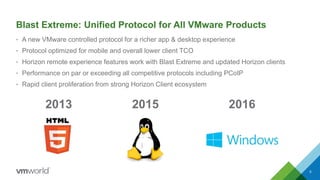
• A new VMware controlled protocol for a richer app & desktop experience
• Protocol optimized for mobile and overall lower client TCO
• Horizon remote experience features work with Blast Extreme and updated Horizon clients
• Performance on par or exceeding all competitive protocols including PCoIP
• Rapid client proliferation from strong Horizon Client ecosystem
5
2013 2015 2016
6
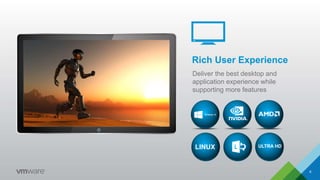
Rich User Experience
Deliver the best desktop and
application experience while
supporting more features
LINUX ULTRA HD
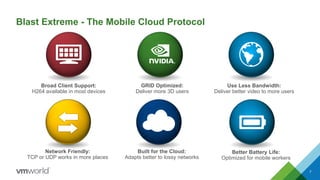
Blast Extreme - The Mobile Cloud Protocol
7
Use Less Bandwidth:
Deliver better video to more users
Broad Client Support:
H264 available in most devices
GRID Optimized:
Deliver more 3D users
Network Friendly:
TCP or UDP works in more places
Built for the Cloud:
Adapts better to lossy networks
Better Battery Life:
Optimized for mobile workers
Blast Extreme
Overview
• Another protocol option in Horizon 7
• Simplifies firewall port configurations
• Feature and performance parity with PCoIP
• PCoIP is NOT going away
• H.264 codec support
–Most devices have H.264 hardware decode support
• Hardware H.264 encode with NVIDIA GRID
• JPG/PNG codec support
–Same as used in Blast Extreme HTML / Linux
• Supports both TCP and UDP
–TCP is default, UDP is optional
• Native Horizon Client 4.x required
8
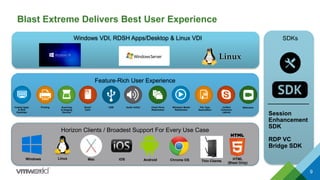
Horizon Clients / Broadest Support For Every Use Case
Feature-Rich User Experience
Blast Extreme Delivers Best User Experience
99
Hosted Apps
& RDS
Desktops
Printing Scanning
& Imaging
Devices
USB Audio In/OutSmart
Card
Client Drive
Redirection
Windows Media
Redirection
File Type
Association
Unified
Communi-
cations
Webcams
Session
Enhancement
SDK
RDP VC
Bridge SDK
Mac iOSLinuxWindows Android Chrome OS HTML
(Blast Only)
SDKsWindows VDI, RDSH Apps/Desktop & Linux VDI
Thin Clients
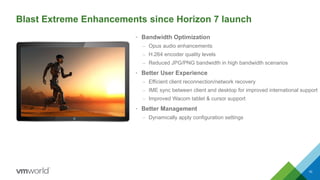
• Bandwidth Optimization
– Opus audio enhancements
– H.264 encoder quality levels
– Reduced JPG/PNG bandwidth in high bandwidth scenarios
• Better User Experience
– Efficient client reconnection/network recovery
– IME sync between client and desktop for improved international support
– Improved Wacom tablet & cursor support
• Better Management
– Dynamically apply configuration settings
10
Blast Extreme Enhancements since Horizon 7 launch
Differentiating Opportunities for Blast Extreme
11
H264 Powered for Ubiquitous Client Access
• Lower cost client ecosystem leveraging H264 standard
• Support for Windows, Linux, Mac, iOS, Android, ChromeOS
• Support for Native clients and Web browsers
H264 for Better Battery Life with Less Bandwidth
• Delivery better experience, less bandwidth
• Greatly improved mobile battery life with hardware decode
Media Offload
• Windows Media offload today for VDI and RDSH
• Leverage H264 transcode for other media formats
Deliver Best 3D Desktop and App Experience
• Leverage NVIDIA with hardware protocol encode
Differentiating Opportunities for Blast Extreme
12
Adapt Better to Lossy Networks
• Improve throughput on lossy and wireless networks
• Media delivered over wide variety of network conditions
Network Friendly
• Support for both TCP & UDP networks
Single Dynamic Protocol for All Needs
• Use hardware encode with NVIDIA GRID if available
• Use software H264 if client can decode H264
• Use JPG/PNG if client can’t decode H264
Blast Extreme: Networking
• Blast Extreme supports both TCP and UDP
• User can choose transport protocol from Client
• Defaults to TCP, UDP is optional
• UDP disabled on agent by default - enabled via GPO
• External Ports 443 (HTTPS) and 8443 (TCP/UDP)
• Blast port sharing on 443 (TCP) with AP 2.5
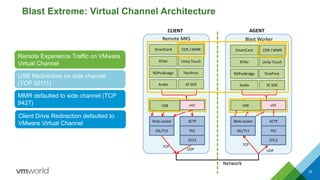
• Remote experience traffic on VMware Virtual Channel
• USB Redirection on TCP Side Channel
• MMR on TCP Side Channel by default. Can be
configured to use VMware Virtual Channel
• CDR on VMware Virtual Channel
Overview
13
Blast Extreme - Bandwidth
Overview
• Blast Extreme will take as much bandwidth as
possible to deliver best user experience
• Administrators can tune protocol for better
experience in most scenarios
• Change defaults of Blast Extreme out of the box to
balance bandwidth usage
14
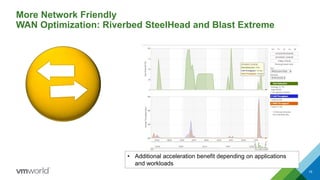
More Network Friendly
WAN Optimization: Riverbed SteelHead and Blast Extreme
15
• Additional acceleration benefit depending on applications
and workloads
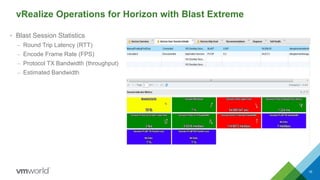
vRealize Operations for Horizon with Blast Extreme
• Blast Session Statistics
– Round Trip Latency (RTT)
– Encode Frame Rate (FPS)
– Protocol TX Bandwidth (throughput)
– Estimated Bandwidth
16
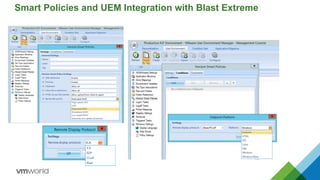
Smart Policies and UEM Integration with Blast Extreme
Rich 3D graphics experience
and ecosystem
18
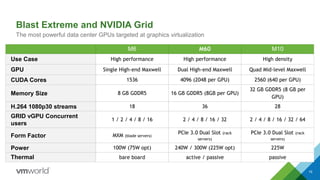
Blast Extreme and NVIDIA Grid
The most powerful data center GPUs targeted at graphics virtualization
M6 M60 M10
Use Case High performance High performance High density
GPU Single High-end Maxwell Dual High-end Maxwell Quad Mid-level Maxwell
CUDA Cores 1536 4096 (2048 per GPU) 2560 (640 per GPU)
Memory Size 8 GB GDDR5 16 GB GDDR5 (8GB per GPU)
32 GB GDDR5 (8 GB per
GPU)
H.264 1080p30 streams 18 36 28
GRID vGPU Concurrent
users
1 / 2 / 4 / 8 / 16 2 / 4 / 8 / 16 / 32 2 / 4 / 8 / 16 / 32 / 64
Form Factor MXM (blade servers)
PCIe 3.0 Dual Slot (rack
servers)
PCIe 3.0 Dual Slot (rack
servers)
Power 100W (75W opt) 240W / 300W (225W opt) 225W
Thermal bare board active / passive passive
19
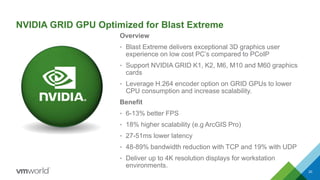
NVIDIA GRID GPU Optimized for Blast Extreme
Overview
• Blast Extreme delivers exceptional 3D graphics user
experience on low cost PC’s compared to PCoIP
• Support NVIDIA GRID K1, K2, M6, M10 and M60 graphics
cards
• Leverage H.264 encoder option on GRID GPUs to lower
CPU consumption and increase scalability.
Benefit
• 6-13% better FPS
• 18% higher scalability (e.g ArcGIS Pro)
• 27-51ms lower latency
• 48-89% bandwidth reduction with TCP and 19% with UDP
• Deliver up to 4K resolution displays for workstation
environments.
20
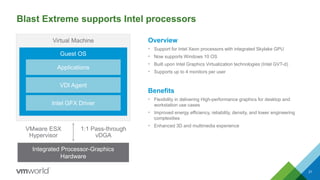
Blast Extreme supports Intel processors
Overview
• Support for Intel Xeon processors with integrated Skylake GPU
• Now supports Windows 10 OS
• Built upon Intel Graphics Virtualization technologies (Intel GVT-d)
• Supports up to 4 monitors per user
Benefits
• Flexibility in delivering High-performance graphics for desktop and
workstation use cases
• Improved energy efficiency, reliability, density, and lower engineering
complexities
• Enhanced 3D and multimedia experience
21
Integrated Processor-Graphics
Hardware
Virtual Machine
Guest OS
Intel GFX Driver
VDI Agent
Applications
VMware ESX
Hypervisor
1:1 Pass-through
vDGA
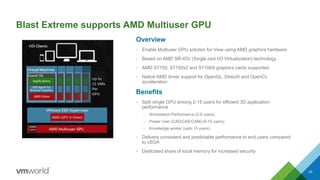
Blast Extreme supports AMD Multiuser GPU
Overview
• Enable Multiuser GPU solution for View using AMD graphics hardware
• Based on AMD SR-IOV (Single root I/O Virtualization) technology
• AMD S7150, S7150x2 and S7100X graphics cards supported.
• Native AMD driver support for OpenGL, DirectX and OpenCL
acceleration
Benefits
• Split single GPU among 2-15 users for efficient 3D application
performance
– Workstation Performance (2-6 users)
– Power User (CAD/CAE/CAM) (6-10 users)
– Knowledge worker (upto 15 users)
• Delivers consistent and predictable performance to end users compared
to vSGA
• Dedicated share of local memory for increased security
22
Rich client
ecosystem
23
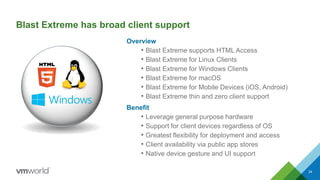
Blast Extreme has broad client support
Overview
• Blast Extreme supports HTML Access
• Blast Extreme for Linux Clients
• Blast Extreme for Windows Clients
• Blast Extreme for macOS
• Blast Extreme for Mobile Devices (iOS, Android)
• Blast Extreme thin and zero client support
Benefit
• Leverage general purpose hardware
• Support for client devices regardless of OS
• Greatest flexibility for deployment and access
• Client availability via public app stores
• Native device gesture and UI support
24
25
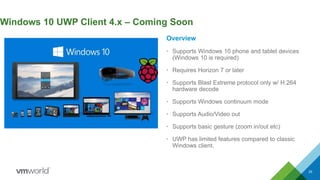
Windows 10 UWP Client 4.x – Coming Soon
Overview
• Supports Windows 10 phone and tablet devices
(Windows 10 is required)
• Requires Horizon 7 or later
• Supports Blast Extreme protocol only w/ H.264
hardware decode
• Supports Windows continuum mode
• Supports Audio/Video out
• Supports basic gesture (zoom in/out etc)
• UWP has limited features compared to classic
Windows client.
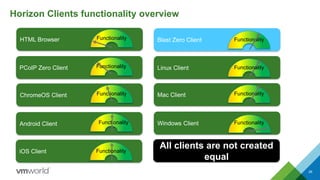
Horizon Clients functionality overview
26
HTML Browser Functionality
iOS Client Functionality
Android Client Functionality
ChromeOS Client Functionality
PCoIP Zero Client Functionality
Blast Zero Client Functionality
Linux Client Functionality
Mac Client Functionality
Windows Client Functionality
All clients are not created
equal
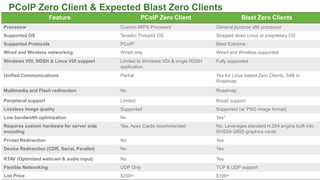
PCoIP Zero Client & Expected Blast Zero Clients
Feature PCoIP Zero Client Blast Zero Clients
Processor Custom MIPS Processor General purpose x86 processor
Supported OS Teradici ThreadX OS Stripped down Linux or proprietary OS
Supported Protocols PCoIP Blast Extreme
Wired and Wireless networking Wired only Wired and Wireless supported
Windows VDI, RDSH & Linux VDI support Limited to Windows VDI & single RDSH
application.
Fully supported
Unified Communications Partial Yes for Linux based Zero Clients. S4B in
Roadmap.
Multimedia and Flash redirection No Roadmap
Peripheral support Limited Broad support
Lossless image quality Supported Supported (w/ PNG image format)
Low bandwidth optimization No Yes*
Requires custom hardware for server side
encoding
Yes. Apex Cards recommended No. Leverages standard H.264 engine built into
NVIDIA GRID graphics cards
Printer Redirection No Yes
Device Redirection (CDR, Serial, Parallel) No Yes
RTAV (Optimized webcam & audio input) No Yes
Flexible Networking UDP Only TCP & UDP support
List Price $350+ $199+
27
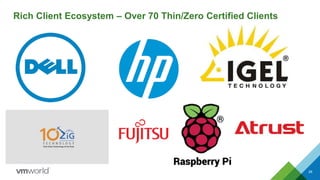
Rich Client Ecosystem – Over 70 Thin/Zero Certified Clients
28
Dell - Restricted - Confidential
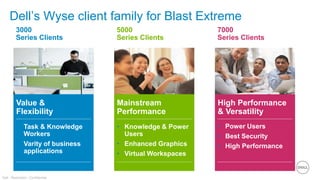
Dell’s Wyse client family for Blast Extreme
7000
Series Clients
High Performance
& Versatility
• Power Users
• Best Security
• High Performance
5000
Series Clients
Mainstream
Performance
• Knowledge & Power
Users
• Enhanced Graphics
• Virtual Workspaces
3000
Series Clients
Value &
Flexibility
• Task & Knowledge
Workers
• Varity of business
applications
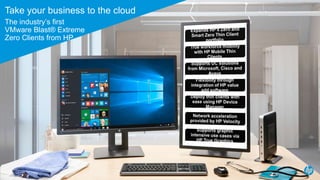
Take your business to the cloud
The industry’s first
VMware Blast® Extreme
Zero Clients from HP
30
Vmware + iPad + Swiftpoint GT Mouse
= Perfection
Introducing The Swiftpoint GT Mouse for iOS
• Designed for Tablet and PC Use
• Patented GesturePoint™ imitates touch
• Patented RapidCharge™ for fast charging
• Ergonomic comfortable design
• Lasts up to a month on a charge
• Excellent quality
• Multiple Awards Won
Order now at www.VegasMouse.com
+“The most
Comfortable
Mouse on the
Market”
HUFFINGTON POST
31
Blast Extreme
Best Practices & Tech Details
32
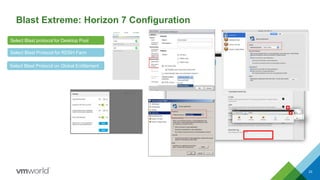
Blast Extreme: Horizon 7 Configuration
Select Blast Protocol for RDSH Farm
Select Blast protocol for Desktop Pool
Select Blast Protocol on Global Entitlement
33
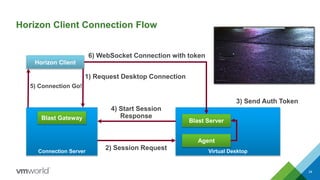
Horizon Client Connection Flow
34
Connection Server
Horizon Client
Virtual Desktop
Blast ServerBlast Gateway
1) Request Desktop Connection
2) Session Request
Agent
3) Send Auth Token
4) Start Session
Response
5) Connection Go!
6) WebSocket Connection with token
Blast Extreme: Virtual Channel Architecture
35
Web socket
SSL/TLS
SCTP
FEC
DTLS
vVC
RDPvcBridge
RTAV
Remote MKS
Web socket
SSL/TLS
SCTP
FEC
DTLS
vVC
Blast Worker
SE SDKAudio
CLIENT AGENT
Network
TCP
UDP
Unity Touch
USB
CDR /
MMR
USB
CDR /
MMR
UDP
TCP
ThinPrint
SmartCard …
RDPvcBridge
RTAV
SE SDKAudio
Unity Touch
ThinPrint
SmartCard …
USB Redirection on side channel
(TCP 32111)
Remote Experience Traffic on VMware
Virtual Channel
MMR defaulted to side channel (TCP
9427)
CDR / MMR CDR / MMR
Client Drive Redirection defaulted to
VMware Virtual Channel
USB USB
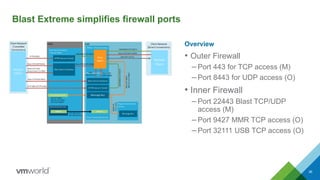
Blast Extreme simplifies firewall ports
Overview
• Outer Firewall
– Port 443 for TCP access (M)
– Port 8443 for UDP access (O)
• Inner Firewall
– Port 22443 Blast TCP/UDP
access (M)
– Port 9427 MMR TCP access (O)
– Port 32111 USB TCP access (O)
36
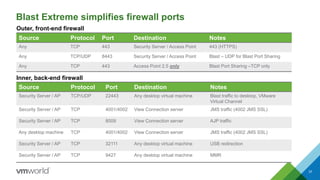
Blast Extreme simplifies firewall ports
37
Source Protocol Port Destination Notes
Any TCP 443 Security Server / Access Point 443 (HTTPS)
Any TCP/UDP 8443 Security Server / Access Point Blast – UDP for Blast Port Sharing
Any TCP 443 Access Point 2.5 only Blast Port Sharing –TCP only
Outer, front-end firewall
Source Protocol Port Destination Notes
Security Server / AP TCP/UDP 22443 Any desktop virtual machine Blast traffic to desktop, VMware
Virtual Channel
Security Server / AP TCP 4001/4002 View Connection server JMS traffic (4002 JMS SSL)
Security Server / AP TCP 8009 View Connection server AJP traffic
Any desktop machine TCP 4001/4002 View Connection server JMS traffic (4002 JMS SSL)
Security Server / AP TCP 32111 Any desktop virtual machine USB redirection
Security Server / AP TCP 9427 Any desktop virtual machine MMR
Inner, back-end firewall
Blast Extreme: Group Policy
Overview
• Blast Extreme can be tuned for specific customer
requirements and network conditions
• Apply options via AD GPO
Benefit
• Customize user experience based on user’s
requirements and network location
38
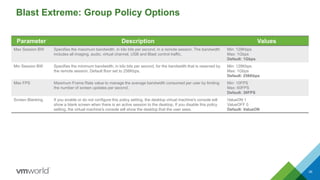
Blast Extreme: Group Policy Options
39
Parameter Description Values
Max Session BW Specifies the maximum bandwidth, in kilo bits per second, in a remote session. The bandwidth
includes all imaging, audio, virtual channel, USB and Blast control traffic.
Min: 128Kbps
Max: 1Gbps
Default: 1Gbps
Min Session BW Specifies the minimum bandwidth, in kilo bits per second, for the bandwidth that is reserved by
the remote session. Default floor set to 256Kbps.
Min: 128Kbps
Max: 1Gbps
Default: 256Kbps
Max FPS Maximum Frame Rate value to manage the average bandwidth consumed per user by limiting
the number of screen updates per second.
Min: 10FPS
Max: 60FPS
Default: 30FPS
Screen Blanking If you enable or do not configure this policy setting, the desktop virtual machine's console will
show a blank screen when there is an active session to the desktop. If you disable this policy
setting, the virtual machine's console will show the desktop that the user sees.
ValueON 1
ValueOFF 0
Default: ValueON
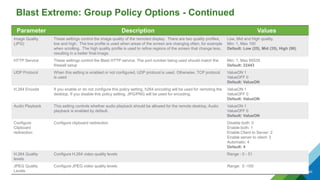
Blast Extreme: Group Policy Options - Continued
40
Parameter Description Values
Image Quality
(JPG)
These settings control the image quality of the remoted display. There are two quality profiles,
low and high. The low profile is used when areas of the screen are changing often, for example
when scrolling. The high quality profile is used to refine regions of the screen that change less,
resulting in a better final image.
Low, Mid and High quality.
Min: 1, Max 100
Default: Low (25), Mid (35), High (90)
HTTP Service These settings control the Blast HTTP service. The port number being used should match the
firewall setup
Min: 1, Max 65535
Default: 22443
UDP Protocol When this setting is enabled or not configured, UDP protocol is used. Otherwise, TCP protocol
is used
ValueON 1
ValueOFF 0
Default: ValueON
H.264 Encode If you enable or do not configure this policy setting, h264 encoding will be used for remoting the
desktop. If you disable this policy setting, JPG/PNG will be used for encoding.
ValueON 1
ValueOFF 0
Default: ValueON
Audio Playback This setting controls whether audio playback should be allowed for the remote desktop. Audio
playback is enabled by default.
ValueON 1
ValueOFF 0
Default: ValueON
Configure
Clipboard
redirection
Configure clipboard redirection Disable both: 0
Enable both: 1
Enable Client to Server: 2
Enable server to client: 3
Automatic: 4
Default: 4
H.264 Quality
levels
Configure H.264 video quality levels Range : 0 - 51
JPEG Quality
Levels
Configure JPEG video quality levels Range: 0 -100
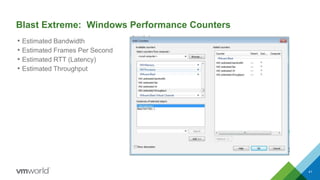
Blast Extreme: Windows Performance Counters
• Estimated Bandwidth
• Estimated Frames Per Second
• Estimated RTT (Latency)
• Estimated Throughput
41
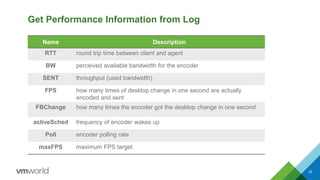
Get Performance Information from Log
Name Description
RTT round trip time between client and agent
BW perceived available bandwidth for the encoder
SENT throughput (used bandwidth)
FPS how many times of desktop change in one second are actually
encoded and sent
FBChange how many times the encoder got the desktop change in one second
activeSched frequency of encoder wakes up
Poll encoder polling rate
maxFPS maximum FPS target
42
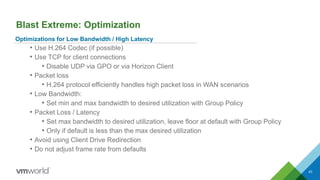
Blast Extreme: Optimization
43
Optimizations for Low Bandwidth / High Latency
• Use H.264 Codec (if possible)
• Use TCP for client connections
• Disable UDP via GPO or via Horizon Client
• Packet loss
• H.264 protocol efficiently handles high packet loss in WAN scenarios
• Low Bandwidth:
• Set min and max bandwidth to desired utilization with Group Policy
• Packet Loss / Latency
• Set max bandwidth to desired utilization, leave floor at default with Group Policy
• Only if default is less than the max desired utilization
• Avoid using Client Drive Redirection
• Do not adjust frame rate from defaults
Blast Extreme - Enterprise Security
Overview
• IPv6 Support (TCP only)
• FIPS ready libraries
• TCP connections over encrypted SSL web sockets
• UDP connections use DTLS encrypted sessions
• TLS 1.1, 1.2
• AES Encryption
44
VMworld 2016: Advances in Remote Display Protocol Technology with VMware Blast Extreme

VMworld 2016: Advances in Remote Display Protocol Technology with VMware Blast Extreme

  • 1.
    Advances in RemoteDisplay Protocol Technology with VMware Blast Extreme - EUC7601 Kiran Rao – Director Product Management Sean Samenfeld-Specht – Sr. Manager R&D
  • 2.
    • This presentationmay contain product features that are currently under development. • This overview of new technology represents no commitment from VMware to deliver these features in any generally available product. • Features are subject to change, and must not be included in contracts, purchase orders, or sales agreements of any kind. • Technical feasibility and market demand will affect final delivery. • Pricing and packaging for any new technologies or features discussed or presented have not been determined. Disclaimer 2
  • 3.
    Agenda 3 1 Blast ExtremeOverview 2 Blast Extreme 3D Graphics support 3 Blast Extreme Client Ecosystem 4 Blast Extreme Best Practices
  • 4.
  • 5.
    Blast Extreme: UnifiedProtocol for All VMware Products • A new VMware controlled protocol for a richer app & desktop experience • Protocol optimized for mobile and overall lower client TCO • Horizon remote experience features work with Blast Extreme and updated Horizon clients • Performance on par or exceeding all competitive protocols including PCoIP • Rapid client proliferation from strong Horizon Client ecosystem 5 2013 2015 2016
  • 6.
    6 Rich User Experience Deliverthe best desktop and application experience while supporting more features LINUX ULTRA HD
  • 7.
    Blast Extreme -The Mobile Cloud Protocol 7 Use Less Bandwidth: Deliver better video to more users Broad Client Support: H264 available in most devices GRID Optimized: Deliver more 3D users Network Friendly: TCP or UDP works in more places Built for the Cloud: Adapts better to lossy networks Better Battery Life: Optimized for mobile workers
  • 8.
    Blast Extreme Overview • Anotherprotocol option in Horizon 7 • Simplifies firewall port configurations • Feature and performance parity with PCoIP • PCoIP is NOT going away • H.264 codec support –Most devices have H.264 hardware decode support • Hardware H.264 encode with NVIDIA GRID • JPG/PNG codec support –Same as used in Blast Extreme HTML / Linux • Supports both TCP and UDP –TCP is default, UDP is optional • Native Horizon Client 4.x required 8
  • 9.
    Horizon Clients /Broadest Support For Every Use Case Feature-Rich User Experience Blast Extreme Delivers Best User Experience 99 Hosted Apps & RDS Desktops Printing Scanning & Imaging Devices USB Audio In/OutSmart Card Client Drive Redirection Windows Media Redirection File Type Association Unified Communi- cations Webcams Session Enhancement SDK RDP VC Bridge SDK Mac iOSLinuxWindows Android Chrome OS HTML (Blast Only) SDKsWindows VDI, RDSH Apps/Desktop & Linux VDI Thin Clients
  • 10.
    • Bandwidth Optimization –Opus audio enhancements – H.264 encoder quality levels – Reduced JPG/PNG bandwidth in high bandwidth scenarios • Better User Experience – Efficient client reconnection/network recovery – IME sync between client and desktop for improved international support – Improved Wacom tablet & cursor support • Better Management – Dynamically apply configuration settings 10 Blast Extreme Enhancements since Horizon 7 launch
  • 11.
    Differentiating Opportunities forBlast Extreme 11 H264 Powered for Ubiquitous Client Access • Lower cost client ecosystem leveraging H264 standard • Support for Windows, Linux, Mac, iOS, Android, ChromeOS • Support for Native clients and Web browsers H264 for Better Battery Life with Less Bandwidth • Delivery better experience, less bandwidth • Greatly improved mobile battery life with hardware decode Media Offload • Windows Media offload today for VDI and RDSH • Leverage H264 transcode for other media formats Deliver Best 3D Desktop and App Experience • Leverage NVIDIA with hardware protocol encode
  • 12.
    Differentiating Opportunities forBlast Extreme 12 Adapt Better to Lossy Networks • Improve throughput on lossy and wireless networks • Media delivered over wide variety of network conditions Network Friendly • Support for both TCP & UDP networks Single Dynamic Protocol for All Needs • Use hardware encode with NVIDIA GRID if available • Use software H264 if client can decode H264 • Use JPG/PNG if client can’t decode H264
  • 13.
    Blast Extreme: Networking •Blast Extreme supports both TCP and UDP • User can choose transport protocol from Client • Defaults to TCP, UDP is optional • UDP disabled on agent by default - enabled via GPO • External Ports 443 (HTTPS) and 8443 (TCP/UDP) • Blast port sharing on 443 (TCP) with AP 2.5 • Remote experience traffic on VMware Virtual Channel • USB Redirection on TCP Side Channel • MMR on TCP Side Channel by default. Can be configured to use VMware Virtual Channel • CDR on VMware Virtual Channel Overview 13
  • 14.
    Blast Extreme -Bandwidth Overview • Blast Extreme will take as much bandwidth as possible to deliver best user experience • Administrators can tune protocol for better experience in most scenarios • Change defaults of Blast Extreme out of the box to balance bandwidth usage 14
  • 15.
    More Network Friendly WANOptimization: Riverbed SteelHead and Blast Extreme 15 • Additional acceleration benefit depending on applications and workloads
  • 16.
    vRealize Operations forHorizon with Blast Extreme • Blast Session Statistics – Round Trip Latency (RTT) – Encode Frame Rate (FPS) – Protocol TX Bandwidth (throughput) – Estimated Bandwidth 16
  • 17.
    Smart Policies andUEM Integration with Blast Extreme
  • 18.
    Rich 3D graphicsexperience and ecosystem 18
  • 19.
    Blast Extreme andNVIDIA Grid The most powerful data center GPUs targeted at graphics virtualization M6 M60 M10 Use Case High performance High performance High density GPU Single High-end Maxwell Dual High-end Maxwell Quad Mid-level Maxwell CUDA Cores 1536 4096 (2048 per GPU) 2560 (640 per GPU) Memory Size 8 GB GDDR5 16 GB GDDR5 (8GB per GPU) 32 GB GDDR5 (8 GB per GPU) H.264 1080p30 streams 18 36 28 GRID vGPU Concurrent users 1 / 2 / 4 / 8 / 16 2 / 4 / 8 / 16 / 32 2 / 4 / 8 / 16 / 32 / 64 Form Factor MXM (blade servers) PCIe 3.0 Dual Slot (rack servers) PCIe 3.0 Dual Slot (rack servers) Power 100W (75W opt) 240W / 300W (225W opt) 225W Thermal bare board active / passive passive 19
  • 20.
    NVIDIA GRID GPUOptimized for Blast Extreme Overview • Blast Extreme delivers exceptional 3D graphics user experience on low cost PC’s compared to PCoIP • Support NVIDIA GRID K1, K2, M6, M10 and M60 graphics cards • Leverage H.264 encoder option on GRID GPUs to lower CPU consumption and increase scalability. Benefit • 6-13% better FPS • 18% higher scalability (e.g ArcGIS Pro) • 27-51ms lower latency • 48-89% bandwidth reduction with TCP and 19% with UDP • Deliver up to 4K resolution displays for workstation environments. 20
  • 21.
    Blast Extreme supportsIntel processors Overview • Support for Intel Xeon processors with integrated Skylake GPU • Now supports Windows 10 OS • Built upon Intel Graphics Virtualization technologies (Intel GVT-d) • Supports up to 4 monitors per user Benefits • Flexibility in delivering High-performance graphics for desktop and workstation use cases • Improved energy efficiency, reliability, density, and lower engineering complexities • Enhanced 3D and multimedia experience 21 Integrated Processor-Graphics Hardware Virtual Machine Guest OS Intel GFX Driver VDI Agent Applications VMware ESX Hypervisor 1:1 Pass-through vDGA
  • 22.
    Blast Extreme supportsAMD Multiuser GPU Overview • Enable Multiuser GPU solution for View using AMD graphics hardware • Based on AMD SR-IOV (Single root I/O Virtualization) technology • AMD S7150, S7150x2 and S7100X graphics cards supported. • Native AMD driver support for OpenGL, DirectX and OpenCL acceleration Benefits • Split single GPU among 2-15 users for efficient 3D application performance – Workstation Performance (2-6 users) – Power User (CAD/CAE/CAM) (6-10 users) – Knowledge worker (upto 15 users) • Delivers consistent and predictable performance to end users compared to vSGA • Dedicated share of local memory for increased security 22
  • 23.
  • 24.
    Blast Extreme hasbroad client support Overview • Blast Extreme supports HTML Access • Blast Extreme for Linux Clients • Blast Extreme for Windows Clients • Blast Extreme for macOS • Blast Extreme for Mobile Devices (iOS, Android) • Blast Extreme thin and zero client support Benefit • Leverage general purpose hardware • Support for client devices regardless of OS • Greatest flexibility for deployment and access • Client availability via public app stores • Native device gesture and UI support 24
  • 25.
    25 Windows 10 UWPClient 4.x – Coming Soon Overview • Supports Windows 10 phone and tablet devices (Windows 10 is required) • Requires Horizon 7 or later • Supports Blast Extreme protocol only w/ H.264 hardware decode • Supports Windows continuum mode • Supports Audio/Video out • Supports basic gesture (zoom in/out etc) • UWP has limited features compared to classic Windows client.
  • 26.
    Horizon Clients functionalityoverview 26 HTML Browser Functionality iOS Client Functionality Android Client Functionality ChromeOS Client Functionality PCoIP Zero Client Functionality Blast Zero Client Functionality Linux Client Functionality Mac Client Functionality Windows Client Functionality All clients are not created equal
  • 27.
    PCoIP Zero Client& Expected Blast Zero Clients Feature PCoIP Zero Client Blast Zero Clients Processor Custom MIPS Processor General purpose x86 processor Supported OS Teradici ThreadX OS Stripped down Linux or proprietary OS Supported Protocols PCoIP Blast Extreme Wired and Wireless networking Wired only Wired and Wireless supported Windows VDI, RDSH & Linux VDI support Limited to Windows VDI & single RDSH application. Fully supported Unified Communications Partial Yes for Linux based Zero Clients. S4B in Roadmap. Multimedia and Flash redirection No Roadmap Peripheral support Limited Broad support Lossless image quality Supported Supported (w/ PNG image format) Low bandwidth optimization No Yes* Requires custom hardware for server side encoding Yes. Apex Cards recommended No. Leverages standard H.264 engine built into NVIDIA GRID graphics cards Printer Redirection No Yes Device Redirection (CDR, Serial, Parallel) No Yes RTAV (Optimized webcam & audio input) No Yes Flexible Networking UDP Only TCP & UDP support List Price $350+ $199+ 27
  • 28.
    Rich Client Ecosystem– Over 70 Thin/Zero Certified Clients 28
  • 29.
    Dell - Restricted- Confidential Dell’s Wyse client family for Blast Extreme 7000 Series Clients High Performance & Versatility • Power Users • Best Security • High Performance 5000 Series Clients Mainstream Performance • Knowledge & Power Users • Enhanced Graphics • Virtual Workspaces 3000 Series Clients Value & Flexibility • Task & Knowledge Workers • Varity of business applications
  • 30.
    Take your businessto the cloud The industry’s first VMware Blast® Extreme Zero Clients from HP 30
  • 31.
    Vmware + iPad+ Swiftpoint GT Mouse = Perfection Introducing The Swiftpoint GT Mouse for iOS • Designed for Tablet and PC Use • Patented GesturePoint™ imitates touch • Patented RapidCharge™ for fast charging • Ergonomic comfortable design • Lasts up to a month on a charge • Excellent quality • Multiple Awards Won Order now at www.VegasMouse.com +“The most Comfortable Mouse on the Market” HUFFINGTON POST 31
  • 32.
  • 33.
    Blast Extreme: Horizon7 Configuration Select Blast Protocol for RDSH Farm Select Blast protocol for Desktop Pool Select Blast Protocol on Global Entitlement 33
  • 34.
    Horizon Client ConnectionFlow 34 Connection Server Horizon Client Virtual Desktop Blast ServerBlast Gateway 1) Request Desktop Connection 2) Session Request Agent 3) Send Auth Token 4) Start Session Response 5) Connection Go! 6) WebSocket Connection with token
  • 35.
    Blast Extreme: VirtualChannel Architecture 35 Web socket SSL/TLS SCTP FEC DTLS vVC RDPvcBridge RTAV Remote MKS Web socket SSL/TLS SCTP FEC DTLS vVC Blast Worker SE SDKAudio CLIENT AGENT Network TCP UDP Unity Touch USB CDR / MMR USB CDR / MMR UDP TCP ThinPrint SmartCard … RDPvcBridge RTAV SE SDKAudio Unity Touch ThinPrint SmartCard … USB Redirection on side channel (TCP 32111) Remote Experience Traffic on VMware Virtual Channel MMR defaulted to side channel (TCP 9427) CDR / MMR CDR / MMR Client Drive Redirection defaulted to VMware Virtual Channel USB USB
  • 36.
    Blast Extreme simplifiesfirewall ports Overview • Outer Firewall – Port 443 for TCP access (M) – Port 8443 for UDP access (O) • Inner Firewall – Port 22443 Blast TCP/UDP access (M) – Port 9427 MMR TCP access (O) – Port 32111 USB TCP access (O) 36
  • 37.
    Blast Extreme simplifiesfirewall ports 37 Source Protocol Port Destination Notes Any TCP 443 Security Server / Access Point 443 (HTTPS) Any TCP/UDP 8443 Security Server / Access Point Blast – UDP for Blast Port Sharing Any TCP 443 Access Point 2.5 only Blast Port Sharing –TCP only Outer, front-end firewall Source Protocol Port Destination Notes Security Server / AP TCP/UDP 22443 Any desktop virtual machine Blast traffic to desktop, VMware Virtual Channel Security Server / AP TCP 4001/4002 View Connection server JMS traffic (4002 JMS SSL) Security Server / AP TCP 8009 View Connection server AJP traffic Any desktop machine TCP 4001/4002 View Connection server JMS traffic (4002 JMS SSL) Security Server / AP TCP 32111 Any desktop virtual machine USB redirection Security Server / AP TCP 9427 Any desktop virtual machine MMR Inner, back-end firewall
  • 38.
    Blast Extreme: GroupPolicy Overview • Blast Extreme can be tuned for specific customer requirements and network conditions • Apply options via AD GPO Benefit • Customize user experience based on user’s requirements and network location 38
  • 39.
    Blast Extreme: GroupPolicy Options 39 Parameter Description Values Max Session BW Specifies the maximum bandwidth, in kilo bits per second, in a remote session. The bandwidth includes all imaging, audio, virtual channel, USB and Blast control traffic. Min: 128Kbps Max: 1Gbps Default: 1Gbps Min Session BW Specifies the minimum bandwidth, in kilo bits per second, for the bandwidth that is reserved by the remote session. Default floor set to 256Kbps. Min: 128Kbps Max: 1Gbps Default: 256Kbps Max FPS Maximum Frame Rate value to manage the average bandwidth consumed per user by limiting the number of screen updates per second. Min: 10FPS Max: 60FPS Default: 30FPS Screen Blanking If you enable or do not configure this policy setting, the desktop virtual machine's console will show a blank screen when there is an active session to the desktop. If you disable this policy setting, the virtual machine's console will show the desktop that the user sees. ValueON 1 ValueOFF 0 Default: ValueON
  • 40.
    Blast Extreme: GroupPolicy Options - Continued 40 Parameter Description Values Image Quality (JPG) These settings control the image quality of the remoted display. There are two quality profiles, low and high. The low profile is used when areas of the screen are changing often, for example when scrolling. The high quality profile is used to refine regions of the screen that change less, resulting in a better final image. Low, Mid and High quality. Min: 1, Max 100 Default: Low (25), Mid (35), High (90) HTTP Service These settings control the Blast HTTP service. The port number being used should match the firewall setup Min: 1, Max 65535 Default: 22443 UDP Protocol When this setting is enabled or not configured, UDP protocol is used. Otherwise, TCP protocol is used ValueON 1 ValueOFF 0 Default: ValueON H.264 Encode If you enable or do not configure this policy setting, h264 encoding will be used for remoting the desktop. If you disable this policy setting, JPG/PNG will be used for encoding. ValueON 1 ValueOFF 0 Default: ValueON Audio Playback This setting controls whether audio playback should be allowed for the remote desktop. Audio playback is enabled by default. ValueON 1 ValueOFF 0 Default: ValueON Configure Clipboard redirection Configure clipboard redirection Disable both: 0 Enable both: 1 Enable Client to Server: 2 Enable server to client: 3 Automatic: 4 Default: 4 H.264 Quality levels Configure H.264 video quality levels Range : 0 - 51 JPEG Quality Levels Configure JPEG video quality levels Range: 0 -100
  • 41.
    Blast Extreme: WindowsPerformance Counters • Estimated Bandwidth • Estimated Frames Per Second • Estimated RTT (Latency) • Estimated Throughput 41
  • 42.
    Get Performance Informationfrom Log Name Description RTT round trip time between client and agent BW perceived available bandwidth for the encoder SENT throughput (used bandwidth) FPS how many times of desktop change in one second are actually encoded and sent FBChange how many times the encoder got the desktop change in one second activeSched frequency of encoder wakes up Poll encoder polling rate maxFPS maximum FPS target 42
  • 43.
    Blast Extreme: Optimization 43 Optimizationsfor Low Bandwidth / High Latency • Use H.264 Codec (if possible) • Use TCP for client connections • Disable UDP via GPO or via Horizon Client • Packet loss • H.264 protocol efficiently handles high packet loss in WAN scenarios • Low Bandwidth: • Set min and max bandwidth to desired utilization with Group Policy • Packet Loss / Latency • Set max bandwidth to desired utilization, leave floor at default with Group Policy • Only if default is less than the max desired utilization • Avoid using Client Drive Redirection • Do not adjust frame rate from defaults
  • 44.
    Blast Extreme -Enterprise Security Overview • IPv6 Support (TCP only) • FIPS ready libraries • TCP connections over encrypted SSL web sockets • UDP connections use DTLS encrypted sessions • TLS 1.1, 1.2 • AES Encryption 44