Morty Eisen Marcum Technology April 28th, 2011 Introduction to Virtualization The Long Island Chapter of the IEEE Circuits and Systems (CAS) Society
Presentation Outline  “ Introduction to Virtualization” What is Virtualization The Traditional Server Concept The Virtual Server Concept Virtual Machines Benefits of Virtualization Server Consolidation Virtualization– Key Solutions / Use Cases Top 3 Economic Reasons For Virtualization Server, Storage and Network Consolidation Virtualization Delivers Tangible Business Outcomes Experienced App Owners Trust Virtualization for Toughest Workloads What is Available Today VMware – Recognized as the Virtualization & Cloud Leader   (2010) What is Available From VMware VMware vSphere: Ready to Virtualize All Applications Virtual Desktop Infrastructure Virtual Distributed Network Switch The Disadvantages of Virtualization System Virtualization - Present State Modernizing the Desktop – Virtual Desktop Infrastructure Cloud Computing Takes Virtualization to the Next Step Private, Hybrid and Public Clouds
Virtualization abstracts the underlying physical structure of various technologies. Virtualization, in computing, is the creation of a virtual (rather than actual) version of something, such as a hardware platform, operating system, a storage device or network resources [1] Server virtualization [2] Creates multiple isolated environments Allows multiple OS’s and workloads to run on the same physical hardware Solves the problem of tight coupling between OS’s and hardware What is Virtualization (1)  http://en.wikipedia.org/wiki/Virtualization   (2) Anil Desai IEEE Computer Society, Austin Chapter April 18th, 2007
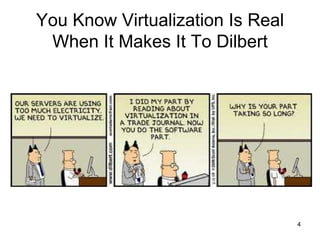
You Know Virtualization Is Real When It Makes It To Dilbert
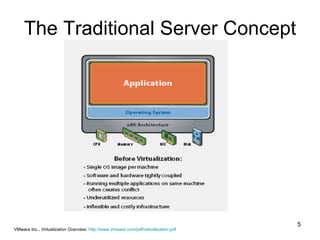
The Traditional Server Concept VMware Inc.,  Virtualization Overview ,  http://www.vmware.com/pdf/virtualization.pdf
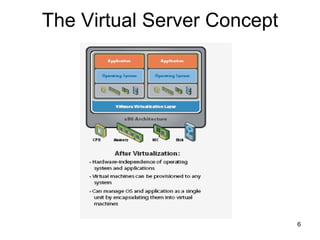
The Virtual Server Concept
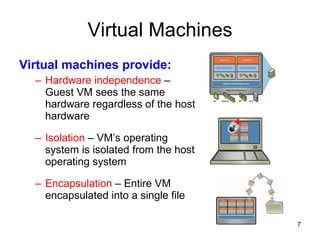
Virtual Machines Virtual machines provide: Hardware independence  – Guest VM sees the same hardware regardless of the host hardware Isolation  – VM’s operating system is isolated from the host operating system Encapsulation  – Entire VM encapsulated into a single file
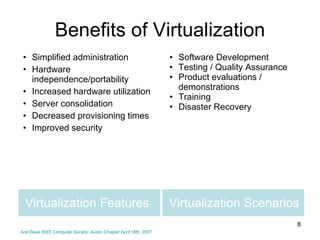
Virtualization Scenarios Simplified administration Hardware independence/portability Increased hardware utilization Server consolidation Decreased provisioning times Improved security Software Development Testing / Quality Assurance Product evaluations / demonstrations Training Disaster Recovery Virtualization Features Benefits of Virtualization Anil Desai IEEE Computer Society, Austin Chapter April 18th, 2007
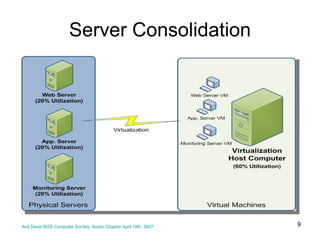
Server Consolidation Anil Desai IEEE Computer Society, Austin Chapter April 18th, 2007
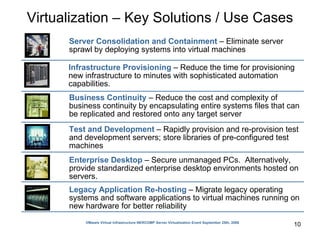
Virtualization – Key Solutions / Use Cases VMware Virtual Infrastructure NERCOMP Server Virtualization Event September 25th, 2006 Server Consolidation and Containment  – Eliminate server sprawl by deploying systems into virtual machines Test and Development  – Rapidly provision and re-provision test and development servers; store libraries of pre-configured test machines Enterprise Desktop  – Secure unmanaged PCs.  Alternatively, provide standardized enterprise desktop environments hosted on servers.  Business Continuity  – Reduce the cost and complexity of business continuity by encapsulating entire systems files that can be replicated and restored onto any target server Infrastructure Provisioning  – Reduce the time for provisioning new infrastructure to minutes with sophisticated automation capabilities.  Legacy Application Re-hosting  – Migrate legacy operating systems and software applications to virtual machines running on new hardware for better reliability
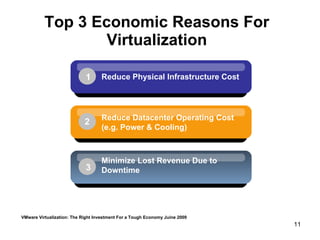
Top 3 Economic Reasons For Virtualization VMware Virtualization: The Right Investment For a Tough Economy Juine 2009 Minimize Lost Revenue Due to Downtime 3 Reduce Datacenter Operating Cost (e.g. Power & Cooling) 2 Reduce Physical Infrastructure Cost 1
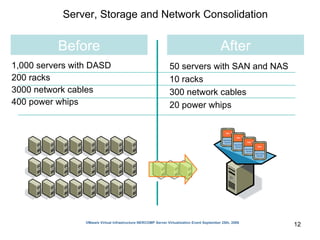
1,000 servers with DASD 200 racks 3000 network cables 400 power whips Server, Storage and Network Consolidation 50 servers with SAN and NAS 10 racks 300 network cables 20 power whips  Before After VMware Virtual Infrastructure NERCOMP Server Virtualization Event September 25th, 2006
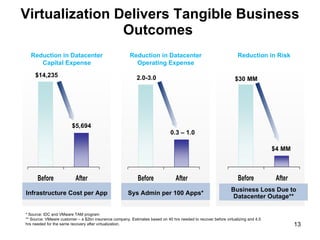
Virtualization Delivers Tangible Business Outcomes  Business Loss Due to Datacenter Outage** Sys Admin per 100 Apps* * Source: IDC and VMware TAM program ** Source: VMware customer – a $2bn insurance company. Estimates based on 40 hrs needed to recover before virtualizing and 4.5 hrs needed for the same recovery after virtualization.  Infrastructure Cost per App Reduction in Datacenter Capital Expense 2.0-3.0 $14,235 $5,694 0.3 – 1.0 Reduction in Datacenter Operating Expense $30 MM $4 MM Reduction in Risk
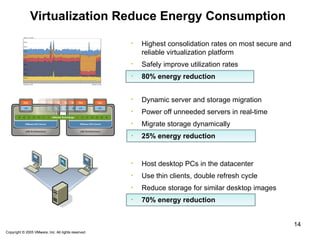
Virtualization Reduce Energy Consumption   Copyright © 2005 Mare, Inc. All rights reserved. Copyright © 2005 VMware, Inc. All rights reserved. Highest consolidation rates on most secure and reliable virtualization platform Safely improve utilization rates 80% energy reduction Dynamic server and storage migration Power off unneeded servers in real-time Migrate storage dynamically 25% energy reduction Host desktop PCs in the datacenter  Use thin clients, double refresh cycle Reduce storage for similar desktop images 70% energy reduction
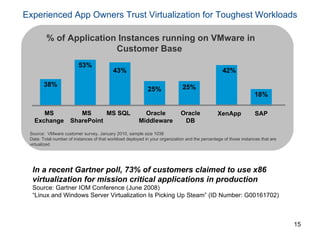
Experienced App Owners Trust Virtualization for Toughest Workloads 38% 43% 53% 25% 25% MS Exchange MS SQL MS SharePoint Oracle Middleware Oracle DB XenApp 42% SAP 18% Source:  VMware customer survey, January 2010, sample size 1038 Data: Total number of instances of that workload deployed in your organization and the percentage of those instances that are virtualized  % of Application Instances running on VMware in Customer Base  In a recent Gartner poll, 73% of customers claimed to use x86 virtualization for mission critical applications in production Source: Gartner IOM Conference (June 2008) “ Linux and Windows Server Virtualization Is Picking Up Steam” (ID Number: G00161702)
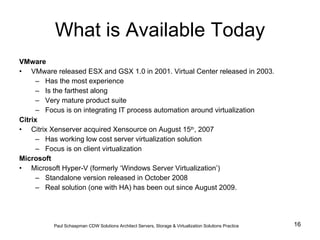
What is Available Today VMware VMware released ESX and GSX 1.0 in 2001. Virtual Center released in 2003. Has the most experience Is the farthest along Very mature product suite Focus is on integrating IT process automation around virtualization Citrix Citrix Xenserver acquired Xensource on August 15 th , 2007 Has working low cost server virtualization solution Focus is on client virtualization Microsoft Microsoft Hyper-V (formerly ‘Windows Server Virtualization’) Standalone version released in October 2008 Real solution (one with HA) has been out since August 2009.  Paul Schaapman CDW   Solutions Architect Servers, Storage & Virtualization Solutions Practice
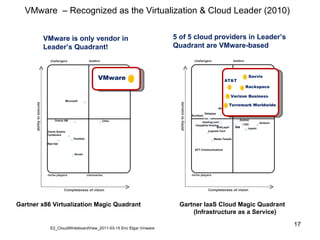
VMware  – Recognized as the Virtualization & Cloud Leader (2010) Gartner x86 Virtualization Magic Quadrant Gartner IaaS Cloud Magic Quadrant (Infrastructure as a Service) VMware is only vendor in Leader’s Quadrant! 5 of 5 cloud providers in Leader’s Quadrant are VMware-based ! visionaries Citrix VMware Microsoft Novell Oracle VM Red Hat Parallels Oracle Solaris  Containers E2_CloudWhiteboardView_2011-03-15 Eric Elgar Vmware niche players ability to execute Completeness of vision leaders challengers niche players ability to execute Completeness of vision leaders challengers Amazon GoGrid CSC IBM Joyent NaviSite OpSource Datapipe SunGard NTT Communications Media Temple Layered Tech Hosting.com Carpathia Hosting Savvis AT&T Rackspace Verizon Business Terremark Worldwide SoftLayer VMware AT&T Savvis Rackspace Verizon Business Terremark Worldwide
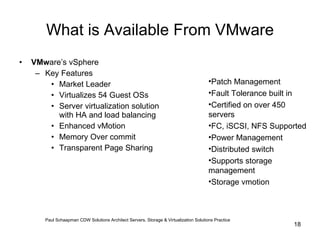
What is Available From VMware VMw are’s vSphere Key Features  Market Leader Virtualizes 54 Guest OSs Server virtualization solution with HA and load balancing Enhanced vMotion Memory Over commit Transparent Page Sharing Patch Management Fault Tolerance built in Certified on over 450 servers FC, iSCSI, NFS Supported Power Management Distributed switch Supports storage management Storage vmotion Paul Schaapman CDW   Solutions Architect Servers, Storage & Virtualization Solutions Practice
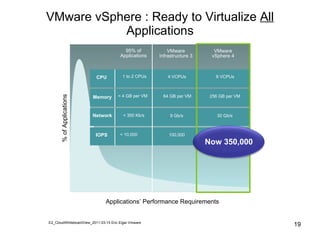
VMware vSphere : Ready to Virtualize  All  Applications % of Applications Applications’ Performance Requirements 95% of Applications IOPS Network Memory CPU < 10,000  < 300 Kb/s  < 4 GB per VM 1 to 2 CPUs E2_CloudWhiteboardView_2011-03-15 Eric Elgar Vmware VMware vSphere 4 300,000 30 Gb/s 256 GB per VM  8 VCPUs VMware Infrastructure 3 100,000 9 Gb/s 64 GB per VM 4 VCPUs Now 350,000
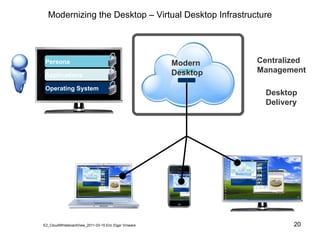
Modernizing the Desktop – Virtual Desktop Infrastructure Persona Applications Operating System Centralized  Management Desktop Delivery Modern Desktop E2_CloudWhiteboardView_2011-03-15 Eric Elgar Vmware
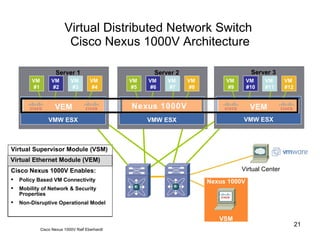
Virtual Distributed Network Switch  Cisco Nexus 1000V Architecture Virtual Supervisor Module (VSM) Virtual or Physical appliance running Cisco OS (supports HA) Performs management, monitoring, & configuration Tight integration with VMware Virtual Center Virtual Ethernet Module (VEM) Enables advanced networking capability on the hypervisor Provides each VM with dedicated “switch port” Collection of VEMs = 1 Distributed Switch Cisco Nexus 1000V Enables: Policy Based VM Connectivity Mobility of Network & Security Properties Non-Disruptive Operational Model Virtual Center Cisco Nexus 1000V  Ralf Eberhardt VMW ESX Server 1 VMware vSwitch  VMW ESX Server 2 VMware vSwitch  VMW ESX Server 3 VMware vSwitch  VM  #1 VM  #4 VM  #3 VM  #2 VM  #5 VM  #8 VM  #7 VM  #6 VM  #9 VM  #12 VM  #11 VM  #10 VEM VEM VEM Nexus 1000V Nexus 1000V VSM
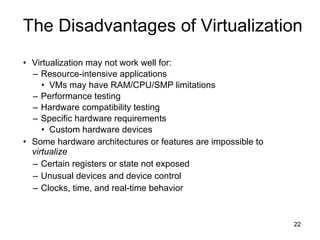
Virtualization may not work well for: Resource-intensive applications VMs may have RAM/CPU/SMP limitations Performance testing Hardware compatibility testing Specific hardware requirements Custom hardware devices Some hardware architectures or features are impossible to  virtualize Certain registers or state not exposed Unusual devices and device control Clocks, time, and real-time behavior The Disadvantages of Virtualization
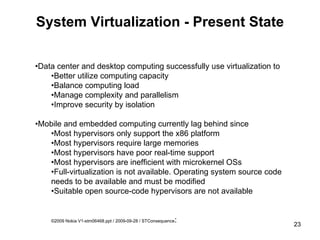
System Virtualization - Present State • Data center and desktop computing successfully use virtualization to • Better utilize computing capacity  • Balance computing load • Manage complexity and parallelism • Improve security by isolation • Mobile and embedded computing currently lag behind since • Most hypervisors only support the x86 platform • Most hypervisors require large memories • Most hypervisors have poor real-time support • Most hypervisors are inefficient with microkernel OSs • Full-virtualization is not available. Operating system source code needs to be available and must be modified • Suitable open source-code hypervisors are not available ©2009 Nokia V1-stm06468.ppt / 2009-09-28 / STConsequence :
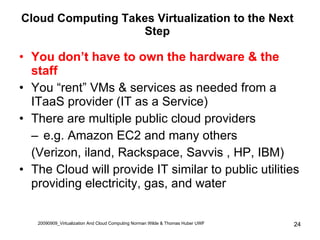
Cloud Computing Takes Virtualization to the Next Step You don’t have to own the hardware & the staff You “rent” VMs & services as needed from a ITaaS provider (IT as a Service) There are multiple public cloud providers e.g. Amazon EC2 and many others  (Verizon, iland, Rackspace, Savvis , HP, IBM) The Cloud will provide IT similar to public utilities providing electricity, gas, and water 20090909_Virtualization And Cloud Computing Norman Wilde & Thomas Huber UWF
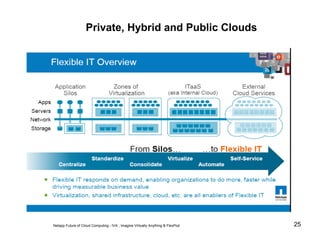
Private, Hybrid and Public Clouds Netapp Future of Cloud Computing - IVA ; Imagine Virtually Anything & FlexPod
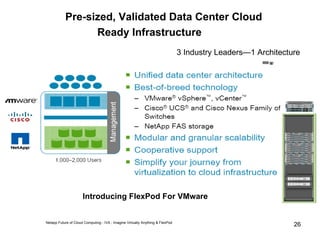
Pre-sized, Validated Data Center Cloud  Ready Infrastructure Netapp Future of Cloud Computing - IVA ; Imagine Virtually Anything & FlexPod 3 Industry Leaders—1 Architecture Introducing FlexPod For VMware
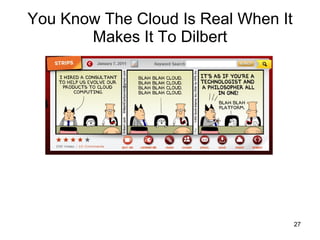
You Know The Cloud Is Real When It Makes It To Dilbert
Questions?
Virtualization meisen 042811

Virtualization meisen 042811

  • 1.
    Morty Eisen MarcumTechnology April 28th, 2011 Introduction to Virtualization The Long Island Chapter of the IEEE Circuits and Systems (CAS) Society
  • 2.
    Presentation Outline “ Introduction to Virtualization” What is Virtualization The Traditional Server Concept The Virtual Server Concept Virtual Machines Benefits of Virtualization Server Consolidation Virtualization– Key Solutions / Use Cases Top 3 Economic Reasons For Virtualization Server, Storage and Network Consolidation Virtualization Delivers Tangible Business Outcomes Experienced App Owners Trust Virtualization for Toughest Workloads What is Available Today VMware – Recognized as the Virtualization & Cloud Leader (2010) What is Available From VMware VMware vSphere: Ready to Virtualize All Applications Virtual Desktop Infrastructure Virtual Distributed Network Switch The Disadvantages of Virtualization System Virtualization - Present State Modernizing the Desktop – Virtual Desktop Infrastructure Cloud Computing Takes Virtualization to the Next Step Private, Hybrid and Public Clouds
  • 3.
    Virtualization abstracts theunderlying physical structure of various technologies. Virtualization, in computing, is the creation of a virtual (rather than actual) version of something, such as a hardware platform, operating system, a storage device or network resources [1] Server virtualization [2] Creates multiple isolated environments Allows multiple OS’s and workloads to run on the same physical hardware Solves the problem of tight coupling between OS’s and hardware What is Virtualization (1) http://en.wikipedia.org/wiki/Virtualization (2) Anil Desai IEEE Computer Society, Austin Chapter April 18th, 2007
  • 4.
    You Know VirtualizationIs Real When It Makes It To Dilbert
  • 5.
    The Traditional ServerConcept VMware Inc., Virtualization Overview , http://www.vmware.com/pdf/virtualization.pdf
  • 6.
  • 7.
    Virtual Machines Virtualmachines provide: Hardware independence – Guest VM sees the same hardware regardless of the host hardware Isolation – VM’s operating system is isolated from the host operating system Encapsulation – Entire VM encapsulated into a single file
  • 8.
    Virtualization Scenarios Simplifiedadministration Hardware independence/portability Increased hardware utilization Server consolidation Decreased provisioning times Improved security Software Development Testing / Quality Assurance Product evaluations / demonstrations Training Disaster Recovery Virtualization Features Benefits of Virtualization Anil Desai IEEE Computer Society, Austin Chapter April 18th, 2007
  • 9.
    Server Consolidation AnilDesai IEEE Computer Society, Austin Chapter April 18th, 2007
  • 10.
    Virtualization – KeySolutions / Use Cases VMware Virtual Infrastructure NERCOMP Server Virtualization Event September 25th, 2006 Server Consolidation and Containment – Eliminate server sprawl by deploying systems into virtual machines Test and Development – Rapidly provision and re-provision test and development servers; store libraries of pre-configured test machines Enterprise Desktop – Secure unmanaged PCs. Alternatively, provide standardized enterprise desktop environments hosted on servers. Business Continuity – Reduce the cost and complexity of business continuity by encapsulating entire systems files that can be replicated and restored onto any target server Infrastructure Provisioning – Reduce the time for provisioning new infrastructure to minutes with sophisticated automation capabilities. Legacy Application Re-hosting – Migrate legacy operating systems and software applications to virtual machines running on new hardware for better reliability
  • 11.
    Top 3 EconomicReasons For Virtualization VMware Virtualization: The Right Investment For a Tough Economy Juine 2009 Minimize Lost Revenue Due to Downtime 3 Reduce Datacenter Operating Cost (e.g. Power & Cooling) 2 Reduce Physical Infrastructure Cost 1
  • 12.
    1,000 servers withDASD 200 racks 3000 network cables 400 power whips Server, Storage and Network Consolidation 50 servers with SAN and NAS 10 racks 300 network cables 20 power whips Before After VMware Virtual Infrastructure NERCOMP Server Virtualization Event September 25th, 2006
  • 13.
    Virtualization Delivers TangibleBusiness Outcomes Business Loss Due to Datacenter Outage** Sys Admin per 100 Apps* * Source: IDC and VMware TAM program ** Source: VMware customer – a $2bn insurance company. Estimates based on 40 hrs needed to recover before virtualizing and 4.5 hrs needed for the same recovery after virtualization. Infrastructure Cost per App Reduction in Datacenter Capital Expense 2.0-3.0 $14,235 $5,694 0.3 – 1.0 Reduction in Datacenter Operating Expense $30 MM $4 MM Reduction in Risk
  • 14.
    Virtualization Reduce EnergyConsumption Copyright © 2005 Mare, Inc. All rights reserved. Copyright © 2005 VMware, Inc. All rights reserved. Highest consolidation rates on most secure and reliable virtualization platform Safely improve utilization rates 80% energy reduction Dynamic server and storage migration Power off unneeded servers in real-time Migrate storage dynamically 25% energy reduction Host desktop PCs in the datacenter Use thin clients, double refresh cycle Reduce storage for similar desktop images 70% energy reduction
  • 15.
    Experienced App OwnersTrust Virtualization for Toughest Workloads 38% 43% 53% 25% 25% MS Exchange MS SQL MS SharePoint Oracle Middleware Oracle DB XenApp 42% SAP 18% Source: VMware customer survey, January 2010, sample size 1038 Data: Total number of instances of that workload deployed in your organization and the percentage of those instances that are virtualized % of Application Instances running on VMware in Customer Base In a recent Gartner poll, 73% of customers claimed to use x86 virtualization for mission critical applications in production Source: Gartner IOM Conference (June 2008) “ Linux and Windows Server Virtualization Is Picking Up Steam” (ID Number: G00161702)
  • 16.
    What is AvailableToday VMware VMware released ESX and GSX 1.0 in 2001. Virtual Center released in 2003. Has the most experience Is the farthest along Very mature product suite Focus is on integrating IT process automation around virtualization Citrix Citrix Xenserver acquired Xensource on August 15 th , 2007 Has working low cost server virtualization solution Focus is on client virtualization Microsoft Microsoft Hyper-V (formerly ‘Windows Server Virtualization’) Standalone version released in October 2008 Real solution (one with HA) has been out since August 2009. Paul Schaapman CDW Solutions Architect Servers, Storage & Virtualization Solutions Practice
  • 17.
    VMware –Recognized as the Virtualization & Cloud Leader (2010) Gartner x86 Virtualization Magic Quadrant Gartner IaaS Cloud Magic Quadrant (Infrastructure as a Service) VMware is only vendor in Leader’s Quadrant! 5 of 5 cloud providers in Leader’s Quadrant are VMware-based ! visionaries Citrix VMware Microsoft Novell Oracle VM Red Hat Parallels Oracle Solaris Containers E2_CloudWhiteboardView_2011-03-15 Eric Elgar Vmware niche players ability to execute Completeness of vision leaders challengers niche players ability to execute Completeness of vision leaders challengers Amazon GoGrid CSC IBM Joyent NaviSite OpSource Datapipe SunGard NTT Communications Media Temple Layered Tech Hosting.com Carpathia Hosting Savvis AT&T Rackspace Verizon Business Terremark Worldwide SoftLayer VMware AT&T Savvis Rackspace Verizon Business Terremark Worldwide
  • 18.
    What is AvailableFrom VMware VMw are’s vSphere Key Features Market Leader Virtualizes 54 Guest OSs Server virtualization solution with HA and load balancing Enhanced vMotion Memory Over commit Transparent Page Sharing Patch Management Fault Tolerance built in Certified on over 450 servers FC, iSCSI, NFS Supported Power Management Distributed switch Supports storage management Storage vmotion Paul Schaapman CDW Solutions Architect Servers, Storage & Virtualization Solutions Practice
  • 19.
    VMware vSphere :Ready to Virtualize All Applications % of Applications Applications’ Performance Requirements 95% of Applications IOPS Network Memory CPU < 10,000 < 300 Kb/s < 4 GB per VM 1 to 2 CPUs E2_CloudWhiteboardView_2011-03-15 Eric Elgar Vmware VMware vSphere 4 300,000 30 Gb/s 256 GB per VM 8 VCPUs VMware Infrastructure 3 100,000 9 Gb/s 64 GB per VM 4 VCPUs Now 350,000
  • 20.
    Modernizing the Desktop– Virtual Desktop Infrastructure Persona Applications Operating System Centralized Management Desktop Delivery Modern Desktop E2_CloudWhiteboardView_2011-03-15 Eric Elgar Vmware
  • 21.
    Virtual Distributed NetworkSwitch Cisco Nexus 1000V Architecture Virtual Supervisor Module (VSM) Virtual or Physical appliance running Cisco OS (supports HA) Performs management, monitoring, & configuration Tight integration with VMware Virtual Center Virtual Ethernet Module (VEM) Enables advanced networking capability on the hypervisor Provides each VM with dedicated “switch port” Collection of VEMs = 1 Distributed Switch Cisco Nexus 1000V Enables: Policy Based VM Connectivity Mobility of Network & Security Properties Non-Disruptive Operational Model Virtual Center Cisco Nexus 1000V Ralf Eberhardt VMW ESX Server 1 VMware vSwitch VMW ESX Server 2 VMware vSwitch VMW ESX Server 3 VMware vSwitch VM #1 VM #4 VM #3 VM #2 VM #5 VM #8 VM #7 VM #6 VM #9 VM #12 VM #11 VM #10 VEM VEM VEM Nexus 1000V Nexus 1000V VSM
  • 22.
    Virtualization may notwork well for: Resource-intensive applications VMs may have RAM/CPU/SMP limitations Performance testing Hardware compatibility testing Specific hardware requirements Custom hardware devices Some hardware architectures or features are impossible to virtualize Certain registers or state not exposed Unusual devices and device control Clocks, time, and real-time behavior The Disadvantages of Virtualization
  • 23.
    System Virtualization -Present State • Data center and desktop computing successfully use virtualization to • Better utilize computing capacity • Balance computing load • Manage complexity and parallelism • Improve security by isolation • Mobile and embedded computing currently lag behind since • Most hypervisors only support the x86 platform • Most hypervisors require large memories • Most hypervisors have poor real-time support • Most hypervisors are inefficient with microkernel OSs • Full-virtualization is not available. Operating system source code needs to be available and must be modified • Suitable open source-code hypervisors are not available ©2009 Nokia V1-stm06468.ppt / 2009-09-28 / STConsequence :
  • 24.
    Cloud Computing TakesVirtualization to the Next Step You don’t have to own the hardware & the staff You “rent” VMs & services as needed from a ITaaS provider (IT as a Service) There are multiple public cloud providers e.g. Amazon EC2 and many others (Verizon, iland, Rackspace, Savvis , HP, IBM) The Cloud will provide IT similar to public utilities providing electricity, gas, and water 20090909_Virtualization And Cloud Computing Norman Wilde & Thomas Huber UWF
  • 25.
    Private, Hybrid andPublic Clouds Netapp Future of Cloud Computing - IVA ; Imagine Virtually Anything & FlexPod
  • 26.
    Pre-sized, Validated DataCenter Cloud Ready Infrastructure Netapp Future of Cloud Computing - IVA ; Imagine Virtually Anything & FlexPod 3 Industry Leaders—1 Architecture Introducing FlexPod For VMware
  • 27.
    You Know TheCloud Is Real When It Makes It To Dilbert
  • 28.

Editor's Notes

  • #12 Mare provides tangible CapEx and OpEx cost savings. In this tough economy, with declining IT budgets, the Top 3 Reasons to adopt Mare virtualization software: Physical Infrastructure Cost Reduction: With virtualization, you can reduce the number of servers and related IT hardware in the datacenter. This leads to reductions in real estate, power and cooling requirements, resulting in significantly lower IT costs. Mare virtualization solutions makes it possible to achieve significantly higher resource utilization by pooling common infrastructure resources and breaking the legacy “one application to one server” model. Datacenter Operating Cost Reduction: Virtualization offers a new way of managing and automating your IT infrastructure and can help IT administrators spend less time on repetitive tasks such as provisioning, configuration, monitoring and maintenance. Mare virtualization improves your organization’s operational efficiency --- increasing flexibility &amp; responsiveness Downtime and Risk Reduction: Eliminate planned downtime and recover quickly from unplanned outages with the ability to securely backup and migrate entire virtual environments with no interruption in service. Mare virtualization increases your Application Availability &amp; improves Business Continuity.