Virtualize Active Directory, the Right Way!
Deji Akomolafe (@dejify), VMware
Matt Liebowitz (@mattliebowitz), EMC Corporation
VIRT7621
#VIRT7621
• This presentation may contain product features that are currently under development.
• This overview of new technology represents no commitment from VMware to deliver these
features in any generally available product.
• Features are subject to change, and must not be included in contracts, purchase orders, or
sales agreements of any kind.
• Technical feasibility and market demand will affect final delivery.
• Pricing and packaging for any new technologies or features discussed or presented have not
been determined.
Disclaimer
CONFIDENTIAL 7
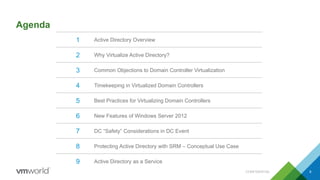
Agenda
CONFIDENTIAL 8
1 Active Directory Overview
2 Why Virtualize Active Directory?
3 Common Objections to Domain Controller Virtualization
4 Timekeeping in Virtualized Domain Controllers
5 Best Practices for Virtualizing Domain Controllers
6 New Features of Windows Server 2012
7 DC “Safety” Considerations in DC Event
8 Protecting Active Directory with SRM – Conceptual Use Case
9 Active Directory as a Service
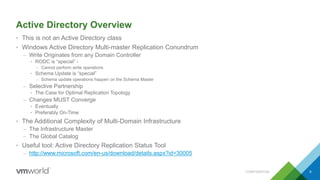
Active Directory Overview
• This is not an Active Directory class
• Windows Active Directory Multi-master Replication Conundrum
– Write Originates from any Domain Controller
• RODC is “special” -
– Cannot perform write operations
• Schema Update is “special”
– Schema update operations happen on the Schema Master
– Selective Partnership
• The Case for Optimal Replication Topology
– Changes MUST Converge
• Eventually
• Preferably On-Time
• The Additional Complexity of Multi-Domain Infrastructure
– The Infrastructure Master
– The Global Catalog
• Useful tool: Active Directory Replication Status Tool
– http://www.microsoft.com/en-us/download/details.aspx?id=30005
CONFIDENTIAL 9
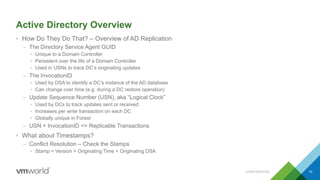
Active Directory Overview
• How Do They Do That? – Overview of AD Replication
– The Directory Service Agent GUID
• Unique to a Domain Controller
• Persistent over the life of a Domain Controller
• Used in USNs to track DC’s originating updates
– The InvocationID
• Used by DSA to identify a DC’s instance of the AD database
• Can change over time (e.g. during a DC restore operation)
– Update Sequence Number (USN), aka “Logical Clock”
• Used by DCs to track updates sent or received
• Increases per write transaction on each DC
• Globally unique in Forest
– USN + InvocationID => Replicable Transactions
• What about Timestamps?
– Conflict Resolution – Check the Stamps
• Stamp = Version + Originating Time + Originating DSA
CONFIDENTIAL 10
Why Virtualize Active Directory?
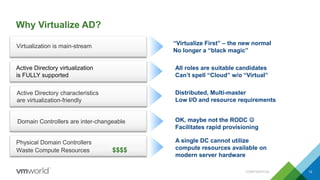
Why Virtualize AD?
CONFIDENTIAL 12
Active Directory virtualization
is FULLY supported
“Virtualize First” – the new normal
No longer a “black magic”
Virtualization is main-stream
Active Directory characteristics
are virtualization-friendly
Domain Controllers are inter-changeable
All roles are suitable candidates
Can’t spell “Cloud” w/o “Virtual”
Distributed, Multi-master
Low I/O and resource requirements
OK, maybe not the RODC 
Facilitates rapid provisioning
Physical Domain Controllers
Waste Compute Resources $$$$
A single DC cannot utilize
compute resources available on
modern server hardware
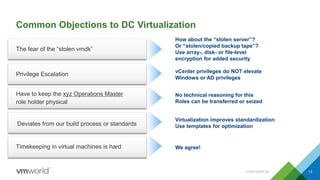
Common Objections to DC Virtualization
CONFIDENTIAL 13
The fear of the “stolen vmdk”
How about the “stolen server”?
Or “stolen/copied backup tape”?
Use array-, disk- or file-level
encryption for added security
Privilege Escalation
vCenter privileges do NOT elevate
Windows or AD privileges
Have to keep the xyz Operations Master
role holder physical
No technical reasoning for this
Roles can be transferred or seized
Deviates from our build process or standards
Virtualization improves standardization
Use templates for optimization
Timekeeping in virtual machines is hard We agree!
Time Keeping is IMPORTANT ….. And HARD
CONFIDENTIAL 14
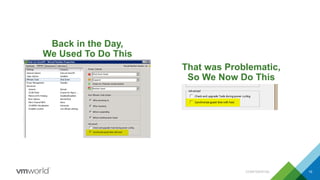
Back in the Day,
We Used To Do This
CONFIDENTIAL 15
That was Problematic,
So We Now Do This
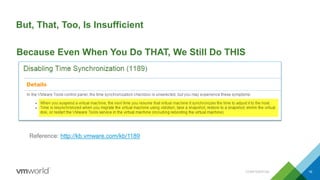
But, That, Too, Is Insufficient
CONFIDENTIAL 16
Reference: http://kb.vmware.com/kb/1189
Because Even When You Do THAT, We Still Do THIS
Live Demo –
Incorrect Timekeeping in
Virtualized Domain Controllers
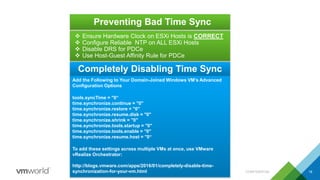
Preventing Bad Time Sync
CONFIDENTIAL 18
 Ensure Hardware Clock on ESXi Hosts is CORRECT
 Configure Reliable NTP on ALL ESXi Hosts
 Disable DRS for PDCe
 Use Host-Guest Affinity Rule for PDCe
Add the Following to Your Domain-Joined Windows VM’s Advanced
Configuration Options
tools.syncTime = "0“
time.synchronize.continue = "0"
time.synchronize.restore = "0"
time.synchronize.resume.disk = "0"
time.synchronize.shrink = "0"
time.synchronize.tools.startup = "0"
time.synchronize.tools.enable = "0"
time.synchronize.resume.host = "0“
To add these settings across multiple VMs at once, use VMware
vRealize Orchestrator:
http://blogs.vmware.com/apps/2016/01/completely-disable-time-
synchronization-for-your-vm.html
Completely Disabling Time Sync
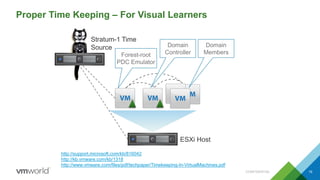
Proper Time Keeping – For Visual Learners
CONFIDENTIAL 19
Stratum-1 Time
Source
Forest-root
PDC Emulator
http://support.microsoft.com/kb/816042
http://kb.vmware.com/kb/1318
http://www.vmware.com/files/pdf/techpaper/Timekeeping-In-VirtualMachines.pdf
ESXi Host
Domain
Controller
Domain
Members
Best Practices
Best Practices for Virtualizing Domain Controllers
CONFIDENTIAL 21
The “low-hanging fruit”
• Deploy across multiple datacenters
• Distribute the FSMO (Operations Masters) roles
– First DC ALWAYS own all the roles
– Follow Microsoft Operations Master Role Placement Best Practices
• http://technet.microsoft.com/en-us/library/cc754889.aspx
• Use EFFECTIVE Role-Based Access Control
– Grant Domain Admin rights only to trusted operators
• Virtual infrastructure Admins do NOT require Domain Admin privileges
• Domain Admins do NOT require Virtual infrastructure Admin privileges
• To P2V or Not to P2V?
• Follow our recommended practices http://kb.vmware.com/kb/1006996
• Use Anti-affinity rules to keep DCs separated/Host-Guest rules
– Avoids “eggs-in-one-basket” failure scenario
– Answers the “where’s my Domain Controller?” question
Best Practices for Virtualizing Domain Controllers
CONFIDENTIAL 22
Domain Controller Sizing
• Sizing domain controllers properly is key to good performance
– Don’t assume DCs sit idle and don’t need a lot of resources
– Use capacity planning tools such as VMware Capacity Planner/Microsoft
Assessment and Planning Toolkit (or vROPs if already virtual) to determine
current state usage
– Resource requirements are highly dependent on total number of objects
and rate of change in the environment
• CPU
– Domain controllers are not typically heavy consumers of CPU resources
– Actual CPU usage varies by environment and by use case
• CPU usage in branch office serving primarily authentication function likely to be
lower than in larger offices
– General sizing guidance:
• 1 – 10,000 users = 1 vCPU. Greater than 10,000 users = 2 vCPU
• If unsure, start with 2 vCPUs and scale up as needed
Best Practices for Virtualizing Domain Controllers
CONFIDENTIAL 23
Domain Controller Sizing
• Memory
– Domain controllers are similar to database servers – can cache AD
database in RAM for faster read performance.
– Monitor “Database/Database Cache % Hit” counter for “lsass” process
to determine current cache usage. Low hit rate may indicate DC would
benefit from more RAM.
– Large forests with millions of objects can consume large amounts of
memory. Not unusual to see DCs with 32GB of RAM for very large forests.
• Networking
– Domain controllers rely on replication to stay in sync.
– Use VMXNET3 virtual NIC for best performance and lowest CPU
utilization on domain controllers.
• Storage
– Need enough space to store AD database (plus room to grow), plus OS
files & any other software.
– DCs not particularly I/O intensive. Can offload read I/O to RAM.
Best Practices for Virtualizing Domain Controllers
CONFIDENTIAL 24
What’s in a Name?
• ~ 75% of AD-related support calls attributable to DNS “issues”
• AD DEPENDS on effective name resolution
– Clients and DCs reference objects by name/GUID
– Internal AD processes depend on DNS
• The “Initial Replication” conundrum – get your DNS right
– DCs MUST perform successful “initial synchronization” on boot-up
– DNS service will not start if not successful
– DCs cannot synchronize if name resolution not working
– The “Repl Perform Initial Synchronizations” Curse Word
• Against Microsoft’s recommended practice
– http://support.microsoft.com/kb/2001093
– HKEY_LOCAL_MACHINESYSTEMCurrentControlSetServicesNTDSParameters
Value name: Repl Perform Initial Synchronizations
Value type: REG_DWORD
Value data: 0
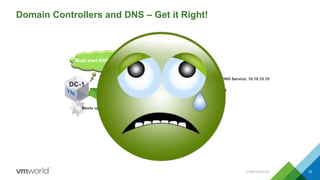
Domain Controllers and DNS – Get it Right!
CONFIDENTIAL 25
DNS Service: 10.10.10.10
DC-1
What’s my IP?
IP Address: 10.10.10.10
Hey, DNS! Who is DC-2.mydomain.local?
Boots up
What’s my DNS IP?
DNS Address: 10.10.10.10
Must sync with
DC-2.mydomain.local
Must start DNS service
I don’t know. I’m not Started.Hey, DNS Service! Please startI’m unable to start. You must sync first!
Historical Problems with Virtualizing Domain Controllers
• Virtual Disk – To cache or not to cache?
– Not our problem a vSphere issue 
– Force Unit Access – http://support.microsoft.com/kb/888794/en-us
– Virtual Disk Corruption in Hyper-V – http://support.microsoft.com/kb/2853952
• AD is a distributed directory service that relies on a clock-based replication scheme
– Each domain controller keeps track of its own transactions and the transactions of every other domain
controller via Update Sequence Numbers and InvocationIDs
– A domain controller which has been reverted to a previously taken snapshot, or restored from a VM
level backup will attempt to reuse USNs for new transactions – USN Rollback
– The local DC will believe its transactions are legit, while other domain controllers know they are not and
refuse to allow incoming replication
• Why is USN Rollback so bad?
CONFIDENTIAL 26
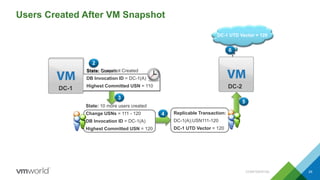
USN Rollback
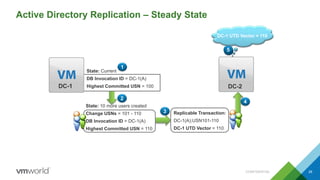
Active Directory Replication – Steady State
CONFIDENTIAL 28
4
Replicable Transaction:
DC-1(A);USN101-110
DC-1 UTD Vector = 110
3
DC-2
DC-1 UTD Vector = 100
15
DC-1 UTD Vector = 110
2
State: 10 more users created
Change USNs = 101 - 110
DB Invocation ID = DC-1(A)
Highest Committed USN = 110
1
DC-1
State: Current
DB Invocation ID = DC-1(A)
Highest Committed USN = 100
Users Created After VM Snapshot
CONFIDENTIAL 29
4 Replicable Transaction:
DC-1(A);USN111-120
DC-1 UTD Vector = 120
3
State: 10 more users created
Change USNs = 111 - 120
DB Invocation ID = DC-1(A)
Highest Committed USN = 120
5
DC-2
1
DC-1 UTD Vector = 110DC-1 UTD Vector = 120
6
1
State: Current
DB Invocation ID = DC-1(A)
Highest Committed USN = 110DC-1
State: Snapshot Created
DB Invocation ID = DC-1(A)
Highest Committed USN = 110
2
DC-1
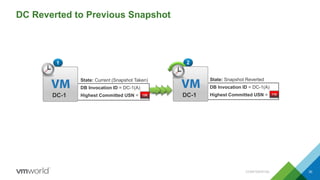
DC Reverted to Previous Snapshot
CONFIDENTIAL 30
State: Snapshot Reverted
DB Invocation ID = DC-1(A)
Highest Committed USN =
2
DC-1 110
1
DC-1
State: Current (Snapshot Taken)
DB Invocation ID = DC-1(A)
Highest Committed USN = 120
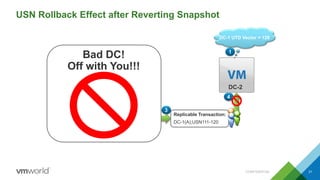
USN Rollback Effect after Reverting Snapshot
CONFIDENTIAL 31
3
Replicable Transaction:
DC-1(A);USN111-120
2
State: 10 more users created
Change USNs = 111 - 120
DB Invocation ID = DC-1(A)
4
1
DC-2
DC-1 UTD Vector = 120
DC-1
State: Snapshot Reverted
DB Invocation ID = DC-1(A)
Highest Committed USN = 110
1
Bad DC!
Off with You!!!
Introducing Domain Controller
“Safety” Features
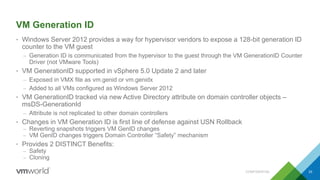
VM Generation ID
• Windows Server 2012 provides a way for hypervisor vendors to expose a 128-bit generation ID
counter to the VM guest
– Generation ID is communicated from the hypervisor to the guest through the VM GenerationID Counter
Driver (not VMware Tools)
• VM GenerationID supported in vSphere 5.0 Update 2 and later
– Exposed in VMX file as vm.genid or vm.genidx
– Added to all VMs configured as Windows Server 2012
• VM GenerationID tracked via new Active Directory attribute on domain controller objects –
msDS-GenerationId
– Attribute is not replicated to other domain controllers
• Changes in VM Generation ID is first line of defense against USN Rollback
– Reverting snapshots triggers VM GenID changes
– VM GenID changes triggers Domain Controller “Safety” mechanism
• Provides 2 DISTINCT Benefits:
– Safety
– Cloning
CONFIDENTIAL 33
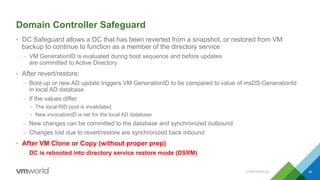
Domain Controller Safeguard
• DC Safeguard allows a DC that has been reverted from a snapshot, or restored from VM
backup to continue to function as a member of the directory service
– VM GenerationID is evaluated during boot sequence and before updates
are committed to Active Directory
• After revert/restore:
– Boot-up or new AD update triggers VM GenerationID to be compared to value of msDS-GenerationId
in local AD database
– If the values differ:
• The local RID pool is invalidated
• New invocationID is set for the local AD database
– New changes can be committed to the database and synchronized outbound
– Changes lost due to revert/restore are synchronized back inbound
• After VM Clone or Copy (without proper prep)
– DC is rebooted into directory service restore mode (DSRM)
CONFIDENTIAL 34
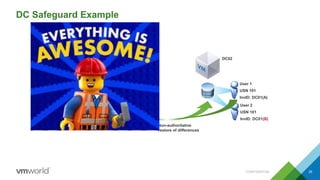
DC Safeguard Example
CONFIDENTIAL 35
DC01
VM GenID: 001
InvocationID: A
Starting USN: 101
DC02
User 1
USN 101
InvID: A
User 1
USN 101
InvID: DC01(A)
Base DiskSnapshotBase Disk
vSphere Host
DC01 vm.genid = 001002
User 2
USN 101
InvID: B
DC01
VM GenID: 002
InvocationID: B
Starting USN: 101
User 2
USN 101
InvID: DC01(B)
User 1
USN 101
InvID: A
VM GenerationID
Counter Driver
Non-authoritative
restore of differences
Demo –
Domain Controller Safety
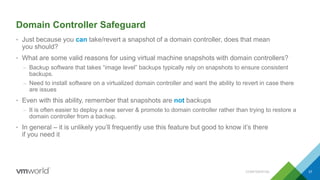
Domain Controller Safeguard
• Just because you can take/revert a snapshot of a domain controller, does that mean
you should?
• What are some valid reasons for using virtual machine snapshots with domain controllers?
– Backup software that takes “image level” backups typically rely on snapshots to ensure consistent
backups.
– Need to install software on a virtualized domain controller and want the ability to revert in case there
are issues
• Even with this ability, remember that snapshots are not backups
– It is often easier to deploy a new server & promote to domain controller rather than trying to restore a
domain controller from a backup.
• In general – it is unlikely you’ll frequently use this feature but good to know it’s there
if you need it
CONFIDENTIAL 37
Demo –
Domain Controller Cloning
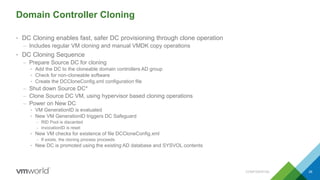
• DC Cloning enables fast, safer DC provisioning through clone operation
– Includes regular VM cloning and manual VMDK copy operations
• DC Cloning Sequence
– Prepare Source DC for cloning
• Add the DC to the cloneable domain controllers AD group
• Check for non-cloneable software
• Create the DCCloneConfig.xml configuration file
– Shut down Source DC*
– Clone Source DC VM, using hypervisor based cloning operations
– Power on New DC
• VM GenerationID is evaluated
• New VM GenerationID triggers DC Safeguard
– RID Pool is discarded
– invocationID is reset
• New VM checks for existence of file DCCloneConfig.xml
– If exists, the cloning process proceeds
• New DC is promoted using the existing AD database and SYSVOL contents
CONFIDENTIAL 39
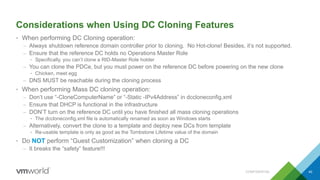
Considerations when Using DC Cloning Features
• When performing DC Cloning operation:
– Always shutdown reference domain controller prior to cloning. No Hot-clone! Besides, it’s not supported.
– Ensure that the reference DC holds no Operations Master Role
• Specifically, you can’t clone a RID-Master Role holder
– You can clone the PDCe, but you must power on the reference DC before powering on the new clone
• Chicken, meet egg
– DNS MUST be reachable during the cloning process
• When performing Mass DC cloning operation:
– Don’t use “-CloneComputerName” or “-Static -IPv4Address” in dccloneconfig.xml
– Ensure that DHCP is functional in the infrastructure
– DON’T turn on the reference DC until you have finished all mass cloning operations
• The dccloneconfig.xml file is automatically renamed as soon as Windows starts
– Alternatively, convert the clone to a template and deploy new DCs from template
• Re-usable template is only as good as the Tombstone Lifetime value of the domain
• Do NOT perform “Guest Customization” when cloning a DC
– It breaks the “safety” feature!!!
CONFIDENTIAL 40
General Considerations for Cloning/Safeguard Features
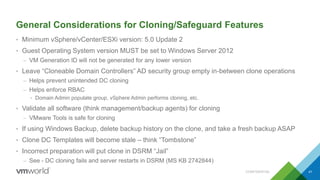
• Minimum vSphere/vCenter/ESXi version: 5.0 Update 2
• Guest Operating System version MUST be set to Windows Server 2012
– VM Generation ID will not be generated for any lower version
• Leave “Cloneable Domain Controllers” AD security group empty in-between clone operations
– Helps prevent unintended DC cloning
– Helps enforce RBAC
• Domain Admin populate group, vSphere Admin performs cloning, etc.
• Validate all software (think management/backup agents) for cloning
– VMware Tools is safe for cloning
• If using Windows Backup, delete backup history on the clone, and take a fresh backup ASAP
• Clone DC Templates will become stale – think “Tombstone”
• Incorrect preparation will put clone in DSRM “Jail”
– See - DC cloning fails and server restarts in DSRM (MS KB 2742844)
CONFIDENTIAL 41
Key Take Aways…
• Dangers which were once present when virtualizing DCs have mostly been resolved in
Windows Server 2012
• Domain Controller virtualization is 100% supported
• Multi-master, distributed, and low resource utilization characteristics of Active Directory make
domain controllers virtualization-friendly
• Physical and virtual Domain Controller best practices are identical
• Same considerations around Time, Security, DNS, Availability, etc
– Physical Servers can experience clock drift, too
• Active Directory is natively highly available
– vSphere High Availability complements it and help mitigate hardware failures
• Upgrade to Windows Server 2012 to bring domain controller safeguard and cloning to the party
CONFIDENTIAL 42
Effects of DC “Safety” on Disaster Recovery
• Special considerations required for site-wide Disaster Recovery plan
• A disaster typically refers to complete site (or Active Directory) outage
• In a disaster you typically must recover multiple domain controllers or entire AD infrastructure
• Recovery could be from backup (agents, etc) or orchestrated (e.g. VMware SRM)
• Remember “DC Safety” workflow logic during a DC “recovery”
• Hypervisor changes VM Generation ID of recovered DC
• What if one of the recovered DCs is the RID-Master?
• RID Pool cannot be obtained while RID Master is down
• RID Master cannot issue RID pools until it has replicated with other DCs
• Avoiding the conundrum
• Always have domain controllers in multiple sites
• Replicate RID-Master and PDC Emulator (at least) to DR site as part of DR Plan
• Restart Directory Service on RID-Master
• Use the Powershell command (restart-service NTDS -force)
• Then force replication to another DC not impacted by outage (if available)
• Reboot RID-Master AFTER all other DCs have started
• Or, just wait ….. For a sufficiently long time …. Yeah Right!
CONFIDENTIAL 43
Protecting Active Directory
with SRM
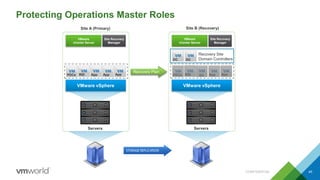
Protecting Operations Master Roles
CONFIDENTIAL 45
VMware vSphere
VMware
vCenter Server
Site Recovery
Manager
Servers
PDCe RID App App App
VMware vSphere
VMware
vCenter Server
Site Recovery
Manager
Servers
PDCe RID App App
Site A (Primary) Site B (Recovery)
Recovery Plan
DC DC
Recovery Site
Domain Controllers
DC
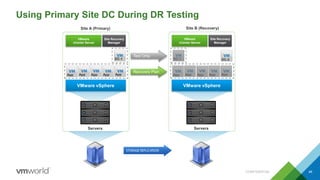
Using Primary Site DC During DR Testing
CONFIDENTIAL 46
VMware vSphere
VMware
vCenter Server
Site Recovery
Manager
Servers
App App App App App
DC-1
VMware vSphere
VMware
vCenter Server
Site Recovery
Manager
Servers
App App App App App
DC-1
Site A (Primary) Site B (Recovery)
Recovery Plan
Test Only
DC-2
VMware
vCenter Server
Site Recovery
Manager
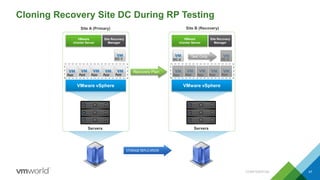
Cloning Recovery Site DC During RP Testing
CONFIDENTIAL 47
VMware vSphere
VMware
vCenter Server
Site Recovery
Manager
Servers
App App App App App
DC-1
VMware vSphere
Servers
App App App App App
DC-2
Site A (Primary) Site B (Recovery)
Recovery Plan
Test Only
DC-2
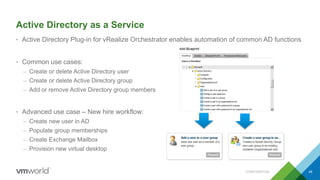
Active Directory as a Service
• Active Directory Plug-in for vRealize Orchestrator enables automation of common AD functions
• Common use cases:
– Create or delete Active Directory user
– Create or delete Active Directory group
– Add or remove Active Directory group members
• Advanced use case – New hire workflow:
– Create new user in AD
– Populate group memberships
– Create Exchange Mailbox
– Provision new virtual desktop
CONFIDENTIAL 49
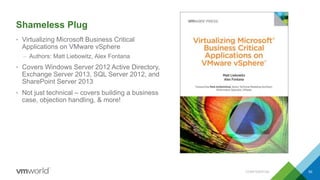
Shameless Plug
• Virtualizing Microsoft Business Critical
Applications on VMware vSphere
– Authors: Matt Liebowitz, Alex Fontana
• Covers Windows Server 2012 Active Directory,
Exchange Server 2013, SQL Server 2012, and
SharePoint Server 2013
• Not just technical – covers building a business
case, objection handling, & more!
CONFIDENTIAL 50
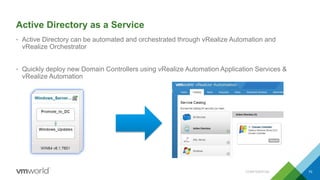
Active Directory as a Service
• Active Directory can be automated and orchestrated through vRealize Automation and
vRealize Orchestrator
• Quickly deploy new Domain Controllers using vRealize Automation Application Services &
vRealize Automation
CONFIDENTIAL 70

VMworld 2016: Virtualize Active Directory, the Right Way!

  • 1.
    Virtualize Active Directory,the Right Way! Deji Akomolafe (@dejify), VMware Matt Liebowitz (@mattliebowitz), EMC Corporation VIRT7621 #VIRT7621
  • 2.
    • This presentationmay contain product features that are currently under development. • This overview of new technology represents no commitment from VMware to deliver these features in any generally available product. • Features are subject to change, and must not be included in contracts, purchase orders, or sales agreements of any kind. • Technical feasibility and market demand will affect final delivery. • Pricing and packaging for any new technologies or features discussed or presented have not been determined. Disclaimer CONFIDENTIAL 7
  • 3.
    Agenda CONFIDENTIAL 8 1 ActiveDirectory Overview 2 Why Virtualize Active Directory? 3 Common Objections to Domain Controller Virtualization 4 Timekeeping in Virtualized Domain Controllers 5 Best Practices for Virtualizing Domain Controllers 6 New Features of Windows Server 2012 7 DC “Safety” Considerations in DC Event 8 Protecting Active Directory with SRM – Conceptual Use Case 9 Active Directory as a Service
  • 4.
    Active Directory Overview •This is not an Active Directory class • Windows Active Directory Multi-master Replication Conundrum – Write Originates from any Domain Controller • RODC is “special” - – Cannot perform write operations • Schema Update is “special” – Schema update operations happen on the Schema Master – Selective Partnership • The Case for Optimal Replication Topology – Changes MUST Converge • Eventually • Preferably On-Time • The Additional Complexity of Multi-Domain Infrastructure – The Infrastructure Master – The Global Catalog • Useful tool: Active Directory Replication Status Tool – http://www.microsoft.com/en-us/download/details.aspx?id=30005 CONFIDENTIAL 9
  • 5.
    Active Directory Overview •How Do They Do That? – Overview of AD Replication – The Directory Service Agent GUID • Unique to a Domain Controller • Persistent over the life of a Domain Controller • Used in USNs to track DC’s originating updates – The InvocationID • Used by DSA to identify a DC’s instance of the AD database • Can change over time (e.g. during a DC restore operation) – Update Sequence Number (USN), aka “Logical Clock” • Used by DCs to track updates sent or received • Increases per write transaction on each DC • Globally unique in Forest – USN + InvocationID => Replicable Transactions • What about Timestamps? – Conflict Resolution – Check the Stamps • Stamp = Version + Originating Time + Originating DSA CONFIDENTIAL 10
  • 6.
  • 7.
    Why Virtualize AD? CONFIDENTIAL12 Active Directory virtualization is FULLY supported “Virtualize First” – the new normal No longer a “black magic” Virtualization is main-stream Active Directory characteristics are virtualization-friendly Domain Controllers are inter-changeable All roles are suitable candidates Can’t spell “Cloud” w/o “Virtual” Distributed, Multi-master Low I/O and resource requirements OK, maybe not the RODC  Facilitates rapid provisioning Physical Domain Controllers Waste Compute Resources $$$$ A single DC cannot utilize compute resources available on modern server hardware
  • 8.
    Common Objections toDC Virtualization CONFIDENTIAL 13 The fear of the “stolen vmdk” How about the “stolen server”? Or “stolen/copied backup tape”? Use array-, disk- or file-level encryption for added security Privilege Escalation vCenter privileges do NOT elevate Windows or AD privileges Have to keep the xyz Operations Master role holder physical No technical reasoning for this Roles can be transferred or seized Deviates from our build process or standards Virtualization improves standardization Use templates for optimization Timekeeping in virtual machines is hard We agree!
  • 9.
    Time Keeping isIMPORTANT ….. And HARD CONFIDENTIAL 14
  • 10.
    Back in theDay, We Used To Do This CONFIDENTIAL 15 That was Problematic, So We Now Do This
  • 11.
    But, That, Too,Is Insufficient CONFIDENTIAL 16 Reference: http://kb.vmware.com/kb/1189 Because Even When You Do THAT, We Still Do THIS
  • 12.
    Live Demo – IncorrectTimekeeping in Virtualized Domain Controllers
  • 13.
    Preventing Bad TimeSync CONFIDENTIAL 18  Ensure Hardware Clock on ESXi Hosts is CORRECT  Configure Reliable NTP on ALL ESXi Hosts  Disable DRS for PDCe  Use Host-Guest Affinity Rule for PDCe Add the Following to Your Domain-Joined Windows VM’s Advanced Configuration Options tools.syncTime = "0“ time.synchronize.continue = "0" time.synchronize.restore = "0" time.synchronize.resume.disk = "0" time.synchronize.shrink = "0" time.synchronize.tools.startup = "0" time.synchronize.tools.enable = "0" time.synchronize.resume.host = "0“ To add these settings across multiple VMs at once, use VMware vRealize Orchestrator: http://blogs.vmware.com/apps/2016/01/completely-disable-time- synchronization-for-your-vm.html Completely Disabling Time Sync
  • 14.
    Proper Time Keeping– For Visual Learners CONFIDENTIAL 19 Stratum-1 Time Source Forest-root PDC Emulator http://support.microsoft.com/kb/816042 http://kb.vmware.com/kb/1318 http://www.vmware.com/files/pdf/techpaper/Timekeeping-In-VirtualMachines.pdf ESXi Host Domain Controller Domain Members
  • 15.
  • 16.
    Best Practices forVirtualizing Domain Controllers CONFIDENTIAL 21 The “low-hanging fruit” • Deploy across multiple datacenters • Distribute the FSMO (Operations Masters) roles – First DC ALWAYS own all the roles – Follow Microsoft Operations Master Role Placement Best Practices • http://technet.microsoft.com/en-us/library/cc754889.aspx • Use EFFECTIVE Role-Based Access Control – Grant Domain Admin rights only to trusted operators • Virtual infrastructure Admins do NOT require Domain Admin privileges • Domain Admins do NOT require Virtual infrastructure Admin privileges • To P2V or Not to P2V? • Follow our recommended practices http://kb.vmware.com/kb/1006996 • Use Anti-affinity rules to keep DCs separated/Host-Guest rules – Avoids “eggs-in-one-basket” failure scenario – Answers the “where’s my Domain Controller?” question
  • 17.
    Best Practices forVirtualizing Domain Controllers CONFIDENTIAL 22 Domain Controller Sizing • Sizing domain controllers properly is key to good performance – Don’t assume DCs sit idle and don’t need a lot of resources – Use capacity planning tools such as VMware Capacity Planner/Microsoft Assessment and Planning Toolkit (or vROPs if already virtual) to determine current state usage – Resource requirements are highly dependent on total number of objects and rate of change in the environment • CPU – Domain controllers are not typically heavy consumers of CPU resources – Actual CPU usage varies by environment and by use case • CPU usage in branch office serving primarily authentication function likely to be lower than in larger offices – General sizing guidance: • 1 – 10,000 users = 1 vCPU. Greater than 10,000 users = 2 vCPU • If unsure, start with 2 vCPUs and scale up as needed
  • 18.
    Best Practices forVirtualizing Domain Controllers CONFIDENTIAL 23 Domain Controller Sizing • Memory – Domain controllers are similar to database servers – can cache AD database in RAM for faster read performance. – Monitor “Database/Database Cache % Hit” counter for “lsass” process to determine current cache usage. Low hit rate may indicate DC would benefit from more RAM. – Large forests with millions of objects can consume large amounts of memory. Not unusual to see DCs with 32GB of RAM for very large forests. • Networking – Domain controllers rely on replication to stay in sync. – Use VMXNET3 virtual NIC for best performance and lowest CPU utilization on domain controllers. • Storage – Need enough space to store AD database (plus room to grow), plus OS files & any other software. – DCs not particularly I/O intensive. Can offload read I/O to RAM.
  • 19.
    Best Practices forVirtualizing Domain Controllers CONFIDENTIAL 24 What’s in a Name? • ~ 75% of AD-related support calls attributable to DNS “issues” • AD DEPENDS on effective name resolution – Clients and DCs reference objects by name/GUID – Internal AD processes depend on DNS • The “Initial Replication” conundrum – get your DNS right – DCs MUST perform successful “initial synchronization” on boot-up – DNS service will not start if not successful – DCs cannot synchronize if name resolution not working – The “Repl Perform Initial Synchronizations” Curse Word • Against Microsoft’s recommended practice – http://support.microsoft.com/kb/2001093 – HKEY_LOCAL_MACHINESYSTEMCurrentControlSetServicesNTDSParameters Value name: Repl Perform Initial Synchronizations Value type: REG_DWORD Value data: 0
  • 20.
    Domain Controllers andDNS – Get it Right! CONFIDENTIAL 25 DNS Service: 10.10.10.10 DC-1 What’s my IP? IP Address: 10.10.10.10 Hey, DNS! Who is DC-2.mydomain.local? Boots up What’s my DNS IP? DNS Address: 10.10.10.10 Must sync with DC-2.mydomain.local Must start DNS service I don’t know. I’m not Started.Hey, DNS Service! Please startI’m unable to start. You must sync first!
  • 21.
    Historical Problems withVirtualizing Domain Controllers • Virtual Disk – To cache or not to cache? – Not our problem a vSphere issue  – Force Unit Access – http://support.microsoft.com/kb/888794/en-us – Virtual Disk Corruption in Hyper-V – http://support.microsoft.com/kb/2853952 • AD is a distributed directory service that relies on a clock-based replication scheme – Each domain controller keeps track of its own transactions and the transactions of every other domain controller via Update Sequence Numbers and InvocationIDs – A domain controller which has been reverted to a previously taken snapshot, or restored from a VM level backup will attempt to reuse USNs for new transactions – USN Rollback – The local DC will believe its transactions are legit, while other domain controllers know they are not and refuse to allow incoming replication • Why is USN Rollback so bad? CONFIDENTIAL 26
  • 22.
  • 23.
    Active Directory Replication– Steady State CONFIDENTIAL 28 4 Replicable Transaction: DC-1(A);USN101-110 DC-1 UTD Vector = 110 3 DC-2 DC-1 UTD Vector = 100 15 DC-1 UTD Vector = 110 2 State: 10 more users created Change USNs = 101 - 110 DB Invocation ID = DC-1(A) Highest Committed USN = 110 1 DC-1 State: Current DB Invocation ID = DC-1(A) Highest Committed USN = 100
  • 24.
    Users Created AfterVM Snapshot CONFIDENTIAL 29 4 Replicable Transaction: DC-1(A);USN111-120 DC-1 UTD Vector = 120 3 State: 10 more users created Change USNs = 111 - 120 DB Invocation ID = DC-1(A) Highest Committed USN = 120 5 DC-2 1 DC-1 UTD Vector = 110DC-1 UTD Vector = 120 6 1 State: Current DB Invocation ID = DC-1(A) Highest Committed USN = 110DC-1 State: Snapshot Created DB Invocation ID = DC-1(A) Highest Committed USN = 110 2 DC-1
  • 25.
    DC Reverted toPrevious Snapshot CONFIDENTIAL 30 State: Snapshot Reverted DB Invocation ID = DC-1(A) Highest Committed USN = 2 DC-1 110 1 DC-1 State: Current (Snapshot Taken) DB Invocation ID = DC-1(A) Highest Committed USN = 120
  • 26.
    USN Rollback Effectafter Reverting Snapshot CONFIDENTIAL 31 3 Replicable Transaction: DC-1(A);USN111-120 2 State: 10 more users created Change USNs = 111 - 120 DB Invocation ID = DC-1(A) 4 1 DC-2 DC-1 UTD Vector = 120 DC-1 State: Snapshot Reverted DB Invocation ID = DC-1(A) Highest Committed USN = 110 1 Bad DC! Off with You!!!
  • 27.
  • 28.
    VM Generation ID •Windows Server 2012 provides a way for hypervisor vendors to expose a 128-bit generation ID counter to the VM guest – Generation ID is communicated from the hypervisor to the guest through the VM GenerationID Counter Driver (not VMware Tools) • VM GenerationID supported in vSphere 5.0 Update 2 and later – Exposed in VMX file as vm.genid or vm.genidx – Added to all VMs configured as Windows Server 2012 • VM GenerationID tracked via new Active Directory attribute on domain controller objects – msDS-GenerationId – Attribute is not replicated to other domain controllers • Changes in VM Generation ID is first line of defense against USN Rollback – Reverting snapshots triggers VM GenID changes – VM GenID changes triggers Domain Controller “Safety” mechanism • Provides 2 DISTINCT Benefits: – Safety – Cloning CONFIDENTIAL 33
  • 29.
    Domain Controller Safeguard •DC Safeguard allows a DC that has been reverted from a snapshot, or restored from VM backup to continue to function as a member of the directory service – VM GenerationID is evaluated during boot sequence and before updates are committed to Active Directory • After revert/restore: – Boot-up or new AD update triggers VM GenerationID to be compared to value of msDS-GenerationId in local AD database – If the values differ: • The local RID pool is invalidated • New invocationID is set for the local AD database – New changes can be committed to the database and synchronized outbound – Changes lost due to revert/restore are synchronized back inbound • After VM Clone or Copy (without proper prep) – DC is rebooted into directory service restore mode (DSRM) CONFIDENTIAL 34
  • 30.
    DC Safeguard Example CONFIDENTIAL35 DC01 VM GenID: 001 InvocationID: A Starting USN: 101 DC02 User 1 USN 101 InvID: A User 1 USN 101 InvID: DC01(A) Base DiskSnapshotBase Disk vSphere Host DC01 vm.genid = 001002 User 2 USN 101 InvID: B DC01 VM GenID: 002 InvocationID: B Starting USN: 101 User 2 USN 101 InvID: DC01(B) User 1 USN 101 InvID: A VM GenerationID Counter Driver Non-authoritative restore of differences
  • 31.
  • 32.
    Domain Controller Safeguard •Just because you can take/revert a snapshot of a domain controller, does that mean you should? • What are some valid reasons for using virtual machine snapshots with domain controllers? – Backup software that takes “image level” backups typically rely on snapshots to ensure consistent backups. – Need to install software on a virtualized domain controller and want the ability to revert in case there are issues • Even with this ability, remember that snapshots are not backups – It is often easier to deploy a new server & promote to domain controller rather than trying to restore a domain controller from a backup. • In general – it is unlikely you’ll frequently use this feature but good to know it’s there if you need it CONFIDENTIAL 37
  • 33.
  • 34.
    Domain Controller Cloning •DC Cloning enables fast, safer DC provisioning through clone operation – Includes regular VM cloning and manual VMDK copy operations • DC Cloning Sequence – Prepare Source DC for cloning • Add the DC to the cloneable domain controllers AD group • Check for non-cloneable software • Create the DCCloneConfig.xml configuration file – Shut down Source DC* – Clone Source DC VM, using hypervisor based cloning operations – Power on New DC • VM GenerationID is evaluated • New VM GenerationID triggers DC Safeguard – RID Pool is discarded – invocationID is reset • New VM checks for existence of file DCCloneConfig.xml – If exists, the cloning process proceeds • New DC is promoted using the existing AD database and SYSVOL contents CONFIDENTIAL 39
  • 35.
    Considerations when UsingDC Cloning Features • When performing DC Cloning operation: – Always shutdown reference domain controller prior to cloning. No Hot-clone! Besides, it’s not supported. – Ensure that the reference DC holds no Operations Master Role • Specifically, you can’t clone a RID-Master Role holder – You can clone the PDCe, but you must power on the reference DC before powering on the new clone • Chicken, meet egg – DNS MUST be reachable during the cloning process • When performing Mass DC cloning operation: – Don’t use “-CloneComputerName” or “-Static -IPv4Address” in dccloneconfig.xml – Ensure that DHCP is functional in the infrastructure – DON’T turn on the reference DC until you have finished all mass cloning operations • The dccloneconfig.xml file is automatically renamed as soon as Windows starts – Alternatively, convert the clone to a template and deploy new DCs from template • Re-usable template is only as good as the Tombstone Lifetime value of the domain • Do NOT perform “Guest Customization” when cloning a DC – It breaks the “safety” feature!!! CONFIDENTIAL 40
  • 36.
    General Considerations forCloning/Safeguard Features • Minimum vSphere/vCenter/ESXi version: 5.0 Update 2 • Guest Operating System version MUST be set to Windows Server 2012 – VM Generation ID will not be generated for any lower version • Leave “Cloneable Domain Controllers” AD security group empty in-between clone operations – Helps prevent unintended DC cloning – Helps enforce RBAC • Domain Admin populate group, vSphere Admin performs cloning, etc. • Validate all software (think management/backup agents) for cloning – VMware Tools is safe for cloning • If using Windows Backup, delete backup history on the clone, and take a fresh backup ASAP • Clone DC Templates will become stale – think “Tombstone” • Incorrect preparation will put clone in DSRM “Jail” – See - DC cloning fails and server restarts in DSRM (MS KB 2742844) CONFIDENTIAL 41
  • 37.
    Key Take Aways… •Dangers which were once present when virtualizing DCs have mostly been resolved in Windows Server 2012 • Domain Controller virtualization is 100% supported • Multi-master, distributed, and low resource utilization characteristics of Active Directory make domain controllers virtualization-friendly • Physical and virtual Domain Controller best practices are identical • Same considerations around Time, Security, DNS, Availability, etc – Physical Servers can experience clock drift, too • Active Directory is natively highly available – vSphere High Availability complements it and help mitigate hardware failures • Upgrade to Windows Server 2012 to bring domain controller safeguard and cloning to the party CONFIDENTIAL 42
  • 38.
    Effects of DC“Safety” on Disaster Recovery • Special considerations required for site-wide Disaster Recovery plan • A disaster typically refers to complete site (or Active Directory) outage • In a disaster you typically must recover multiple domain controllers or entire AD infrastructure • Recovery could be from backup (agents, etc) or orchestrated (e.g. VMware SRM) • Remember “DC Safety” workflow logic during a DC “recovery” • Hypervisor changes VM Generation ID of recovered DC • What if one of the recovered DCs is the RID-Master? • RID Pool cannot be obtained while RID Master is down • RID Master cannot issue RID pools until it has replicated with other DCs • Avoiding the conundrum • Always have domain controllers in multiple sites • Replicate RID-Master and PDC Emulator (at least) to DR site as part of DR Plan • Restart Directory Service on RID-Master • Use the Powershell command (restart-service NTDS -force) • Then force replication to another DC not impacted by outage (if available) • Reboot RID-Master AFTER all other DCs have started • Or, just wait ….. For a sufficiently long time …. Yeah Right! CONFIDENTIAL 43
  • 39.
  • 40.
    Protecting Operations MasterRoles CONFIDENTIAL 45 VMware vSphere VMware vCenter Server Site Recovery Manager Servers PDCe RID App App App VMware vSphere VMware vCenter Server Site Recovery Manager Servers PDCe RID App App Site A (Primary) Site B (Recovery) Recovery Plan DC DC Recovery Site Domain Controllers DC
  • 41.
    Using Primary SiteDC During DR Testing CONFIDENTIAL 46 VMware vSphere VMware vCenter Server Site Recovery Manager Servers App App App App App DC-1 VMware vSphere VMware vCenter Server Site Recovery Manager Servers App App App App App DC-1 Site A (Primary) Site B (Recovery) Recovery Plan Test Only DC-2
  • 42.
    VMware vCenter Server Site Recovery Manager CloningRecovery Site DC During RP Testing CONFIDENTIAL 47 VMware vSphere VMware vCenter Server Site Recovery Manager Servers App App App App App DC-1 VMware vSphere Servers App App App App App DC-2 Site A (Primary) Site B (Recovery) Recovery Plan Test Only DC-2
  • 43.
  • 44.
    Active Directory asa Service • Active Directory Plug-in for vRealize Orchestrator enables automation of common AD functions • Common use cases: – Create or delete Active Directory user – Create or delete Active Directory group – Add or remove Active Directory group members • Advanced use case – New hire workflow: – Create new user in AD – Populate group memberships – Create Exchange Mailbox – Provision new virtual desktop CONFIDENTIAL 49
  • 45.
    Shameless Plug • VirtualizingMicrosoft Business Critical Applications on VMware vSphere – Authors: Matt Liebowitz, Alex Fontana • Covers Windows Server 2012 Active Directory, Exchange Server 2013, SQL Server 2012, and SharePoint Server 2013 • Not just technical – covers building a business case, objection handling, & more! CONFIDENTIAL 50
  • 48.
    Active Directory asa Service • Active Directory can be automated and orchestrated through vRealize Automation and vRealize Orchestrator • Quickly deploy new Domain Controllers using vRealize Automation Application Services & vRealize Automation CONFIDENTIAL 70