1Confidential
VMware, Virtualization, Capabilities & Benefits
Gary Ciliberto
VP Business Development
Radiant Resources, Inc.
2
Agenda
SMB Market Overview & Challenges
VMware Overview
Pricing Options & SMB Packages
Desktop Virtualization
Q & A
3
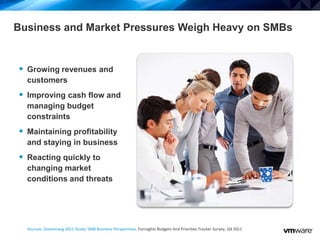
 Growing revenues and
customers
 Improving cash flow and
managing budget
constraints
 Maintaining profitability
and staying in business
 Reacting quickly to
changing market
conditions and threats
Sources: Zoomerang 2011 Study: SMB Business Perspectives, Forrsights Budgets And Priorities Tracker Survey, Q4 2011
Business and Market Pressures Weigh Heavy on SMBs
4
Primary SMB Objectives
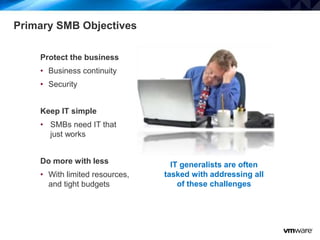
Protect the business
• Business continuity
• Security
Keep IT simple
• SMBs need IT that
just works
Do more with less
• With limited resources,
and tight budgets
IT generalists are often
tasked with addressing all
of these challenges
5
SMB Market Trends
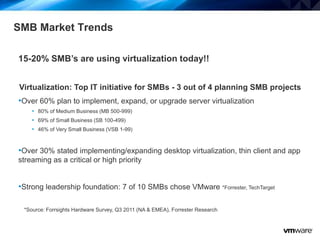
15-20% SMB’s are using virtualization today!!
Virtualization: Top IT initiative for SMBs - 3 out of 4 planning SMB projects
•Over 60% plan to implement, expand, or upgrade server virtualization
• 80% of Medium Business (MB 500-999)
• 69% of Small Business (SB 100-499)
• 46% of Very Small Business (VSB 1-99)
•Over 30% stated implementing/expanding desktop virtualization, thin client and app
streaming as a critical or high priority
•Strong leadership foundation: 7 of 10 SMBs chose VMware *Forrester, TechTarget
*Source: Forrsights Hardware Survey, Q3 2011 (NA & EMEA), Forrester Research
6
Who will benefit from Virtual Infrastructure?
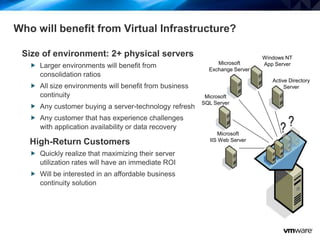
Size of environment: 2+ physical servers
 Larger environments will benefit from
consolidation ratios
 All size environments will benefit from business
continuity
 Any customer buying a server-technology refresh
 Any customer that has experience challenges
with application availability or data recovery
High-Return Customers
 Quickly realize that maximizing their server
utilization rates will have an immediate ROI
 Will be interested in an affordable business
continuity solution
Active Directory
Server
Microsoft
SQL Server
Windows NT
App Server
Microsoft
IIS Web Server
Microsoft
Exchange Server
9
How does Virtualization Solve My Problems?
Physical World
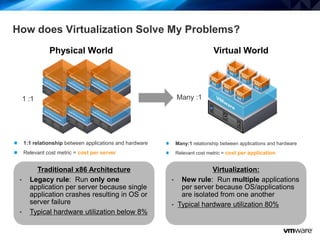
1:1 relationship between applications and hardware
Relevant cost metric = cost per server
1 :1
Traditional x86 Architecture
• Legacy rule: Run only one
application per server because single
application crashes resulting in OS or
server failure
• Typical hardware utilization below 8%
Many:1 relationship between applications and hardware
Relevant cost metric = cost per application
Virtual World
Many :1
Virtualization:
• New rule: Run multiple applications
per server because OS/applications
are isolated from one another
• Typical hardware utilization 80%
11
Make Better Use of Existing Infrastructure
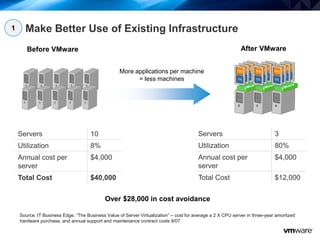
Servers 10
Utilization 8%
Annual cost per
server
$4,000
Total Cost $40,000
Servers 3
Utilization 80%
Annual cost per
server
$4,000
Total Cost $12,000
Before VMware After VMware
More applications per machine
= less machines
Over $28,000 in cost avoidance
Source: IT Business Edge, “The Business Value of Server Virtualization” – cost for average a 2 X CPU server in three-year amortized
hardware purchase, and annual support and maintenance contract costs 9/07
1
12
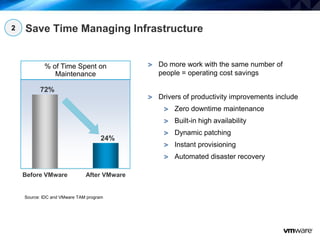
Save Time Managing Infrastructure
% of Time Spent on
Maintenance
72%
Before VMware After VMware
24%
Source: IDC and VMware TAM program
Do more work with the same number of
people = operating cost savings
Drivers of productivity improvements include
Zero downtime maintenance
Built-in high availability
Dynamic patching
Instant provisioning
Automated disaster recovery
2
13
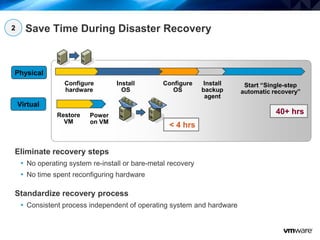
Save Time During Disaster Recovery
Eliminate recovery steps
• No operating system re-install or bare-metal recovery
• No time spent reconfiguring hardware
Standardize recovery process
• Consistent process independent of operating system and hardware
Configure
hardware
Install
OS
Configure
OS
Install
backup
agent
Start “Single-step
automatic recovery”
Restore
VM
Power
on VM
Physical
Virtual
40+ hrs
< 4 hrs
2
14
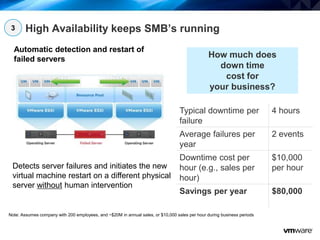
High Availability keeps SMB’s running
Automatic detection and restart of
failed servers
Detects server failures and initiates the new
virtual machine restart on a different physical
server without human intervention
Typical downtime per
failure
4 hours
Average failures per
year
2 events
Downtime cost per
hour (e.g., sales per
hour)
$10,000
per hour
Savings per year $80,000
Note: Assumes company with 200 employees, and ~$20M in annual sales, or $10,000 sales per hour during business periods
How much does
down time
cost for
your business?
3
16
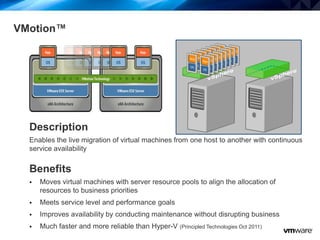
VMotion™
Description
Enables the live migration of virtual machines from one host to another with continuous
service availability
Benefits
 Moves virtual machines with server resource pools to align the allocation of
resources to business priorities
 Meets service level and performance goals
 Improves availability by conducting maintenance without disrupting business
 Much faster and more reliable than Hyper-V (Principled Technologies Oct 2011)
18
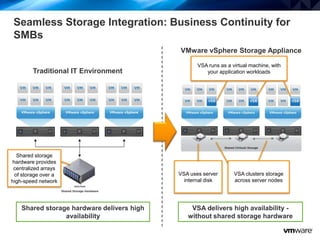
VSA delivers high availability -
without shared storage hardware
VMware vSphere Storage Appliance
VSA runs as a virtual machine, with
your application workloads
VSA uses server
internal disk
VSA clusters storage
across server nodes
Shared storage hardware delivers high
availability
Traditional IT Environment
Shared storage
hardware provides
centralized arrays
of storage over a
high-speed network
Seamless Storage Integration: Business Continuity for
SMBs
19
VMware vSphere™ Packaging / Pricing
21
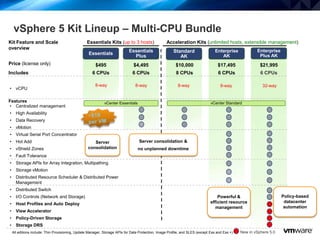
vSphere 5 Kit Lineup – Multi-CPU Bundle
Price (license only)
Essentials
Plus
$4,495
Standard
AK
8-way
Enterprise
AK
$17,495
8-way
Enterprise
Plus AK
$21,995
32-way
• vCPU
Features
• Centralized management
• High Availability
• Data Recovery
• vMotion
• Virtual Serial Port Concentrator
• Hot Add
• vShield Zones
• Fault Tolerance
• Storage APIs for Array Integration, Multipathing
• Storage vMotion
• Distributed Resource Scheduler & Distributed Power
Management
• Distributed Switch
• I/O Controls (Network and Storage)
• Host Profiles and Auto Deploy
• View Accelerator
• Policy-Driven Storage
• Storage DRS
$495
8-way
All editions include: Thin Provisioning, Update Manager, Storage APIs for Data Protection, Image Profile, and SLES (except Ess and Ess +) New in vSphere 5.0
Essentials
$10,000
Kit Feature and Scale
overview
Essentials Kits (up to 3 hosts) Acceleration Kits (unlimited hosts, extensible management)
Includes 6 CPUs 6 CPUs 6 CPUs6 CPUs 8 CPUs
8-way
vCenter Essentials vCenter Standard
Policy-based
datacenter
automation
Powerful &
efficient resource
management
Server consolidation &
no unplanned downtime
Server
consolidation

Virtualize with v mware radiant

  • 1.
    1Confidential VMware, Virtualization, Capabilities& Benefits Gary Ciliberto VP Business Development Radiant Resources, Inc.
  • 2.
    2 Agenda SMB Market Overview& Challenges VMware Overview Pricing Options & SMB Packages Desktop Virtualization Q & A
  • 3.
    3  Growing revenuesand customers  Improving cash flow and managing budget constraints  Maintaining profitability and staying in business  Reacting quickly to changing market conditions and threats Sources: Zoomerang 2011 Study: SMB Business Perspectives, Forrsights Budgets And Priorities Tracker Survey, Q4 2011 Business and Market Pressures Weigh Heavy on SMBs
  • 4.
    4 Primary SMB Objectives Protectthe business • Business continuity • Security Keep IT simple • SMBs need IT that just works Do more with less • With limited resources, and tight budgets IT generalists are often tasked with addressing all of these challenges
  • 5.
    5 SMB Market Trends 15-20%SMB’s are using virtualization today!! Virtualization: Top IT initiative for SMBs - 3 out of 4 planning SMB projects •Over 60% plan to implement, expand, or upgrade server virtualization • 80% of Medium Business (MB 500-999) • 69% of Small Business (SB 100-499) • 46% of Very Small Business (VSB 1-99) •Over 30% stated implementing/expanding desktop virtualization, thin client and app streaming as a critical or high priority •Strong leadership foundation: 7 of 10 SMBs chose VMware *Forrester, TechTarget *Source: Forrsights Hardware Survey, Q3 2011 (NA & EMEA), Forrester Research
  • 6.
    6 Who will benefitfrom Virtual Infrastructure? Size of environment: 2+ physical servers  Larger environments will benefit from consolidation ratios  All size environments will benefit from business continuity  Any customer buying a server-technology refresh  Any customer that has experience challenges with application availability or data recovery High-Return Customers  Quickly realize that maximizing their server utilization rates will have an immediate ROI  Will be interested in an affordable business continuity solution Active Directory Server Microsoft SQL Server Windows NT App Server Microsoft IIS Web Server Microsoft Exchange Server
  • 7.
    9 How does VirtualizationSolve My Problems? Physical World 1:1 relationship between applications and hardware Relevant cost metric = cost per server 1 :1 Traditional x86 Architecture • Legacy rule: Run only one application per server because single application crashes resulting in OS or server failure • Typical hardware utilization below 8% Many:1 relationship between applications and hardware Relevant cost metric = cost per application Virtual World Many :1 Virtualization: • New rule: Run multiple applications per server because OS/applications are isolated from one another • Typical hardware utilization 80%
  • 8.
    11 Make Better Useof Existing Infrastructure Servers 10 Utilization 8% Annual cost per server $4,000 Total Cost $40,000 Servers 3 Utilization 80% Annual cost per server $4,000 Total Cost $12,000 Before VMware After VMware More applications per machine = less machines Over $28,000 in cost avoidance Source: IT Business Edge, “The Business Value of Server Virtualization” – cost for average a 2 X CPU server in three-year amortized hardware purchase, and annual support and maintenance contract costs 9/07 1
  • 9.
    12 Save Time ManagingInfrastructure % of Time Spent on Maintenance 72% Before VMware After VMware 24% Source: IDC and VMware TAM program Do more work with the same number of people = operating cost savings Drivers of productivity improvements include Zero downtime maintenance Built-in high availability Dynamic patching Instant provisioning Automated disaster recovery 2
  • 10.
    13 Save Time DuringDisaster Recovery Eliminate recovery steps • No operating system re-install or bare-metal recovery • No time spent reconfiguring hardware Standardize recovery process • Consistent process independent of operating system and hardware Configure hardware Install OS Configure OS Install backup agent Start “Single-step automatic recovery” Restore VM Power on VM Physical Virtual 40+ hrs < 4 hrs 2
  • 11.
    14 High Availability keepsSMB’s running Automatic detection and restart of failed servers Detects server failures and initiates the new virtual machine restart on a different physical server without human intervention Typical downtime per failure 4 hours Average failures per year 2 events Downtime cost per hour (e.g., sales per hour) $10,000 per hour Savings per year $80,000 Note: Assumes company with 200 employees, and ~$20M in annual sales, or $10,000 sales per hour during business periods How much does down time cost for your business? 3
  • 12.
    16 VMotion™ Description Enables the livemigration of virtual machines from one host to another with continuous service availability Benefits  Moves virtual machines with server resource pools to align the allocation of resources to business priorities  Meets service level and performance goals  Improves availability by conducting maintenance without disrupting business  Much faster and more reliable than Hyper-V (Principled Technologies Oct 2011)
  • 13.
    18 VSA delivers highavailability - without shared storage hardware VMware vSphere Storage Appliance VSA runs as a virtual machine, with your application workloads VSA uses server internal disk VSA clusters storage across server nodes Shared storage hardware delivers high availability Traditional IT Environment Shared storage hardware provides centralized arrays of storage over a high-speed network Seamless Storage Integration: Business Continuity for SMBs
  • 14.
  • 15.
    21 vSphere 5 KitLineup – Multi-CPU Bundle Price (license only) Essentials Plus $4,495 Standard AK 8-way Enterprise AK $17,495 8-way Enterprise Plus AK $21,995 32-way • vCPU Features • Centralized management • High Availability • Data Recovery • vMotion • Virtual Serial Port Concentrator • Hot Add • vShield Zones • Fault Tolerance • Storage APIs for Array Integration, Multipathing • Storage vMotion • Distributed Resource Scheduler & Distributed Power Management • Distributed Switch • I/O Controls (Network and Storage) • Host Profiles and Auto Deploy • View Accelerator • Policy-Driven Storage • Storage DRS $495 8-way All editions include: Thin Provisioning, Update Manager, Storage APIs for Data Protection, Image Profile, and SLES (except Ess and Ess +) New in vSphere 5.0 Essentials $10,000 Kit Feature and Scale overview Essentials Kits (up to 3 hosts) Acceleration Kits (unlimited hosts, extensible management) Includes 6 CPUs 6 CPUs 6 CPUs6 CPUs 8 CPUs 8-way vCenter Essentials vCenter Standard Policy-based datacenter automation Powerful & efficient resource management Server consolidation & no unplanned downtime Server consolidation

Editor's Notes

  • #5 Protect your businessBusiness continuity is critical for SMBs – the entire business may rely on a few number of applications Improved availability – automatic restart of applications when servers fail with VMware High Availability, no additional hardware requiredSecurity is a growing challenge and new devices are always entering the IT environment.Virtualization-aware security – maintain control of security while letting end users access their apps from any deviceKeep IT simplSMBs need IT that just works, so they can stay focused on running their businessIntuitive management – so the technology can get out of the wayFlexibility for end users – users can use the apps they already know, from any device, anywhere, any timeOptions – run your apps using trusted vCloud datacenter partnersDo more with lessWith limited resources, SMBs always need to make do on tight budgets and get value from their IT investmentsHighest utilization and automated management – get the most out of your hardware, while ensuring service levels for your applicationsCost effective email and collaboration - feature-rich alternatives that save you money
  • #6 Server virtualization is currently a top priority among SMBs. Currently around 15~20 percent have adopted server virtualization and the majority of SMBs will virtualize in the next 12 months. SMBs also represent the largest and fastest growing segment of VMware customers. In fact, VMware has tripled the volume of SMB customers in the last two years.
  • #7 r
  • #10 Physical World:To better understand how these business benefits are delivered via virtualization, let’s talk a little bit about how virtualization works.In the traditional IT stack there was a rigid 1-1 mapping between hardware, an instance of an operating system and a single software application. That rigid model lead to tremendous under-utilization of hardware resources. The industry statistic is that in this traditional model, servers are utilized only 5-15%. This is a huge problem for companies – having a very large pool of resources that stays idle most of the time. it is a picture that CFOs are very unhappy about.But the story doesn&apos;t end there – the server sprawl and the associated underutilization of resources have ripple through effects for the entire environment – server sprawl means not only wasted investment in hardware, but also unsustainable power, cooling, and real estate costs. This tremendous complexity means that it is hard to provision new infrastructure and to respond to changing business needs. IT departments are stuck wasting cycles on mundane tasks, and don’t have time to focus on what really matters. For example, in most companies a single sys admin can support only up to 20 servers, and the time for provisioning a new server is often 6-8 weeks.Virtualized World:Virtualization breaks the rigid bond between hardware and software, and allows multiple instances of an operating systems and multiple software applications to run on the same hardware box. In essence, virtualization “bundles” or encapsulates the operating system and a software application into a virtual machine. This entire “package” of virtual hardware - CPU, memory and networking, OS and application, is turned into a single software file. Virtual machines are hardware independent, and because they are files, they can be manipulated with the ease of file copy and paste. Virtual machines bring an entirely new level of efficiency and flexibility to the IT environment. One way to understand the impact of virtualization on the IT industry is to compare it with electronic banking – once the cash money was turned into bytes, it increased the velocity of commerce – money can be moved around the world now with lightening speed – because it is virtual, it is information. By turning physical capabilities into information, virtualization makes provisioning and managing the entire IT infrastructure a lot faster and more flexible.
  • #12 The savings that come from hardware cost are pretty clear, so let’s look at annual costs of running your servers.If your cost per server is $4,000, that’s $40K a year. If you consolidate this to three servers, that’s $28 in savings.This represents a conservative consolidation ratio (~3:1) typically we see ratios around 8~10.
  • #13 This is just a sampling of some of the results of the capabilities we provide to our customers. Customers save up to 60% in total cost of infrastructure on a per application basis – and increase productivity of admins almost 2-3x. The net effect that we typically see among our customers is that they can meet business requirements at a fairly low cost, and because they can spend a lot less time fighting fires on a daily basis – they are able to manage many more workloads than they would in a physical environment. They are also able to spend more time architecting their infrastructure better for higher levels of productivity.Supporting data:Before VMware, IDC claims an average of about 30 servers per admin. After virtualization, they typically see the number increase 3x.In the TAM program, we considered collecting this statistic.   One company with a very good VM to Admin ratio is Fidelity Investments.  They had approximately 300 : 1 ratio  (Approximately 1500 VMs to 5 Admins). Bank of America has approx 2000 VMs and between 8 to 10 VI administrators (200:1). The ratios vary widely based on the role of the administrator and the length of their deployment.  This is merely anecdotal information and not in depth analysis of our larger customer base, but even IDC has claimed that average server to admin ratios with VMware are 3x or 90 server per admin (John Humphreys, Vforumpreso / Virtualization 2.0).
  • #14 vSphere also simplifies the disaster recovery process, by eliminating many of the time-consuming manual steps. For example, it eliminates the need to reinstall and reconfigure operating systems and applications because all of that information is encapsulated in the VM data on disk.
  • #15 Another business benefit of vSphere is automatic business continuity. VMware High Availability restarts your VMs automatically in if a server failure occurs. How much does downtime cost your business? Do you have business critical workloads like point of sale systems , databases or websites that directly support revenue generation? For many businesses, downtime to any of these systems would represent significant risk to the business.HA provides business continuity without any human intervention.
  • #16 Data Recovery is a disk-based backup and recovery solution that delivers quick, simple and complete data protection for your virtual machines. You can use vCenter to manage schedule backups or snapshots of your VMs.When a VM goes down, you can go to vCenter and quickly access the directory of backup VMs and files. Data Recovery also incorporates de-duplication to save on disk storage for your backups by only backing up changes that have taken place after the initial backup.
  • #17 VMware VMotion is a revolutionary technology that moves running virtual machines from one server to another, while maintaining continuous service availability, and zero downtime. While VMotion requires user action to initiate, this product is also the basis for products like VMware DRS, which automate the movement of virtual machines under pre-defined conditions. VMotion was VMware’s first product that made it possible to distribute virtual machines and create conditions where it was possible to move workloads as required to maintain service levels and performance goals. Hardware maintenance can now be done without scheduling downtime and disrupting business operations.
  • #19 While many SMBs have heard of the benefits of virtualization, not all have been able to get all these benefits. Key features like vMotion, High Availability, all require shared storage capabilities. SMBs without shared storage hardware to date can only get a small fraction of the benefits that virtualization can bring – specifically server consolidation in a isolated manner (per host).Install in minutes – with just a few mouse clicksEasy to use – Manage all your storage resources in vCenter ServerSaves money – Less than half the cost of storage hardware alternativesSurvive server failures – Use auto-restart for all apps and get continuous availability for the for the most important apps No more planned downtime – migrate virtual machines from host to host, with no service disruptionSet and forget automation – Use unique vSphere capabilities like DRS to guarantee application service levelsGet more out of your hardware – increase utilization by pooling workloads among all your servers
  • #21 vSphere is sold in both Kits and a la carte Editions.Kits include virtualization for a number of processors, and one license of vCenter for centralized management. Essentials Kits are for smaller environments while Acceleration Kits can be scaled to any sized environments.vSphere Editions are a la carte license that you can purchase as your environment grows.