Building a Business Case for Virtual SAN
Madelyn Grunewald, VMware, Inc
Jordan Glamann, Dominos Pizza
Rafael Kabesa, VMware, Inc
STO5887
#STO5887
• This presentation may contain product features that are currently under development.
• This overview of new technology represents no commitment from VMware to deliver these
features in any generally available product.
• Features are subject to change, and must not be included in contracts, purchase orders, or
sales agreements of any kind.
• Technical feasibility and market demand will affect final delivery.
• Pricing and packaging for any new technologies or features discussed or presented have not
been determined.
Disclaimer
CONFIDENTIAL 2
Agenda
1 Virtual SAN Overview and Customer Introduction
2 What‘s Important for HCI Customers
 Choice, Integration, Cost & Performance
 Storage Costs Deep Dive
 VSAN Assessment Live Demo
3 Additional Resources
3
Virtual SAN Overview and
Customer Introduction
4
VMware Virtual SAN: Radically Simple Storage
5
Hyper-Converged Storage Designed for Virtual Machines
vSphere + Virtual SAN
…
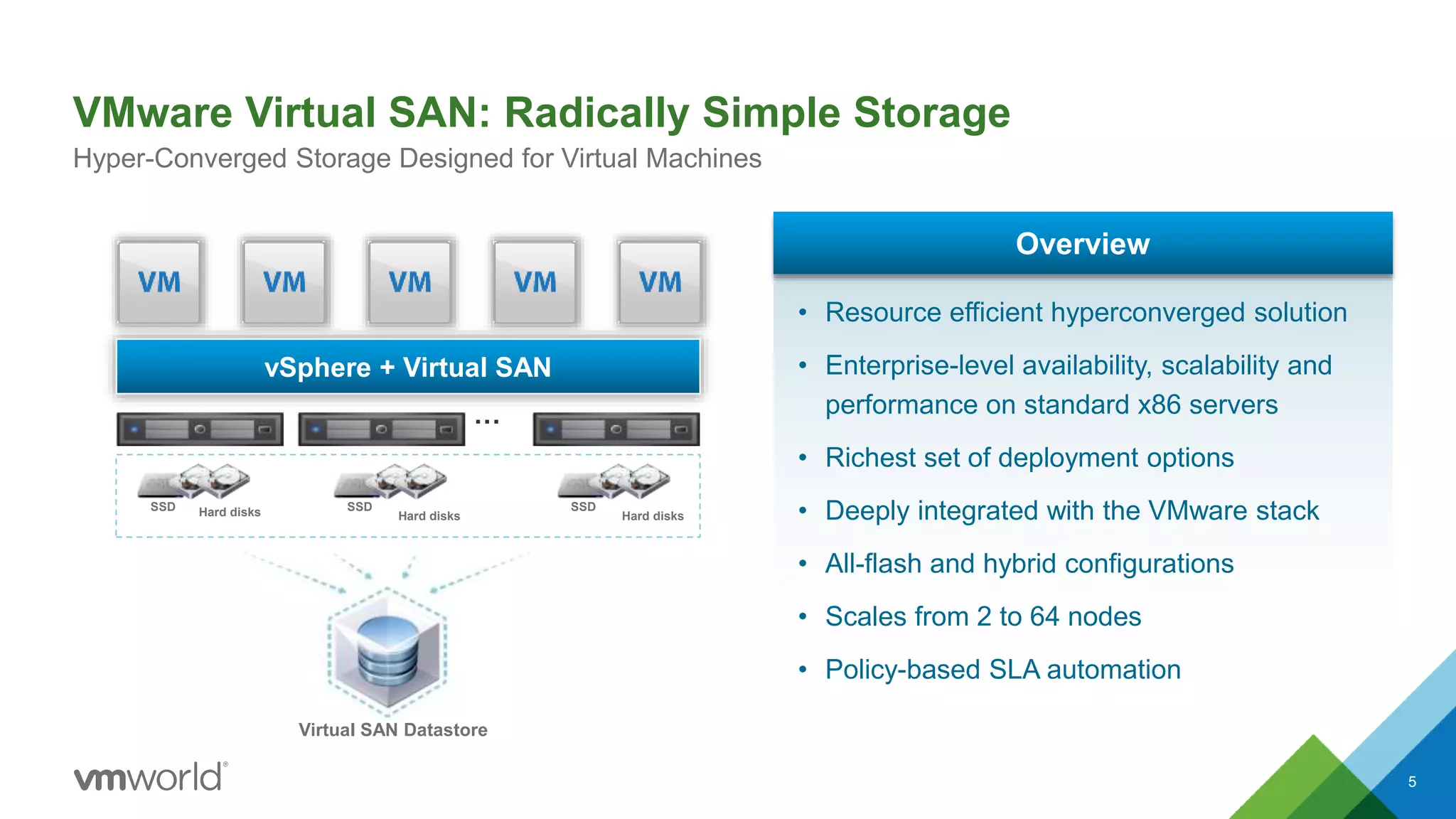
• Resource efficient hyperconverged solution
• Enterprise-level availability, scalability and
performance on standard x86 servers
• Richest set of deployment options
• Deeply integrated with the VMware stack
• All-flash and hybrid configurations
• Scales from 2 to 64 nodes
• Policy-based SLA automation
Overview
Hard disksSSD
Hard disks
SSD
Hard disks
SSD
Virtual SAN Datastore
Virtual SAN Takes Hyper-converged Architecture to a New Level
6
Typical Hyper-Converged Solution VMware Virtual SAN
Storage
VM
vSphere vSphere + Virtual SAN
Efficiency of a
Single Software
Stack
Simplicity of
Native
Integration
Flexibility of
Hardware
Agnostic
vSphere ClientvSphere Client Third Party
APIs
Pre-Defined
 2x CPU efficiency
 3x memory efficiency
 Native vMotion
 Native DRS
 Single pane glass
 Latest hardware
 Form factors
Why Customers Love Virtual SAN?
CHOICE
Choose preferred vendor
Meet exact needs, no waste
SIMPLICITY
2-click provisioning
Integrated workflows
Policy-driven management
COST
50% TCO savings
Simple to operate
and learn
$
3
PERFORMANCE
AND SCALABILITY
1.5 - 5x faster than competitors
Predictable, elastic scaling
Dominos VSAN Business Case
Jordan Glamann
Virtualization and Compute Engineer
9
Dominos Pizza Overview
• Over 12,000 stores in over 80 markets
• On average we sell more than 1.5 million pizzas each day globally
• 2014 global retail sales: $8.9 billion (4.1 domestic and 4.8 international)
• Run Rate of $4 Billion Annually in Global Digital Sales
10
Technology Company?
• Technology company that happens to sell pizza
• Consistently within the top three for overall Ecomm
sales
• 50% of US sales came from digital channels by the
end of 2014
• *New* Domino’s AnyWare™ platform
– Ford SYNC®
– Samsung Smart TVs®
– Pebble and Android™ Wear smartwatches
– Voice ordering via Dom for iPhone® and Android™
– “Tweet-to-order” and “text-to-order” via emoji now available in the
U.S.
11
Global Online Ordering (GOLO) Requirements
• New Datacenter in Germany to handle online ordering for African and
Middle Eastern markets
• Small footprint to start but need to be able to scale and grow quickly
• Built on same platform/code base as US and Canada OLO
– Would like to leverage similar technologies that we know work (i.e. VMware, Cisco UCS, etc)
• Smaller budget for the compute and storage components because of
the need for network gear (i.e. Firewalls, Load Balancers, Switches, etc.)
• Need acceptable storage performance because of SQL Databases
Building the Business Case for
HCI & Virtual SAN
12
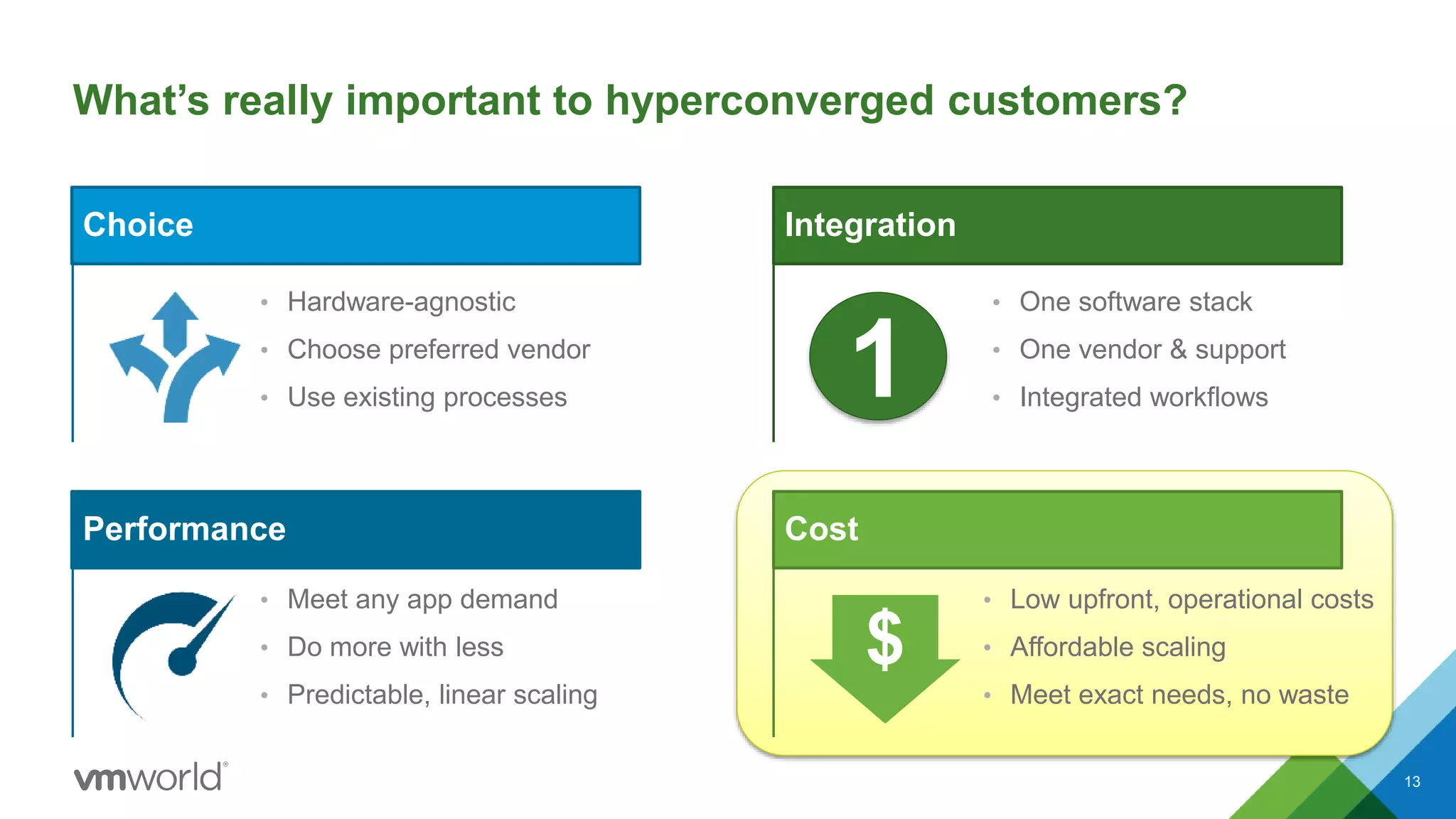
What’s really important to hyperconverged customers?
Choice
• Hardware-agnostic
• Choose preferred vendor
• Use existing processes
13
Performance
• Meet any app demand
• Do more with less
• Predictable, linear scaling
Integration
• One software stack
• One vendor & support
• Integrated workflows
Cost
• Low upfront, operational costs
• Affordable scaling
• Meet exact needs, no waste
1
$
Learn more at VMworld: What’s really important to
hyperconverged customers?
Choice
14
Performance
• STO4949 Extreme Performance
Series: Virtual SAN Performance
Deep-Dive
• STO5920 Considerations for
Virtual SAN Running Business
Critical Applications
• STO4544 Using Virtual SAN to
Maximize Database Performance
Integration
Cost
1
$
• STO5947 Virtual SAN
Operations Management Using
vRealize Operations
• EUC4509 Architecting Horizon
for Virtual SAN, the VCDX way
• This session!
• STO4820 Virtual SAN
Hardware Guidance & Sizing
• SDDC5273-S VMware
Hyper-Converged
Infrastructure: From vSAN to
EVO:RAIL and EVO:RACK
Costs Deep Dive
Building the Business Case for HCI & Virtual SAN
15
48%
10%
22%
2%
5%
3% 10%
Hardware Software
Personnel Connectivity
Facilities Disaster Recovery
Unallocated
What’s Driving The Cost of Storage?
CAPEX is only half of the TCO equation for Storage
Source: Gartner – IT Key Metrics Data 2015
40% of Annual Storage Costs
are OPEX-related
$0
$20,000
$40,000
$60,000
$80,000
$100,000
$120,000
$140,000
$160,000
Year 1 Year 2 Year 3 Year 4
CAPEX OPEX
OPEX is 2x larger than
CAPEX over a four year period
Source: Estimated using Gartner CP Profiles Database and IT Key Metrics Data 2014 Report
16
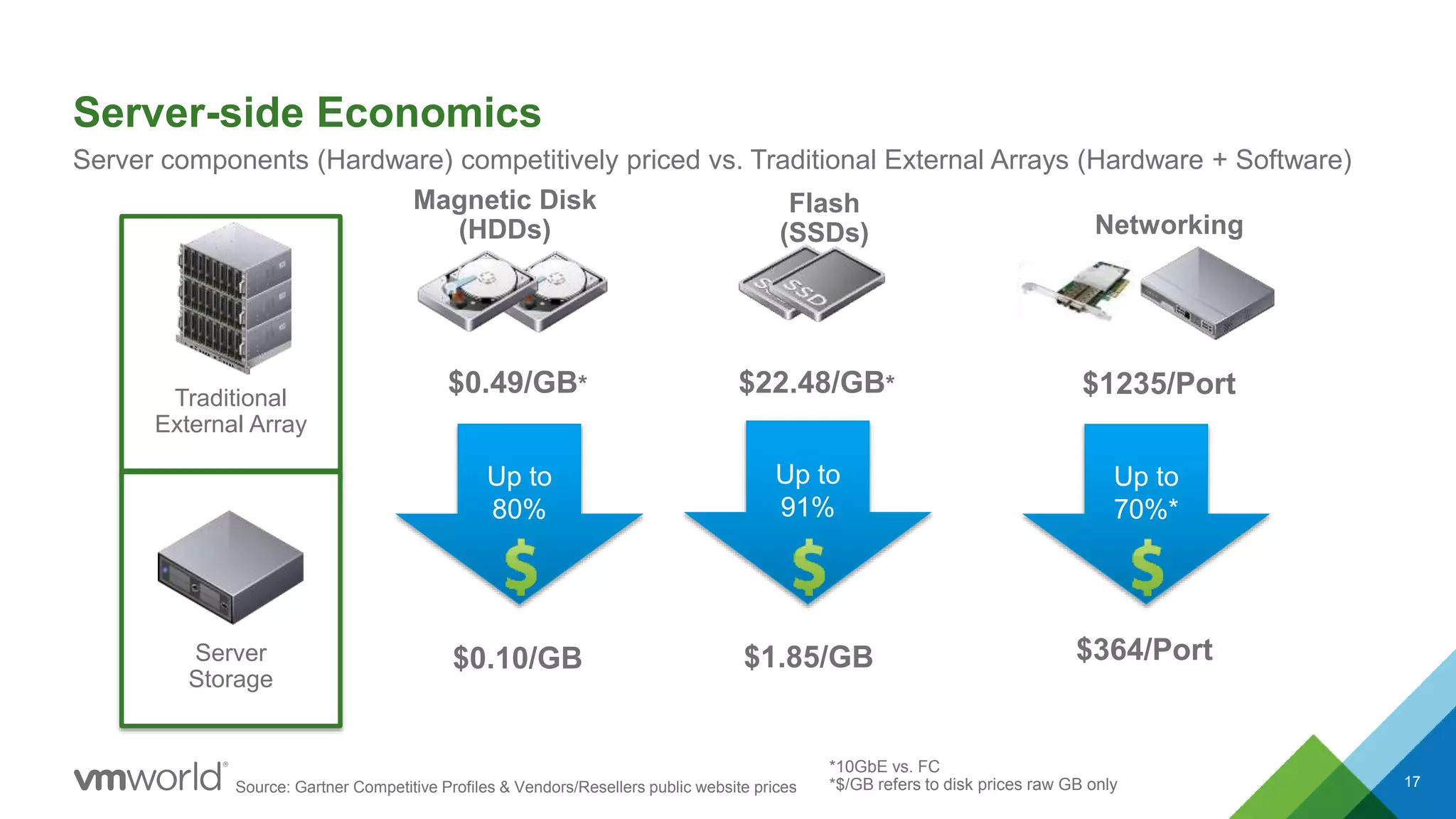
Server-side Economics
17
Server components (Hardware) competitively priced vs. Traditional External Arrays (Hardware + Software)
Flash
(SSDs)
Magnetic Disk
(HDDs) Networking
Source: Gartner Competitive Profiles & Vendors/Resellers public website prices
Up to
91%
Up to
70%*
*10GbE vs. FC
*$/GB refers to disk prices raw GB only
Up to
80%
Traditional
External Array
Server
Storage
$0.49/GB*
$0.10/GB
$22.48/GB*
$1.85/GB
$1235/Port
$364/Port
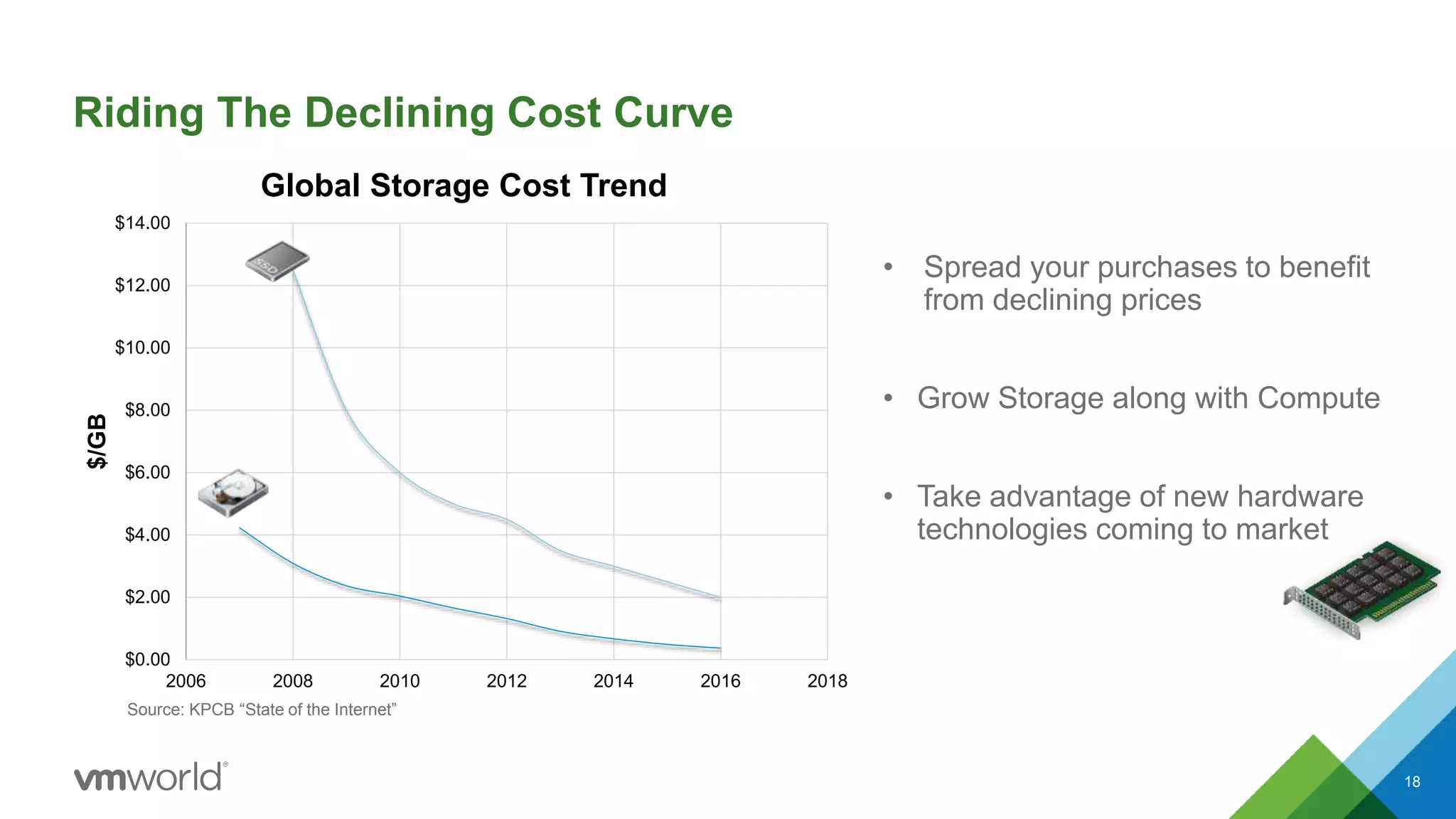
Riding The Declining Cost Curve
18
• Spread your purchases to benefit
from declining prices
• Grow Storage along with Compute
• Take advantage of new hardware
technologies coming to market
$0.00
$2.00
$4.00
$6.00
$8.00
$10.00
$12.00
$14.00
2006 2008 2010 2012 2014 2016 2018
$/GB
Global Storage Cost Trend
Source: KPCB “State of the Internet”
Low Upfront Investment & Granular Scaling
19
Source: Gartner Competitive Profiles & Vendors/Resellers public website prices
* VSAN prices include storage costs and software license in street pricing
* Hybrid array is all inclusive with current estimated street pricing
$1.60 $1.42
$1.45
$6.7
$5.0
$4.0
$0
$1
$2
$3
$4
$5
$6
$7
YEAR 1 YEAR 2 YEAR 3
VSAN $/GB Hybrid Array $/GB
$10,000
Year 2
$9,000
Year 1
$22,000
Year 3Year 1
$100,000
Hybrid
Array
Virtual SAN
Total
$41,000
Effective $/GB Paid for
Utilized Capacity
Traditional Upfront Storage
vs.
Granular Scale-Out
Performance Comparison - $/IOPS Critical Metric
20
61,606
32,742
38,128
VSAN 6
Hybrid
Other
HCI
Popular
Hybrid
Array
IOPS
OLTP Test done by
customer
$0.69
$3.77
$2.45
$/IOPS
VSAN 6
Hybrid
Other
HCI
Popular
Hybrid
Array
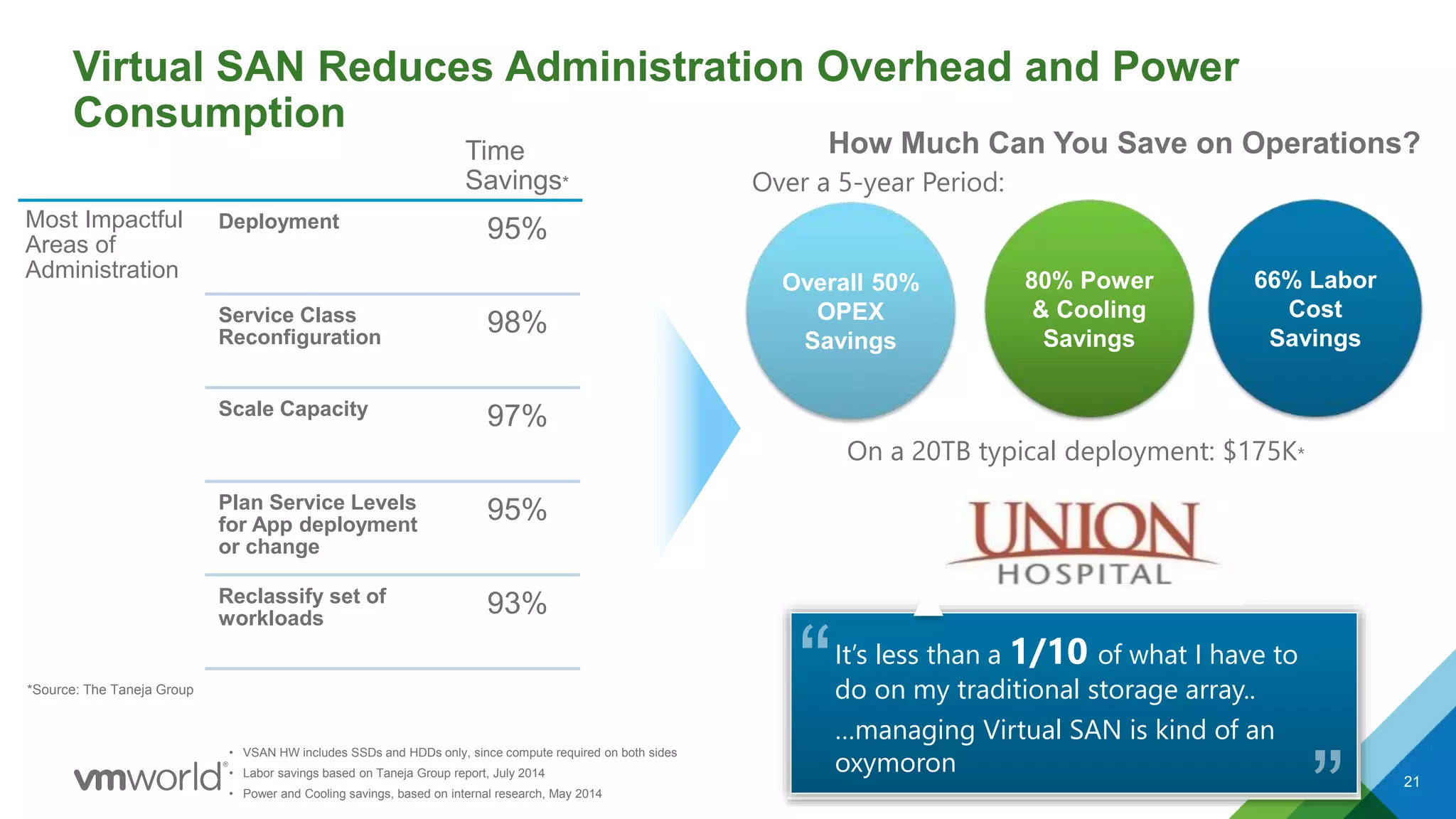
Virtual SAN Reduces Administration Overhead and Power
Consumption
21
Most Impactful
Areas of
Administration
Deployment 95%
Service Class
Reconfiguration
98%
Scale Capacity 97%
Plan Service Levels
for App deployment
or change
95%
Reclassify set of
workloads
93%
How Much Can You Save on Operations?Time
Savings*
*Source: The Taneja Group
It’s less than a 1/10 of what I have to
do on my traditional storage array..
…managing Virtual SAN is kind of an
oxymoron
80% Power
& Cooling
Savings
66% Labor
Cost
Savings
Overall 50%
OPEX
Savings
Over a 5-year Period:
On a 20TB typical deployment: $175K*
• VSAN HW includes SSDs and HDDs only, since compute required on both sides
• Labor savings based on Taneja Group report, July 2014
• Power and Cooling savings, based on internal research, May 2014
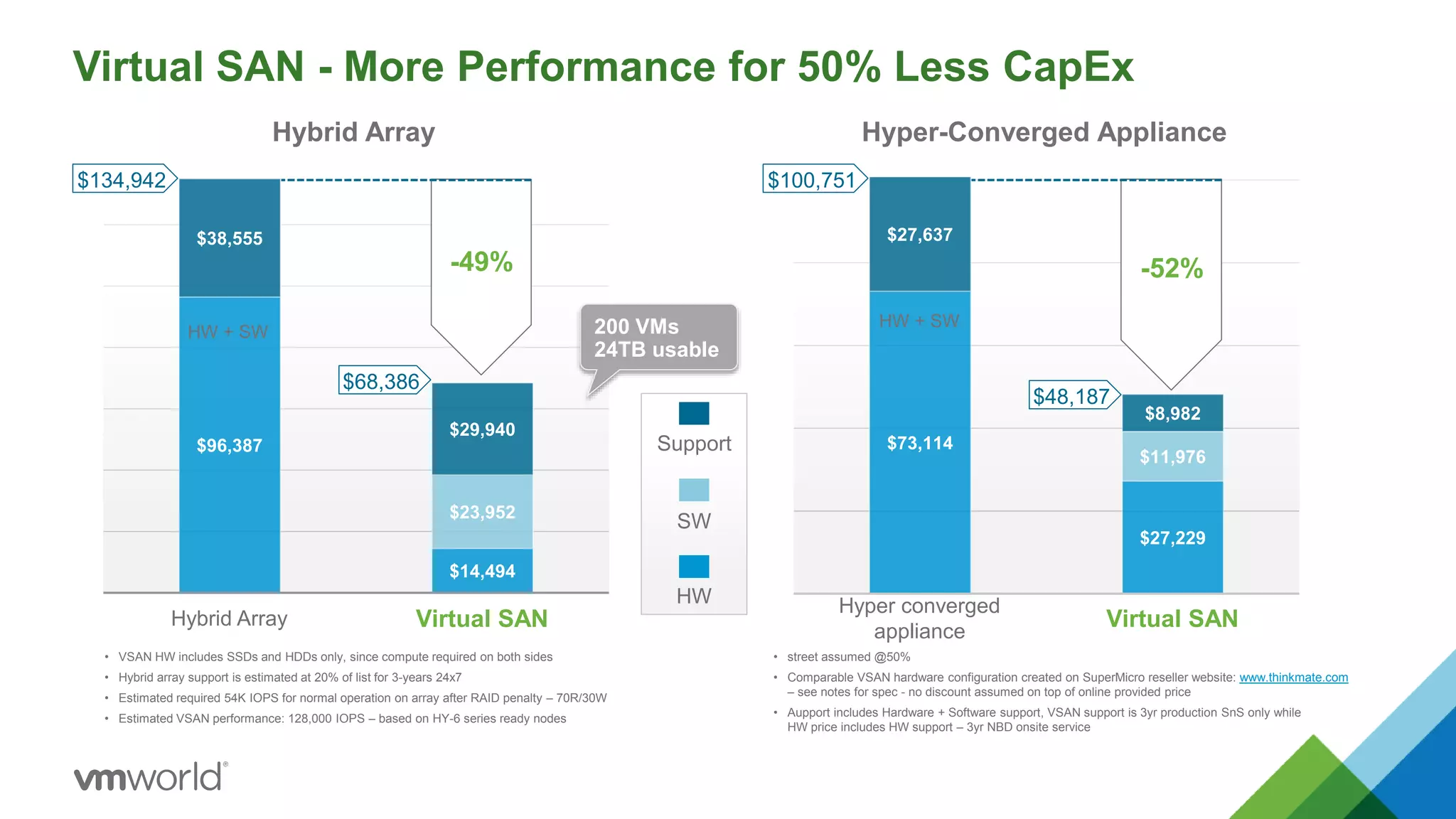
Virtual SAN - More Performance for 50% Less CapEx
22
HW
SW
Support$96,387
$14,494
$23,952
$38,555
$29,940
Hybrid Array Virtual SAN
Hybrid Array
-49%
$68,386
$134,942
• VSAN HW includes SSDs and HDDs only, since compute required on both sides
• Hybrid array support is estimated at 20% of list for 3-years 24x7
• Estimated required 54K IOPS for normal operation on array after RAID penalty – 70R/30W
• Estimated VSAN performance: 128,000 IOPS – based on HY-6 series ready nodes
200 VMs
24TB usable
HW + SW
$73,114
$27,229
$11,976
$27,637
$8,982
Hyper converged
appliance
Virtual SAN
Hyper-Converged Appliance
-52%
$48,187
$100,751
• street assumed @50%
• Comparable VSAN hardware configuration created on SuperMicro reseller website: www.thinkmate.com
– see notes for spec - no discount assumed on top of online provided price
• Aupport includes Hardware + Software support, VSAN support is 3yr production SnS only while
HW price includes HW support – 3yr NBD onsite service
HW + SW
Lowest All Flash $/Desktop
23
$0
$50
$100
$150
$200
$250
$300
$350
$400
1000 1500 2000 2500 3000 3500 4000 4500 5000 5500 6000
StorageCostPerDesktop
Number of Desktops
$/VDI Storage Cost
VSAN + View Adv/Ent Virtual SAN All Flash Array
Spikes correspond to
scaling out due to
IOPs requirements
VSAN is included with
Horizon View
Advanced/Enterprise
VSAN enables
predictable linear
scaling
• Compared to external storage at scale
• Estimated based on 2015 street pricing, Capex (includes storage hardware + Software License costs)
• Linked clones scenario assuming 70% space savings as a result for VSAN – x6 dedupe ratio for storage array
• Virtual SAN configuration: 8 VMs per core, with 40GB per VM, 2 copies for availability and 10% SSD for write caching
Virtual SAN Assessment Demo
24
3. [Customer] Receive Email, Confirm Account
25
3. [Customer] Receive Email, Confirm Account
26
4. [Customer] Download the Collector Appliance
27
4. [Customer] Download the Collector Appliance
28
4. [Customer] Deploy OVF file
CONFIDENTIAL 29
5. [Customer] Configure the Collector Appliance
30
• Browse to the Collector VM
• Enter Assessment Key (available off the Portal)
5. [Customer] Configure the Collector Appliance
CONFIDENTIAL 31
Choose to Analyze
• An Entire Cluster (Transient VM Case) or
• Select VMs Across Clusters (Static VM Case)
5. [Customer] Configure Collection Duration
32
5. [Customer] Configure the Collector Appliance
33
Enter vCenter Details
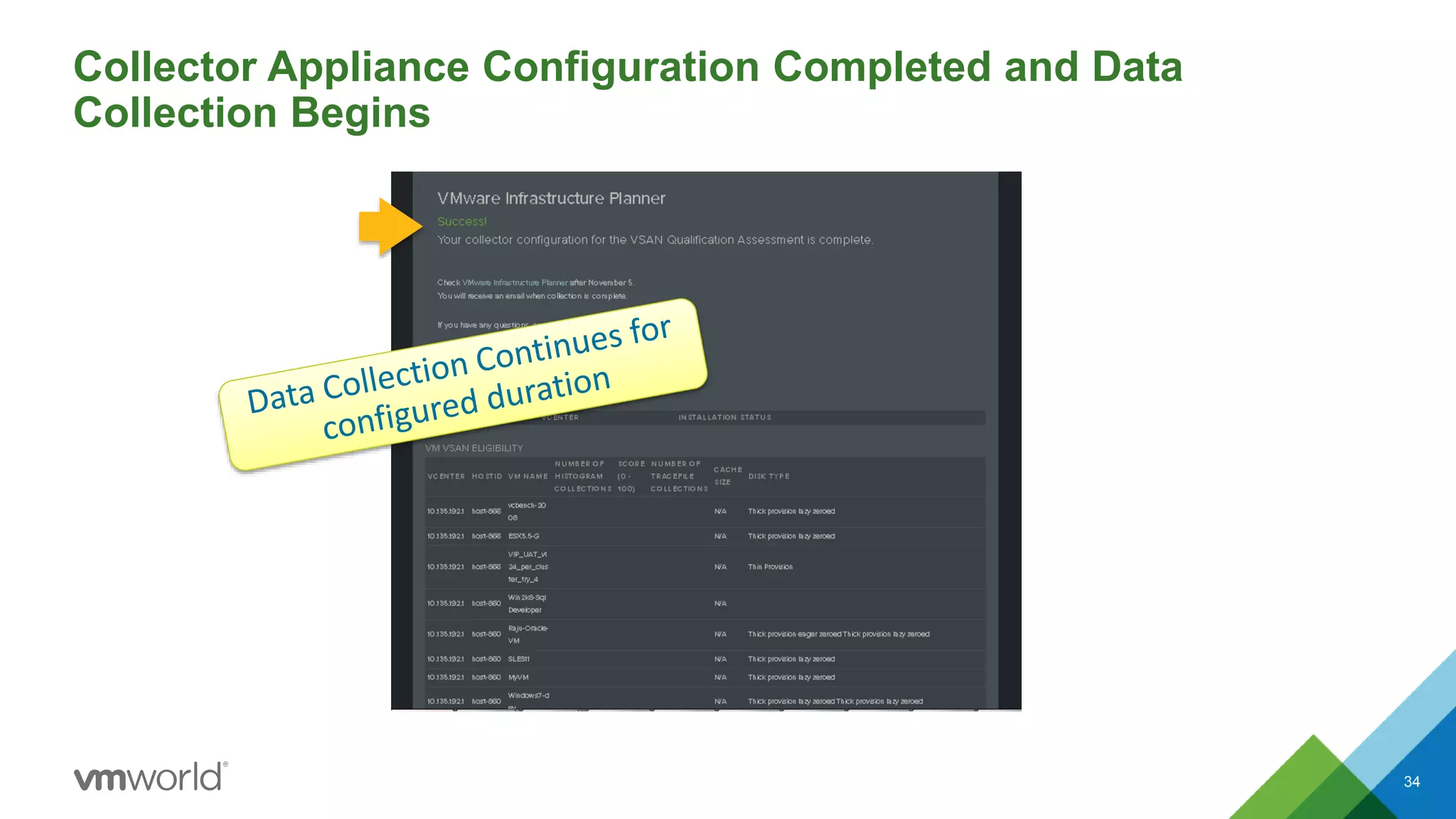
Collector Appliance Configuration Completed and Data
Collection Begins
34
35
Live Demo..
Customer Case Study
36
Jordan Glamann - Compute and Virtualization
Engineer, Dominos Pizza
37
How It Came to Be
• Did a POC of Virtual SAN configuration that would work for us
• Compared Virtual SAN vs Smaller Traditional Style Array
• Cost was a big factor – Virtual SAN configuration roughly 40% less in our case
• Traditional Style Array had more costs
– Support/Maintenance Costs
– Require SAN fabric to support multiple hosts (SAN switches/port costs, etc)
– Did not have performance that we were looking for.
• Pros for VSAN configuration
– Flexible/Scalable
– Incorporated Hardware (host) and storage cost
– Works with technologies that we know (VMware and Cisco UCS)
– Very easy to install (Non-SAN Admin could do it)
– No storage array and switches = less power and rack space (important in a co-location datacenter)
38
3 Live Markets
Portugal South Africa Saudi Arabia
Egypt Lebanon Jordan Bahrain
Coming Soon…
39
GOLO Stats
• Installed in January and has been in Prod since May
• Over 300 stores by the end of 2015 with many more markets planned for next year.
• Portugal currently the heaviest user
– Portugal Day 1: 25% Digital
– Portugal Averaging 15% - 17% digital since then
• Performance has been good. Haven’t been able to push system to the limits with
the current workload.
– https://blogs.vmware.com/storage/2015/08/03/storagereview-com-vsan-series/
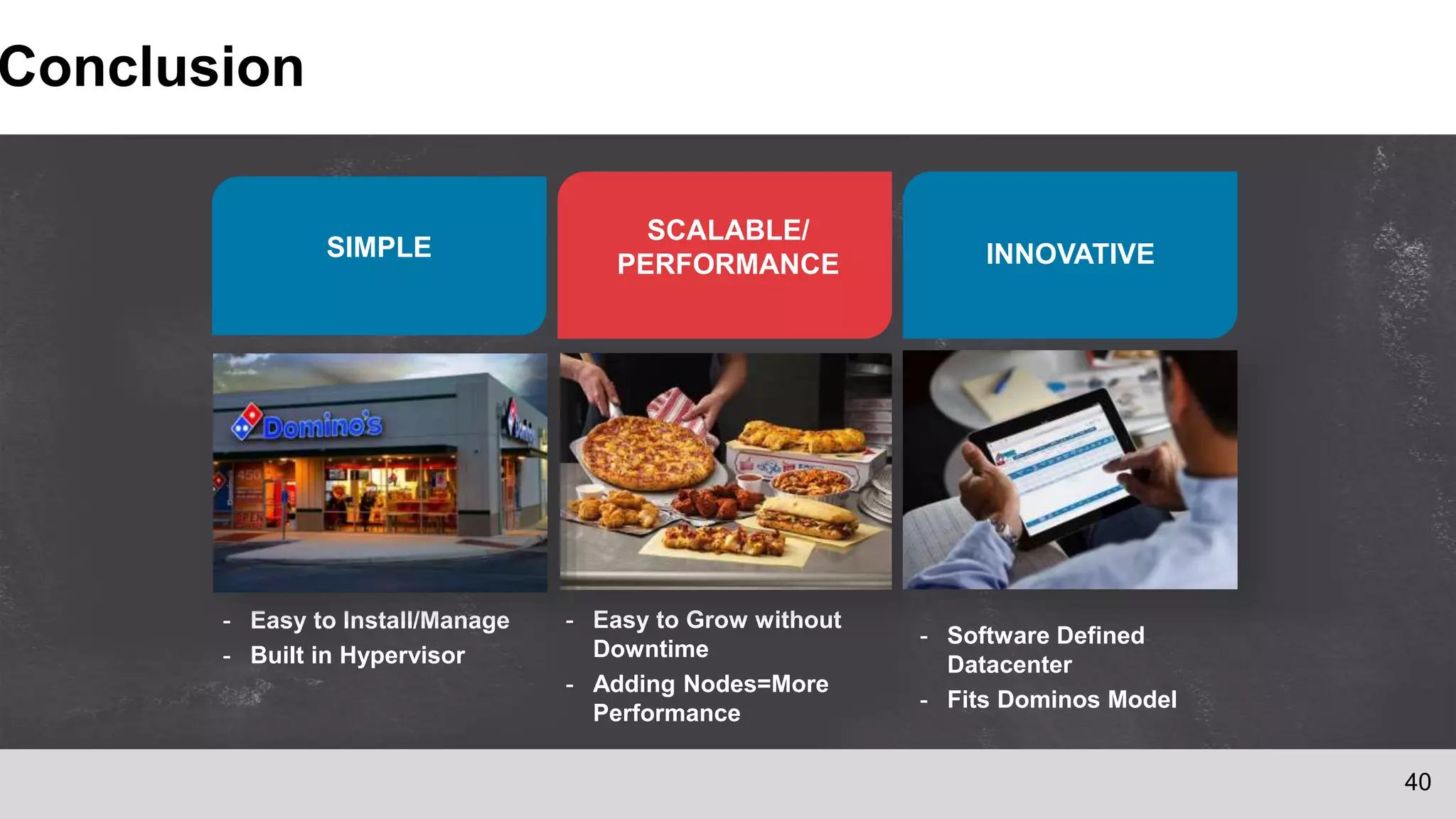
SIMPLE INNOVATIVE
SCALABLE/
PERFORMANCE
- Easy to Install/Manage
- Built in Hypervisor
- Easy to Grow without
Downtime
- Adding Nodes=More
Performance
- Software Defined
Datacenter
- Fits Dominos Model
Conclusion
40
41
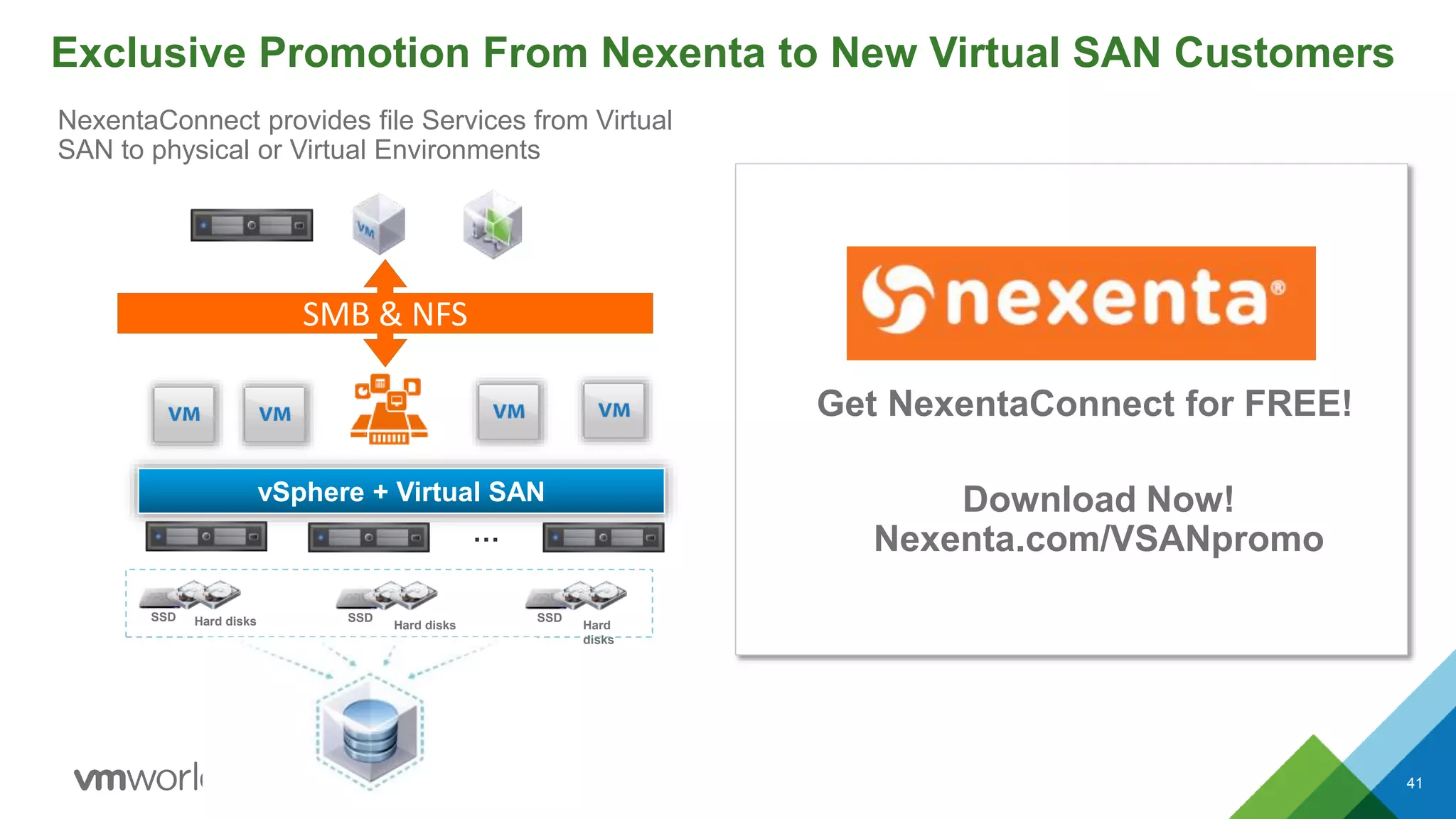
vSphere + Virtual SAN
…
Hard disksSSD
Hard disks
SSD
Hard
disks
SSD
SMB & NFS
Exclusive Promotion From Nexenta to New Virtual SAN Customers
Get NexentaConnect for FREE!
Download Now!
Nexenta.com/VSANpromo
NexentaConnect provides file Services from Virtual
SAN to physical or Virtual Environments
Help Us Test Space Efficiency and Data Integrity
42
Beta
• Get a glimpse of Virtual SAN’s future
• Free, limited beta – will not be able to accommodate all registrations
vmware.com/go/vsan6beta
World’s 1st 64-Node, All-Flash Array with Virtual SAN and NVMe
43
See VMware Virtual SAN live and at scale in the HCI Zone!
4.2M
IOPS
500
Terabytes
64
Nodes
Where:
HCI Zone
When:
Expo Hours
Sponsor:
Intel
6,400
VMs
Three Ways to Get Started with Virtual SAN Today
44
VSAN
Assessment32Download
Evaluation
Online
Hands-on Lab1
• Test-drive Virtual SAN right
from your browser—with
an instant Hands-on Lab
• Register and your free,
self-paced lab is up and
running in minutes
• 60-day Free Virtual SAN
Evaluation
• VMUG members get a 6-
month EVAL or 1-year
EVALExperience for $200
• Reach out to your VMware
Partner, SEs or Rep for a
FREE VSAN Assessment
• Results in just 1 week!
• The VSAN Assessment tool
collects and analyzes data
from your vSphere storage
environment and provides
technical and business
recommendations.
Learn more…
vmware.com/go/virtual-san
• Virtual SAN Product
Overview Video
• Virtual SAN Datasheet
• Virtual SAN Customer
References
• Virtual SAN Assessment
• VMware Storage Blog
• @vmwarevsan
vmware.com/go/try-vsan-en vmware.com/go/try-vsan-en
Building a Business Case for Virtual SAN
Madelyn Grunewald, VMware, Inc
Jordan Glamann, Dominos Pizza
Rafael Kabesa, VMware, Inc
STO5887
#STO5887

VMworld 2015: Building a Business Case for Virtual SAN

  • 1.
    Building a BusinessCase for Virtual SAN Madelyn Grunewald, VMware, Inc Jordan Glamann, Dominos Pizza Rafael Kabesa, VMware, Inc STO5887 #STO5887
  • 2.
    • This presentationmay contain product features that are currently under development. • This overview of new technology represents no commitment from VMware to deliver these features in any generally available product. • Features are subject to change, and must not be included in contracts, purchase orders, or sales agreements of any kind. • Technical feasibility and market demand will affect final delivery. • Pricing and packaging for any new technologies or features discussed or presented have not been determined. Disclaimer CONFIDENTIAL 2
  • 3.
    Agenda 1 Virtual SANOverview and Customer Introduction 2 What‘s Important for HCI Customers  Choice, Integration, Cost & Performance  Storage Costs Deep Dive  VSAN Assessment Live Demo 3 Additional Resources 3
  • 4.
    Virtual SAN Overviewand Customer Introduction 4
  • 5.
    VMware Virtual SAN:Radically Simple Storage 5 Hyper-Converged Storage Designed for Virtual Machines vSphere + Virtual SAN … • Resource efficient hyperconverged solution • Enterprise-level availability, scalability and performance on standard x86 servers • Richest set of deployment options • Deeply integrated with the VMware stack • All-flash and hybrid configurations • Scales from 2 to 64 nodes • Policy-based SLA automation Overview Hard disksSSD Hard disks SSD Hard disks SSD Virtual SAN Datastore
  • 6.
    Virtual SAN TakesHyper-converged Architecture to a New Level 6 Typical Hyper-Converged Solution VMware Virtual SAN Storage VM vSphere vSphere + Virtual SAN Efficiency of a Single Software Stack Simplicity of Native Integration Flexibility of Hardware Agnostic vSphere ClientvSphere Client Third Party APIs Pre-Defined  2x CPU efficiency  3x memory efficiency  Native vMotion  Native DRS  Single pane glass  Latest hardware  Form factors
  • 7.
    Why Customers LoveVirtual SAN? CHOICE Choose preferred vendor Meet exact needs, no waste SIMPLICITY 2-click provisioning Integrated workflows Policy-driven management COST 50% TCO savings Simple to operate and learn $ 3 PERFORMANCE AND SCALABILITY 1.5 - 5x faster than competitors Predictable, elastic scaling
  • 8.
    Dominos VSAN BusinessCase Jordan Glamann Virtualization and Compute Engineer
  • 9.
    9 Dominos Pizza Overview •Over 12,000 stores in over 80 markets • On average we sell more than 1.5 million pizzas each day globally • 2014 global retail sales: $8.9 billion (4.1 domestic and 4.8 international) • Run Rate of $4 Billion Annually in Global Digital Sales
  • 10.
    10 Technology Company? • Technologycompany that happens to sell pizza • Consistently within the top three for overall Ecomm sales • 50% of US sales came from digital channels by the end of 2014 • *New* Domino’s AnyWare™ platform – Ford SYNC® – Samsung Smart TVs® – Pebble and Android™ Wear smartwatches – Voice ordering via Dom for iPhone® and Android™ – “Tweet-to-order” and “text-to-order” via emoji now available in the U.S.
  • 11.
    11 Global Online Ordering(GOLO) Requirements • New Datacenter in Germany to handle online ordering for African and Middle Eastern markets • Small footprint to start but need to be able to scale and grow quickly • Built on same platform/code base as US and Canada OLO – Would like to leverage similar technologies that we know work (i.e. VMware, Cisco UCS, etc) • Smaller budget for the compute and storage components because of the need for network gear (i.e. Firewalls, Load Balancers, Switches, etc.) • Need acceptable storage performance because of SQL Databases
  • 12.
    Building the BusinessCase for HCI & Virtual SAN 12
  • 13.
    What’s really importantto hyperconverged customers? Choice • Hardware-agnostic • Choose preferred vendor • Use existing processes 13 Performance • Meet any app demand • Do more with less • Predictable, linear scaling Integration • One software stack • One vendor & support • Integrated workflows Cost • Low upfront, operational costs • Affordable scaling • Meet exact needs, no waste 1 $
  • 14.
    Learn more atVMworld: What’s really important to hyperconverged customers? Choice 14 Performance • STO4949 Extreme Performance Series: Virtual SAN Performance Deep-Dive • STO5920 Considerations for Virtual SAN Running Business Critical Applications • STO4544 Using Virtual SAN to Maximize Database Performance Integration Cost 1 $ • STO5947 Virtual SAN Operations Management Using vRealize Operations • EUC4509 Architecting Horizon for Virtual SAN, the VCDX way • This session! • STO4820 Virtual SAN Hardware Guidance & Sizing • SDDC5273-S VMware Hyper-Converged Infrastructure: From vSAN to EVO:RAIL and EVO:RACK
  • 15.
    Costs Deep Dive Buildingthe Business Case for HCI & Virtual SAN 15
  • 16.
    48% 10% 22% 2% 5% 3% 10% Hardware Software PersonnelConnectivity Facilities Disaster Recovery Unallocated What’s Driving The Cost of Storage? CAPEX is only half of the TCO equation for Storage Source: Gartner – IT Key Metrics Data 2015 40% of Annual Storage Costs are OPEX-related $0 $20,000 $40,000 $60,000 $80,000 $100,000 $120,000 $140,000 $160,000 Year 1 Year 2 Year 3 Year 4 CAPEX OPEX OPEX is 2x larger than CAPEX over a four year period Source: Estimated using Gartner CP Profiles Database and IT Key Metrics Data 2014 Report 16
  • 17.
    Server-side Economics 17 Server components(Hardware) competitively priced vs. Traditional External Arrays (Hardware + Software) Flash (SSDs) Magnetic Disk (HDDs) Networking Source: Gartner Competitive Profiles & Vendors/Resellers public website prices Up to 91% Up to 70%* *10GbE vs. FC *$/GB refers to disk prices raw GB only Up to 80% Traditional External Array Server Storage $0.49/GB* $0.10/GB $22.48/GB* $1.85/GB $1235/Port $364/Port
  • 18.
    Riding The DecliningCost Curve 18 • Spread your purchases to benefit from declining prices • Grow Storage along with Compute • Take advantage of new hardware technologies coming to market $0.00 $2.00 $4.00 $6.00 $8.00 $10.00 $12.00 $14.00 2006 2008 2010 2012 2014 2016 2018 $/GB Global Storage Cost Trend Source: KPCB “State of the Internet”
  • 19.
    Low Upfront Investment& Granular Scaling 19 Source: Gartner Competitive Profiles & Vendors/Resellers public website prices * VSAN prices include storage costs and software license in street pricing * Hybrid array is all inclusive with current estimated street pricing $1.60 $1.42 $1.45 $6.7 $5.0 $4.0 $0 $1 $2 $3 $4 $5 $6 $7 YEAR 1 YEAR 2 YEAR 3 VSAN $/GB Hybrid Array $/GB $10,000 Year 2 $9,000 Year 1 $22,000 Year 3Year 1 $100,000 Hybrid Array Virtual SAN Total $41,000 Effective $/GB Paid for Utilized Capacity Traditional Upfront Storage vs. Granular Scale-Out
  • 20.
    Performance Comparison -$/IOPS Critical Metric 20 61,606 32,742 38,128 VSAN 6 Hybrid Other HCI Popular Hybrid Array IOPS OLTP Test done by customer $0.69 $3.77 $2.45 $/IOPS VSAN 6 Hybrid Other HCI Popular Hybrid Array
  • 21.
    Virtual SAN ReducesAdministration Overhead and Power Consumption 21 Most Impactful Areas of Administration Deployment 95% Service Class Reconfiguration 98% Scale Capacity 97% Plan Service Levels for App deployment or change 95% Reclassify set of workloads 93% How Much Can You Save on Operations?Time Savings* *Source: The Taneja Group It’s less than a 1/10 of what I have to do on my traditional storage array.. …managing Virtual SAN is kind of an oxymoron 80% Power & Cooling Savings 66% Labor Cost Savings Overall 50% OPEX Savings Over a 5-year Period: On a 20TB typical deployment: $175K* • VSAN HW includes SSDs and HDDs only, since compute required on both sides • Labor savings based on Taneja Group report, July 2014 • Power and Cooling savings, based on internal research, May 2014
  • 22.
    Virtual SAN -More Performance for 50% Less CapEx 22 HW SW Support$96,387 $14,494 $23,952 $38,555 $29,940 Hybrid Array Virtual SAN Hybrid Array -49% $68,386 $134,942 • VSAN HW includes SSDs and HDDs only, since compute required on both sides • Hybrid array support is estimated at 20% of list for 3-years 24x7 • Estimated required 54K IOPS for normal operation on array after RAID penalty – 70R/30W • Estimated VSAN performance: 128,000 IOPS – based on HY-6 series ready nodes 200 VMs 24TB usable HW + SW $73,114 $27,229 $11,976 $27,637 $8,982 Hyper converged appliance Virtual SAN Hyper-Converged Appliance -52% $48,187 $100,751 • street assumed @50% • Comparable VSAN hardware configuration created on SuperMicro reseller website: www.thinkmate.com – see notes for spec - no discount assumed on top of online provided price • Aupport includes Hardware + Software support, VSAN support is 3yr production SnS only while HW price includes HW support – 3yr NBD onsite service HW + SW
  • 23.
    Lowest All Flash$/Desktop 23 $0 $50 $100 $150 $200 $250 $300 $350 $400 1000 1500 2000 2500 3000 3500 4000 4500 5000 5500 6000 StorageCostPerDesktop Number of Desktops $/VDI Storage Cost VSAN + View Adv/Ent Virtual SAN All Flash Array Spikes correspond to scaling out due to IOPs requirements VSAN is included with Horizon View Advanced/Enterprise VSAN enables predictable linear scaling • Compared to external storage at scale • Estimated based on 2015 street pricing, Capex (includes storage hardware + Software License costs) • Linked clones scenario assuming 70% space savings as a result for VSAN – x6 dedupe ratio for storage array • Virtual SAN configuration: 8 VMs per core, with 40GB per VM, 2 copies for availability and 10% SSD for write caching
  • 24.
  • 25.
    3. [Customer] ReceiveEmail, Confirm Account 25
  • 26.
    3. [Customer] ReceiveEmail, Confirm Account 26
  • 27.
    4. [Customer] Downloadthe Collector Appliance 27
  • 28.
    4. [Customer] Downloadthe Collector Appliance 28
  • 29.
    4. [Customer] DeployOVF file CONFIDENTIAL 29
  • 30.
    5. [Customer] Configurethe Collector Appliance 30 • Browse to the Collector VM • Enter Assessment Key (available off the Portal)
  • 31.
    5. [Customer] Configurethe Collector Appliance CONFIDENTIAL 31 Choose to Analyze • An Entire Cluster (Transient VM Case) or • Select VMs Across Clusters (Static VM Case)
  • 32.
    5. [Customer] ConfigureCollection Duration 32
  • 33.
    5. [Customer] Configurethe Collector Appliance 33 Enter vCenter Details
  • 34.
    Collector Appliance ConfigurationCompleted and Data Collection Begins 34
  • 35.
  • 36.
    Customer Case Study 36 JordanGlamann - Compute and Virtualization Engineer, Dominos Pizza
  • 37.
    37 How It Cameto Be • Did a POC of Virtual SAN configuration that would work for us • Compared Virtual SAN vs Smaller Traditional Style Array • Cost was a big factor – Virtual SAN configuration roughly 40% less in our case • Traditional Style Array had more costs – Support/Maintenance Costs – Require SAN fabric to support multiple hosts (SAN switches/port costs, etc) – Did not have performance that we were looking for. • Pros for VSAN configuration – Flexible/Scalable – Incorporated Hardware (host) and storage cost – Works with technologies that we know (VMware and Cisco UCS) – Very easy to install (Non-SAN Admin could do it) – No storage array and switches = less power and rack space (important in a co-location datacenter)
  • 38.
    38 3 Live Markets PortugalSouth Africa Saudi Arabia Egypt Lebanon Jordan Bahrain Coming Soon…
  • 39.
    39 GOLO Stats • Installedin January and has been in Prod since May • Over 300 stores by the end of 2015 with many more markets planned for next year. • Portugal currently the heaviest user – Portugal Day 1: 25% Digital – Portugal Averaging 15% - 17% digital since then • Performance has been good. Haven’t been able to push system to the limits with the current workload. – https://blogs.vmware.com/storage/2015/08/03/storagereview-com-vsan-series/
  • 40.
    SIMPLE INNOVATIVE SCALABLE/ PERFORMANCE - Easyto Install/Manage - Built in Hypervisor - Easy to Grow without Downtime - Adding Nodes=More Performance - Software Defined Datacenter - Fits Dominos Model Conclusion 40
  • 41.
    41 vSphere + VirtualSAN … Hard disksSSD Hard disks SSD Hard disks SSD SMB & NFS Exclusive Promotion From Nexenta to New Virtual SAN Customers Get NexentaConnect for FREE! Download Now! Nexenta.com/VSANpromo NexentaConnect provides file Services from Virtual SAN to physical or Virtual Environments
  • 42.
    Help Us TestSpace Efficiency and Data Integrity 42 Beta • Get a glimpse of Virtual SAN’s future • Free, limited beta – will not be able to accommodate all registrations vmware.com/go/vsan6beta
  • 43.
    World’s 1st 64-Node,All-Flash Array with Virtual SAN and NVMe 43 See VMware Virtual SAN live and at scale in the HCI Zone! 4.2M IOPS 500 Terabytes 64 Nodes Where: HCI Zone When: Expo Hours Sponsor: Intel 6,400 VMs
  • 44.
    Three Ways toGet Started with Virtual SAN Today 44 VSAN Assessment32Download Evaluation Online Hands-on Lab1 • Test-drive Virtual SAN right from your browser—with an instant Hands-on Lab • Register and your free, self-paced lab is up and running in minutes • 60-day Free Virtual SAN Evaluation • VMUG members get a 6- month EVAL or 1-year EVALExperience for $200 • Reach out to your VMware Partner, SEs or Rep for a FREE VSAN Assessment • Results in just 1 week! • The VSAN Assessment tool collects and analyzes data from your vSphere storage environment and provides technical and business recommendations. Learn more… vmware.com/go/virtual-san • Virtual SAN Product Overview Video • Virtual SAN Datasheet • Virtual SAN Customer References • Virtual SAN Assessment • VMware Storage Blog • @vmwarevsan vmware.com/go/try-vsan-en vmware.com/go/try-vsan-en
  • 47.
    Building a BusinessCase for Virtual SAN Madelyn Grunewald, VMware, Inc Jordan Glamann, Dominos Pizza Rafael Kabesa, VMware, Inc STO5887 #STO5887

Editor's Notes

  • #4 We’re going to take through a very quick overview of VMware’s Hyperconverged Infrastructure of HCI, Virtual SAN+vSphere on certified hardware, and the key cost drivers when building a building case a business case for HCI & VSAN. I’ll leave about 10 minutes for questions in the end, so please hold your comments till I finish the presentation T: so let’s get started
  • #6 Virtual SAN is VMware’s software-defined storage solution, built from the ground up for vSphere virtual machines. It abstracts and aggregates locally attached disks in a vSphere cluster to create a storage solution that can be provisioned and managed from vCenter and the vSphere Web Client. VSAN is hypervisor-converged – that is – storage and compute for VMs are delivered from the same x86 server platform running the hypervisor. It integrates with the entire VMware stack, including features like vMotion, HA, DRS etc. VM storage provisioning and day-to-day management of storage SLAs can be all be controlled through VM-level policies that can be set and modified on-the-fly. VSAN delivers enterprise-class features, scale and performance, making it the ideal storage platform for VMs.
  • #7 Hyper-Converged Infrastructure (HCI) leverages the hypervisor to deliver compute, networking and shared storage from a single x86 server platform. The software-driven architecture allows the convergence of physical storage onto commodity x86 servers, enabling a building block approach with scale-out capabilities. The use of commodity x86 server and storage hardware allows datacenters to operate with agility on a highly scalable, cost-effective infrastructure. How VMware Enables Hyper-Converged Infrastructure The foundational components of VMware’s HCI solution are VMware vSphere and VMware Virtual SAN, which allow the convergence of compute, storage and networking onto a single, integrated layer of software that, can run on any commodity x86 infrastructure. vSphere abstracts and aggregates compute and memory resources into logical pools of compute capacity while Virtual SAN, embedded in vSphere, pools server-attached storage to create a high performance, shared datastore for virtual machine storage.
  • #8 Virtual SAN is built from the ground up for vSphere environments and its core value proposition revolves comes from the following key strengths: Radically Simple It is embedded in the VM kernel and does not need to be installed like a storage appliance. Just 2 clicks and its enabled! It uses storage policies to assign storage services to specific VMs. It then automatically tunes and rebalances storage to ensure that the VM storage SLAs stay compliant with the policies throughout the lifecycle of the VM. It is managed through the same web interface as the rest of your vSphere environment. This makes it easy for even the VI Admin to manage storage and eliminates the need for specialized skillsets. It is completed integrated into VMware stack, and works seamlessly with other vSphere features and VMware products. One software stack, one vendor No physical storage silo Policy-driven management Integrated workflows High Performance VSAN 6.0 introduced a new flash architecture for caching and data persistence. This provides the ability to get high IOPS with consistently low latencies suitable for business-critical or transaction processing applications that require consistent response times It is embedded in ESXi kernel and therefore optimizes the data I/O path better than other technologies that need a storage virtual appliance One of VSAN’s core advantages is its ability to scale performance and capacity in a linear and predictable manner: both scale-out or scale-up by adding flash, magnetic disks or hosts as needed Up to 90k IOPs per host All-flash for sub-ms response Predictable, elastic scaling 1.5 – 5x faster than competitors Lowers TCO by as much as 50% VSAN has a hardware independent architecture which can utilize cheaper server-side, industry-standard components to reduce storage capex; the scaling and purchasing in chunks allows the flexibility to change vendors or hardware over time, ensuring you use the latest available on the market Grow-as-you-go scaling allows investments to be spread over time in a more cost-effective manner Last but not least, its VMware integration, policy-driven control and automation make it operationally efficient, saving even more dollars in the long run 50% lower capital costs Simple to operate and learn x86, server-side economics Grow-as-you-go Choice: Hardware-agnostic Choose preferred vendor Use existing processes Meet exact needs, no waste
  • #9 Today we have Jordan Glamann, a Virtualization and Compute Engineer at Dominos joining us Over 12,000 stores in over 80 markets On average we sell more than 1.5 million pizzas each day globally 2014 global retail sales: $8.9 billion (4.1 domestic and 4.8 international) Run Rate of $4 Billion Annually in Global Digital Sales
  • #12 Technology company that happens to sell pizza…. Consistently within the top three for overall Ecomm sales 50% of US sales came from digital channels by the end of 2014 *New* Domino’s AnyWare™ platform Ford SYNC® Samsung Smart TVs® Pebble and Android™ Wear smartwatches Voice ordering via Dom for iPhone® and Android™ “Tweet-to-order” and “text-to-order” via emoji now available in the U.S.
  • #13 As you’re thinking about building a business case for Virtual SAN to meet your new data center, cost, or storage needs like Jordan he’s what we hear from customers is important for HCI solutions
  • #14 Single-software stack One stop for managing storage, server, network and virtualization One management tool to learn Simple and rapid monitoring One stop for managing storage, server, network and virtualization One management tool to learn Simple and rapid monitoring Today we’re going to focus on costs
  • #15 Definitely check out our other HCI & VSAN sessions to learn more about the advantages HCI brings to your business
  • #16 Rafael will take it from hear to go into more detail on how to build the business case for HCI focusing in on the cost component.
  • #17 When talking about reducing storage TCO we first need to understand what comprises the storage budget On the left you can see the most recent Gartner data on how the storage budget gets distributed CAPEX – hardware and software - is always a big part and takes about 60% of the annual storage budget. (click) But ignoring OPEX is a big mistake as over the life of a storage device it is 2 times the cost of your initial CAPEX Average $/TB - $2,520
  • #18 1 TB NL SAS $900 vs. $129 200GB SSD $4500 vs $370
  • #20 According to Gartner IT Key Metrics 2015 – the average storage utilization rate is 59.4%
  • #21 Customer extensive head-to-head performance testing VSAN 6 Hybrid outperformed comparable systems by 53%-307% on IOPS VSAN 6 response times were 3.3x to 9x faster than comparable systems Storage arrays are bound by their controller unit – It will be the bottleneck for IOPS Regardless of the amount of SSD that is on the array Once IOPS limit is reached on the controller – a second purchase is required to scale storage Virtual SAN leverages a small percentage of every CPU in the cluster to avoid the problem Single disk group on VSAN – 400gb flash + 7x1.2TB 10K drives 4 nodes Test bench IOmeter multiple VMs, multiple VMDKs per VM OIO set to 1 to emphasize response time vs. total IOPS Support Customer had technical support from all vendors involved Each vendor suggested different test profiles; customer ran all of them
  • #23 Nutanix 4-node NX-3460 as SuperServer 2028TP-HTR My System June 3rd, 10:54 pm EDT Barebone Supermicro SuperServer 2028TP-HTTR - 2U TwinPro2 - 24x SATA - Dual 10-Gigabit Ethernet - 2000W Redundant Processor: 2 x Eight-Core Intel® Xeon® Processor E5-2630 v3 2.40GHz 20MB Cache (85W) Memory: 32 x 16GB PC4-17000 2133MHz DDR4 ECC Registered DIMM Boot Drive No SATA Disk on Module for boot Hard Drive: 16 x 1.0TB SATA 6.0Gb/s 7200RPM - 2.5" - Seagate Constellation.2™ 8 x 400GB Intel® SSD DC S3710 Series 2.5" SATA 6.0Gb/s Solid State Drive Optical Drive No Optical Drive Support Network Card: 4 x Intel® Ethernet Server Adapter I350-T2V2 Dual Port (2x RJ-45) Operating System No Windows Operating System (Hardware Warranty Only, No Software Support) Warranty Three Year Warranty with Advanced Parts Replacement and NBD Onsite Service Configured Price: $27,229.00
  • #25 Rafael will take it from hear to go into more detail on how to build the business case for HCI focusing in on the cost component.
  • #34 Data collection for 7 days..
  • #37 Rafael will take it from hear to go into more detail on how to build the business case for HCI focusing in on the cost component.
  • #38 T: Cost & Performance Cisco UCS 240 M3 Ready Node Configuration (4 Server Package) Two 10 core Intel Xeon Processors 256 GB of memory Cisco UCS VIC 1225 LSI MegaRAID SAS 9271-8i 2 – 400GB SAS SSD 10 – 800GB SAS 10K 2 – Disk Groups (1 SAS SSD and 5 SAS 10K per group) ~33 TB of usable capacity for the vSAN datastore 4 vSphere Enterprise Plus hosts running 80 VMs
  • #44 Beyond the big numbers on this page…. …Virtual SAN scales to the needs of your environment Powerful storage tier running on heterogeneous server hardware Most importantly…scales to the needs of customers. 32 node VSAN cluster 4.4 TBs of capacity 2M IOPs 3,200 VMs Enterprise-grade persistent storage Ideal and viable storage tier for vSphere environments VSAN is high performance, scalable and resilient… and runs on heterogeneous hardware. T: We have done quite a bit of testing to prove this out in our labs