Agenda


Visualforce Overview



Visualforce Benefits



Visualforce Page Architecture
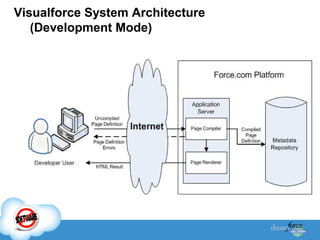
Visualforce System Architecture
(Development Mode)
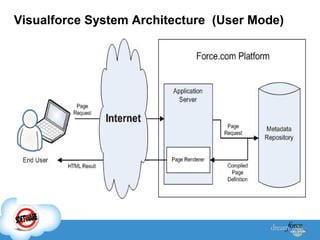
Visualforce System Architecture (User Mode)
Visualforce benefits


User-friendly development



Integration with other Web-based user interface
technologies



Model-View-Controller (MVC) style development



Concise syntax



Automatically upgradeable
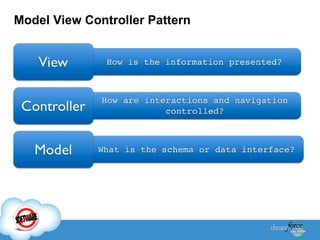
Model View Controller Pattern
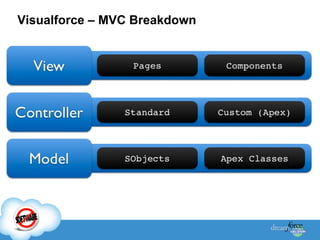
Visualforce – MVC Breakdown
Developers can use Visualforce pages to:


Override standard buttons, such as the New button for
accounts, or the Save button for contacts



Override tab overview pages, such as the Accounts
tab home page



Define custom tabs



Create dashboard components or custom help pages



Customize, extend, or integrate the sidebars in the
Service Cloud console (custom console components)
Displaying Field Values with Visualforce

Visualforce pages use the same expression language
as formulas—that is, anything inside {! } is evaluated as
an expression that can access values from records that
are currently in context. For example, you can display
the current user's first name by adding the {!
$User.FirstName} expression
Controllers
A Visualforce controller is a set of instructions that
specify what happens when a user interacts with the
components specified in associated Visualforce
markup, such as when a user clicks a button or link.
Controllers also provide access to the data that should
be displayed in a page, and can modify component
behavior.
Types of Controllers :1. Standard Controller
2. Custom Controller
3. Extension
Controllers
Visualforce markup can use the following types of
controller extension and custom controller methods:
• Action
• Getter
• Setter
Order of Execution in a Visualforce Page
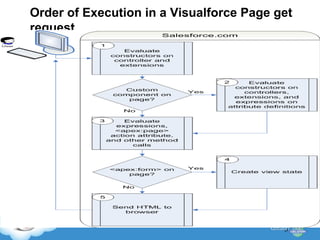
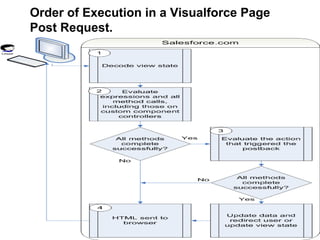
There are two types of Visualforce page requests:
• A get request is an initial request for a page either made
when a user enters an URL or when a link or button is
clicked that takes the user to a new page.
• A postback request is made when user interaction
requires a page update, such as when a user clicks on
a Save button and triggers a save action.
Order of Execution in a Visualforce Page get
request.
Order of Execution in a Visualforce Page
Post Request.
Using JavaScript and CSS in Visualforce
Pages
Using JavaScript in Visualforce pages gives you
access to a wide range of existing JavaScript
functionality,
Some Tags of VisualForce :1. <apex:page> calls an action when the page is loaded
2. <apex:actionFunction> defines a new JavaScript function that
calls an action
3. <apex:stylesheet value="{!$Resource.<filename>}"/>
4. <apex:outputText>
5. <apex:commandButton> creates a button that calls an action
6. <apex:commandLink> creates a link that calls an action
7. <apex:actionSupport> makes an event (such as “onclick”,
“onmouseover”, and so on) on another, named component,
call an action.
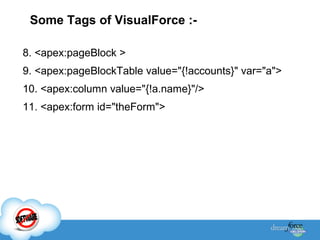
Some Tags of VisualForce :8. <apex:pageBlock >
9. <apex:pageBlockTable value="{!accounts}" var="a">
10. <apex:column value="{!a.name}"/>
11. <apex:form id="theForm">
Demos

Vf ppt (1)

  • 2.
  • 3.
  • 4.
  • 5.
    Visualforce benefits  User-friendly development  Integrationwith other Web-based user interface technologies  Model-View-Controller (MVC) style development  Concise syntax  Automatically upgradeable
  • 6.
  • 7.
  • 8.
    Developers can useVisualforce pages to:  Override standard buttons, such as the New button for accounts, or the Save button for contacts  Override tab overview pages, such as the Accounts tab home page  Define custom tabs  Create dashboard components or custom help pages  Customize, extend, or integrate the sidebars in the Service Cloud console (custom console components)
  • 9.
    Displaying Field Valueswith Visualforce Visualforce pages use the same expression language as formulas—that is, anything inside {! } is evaluated as an expression that can access values from records that are currently in context. For example, you can display the current user's first name by adding the {! $User.FirstName} expression
  • 10.
    Controllers A Visualforce controlleris a set of instructions that specify what happens when a user interacts with the components specified in associated Visualforce markup, such as when a user clicks a button or link. Controllers also provide access to the data that should be displayed in a page, and can modify component behavior. Types of Controllers :1. Standard Controller 2. Custom Controller 3. Extension
  • 11.
    Controllers Visualforce markup canuse the following types of controller extension and custom controller methods: • Action • Getter • Setter
  • 12.
    Order of Executionin a Visualforce Page There are two types of Visualforce page requests: • A get request is an initial request for a page either made when a user enters an URL or when a link or button is clicked that takes the user to a new page. • A postback request is made when user interaction requires a page update, such as when a user clicks on a Save button and triggers a save action.
  • 13.
    Order of Executionin a Visualforce Page get request.
  • 14.
    Order of Executionin a Visualforce Page Post Request.
  • 15.
    Using JavaScript andCSS in Visualforce Pages Using JavaScript in Visualforce pages gives you access to a wide range of existing JavaScript functionality,
  • 16.
    Some Tags ofVisualForce :1. <apex:page> calls an action when the page is loaded 2. <apex:actionFunction> defines a new JavaScript function that calls an action 3. <apex:stylesheet value="{!$Resource.<filename>}"/> 4. <apex:outputText> 5. <apex:commandButton> creates a button that calls an action 6. <apex:commandLink> creates a link that calls an action 7. <apex:actionSupport> makes an event (such as “onclick”, “onmouseover”, and so on) on another, named component, call an action.
  • 17.
    Some Tags ofVisualForce :8. <apex:pageBlock > 9. <apex:pageBlockTable value="{!accounts}" var="a"> 10. <apex:column value="{!a.name}"/> 11. <apex:form id="theForm">
  • 18.