Bringing it All TogetherSharePoint 2010 Business IntelligenceKathryn Birstein, SharePoint ArchitectSharePoint Salvationhttp://www.sharepointsalvation.com
What is Business Intelligence?Any information that pertains to the history, current status or future projections of a business organizationSystems that provide directed background data and reporting tools to support and improvethe decision-making process
The Three Stages of Business IntelligenceOrganizing, cleansing and collecting dataDelivering the data in a consistent and appropriate, meaningful and easy-to-use formatUsing the data to make effective decisions
Stage 1: Organizing DataOLAP (Online Analytical Processing)Precalculates and stores aggregates in SSAS databasesUse Business Intelligence Studio (BIDS) to create SSAS databasesCubes: The basic unit of storage and analysis in Analysis Services Dimensions: a category for analyzing business data, ex: States,CitiesMeasures: column in a table that you'd like to analyze, ex: sales
Stage 2: Delivering DataA team effort – need at least business analyst with a good knowledge of data warehouseEstablish governance rules upfront – only stored procedures, all connections in libraries, etc.Enlist business power users to manage rights of BI objectsTest user acceptance at draft stage
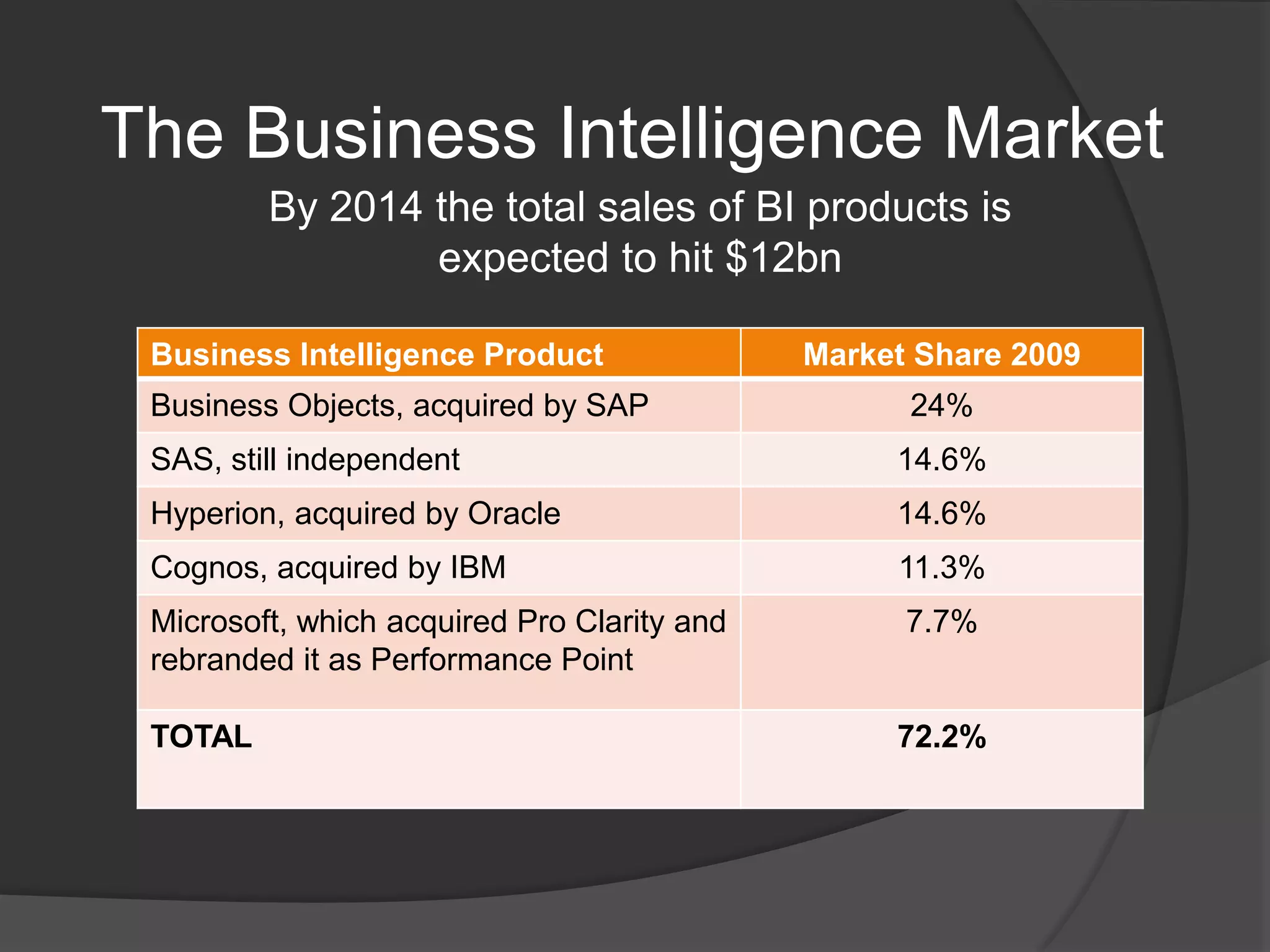
The Business Intelligence MarketBy 2014 the total sales of BI products is expected to hit $12bn
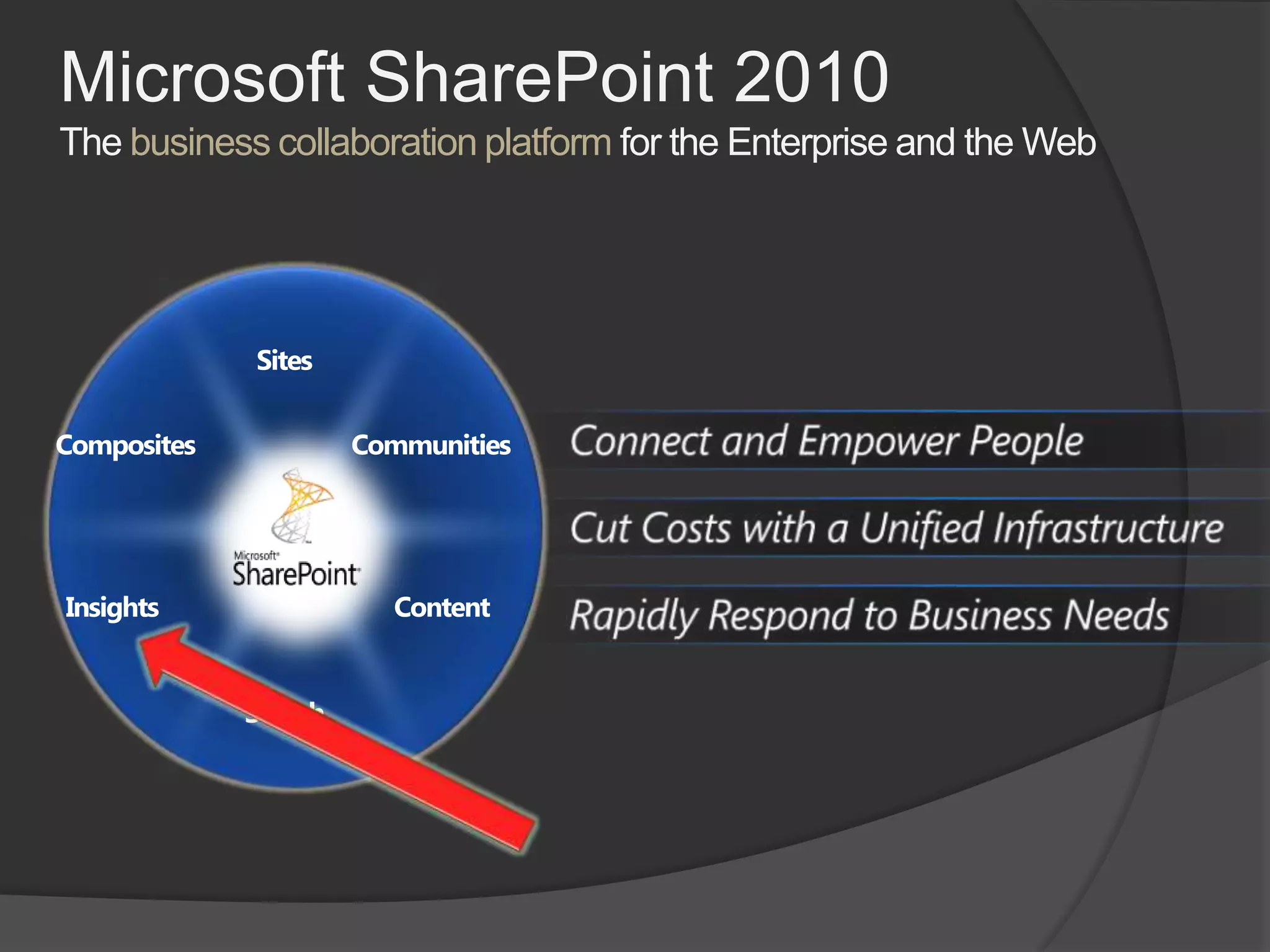
Microsoft SharePoint 2010The business collaboration platform for the Enterprise and the WebSitesConnect and Empower PeopleCommunitiesCompositesCut Costs with a Unified InfrastructureContentInsightsRapidly Respond to Business NeedsSearch
SharePoint 2010 BI ProsLess expensive than other solutions—free with Enterprise version of SharePoint 2010Completely customizable and extensible with .NET and SilverlightGood support from Microsoft premier supportBrings together your entire environmentOffers users more “self-service” optionsIs “embedded” with SharePoint rather than separate
SharePoint 2010 BI ConsMore work to get started—have to build or purchase a risk analysis application (like ProViz XL IRM), for instance, while other products offer this OTBSharePoint 2010 setup and admin requires senior IT supportRequires SharePoint Enterprise licenseNeed to be a entirely Microsoft shop to reap the full benefitsNew kid on the block
When to Use SharePoint BI?When your organization is looking for a long term solutionWhen you are an all-Microsoft shopWhen flexibility and extensibility are paramount concernsWhen your users make extensive use of Excel for modeling critical dataWhen delivering data worldwide is important
What Comprises SharePoint BI?The following services are the primary SharePoint Business Intelligence servicesExcel ServicesPowerPivot for Excel 2010Performance Point SQL Server Reporting ServicesOffice Web AppsVisio Graphic ServicesBusiness Connectivity Services
Supporting BI ServicesThe following services play a supporting role in SharePoint Business Intelligence servicesEnterprise SearchSecure Store ServiceMetadata ServiceUsage Data CollectionWeb AnalyticsState Service
Other SharePoint BI ElementsSQL Server 2008 R2 Analysis Services – for OLAP cubesBusiness Intelligence Studio – for report and cube creationReport Builder – for report creation by business usersDashboard Designer – the client part of Performance Point SharePoint Designer 2010 – for Business Connectivity connections, etc.
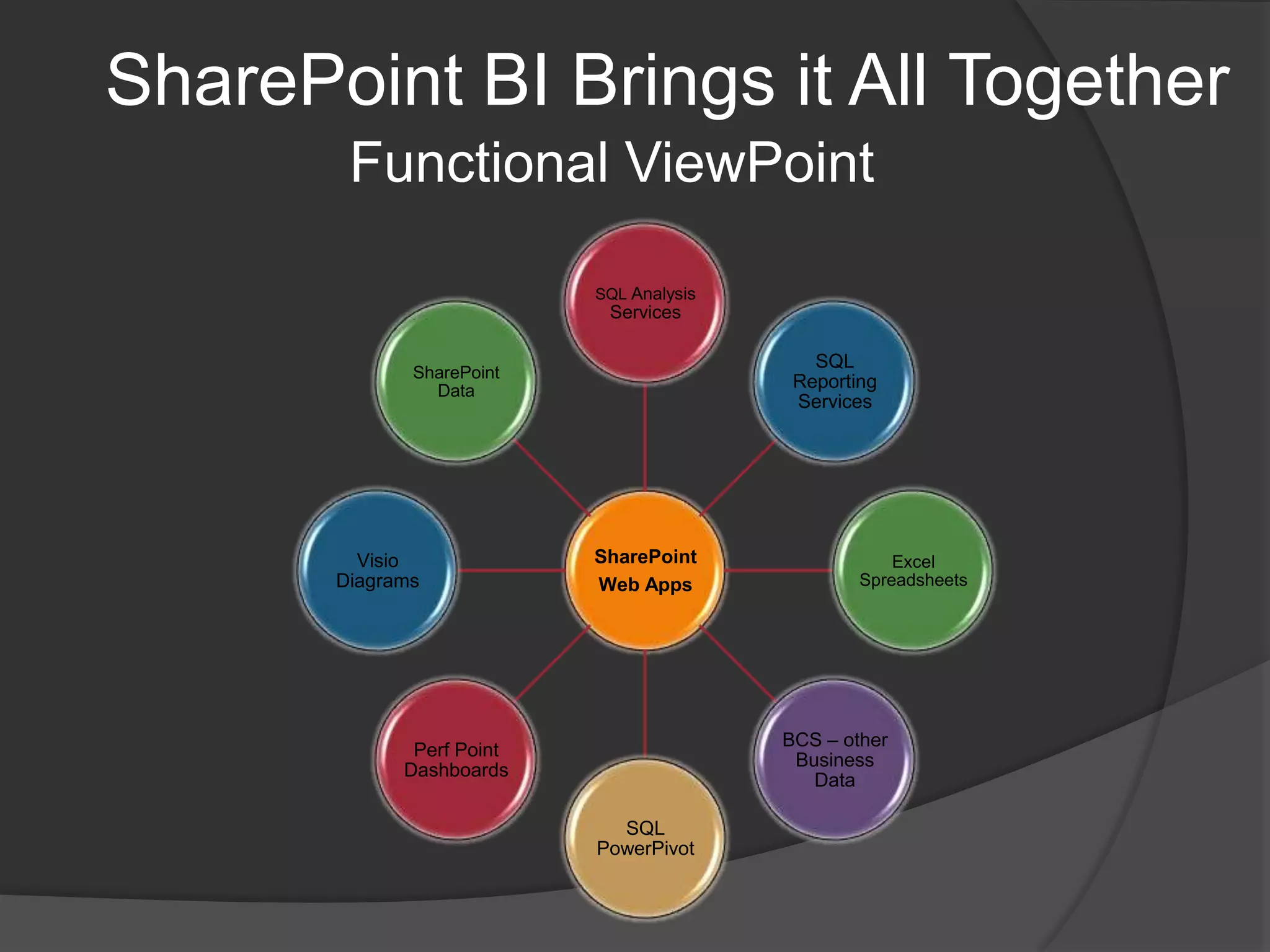
SharePoint BI Brings it All TogetherFunctional ViewPoint
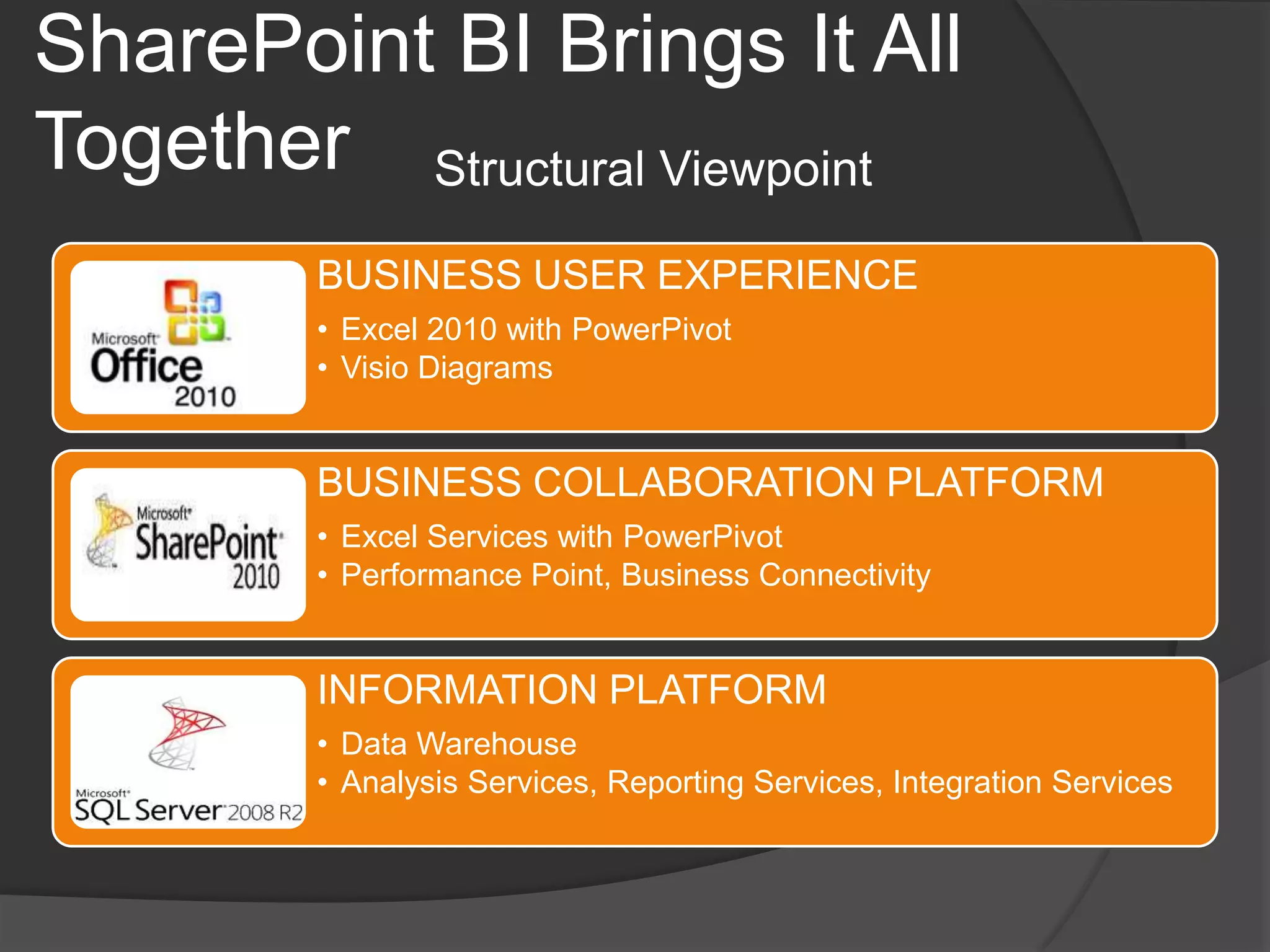
SharePoint BI Brings It All TogetherStructural Viewpoint
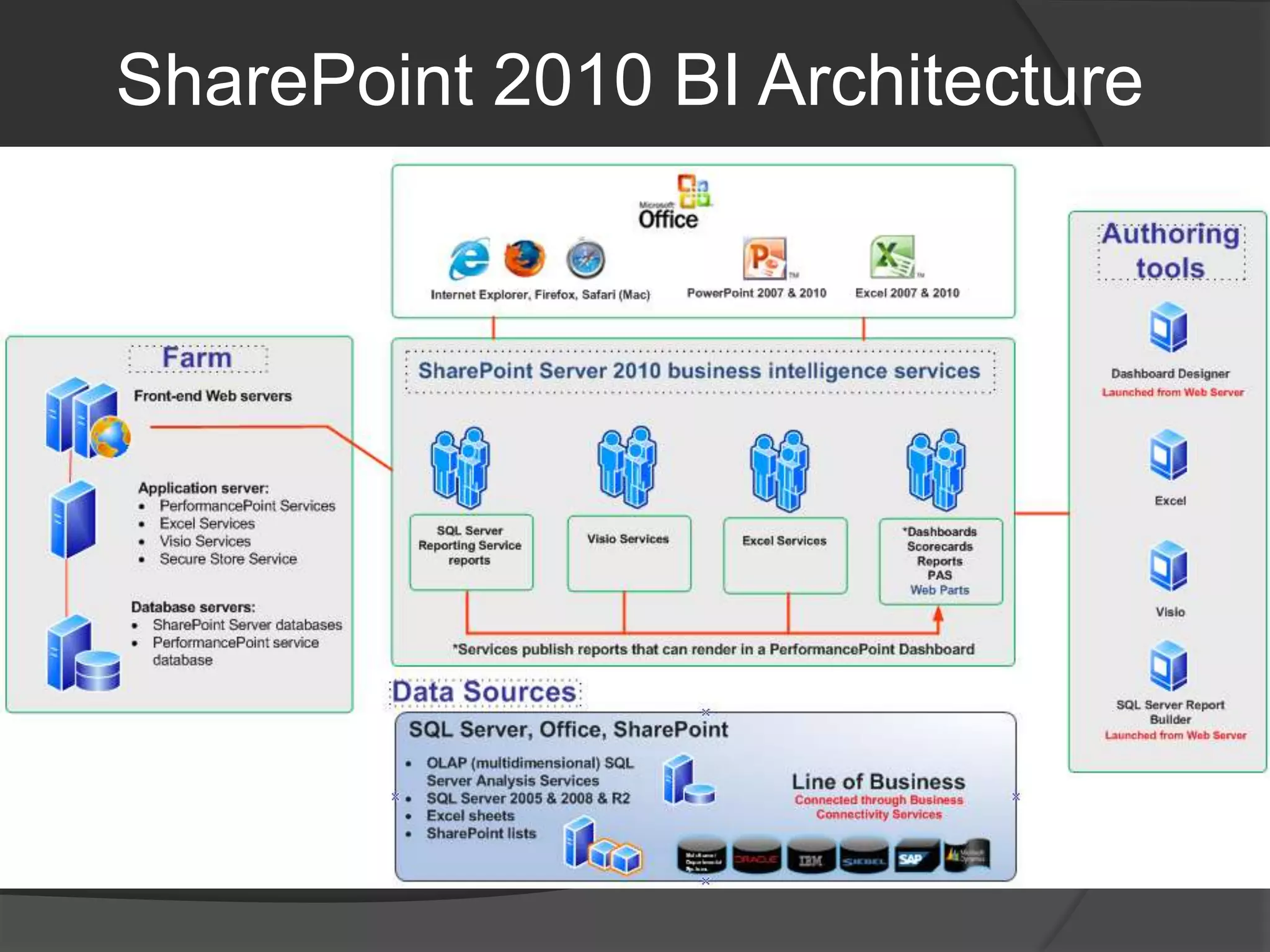
SharePoint 2010 BI Architecture
SharePoint 2010 BI DeploymentMany interdependent servicesMust use Kerberos authentication for full, secure, data accessRead and use 177-page white paper “Configuring Kerberos Authentication for Microsoft SharePoint 2010 Products”Must TEST connections to external data – make sure you can refresh successfullySQL databasesSQL Server OLAP cubesOther data sources
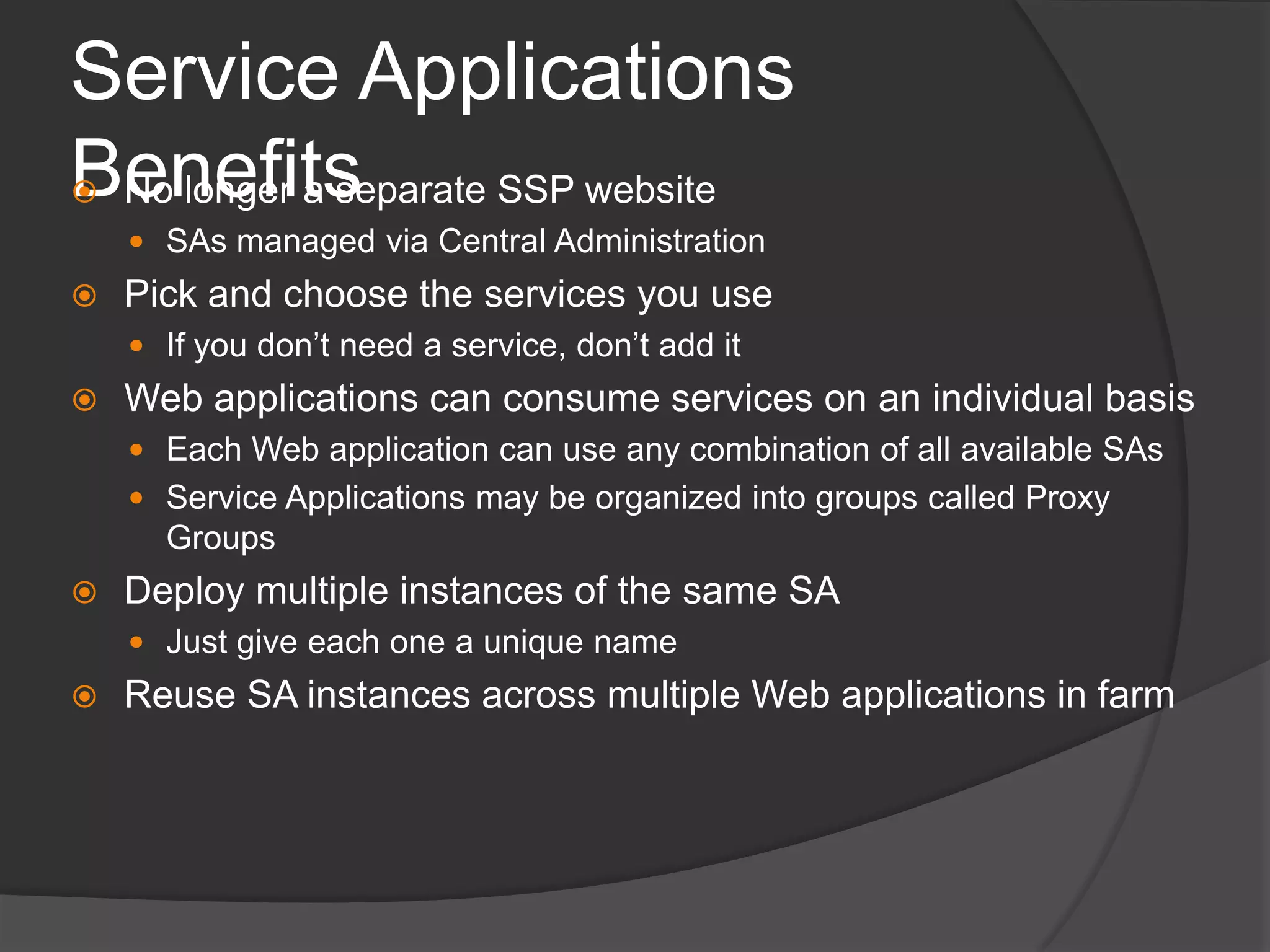
Service Applications BenefitsNo longer a separate SSP websiteSAs managed via Central AdministrationPick and choose the services you useIf you don’t need a service, don’t add itWeb applications can consume services on an individual basisEach Web application can use any combination of all available SAsService Applications may be organized into groups called Proxy GroupsDeploy multiple instances of the same SAJust give each one a unique nameReuse SA instances across multiple Web applications in farm
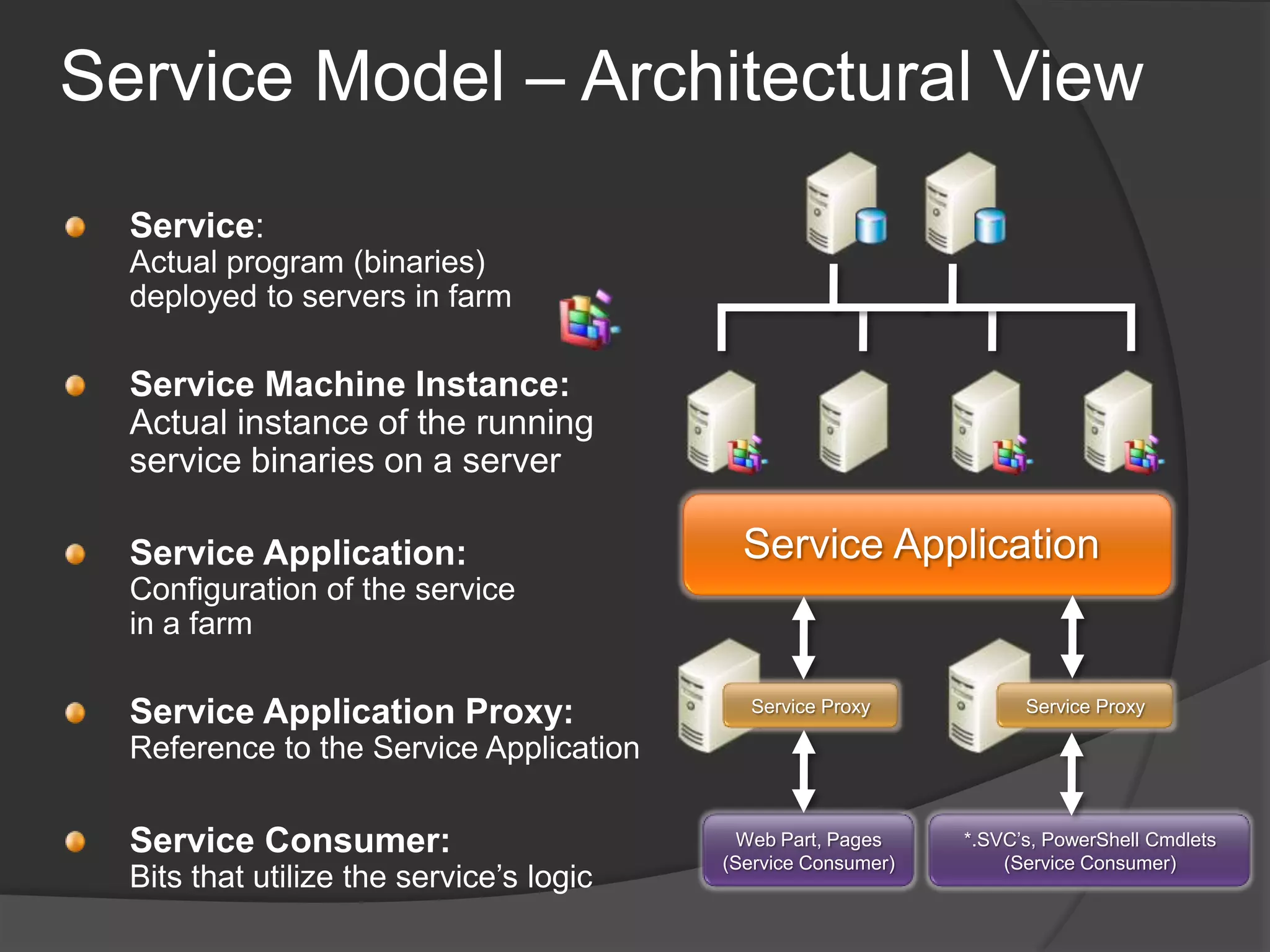
Service Model – Architectural ViewService: Actual program (binaries) deployed to servers in farmService Machine Instance: Actual instance of the running service binaries on a serverService ApplicationService Application:Configuration of the service in a farmService ProxyService ProxyService Application Proxy:Reference to the Service ApplicationService Consumer:Bits that utilize the service’s logicWeb Part, Pages(Service Consumer)*.SVC’s, PowerShell Cmdlets(Service Consumer)
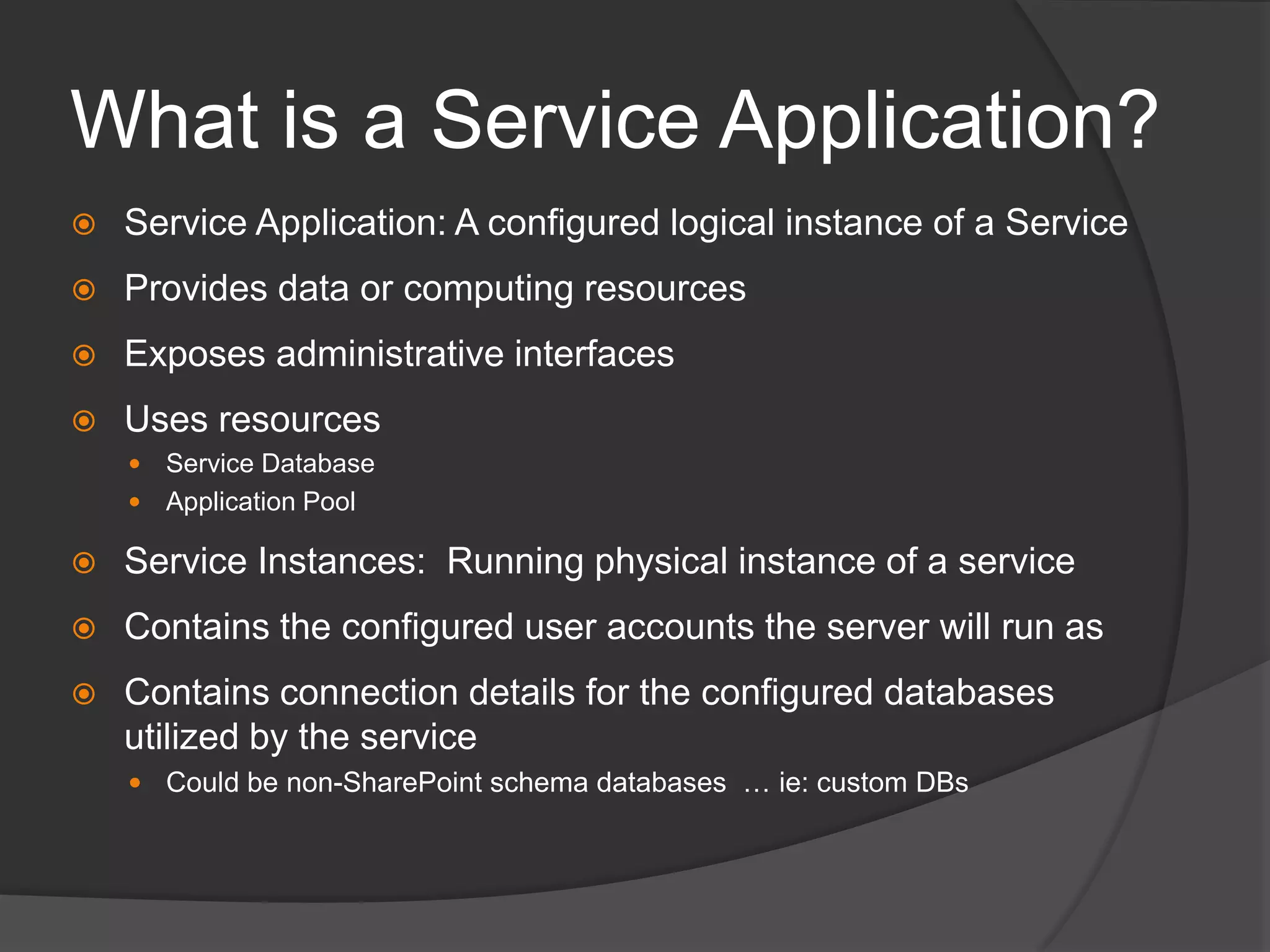
What is a Service Application?Service Application: A configured logical instance of a ServiceProvides data or computing resourcesExposes administrative interfacesUses resourcesService DatabaseApplication PoolService Instances:  Running physical instance of a serviceContains the configured user accounts the server will run asContains connection details for the configured databases utilized by the serviceCould be non-SharePoint schema databases  … ie: custom DBs
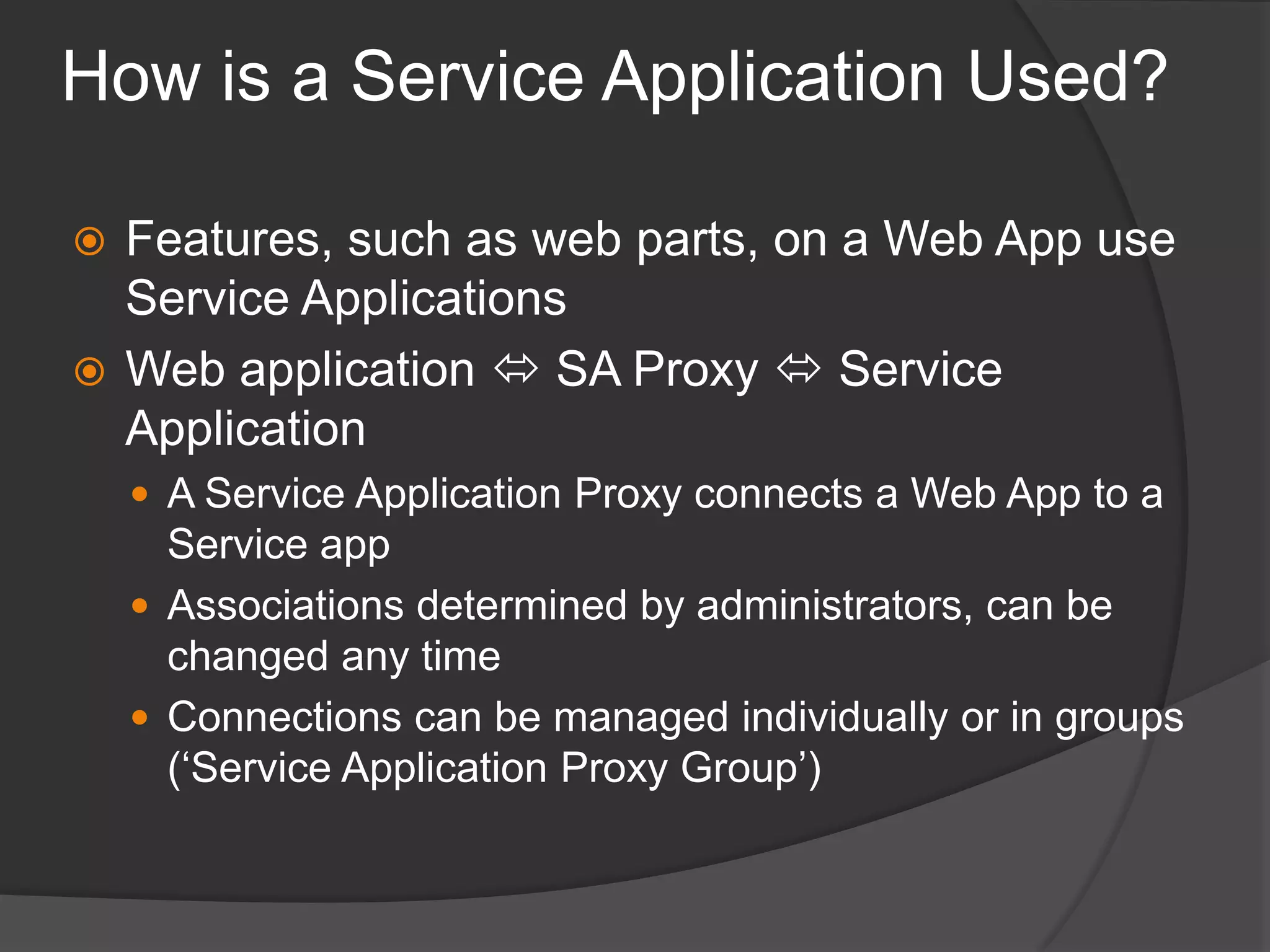
How is a Service Application Used?Features, such as web parts, on a Web App use Service ApplicationsWeb application  SA Proxy  Service ApplicationA Service Application Proxy connects a Web App to a Service appAssociations determined by administrators, can be changed any timeConnections can be managed individually or in groups (‘Service Application Proxy Group’)
Service Application ProxyA proxy is a virtual entity that connects Web applications to service applicationsConsumers interact with the service via proxiesInstalled on the WFE serversAssociated with a service applicationKnows how to connect to the service on the app servers via WCF servicesTalks to a round-robin load balancer when the service is installed on multiple app servers
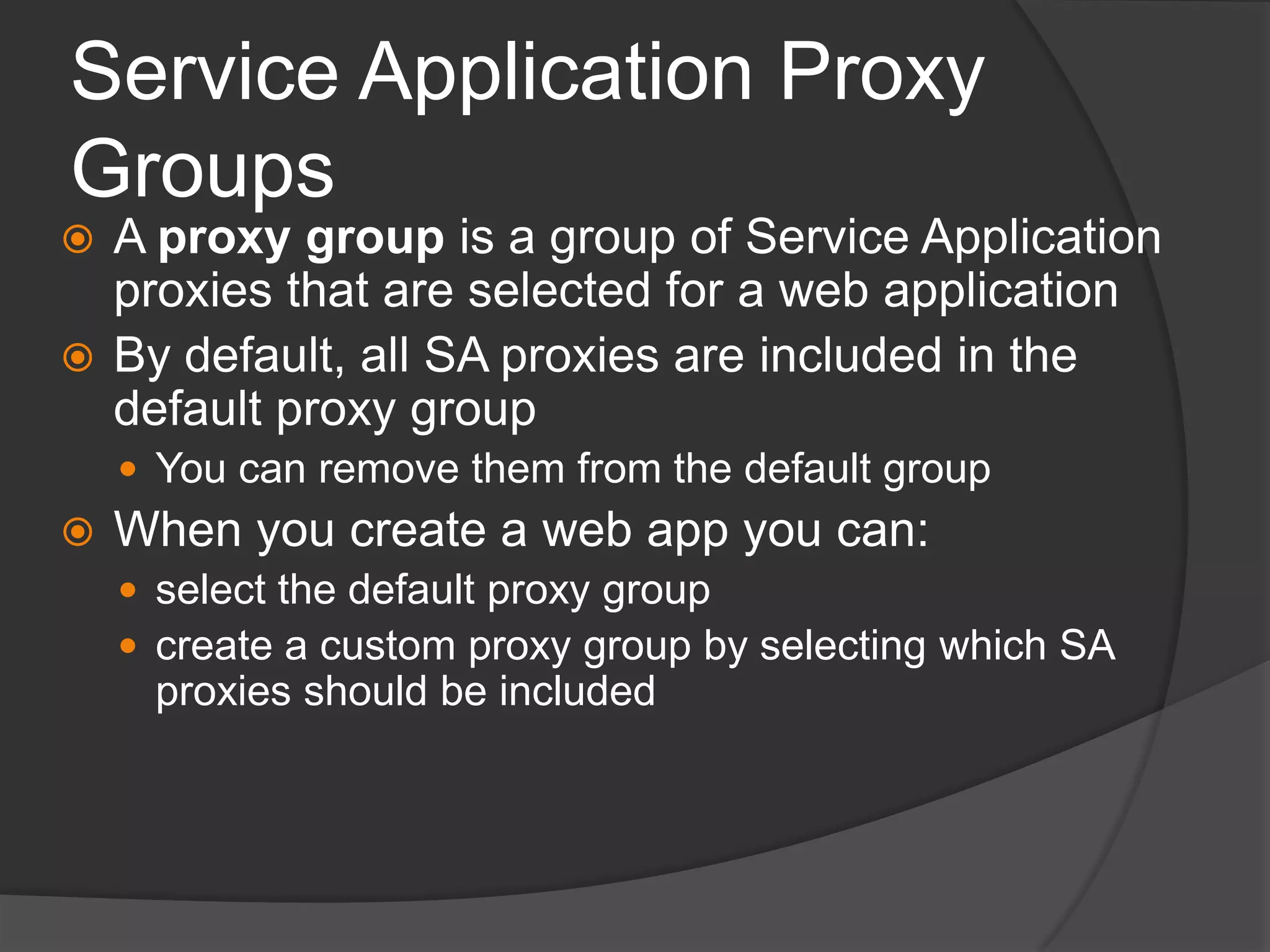
Service Application Proxy GroupsA proxy group is a group of Service Application proxies that are selected for a web applicationBy default, all SA proxies are included in the default proxy groupYou can remove them from the default groupWhen you create a web app you can:select the default proxy groupcreate a custom proxy group by selecting which SA proxies should be included
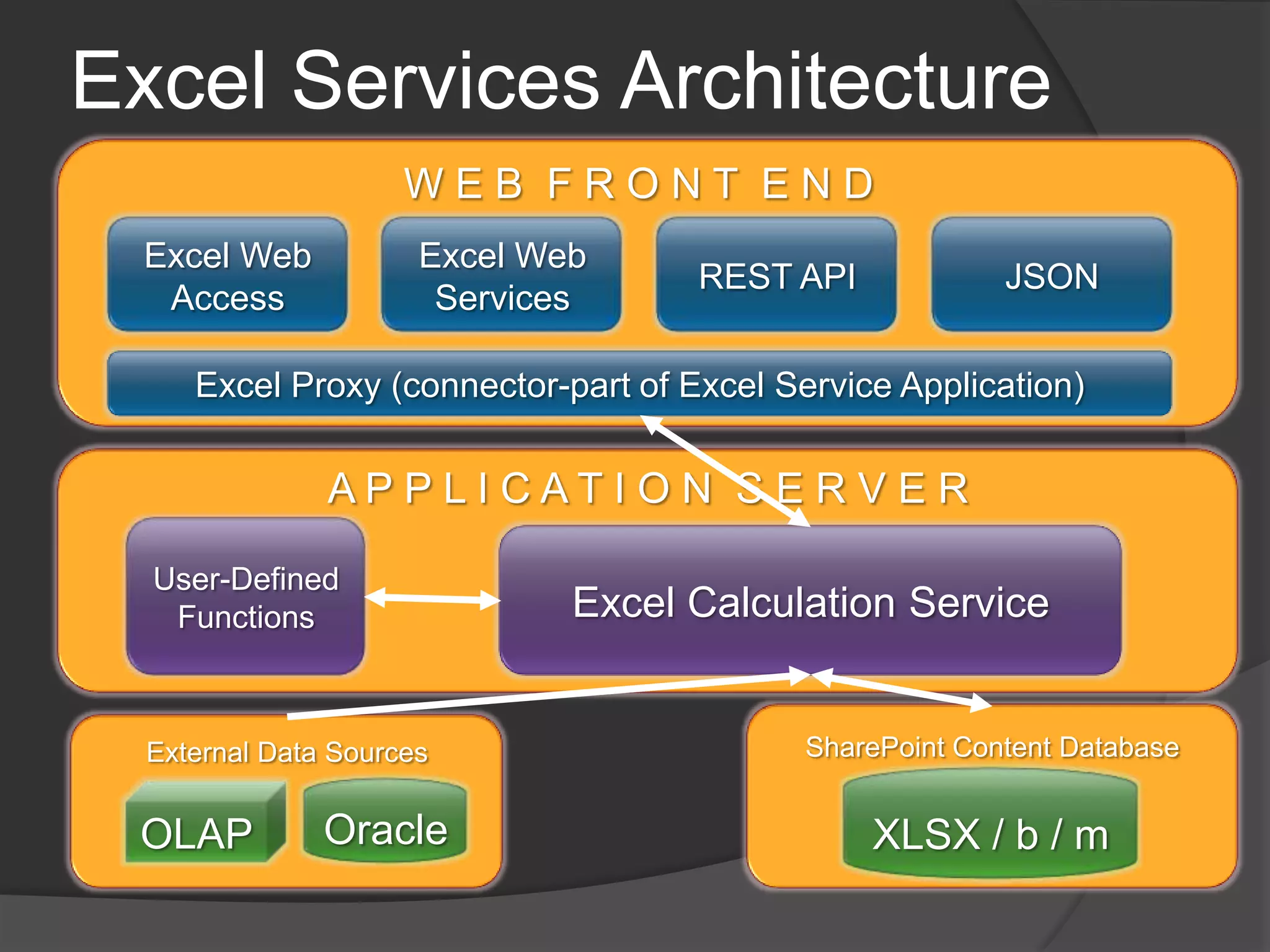
Excel Services ArchitectureW E B  F R O N T  E N DREST APIExcel Web ServicesExcel Web Access JSONExcel Proxy (connector-part of Excel Service Application)A P P L I C A T I O N  S E R V E RUser-Defined FunctionsExcel Calculation ServiceSharePoint Content DatabaseExternal Data SourcesXLSX / b / mOracleOLAP
Excel Deployment: Let's Get RealWeb applications must use Kerberos authentication, add SPN on app pool accounthttp/WFE and http/WFE.mydomain.comCreate Excel Calculation Services SPN on Application Pool identity accountHTTP/appservernameStart Excel Calculation Services on APP serverAdd  and configure Excel Service Application
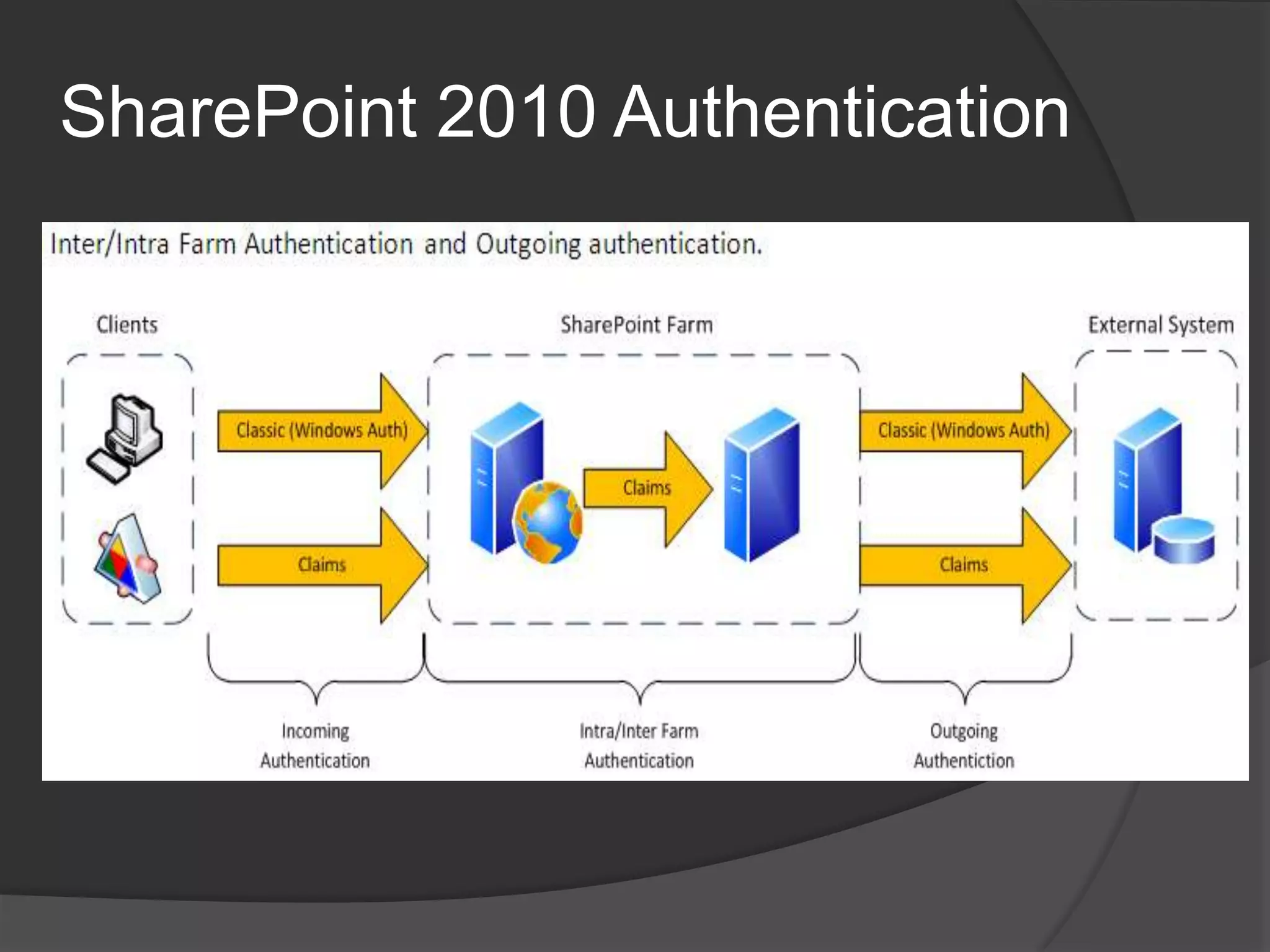
SharePoint 2010 Authentication
Excel Deployment (continued)Start Claims to Windows Token Service on APP serverCheck to make sure its running as “Local System” in Central Admin/SecurityInstall SSAS on SQL ServerCreate SPN for SSAS service account, MSOLAPSvc.3/sqlservernameConfigure constrained delegationOn APP server, add SSAS service accountOn Excel service account, add SSAS service account
Excel Services LimitationsSupported and Unsupported Featureshttp://msdn.microsoft.com/en-us/library/ff595319.aspxDifferences between using a workbook in Excel and Excel Serviceshttp://office.microsoft.com/en-us/excel-help/differences-between-using-a-workbook-in-excel-and-excel-services-HA010021716.aspx
PowerPivot Deployementhttp://msdn.microsoft.com/en-us/library/ee210616.aspxInstall PowerPivot for “existing” farm from SQL Server 2008 DVD on APP serverDeploy powerpivotwebapp.wsp solution to each web application that will run PowerPivotCreate a PowerPivot service applicationInstall Secure Store and configure unattended service account (you really should use Kerberos)Activate PowerPivot feature on site collections
Demo of Excel Services setup
Demo of Excel Services in Action(create data connection)
PowerPivot Demo(show in Excel 2010 and publish to PowerPivot Gallery)
Report Server Demo(show internet sales and connection to stored procedure)
PPS Architecture
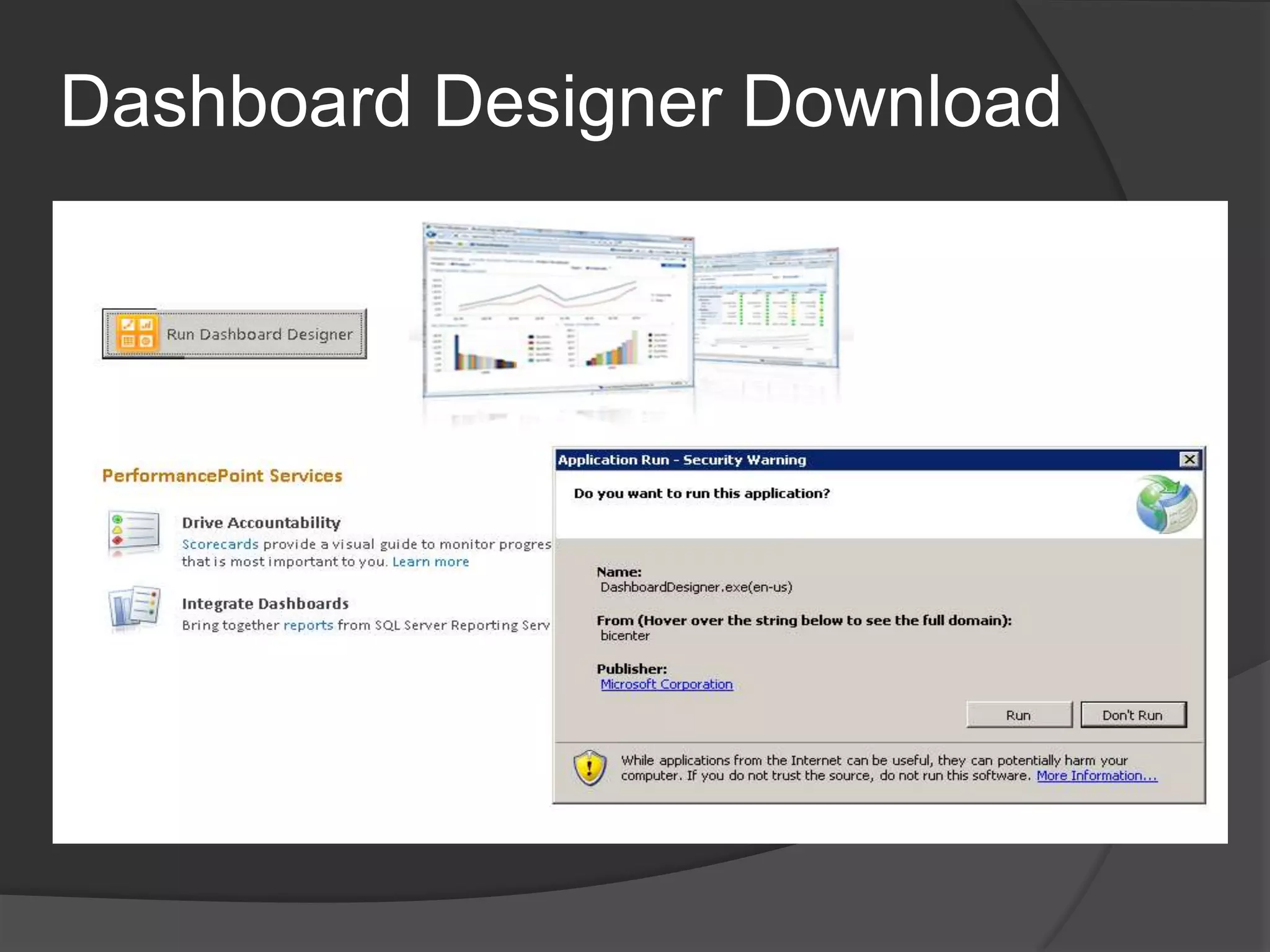
Dashboard Designer Download
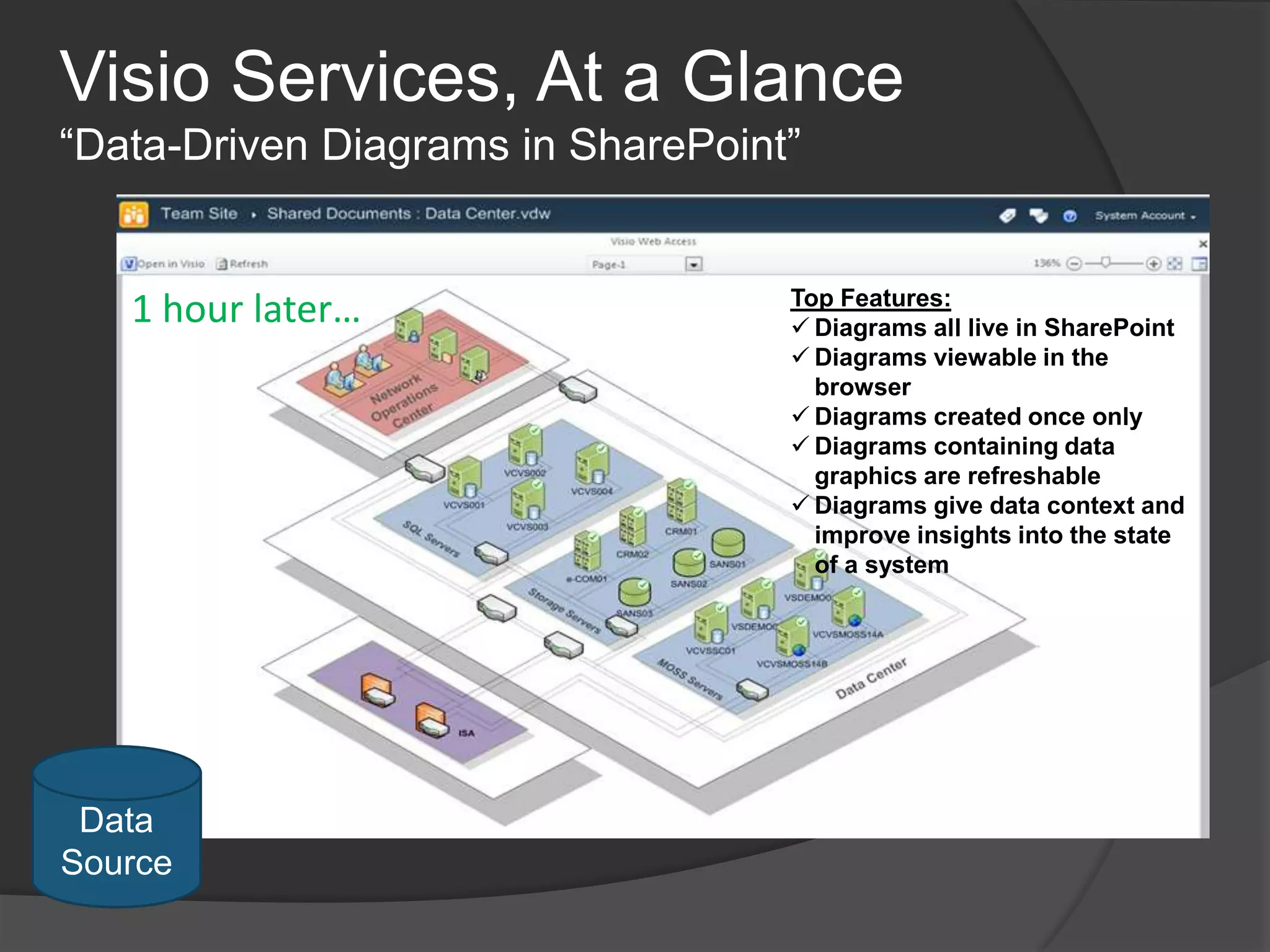
Visio Services, At a Glance“Data-Driven Diagrams in SharePoint”1 hour later…Top Features:Diagrams all live in SharePoint
Diagrams viewable in the browser
Diagrams created once only
Diagrams containing data graphics are refreshable
Diagrams give data context and improve insights into the state of a systemData Source
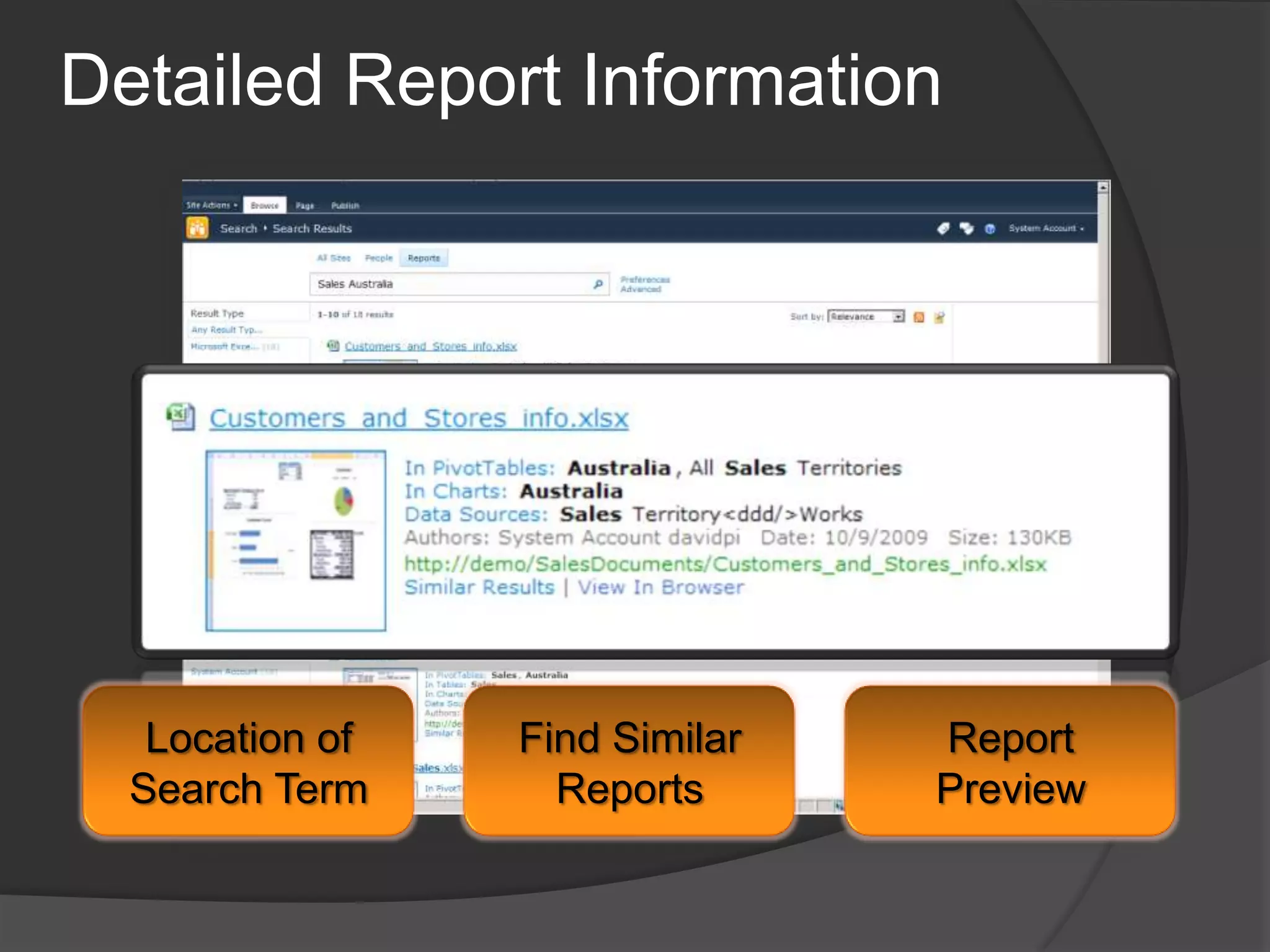
FAST BI Indexing ConnectorAdd-in to FAST Search Server for SharePointQuery and Crawl XLSX/XSLM and RDL reportsDedicated Reports tabUse filters to refine and narrow resultsBI Search identifies Table, Pivot Tables, and Chart DataCrawls data not visible in report using data connection
Detailed Report InformationLocation of Search TermFind Similar ReportsReport Preview
SO! How do I Get Started?
Watch VideosMicrosoft BI Resource Centerhttp://technet.microsoft.com/en-us/sharepoint/ee692578.aspxTwo important Twenty-Six New York videos:http://www.26ny.com/content/5.1_articles.html#articles_webcasts1. How does the Microsoft BI Stack . . .Stack UP?	An excellent review of all the BI software products out there and how they compare to Microsoft BI. 2.	Rapid BI Dashboard Development	A great demo of Performance Point Dashboard Designer showing the full power of this tool
Do Some TutorialsExcel Services Tutorial – Is  It Working?http://www.sharepointmonitor.com/2010/02/getting-started-with-the-sharepoint-2010-excel-services/ PowerPivot Tutorial for Excel 2010http://technet.microsoft.com/en-us/library/ee835510.aspxReporting Services Tutorialshttp://msdn.microsoft.com/en-us/library/bb522859.aspxSQL Server Analysis Services Tutorialhttp://technet.microsoft.com/en-us/library/ms170208.aspx

Kathryn Birstein: SharePoint 2010 Business Intelligence-Brining It All Together

  • 1.
    Bringing it AllTogetherSharePoint 2010 Business IntelligenceKathryn Birstein, SharePoint ArchitectSharePoint Salvationhttp://www.sharepointsalvation.com
  • 2.
    What is BusinessIntelligence?Any information that pertains to the history, current status or future projections of a business organizationSystems that provide directed background data and reporting tools to support and improvethe decision-making process
  • 3.
    The Three Stagesof Business IntelligenceOrganizing, cleansing and collecting dataDelivering the data in a consistent and appropriate, meaningful and easy-to-use formatUsing the data to make effective decisions
  • 4.
    Stage 1: OrganizingDataOLAP (Online Analytical Processing)Precalculates and stores aggregates in SSAS databasesUse Business Intelligence Studio (BIDS) to create SSAS databasesCubes: The basic unit of storage and analysis in Analysis Services Dimensions: a category for analyzing business data, ex: States,CitiesMeasures: column in a table that you'd like to analyze, ex: sales
  • 5.
    Stage 2: DeliveringDataA team effort – need at least business analyst with a good knowledge of data warehouseEstablish governance rules upfront – only stored procedures, all connections in libraries, etc.Enlist business power users to manage rights of BI objectsTest user acceptance at draft stage
  • 6.
    The Business IntelligenceMarketBy 2014 the total sales of BI products is expected to hit $12bn
  • 7.
    Microsoft SharePoint 2010Thebusiness collaboration platform for the Enterprise and the WebSitesConnect and Empower PeopleCommunitiesCompositesCut Costs with a Unified InfrastructureContentInsightsRapidly Respond to Business NeedsSearch
  • 8.
    SharePoint 2010 BIProsLess expensive than other solutions—free with Enterprise version of SharePoint 2010Completely customizable and extensible with .NET and SilverlightGood support from Microsoft premier supportBrings together your entire environmentOffers users more “self-service” optionsIs “embedded” with SharePoint rather than separate
  • 9.
    SharePoint 2010 BIConsMore work to get started—have to build or purchase a risk analysis application (like ProViz XL IRM), for instance, while other products offer this OTBSharePoint 2010 setup and admin requires senior IT supportRequires SharePoint Enterprise licenseNeed to be a entirely Microsoft shop to reap the full benefitsNew kid on the block
  • 10.
    When to UseSharePoint BI?When your organization is looking for a long term solutionWhen you are an all-Microsoft shopWhen flexibility and extensibility are paramount concernsWhen your users make extensive use of Excel for modeling critical dataWhen delivering data worldwide is important
  • 11.
    What Comprises SharePointBI?The following services are the primary SharePoint Business Intelligence servicesExcel ServicesPowerPivot for Excel 2010Performance Point SQL Server Reporting ServicesOffice Web AppsVisio Graphic ServicesBusiness Connectivity Services
  • 12.
    Supporting BI ServicesThefollowing services play a supporting role in SharePoint Business Intelligence servicesEnterprise SearchSecure Store ServiceMetadata ServiceUsage Data CollectionWeb AnalyticsState Service
  • 13.
    Other SharePoint BIElementsSQL Server 2008 R2 Analysis Services – for OLAP cubesBusiness Intelligence Studio – for report and cube creationReport Builder – for report creation by business usersDashboard Designer – the client part of Performance Point SharePoint Designer 2010 – for Business Connectivity connections, etc.
  • 14.
    SharePoint BI Bringsit All TogetherFunctional ViewPoint
  • 15.
    SharePoint BI BringsIt All TogetherStructural Viewpoint
  • 16.
    SharePoint 2010 BIArchitecture
  • 17.
    SharePoint 2010 BIDeploymentMany interdependent servicesMust use Kerberos authentication for full, secure, data accessRead and use 177-page white paper “Configuring Kerberos Authentication for Microsoft SharePoint 2010 Products”Must TEST connections to external data – make sure you can refresh successfullySQL databasesSQL Server OLAP cubesOther data sources
  • 18.
    Service Applications BenefitsNolonger a separate SSP websiteSAs managed via Central AdministrationPick and choose the services you useIf you don’t need a service, don’t add itWeb applications can consume services on an individual basisEach Web application can use any combination of all available SAsService Applications may be organized into groups called Proxy GroupsDeploy multiple instances of the same SAJust give each one a unique nameReuse SA instances across multiple Web applications in farm
  • 19.
    Service Model –Architectural ViewService: Actual program (binaries) deployed to servers in farmService Machine Instance: Actual instance of the running service binaries on a serverService ApplicationService Application:Configuration of the service in a farmService ProxyService ProxyService Application Proxy:Reference to the Service ApplicationService Consumer:Bits that utilize the service’s logicWeb Part, Pages(Service Consumer)*.SVC’s, PowerShell Cmdlets(Service Consumer)
  • 20.
    What is aService Application?Service Application: A configured logical instance of a ServiceProvides data or computing resourcesExposes administrative interfacesUses resourcesService DatabaseApplication PoolService Instances: Running physical instance of a serviceContains the configured user accounts the server will run asContains connection details for the configured databases utilized by the serviceCould be non-SharePoint schema databases … ie: custom DBs
  • 21.
    How is aService Application Used?Features, such as web parts, on a Web App use Service ApplicationsWeb application  SA Proxy  Service ApplicationA Service Application Proxy connects a Web App to a Service appAssociations determined by administrators, can be changed any timeConnections can be managed individually or in groups (‘Service Application Proxy Group’)
  • 22.
    Service Application ProxyAproxy is a virtual entity that connects Web applications to service applicationsConsumers interact with the service via proxiesInstalled on the WFE serversAssociated with a service applicationKnows how to connect to the service on the app servers via WCF servicesTalks to a round-robin load balancer when the service is installed on multiple app servers
  • 23.
    Service Application ProxyGroupsA proxy group is a group of Service Application proxies that are selected for a web applicationBy default, all SA proxies are included in the default proxy groupYou can remove them from the default groupWhen you create a web app you can:select the default proxy groupcreate a custom proxy group by selecting which SA proxies should be included
  • 24.
    Excel Services ArchitectureWE B F R O N T E N DREST APIExcel Web ServicesExcel Web Access JSONExcel Proxy (connector-part of Excel Service Application)A P P L I C A T I O N S E R V E RUser-Defined FunctionsExcel Calculation ServiceSharePoint Content DatabaseExternal Data SourcesXLSX / b / mOracleOLAP
  • 25.
    Excel Deployment: Let'sGet RealWeb applications must use Kerberos authentication, add SPN on app pool accounthttp/WFE and http/WFE.mydomain.comCreate Excel Calculation Services SPN on Application Pool identity accountHTTP/appservernameStart Excel Calculation Services on APP serverAdd and configure Excel Service Application
  • 26.
  • 27.
    Excel Deployment (continued)StartClaims to Windows Token Service on APP serverCheck to make sure its running as “Local System” in Central Admin/SecurityInstall SSAS on SQL ServerCreate SPN for SSAS service account, MSOLAPSvc.3/sqlservernameConfigure constrained delegationOn APP server, add SSAS service accountOn Excel service account, add SSAS service account
  • 28.
    Excel Services LimitationsSupportedand Unsupported Featureshttp://msdn.microsoft.com/en-us/library/ff595319.aspxDifferences between using a workbook in Excel and Excel Serviceshttp://office.microsoft.com/en-us/excel-help/differences-between-using-a-workbook-in-excel-and-excel-services-HA010021716.aspx
  • 29.
    PowerPivot Deployementhttp://msdn.microsoft.com/en-us/library/ee210616.aspxInstall PowerPivotfor “existing” farm from SQL Server 2008 DVD on APP serverDeploy powerpivotwebapp.wsp solution to each web application that will run PowerPivotCreate a PowerPivot service applicationInstall Secure Store and configure unattended service account (you really should use Kerberos)Activate PowerPivot feature on site collections
  • 30.
    Demo of ExcelServices setup
  • 31.
    Demo of ExcelServices in Action(create data connection)
  • 32.
    PowerPivot Demo(show inExcel 2010 and publish to PowerPivot Gallery)
  • 33.
    Report Server Demo(showinternet sales and connection to stored procedure)
  • 34.
  • 35.
  • 36.
    Visio Services, Ata Glance“Data-Driven Diagrams in SharePoint”1 hour later…Top Features:Diagrams all live in SharePoint
  • 37.
  • 38.
  • 39.
    Diagrams containing datagraphics are refreshable
  • 40.
    Diagrams give datacontext and improve insights into the state of a systemData Source
  • 41.
    FAST BI IndexingConnectorAdd-in to FAST Search Server for SharePointQuery and Crawl XLSX/XSLM and RDL reportsDedicated Reports tabUse filters to refine and narrow resultsBI Search identifies Table, Pivot Tables, and Chart DataCrawls data not visible in report using data connection
  • 42.
    Detailed Report InformationLocationof Search TermFind Similar ReportsReport Preview
  • 43.
    SO! How doI Get Started?
  • 44.
    Watch VideosMicrosoft BIResource Centerhttp://technet.microsoft.com/en-us/sharepoint/ee692578.aspxTwo important Twenty-Six New York videos:http://www.26ny.com/content/5.1_articles.html#articles_webcasts1. How does the Microsoft BI Stack . . .Stack UP? An excellent review of all the BI software products out there and how they compare to Microsoft BI. 2. Rapid BI Dashboard Development A great demo of Performance Point Dashboard Designer showing the full power of this tool
  • 45.
    Do Some TutorialsExcelServices Tutorial – Is It Working?http://www.sharepointmonitor.com/2010/02/getting-started-with-the-sharepoint-2010-excel-services/ PowerPivot Tutorial for Excel 2010http://technet.microsoft.com/en-us/library/ee835510.aspxReporting Services Tutorialshttp://msdn.microsoft.com/en-us/library/bb522859.aspxSQL Server Analysis Services Tutorialhttp://technet.microsoft.com/en-us/library/ms170208.aspx
  • 46.
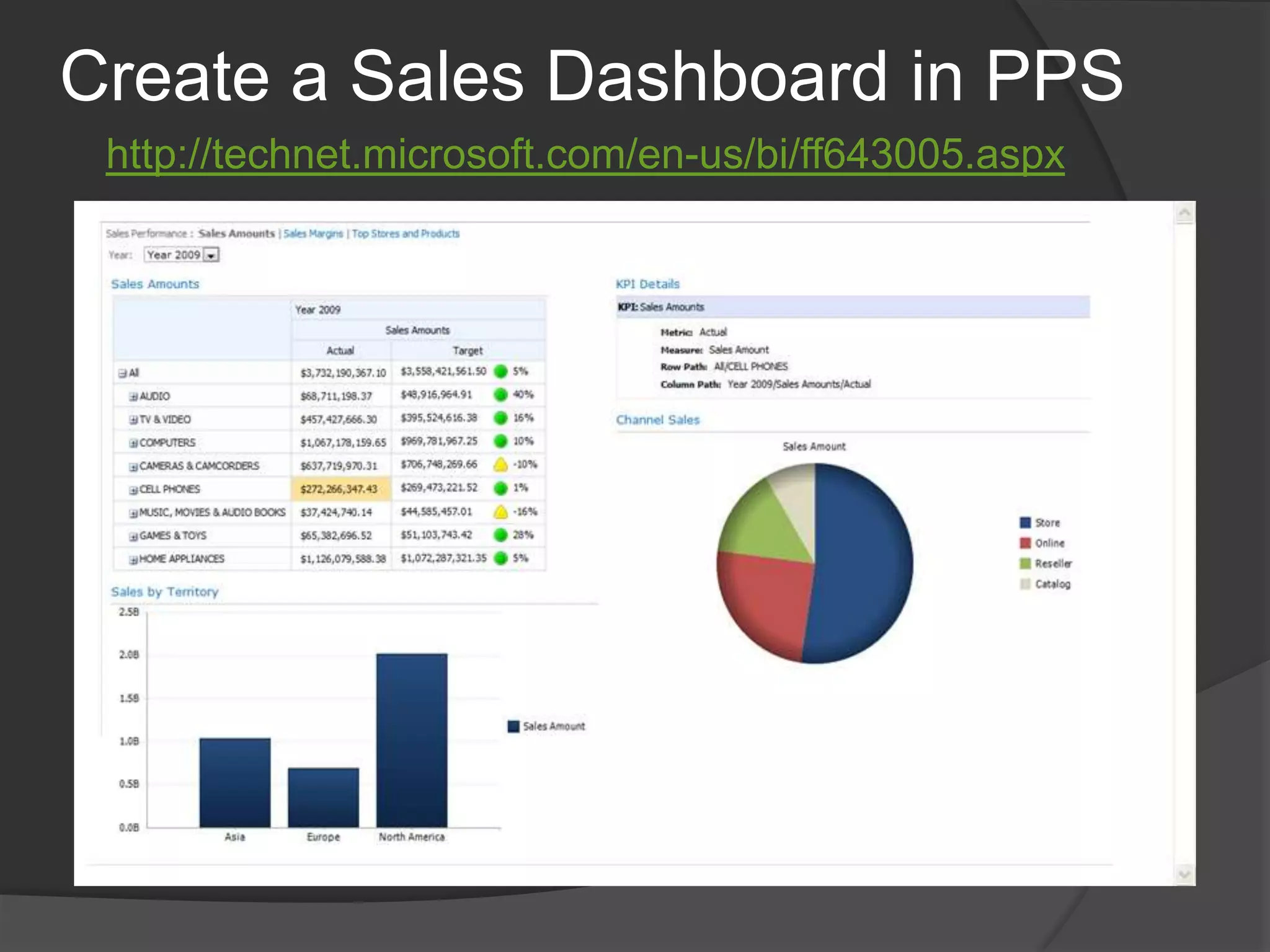
    Create a SalesDashboard in PPShttp://technet.microsoft.com/en-us/bi/ff643005.aspx
  • 47.
    SharePoint 2010 BIResourcesChoosing a Business Intelligence Toolhttp://technet.microsoft.com/en-us/library/ff394320(office.14).aspxExcel Services 2010 Overviewhttp://technet.microsoft.com/en-us/library/ee424405(office.14).aspxOffice Web Appshttp://technet.microsoft.com/en-us/library/ee855124(office.14).aspxPowerPivot for SharePointhttp://technet.microsoft.com/en-us/library/ee210682(SQL.105).aspxPerformancePoint Services Planninghttp://technet.microsoft.com/en-us/library/ee681486(office.14).aspxReporting Services & SharePoint Integrationhttp://technet.microsoft.com/en-us/library/ee210649(SQL.105).aspxVisio Services Planninghttp://technet.microsoft.com/en-us/library/ee663482(office.14).aspx
  • 48.
  • 49.
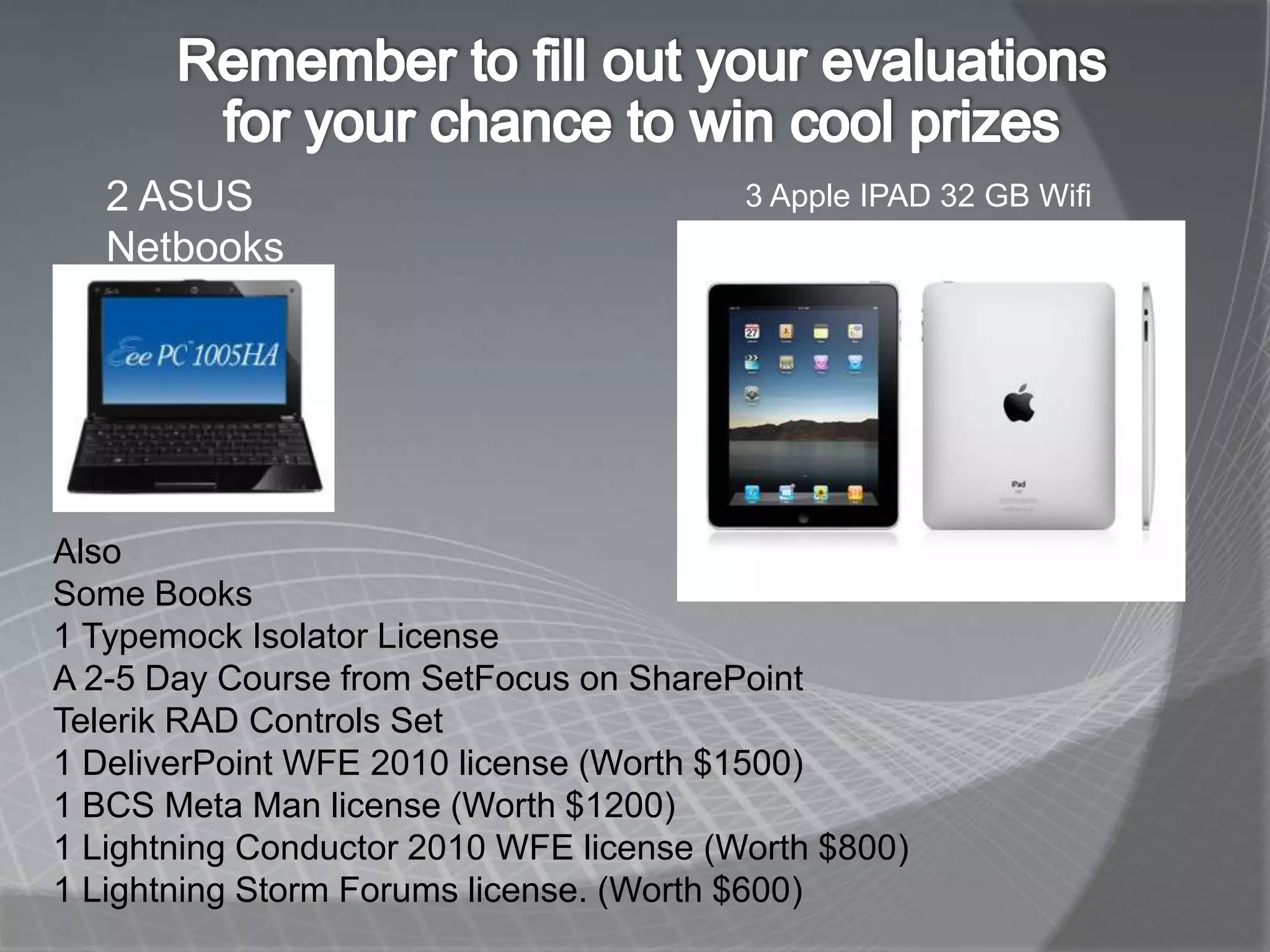
    2 ASUS NetbooksAlsoSome Books1 Typemock Isolator LicenseA 2-5 Day Course from SetFocus on SharePointTelerik RAD Controls Set1 DeliverPointWFE 2010 license (Worth $1500)1 BCS Meta Man license (Worth $1200)1 Lightning Conductor 2010 WFE license (Worth $800)1 Lightning Storm Forums license. (Worth $600)

Editor's Notes

  • #3 The first step is often the most difficult because you have to clean up the data before you can use it effectively. This is particularly difficult in finance where results are often restated.
  • #4 The most important tool in organizing data is OLAP cubes. BIDS, which installs with SQL Server, has wizards to help you create cubes. This work is usuallydone by a business analyst or information architect because it requires an in-depth knowledge of the data.
  • #5 This is the hardest step and you won’t be able to do it alone. At the very least you will need a business analyst or project manager with a comprehensive knowledge of the data and what it means. Creating analysis cubes especially is difficult because it requires a thorough understanding of how the business works and what Measures would be significant for the business users.
  • #6 Used to be a lot of smaller independent copies but now only one is left as a major player. Most of these products provide a set of targeted applications that can not be added extended with custom programming.
  • #7 The “Insights” slice of the Microsoft “pie”
  • #8 I know of company that has written a powerful risk analysis product for SharePoint 2010 – get name from my email
  • #9 This is the Functional view
  • #11 Plan your data connections and place them in data connection libraries--test them from all BI application: Excel spreadsheets, PowerPivot spreadsheets, Dashboard Designer, Reporting Services, etc.
  • #19 In SharePoint 2007, a separate web site was used to manage the Shared Service Provider (SSP). In SharePoint Server 2010 and hence Project Server 2010, all Service Applications can be managed directly in Central Admin (CA) – doesn’t require a separate site for management purposes.In the SSP model you traditionally consumed all available services from an SSP or none at all (Excel Services sometimes being an exception). In Project Server 2010 there is more flexibility, so you can pick and choose which Service Applications you want to consume within an individual web app.
  • #23 WFE = Web Front EndWhen you create a service application, a proxy for the service application is created at the same time. A proxy is a virtual entity that connects Web applications to service applications.Proxies for services in the local farm are not created by the administrator, but these appear along with the list of service applications in Central Administration. Some proxies might include settings that can be modified. For example, if a Web application is connected to multiple instances of the Managed Metadata service, you must indicate which of the proxies is connected to the primary service application which hosts the corporate taxonomy.Proxy groups are explained in more detail in the next slide.
  • #24 SA = Service ApplicationIn MOSS 2007 Web apps were tied to bundled services via SSPsIn Windows SharePoint Services (WSS) 4.0 it is a looser association, a web application is able to select from just the service application it needs to fulfill its user requirements – i.e. “a la carte” The Service Application Proxy Groups is what makes this possible.Web applications group multiple service application proxies into Service Application Proxy GroupsEnables a Web application to be tied to one or more sets of services, or a mix of multiple farm services.Note that some types of SharePoint 2010 services are capable of sharing their capabilities across server farms. But the project service application for Project Server 2010 does not.By default, all service applications are included in the default proxy group. You may remove service applications from the default proxy group if needed.When you create a Web application, you can select the default proxy group, or you can create a custom proxy group by selecting only the service applications that you want the Web application to use.Custom proxy groups are not reusable across multiple Web applications. Each time you select “custom” when creating a Web application, you are selecting services only for the Web application you are creating.
  • #25 This slide, which I took from one of the MSDN SharePoint 2010 BI video, might give you the idea that all you have to install is the Service Application and the Excel Calculation Service instance. Unfortunately, there’s a lot more to it.
  • #26 Installing Excel without adding SPNs for
  • #27 You will probably never use Claims unless you need Form Authentication and you will need Kerberos because you will be in a multi-server farm environment.
  • #29 Much easier if you deploy and test Excel services first!
  • #30 I’ve been trying to figure out what this ”1 hour later” in this diagram refers to. Does that mean how long it takes to create this diagram in Visio? I don’t think so!
  • #32 Let’s take a look at this