1
www.bispsolutions.com www.alacontec.com
Getting Started with Visualforce Part I
Sno Date Modification Author Verified By
1 2019/07/07 Initial Document Shivendra Singh
Pawar
Sumit Goyal
2
www.bispsolutions.com www.alacontec.com
Table of Contents
An Introduction to Visualforce..................................................................................................3
An Example ..............................................................................................................................4
Code Explanation ....................................................................................................................5
Create Visualforce Pages in the Developer Console............................................................5
Compose components to form a page structure.................................................................6
Final Output .............................................................................................................................6
Simple Variables and Formulas.................................................................................................6
Global Variable and Visualforce Expression..........................................................................6
Global Variables....................................................................................................................7
Formula Expression ..............................................................................................................7
3
www.bispsolutions.com www.alacontec.com
An Introduction to Visualforce
Visualforce is a web development framework that enables developers to build sophisticated, custom user
interfaces for mobile and desktop apps that can be hosted on the Lightning Platform. Visualforce enables
developers to extend Salesforce built-in features, replace them with new functionality, and build completely new
apps. Use powerful built-in standard controller features, or write your own custom business logic in Apex.
Developers create Visualforce pages by composing components, HTML, and optional styling elements.
Visualforce can integrate with any standard web technology or JavaScript framework to allow for a more
animated and rich user interface. Each page is accessible by a unique URL.
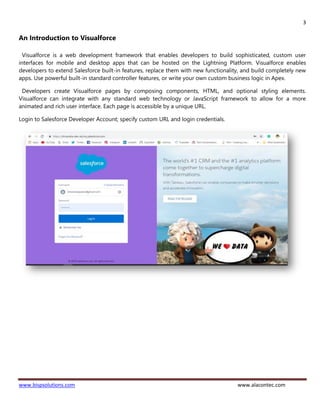
Login to Salesforce Developer Account; specify custom URL and login credentials.
4
www.bispsolutions.com www.alacontec.com
An Example
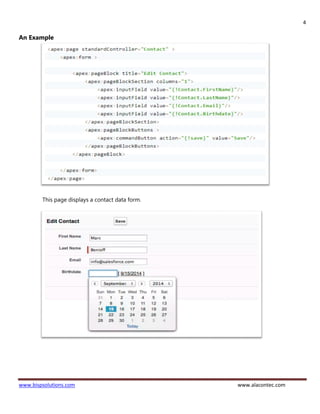
This page displays a contact data form.
5
www.bispsolutions.com www.alacontec.com
Code Explanation
• It connects to the Visualforce standard controller, a part of the Visualforce framework that provides
automatic data access and modification.
• When accessed without a record ID, the page displays a blank data entry form. When you click Save, a
new record is created from the form data.
Create and Edit Visualforce Page
Visualforce pages are basic building blocks for application developers. A Visualforce page is similar to a
standard Web page, but includes powerful features to access, display, and update your organization’s data.
Pages can be referenced and invoked via a unique URL.
Visualforce uses a tag-based markup language that’s similar to HTML.
Visualforce boasts nearly 150 built-in components, and provides a way for developers to create their own
components. Visualforce markup can be freely mixed with HTML markup, CSS styles, and JavaScript libraries,
giving you considerable flexibility in how you implement your app’s user interface.
Create Visualforce Pages in the Developer Console
Follow these steps of create Visualforce page in Developer Console:
1. Open Developer Console.
2. Click File –> New –> Visualforce page.
3. Enter name of your new page, and click OK.
4. A new blank Visualforce page opens in the Developer Console.
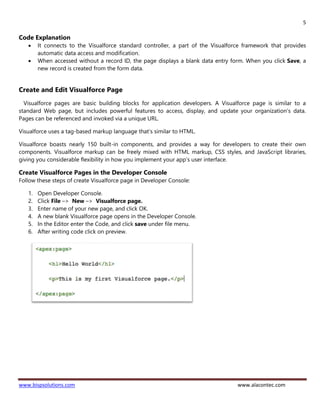
5. In the Editor enter the Code, and click save under file menu.
6. After writing code click on preview.
6
www.bispsolutions.com www.alacontec.com
Compose components to form a page structure
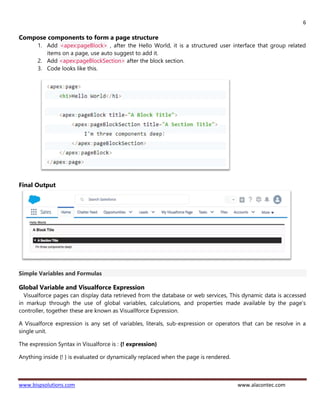
1. Add <apex:pageBlock> , after the Hello World, it is a structured user interface that group related
items on a page, use auto suggest to add it.
2. Add <apex:pageBlockSection> after the block section.
3. Code looks like this.
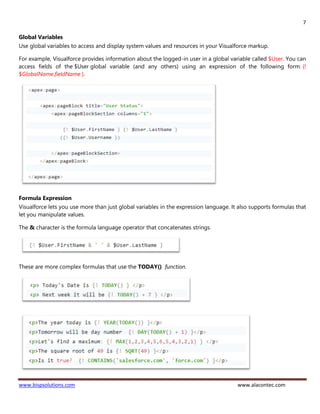
Final Output
Simple Variables and Formulas
Global Variable and Visualforce Expression
Visualforce pages can display data retrieved from the database or web services, This dynamic data is accessed
in markup through the use of global variables, calculations, and properties made available by the page’s
controller, together these are known as Visuallforce Expression.
A Visualforce expression is any set of variables, literals, sub-expression or operators that can be resolve in a
single unit.
The expression Syntax in Visualforce is : {! expression}
Anything inside {! } is evaluated or dynamically replaced when the page is rendered.
7
www.bispsolutions.com www.alacontec.com
Global Variables
Use global variables to access and display system values and resources in your Visualforce markup.
For example, Visualforce provides information about the logged-in user in a global variable called $User. You can
access fields of the $User global variable (and any others) using an expression of the following form: {!
$GlobalName.fieldName }.
Formula Expression
Visualforce lets you use more than just global variables in the expression language. It also supports formulas that
let you manipulate values.
The & character is the formula language operator that concatenates strings.
These are more complex formulas that use the TODAY() function.

Getting Started with Visualforce

  • 1.
    1 www.bispsolutions.com www.alacontec.com Getting Startedwith Visualforce Part I Sno Date Modification Author Verified By 1 2019/07/07 Initial Document Shivendra Singh Pawar Sumit Goyal
  • 2.
    2 www.bispsolutions.com www.alacontec.com Table ofContents An Introduction to Visualforce..................................................................................................3 An Example ..............................................................................................................................4 Code Explanation ....................................................................................................................5 Create Visualforce Pages in the Developer Console............................................................5 Compose components to form a page structure.................................................................6 Final Output .............................................................................................................................6 Simple Variables and Formulas.................................................................................................6 Global Variable and Visualforce Expression..........................................................................6 Global Variables....................................................................................................................7 Formula Expression ..............................................................................................................7
  • 3.
    3 www.bispsolutions.com www.alacontec.com An Introductionto Visualforce Visualforce is a web development framework that enables developers to build sophisticated, custom user interfaces for mobile and desktop apps that can be hosted on the Lightning Platform. Visualforce enables developers to extend Salesforce built-in features, replace them with new functionality, and build completely new apps. Use powerful built-in standard controller features, or write your own custom business logic in Apex. Developers create Visualforce pages by composing components, HTML, and optional styling elements. Visualforce can integrate with any standard web technology or JavaScript framework to allow for a more animated and rich user interface. Each page is accessible by a unique URL. Login to Salesforce Developer Account; specify custom URL and login credentials.
  • 4.
  • 5.
    5 www.bispsolutions.com www.alacontec.com Code Explanation •It connects to the Visualforce standard controller, a part of the Visualforce framework that provides automatic data access and modification. • When accessed without a record ID, the page displays a blank data entry form. When you click Save, a new record is created from the form data. Create and Edit Visualforce Page Visualforce pages are basic building blocks for application developers. A Visualforce page is similar to a standard Web page, but includes powerful features to access, display, and update your organization’s data. Pages can be referenced and invoked via a unique URL. Visualforce uses a tag-based markup language that’s similar to HTML. Visualforce boasts nearly 150 built-in components, and provides a way for developers to create their own components. Visualforce markup can be freely mixed with HTML markup, CSS styles, and JavaScript libraries, giving you considerable flexibility in how you implement your app’s user interface. Create Visualforce Pages in the Developer Console Follow these steps of create Visualforce page in Developer Console: 1. Open Developer Console. 2. Click File –> New –> Visualforce page. 3. Enter name of your new page, and click OK. 4. A new blank Visualforce page opens in the Developer Console. 5. In the Editor enter the Code, and click save under file menu. 6. After writing code click on preview.
  • 6.
    6 www.bispsolutions.com www.alacontec.com Compose componentsto form a page structure 1. Add <apex:pageBlock> , after the Hello World, it is a structured user interface that group related items on a page, use auto suggest to add it. 2. Add <apex:pageBlockSection> after the block section. 3. Code looks like this. Final Output Simple Variables and Formulas Global Variable and Visualforce Expression Visualforce pages can display data retrieved from the database or web services, This dynamic data is accessed in markup through the use of global variables, calculations, and properties made available by the page’s controller, together these are known as Visuallforce Expression. A Visualforce expression is any set of variables, literals, sub-expression or operators that can be resolve in a single unit. The expression Syntax in Visualforce is : {! expression} Anything inside {! } is evaluated or dynamically replaced when the page is rendered.
  • 7.
    7 www.bispsolutions.com www.alacontec.com Global Variables Useglobal variables to access and display system values and resources in your Visualforce markup. For example, Visualforce provides information about the logged-in user in a global variable called $User. You can access fields of the $User global variable (and any others) using an expression of the following form: {! $GlobalName.fieldName }. Formula Expression Visualforce lets you use more than just global variables in the expression language. It also supports formulas that let you manipulate values. The & character is the formula language operator that concatenates strings. These are more complex formulas that use the TODAY() function.