Chapter 1
Introducing Visualforce
Mohammed S. A. Kwaik
26/8/2013
msabukwaik@gmil.com
www.facebook.com/msabukwaik
Introducing Visualforce
• The Force.com platform offers separate tools for defining
• The structure of the data—that is, the data model
• The rules that detail how that data can be manipulated—that is, the business
logic
• The layouts that specify how that data should be displayed—that is, the user
interface
• Splitting up application development tools based on whether they
affect the data model, business logic, or user interface is also known
as the Model-View-Controller (MVC) application development
pattern—the Model is the data model, the View is the user interface,
and the Controller is the business logic.
What is Visualforce?
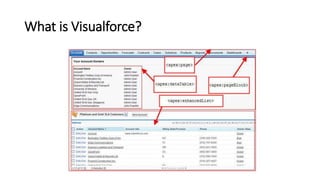
• Visualforce is a framework that allows developers to build
sophisticated, custom user interfaces that can be hosted natively on
the Force.com platform.
• The Visualforce framework includes a tag-based markup language,
similar to HTML.
• The behavior of Visualforce components can either be controlled by
the same logic that is used in standard Salesforce pages, or
developers can associate their own logic with a controller class
written in Apex.
What is Visualforce?
What is a Visualforce Page?
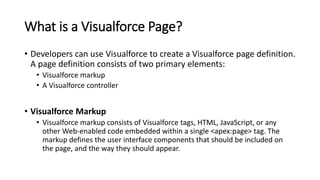
• Developers can use Visualforce to create a Visualforce page definition.
A page definition consists of two primary elements:
• Visualforce markup
• A Visualforce controller
• Visualforce Markup
• Visualforce markup consists of Visualforce tags, HTML, JavaScript, or any
other Web-enabled code embedded within a single <apex:page> tag. The
markup defines the user interface components that should be included on
the page, and the way they should appear.
What is a Visualforce Page?
• Visualforce Controllers
• A Visualforce controller is a set of instructions that specify what happens
when a user interacts with the components specified in associated Visualforce
markup.
• A developer can either use a standard controller provided by the Force.com
platform, or add custom controller logic with a class written in Apex:
• A standard controller consists of the same functionality and logic that is used for a
standard Salesforce page. For example, if you use the standard Accounts controller,
clicking a Save button in a Visualforce page results in the same behavior as clicking Save
on a standard Account edit page.
• If you use a standard controller on a page and the user doesn't have access to the object,
the page will display a insufficient privileges error message. You can avoid this by
checking the user's accessibility for an object and displaying components appropriately.
Where Can Visualforce Pages Be Used?
• Override standard buttons, such as the New button for accounts, or
the Save button for contacts
• Override tab overview pages, such as the Accounts tab home page
• Define custom tabs
• Embed components in detail page layouts
• Create dashboard components or custom help pages
• Customize, extend, or integrate the sidebars in the Salesforce console
(custom console components)
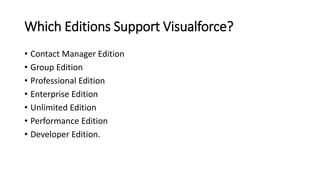
Which Editions Support Visualforce?
• Contact Manager Edition
• Group Edition
• Professional Edition
• Enterprise Edition
• Unlimited Edition
• Performance Edition
• Developer Edition.
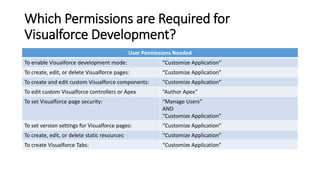
Which Permissions are Required for
Visualforce Development?
User Permissions Needed
To enable Visualforce development mode: “Customize Application”
To create, edit, or delete Visualforce pages: “Customize Application”
To create and edit custom Visualforce components: “Customize Application”
To edit custom Visualforce controllers or Apex “Author Apex”
To set Visualforce page security: “Manage Users”
AND
“Customize Application”
To set version settings for Visualforce pages: “Customize Application”
To create, edit, or delete static resources: “Customize Application”
To create Visualforce Tabs: “Customize Application”
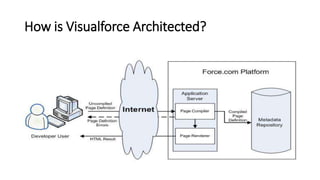
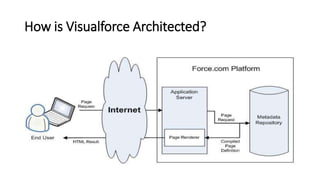
How is Visualforce Architected?
What are the Benefits of Visualforce?
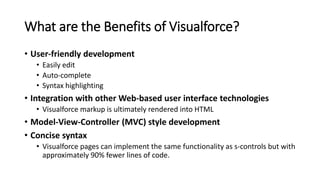
• User-friendly development
• Easily edit
• Auto-complete
• Syntax highlighting
• Integration with other Web-based user interface technologies
• Visualforce markup is ultimately rendered into HTML
• Model-View-Controller (MVC) style development
• Concise syntax
• Visualforce pages can implement the same functionality as s-controls but with
approximately 90% fewer lines of code.
What are the Benefits of Visualforce?
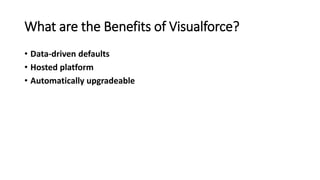
• Data-driven defaults
• Hosted platform
• Automatically upgradeable
When Should I Use Visualforce?
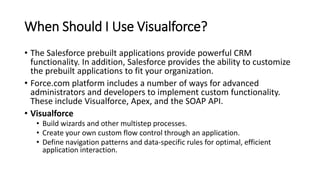
• The Salesforce prebuilt applications provide powerful CRM
functionality. In addition, Salesforce provides the ability to customize
the prebuilt applications to fit your organization.
• Force.com platform includes a number of ways for advanced
administrators and developers to implement custom functionality.
These include Visualforce, Apex, and the SOAP API.
• Visualforce
• Build wizards and other multistep processes.
• Create your own custom flow control through an application.
• Define navigation patterns and data-specific rules for optimal, efficient
application interaction.
When Should I Use Visualforce?
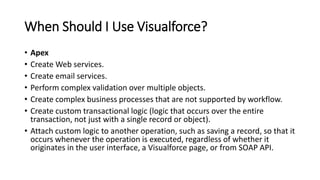
• Apex
• Create Web services.
• Create email services.
• Perform complex validation over multiple objects.
• Create complex business processes that are not supported by workflow.
• Create custom transactional logic (logic that occurs over the entire
transaction, not just with a single record or object).
• Attach custom logic to another operation, such as saving a record, so that it
occurs whenever the operation is executed, regardless of whether it
originates in the user interface, a Visualforce page, or from SOAP API.
When Should I Use Visualforce?
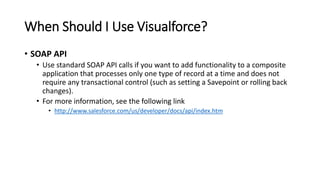
• SOAP API
• Use standard SOAP API calls if you want to add functionality to a composite
application that processes only one type of record at a time and does not
require any transactional control (such as setting a Savepoint or rolling back
changes).
• For more information, see the following link
• http://www.salesforce.com/us/developer/docs/api/index.htm
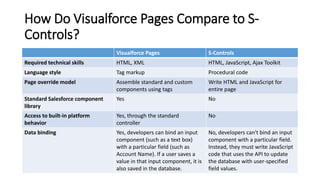
How Do Visualforce Pages Compare to S-
Controls?
Visualforce Pages S-Controls
Required technical skills HTML, XML HTML, JavaScript, Ajax Toolkit
Language style Tag markup Procedural code
Page override model Assemble standard and custom
components using tags
Write HTML and JavaScript for
entire page
Standard Salesforce component
library
Yes No
Access to built-in platform
behavior
Yes, through the standard
controller
No
Data binding Yes, developers can bind an input
component (such as a text box)
with a particular field (such as
Account Name). If a user saves a
value in that input component, it is
also saved in the database.
No, developers can't bind an input
component with a particular field.
Instead, they must write JavaScript
code that uses the API to update
the database with user-specified
field values.
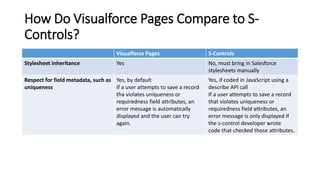
How Do Visualforce Pages Compare to S-
Controls?
Visualforce Pages S-Controls
Stylesheet inheritance Yes No, must bring in Salesforce
stylesheets manually
Respect for field metadata, such as
uniqueness
Yes, by default
If a user attempts to save a record
tha violates uniqueness or
requiredness field attributes, an
error message is automatically
displayed and the user can try
again.
Yes, if coded in JavaScript using a
describe API call
If a user attempts to save a record
that violates uniqueness or
requiredness field attributes, an
error message is only displayed if
the s-control developer wrote
code that checked those attributes.
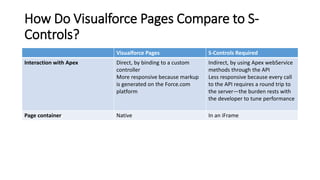
How Do Visualforce Pages Compare to S-
Controls?
Visualforce Pages S-Controls Required
Interaction with Apex Direct, by binding to a custom
controller
More responsive because markup
is generated on the Force.com
platform
Indirect, by using Apex webService
methods through the API
Less responsive because every call
to the API requires a round trip to
the server—the burden rests with
the developer to tune performance
Page container Native In an iFrame

Introducing Visualforce

  • 1.
    Chapter 1 Introducing Visualforce MohammedS. A. Kwaik 26/8/2013 msabukwaik@gmil.com www.facebook.com/msabukwaik
  • 2.
    Introducing Visualforce • TheForce.com platform offers separate tools for defining • The structure of the data—that is, the data model • The rules that detail how that data can be manipulated—that is, the business logic • The layouts that specify how that data should be displayed—that is, the user interface • Splitting up application development tools based on whether they affect the data model, business logic, or user interface is also known as the Model-View-Controller (MVC) application development pattern—the Model is the data model, the View is the user interface, and the Controller is the business logic.
  • 3.
    What is Visualforce? •Visualforce is a framework that allows developers to build sophisticated, custom user interfaces that can be hosted natively on the Force.com platform. • The Visualforce framework includes a tag-based markup language, similar to HTML. • The behavior of Visualforce components can either be controlled by the same logic that is used in standard Salesforce pages, or developers can associate their own logic with a controller class written in Apex.
  • 4.
  • 5.
    What is aVisualforce Page? • Developers can use Visualforce to create a Visualforce page definition. A page definition consists of two primary elements: • Visualforce markup • A Visualforce controller • Visualforce Markup • Visualforce markup consists of Visualforce tags, HTML, JavaScript, or any other Web-enabled code embedded within a single <apex:page> tag. The markup defines the user interface components that should be included on the page, and the way they should appear.
  • 6.
    What is aVisualforce Page? • Visualforce Controllers • A Visualforce controller is a set of instructions that specify what happens when a user interacts with the components specified in associated Visualforce markup. • A developer can either use a standard controller provided by the Force.com platform, or add custom controller logic with a class written in Apex: • A standard controller consists of the same functionality and logic that is used for a standard Salesforce page. For example, if you use the standard Accounts controller, clicking a Save button in a Visualforce page results in the same behavior as clicking Save on a standard Account edit page. • If you use a standard controller on a page and the user doesn't have access to the object, the page will display a insufficient privileges error message. You can avoid this by checking the user's accessibility for an object and displaying components appropriately.
  • 7.
    Where Can VisualforcePages Be Used? • Override standard buttons, such as the New button for accounts, or the Save button for contacts • Override tab overview pages, such as the Accounts tab home page • Define custom tabs • Embed components in detail page layouts • Create dashboard components or custom help pages • Customize, extend, or integrate the sidebars in the Salesforce console (custom console components)
  • 8.
    Which Editions SupportVisualforce? • Contact Manager Edition • Group Edition • Professional Edition • Enterprise Edition • Unlimited Edition • Performance Edition • Developer Edition.
  • 9.
    Which Permissions areRequired for Visualforce Development? User Permissions Needed To enable Visualforce development mode: “Customize Application” To create, edit, or delete Visualforce pages: “Customize Application” To create and edit custom Visualforce components: “Customize Application” To edit custom Visualforce controllers or Apex “Author Apex” To set Visualforce page security: “Manage Users” AND “Customize Application” To set version settings for Visualforce pages: “Customize Application” To create, edit, or delete static resources: “Customize Application” To create Visualforce Tabs: “Customize Application”
  • 10.
    How is VisualforceArchitected?
  • 11.
    How is VisualforceArchitected?
  • 12.
    What are theBenefits of Visualforce? • User-friendly development • Easily edit • Auto-complete • Syntax highlighting • Integration with other Web-based user interface technologies • Visualforce markup is ultimately rendered into HTML • Model-View-Controller (MVC) style development • Concise syntax • Visualforce pages can implement the same functionality as s-controls but with approximately 90% fewer lines of code.
  • 13.
    What are theBenefits of Visualforce? • Data-driven defaults • Hosted platform • Automatically upgradeable
  • 14.
    When Should IUse Visualforce? • The Salesforce prebuilt applications provide powerful CRM functionality. In addition, Salesforce provides the ability to customize the prebuilt applications to fit your organization. • Force.com platform includes a number of ways for advanced administrators and developers to implement custom functionality. These include Visualforce, Apex, and the SOAP API. • Visualforce • Build wizards and other multistep processes. • Create your own custom flow control through an application. • Define navigation patterns and data-specific rules for optimal, efficient application interaction.
  • 15.
    When Should IUse Visualforce? • Apex • Create Web services. • Create email services. • Perform complex validation over multiple objects. • Create complex business processes that are not supported by workflow. • Create custom transactional logic (logic that occurs over the entire transaction, not just with a single record or object). • Attach custom logic to another operation, such as saving a record, so that it occurs whenever the operation is executed, regardless of whether it originates in the user interface, a Visualforce page, or from SOAP API.
  • 16.
    When Should IUse Visualforce? • SOAP API • Use standard SOAP API calls if you want to add functionality to a composite application that processes only one type of record at a time and does not require any transactional control (such as setting a Savepoint or rolling back changes). • For more information, see the following link • http://www.salesforce.com/us/developer/docs/api/index.htm
  • 17.
    How Do VisualforcePages Compare to S- Controls? Visualforce Pages S-Controls Required technical skills HTML, XML HTML, JavaScript, Ajax Toolkit Language style Tag markup Procedural code Page override model Assemble standard and custom components using tags Write HTML and JavaScript for entire page Standard Salesforce component library Yes No Access to built-in platform behavior Yes, through the standard controller No Data binding Yes, developers can bind an input component (such as a text box) with a particular field (such as Account Name). If a user saves a value in that input component, it is also saved in the database. No, developers can't bind an input component with a particular field. Instead, they must write JavaScript code that uses the API to update the database with user-specified field values.
  • 18.
    How Do VisualforcePages Compare to S- Controls? Visualforce Pages S-Controls Stylesheet inheritance Yes No, must bring in Salesforce stylesheets manually Respect for field metadata, such as uniqueness Yes, by default If a user attempts to save a record tha violates uniqueness or requiredness field attributes, an error message is automatically displayed and the user can try again. Yes, if coded in JavaScript using a describe API call If a user attempts to save a record that violates uniqueness or requiredness field attributes, an error message is only displayed if the s-control developer wrote code that checked those attributes.
  • 19.
    How Do VisualforcePages Compare to S- Controls? Visualforce Pages S-Controls Required Interaction with Apex Direct, by binding to a custom controller More responsive because markup is generated on the Force.com platform Indirect, by using Apex webService methods through the API Less responsive because every call to the API requires a round trip to the server—the burden rests with the developer to tune performance Page container Native In an iFrame