

Coding the Salesforce1
Platform User Interface
June 17, 2014
Keir Bowden
CTO, BrightGen
@bob_buzzard
What
Why
How
Agenda
What
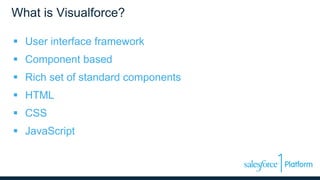
What is Visualforce?
 User interface framework
 Component based
 Rich set of standard components
 HTML
 CSS
 JavaScript
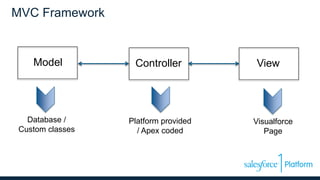
MVC Framework
ViewModel Controller
Platform provided
/ Apex coded
Visualforce
Page
Database /
Custom classes
What
Why
How
Agenda
Why
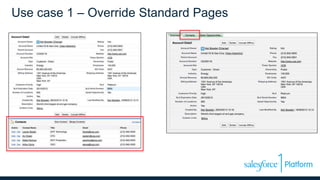
Use case 1 – Override Standard Pages
Use Case 1 Features
 Standard Controller
– Required to override standard page
– Manages a Salesforce record
• Account in this example
– Declarative – no Apex code
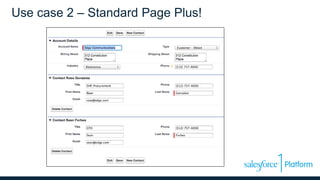
Use case 2 – Standard Page Plus!
Use Case 2 Features
 Standard Controller
– As use case 1
– Managing Account
 Extension Controller
– Coded in Apex
– Extends Standard Controller
– Managing Contacts
– Delegate to Standard Controller
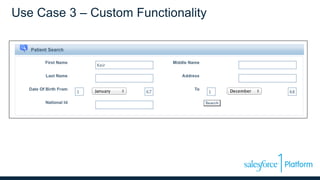
Use Case 3 – Custom Functionality
Use Case 3 Features
 Custom Controller
– No standard controller to extend
– Coded in Apex from scratch
– Method to execute search
– All data managed in properties
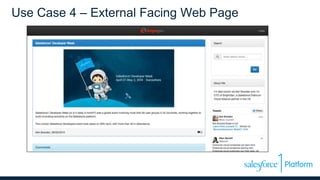
Use Case 4 – External Facing Web Page
Use Case 4 Features
 Any type of controller (including none)
 Exclude Salesforce Styling, Elements
 Regular HTML
 External CSS and JavaScript Libraries
 Surfaced through Force.com Site
What
Why
How
Agenda
How
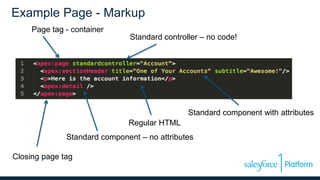
Example Page - Markup
Page tag - container
Standard controller – no code!
Standard component with attributes
Regular HTML
Standard component – no attributes
Closing page tag
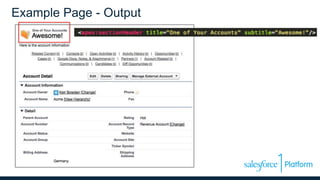
Example Page - Output
Components
 Elements on a page
– Standard library – 100+
– Custom components
• Functional Decomposition
• DRY
• Custom controller only
• Attributes influence behaviour
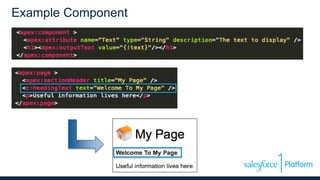
Example Component
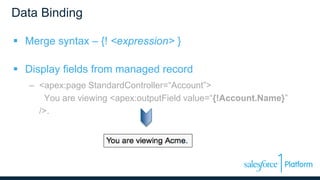
Data Binding
 Merge syntax – {! <expression> }
 Display fields from managed record
– <apex:page StandardController=“Account”>
You are viewing <apex:outputField value=“{!Account.Name}”
/>.
Data Binding
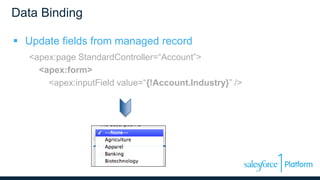
 Update fields from managed record
<apex:page StandardController=“Account”>
<apex:form>
<apex:inputField value=“{!Account.Industry}” />
Data Binding
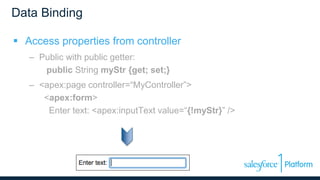
 Access properties from controller
– Public with public getter:
public String myStr {get; set;}
– <apex:page controller=“MyController”>
<apex:form>
Enter text: <apex:inputText value=“{!myStr}” />
Action Binding
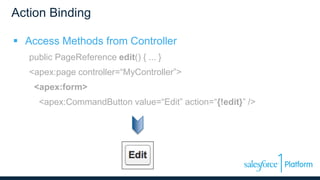
 Access Methods from Controller
public PageReference edit() { ... }
<apex:page controller=“MyController”>
<apex:form>
<apex:CommandButton value=“Edit” action=“{!edit}” />
Where Next?
 https://developer.salesforce.com
– Developer Portal
– Documentation, Wiki, Blogs, Forums
 Developer Edition - http://bobbuzz.me.uk/1n2NND2
– All Salesforce features
– Restrictions on users and records
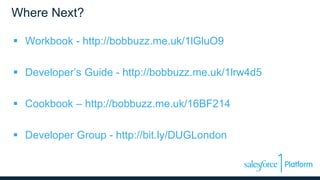
Where Next?
 Workbook - http://bobbuzz.me.uk/1lGluO9
 Developer’s Guide - http://bobbuzz.me.uk/1lrw4d5
 Cookbook – http://bobbuzz.me.uk/16BF214
 Developer Group - http://bit.ly/DUGLondon
Thank You

Coding the Salesforce1 Platform User Interface

  • 1.
    Coding the Salesforce1 PlatformUser Interface June 17, 2014
  • 2.
  • 3.
  • 4.
    What is Visualforce? User interface framework  Component based  Rich set of standard components  HTML  CSS  JavaScript
  • 5.
    MVC Framework ViewModel Controller Platformprovided / Apex coded Visualforce Page Database / Custom classes
  • 6.
  • 7.
    Use case 1– Override Standard Pages
  • 8.
    Use Case 1Features  Standard Controller – Required to override standard page – Manages a Salesforce record • Account in this example – Declarative – no Apex code
  • 9.
    Use case 2– Standard Page Plus!
  • 10.
    Use Case 2Features  Standard Controller – As use case 1 – Managing Account  Extension Controller – Coded in Apex – Extends Standard Controller – Managing Contacts – Delegate to Standard Controller
  • 11.
    Use Case 3– Custom Functionality
  • 12.
    Use Case 3Features  Custom Controller – No standard controller to extend – Coded in Apex from scratch – Method to execute search – All data managed in properties
  • 13.
    Use Case 4– External Facing Web Page
  • 14.
    Use Case 4Features  Any type of controller (including none)  Exclude Salesforce Styling, Elements  Regular HTML  External CSS and JavaScript Libraries  Surfaced through Force.com Site
  • 15.
  • 16.
    Example Page -Markup Page tag - container Standard controller – no code! Standard component with attributes Regular HTML Standard component – no attributes Closing page tag
  • 17.
  • 18.
    Components  Elements ona page – Standard library – 100+ – Custom components • Functional Decomposition • DRY • Custom controller only • Attributes influence behaviour
  • 19.
  • 20.
    Data Binding  Mergesyntax – {! <expression> }  Display fields from managed record – <apex:page StandardController=“Account”> You are viewing <apex:outputField value=“{!Account.Name}” />.
  • 21.
    Data Binding  Updatefields from managed record <apex:page StandardController=“Account”> <apex:form> <apex:inputField value=“{!Account.Industry}” />
  • 22.
    Data Binding  Accessproperties from controller – Public with public getter: public String myStr {get; set;} – <apex:page controller=“MyController”> <apex:form> Enter text: <apex:inputText value=“{!myStr}” />
  • 23.
    Action Binding  AccessMethods from Controller public PageReference edit() { ... } <apex:page controller=“MyController”> <apex:form> <apex:CommandButton value=“Edit” action=“{!edit}” />
  • 24.
    Where Next?  https://developer.salesforce.com –Developer Portal – Documentation, Wiki, Blogs, Forums  Developer Edition - http://bobbuzz.me.uk/1n2NND2 – All Salesforce features – Restrictions on users and records
  • 25.
    Where Next?  Workbook- http://bobbuzz.me.uk/1lGluO9  Developer’s Guide - http://bobbuzz.me.uk/1lrw4d5  Cookbook – http://bobbuzz.me.uk/16BF214  Developer Group - http://bit.ly/DUGLondon
  • 26.

Editor's Notes

  • #22 Must be wrapped in form, as will generate an HTML input element. Note that the appropriate input for the field type is generated – in this case the field is a picklist, so a select input is generated to allow the user to choose one of the defined picklist values.