Introduction to Visualforce

Samantha Ready, salesforce.com, Developer Evangelist
@samantha_ready
Safe Harbor
 Safe harbor statement under the Private Securities Litigation Reform Act of 1995:

 This presentation may contain forward-looking statements that involve risks, uncertainties, and assumptions. If any such uncertainties
 materialize or if any of the assumptions proves incorrect, the results of salesforce.com, inc. could differ materially from the results
 expressed or implied by the forward-looking statements we make. All statements other than statements of historical fact could be
 deemed forward-looking, including any projections of product or service availability, subscriber growth, earnings, revenues, or other
 financial items and any statements regarding strategies or plans of management for future operations, statements of belief, any
 statements concerning new, planned, or upgraded services or technology developments and customer contracts or use of our services.

 The risks and uncertainties referred to above include – but are not limited to – risks associated with developing and delivering new
 functionality for our service, new products and services, our new business model, our past operating losses, possible fluctuations in our
 operating results and rate of growth, interruptions or delays in our Web hosting, breach of our security measures, the outcome of
 intellectual property and other litigation, risks associated with possible mergers and acquisitions, the immature market in which we
 operate, our relatively limited operating history, our ability to expand, retain, and motivate our employees and manage our growth, new
 releases of our service and successful customer deployment, our limited history reselling non-salesforce.com products, and utilization
 and selling to larger enterprise customers. Further information on potential factors that could affect the financial results of
 salesforce.com, inc. is included in our annual report on Form 10-Q for the most recent fiscal quarter ended July 31, 2012. This
 documents and others containing important disclosures are available on the SEC Filings section of the Investor Information section of
 our Web site.

 Any unreleased services or features referenced in this or other presentations, press releases or public statements are not currently
 available and may not be delivered on time or at all. Customers who purchase our services should make the purchase decisions based
 upon features that are currently available. Salesforce.com, inc. assumes no obligation and does not intend to update these forward-
 looking statements.
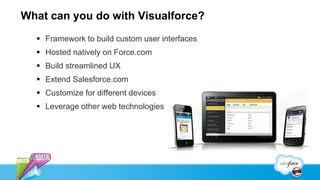
What can you do with Visualforce?
   Framework to build custom user interfaces
   Hosted natively on Force.com
   Build streamlined UX
   Extend Salesforce.com
   Customize for different devices
   Leverage other web technologies
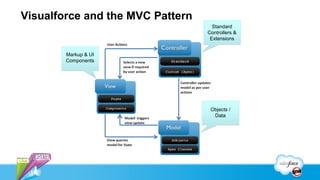
Visualforce and the MVC Pattern
                                    Standard
                                  Controllers &
                                   Extensions


        Markup & UI
        Components


                                   Objects /
                                    Data
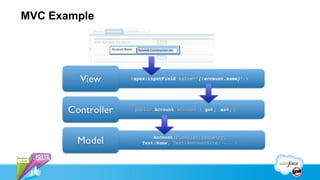
MVC Example
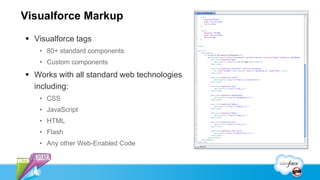
Visualforce Markup
 Visualforce tags
   • 80+ standard components
   • Custom components
 Works with all standard web technologies
  including:
   • CSS
   • JavaScript
   • HTML
   • Flash
   • Any other Web-Enabled Code
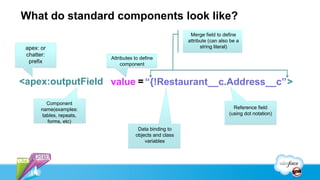
What do standard components look like?
                                                          Merge field to define
                                                         attribute (can also be a
 apex: or                                                      string literal)
 chatter:
                          Attributes to define
  prefix                       component


<apex:outputField value = “{!Restaurant__c.Address__c” >

         Component
       name(examples:                                                         Reference field
       tables, repeats,                                                     (using dot notation)
         forms, etc)
                                      Data binding to
                                     objects and class
                                         variables
Visualforce Controllers
   Provides access to data
   Logic for handling UI interaction
   Standard Controllers
      • Same functionality as standard pages
          – Save, delete, field access etc.

   Custom Controllers
      • Written in Apex
      • Override standard behavior
      • Controller Extensions
What does that look like in code?

          Defined at the
           page level
                                              Supports both
                                               standard and
                                              custom objects

<apex:page standardController = “Restaurant__c” extensions =“yelpExtension” >

                                                                Use custom
                     If only using custom controllers,
                                                               controller logic
                     use controller=“controllerName”
                                                                  to extend
                                                                  standard
                                                                 controllers
What does Visualforce look like?
                                          column


datatable
                                                     command button


                            outputfield


                                                   markup
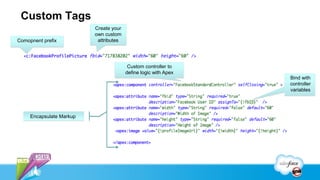
Custom Tags
                          Create your
                          own custom
Comopnent prefix           attributes


                                         Custom controller to
                                        define logic with Apex
                                                                 Bind with
                                                                 controller
                                                                 variables


     Encapsulate Markup
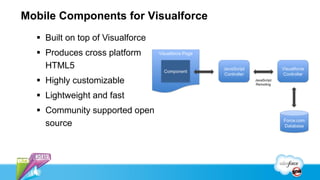
Mobile Components for Visualforce
   Built on top of Visualforce
   Produces cross platform
    HTML5
   Highly customizable
   Lightweight and fast
   Community supported open
    source
Breakdown of a Simple Mobile Page
SplitView
Template
                                       Detail
                                     Component


               List
            Component
Where else can Visualforce be used?
   Email Templates
   Dashboard Components
   Define custom tabs
   Custom sections on detail pages
   Override standard behavior
     • Button clicks ex: perform save on
       detail page with custom logic
What else can you do with
Visualforce?
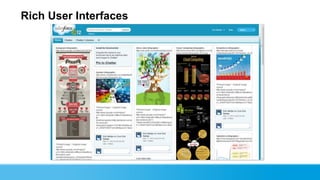
Rich User Interfaces
Complete Web Apps
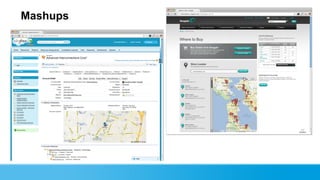
Mashups
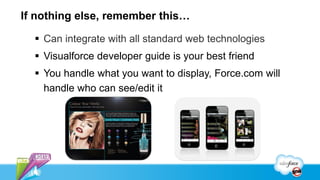
If nothing else, remember this…

   Can integrate with all standard web technologies
   Visualforce developer guide is your best friend
   You handle what you want to display, Force.com will
    handle who can see/edit it
Next Steps
   Developer.force.com
   Mini-workshops

Recorded Sessions
   “7 Habits of Highly Efficient Visualforce Pages”
   “Building the New AppExchange Using Responsive Design”
   “Mobile Components for Visualforce”
Samantha Ready
Developer Evangelist,
 @samantha_ready
Introduction to Visualforce

Introduction to Visualforce

  • 1.
    Introduction to Visualforce SamanthaReady, salesforce.com, Developer Evangelist @samantha_ready
  • 2.
    Safe Harbor Safeharbor statement under the Private Securities Litigation Reform Act of 1995: This presentation may contain forward-looking statements that involve risks, uncertainties, and assumptions. If any such uncertainties materialize or if any of the assumptions proves incorrect, the results of salesforce.com, inc. could differ materially from the results expressed or implied by the forward-looking statements we make. All statements other than statements of historical fact could be deemed forward-looking, including any projections of product or service availability, subscriber growth, earnings, revenues, or other financial items and any statements regarding strategies or plans of management for future operations, statements of belief, any statements concerning new, planned, or upgraded services or technology developments and customer contracts or use of our services. The risks and uncertainties referred to above include – but are not limited to – risks associated with developing and delivering new functionality for our service, new products and services, our new business model, our past operating losses, possible fluctuations in our operating results and rate of growth, interruptions or delays in our Web hosting, breach of our security measures, the outcome of intellectual property and other litigation, risks associated with possible mergers and acquisitions, the immature market in which we operate, our relatively limited operating history, our ability to expand, retain, and motivate our employees and manage our growth, new releases of our service and successful customer deployment, our limited history reselling non-salesforce.com products, and utilization and selling to larger enterprise customers. Further information on potential factors that could affect the financial results of salesforce.com, inc. is included in our annual report on Form 10-Q for the most recent fiscal quarter ended July 31, 2012. This documents and others containing important disclosures are available on the SEC Filings section of the Investor Information section of our Web site. Any unreleased services or features referenced in this or other presentations, press releases or public statements are not currently available and may not be delivered on time or at all. Customers who purchase our services should make the purchase decisions based upon features that are currently available. Salesforce.com, inc. assumes no obligation and does not intend to update these forward- looking statements.
  • 3.
    What can youdo with Visualforce?  Framework to build custom user interfaces  Hosted natively on Force.com  Build streamlined UX  Extend Salesforce.com  Customize for different devices  Leverage other web technologies
  • 4.
    Visualforce and theMVC Pattern Standard Controllers & Extensions Markup & UI Components Objects / Data
  • 5.
  • 6.
    Visualforce Markup  Visualforcetags • 80+ standard components • Custom components  Works with all standard web technologies including: • CSS • JavaScript • HTML • Flash • Any other Web-Enabled Code
  • 7.
    What do standardcomponents look like? Merge field to define attribute (can also be a apex: or string literal) chatter: Attributes to define prefix component <apex:outputField value = “{!Restaurant__c.Address__c” > Component name(examples: Reference field tables, repeats, (using dot notation) forms, etc) Data binding to objects and class variables
  • 8.
    Visualforce Controllers  Provides access to data  Logic for handling UI interaction  Standard Controllers • Same functionality as standard pages – Save, delete, field access etc.  Custom Controllers • Written in Apex • Override standard behavior • Controller Extensions
  • 9.
    What does thatlook like in code? Defined at the page level Supports both standard and custom objects <apex:page standardController = “Restaurant__c” extensions =“yelpExtension” > Use custom If only using custom controllers, controller logic use controller=“controllerName” to extend standard controllers
  • 10.
    What does Visualforcelook like? column datatable command button outputfield markup
  • 11.
    Custom Tags Create your own custom Comopnent prefix attributes Custom controller to define logic with Apex Bind with controller variables Encapsulate Markup
  • 12.
    Mobile Components forVisualforce  Built on top of Visualforce  Produces cross platform HTML5  Highly customizable  Lightweight and fast  Community supported open source
  • 13.
    Breakdown of aSimple Mobile Page SplitView Template Detail Component List Component
  • 14.
    Where else canVisualforce be used?  Email Templates  Dashboard Components  Define custom tabs  Custom sections on detail pages  Override standard behavior • Button clicks ex: perform save on detail page with custom logic
  • 15.
    What else canyou do with Visualforce?
  • 16.
  • 17.
  • 18.
  • 19.
    If nothing else,remember this…  Can integrate with all standard web technologies  Visualforce developer guide is your best friend  You handle what you want to display, Force.com will handle who can see/edit it
  • 20.
    Next Steps  Developer.force.com  Mini-workshops Recorded Sessions  “7 Habits of Highly Efficient Visualforce Pages”  “Building the New AppExchange Using Responsive Design”  “Mobile Components for Visualforce”
  • 21.