#forcewebinar
Coding Apps in the Cloud with Force.com – Part II
March 31st , 2016
#forcewebinar#forcewebinar
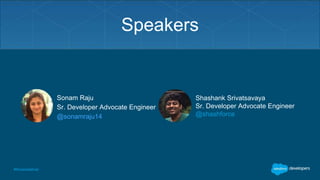
Speakers
Shashank Srivatsavaya
Sr. Developer Advocate Engineer
@shashforce
Sonam Raju
Sr. Developer Advocate Engineer
@sonamraju14
Forward Looking Statement
This presentation may contain forward-looking statements that involve risks, uncertainties, and assumptions. If any such uncertainties
materialize or if any of the assumptions proves incorrect, the results of salesforce.com, inc. could differ materially from the results expressed or
implied by the forward-looking statements we make. All statements other than statements of historical fact could be deemed forward-looking,
including any projections of product or service availability, subscriber growth, earnings, revenues, or other financial items and any statements
regarding strategies or plans of management for future operations, statements of belief, any statements concerning new, planned, or upgraded
services or technology developments and customer contracts or use of our services.
The risks and uncertainties referred to above include – but are not limited to – risks associated with developing and delivering new functionality
for our service, new products and services, our new business model, our past operating losses, possible fluctuations in our operating results
and rate of growth, interruptions or delays in our Web hosting, breach of our security measures, the outcome of any litigation, risks associated
with completed and any possible mergers and acquisitions, the immature market in which we operate, our relatively limited operating history,
our ability to expand, retain, and motivate our employees and manage our growth, new releases of our service and successful customer
deployment, our limited history reselling non-salesforce.com products, and utilization and selling to larger enterprise customers. Further
information on potential factors that could affect the financial results of salesforce.com, inc. is included in our annual report on Form 10-K for
the most recent fiscal year and in our quarterly report on Form 10-Q for the most recent fiscal quarter. These documents and others containing
important disclosures are available on the SEC Filings section of the Investor Information section of our Web site.
Any unreleased services or features referenced in this or other presentations, press releases or public statements are not currently available
and may not be delivered on time or at all. Customers who purchase our services should make the purchase decisions based upon features
that are currently available. Salesforce.com, inc. assumes no obligation and does not intend to update these forward-looking statements.
Statement under the Private Securities Litigation Reform Act of 1995:
#forcewebinar
Go Social!
@salesforcedevs / #forcewebinar
Salesforce Developers
This webinar is being recorded!
The video will be posted to
YouTube & the webinar recap
page (same URL as
registration).
#forcewebinar
Agenda
• Part I – Demo
• Visualforce Pages
• Controllers
• Javascript in Visualforce Pages
• Part II - Demo
• Q&A
#forcewebinar
Part I : Demo
(Data Model, Application, Apex, SOQL, Triggers)
#forcewebinar
Visualforce
#forcewebinar
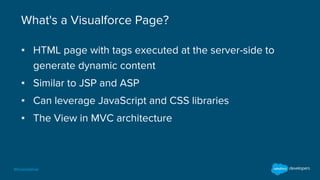
What's a Visualforce Page?
▪ HTML page with tags executed at the server-side to
generate dynamic content
▪ Similar to JSP and ASP
▪ Can leverage JavaScript and CSS libraries
▪ The View in MVC architecture
#forcewebinar
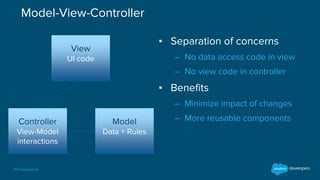
Model-View-Controller
Model
Data + Rules
Controller
View-Model
interactions
View
UI code
▪ Separation of concerns
– No data access code in view
– No view code in controller
▪ Benefits
– Minimize impact of changes
– More reusable components
#forcewebinar
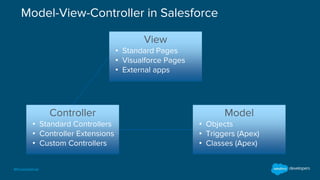
Model-View-Controller in Salesforce
View
• Standard Pages
• Visualforce Pages
• External apps
Controller
• Standard Controllers
• Controller Extensions
• Custom Controllers
Model
• Objects
• Triggers (Apex)
• Classes (Apex)
#forcewebinar
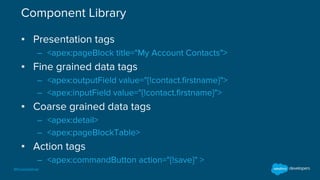
Component Library
▪ Presentation tags
– <apex:pageBlock title="My Account Contacts">
▪ Fine grained data tags
– <apex:outputField value="{!contact.firstname}">
– <apex:inputField value="{!contact.firstname}">
▪ Coarse grained data tags
– <apex:detail>
– <apex:pageBlockTable>
▪ Action tags
– <apex:commandButton action="{!save}" >
#forcewebinar
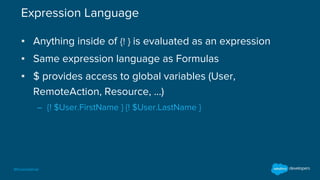
Expression Language
▪ Anything inside of {! } is evaluated as an expression
▪ Same expression language as Formulas
▪ $ provides access to global variables (User,
RemoteAction, Resource, …)
– {! $User.FirstName } {! $User.LastName }
#forcewebinar
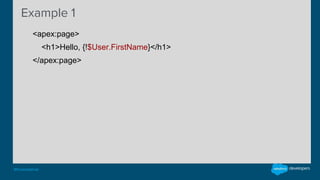
Example 1
• <apex:page>
• <h1>Hello, {!$User.FirstName}</h1>
• </apex:page>
#forcewebinar
Controllers
#forcewebinar
Standard Controller
▪ A standard controller is available for all objects
– You don't have to write it!
▪ Provides standard CRUD operations
– Create, Update, Delete, Field Access, etc.
▪ Can be extended with more capabilities
▪ Uses id query string parameter in URL to access object
#forcewebinar
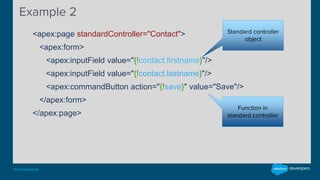
Example 2
• <apex:page standardController="Contact">
• <apex:form>
• <apex:inputField value="{!contact.firstname}"/>
• <apex:inputField value="{!contact.lastname}"/>
• <apex:commandButton action="{!save}" value="Save"/>
• </apex:form>
• </apex:page>
Function in
standard controller
Standard controller
object
#forcewebinar
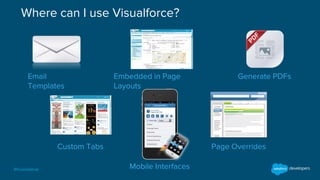
Email
Templates
Embedded in Page
Layouts
Generate PDFs
Custom Tabs
Mobile Interfaces
Page Overrides
Where can I use Visualforce?
#forcewebinar
What's a Custom Controller?
• Custom class written in Apex
• Doesn't work on a specific object
• Provides custom data
• Provides custom behaviors
#forcewebinar
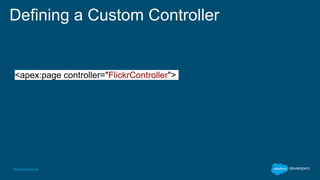
Defining a Custom Controller
<apex:page controller="FlickrController">
#forcewebinar
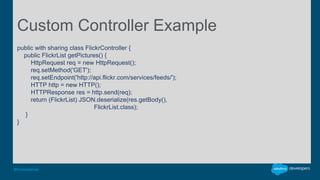
Custom Controller Example
public with sharing class FlickrController {
public FlickrList getPictures() {
HttpRequest req = new HttpRequest();
req.setMethod('GET');
req.setEndpoint('http://api.flickr.com/services/feeds/');
HTTP http = new HTTP();
HTTPResponse res = http.send(req);
return (FlickrList) JSON.deserialize(res.getBody(),
FlickrList.class);
}
}
#forcewebinar
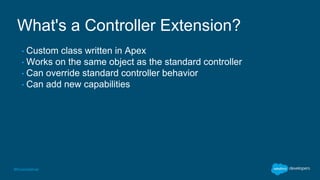
What's a Controller Extension?
• Custom class written in Apex
• Works on the same object as the standard controller
• Can override standard controller behavior
• Can add new capabilities
#forcewebinar
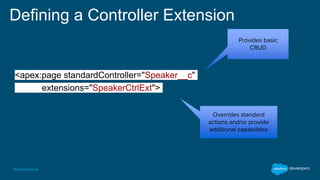
Defining a Controller Extension
<apex:page standardController="Speaker__c"
extensions="SpeakerCtrlExt">
Provides basic
CRUD
Overrides standard
actions and/or provide
additional capabilities
#forcewebinar
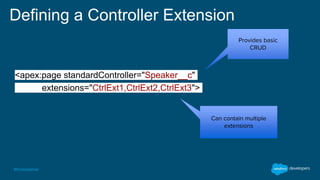
Defining a Controller Extension
<apex:page standardController="Speaker__c"
extensions="CtrlExt1,CtrlExt2,CtrlExt3">
Provides basic
CRUD
Can contain multiple
extensions
#forcewebinar
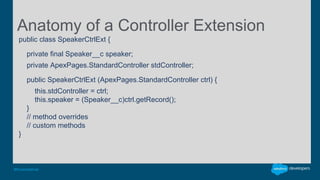
Anatomy of a Controller Extension
public class SpeakerCtrlExt {
private final Speaker__c speaker;
private ApexPages.StandardController stdController;
public SpeakerCtrlExt (ApexPages.StandardController ctrl) {
this.stdController = ctrl;
this.speaker = (Speaker__c)ctrl.getRecord();
}
// method overrides
// custom methods
}
#forcewebinar
Javascript in Visualforce Pages
#forcewebinar
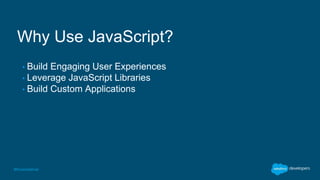
Why Use JavaScript?
• Build Engaging User Experiences
• Leverage JavaScript Libraries
• Build Custom Applications
#forcewebinar
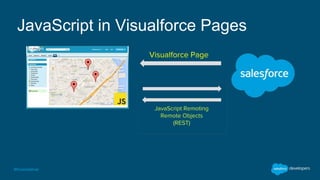
JavaScript in Visualforce Pages
Visualforce Page
JavaScript Remoting
Remote Objects
(REST)
#forcewebinar
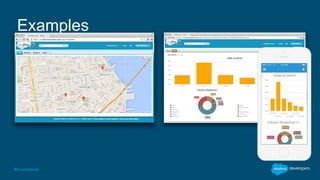
Examples
#forcewebinar
JavaScript Remoting - Server-Side
global with sharing class HotelRemoter {
@RemoteAction
global static List<Hotel__c> findAll() {
return [SELECT Id,
Name,
Location__Latitude__s,
Location__Longitude__s
FROM Hotel__c];
}
}
#forcewebinar
"global with sharing"?
• global
• Available from outside of the application
• with sharing
• Run code with current user permissions. (Apex code runs in system
context by default -- with access to all objects and fields)
#forcewebinar
JavaScript Remoting - Visualforce
Page
<script>
Visualforce.remoting.Manager.invokeAction(
'{!$RemoteAction.HotelRemoter.findAll}',
function (result, event) {
if (event.status) {
for (var i = 0; i < result.length; i++) {
var lat = result[i].Location__Latitude__s;
var lng = result[i].Location__Longitude__s;
addMarker(lat, lng);
}
} else {
alert(event.message);
}
}
);
</script>
#forcewebinar
Using JavaScript and CSS Libraries
• Hosted elsewhere
<script src="https://maps.googleapis.com/maps/api/js"></script>
• Hosted in Salesforce
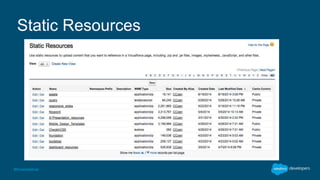
• Upload individual file or Zip file as Static Resource
• Reference asset using special tags
#forcewebinar
Static Resources
#forcewebinar
Referencing Static Resources
// Single file
<apex:stylesheet value="{!$Resource.bootstrap}"/>
<apex:includeScript value="{!$Resource.jquery}"/>
<apex:image url="{!$Resource.logo}"/>
// ZIP file
<apex:stylesheet value="{!URLFOR($Resource.assets, 'css/main.css')}"/>
<apex:image url="{!URLFOR($Resource.assets, 'img/logo.png')}"/>
<apex:includeScript value="{!URLFOR($Resource.assets, 'js/app.js')}"/>
#forcewebinar
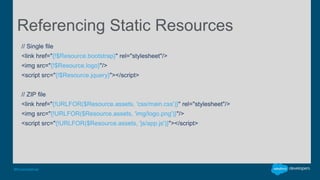
Referencing Static Resources
// Single file
<link href="{!$Resource.bootstrap}" rel="stylesheet"/>
<img src="{!$Resource.logo}"/>
<script src="{!$Resource.jquery}"></script>
// ZIP file
<link href="{!URLFOR($Resource.assets, 'css/main.css')}" rel="stylesheet"/>
<img src="{!URLFOR($Resource.assets, 'img/logo.png')}"/>
<script src="{!URLFOR($Resource.assets, 'js/app.js')}"></script>
#forcewebinar
Demo
(Visualforce with Standard controller and Extension,
Custom Controller and Javascript)
developer.salesforce.com/trailhead
#forcewebinar#forcewebinar
Recommended Trail:
#forcewebinar#forcewebinar
Got Questions?
Post’em to
http://developer.salesforce.com/forums/
#forcewebinar#forcewebinar
Q&A
Your feedback is crucial to the success
of our webinar programs. Thank you!
http://bit.ly/forcewebinarfeedback
#forcewebinar#forcewebinar
Thank You
Try Trailhead: trailhead.salesforce.com
Join the conversation: #forcewebinar
@salesforcedevs @SonamRaju14 @shashforce

Coding Apps in the Cloud with Force.com - Part 2

  • 1.
    #forcewebinar Coding Apps inthe Cloud with Force.com – Part II March 31st , 2016
  • 2.
    #forcewebinar#forcewebinar Speakers Shashank Srivatsavaya Sr. DeveloperAdvocate Engineer @shashforce Sonam Raju Sr. Developer Advocate Engineer @sonamraju14
  • 3.
    Forward Looking Statement Thispresentation may contain forward-looking statements that involve risks, uncertainties, and assumptions. If any such uncertainties materialize or if any of the assumptions proves incorrect, the results of salesforce.com, inc. could differ materially from the results expressed or implied by the forward-looking statements we make. All statements other than statements of historical fact could be deemed forward-looking, including any projections of product or service availability, subscriber growth, earnings, revenues, or other financial items and any statements regarding strategies or plans of management for future operations, statements of belief, any statements concerning new, planned, or upgraded services or technology developments and customer contracts or use of our services. The risks and uncertainties referred to above include – but are not limited to – risks associated with developing and delivering new functionality for our service, new products and services, our new business model, our past operating losses, possible fluctuations in our operating results and rate of growth, interruptions or delays in our Web hosting, breach of our security measures, the outcome of any litigation, risks associated with completed and any possible mergers and acquisitions, the immature market in which we operate, our relatively limited operating history, our ability to expand, retain, and motivate our employees and manage our growth, new releases of our service and successful customer deployment, our limited history reselling non-salesforce.com products, and utilization and selling to larger enterprise customers. Further information on potential factors that could affect the financial results of salesforce.com, inc. is included in our annual report on Form 10-K for the most recent fiscal year and in our quarterly report on Form 10-Q for the most recent fiscal quarter. These documents and others containing important disclosures are available on the SEC Filings section of the Investor Information section of our Web site. Any unreleased services or features referenced in this or other presentations, press releases or public statements are not currently available and may not be delivered on time or at all. Customers who purchase our services should make the purchase decisions based upon features that are currently available. Salesforce.com, inc. assumes no obligation and does not intend to update these forward-looking statements. Statement under the Private Securities Litigation Reform Act of 1995:
  • 4.
    #forcewebinar Go Social! @salesforcedevs /#forcewebinar Salesforce Developers Salesforce Developers Salesforce Developers This webinar is being recorded! The video will be posted to YouTube & the webinar recap page (same URL as registration).
  • 5.
    #forcewebinar Agenda • Part I– Demo • Visualforce Pages • Controllers • Javascript in Visualforce Pages • Part II - Demo • Q&A
  • 6.
    #forcewebinar Part I :Demo (Data Model, Application, Apex, SOQL, Triggers)
  • 7.
  • 8.
    #forcewebinar What's a VisualforcePage? ▪ HTML page with tags executed at the server-side to generate dynamic content ▪ Similar to JSP and ASP ▪ Can leverage JavaScript and CSS libraries ▪ The View in MVC architecture
  • 9.
    #forcewebinar Model-View-Controller Model Data + Rules Controller View-Model interactions View UIcode ▪ Separation of concerns – No data access code in view – No view code in controller ▪ Benefits – Minimize impact of changes – More reusable components
  • 10.
    #forcewebinar Model-View-Controller in Salesforce View •Standard Pages • Visualforce Pages • External apps Controller • Standard Controllers • Controller Extensions • Custom Controllers Model • Objects • Triggers (Apex) • Classes (Apex)
  • 11.
    #forcewebinar Component Library ▪ Presentationtags – <apex:pageBlock title="My Account Contacts"> ▪ Fine grained data tags – <apex:outputField value="{!contact.firstname}"> – <apex:inputField value="{!contact.firstname}"> ▪ Coarse grained data tags – <apex:detail> – <apex:pageBlockTable> ▪ Action tags – <apex:commandButton action="{!save}" >
  • 12.
    #forcewebinar Expression Language ▪ Anythinginside of {! } is evaluated as an expression ▪ Same expression language as Formulas ▪ $ provides access to global variables (User, RemoteAction, Resource, …) – {! $User.FirstName } {! $User.LastName }
  • 13.
    #forcewebinar Example 1 • <apex:page> •<h1>Hello, {!$User.FirstName}</h1> • </apex:page>
  • 14.
  • 15.
    #forcewebinar Standard Controller ▪ Astandard controller is available for all objects – You don't have to write it! ▪ Provides standard CRUD operations – Create, Update, Delete, Field Access, etc. ▪ Can be extended with more capabilities ▪ Uses id query string parameter in URL to access object
  • 16.
    #forcewebinar Example 2 • <apex:pagestandardController="Contact"> • <apex:form> • <apex:inputField value="{!contact.firstname}"/> • <apex:inputField value="{!contact.lastname}"/> • <apex:commandButton action="{!save}" value="Save"/> • </apex:form> • </apex:page> Function in standard controller Standard controller object
  • 17.
    #forcewebinar Email Templates Embedded in Page Layouts GeneratePDFs Custom Tabs Mobile Interfaces Page Overrides Where can I use Visualforce?
  • 18.
    #forcewebinar What's a CustomController? • Custom class written in Apex • Doesn't work on a specific object • Provides custom data • Provides custom behaviors
  • 19.
    #forcewebinar Defining a CustomController <apex:page controller="FlickrController">
  • 20.
    #forcewebinar Custom Controller Example publicwith sharing class FlickrController { public FlickrList getPictures() { HttpRequest req = new HttpRequest(); req.setMethod('GET'); req.setEndpoint('http://api.flickr.com/services/feeds/'); HTTP http = new HTTP(); HTTPResponse res = http.send(req); return (FlickrList) JSON.deserialize(res.getBody(), FlickrList.class); } }
  • 21.
    #forcewebinar What's a ControllerExtension? • Custom class written in Apex • Works on the same object as the standard controller • Can override standard controller behavior • Can add new capabilities
  • 22.
    #forcewebinar Defining a ControllerExtension <apex:page standardController="Speaker__c" extensions="SpeakerCtrlExt"> Provides basic CRUD Overrides standard actions and/or provide additional capabilities
  • 23.
    #forcewebinar Defining a ControllerExtension <apex:page standardController="Speaker__c" extensions="CtrlExt1,CtrlExt2,CtrlExt3"> Provides basic CRUD Can contain multiple extensions
  • 24.
    #forcewebinar Anatomy of aController Extension public class SpeakerCtrlExt { private final Speaker__c speaker; private ApexPages.StandardController stdController; public SpeakerCtrlExt (ApexPages.StandardController ctrl) { this.stdController = ctrl; this.speaker = (Speaker__c)ctrl.getRecord(); } // method overrides // custom methods }
  • 25.
  • 26.
    #forcewebinar Why Use JavaScript? •Build Engaging User Experiences • Leverage JavaScript Libraries • Build Custom Applications
  • 27.
    #forcewebinar JavaScript in VisualforcePages Visualforce Page JavaScript Remoting Remote Objects (REST)
  • 28.
  • 29.
    #forcewebinar JavaScript Remoting -Server-Side global with sharing class HotelRemoter { @RemoteAction global static List<Hotel__c> findAll() { return [SELECT Id, Name, Location__Latitude__s, Location__Longitude__s FROM Hotel__c]; } }
  • 30.
    #forcewebinar "global with sharing"? •global • Available from outside of the application • with sharing • Run code with current user permissions. (Apex code runs in system context by default -- with access to all objects and fields)
  • 31.
    #forcewebinar JavaScript Remoting -Visualforce Page <script> Visualforce.remoting.Manager.invokeAction( '{!$RemoteAction.HotelRemoter.findAll}', function (result, event) { if (event.status) { for (var i = 0; i < result.length; i++) { var lat = result[i].Location__Latitude__s; var lng = result[i].Location__Longitude__s; addMarker(lat, lng); } } else { alert(event.message); } } ); </script>
  • 32.
    #forcewebinar Using JavaScript andCSS Libraries • Hosted elsewhere <script src="https://maps.googleapis.com/maps/api/js"></script> • Hosted in Salesforce • Upload individual file or Zip file as Static Resource • Reference asset using special tags
  • 33.
  • 34.
    #forcewebinar Referencing Static Resources //Single file <apex:stylesheet value="{!$Resource.bootstrap}"/> <apex:includeScript value="{!$Resource.jquery}"/> <apex:image url="{!$Resource.logo}"/> // ZIP file <apex:stylesheet value="{!URLFOR($Resource.assets, 'css/main.css')}"/> <apex:image url="{!URLFOR($Resource.assets, 'img/logo.png')}"/> <apex:includeScript value="{!URLFOR($Resource.assets, 'js/app.js')}"/>
  • 35.
    #forcewebinar Referencing Static Resources //Single file <link href="{!$Resource.bootstrap}" rel="stylesheet"/> <img src="{!$Resource.logo}"/> <script src="{!$Resource.jquery}"></script> // ZIP file <link href="{!URLFOR($Resource.assets, 'css/main.css')}" rel="stylesheet"/> <img src="{!URLFOR($Resource.assets, 'img/logo.png')}"/> <script src="{!URLFOR($Resource.assets, 'js/app.js')}"></script>
  • 36.
    #forcewebinar Demo (Visualforce with Standardcontroller and Extension, Custom Controller and Javascript)
  • 37.
  • 38.
  • 39.
  • 40.
    #forcewebinar#forcewebinar Q&A Your feedback iscrucial to the success of our webinar programs. Thank you! http://bit.ly/forcewebinarfeedback
  • 41.
    #forcewebinar#forcewebinar Thank You Try Trailhead:trailhead.salesforce.com Join the conversation: #forcewebinar @salesforcedevs @SonamRaju14 @shashforce