Using Web 2.0 Tools to Create a Professional Learning Environment  Julie Lindsay International School Dhaka March 2007
Some Questions Who am I? What do I do? Where do I stand as a 21 st  century educator? How do I communicate and interact with my students, colleagues and the world? How can I foster an online learning environment? What trends suggest this is a worthy pursuit for an educator?
Who am I? An international educator (Australia, Zambia, Kuwait, Bangladesh) A specialist in E-Learning and digital literacy MA in Music and an MA in Education and Human Development (Educational Technology Leadership)
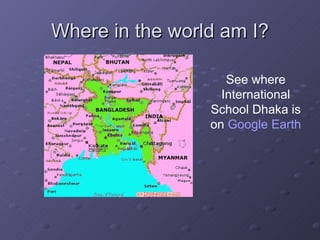
Where in the world am I? See where International School Dhaka is on  Google  Earth
What do I do? Head of Technology, Director of E-Learning at International School Dhaka Coordinate a whole-school approach to E-Learning and digital literacy Coordinate an IT Tech Support department Manage a laptop and a handheld program ‘Teach’ ITGS and MYP Technology Play jazz piano in my spare time…….
What do I Really Do? … ..try to make sense of a changing world where everything seems to be categorized by numbers… Web 2.0 School 2.0 Web 3.0, Web 3D 21 st  century learning 2020 Vision (Karl Fisch)  http://video.google.com/videoplay?docid=7281108124087435381
21 st  Century Education? Equality of learning opportunities Inquiry based learning Online learning Virtual worlds Digital Native vs Digital Immigrant  (Marc Prensky)   Impact of Web 2.0 and digital literacy issues  (Wesch: The Machine is Us/Ing Us)  http://youtube.com/watch?v=NLlGopyXT_g
Interacting with the World Why is this important? Who is really out there? The profile of an international educator, student, person....... What does internationalism and globalization mean? How does this relate to what I do in my classroom? With my students? As an administrator?
Globalization for Education? It means increased opportunities to learn with and from the global community  It means wonderful collaborative projects for students and teachers  It means wonderful opportunities for students to be involved in global projects on their own  Anita McAnear ISTE Learning and Leading with Technology Editor
Think Global! "An education leader today cannot claim to be an informed leader without knowledge of what is happening in education within and outside that leader’s own country. Learning with and from the global education community stimulates ideas that might never have come to mind otherwise. Understanding how educators and young learners in other countries overcome shortages of resources can provide both inspiration and strategies to help the most seasoned leader".  Don Knezek, CEO ISTE
A Day in the Life….. ….. of a Global, Connected Educator Online collaboration With students With colleagues With a Pulitzer prize winning author Online resources IBO Online Curriculum centre Online mentors: using the collective wisdom of my extended network
The Day Continues…….. Using VOIP to speak to a teacher workshop in the USA on global collaboration Sharing a video on YouTube Podcast Bangladesh viewed over 2000 times since last September! Immediacy, collaboration, interaction, networking, socializing, connecting, learning……… What is YOUR day like? http:// julielindsay.wikispaces.com/A+Day+in+the+Life
Online Learning Environment What does this mean to me? To my students? To my school? Does that mean I have to ‘master’ new software? Is this meant only for the tech savvy? But I like talking to people in person……. Second Life? What’s wrong with first life? The importance of games and gaming
Trends in 21 st  Century Education The  Horizon Report 2007 Edition  from the New Media Consortium and the Educause Learning Initiate has outlined 6 trends they believe will be impacting college and university campuses within the next five years.  Key trends identified in the practice of teaching, learning and creativity
Horizon Report 2007:  Six Key trends User-created content Social networking Mobile phones Virtual worlds New scholarship and emerging forms of publication Massively multiplayer educational games
Digital Future Report 2007 Internet use is growing and evolving as an instrument for personal engagement, through blogs, personal Web sites and online communities Hours online increased: average of 8.9 hours per week Internet users who keep a blog has more than doubled in 3 years (now 7.4%) http://digitalcenter.org
PEW: Internet and  American Life Project More than half (55%) of all online American youths ages 12-17 use online social networking sites.  Fully 87% of online users have at one time used the internet to carry out research on a scientific topic or concept.  Some 34% of internet users have logged onto the internet using a wireless connection either around the house, at their workplace, or some place else.  http://www.pewinternet.org/index.asp
In the News March 19, 2007! MySpace: New 'impact' website to focus on political and other individuals and events eg US election 2008  http://impact.myspace.com/   Australian Broadcasting Commission (ABC) buys an island in Second Life  http://australianit.news.com.au/articles/0,7204,21403473%5E16123%5E%5Enbv%5E,00.html   Italian schools ban mobile phones   http://australianit.news.com.au/articles/0,7204,21406708%5E15319%5E%5Enbv%5E,00.html
Professional Learning Environment What is it? a place or places on the Internet where learning and interaction with others takes place using available online tools.  a collection of resources and tools specifically chosen by the individual to be used for recording or documenting the journey of learning professionally (and personally)
A PLE is where you can….. Store pertinent information  Show professional development  Share personal experiences  Share resources: socialbookmarking, online images and multimedia files  Blog and interact  Collaborate with educators around the world  Publish user content
Going Beyond a Digital Portfolio A Professional Learning Environment goes beyond being a digital portfolio Inspired by the work of Dr Helen Barrett and ePortfolio best practice examples http://electronicportfolios.org/blog/index.html   http://eportfolios.wikispaces.com/
Essential Web 2.0 Tools Wiki-centric Blog Podcast RSS Social bookmarking Sharing multimedia Social networking
 
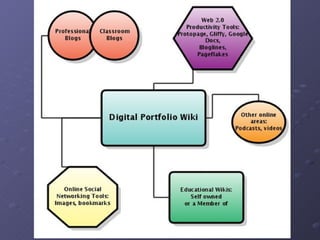
Wiki-Centric The central focus of the PLE Can be the core of all other activity with everything else radiating from it.  Wikispaces tutorial  http://digitalportfolio.wikispaces.com/Digital+Portfolio+using+a+Wiki   May include more than one wiki Julie’s PLE:  http://julielindsay.wikispaces.com/
Why use a Wiki? A wiki allows for easy and immediate web-page authoring (yes, I love Dreamweaver but............)  A wiki allows for inclusion of multimedia, widgets and RSS feeds  A wiki allows for collaboration with others through discussion and page creation if required
Blogs and Blogging Both professional and classroom blogs are represented to show professional development and involvement in education E-Learning Blog  http://123elearning.blogspot.com   ITGS Blog on eduspaces.net (ELGG)  http://elgg.net/itgs/weblog   NextGenTeachers  http://nextgenteachers.com
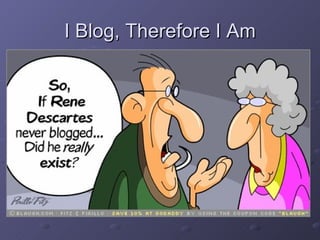
I Blog, Therefore I Am
Blog Toys Technorati  http://technorati.com   Talkr  http://talkr.com   GCast (embed audio)  http://gcast.com   ClustrMaps  http://clustrmaps.com   GeoVisitors  http://www.digitalpoint.com/tools/geovisitors/   NeoWorx  http://neoworx.net/blue/index.php   MyBlogLog  http://mybloglog.com   Clocklink  http://clocklink.com   Library Thing  http://librarything.com
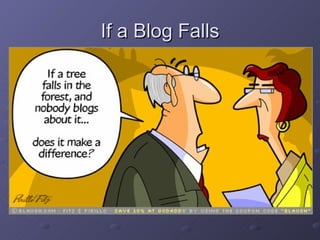
If a Blog Falls
Online Social Networking Social bookmarking  http://del.icio.us/   Sharing photos  http://flickr.com   Sharing videos http://youtube.com   Sharing slideshows http://slideshow.net   Folksonomies that emphasize online collaboration and sharing among users (tagging)
Productivity Web 2.0 Tools These are often used on a daily basis to find information and create interfaces for personal or shared use Google Docs and Spreadsheets Google Earth Protopage:  http://protopage.com   Pageflakes:  http://pageflakes.com
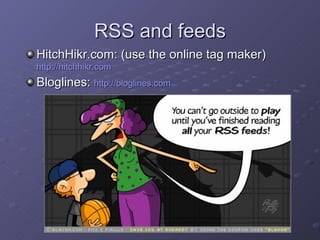
RSS and feeds HitchHikr.com: (use the online tag maker)  http://hitchhikr.com Bloglines:  http://bloglines.com
Multimedia Online storage and social networking areas: Podcasts (create, find and share!)  Evoca  http://evoca.com   Podomatic  http://podomatic.com   Videos Google Video  http://video.google.com   Blip.tv  http://blip.tv   Archive.org  http://archive.org
Using Web 2.0 to Create a PLE Presented by   Julie Lindsay International School Dhaka, Bangladesh At ECIS IT, International School Düsseldorf   March 2007 All resources mentioned in this slideshow (and more!) can be found on the wiki page:  http://julielindsaylinks.pbwiki.com/ Creative Commons Attribution Share-Alike License 3.0

Using Web 2.0 Tools to Create a Professional Learning Environment

  • 1.
    Using Web 2.0Tools to Create a Professional Learning Environment Julie Lindsay International School Dhaka March 2007
  • 2.
    Some Questions Whoam I? What do I do? Where do I stand as a 21 st century educator? How do I communicate and interact with my students, colleagues and the world? How can I foster an online learning environment? What trends suggest this is a worthy pursuit for an educator?
  • 3.
    Who am I?An international educator (Australia, Zambia, Kuwait, Bangladesh) A specialist in E-Learning and digital literacy MA in Music and an MA in Education and Human Development (Educational Technology Leadership)
  • 4.
    Where in theworld am I? See where International School Dhaka is on Google Earth
  • 5.
    What do Ido? Head of Technology, Director of E-Learning at International School Dhaka Coordinate a whole-school approach to E-Learning and digital literacy Coordinate an IT Tech Support department Manage a laptop and a handheld program ‘Teach’ ITGS and MYP Technology Play jazz piano in my spare time…….
  • 6.
    What do IReally Do? … ..try to make sense of a changing world where everything seems to be categorized by numbers… Web 2.0 School 2.0 Web 3.0, Web 3D 21 st century learning 2020 Vision (Karl Fisch) http://video.google.com/videoplay?docid=7281108124087435381
  • 7.
    21 st Century Education? Equality of learning opportunities Inquiry based learning Online learning Virtual worlds Digital Native vs Digital Immigrant (Marc Prensky) Impact of Web 2.0 and digital literacy issues (Wesch: The Machine is Us/Ing Us) http://youtube.com/watch?v=NLlGopyXT_g
  • 8.
    Interacting with theWorld Why is this important? Who is really out there? The profile of an international educator, student, person....... What does internationalism and globalization mean? How does this relate to what I do in my classroom? With my students? As an administrator?
  • 9.
    Globalization for Education?It means increased opportunities to learn with and from the global community It means wonderful collaborative projects for students and teachers It means wonderful opportunities for students to be involved in global projects on their own Anita McAnear ISTE Learning and Leading with Technology Editor
  • 10.
    Think Global! "Aneducation leader today cannot claim to be an informed leader without knowledge of what is happening in education within and outside that leader’s own country. Learning with and from the global education community stimulates ideas that might never have come to mind otherwise. Understanding how educators and young learners in other countries overcome shortages of resources can provide both inspiration and strategies to help the most seasoned leader". Don Knezek, CEO ISTE
  • 11.
    A Day inthe Life….. ….. of a Global, Connected Educator Online collaboration With students With colleagues With a Pulitzer prize winning author Online resources IBO Online Curriculum centre Online mentors: using the collective wisdom of my extended network
  • 12.
    The Day Continues……..Using VOIP to speak to a teacher workshop in the USA on global collaboration Sharing a video on YouTube Podcast Bangladesh viewed over 2000 times since last September! Immediacy, collaboration, interaction, networking, socializing, connecting, learning……… What is YOUR day like? http:// julielindsay.wikispaces.com/A+Day+in+the+Life
  • 13.
    Online Learning EnvironmentWhat does this mean to me? To my students? To my school? Does that mean I have to ‘master’ new software? Is this meant only for the tech savvy? But I like talking to people in person……. Second Life? What’s wrong with first life? The importance of games and gaming
  • 14.
    Trends in 21st Century Education The Horizon Report 2007 Edition from the New Media Consortium and the Educause Learning Initiate has outlined 6 trends they believe will be impacting college and university campuses within the next five years. Key trends identified in the practice of teaching, learning and creativity
  • 15.
    Horizon Report 2007: Six Key trends User-created content Social networking Mobile phones Virtual worlds New scholarship and emerging forms of publication Massively multiplayer educational games
  • 16.
    Digital Future Report2007 Internet use is growing and evolving as an instrument for personal engagement, through blogs, personal Web sites and online communities Hours online increased: average of 8.9 hours per week Internet users who keep a blog has more than doubled in 3 years (now 7.4%) http://digitalcenter.org
  • 17.
    PEW: Internet and American Life Project More than half (55%) of all online American youths ages 12-17 use online social networking sites. Fully 87% of online users have at one time used the internet to carry out research on a scientific topic or concept. Some 34% of internet users have logged onto the internet using a wireless connection either around the house, at their workplace, or some place else. http://www.pewinternet.org/index.asp
  • 18.
    In the NewsMarch 19, 2007! MySpace: New 'impact' website to focus on political and other individuals and events eg US election 2008 http://impact.myspace.com/ Australian Broadcasting Commission (ABC) buys an island in Second Life http://australianit.news.com.au/articles/0,7204,21403473%5E16123%5E%5Enbv%5E,00.html Italian schools ban mobile phones http://australianit.news.com.au/articles/0,7204,21406708%5E15319%5E%5Enbv%5E,00.html
  • 19.
    Professional Learning EnvironmentWhat is it? a place or places on the Internet where learning and interaction with others takes place using available online tools. a collection of resources and tools specifically chosen by the individual to be used for recording or documenting the journey of learning professionally (and personally)
  • 20.
    A PLE iswhere you can….. Store pertinent information Show professional development Share personal experiences Share resources: socialbookmarking, online images and multimedia files Blog and interact Collaborate with educators around the world Publish user content
  • 21.
    Going Beyond aDigital Portfolio A Professional Learning Environment goes beyond being a digital portfolio Inspired by the work of Dr Helen Barrett and ePortfolio best practice examples http://electronicportfolios.org/blog/index.html http://eportfolios.wikispaces.com/
  • 22.
    Essential Web 2.0Tools Wiki-centric Blog Podcast RSS Social bookmarking Sharing multimedia Social networking
  • 23.
  • 24.
    Wiki-Centric The centralfocus of the PLE Can be the core of all other activity with everything else radiating from it. Wikispaces tutorial http://digitalportfolio.wikispaces.com/Digital+Portfolio+using+a+Wiki May include more than one wiki Julie’s PLE: http://julielindsay.wikispaces.com/
  • 25.
    Why use aWiki? A wiki allows for easy and immediate web-page authoring (yes, I love Dreamweaver but............) A wiki allows for inclusion of multimedia, widgets and RSS feeds A wiki allows for collaboration with others through discussion and page creation if required
  • 26.
    Blogs and BloggingBoth professional and classroom blogs are represented to show professional development and involvement in education E-Learning Blog http://123elearning.blogspot.com ITGS Blog on eduspaces.net (ELGG) http://elgg.net/itgs/weblog NextGenTeachers http://nextgenteachers.com
  • 27.
  • 28.
    Blog Toys Technorati http://technorati.com Talkr http://talkr.com GCast (embed audio) http://gcast.com ClustrMaps http://clustrmaps.com GeoVisitors http://www.digitalpoint.com/tools/geovisitors/ NeoWorx http://neoworx.net/blue/index.php MyBlogLog http://mybloglog.com Clocklink http://clocklink.com Library Thing http://librarything.com
  • 29.
    If a BlogFalls
  • 30.
    Online Social NetworkingSocial bookmarking http://del.icio.us/ Sharing photos http://flickr.com Sharing videos http://youtube.com Sharing slideshows http://slideshow.net Folksonomies that emphasize online collaboration and sharing among users (tagging)
  • 31.
    Productivity Web 2.0Tools These are often used on a daily basis to find information and create interfaces for personal or shared use Google Docs and Spreadsheets Google Earth Protopage: http://protopage.com Pageflakes: http://pageflakes.com
  • 32.
    RSS and feedsHitchHikr.com: (use the online tag maker) http://hitchhikr.com Bloglines: http://bloglines.com
  • 33.
    Multimedia Online storageand social networking areas: Podcasts (create, find and share!) Evoca http://evoca.com Podomatic http://podomatic.com Videos Google Video http://video.google.com Blip.tv http://blip.tv Archive.org http://archive.org
  • 34.
    Using Web 2.0to Create a PLE Presented by Julie Lindsay International School Dhaka, Bangladesh At ECIS IT, International School Düsseldorf March 2007 All resources mentioned in this slideshow (and more!) can be found on the wiki page: http://julielindsaylinks.pbwiki.com/ Creative Commons Attribution Share-Alike License 3.0