Wikis in the EFL classroom
Maria Siamidou (M.Ed. in TESOL)
1
Web 2.0--Definition
 an attempt to redefine what the Web is
all about and how it is used –refers to the
social web
 a more democratic approach to the use
of the Web, in which traffic is less likely
to be one-way, i.e. from the website to
the end-user
 includes tools that promote sharing,
collaboration and interaction -- 'social
software' as they allow users to develop
Web content collaboratively
2
Benefits of Web 2.0 tools
• offer variety of unique and powerful information
sharing and collaboration features;
• aid the construction of meaning through the act of self-
design of knowledge databases;
• help to realize the original vision of the Web as a space
in which anyone can participate;
• are characterized by ease of use and rapidity of
deployment,
• reduce the technical skill required to use their features;
• allow users to focus on the information exchange and
collaborative tasks themselves without the distraction
of a difficult technological environment;
• let the student concentrate more on the learning task
by 'seeing through' the technology with which they are
interacting.
3
Web 2.0 enables:
 Socialisation - Through socialisation our students can
use the language and skills they are learning to build
networks and develop relationships with real people.
 Collaboration - They can work together with others to
construct and share real knowledge.
 Creativity - They can create genuine products, in a
wide range and combination of media to high
standards, that will have a real audience.
 Authenticity - The tasks and activities they do and the
people they communicate with are real and motivating.
 Sharing - They can share what they create and learn
from each other.
Peachey, N. (n.d.). Web 2.0 tools for teachers, at
http://www.scribd.com/doc/20418106/19576895-Web-20-
Tools-for-Teachers
4
Web 2.0 Applications 1
 Image, storage and sharing
 Discussion lists, blogs, wikis, and social networking
 Chat rooms,
 MUDs (Programs users can log into and explore. Each
user takes control of a computerized persona / avatar /
incarnation / character. Role playing games-player vs
player) (http://en.wikipedia.org/wiki/MUD),
5
Applications 2
 MOOs (Fully interactive societies in which users can
role play, or project their real self, as they wish. Its
most common use is a multi-participant, virtual reality
adventure game with players from all over the world)
(http://en.wikipedia.org/wiki/MOO),
 Podcasting and other Audio Tools
 Video sharing applications and screen capture
tools
 Animation tools—comic strips, movies, etc
6
Computer Mediated
Communication
Synchronous:
 Real-time communication between two or more
people, using the keyboard as the means of
communication
◦ better suited to social interaction
Asynchronous
 Messages are sent via the computer but they are
picked up at a later time and are replied to after the
content has been considered.
◦ more appropriate for topic- and task-focused
interaction
7
Sites for web 2.0 tools
-Web 2.0: Cool Tools for Schools
-Web 2.0 in Education - a wiki by Mark
Pegrum
-E-learning references
-Web 2.0 Tools for Teachers by Nik
Peachey: a 53-page guide with instructions
and suggestions for how to use free web
based tools to develop languages
-Web 2.0 and Language Learning-a you-
tube video
-ELT/ESL Training Videos
8
Wikis
A wiki not only takes the classroom “into the real
world that the students inhabit”, but most
importantly
“brings their real world into their classroom”.
(Harding, 2007, p.8)
9
Introduction
 The rapid infusion of knowledge and the
constantly changing world of technology
call for a change in traditional teaching
practices.
 The advancement of educational technology
resulted in placing a strong emphasis on
integrating Web 2.0 technologies into
language teaching and learning
 Wikis have emerged as promising tools for
facilitating collaborative language learning
and writing.
10
What is a wiki?
• a source of information and knowledge,
• a tool for collaborative authoring which
allows visitors:
• to engage in dialogue
• to share information among participants in group
projects,
• to engage in learning with each other by using
wikis as a collaborative environment in which
they construct their knowledge
• A well known wiki is Wikipedia, an online
collaborative encyclopedia, where anybody
can edit and update the site content as they
see fit.
11
Wikis
are collaborative websites with open editing, which allow users
to visit, read, reorganize and update the structure and the
content as they build on their learning.
The wiki is an effective tool for a young learners’ classroom
since
 It is a user friendly tool which supports easy addition
of hyperlinks and images, without the need to download
any software
 It enhances cooperative learning and collaborative
writing.
 It promotes scaffolding and social interaction
12
 It allows for careful construction of grammar as it is an
asynchronous CMC tool, which permits delayed
responses to questions
 It promotes self-evaluation as the learners are able to
look back to earlier versions of their writings and reflect
on the changes
 It provides a safe context owing to personal logging in
connection to the history function which allows previous
versions to be examined as well as a rollback function,
which restores previous versions
13
How wikis work
 two different writing modes or styles of usage:
• document mode--contributors create collaborative
documents written in the third person. Authors
leave their additions to the wiki document
unsigned. As time passes, multiple authors edit
and update the content of the document and
gradually the content becomes a representation of
the shared knowledge or beliefs of the contributors.
• thread mode-- contributors carry out discussions
in the wiki environment by posting signed
messages. Others respond leaving the original
messages intact and eventually a group of
threaded messages evolves.
14
Blended Learning
 The underlying principle of blended learning is
supported by an e-learning theory which enables
learner-centered approaches since students proceed
with their learning in their own pace.
 The traditional classroom is sustained while an
online technology, the wiki, is integrated.
 There are millions of content-rich pages of
information in text, graphic, audio and video forms
which increase students’ motivation
(Warschauer,1997).
BUT
 Working online can be a frustrating experience.
 Students value face-to- face contact and consider this
‘vital’ in building a sense of community or belonging to a
class or group study (Conole et al, 2008)
15
Why Blended Learning?
 enhance learner autonomy since learners are able to
work beyond classroom boundaries
 provide young learners with a sense of security in
order to overcome problems with technology
 cope with the limited number of class sessions and
insufficient time in the traditional classroom
 satisfy the learning needs of the ‘digital native
students’ (Prensky, 2001).Τhe wiki, a social networking
tool, aims at motivating the learners to write, following
the familiar patterns of texting, posting comments,
and responding to discussion threads.
16
E-literacies
 Writing has acquired new dimensions in today’s
electronic era. The advent of Web 2.0 tools has
seriously affected the way individuals interact and
socialize with one another (Downes, 2006).
 In the last few years several online social networking
communities (SNCs) have emerged along with new
language practices, rules, and conventions.
 Being literate no longer means merely to be able to
read and write. Foundational literacies cannot satisfy
present needs.
 Knowing how to navigate Internet sources, search for
information, and critically evaluate and interpret what is
found represents perhaps the most crucial set of
electronic literacy skills.
Shetzer & Warschauer, 2000
17
The learners are expected to
 Be able to access, evaluate, process, and
synthesize information.
 Promote their critical thinking skills as they learn
to evaluate the information content as well as the
source
 Enhance their quick processing skills as they
are expected to make decisions regarding what
hyperlinks are worth following.
 Familiarize with safety issues, such as netiquette,
intellectual property, and privacy, when they
construct an on-line document.
18
Why collaborative writing ?
 Joint decision making promotes autonomy in learning.
 Shared responsibility for the jointly produced text
reduces the cognitive load.
 It promotes social support
 low achieving students can learn the way the high
achieving students use different writing strategies
 high achievers become aware of their social
responsibility for scaffolding.
 Learners’ critical thinking skills are promoted as they
learn how to evaluate their drafts and provide peer
feedback.
19
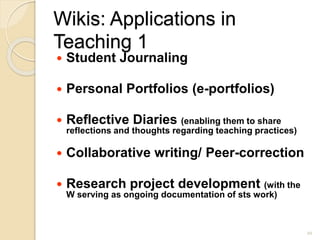
Wikis: Applications in
Teaching 1
 Student Journaling
 Personal Portfolios (e-portfolios)
 Reflective Diaries (enabling them to share
reflections and thoughts regarding teaching practices)
 Collaborative writing/ Peer-correction
 Research project development (with the
W serving as ongoing documentation of sts work)
20
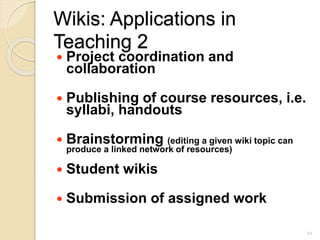
Wikis: Applications in
Teaching 2
 Project coordination and
collaboration
 Publishing of course resources, i.e.
syllabi, handouts
 Brainstorming (editing a given wiki topic can
produce a linked network of resources)
 Student wikis
 Submission of assigned work
21
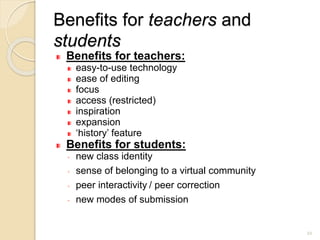
Benefits for teachers and
students
Benefits for teachers:
easy-to-use technology
ease of editing
focus
access (restricted)
inspiration
expansion
‘history’ feature
Benefits for students:
◦ new class identity
◦ sense of belonging to a virtual community
◦ peer interactivity / peer correction
◦ new modes of submission
22
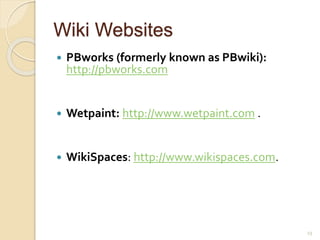
Wiki Websites
 PBworks (formerly known as PBwiki):
http://pbworks.com
 Wetpaint: http://www.wetpaint.com .
 WikiSpaces: http://www.wikispaces.com.
23
The gap in the existing context
• Recent studies demonstrate that wikis are useful
tools for primary-school students’ collaborative
writing (Désilets & Paquet, 2005; Woo et. al, 2011;
Fu et. al, 2013).
• As far as the Greek reality is concerned, the
effectiveness of wikis in promoting primary school
students’ writing skills has only partially been
explored.
• The learners' negative attitude towards writing
combined with the course book’s insufficiency to
promote process writing and enhance e-literacy
skills set the foundations for this research.
24
The research process
• The designed program consisted of two work
units, each of which was broken down into four
teaching sessions.
• In the first work unit, the learners were asked to
produce an article as a part of a brochure, which
was going to inform the school community about
bullying.
• In the second work unit, the students were invited
to create a fairytale, relying on the knowledge
gained by deconstructing and analyzing similar
versions of the fairytale.
25
• For the production of the written texts the learners
employed the process approach to writing as they co-
created content by planning, writing, revising, and
editing their drafts.
• The wiki group followed the instructional model for
writing in a blended learning environment, working
either on-line or off-line in every stage of the writing
process.
• The integration of Wiki technology and peer feedback
was an innovative writing practice, which allowed for
online construction of a piece as it progressed
through a cycle of writing, peer feedback and rewriting.
26
The process
 Oral consent from the parents
 Students were provided with login IDs and passwords.
 The wiki resource had been set up as a closed
password-protected system which only the
participants and their teacher were allowed to access.
 In the first teaching session the learners were involved
in learning how to navigate through the wiki pages,
use a search engine machine, add a link and post a
comment.
 The wiki group edited collaboratively on their group’s
page in order to produce a jointly composed text.
27
Students wrote on the wiki pages:
 1. the Generating ideas page which stimulated the writers’
thinking
 2. the Focusing page where the learners started working
on-line
 3. the Structuring ideas page where the learners
watched the relevant links in order to add, correct, and
comment on both their group’s and their classmates’
pages
 4. the Evaluating page –where they evaluated their peers’
work allowing for social interaction and scaffolding to take
place.
 5. the Editing page where the learners edited their final
text based on peer feedback, teacher feedback, and the
evaluation checklist.
The researcher provided meta-comments upon students’
completion each peer-feedback activity.
28
 the Wiki Netiquette page, which offered guidelines about
proper behavior while working on the wiki. Students
became aware of their responsibility while editing as well
as the permanence of their work.
 the Wiki Tips page, which served as a manual for the
learners.
 The learners were guided to make use of online
dictionaries as well as search engines to locate
information on other websites.
 In this way they enhanced their e-literacy skills as they
learnt how to ‘copy’ and ‘paste’ images or texts and how to
add a link in their wiki page in order to produce a
multimodal text.
29
Findings, benefits
 Wikis taught students to criticize ideas, not people,
because learners were provided with a jointly produced
text by co-authors.
 The learners were provided with a digitally safe space
to generate new without a threatening face-to-face
interaction with their peers, without the fear of
being laughed at.
 They acquired a more favorable attitude towards
writing and they felt self-confident
 The idea of having an audience to comment on their
work improved the quality of the students’ writing.
30
 On condition that they were given sufficient time, their
writing skills as well as their e-literacy skills were
promoted.
 Blended Learning can enhance students’ writing skills. The
majority considered writing on a computer easier than the
traditional way.
 All students felt safe in the wiki, thus verifying the
researcher’s assumptions that personal logging in
connection to the history function would appease the
students’ fear of malicious behavior.
 Advanced students were given the opportunity to
accelerate through the particular curriculum.
31
Students’ writings
 Whenever the participants revised their wiki page, the
change was registered by the wiki while upon saving
the change, an updated version of the wiki page was
created.
 The wiki proved a useful tool for promoting
collaborative writing as the wiki groups produced
higher quality texts, based mostly on content
revisions.
 The learners of this group paid more attention to
content rather than form when they revised due to
 the plethora of material accessed through the Internet
 the spelling check that was built into Wikispaces
contributed to the reduction of the cognitive load,
thus allowing the learners to focus on the content.
32
33
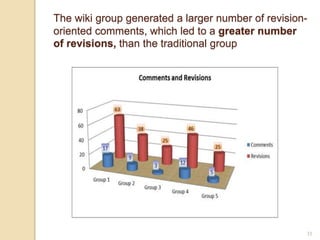
The wiki group generated a larger number of revision-
oriented comments, which led to a greater number
of revisions, than the traditional group
34
According to Gunning FOG Formula which
compares syllables and sentence lengths:
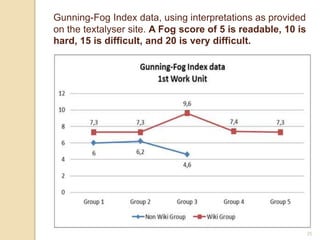
 The wiki group’s performance surpassed the non-
wiki group in both work units since it featured a
slightly higher level of vocabulary, more
complex sentences, and an improved reading
level.
 These data, however, failed to yield results as far
as the improvement in students’ writing within the
same group was concerned. (In order to measure
an improvement, the students should have written
an article in the second unit as well )
35
Gunning-Fog Index data, using interpretations as provided
on the textalyser site. A Fog score of 5 is readable, 10 is
hard, 15 is difficult, and 20 is very difficult.
36
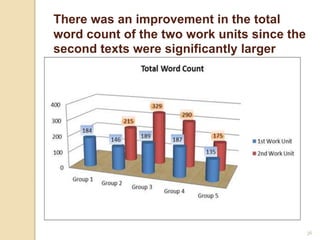
There was an improvement in the total
word count of the two work units since the
second texts were significantly larger
Limitations
 Poor network access
 The learners’ fear about technological problems.
 The parents’ fear regarding the use of the Net.
 The degree of improvement for every individual learner
cannot be objectively measured.
 Unequal contribution of group members
 It is time consuming on the part of the teacher.
organisation
constant monitoring
 posting pressure and timing
37
References
 Leuf, B., & Cunningham, W. (2001). The
WIKIWAY.quick Collaboration on the Web:Addison-
Wesley
 Mak, B., & Coniam, D. (2008). Using wikis to enhance
and develop writing skills among secondary school
students in Hong Kong. System, 36, 437-55.
 Prensky, M. (2001) ‘Digital natives, digital immigrants’.
On the Horizon, 9/5: 1-6.
 Shetzer, H., & Warschauer, M. (2000). An electronic
literacy approach to network-based language teaching.
In M. Warschauer & R. Kern (Eds.), Network-based
language teaching: Concepts and practice (pp. 171-
185). Cambridge: Cambridge University Press.
38
Thank you for your attention!
39

Wikis in the efl classroom.

  • 1.
    Wikis in theEFL classroom Maria Siamidou (M.Ed. in TESOL) 1
  • 2.
    Web 2.0--Definition  anattempt to redefine what the Web is all about and how it is used –refers to the social web  a more democratic approach to the use of the Web, in which traffic is less likely to be one-way, i.e. from the website to the end-user  includes tools that promote sharing, collaboration and interaction -- 'social software' as they allow users to develop Web content collaboratively 2
  • 3.
    Benefits of Web2.0 tools • offer variety of unique and powerful information sharing and collaboration features; • aid the construction of meaning through the act of self- design of knowledge databases; • help to realize the original vision of the Web as a space in which anyone can participate; • are characterized by ease of use and rapidity of deployment, • reduce the technical skill required to use their features; • allow users to focus on the information exchange and collaborative tasks themselves without the distraction of a difficult technological environment; • let the student concentrate more on the learning task by 'seeing through' the technology with which they are interacting. 3
  • 4.
    Web 2.0 enables: Socialisation - Through socialisation our students can use the language and skills they are learning to build networks and develop relationships with real people.  Collaboration - They can work together with others to construct and share real knowledge.  Creativity - They can create genuine products, in a wide range and combination of media to high standards, that will have a real audience.  Authenticity - The tasks and activities they do and the people they communicate with are real and motivating.  Sharing - They can share what they create and learn from each other. Peachey, N. (n.d.). Web 2.0 tools for teachers, at http://www.scribd.com/doc/20418106/19576895-Web-20- Tools-for-Teachers 4
  • 5.
    Web 2.0 Applications1  Image, storage and sharing  Discussion lists, blogs, wikis, and social networking  Chat rooms,  MUDs (Programs users can log into and explore. Each user takes control of a computerized persona / avatar / incarnation / character. Role playing games-player vs player) (http://en.wikipedia.org/wiki/MUD), 5
  • 6.
    Applications 2  MOOs(Fully interactive societies in which users can role play, or project their real self, as they wish. Its most common use is a multi-participant, virtual reality adventure game with players from all over the world) (http://en.wikipedia.org/wiki/MOO),  Podcasting and other Audio Tools  Video sharing applications and screen capture tools  Animation tools—comic strips, movies, etc 6
  • 7.
    Computer Mediated Communication Synchronous:  Real-timecommunication between two or more people, using the keyboard as the means of communication ◦ better suited to social interaction Asynchronous  Messages are sent via the computer but they are picked up at a later time and are replied to after the content has been considered. ◦ more appropriate for topic- and task-focused interaction 7
  • 8.
    Sites for web2.0 tools -Web 2.0: Cool Tools for Schools -Web 2.0 in Education - a wiki by Mark Pegrum -E-learning references -Web 2.0 Tools for Teachers by Nik Peachey: a 53-page guide with instructions and suggestions for how to use free web based tools to develop languages -Web 2.0 and Language Learning-a you- tube video -ELT/ESL Training Videos 8
  • 9.
    Wikis A wiki notonly takes the classroom “into the real world that the students inhabit”, but most importantly “brings their real world into their classroom”. (Harding, 2007, p.8) 9
  • 10.
    Introduction  The rapidinfusion of knowledge and the constantly changing world of technology call for a change in traditional teaching practices.  The advancement of educational technology resulted in placing a strong emphasis on integrating Web 2.0 technologies into language teaching and learning  Wikis have emerged as promising tools for facilitating collaborative language learning and writing. 10
  • 11.
    What is awiki? • a source of information and knowledge, • a tool for collaborative authoring which allows visitors: • to engage in dialogue • to share information among participants in group projects, • to engage in learning with each other by using wikis as a collaborative environment in which they construct their knowledge • A well known wiki is Wikipedia, an online collaborative encyclopedia, where anybody can edit and update the site content as they see fit. 11
  • 12.
    Wikis are collaborative websiteswith open editing, which allow users to visit, read, reorganize and update the structure and the content as they build on their learning. The wiki is an effective tool for a young learners’ classroom since  It is a user friendly tool which supports easy addition of hyperlinks and images, without the need to download any software  It enhances cooperative learning and collaborative writing.  It promotes scaffolding and social interaction 12
  • 13.
     It allowsfor careful construction of grammar as it is an asynchronous CMC tool, which permits delayed responses to questions  It promotes self-evaluation as the learners are able to look back to earlier versions of their writings and reflect on the changes  It provides a safe context owing to personal logging in connection to the history function which allows previous versions to be examined as well as a rollback function, which restores previous versions 13
  • 14.
    How wikis work two different writing modes or styles of usage: • document mode--contributors create collaborative documents written in the third person. Authors leave their additions to the wiki document unsigned. As time passes, multiple authors edit and update the content of the document and gradually the content becomes a representation of the shared knowledge or beliefs of the contributors. • thread mode-- contributors carry out discussions in the wiki environment by posting signed messages. Others respond leaving the original messages intact and eventually a group of threaded messages evolves. 14
  • 15.
    Blended Learning  Theunderlying principle of blended learning is supported by an e-learning theory which enables learner-centered approaches since students proceed with their learning in their own pace.  The traditional classroom is sustained while an online technology, the wiki, is integrated.  There are millions of content-rich pages of information in text, graphic, audio and video forms which increase students’ motivation (Warschauer,1997). BUT  Working online can be a frustrating experience.  Students value face-to- face contact and consider this ‘vital’ in building a sense of community or belonging to a class or group study (Conole et al, 2008) 15
  • 16.
    Why Blended Learning? enhance learner autonomy since learners are able to work beyond classroom boundaries  provide young learners with a sense of security in order to overcome problems with technology  cope with the limited number of class sessions and insufficient time in the traditional classroom  satisfy the learning needs of the ‘digital native students’ (Prensky, 2001).Τhe wiki, a social networking tool, aims at motivating the learners to write, following the familiar patterns of texting, posting comments, and responding to discussion threads. 16
  • 17.
    E-literacies  Writing hasacquired new dimensions in today’s electronic era. The advent of Web 2.0 tools has seriously affected the way individuals interact and socialize with one another (Downes, 2006).  In the last few years several online social networking communities (SNCs) have emerged along with new language practices, rules, and conventions.  Being literate no longer means merely to be able to read and write. Foundational literacies cannot satisfy present needs.  Knowing how to navigate Internet sources, search for information, and critically evaluate and interpret what is found represents perhaps the most crucial set of electronic literacy skills. Shetzer & Warschauer, 2000 17
  • 18.
    The learners areexpected to  Be able to access, evaluate, process, and synthesize information.  Promote their critical thinking skills as they learn to evaluate the information content as well as the source  Enhance their quick processing skills as they are expected to make decisions regarding what hyperlinks are worth following.  Familiarize with safety issues, such as netiquette, intellectual property, and privacy, when they construct an on-line document. 18
  • 19.
    Why collaborative writing?  Joint decision making promotes autonomy in learning.  Shared responsibility for the jointly produced text reduces the cognitive load.  It promotes social support  low achieving students can learn the way the high achieving students use different writing strategies  high achievers become aware of their social responsibility for scaffolding.  Learners’ critical thinking skills are promoted as they learn how to evaluate their drafts and provide peer feedback. 19
  • 20.
    Wikis: Applications in Teaching1  Student Journaling  Personal Portfolios (e-portfolios)  Reflective Diaries (enabling them to share reflections and thoughts regarding teaching practices)  Collaborative writing/ Peer-correction  Research project development (with the W serving as ongoing documentation of sts work) 20
  • 21.
    Wikis: Applications in Teaching2  Project coordination and collaboration  Publishing of course resources, i.e. syllabi, handouts  Brainstorming (editing a given wiki topic can produce a linked network of resources)  Student wikis  Submission of assigned work 21
  • 22.
    Benefits for teachersand students Benefits for teachers: easy-to-use technology ease of editing focus access (restricted) inspiration expansion ‘history’ feature Benefits for students: ◦ new class identity ◦ sense of belonging to a virtual community ◦ peer interactivity / peer correction ◦ new modes of submission 22
  • 23.
    Wiki Websites  PBworks(formerly known as PBwiki): http://pbworks.com  Wetpaint: http://www.wetpaint.com .  WikiSpaces: http://www.wikispaces.com. 23
  • 24.
    The gap inthe existing context • Recent studies demonstrate that wikis are useful tools for primary-school students’ collaborative writing (Désilets & Paquet, 2005; Woo et. al, 2011; Fu et. al, 2013). • As far as the Greek reality is concerned, the effectiveness of wikis in promoting primary school students’ writing skills has only partially been explored. • The learners' negative attitude towards writing combined with the course book’s insufficiency to promote process writing and enhance e-literacy skills set the foundations for this research. 24
  • 25.
    The research process •The designed program consisted of two work units, each of which was broken down into four teaching sessions. • In the first work unit, the learners were asked to produce an article as a part of a brochure, which was going to inform the school community about bullying. • In the second work unit, the students were invited to create a fairytale, relying on the knowledge gained by deconstructing and analyzing similar versions of the fairytale. 25
  • 26.
    • For theproduction of the written texts the learners employed the process approach to writing as they co- created content by planning, writing, revising, and editing their drafts. • The wiki group followed the instructional model for writing in a blended learning environment, working either on-line or off-line in every stage of the writing process. • The integration of Wiki technology and peer feedback was an innovative writing practice, which allowed for online construction of a piece as it progressed through a cycle of writing, peer feedback and rewriting. 26
  • 27.
    The process  Oralconsent from the parents  Students were provided with login IDs and passwords.  The wiki resource had been set up as a closed password-protected system which only the participants and their teacher were allowed to access.  In the first teaching session the learners were involved in learning how to navigate through the wiki pages, use a search engine machine, add a link and post a comment.  The wiki group edited collaboratively on their group’s page in order to produce a jointly composed text. 27
  • 28.
    Students wrote onthe wiki pages:  1. the Generating ideas page which stimulated the writers’ thinking  2. the Focusing page where the learners started working on-line  3. the Structuring ideas page where the learners watched the relevant links in order to add, correct, and comment on both their group’s and their classmates’ pages  4. the Evaluating page –where they evaluated their peers’ work allowing for social interaction and scaffolding to take place.  5. the Editing page where the learners edited their final text based on peer feedback, teacher feedback, and the evaluation checklist. The researcher provided meta-comments upon students’ completion each peer-feedback activity. 28
  • 29.
     the WikiNetiquette page, which offered guidelines about proper behavior while working on the wiki. Students became aware of their responsibility while editing as well as the permanence of their work.  the Wiki Tips page, which served as a manual for the learners.  The learners were guided to make use of online dictionaries as well as search engines to locate information on other websites.  In this way they enhanced their e-literacy skills as they learnt how to ‘copy’ and ‘paste’ images or texts and how to add a link in their wiki page in order to produce a multimodal text. 29
  • 30.
    Findings, benefits  Wikistaught students to criticize ideas, not people, because learners were provided with a jointly produced text by co-authors.  The learners were provided with a digitally safe space to generate new without a threatening face-to-face interaction with their peers, without the fear of being laughed at.  They acquired a more favorable attitude towards writing and they felt self-confident  The idea of having an audience to comment on their work improved the quality of the students’ writing. 30
  • 31.
     On conditionthat they were given sufficient time, their writing skills as well as their e-literacy skills were promoted.  Blended Learning can enhance students’ writing skills. The majority considered writing on a computer easier than the traditional way.  All students felt safe in the wiki, thus verifying the researcher’s assumptions that personal logging in connection to the history function would appease the students’ fear of malicious behavior.  Advanced students were given the opportunity to accelerate through the particular curriculum. 31
  • 32.
    Students’ writings  Wheneverthe participants revised their wiki page, the change was registered by the wiki while upon saving the change, an updated version of the wiki page was created.  The wiki proved a useful tool for promoting collaborative writing as the wiki groups produced higher quality texts, based mostly on content revisions.  The learners of this group paid more attention to content rather than form when they revised due to  the plethora of material accessed through the Internet  the spelling check that was built into Wikispaces contributed to the reduction of the cognitive load, thus allowing the learners to focus on the content. 32
  • 33.
    33 The wiki groupgenerated a larger number of revision- oriented comments, which led to a greater number of revisions, than the traditional group
  • 34.
    34 According to GunningFOG Formula which compares syllables and sentence lengths:  The wiki group’s performance surpassed the non- wiki group in both work units since it featured a slightly higher level of vocabulary, more complex sentences, and an improved reading level.  These data, however, failed to yield results as far as the improvement in students’ writing within the same group was concerned. (In order to measure an improvement, the students should have written an article in the second unit as well )
  • 35.
    35 Gunning-Fog Index data,using interpretations as provided on the textalyser site. A Fog score of 5 is readable, 10 is hard, 15 is difficult, and 20 is very difficult.
  • 36.
    36 There was animprovement in the total word count of the two work units since the second texts were significantly larger
  • 37.
    Limitations  Poor networkaccess  The learners’ fear about technological problems.  The parents’ fear regarding the use of the Net.  The degree of improvement for every individual learner cannot be objectively measured.  Unequal contribution of group members  It is time consuming on the part of the teacher. organisation constant monitoring  posting pressure and timing 37
  • 38.
    References  Leuf, B.,& Cunningham, W. (2001). The WIKIWAY.quick Collaboration on the Web:Addison- Wesley  Mak, B., & Coniam, D. (2008). Using wikis to enhance and develop writing skills among secondary school students in Hong Kong. System, 36, 437-55.  Prensky, M. (2001) ‘Digital natives, digital immigrants’. On the Horizon, 9/5: 1-6.  Shetzer, H., & Warschauer, M. (2000). An electronic literacy approach to network-based language teaching. In M. Warschauer & R. Kern (Eds.), Network-based language teaching: Concepts and practice (pp. 171- 185). Cambridge: Cambridge University Press. 38
  • 39.
    Thank you foryour attention! 39