www.glcnetworks.com
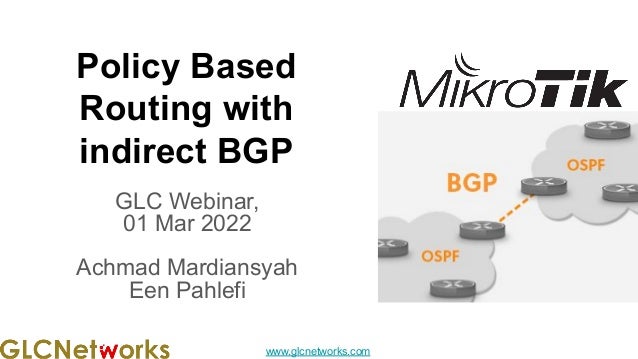
Policy Based
Routing with
indirect BGP
GLC Webinar,
01 Mar 2022
Achmad Mardiansyah
Een Pahlefi
www.glcnetworks.com
Agenda
● Introduction
● Review prerequisite knowledge
● Network monitoring
● Mikrotik the dude
● Live practice
● Q & A
2
www.glcnetworks.com
Introduction
3
www.glcnetworks.com
What is GLC?
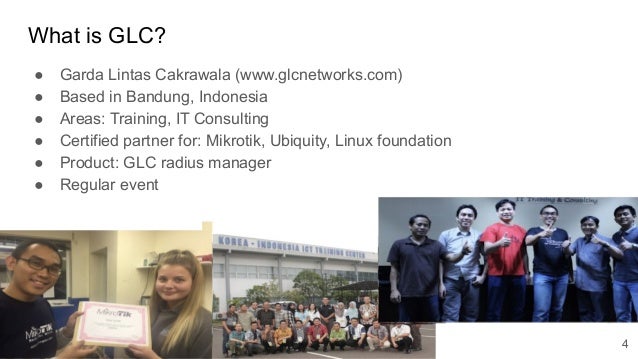
● Garda Lintas Cakrawala (www.glcnetworks.com)
● Based in Bandung, Indonesia
● Areas: Training, IT Consulting
● Certified partner for: Mikrotik, Ubiquity, Linux foundation
● Product: GLC radius manager
● Regular event
4
www.glcnetworks.com
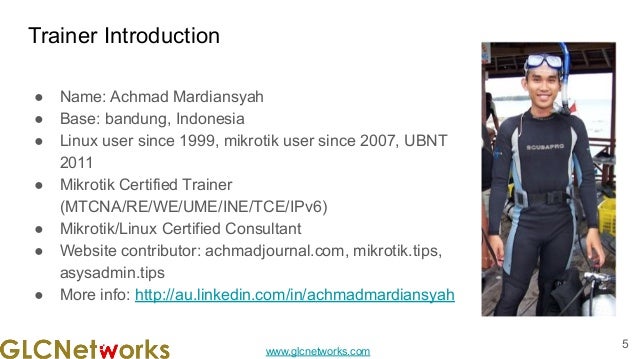
Trainer Introduction
● Name: Achmad Mardiansyah
● Base: bandung, Indonesia
● Linux user since 1999, mikrotik user since 2007, UBNT
2011
● Mikrotik Certified Trainer
(MTCNA/RE/WE/UME/INE/TCE/IPv6)
● Mikrotik/Linux Certified Consultant
● Website contributor: achmadjournal.com, mikrotik.tips,
asysadmin.tips
● More info: http://au.linkedin.com/in/achmadmardiansyah
5
www.glcnetworks.com
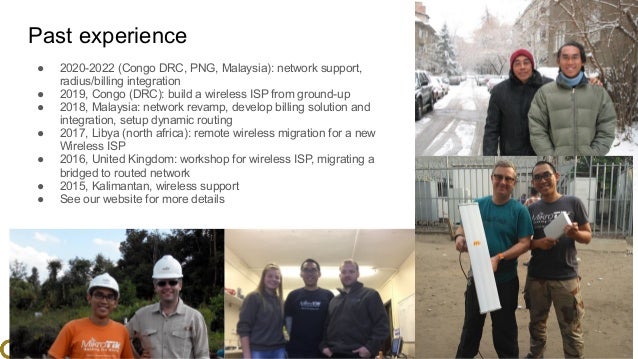
Past experience
● 2020-2022 (Congo DRC, PNG, Malaysia): network support,
radius/billing integration
● 2019, Congo (DRC): build a wireless ISP from ground-up
● 2018, Malaysia: network revamp, develop billing solution and
integration, setup dynamic routing
● 2017, Libya (north africa): remote wireless migration for a new
Wireless ISP
● 2016, United Kingdom: workshop for wireless ISP, migrating a
bridged to routed network
● 2015, Kalimantan, wireless support
● See our website for more details
6
www.glcnetworks.com
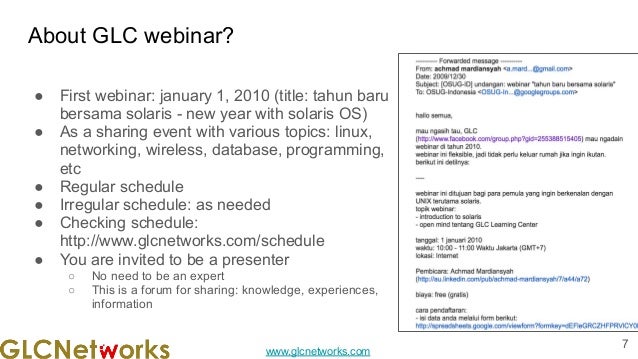
About GLC webinar?
● First webinar: january 1, 2010 (title: tahun baru
bersama solaris - new year with solaris OS)
● As a sharing event with various topics: linux,
networking, wireless, database, programming,
etc
● Regular schedule
● Irregular schedule: as needed
● Checking schedule:
http://www.glcnetworks.com/schedule
● You are invited to be a presenter
○ No need to be an expert
○ This is a forum for sharing: knowledge, experiences,
information
7
www.glcnetworks.com
Please introduce yourself
● Your name
● Your company/university?
● Your networking experience?
● Your mikrotik experience?
● Your expectation from this course?
8
www.glcnetworks.com
Prerequisite
● This presentation requires some prerequisite knowledge
● We assume you already know:
○ Computer network
○ Mikrotik RouterOS
9
www.glcnetworks.com
Review prerequisite knowledge
10
www.glcnetworks.com
Routing review
11
www.glcnetworks.com
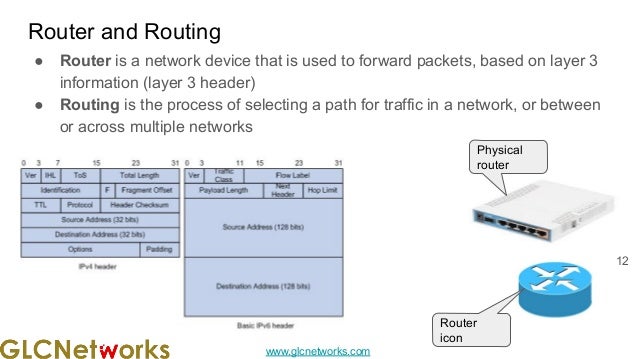
Router and Routing
● Router is a network device that is used to forward packets, based on layer 3
information (layer 3 header)
● Routing is the process of selecting a path for traffic in a network, or between
or across multiple networks
12
Physical
router
Router
icon
www.glcnetworks.com
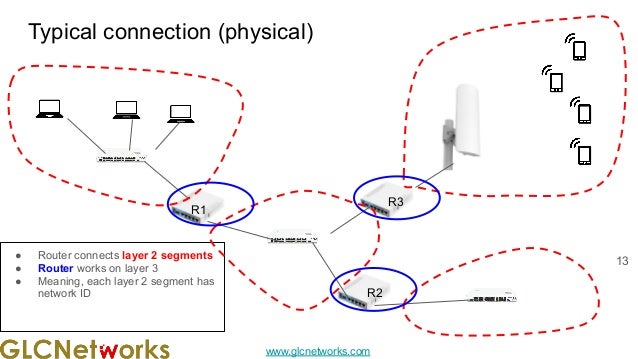
Typical connection (physical)
13
R2
R1
R3
● Router connects layer 2 segments
● Router works on layer 3
● Meaning, each layer 2 segment has
network ID
www.glcnetworks.com
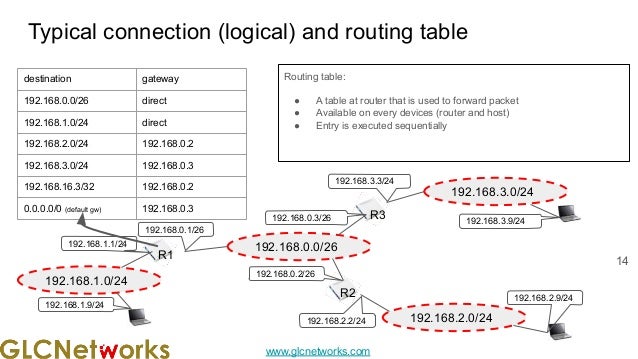
Typical connection (logical) and routing table
Routing table:
● A table at router that is used to forward packet
● Available on every devices (router and host)
● Entry is executed sequentially
14
192.168.0.0/26
R1
192.168.0.1/26
192.168.0.3/26
192.168.0.2/26
R3
R2
192.168.1.0/24
192.168.2.0/24
192.168.3.0/24
192.168.3.3/24
192.168.3.9/24
192.168.2.9/24
192.168.2.2/24
192.168.1.1/24
192.168.1.9/24
destination gateway
192.168.0.0/26 direct
192.168.1.0/24 direct
192.168.2.0/24 192.168.0.2
192.168.3.0/24 192.168.0.3
192.168.16.3/32 192.168.0.2
0.0.0.0/0 (default gw) 192.168.0.3
www.glcnetworks.com
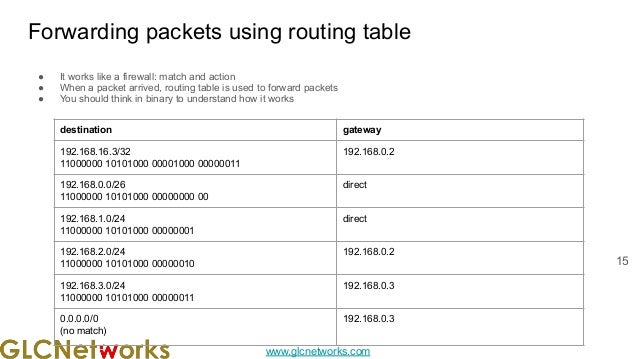
Forwarding packets using routing table
● It works like a firewall: match and action
● When a packet arrived, routing table is used to forward packets
● You should think in binary to understand how it works
15
destination gateway
192.168.16.3/32
11000000 10101000 00001000 00000011
192.168.0.2
192.168.0.0/26
11000000 10101000 00000000 00
direct
192.168.1.0/24
11000000 10101000 00000001
direct
192.168.2.0/24
11000000 10101000 00000010
192.168.0.2
192.168.3.0/24
11000000 10101000 00000011
192.168.0.3
0.0.0.0/0
(no match)
192.168.0.3
www.glcnetworks.com
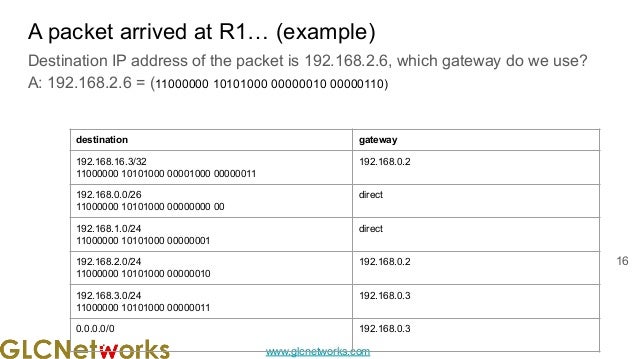
A packet arrived at R1… (example)
Destination IP address of the packet is 192.168.2.6, which gateway do we use?
A: 192.168.2.6 = (11000000 10101000 00000010 00000110)
16
destination gateway
192.168.16.3/32
11000000 10101000 00001000 00000011
192.168.0.2
192.168.0.0/26
11000000 10101000 00000000 00
direct
192.168.1.0/24
11000000 10101000 00000001
direct
192.168.2.0/24
11000000 10101000 00000010
192.168.0.2
192.168.3.0/24
11000000 10101000 00000011
192.168.0.3
0.0.0.0/0 192.168.0.3
www.glcnetworks.com
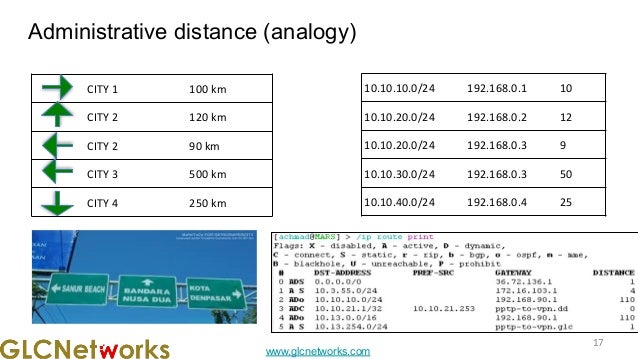
Administrative distance (analogy)
17
17
CITY 1 100 km
CITY 2 120 km
CITY 2 90 km
CITY 3 500 km
CITY 4 250 km
10.10.10.0/24 192.168.0.1 10
10.10.20.0/24 192.168.0.2 12
10.10.20.0/24 192.168.0.3 9
10.10.30.0/24 192.168.0.3 50
10.10.40.0/24 192.168.0.4 25
www.glcnetworks.com
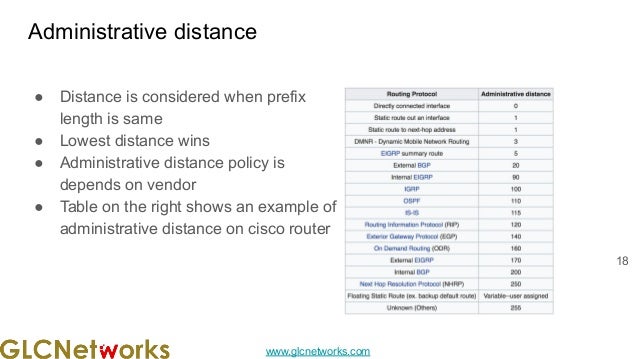
Administrative distance
● Distance is considered when prefix
length is same
● Lowest distance wins
● Administrative distance policy is
depends on vendor
● Table on the right shows an example of
administrative distance on cisco router
18
www.glcnetworks.com
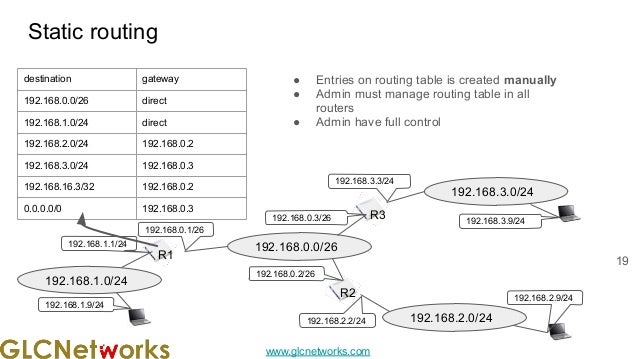
Static routing
● Entries on routing table is created manually
● Admin must manage routing table in all
routers
● Admin have full control
19
192.168.0.0/26
R1
192.168.0.1/26
192.168.0.3/26
192.168.0.2/26
R3
R2
192.168.1.0/24
192.168.2.0/24
192.168.3.0/24
192.168.3.3/24
192.168.3.9/24
192.168.2.9/24
192.168.2.2/24
192.168.1.1/24
192.168.1.9/24
destination gateway
192.168.0.0/26 direct
192.168.1.0/24 direct
192.168.2.0/24 192.168.0.2
192.168.3.0/24 192.168.0.3
192.168.16.3/32 192.168.0.2
0.0.0.0/0 192.168.0.3
www.glcnetworks.com
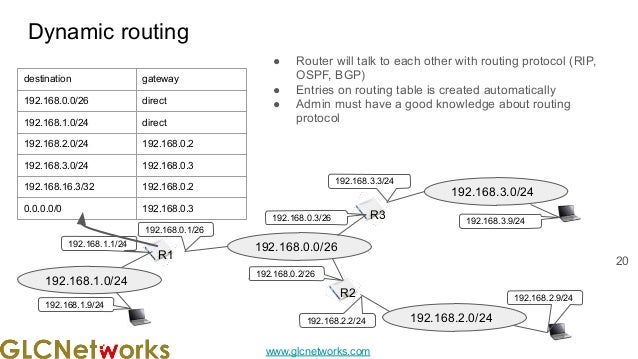
Dynamic routing
● Router will talk to each other with routing protocol (RIP,
OSPF, BGP)
● Entries on routing table is created automatically
● Admin must have a good knowledge about routing
protocol
20
192.168.0.0/26
R1
192.168.0.1/26
192.168.0.3/26
192.168.0.2/26
R3
R2
192.168.1.0/24
192.168.2.0/24
192.168.3.0/24
192.168.3.3/24
192.168.3.9/24
192.168.2.9/24
192.168.2.2/24
192.168.1.1/24
192.168.1.9/24
destination gateway
192.168.0.0/26 direct
192.168.1.0/24 direct
192.168.2.0/24 192.168.0.2
192.168.3.0/24 192.168.0.3
192.168.16.3/32 192.168.0.2
0.0.0.0/0 192.168.0.3
www.glcnetworks.com
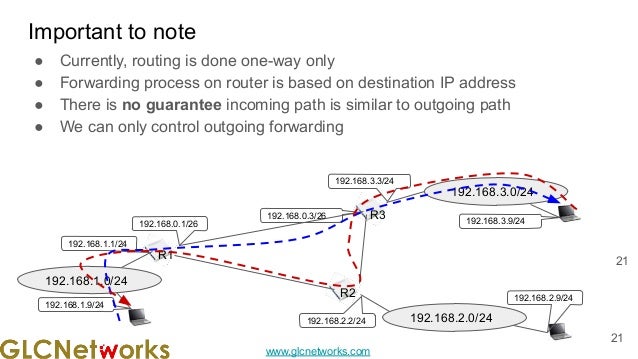
● Currently, routing is done one-way only
● Forwarding process on router is based on destination IP address
● There is no guarantee incoming path is similar to outgoing path
● We can only control outgoing forwarding
Important to note
21
21
R1
192.168.0.1/26
192.168.0.3/26 R3
R2
192.168.1.0/24
192.168.2.0/24
192.168.3.0/24
192.168.3.3/24
192.168.3.9/24
192.168.2.9/24
192.168.2.2/24
192.168.1.1/24
192.168.1.9/24
www.glcnetworks.com
IGP vs EGP
22
www.glcnetworks.com
Autonomous system (AS)
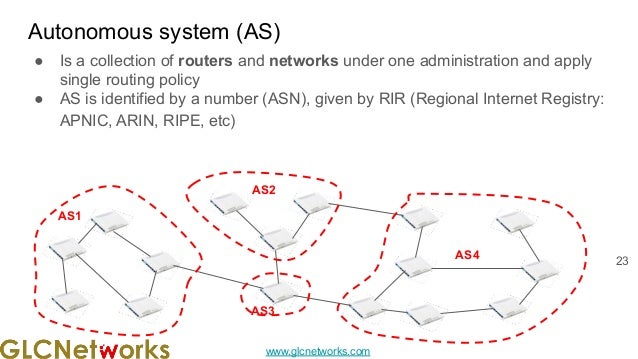
● Is a collection of routers and networks under one administration and apply
single routing policy
● AS is identified by a number (ASN), given by RIR (Regional Internet Registry:
APNIC, ARIN, RIPE, etc)
23
AS1
AS4
AS3
AS2
www.glcnetworks.com
Addressing, IANA, RIR
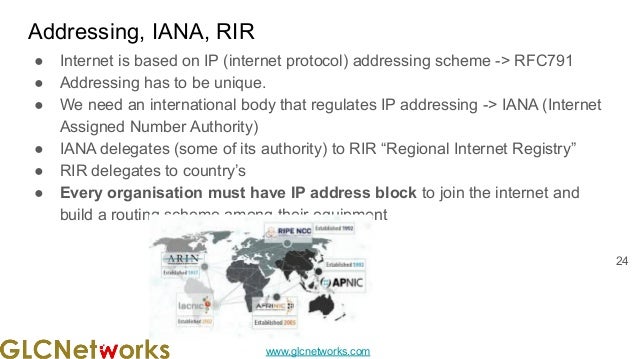
● Internet is based on IP (internet protocol) addressing scheme -> RFC791
● Addressing has to be unique.
● We need an international body that regulates IP addressing -> IANA (Internet
Assigned Number Authority)
● IANA delegates (some of its authority) to RIR “Regional Internet Registry”
● RIR delegates to country’s
● Every organisation must have IP address block to join the internet and
build a routing scheme among their equipment
24
www.glcnetworks.com
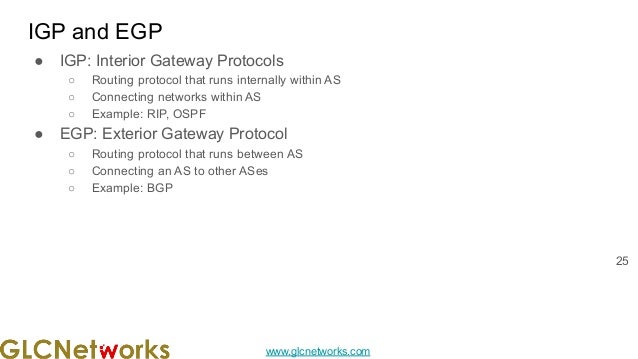
IGP and EGP
● IGP: Interior Gateway Protocols
○ Routing protocol that runs internally within AS
○ Connecting networks within AS
○ Example: RIP, OSPF
● EGP: Exterior Gateway Protocol
○ Routing protocol that runs between AS
○ Connecting an AS to other ASes
○ Example: BGP
25
www.glcnetworks.com
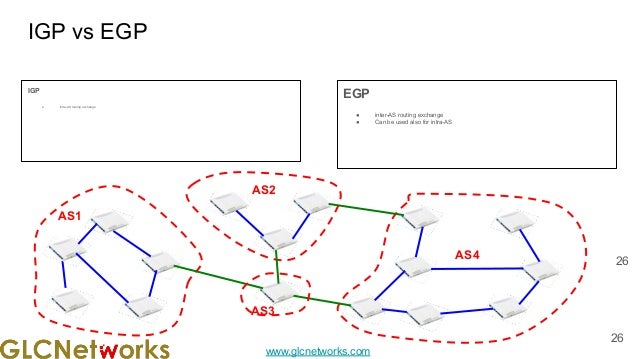
AS1
IGP vs EGP
IGP
● intra-AS routing exchange
EGP
● inter-AS routing exchange
● Can be used also for intra-AS
26
26
AS4
AS3
AS2
www.glcnetworks.com
BGP vs IGP
27
www.glcnetworks.com
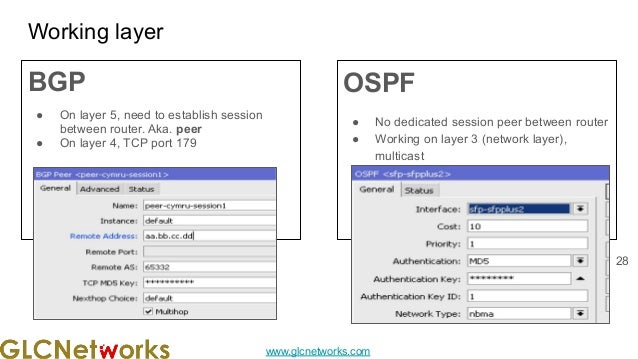
Working layer
BGP
● On layer 5, need to establish session
between router. Aka. peer
● On layer 4, TCP port 179
OSPF
● No dedicated session peer between router
● Working on layer 3 (network layer),
multicast
28
www.glcnetworks.com
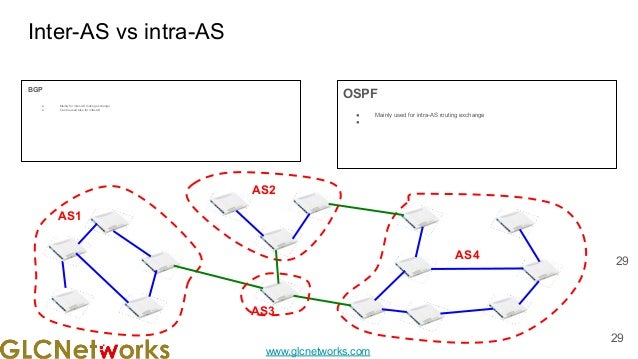
AS1
Inter-AS vs intra-AS
BGP
● Mainly for inter-AS routing exchange
● Can be used also for intra-AS
OSPF
● Mainly used for intra-AS routing exchange
●
29
29
AS4
AS3
AS2
www.glcnetworks.com
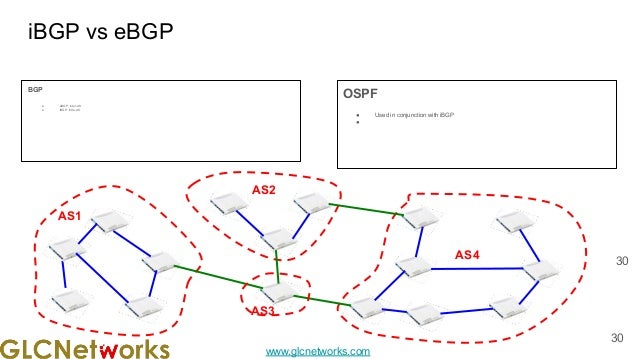
AS1
iBGP vs eBGP
BGP
● eBGP: inter-AS
● iBGP: intra-AS
OSPF
● Used in conjunction with iBGP
●
30
30
AS4
AS3
AS2
www.glcnetworks.com
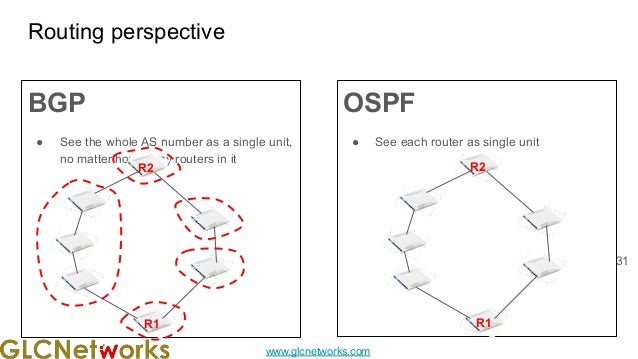
Routing perspective
BGP
● See the whole AS number as a single unit,
no matter how many routers in it
OSPF
● See each router as single unit
31
R2
R1
R2
R1
www.glcnetworks.com
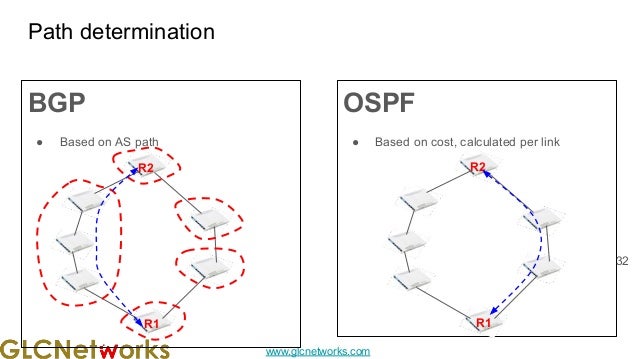
Path determination
BGP
● Based on AS path
OSPF
● Based on cost, calculated per link
32
R2
R1
R2
R1
www.glcnetworks.com
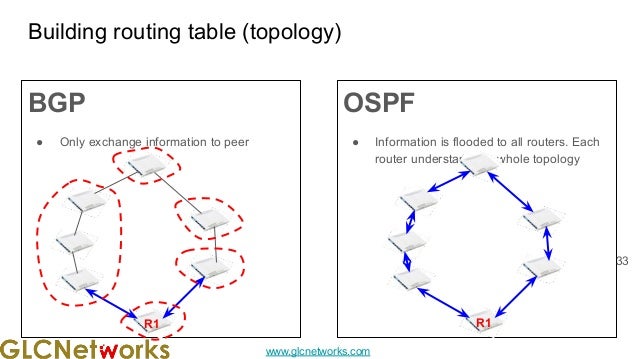
Building routing table (topology)
BGP
● Only exchange information to peer
OSPF
● Information is flooded to all routers. Each
router understand the whole topology
33
R1 R1
www.glcnetworks.com
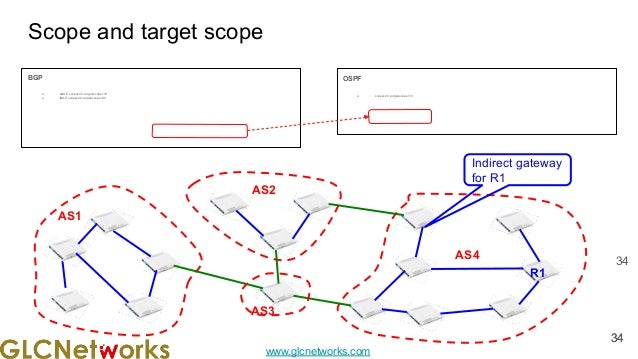
BGP
● eBGP. scope=40, target-scope=10
● iBGP. scope=40, target-scope=30
Scope and target scope
OSPF
● scope=20, target-scope=10
34
AS1
34
34
AS4
AS3
AS2
R1
Indirect gateway
for R1
www.glcnetworks.com
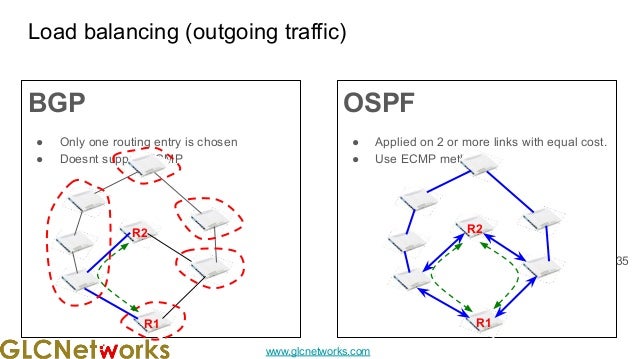
BGP
● Only one routing entry is chosen
● Doesnt support ECMP
Load balancing (outgoing traffic)
OSPF
● Applied on 2 or more links with equal cost.
● Use ECMP method
35
R1 R1
R2
R2
www.glcnetworks.com
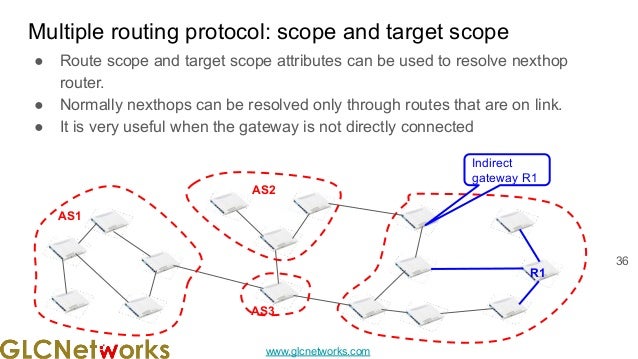
● Route scope and target scope attributes can be used to resolve nexthop
router.
● Normally nexthops can be resolved only through routes that are on link.
● It is very useful when the gateway is not directly connected
Multiple routing protocol: scope and target scope
36
AS1
R1
AS3
AS2
Indirect
gateway R1
www.glcnetworks.com
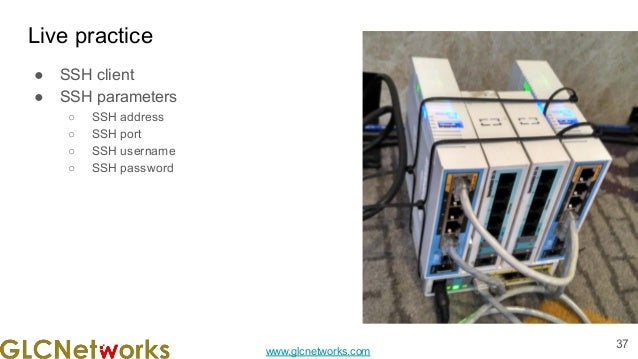
Live practice
● SSH client
● SSH parameters
○ SSH address
○ SSH port
○ SSH username
○ SSH password
37
www.glcnetworks.com
QnA
Any questions?
38
www.glcnetworks.com
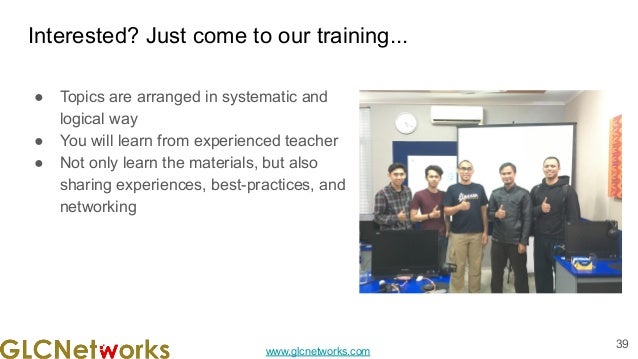
Interested? Just come to our training...
● Topics are arranged in systematic and
logical way
● You will learn from experienced teacher
● Not only learn the materials, but also
sharing experiences, best-practices, and
networking
39
www.glcnetworks.com
End of slides
● Thank you for your attention
● Please submit your feedback: http://bit.ly/glcfeedback
● Find our further event on our website :
https://www.glcnetworks.com
● Like our facebook page:
https://www.facebook.com/glcnetworks
● Slide: https://www.slideshare.net/glcnetworks/
● Discord (bahasa indonesia):
(https://discord.gg/6MZ3KUHHBX )
● Recording (youtube):
https://www.youtube.com/c/GLCNetworks
● Stay tune with our schedule
40

Policy Based Routing with Indirect BGP - Part 1

  • 1.
    www.glcnetworks.com Policy Based Routing with indirectBGP GLC Webinar, 01 Mar 2022 Achmad Mardiansyah Een Pahlefi
  • 2.
    www.glcnetworks.com Agenda ● Introduction ● Reviewprerequisite knowledge ● Network monitoring ● Mikrotik the dude ● Live practice ● Q & A 2
  • 3.
  • 4.
    www.glcnetworks.com What is GLC? ●Garda Lintas Cakrawala (www.glcnetworks.com) ● Based in Bandung, Indonesia ● Areas: Training, IT Consulting ● Certified partner for: Mikrotik, Ubiquity, Linux foundation ● Product: GLC radius manager ● Regular event 4
  • 5.
    www.glcnetworks.com Trainer Introduction ● Name:Achmad Mardiansyah ● Base: bandung, Indonesia ● Linux user since 1999, mikrotik user since 2007, UBNT 2011 ● Mikrotik Certified Trainer (MTCNA/RE/WE/UME/INE/TCE/IPv6) ● Mikrotik/Linux Certified Consultant ● Website contributor: achmadjournal.com, mikrotik.tips, asysadmin.tips ● More info: http://au.linkedin.com/in/achmadmardiansyah 5
  • 6.
    www.glcnetworks.com Past experience ● 2020-2022(Congo DRC, PNG, Malaysia): network support, radius/billing integration ● 2019, Congo (DRC): build a wireless ISP from ground-up ● 2018, Malaysia: network revamp, develop billing solution and integration, setup dynamic routing ● 2017, Libya (north africa): remote wireless migration for a new Wireless ISP ● 2016, United Kingdom: workshop for wireless ISP, migrating a bridged to routed network ● 2015, Kalimantan, wireless support ● See our website for more details 6
  • 7.
    www.glcnetworks.com About GLC webinar? ●First webinar: january 1, 2010 (title: tahun baru bersama solaris - new year with solaris OS) ● As a sharing event with various topics: linux, networking, wireless, database, programming, etc ● Regular schedule ● Irregular schedule: as needed ● Checking schedule: http://www.glcnetworks.com/schedule ● You are invited to be a presenter ○ No need to be an expert ○ This is a forum for sharing: knowledge, experiences, information 7
  • 8.
    www.glcnetworks.com Please introduce yourself ●Your name ● Your company/university? ● Your networking experience? ● Your mikrotik experience? ● Your expectation from this course? 8
  • 9.
    www.glcnetworks.com Prerequisite ● This presentationrequires some prerequisite knowledge ● We assume you already know: ○ Computer network ○ Mikrotik RouterOS 9
  • 10.
  • 11.
  • 12.
    www.glcnetworks.com Router and Routing ●Router is a network device that is used to forward packets, based on layer 3 information (layer 3 header) ● Routing is the process of selecting a path for traffic in a network, or between or across multiple networks 12 Physical router Router icon
  • 13.
    www.glcnetworks.com Typical connection (physical) 13 R2 R1 R3 ●Router connects layer 2 segments ● Router works on layer 3 ● Meaning, each layer 2 segment has network ID
  • 14.
    www.glcnetworks.com Typical connection (logical)and routing table Routing table: ● A table at router that is used to forward packet ● Available on every devices (router and host) ● Entry is executed sequentially 14 192.168.0.0/26 R1 192.168.0.1/26 192.168.0.3/26 192.168.0.2/26 R3 R2 192.168.1.0/24 192.168.2.0/24 192.168.3.0/24 192.168.3.3/24 192.168.3.9/24 192.168.2.9/24 192.168.2.2/24 192.168.1.1/24 192.168.1.9/24 destination gateway 192.168.0.0/26 direct 192.168.1.0/24 direct 192.168.2.0/24 192.168.0.2 192.168.3.0/24 192.168.0.3 192.168.16.3/32 192.168.0.2 0.0.0.0/0 (default gw) 192.168.0.3
  • 15.
    www.glcnetworks.com Forwarding packets usingrouting table ● It works like a firewall: match and action ● When a packet arrived, routing table is used to forward packets ● You should think in binary to understand how it works 15 destination gateway 192.168.16.3/32 11000000 10101000 00001000 00000011 192.168.0.2 192.168.0.0/26 11000000 10101000 00000000 00 direct 192.168.1.0/24 11000000 10101000 00000001 direct 192.168.2.0/24 11000000 10101000 00000010 192.168.0.2 192.168.3.0/24 11000000 10101000 00000011 192.168.0.3 0.0.0.0/0 (no match) 192.168.0.3
  • 16.
    www.glcnetworks.com A packet arrivedat R1… (example) Destination IP address of the packet is 192.168.2.6, which gateway do we use? A: 192.168.2.6 = (11000000 10101000 00000010 00000110) 16 destination gateway 192.168.16.3/32 11000000 10101000 00001000 00000011 192.168.0.2 192.168.0.0/26 11000000 10101000 00000000 00 direct 192.168.1.0/24 11000000 10101000 00000001 direct 192.168.2.0/24 11000000 10101000 00000010 192.168.0.2 192.168.3.0/24 11000000 10101000 00000011 192.168.0.3 0.0.0.0/0 192.168.0.3
  • 17.
    www.glcnetworks.com Administrative distance (analogy) 17 17 CITY1 100 km CITY 2 120 km CITY 2 90 km CITY 3 500 km CITY 4 250 km 10.10.10.0/24 192.168.0.1 10 10.10.20.0/24 192.168.0.2 12 10.10.20.0/24 192.168.0.3 9 10.10.30.0/24 192.168.0.3 50 10.10.40.0/24 192.168.0.4 25
  • 18.
    www.glcnetworks.com Administrative distance ● Distanceis considered when prefix length is same ● Lowest distance wins ● Administrative distance policy is depends on vendor ● Table on the right shows an example of administrative distance on cisco router 18
  • 19.
    www.glcnetworks.com Static routing ● Entrieson routing table is created manually ● Admin must manage routing table in all routers ● Admin have full control 19 192.168.0.0/26 R1 192.168.0.1/26 192.168.0.3/26 192.168.0.2/26 R3 R2 192.168.1.0/24 192.168.2.0/24 192.168.3.0/24 192.168.3.3/24 192.168.3.9/24 192.168.2.9/24 192.168.2.2/24 192.168.1.1/24 192.168.1.9/24 destination gateway 192.168.0.0/26 direct 192.168.1.0/24 direct 192.168.2.0/24 192.168.0.2 192.168.3.0/24 192.168.0.3 192.168.16.3/32 192.168.0.2 0.0.0.0/0 192.168.0.3
  • 20.
    www.glcnetworks.com Dynamic routing ● Routerwill talk to each other with routing protocol (RIP, OSPF, BGP) ● Entries on routing table is created automatically ● Admin must have a good knowledge about routing protocol 20 192.168.0.0/26 R1 192.168.0.1/26 192.168.0.3/26 192.168.0.2/26 R3 R2 192.168.1.0/24 192.168.2.0/24 192.168.3.0/24 192.168.3.3/24 192.168.3.9/24 192.168.2.9/24 192.168.2.2/24 192.168.1.1/24 192.168.1.9/24 destination gateway 192.168.0.0/26 direct 192.168.1.0/24 direct 192.168.2.0/24 192.168.0.2 192.168.3.0/24 192.168.0.3 192.168.16.3/32 192.168.0.2 0.0.0.0/0 192.168.0.3
  • 21.
    www.glcnetworks.com ● Currently, routingis done one-way only ● Forwarding process on router is based on destination IP address ● There is no guarantee incoming path is similar to outgoing path ● We can only control outgoing forwarding Important to note 21 21 R1 192.168.0.1/26 192.168.0.3/26 R3 R2 192.168.1.0/24 192.168.2.0/24 192.168.3.0/24 192.168.3.3/24 192.168.3.9/24 192.168.2.9/24 192.168.2.2/24 192.168.1.1/24 192.168.1.9/24
  • 22.
  • 23.
    www.glcnetworks.com Autonomous system (AS) ●Is a collection of routers and networks under one administration and apply single routing policy ● AS is identified by a number (ASN), given by RIR (Regional Internet Registry: APNIC, ARIN, RIPE, etc) 23 AS1 AS4 AS3 AS2
  • 24.
    www.glcnetworks.com Addressing, IANA, RIR ●Internet is based on IP (internet protocol) addressing scheme -> RFC791 ● Addressing has to be unique. ● We need an international body that regulates IP addressing -> IANA (Internet Assigned Number Authority) ● IANA delegates (some of its authority) to RIR “Regional Internet Registry” ● RIR delegates to country’s ● Every organisation must have IP address block to join the internet and build a routing scheme among their equipment 24
  • 25.
    www.glcnetworks.com IGP and EGP ●IGP: Interior Gateway Protocols ○ Routing protocol that runs internally within AS ○ Connecting networks within AS ○ Example: RIP, OSPF ● EGP: Exterior Gateway Protocol ○ Routing protocol that runs between AS ○ Connecting an AS to other ASes ○ Example: BGP 25
  • 26.
    www.glcnetworks.com AS1 IGP vs EGP IGP ●intra-AS routing exchange EGP ● inter-AS routing exchange ● Can be used also for intra-AS 26 26 AS4 AS3 AS2
  • 27.
  • 28.
    www.glcnetworks.com Working layer BGP ● Onlayer 5, need to establish session between router. Aka. peer ● On layer 4, TCP port 179 OSPF ● No dedicated session peer between router ● Working on layer 3 (network layer), multicast 28
  • 29.
    www.glcnetworks.com AS1 Inter-AS vs intra-AS BGP ●Mainly for inter-AS routing exchange ● Can be used also for intra-AS OSPF ● Mainly used for intra-AS routing exchange ● 29 29 AS4 AS3 AS2
  • 30.
    www.glcnetworks.com AS1 iBGP vs eBGP BGP ●eBGP: inter-AS ● iBGP: intra-AS OSPF ● Used in conjunction with iBGP ● 30 30 AS4 AS3 AS2
  • 31.
    www.glcnetworks.com Routing perspective BGP ● Seethe whole AS number as a single unit, no matter how many routers in it OSPF ● See each router as single unit 31 R2 R1 R2 R1
  • 32.
    www.glcnetworks.com Path determination BGP ● Basedon AS path OSPF ● Based on cost, calculated per link 32 R2 R1 R2 R1
  • 33.
    www.glcnetworks.com Building routing table(topology) BGP ● Only exchange information to peer OSPF ● Information is flooded to all routers. Each router understand the whole topology 33 R1 R1
  • 34.
    www.glcnetworks.com BGP ● eBGP. scope=40,target-scope=10 ● iBGP. scope=40, target-scope=30 Scope and target scope OSPF ● scope=20, target-scope=10 34 AS1 34 34 AS4 AS3 AS2 R1 Indirect gateway for R1
  • 35.
    www.glcnetworks.com BGP ● Only onerouting entry is chosen ● Doesnt support ECMP Load balancing (outgoing traffic) OSPF ● Applied on 2 or more links with equal cost. ● Use ECMP method 35 R1 R1 R2 R2
  • 36.
    www.glcnetworks.com ● Route scopeand target scope attributes can be used to resolve nexthop router. ● Normally nexthops can be resolved only through routes that are on link. ● It is very useful when the gateway is not directly connected Multiple routing protocol: scope and target scope 36 AS1 R1 AS3 AS2 Indirect gateway R1
  • 37.
    www.glcnetworks.com Live practice ● SSHclient ● SSH parameters ○ SSH address ○ SSH port ○ SSH username ○ SSH password 37
  • 38.
  • 39.
    www.glcnetworks.com Interested? Just cometo our training... ● Topics are arranged in systematic and logical way ● You will learn from experienced teacher ● Not only learn the materials, but also sharing experiences, best-practices, and networking 39
  • 40.
    www.glcnetworks.com End of slides ●Thank you for your attention ● Please submit your feedback: http://bit.ly/glcfeedback ● Find our further event on our website : https://www.glcnetworks.com ● Like our facebook page: https://www.facebook.com/glcnetworks ● Slide: https://www.slideshare.net/glcnetworks/ ● Discord (bahasa indonesia): (https://discord.gg/6MZ3KUHHBX ) ● Recording (youtube): https://www.youtube.com/c/GLCNetworks ● Stay tune with our schedule 40