
Teaching
Strategies for
Digital Literacy
June Wall
Education consultant
@junewall
What’s digital literacy all about?
Digital literacy has become an amorphous term. In the context of the General capabilities, the digital
technologies curriculum of the Australian Curriculum and 21c learning as viewed through the lens of
a teacher librarian, this seminar uses the following guidelines from Bawden (2008):
 underpinnings
 background knowledge
 central competencies
 attitudes and perspectives
Bawden, D. (2008). CHAPTER ONE: Origins and concepts of digital literacy. In Digital Literacies: Concepts, Policies & Practices (pp. 17–32). Peter Lang
Publishing, Inc.
Teaching strategies for digital literacy
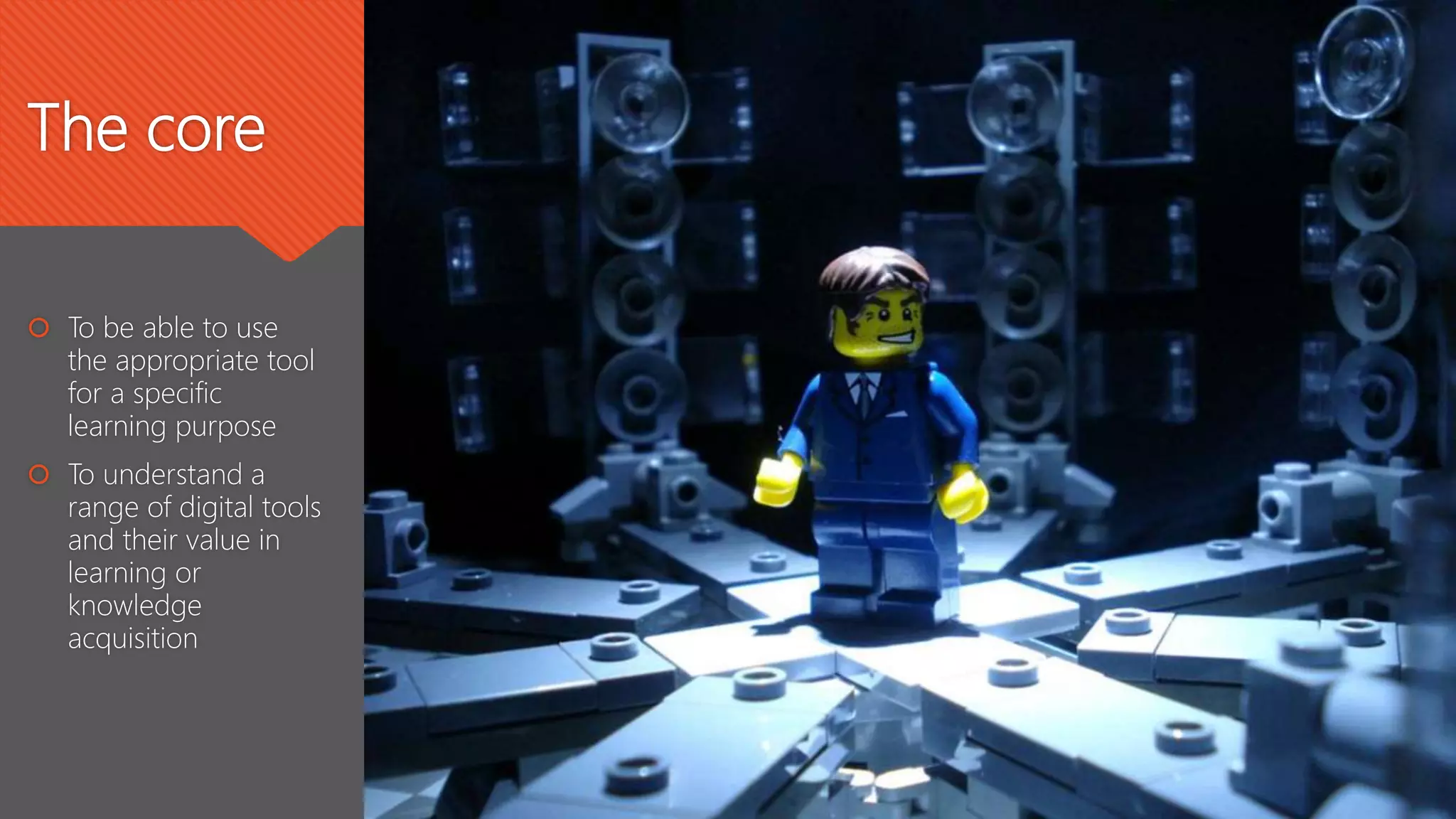
cc: gcouros - https://www.flickr.com/photos/49053756@N03
The core
 To be able to use
the appropriate tool
for a specific
learning purpose
 To understand a
range of digital tools
and their value in
learning or
knowledge
acquisition
Step by step….inch by
inch….
Everyone needs to start somewhere …
General Capabilities
• Literacy
• ICT
• Critical and Creative thinking
• Personal and social capability
Core digital skills
1. Managing information
• Digital citizenship – security, digital etiquette etc
• Understand the cloud vs network vs personal device environment
2. Communicating
• Use of various communication mechanisms for the appropriate audience
• Use of appropriate language form for the audience
3. Research
• Search
• Collect information
• Synthesise
4. Problem solving
• Life long learning attitudes
• High level questioning
• Ability to select the right tool for the right purpose for the right audience
5. Creating
• Understanding of copyright / creative commons
• Continual improvement as a core attitude and behaviour
• Video creation skills
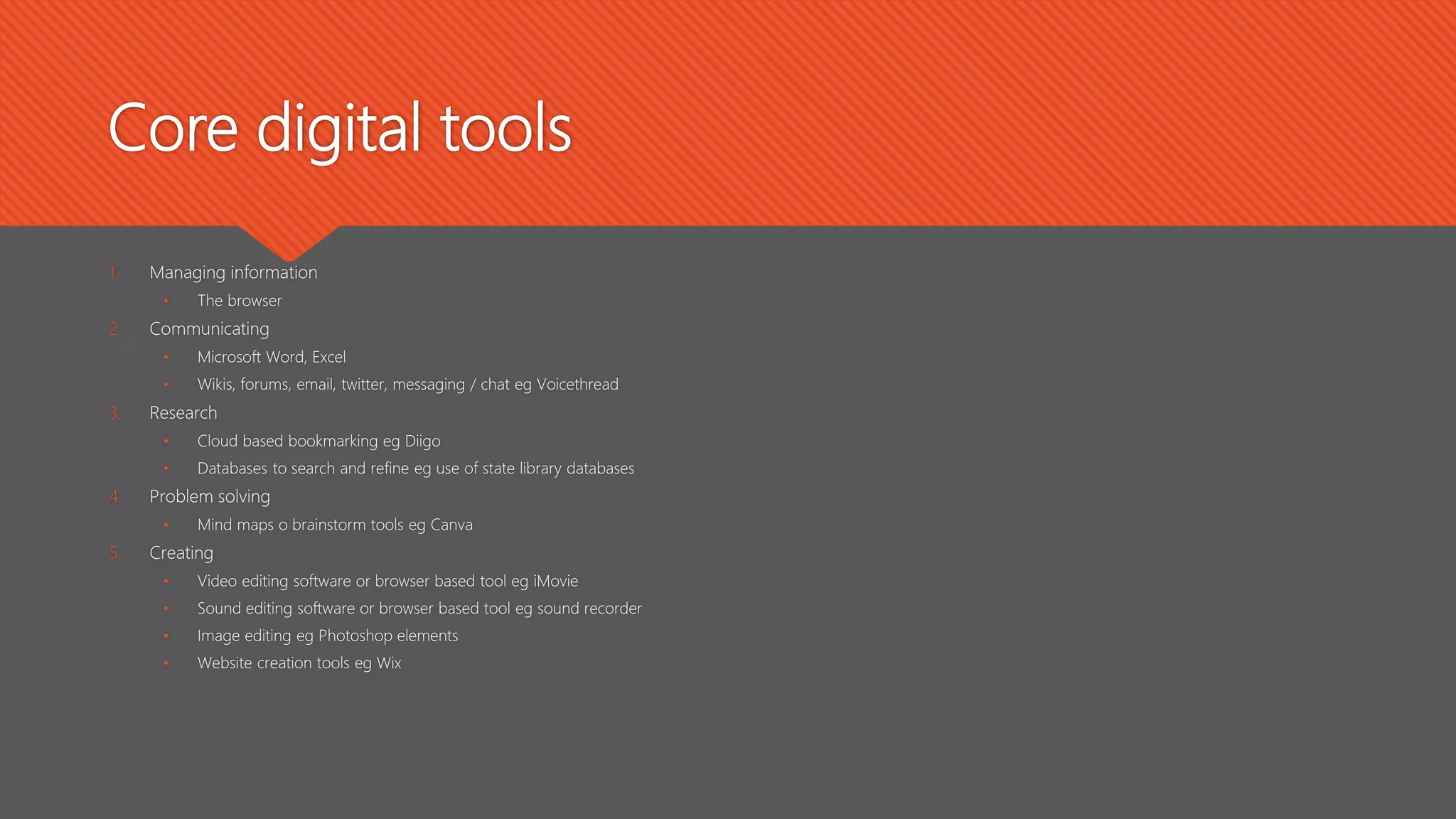
Core digital tools
1. Managing information
• The browser
2. Communicating
• Microsoft Word, Excel
• Wikis, forums, email, twitter, messaging / chat eg Voicethread
3. Research
• Cloud based bookmarking eg Diigo
• Databases to search and refine eg use of state library databases
4. Problem solving
• Mind maps o brainstorm tools eg Canva
5. Creating
• Video editing software or browser based tool eg iMovie
• Sound editing software or browser based tool eg sound recorder
• Image editing eg Photoshop elements
• Website creation tools eg Wix
To teach a digital skill you often need
to lay the groundwork of thinking
before the technical skill is taught
June 
Teaching strategies
 Assign a research task relevant to the students current
unit of work and segment stages into a nominated
number of lessons.
1. Brainstorm and use the results of this as outline or questions
for the research
2. High level search strategies
3. Use of a wiki to develop whole class information source
4. Segment class into 3 groups for the next 3 lessons to learn
about the use of:
1. Video creation
2. Website creation
3. Developing quizzes or surveys
5. Students determine how they will present their information
using 1 or more of the above skills. They could also form
teams to combine efforts – could need 3 or more lessons
6. Final product must teach others in the class about the topic.
– could need at least 2 lessons for the learning to happen
 Use current topic as catalyst to learning. Eg recent
excursion to a zoo.
1. Capture photos of animals – talk about image formats and
how images can be edited. Provide a sample of an edited
image as an idea and then let children create their own
gallery of animals. Tool will depend on OS and device.
Discuss why editing images of people is not a good idea
without their permission
2. Introduce the idea of curating content – through Diigo (class
account – explain why this is used rather than individuals as a
security measure) and attach images.
3. Introduce how to use a wiki and a blog.
4. Class discussion on a publishing tool eg blog or wiki. Talk
about the features of each and decide which one would be
most appropriate for publishing their work. Each student
adds 1 image and writes about the animal.
Teaching strategies
 Assessment task – secondary
• Students create a website to act as their portfolio
for a science assessment
• Sub sets of this will include: creative commons and
copyright, information structure, image and video
manipulation
• Students use a device to capture video content of
their scientific techniques to include in portfolio
Note: this would need at least 2 – 3 lessons at the
beginning of the unit to set the portfolio up.
Individualised learning for students should be
available as they edit their videos and upload to the
portfolio
 Literature response task – primary
• At the conclusion of a story / novel, children are
asked to think about how they would have ended
the story if they had been the author. Use a
brainstorm tool to capture ideas and then each
child brainstorms their own story
• Children are then asked to develop their story
ending as a comic or graphic novel eg use
Canva.
• Sub sets of this will be storyboarding, layout, critical
thinking
• Note: This would need at least 3 – 4 lessons as
at least 1 of them will be used in teaching the
children how to use the comic strip tool
Taking it further
Questions?
Collaboration
cc: vharjadi - https://www.flickr.com/photos/48984971@N08
Communication
cc: DocChewbacca - https://www.flickr.com/photos/49462908@N00
Creativity
cc: shannonkringen - https://www.flickr.com/photos/18161271@N00
Critical thinkingcc: JohnE777 - https://www.flickr.com/photos/8168146@N06
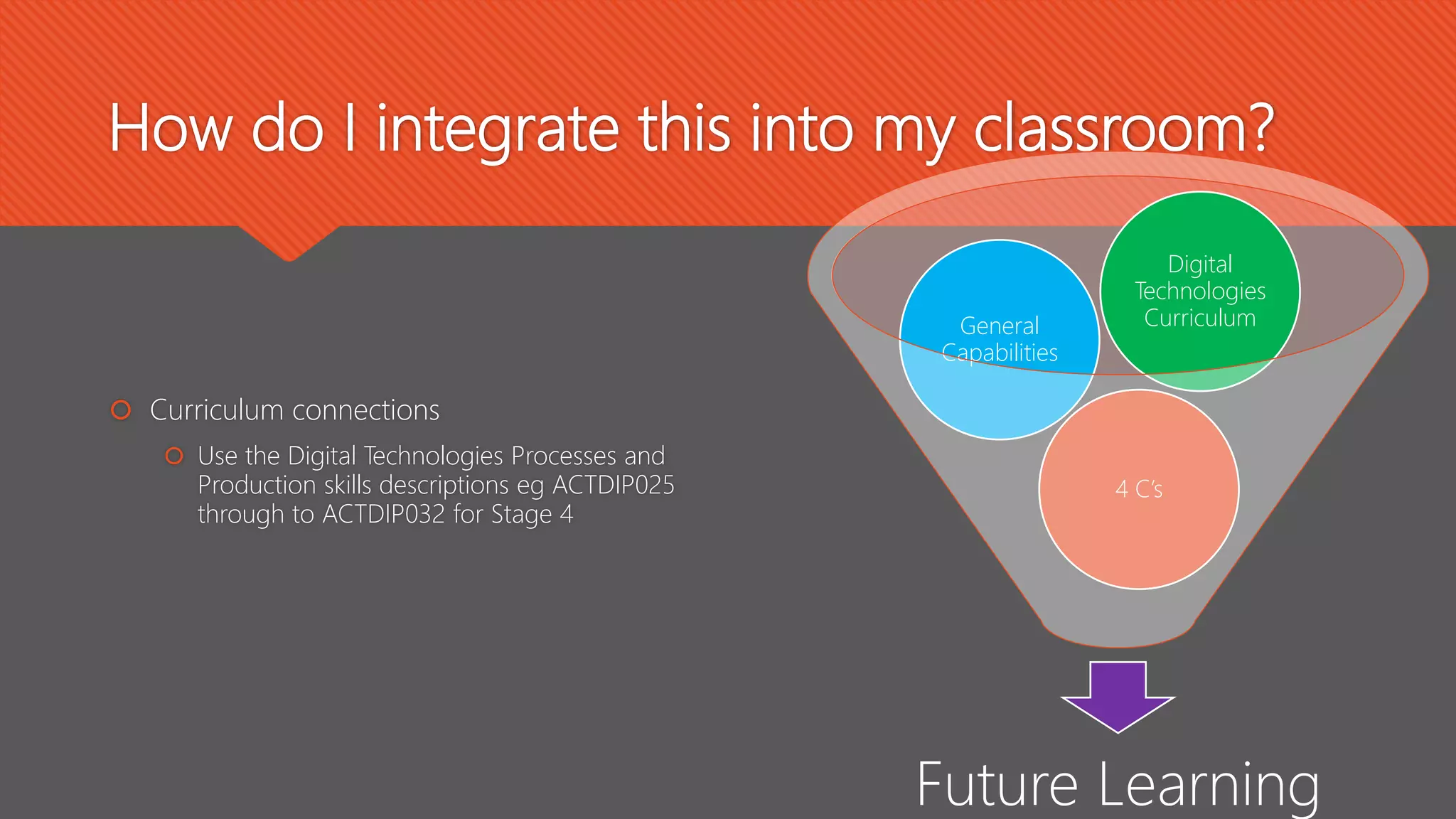
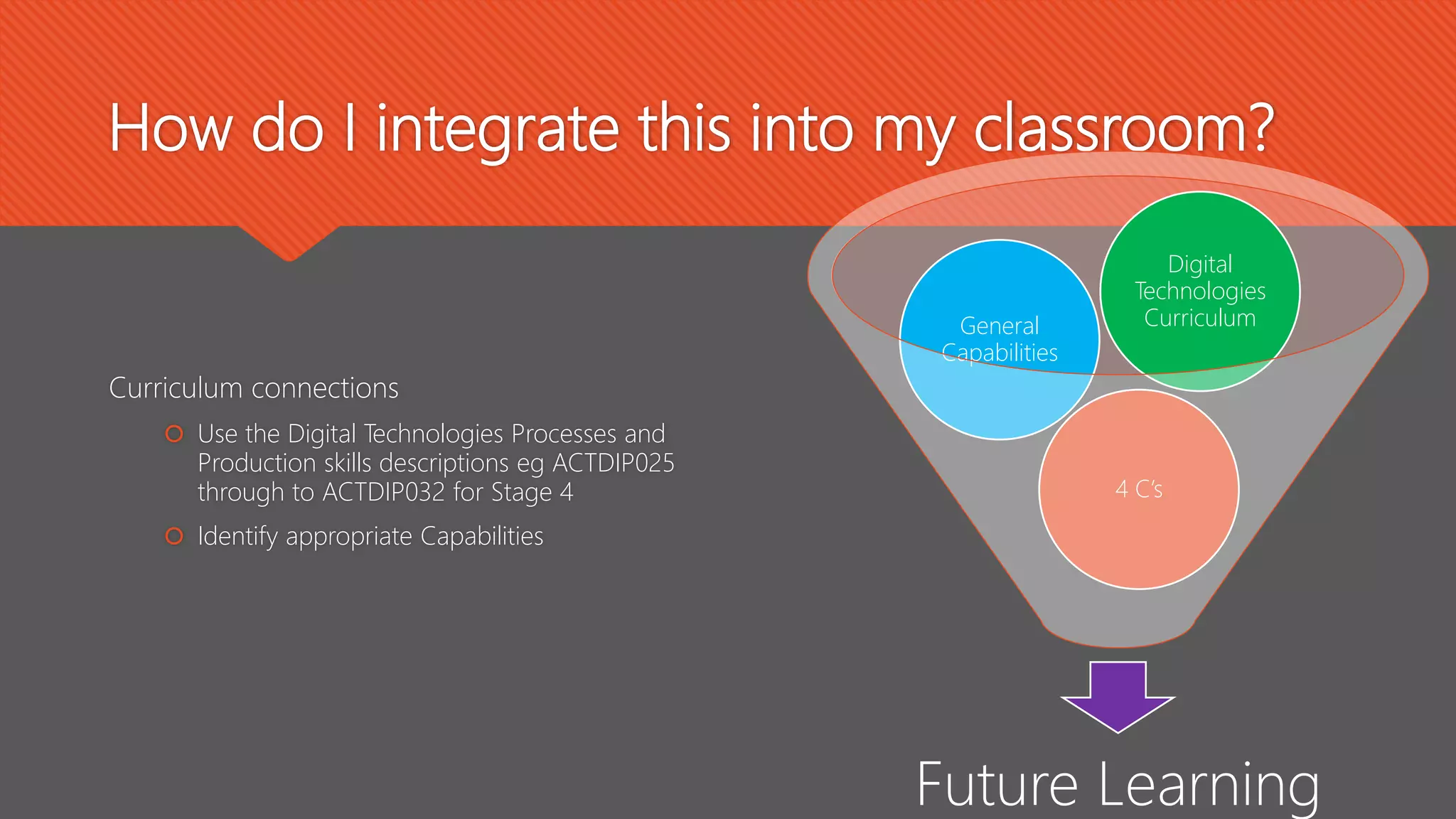
How do I integrate this into my classroom?
 Curriculum connections
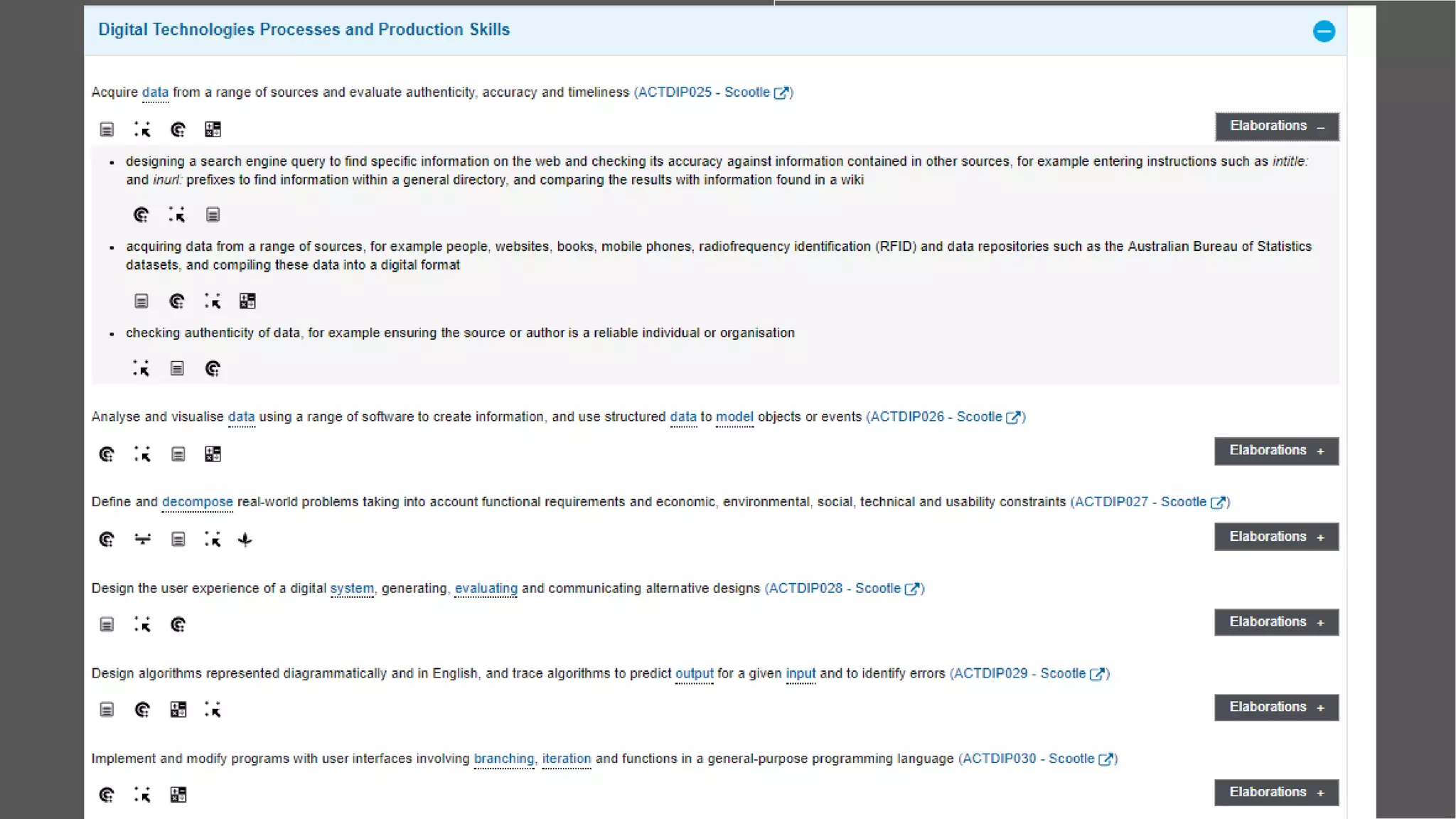
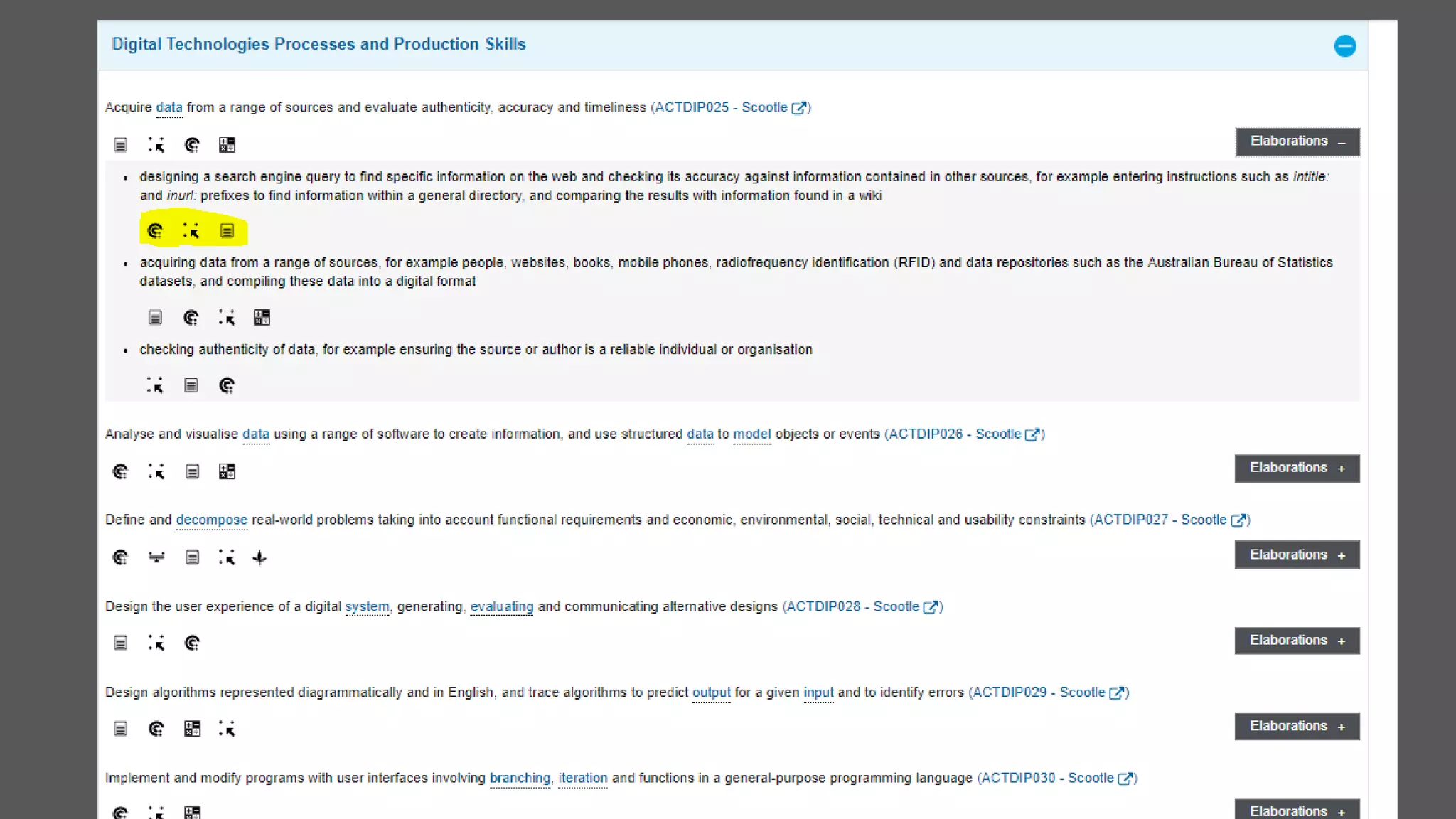
 Use the Digital Technologies Processes and
Production skills descriptions eg ACTDIP025
through to ACTDIP032 for Stage 4
Future Learning
4 C’s
General
Capabilities
Digital
Technologies
Curriculum
Curriculum connections
How do I integrate this into my classroom?
Curriculum connections
 Use the Digital Technologies Processes and
Production skills descriptions eg ACTDIP025
through to ACTDIP032 for Stage 4
 Identify appropriate Capabilities
Future Learning
4 C’s
General
Capabilities
Digital
Technologies
Curriculum
How do I integrate this into my classroom?
Curriculum connections
 Use the Digital Technologies Processes and
Production skills descriptions eg ACTDIP025
through to ACTDIP032 for Stage 4
 Identify appropriate Capabilities
 Map these to the 4 C’s
Future Learning
4 C’s
General
Capabilities
Digital
Technologies
Curriculum
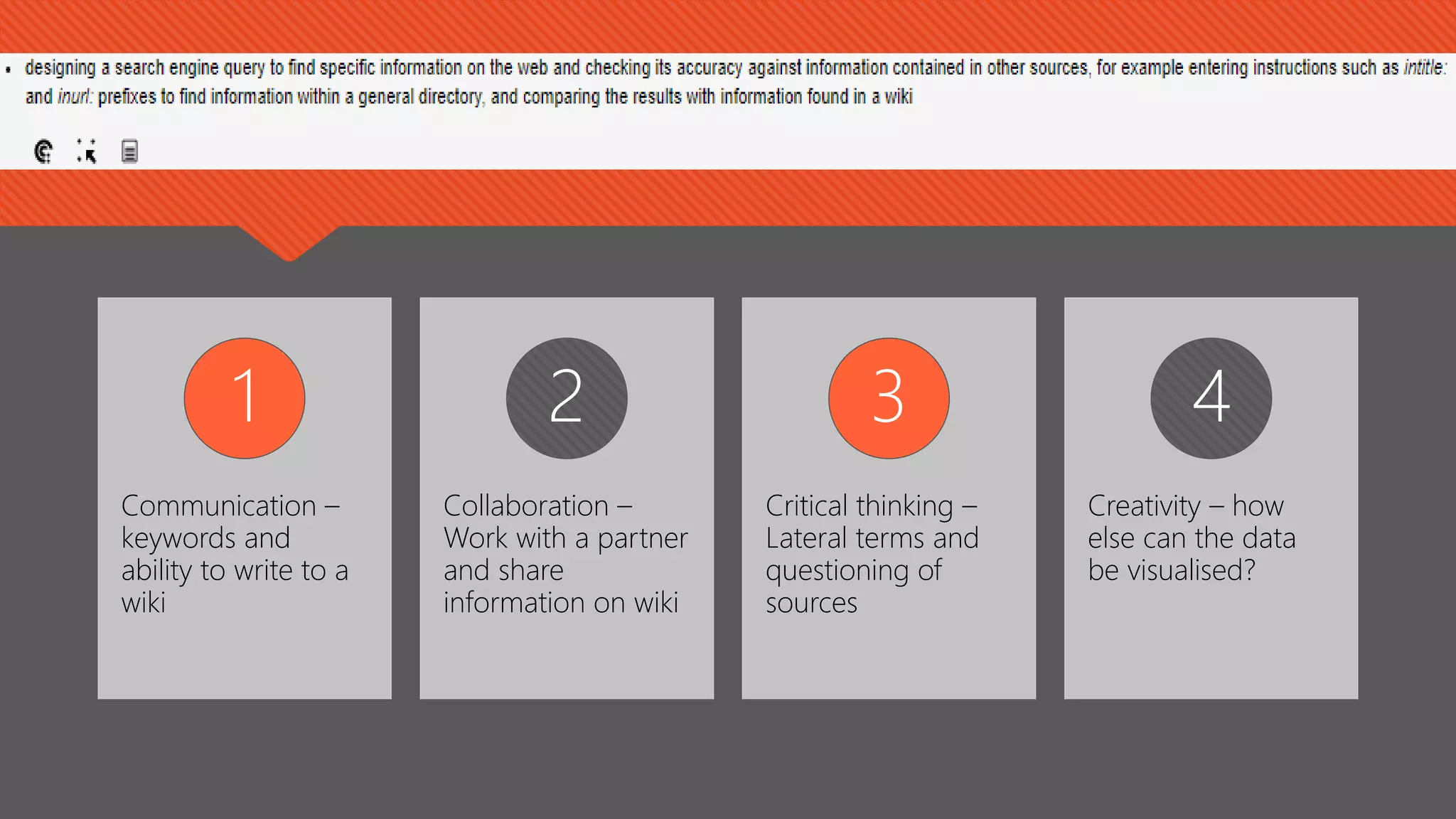
Communication –
keywords and
ability to write to a
wiki
1
Collaboration –
Work with a partner
and share
information on wiki
2
Critical thinking –
Lateral terms and
questioning of
sources
3
Creativity – how
else can the data
be visualised?
4
….and further still
Focus on learning
purpose NOT the
digital tool or object
 Curriculum Skills:
 Using a digital learning framework, what specific skills are required for this unit?
 Are there any specific application skills needed? Eg Photoshop?
 Core Inquiry Skills:
 What is the inquiry focus for this unit? Can the required digital skills be used / taught within this focus area?
 Learning management:
 Whole class?
 Project teams?
 Individuals?
Designing a digital inquiry unit
 Phase: Open - Create a powerful open
that invites the students to engage in
the inquiry topic.
 Phase: Immerse - Students build their
background knowledge by immersion in
the content. Students reflect on the
content and select a topic for further
investigation.
 Present the inquiry or issue as a digital
story or video
 Ensure more than superficial info is
considered by asking students to collect
summaries and then analyse using a tool
such as a concept map
Guided Inquiry Design
Phase: Explore - Students browse
and scan through a wide range and
variety of resources to explore
interesting ideas around their topic.
Phase: Identify - Students develop
an inquiry question or questions and
form a focus for their research. The
question or questions will frame the rest
of the inquiry.
 Research process using tools
such as Zotero or Evernote
 Use socratic questioning
processes in a collaborative
environment for students to
develop their inquiry question
Phase: gather - Students
collect detailed information from a
variety of information sources – “go
broad, go deep”
 Phase: Create - Students organise their
gathered information to create their
product – “tell the story”
 Ensure depth in research through
learning scaffolds and high expectations.
 All students to select their own product
to tell their story – encourage a
makerspace attitude to this process
 Phase: Share - Students present their
product to others to show what they
have learned
 Phase: Evaluate - Students reflect on their
content learning and the progress
through the inquiry process.
 Use collaborative space such as Google
drive or video or game development to
share
 Encourage peer and self evaluation by
using a social or collaborative space for
discussion against the criteria from the
rubric
References
 Digital Technologies content descriptions for Stage 4. Processes and Production skills
https://www.australiancurriculum.edu.au/f-10-curriculum/technologies/digital-technologies
Resources
 10 Innovative learning stations https://www.edutopia.org/article/10-innovative-
learning-stations-get-students-reading-shelby-scoffield
 Internet Safety from Google https://beinternetawesome.withgoogle.com/
 https://beinternetawesome.withgoogle.com/pdfs/Google_BeInternetAwesome_Digit
alCitizenshipSafety_Curriculum_.pdf
 Design thinking http://designthinkingforlibraries.com/
 Research tools https://docs.google.com/document/d/1v-
KkA88vGNWuhPu9aSbjfBdAL8NL6JtuSwVuX4iIgo4/edit
 https://docs.google.com/drawings/d/17eOafGx-
Zutke9VbTzC5SHCKyqGjDGNwW2cnDQGtH0E/edit
 10 Innovative learning strategies https://www.teachthought.com/learning/10-
innovative-learning-strategies-for-modern-pedagogy/
June Wall
Email: june@junewall.com.au
Twitter: @junewall
Facebook page: https://www.facebook.com/junewallconsultancy
LinkedIn
https://www.linkedin.com/in/junewall/

Teaching strategies for digital literacy

  • 1.
    Teaching Strategies for Digital Literacy JuneWall Education consultant @junewall
  • 2.
    What’s digital literacyall about? Digital literacy has become an amorphous term. In the context of the General capabilities, the digital technologies curriculum of the Australian Curriculum and 21c learning as viewed through the lens of a teacher librarian, this seminar uses the following guidelines from Bawden (2008):  underpinnings  background knowledge  central competencies  attitudes and perspectives Bawden, D. (2008). CHAPTER ONE: Origins and concepts of digital literacy. In Digital Literacies: Concepts, Policies & Practices (pp. 17–32). Peter Lang Publishing, Inc.
  • 3.
    Teaching strategies fordigital literacy cc: gcouros - https://www.flickr.com/photos/49053756@N03
  • 4.
    The core  Tobe able to use the appropriate tool for a specific learning purpose  To understand a range of digital tools and their value in learning or knowledge acquisition
  • 5.
    Step by step….inchby inch…. Everyone needs to start somewhere … General Capabilities • Literacy • ICT • Critical and Creative thinking • Personal and social capability
  • 6.
    Core digital skills 1.Managing information • Digital citizenship – security, digital etiquette etc • Understand the cloud vs network vs personal device environment 2. Communicating • Use of various communication mechanisms for the appropriate audience • Use of appropriate language form for the audience 3. Research • Search • Collect information • Synthesise 4. Problem solving • Life long learning attitudes • High level questioning • Ability to select the right tool for the right purpose for the right audience 5. Creating • Understanding of copyright / creative commons • Continual improvement as a core attitude and behaviour • Video creation skills
  • 7.
    Core digital tools 1.Managing information • The browser 2. Communicating • Microsoft Word, Excel • Wikis, forums, email, twitter, messaging / chat eg Voicethread 3. Research • Cloud based bookmarking eg Diigo • Databases to search and refine eg use of state library databases 4. Problem solving • Mind maps o brainstorm tools eg Canva 5. Creating • Video editing software or browser based tool eg iMovie • Sound editing software or browser based tool eg sound recorder • Image editing eg Photoshop elements • Website creation tools eg Wix
  • 8.
    To teach adigital skill you often need to lay the groundwork of thinking before the technical skill is taught June 
  • 9.
    Teaching strategies  Assigna research task relevant to the students current unit of work and segment stages into a nominated number of lessons. 1. Brainstorm and use the results of this as outline or questions for the research 2. High level search strategies 3. Use of a wiki to develop whole class information source 4. Segment class into 3 groups for the next 3 lessons to learn about the use of: 1. Video creation 2. Website creation 3. Developing quizzes or surveys 5. Students determine how they will present their information using 1 or more of the above skills. They could also form teams to combine efforts – could need 3 or more lessons 6. Final product must teach others in the class about the topic. – could need at least 2 lessons for the learning to happen  Use current topic as catalyst to learning. Eg recent excursion to a zoo. 1. Capture photos of animals – talk about image formats and how images can be edited. Provide a sample of an edited image as an idea and then let children create their own gallery of animals. Tool will depend on OS and device. Discuss why editing images of people is not a good idea without their permission 2. Introduce the idea of curating content – through Diigo (class account – explain why this is used rather than individuals as a security measure) and attach images. 3. Introduce how to use a wiki and a blog. 4. Class discussion on a publishing tool eg blog or wiki. Talk about the features of each and decide which one would be most appropriate for publishing their work. Each student adds 1 image and writes about the animal.
  • 10.
    Teaching strategies  Assessmenttask – secondary • Students create a website to act as their portfolio for a science assessment • Sub sets of this will include: creative commons and copyright, information structure, image and video manipulation • Students use a device to capture video content of their scientific techniques to include in portfolio Note: this would need at least 2 – 3 lessons at the beginning of the unit to set the portfolio up. Individualised learning for students should be available as they edit their videos and upload to the portfolio  Literature response task – primary • At the conclusion of a story / novel, children are asked to think about how they would have ended the story if they had been the author. Use a brainstorm tool to capture ideas and then each child brainstorms their own story • Children are then asked to develop their story ending as a comic or graphic novel eg use Canva. • Sub sets of this will be storyboarding, layout, critical thinking • Note: This would need at least 3 – 4 lessons as at least 1 of them will be used in teaching the children how to use the comic strip tool
  • 11.
  • 12.
    Collaboration cc: vharjadi -https://www.flickr.com/photos/48984971@N08
  • 13.
    Communication cc: DocChewbacca -https://www.flickr.com/photos/49462908@N00
  • 14.
    Creativity cc: shannonkringen -https://www.flickr.com/photos/18161271@N00
  • 15.
    Critical thinkingcc: JohnE777- https://www.flickr.com/photos/8168146@N06
  • 16.
    How do Iintegrate this into my classroom?  Curriculum connections  Use the Digital Technologies Processes and Production skills descriptions eg ACTDIP025 through to ACTDIP032 for Stage 4 Future Learning 4 C’s General Capabilities Digital Technologies Curriculum
  • 17.
  • 18.
    How do Iintegrate this into my classroom? Curriculum connections  Use the Digital Technologies Processes and Production skills descriptions eg ACTDIP025 through to ACTDIP032 for Stage 4  Identify appropriate Capabilities Future Learning 4 C’s General Capabilities Digital Technologies Curriculum
  • 20.
    How do Iintegrate this into my classroom? Curriculum connections  Use the Digital Technologies Processes and Production skills descriptions eg ACTDIP025 through to ACTDIP032 for Stage 4  Identify appropriate Capabilities  Map these to the 4 C’s Future Learning 4 C’s General Capabilities Digital Technologies Curriculum
  • 21.
    Communication – keywords and abilityto write to a wiki 1 Collaboration – Work with a partner and share information on wiki 2 Critical thinking – Lateral terms and questioning of sources 3 Creativity – how else can the data be visualised? 4
  • 22.
  • 23.
    Focus on learning purposeNOT the digital tool or object
  • 24.
     Curriculum Skills: Using a digital learning framework, what specific skills are required for this unit?  Are there any specific application skills needed? Eg Photoshop?  Core Inquiry Skills:  What is the inquiry focus for this unit? Can the required digital skills be used / taught within this focus area?  Learning management:  Whole class?  Project teams?  Individuals? Designing a digital inquiry unit
  • 25.
     Phase: Open- Create a powerful open that invites the students to engage in the inquiry topic.  Phase: Immerse - Students build their background knowledge by immersion in the content. Students reflect on the content and select a topic for further investigation.  Present the inquiry or issue as a digital story or video  Ensure more than superficial info is considered by asking students to collect summaries and then analyse using a tool such as a concept map Guided Inquiry Design
  • 26.
    Phase: Explore -Students browse and scan through a wide range and variety of resources to explore interesting ideas around their topic. Phase: Identify - Students develop an inquiry question or questions and form a focus for their research. The question or questions will frame the rest of the inquiry.  Research process using tools such as Zotero or Evernote  Use socratic questioning processes in a collaborative environment for students to develop their inquiry question
  • 27.
    Phase: gather -Students collect detailed information from a variety of information sources – “go broad, go deep”  Phase: Create - Students organise their gathered information to create their product – “tell the story”  Ensure depth in research through learning scaffolds and high expectations.  All students to select their own product to tell their story – encourage a makerspace attitude to this process
  • 28.
     Phase: Share- Students present their product to others to show what they have learned  Phase: Evaluate - Students reflect on their content learning and the progress through the inquiry process.  Use collaborative space such as Google drive or video or game development to share  Encourage peer and self evaluation by using a social or collaborative space for discussion against the criteria from the rubric
  • 30.
    References  Digital Technologiescontent descriptions for Stage 4. Processes and Production skills https://www.australiancurriculum.edu.au/f-10-curriculum/technologies/digital-technologies
  • 31.
    Resources  10 Innovativelearning stations https://www.edutopia.org/article/10-innovative- learning-stations-get-students-reading-shelby-scoffield  Internet Safety from Google https://beinternetawesome.withgoogle.com/  https://beinternetawesome.withgoogle.com/pdfs/Google_BeInternetAwesome_Digit alCitizenshipSafety_Curriculum_.pdf  Design thinking http://designthinkingforlibraries.com/  Research tools https://docs.google.com/document/d/1v- KkA88vGNWuhPu9aSbjfBdAL8NL6JtuSwVuX4iIgo4/edit  https://docs.google.com/drawings/d/17eOafGx- Zutke9VbTzC5SHCKyqGjDGNwW2cnDQGtH0E/edit  10 Innovative learning strategies https://www.teachthought.com/learning/10- innovative-learning-strategies-for-modern-pedagogy/
  • 32.
    June Wall Email: june@junewall.com.au Twitter:@junewall Facebook page: https://www.facebook.com/junewallconsultancy LinkedIn https://www.linkedin.com/in/junewall/

Editor's Notes

  • #3 Using a core set of digital literacies (linked to the general capabilities of the Australian Curriculum), this session will take you step by step through some teaching strategies to use for how digital skills can be taught or integrated.   Participants will be able to: Identify digital literacies from the general capabilities of the Australian Curriculum and map them to sample curriculum outcomes Identify teaching strategies to use for digital literacy instruction Identify digital tools for use with instructional strategies Bawden, D. (2008). CHAPTER ONE: Origins and concepts of digital literacy. In Digital Literacies: Concepts, Policies & Practices (pp. 17–32). Peter Lang Publishing, Inc. underpinnings • literacy per se • Computer / ICT literacy These “underpinnings” reflect the rather traditional skills, of which we may now need to regard computer literacy as one, which make up an older idea of literacy, and an ability to function in society. It seems an open question as to whether they should be regarded as a part of digital literacy (perhaps in its formulation as “smart working” or “basic skills”) or whether they should be assumed, before digital literacy is grafted on. 2. background knowledge • the world of information • nature of information resources Th is is the kind of knowledge that was assumed of any educated person, in the days when information came as books, newspapers and magazines, academic journals, professional reports, and not much else, and was largely accessed through physical print-on-paper libraries. Th e well-understood “publication chain”—from author to archivist, passing through editors, publishers, booksellers, librarians and the rest—lasted as a sensible concept well into the computer age. Now, it is largely meaningless, and there is no clear model to replace it. Nonetheless, attaining as good an understanding of what the new forms of information are, and where they fi t into the world of digital information, has to be an essential start in being digitally literate. 3. central competencies • reading and understanding digital and non-digital formats • creating and communicating digital information • evaluation of information • knowledge assembly • information literacy • media literacy Th ese are the basic skills and competences, without which any claim to digital literacy has to be regarded skeptically. Th ey are a remarkably wide set, and it would be sobering to try to assess to what degree they are possessed in the various countries of the world. 4. attitudes and perspectives • independent learning • moral / social literacy Th ese attitudes and perspectives are perhaps what make the link between the new concept of digital literacy, and an older idea of literacy, in vogue over two hundred years ago. It is not enough to have skills and competences, they must be grounded in some moral framework, strongly associated with being an educated, or as our ancestors would have said, a “lettered,” person. Th ey are arguably the most diffi cult to teach or inculcate of all the components, but they come closest to living up to the meaning of information from “infomare”; the transforming, structuring force.
  • #8 Managing information Digital citizenship Understand the cloud vs network vs personal device environment Communicating Use of various communication mechanisms for the appropriate audience Use of appropriate language form for the audience Research Search Collect information Synthesise Problem solving Life long learning attitudes High level questioning Ability to select the right tool for the right purpose for the right audience Creating Understanding of copyright / creative commons Continual improvement as a core attitude and behaviour Video creation skills