Embracing change, where might daring to think differently take us? Gráinne Conole, Open University, UK The Blended Learning Event Massey University, 10 th - 14 th  December 2009 More info, slides and references: http://cloudworks.ac.uk/
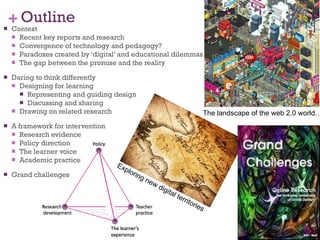
Outline Context Recent key reports and research Convergence of technology and pedagogy? Paradoxes created by ‘digital’ and educational dilemmas The gap between the promise and the reality Daring to think differently Designing for learning Representing and guiding design Discussing and sharing Drawing on related research A framework for intervention Research evidence Policy direction The learner voice Academic practice Grand challenges The landscape of the web 2.0 world…. Exploring new digital territories
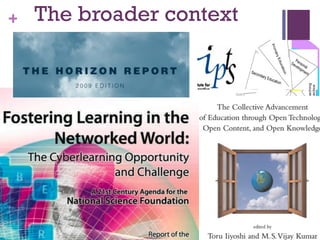
The broader context
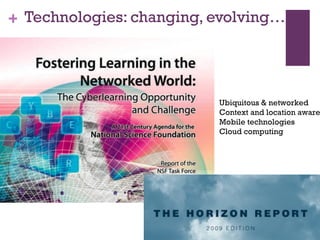
Technologies: changing, evolving… Ubiquitous & networked Context and location aware Mobile technologies Cloud computing
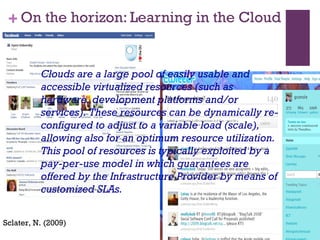
On the horizon: Learning in the Cloud Sclater, N. (2009) Clouds are a large pool of easily usable and accessible virtualized resources (such as hardware, development platforms and/or services). These resources can be dynamically re-configured to adjust to a variable load (scale), allowing also for an optimum resource utilization. This pool of resources is typically exploited by a pay-per-use model in which guarantees are offered by the Infrastructure Provider by means of customized SLAs.
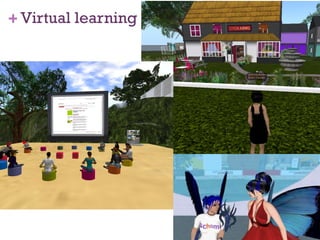
Virtual learning
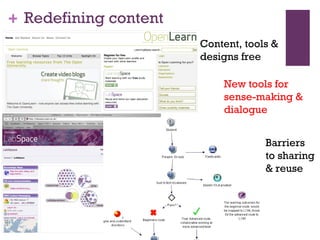
Redefining content Content, tools &  designs free New tools for sense-making & dialogue Barriers  to sharing  & reuse
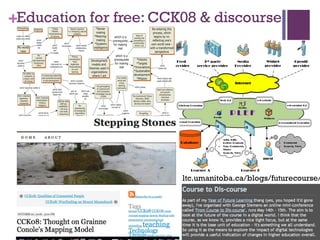
Education for free: CCK08 & discourse ltc.umanitoba.ca/blogs/futurecourse/
Did we change the world? No. Not yet. But we (and I mean all course participants, not just Stephen and I) managed to explore what is possible online. People self-organized in their preferred spaces. They etched away at the hallowed plaque of “what it means to be an expert”. They learned in transparent environments, and in the process, became teachers to others. Those that observed (or lurked as is the more common term), hopefully found value in the course as well. Perhaps life circumstances, personal schedule, motivation for participating, confidence, familiarity with the online environment, or numerous other factors, impacted their ability to contribute. While we can’t “measure them” the way I’ve tried to do with blog and moodle participants, their continued subscription to The Daily and the comments encountered in F2F conferences suggest they also found some value in the course.
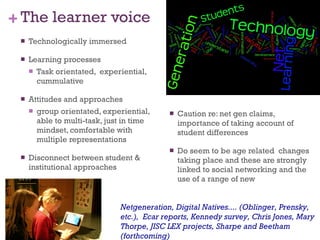
The learner voice Technologically immersed Learning processes Task orientated,  experiential, cummulative Attitudes and approaches group orientated, experiential, able to multi-task, just in time mindset, comfortable with multiple representations Disconnect between student & institutional approaches Caution re: net gen claims, importance of taking account of student differences Do seem to be age related  changes taking place and these are strongly linked to social networking and the use of a range of new  Netgeneration, Digital Natives.... (Oblinger, Prensky, etc.),  Ecar reports, Kennedy survey, Chris Jones, Mary Thorpe, JISC LEX projects, Sharpe and Beetham (forthcoming)
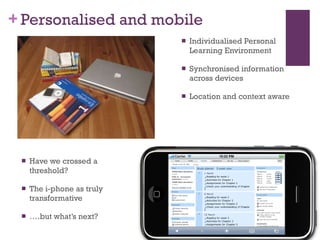
Personalised and mobile Individualised Personal Learning Environment Synchronised information across devices Location and context aware Have we crossed a threshold? The i-phone as truly transformative … .but what’s next?
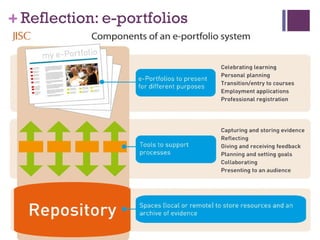
Reflection: e-portfolios
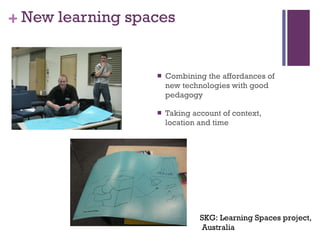
New learning spaces Combining the affordances of new technologies with good pedagogy Taking account of context, location and time  SKG: Learning Spaces project, Australia
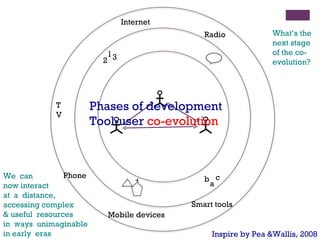
Inspire by Pea &Wallis, 2008 We  can  now interact at  a  distance,  accessing complex  & useful  resources  in  ways  unimaginable  in early  eras What’s the next stage of the co-evolution? Phases of development  Tool-user  co-evolution 1 2 3 b a c + Internet Mobile devices TV Radio Smart tools Phone
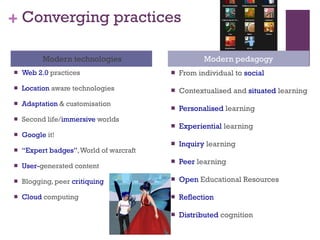
Converging practices Modern technologies Modern pedagogy Web 2.0  practices Location  aware technologies Adaptation  & customisation Second life/ immersive  worlds Google  it! “ Expert badges” , World of warcraft  User- generated content Blogging, peer  critiquing Cloud  computing From individual to  social Contextualised and  situated  learning Personalised  learning Experiential  learning Inquiry  learning Peer  learning Open  Educational Resources Reflection Distributed  cognition
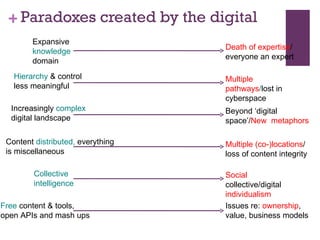
Paradoxes created by the digital Expansive  knowledge  domain Hierarchy  & control less meaningful Increasingly  complex  digital landscape Content  distributed,  everything is miscellaneous Collective intelligence Free  content & tools, open APIs and mash ups Death of expertise / everyone an expert Multiple pathways / lost in cyberspace Beyond ‘digital space’/ New  metaphors  Multiple (co-)locations / loss of content integrity Social  collective/digital  individualism Issues re:  ownership , value, business models
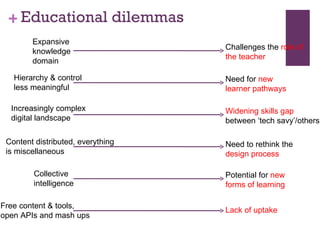
Educational dilemmas Expansive knowledge domain Hierarchy & control less meaningful Increasingly complex digital landscape Content distributed, everything is miscellaneous Collective intelligence Free content & tools, open APIs and mash ups Challenges the  role of the teacher Need for  new learner pathways Widening skills gap  between ‘tech savy’/others Need to rethink the  design process Potential for  new forms of learning Lack of uptake
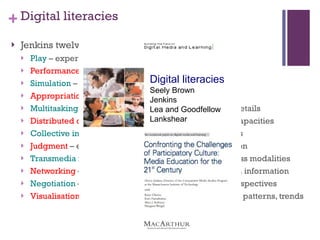
Digital literacies Jenkins twelve skills for participatory culture Play  – experimentation/problem solving Performance  – alternative identities Simulation  – construct models of real-world processes Appropriation  – sample and remix of media content Multitasking  – scanning and then focusing on salient details Distributed cognition  – interaction to expand mental capacities Collective intelligence  - to pool knowledge with others Judgment  – evaluation reliability of different information Transmedia navigation  – follow the flow of stories across modalities Networking  – search for,  synthesize and dissemination information Negotiation  – travel diverse communities, multiple perspectives Visualisation  – different data representations for ideas, patterns, trends Digital literacies Seely Brown Jenkins Lea and Goodfellow Lankshear
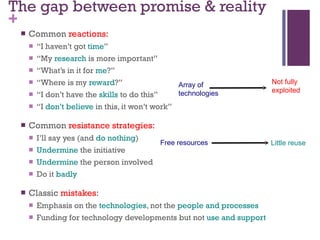
The gap between promise & reality Common  reactions:   “ I haven’t got  time ” “ My  research  is more important” “ What’s in it for  me ?” “ Where is my  reward ?” “ I don’t have the  skills  to do this” “ I  don’t believe  in this, it won’t work” Common  resistance strategies: I’ll say yes (and  do nothing ) Undermine  the initiative Undermine  the person involved Do it  badly Classic  mistakes : Emphasis on the  technologies , not the  people and processes Funding for technology developments but not  use and support Free resources Little reuse Array of  technologies Not fully  exploited
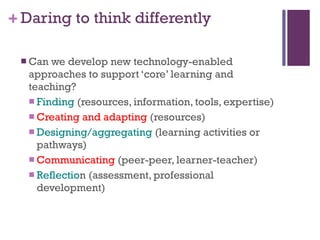
Daring to think differently Can we develop new technology-enabled approaches to support ‘core’ learning and teaching? Finding  (resources, information, tools, expertise) Creating and adapting  (resources) Designing/aggregating  (learning activities or pathways) Communicating  (peer-peer, learner-teacher) Reflectio n (assessment, professional development)
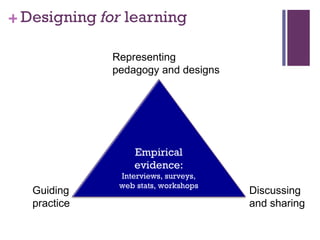
Designing  for  learning Representing pedagogy and designs  Guiding practice Discussing and sharing Empirical evidence:  Interviews, surveys, web stats, workshops
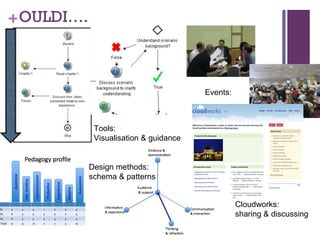
OULDI…. Design methods: schema & patterns Tools:  Visualisation & guidance Events:  Cloudworks:  sharing & discussing
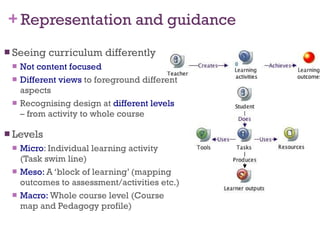
Representation and guidance Seeing curriculum differently Not content focused Different views  to foreground different aspects Recognising design at  different levels  – from activity to whole course Levels Micro : Individual learning activity (Task swim line) Meso:  A ‘block of learning’ (mapping outcomes to assessment/activities etc.) Macro:  Whole course level (Course map and Pedagogy profile)
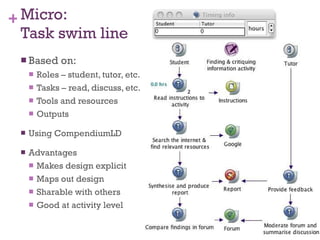
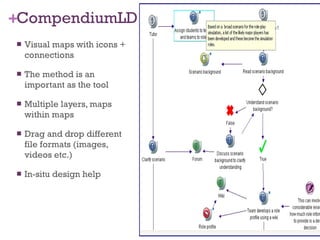
Micro:  Task swim line Based on: Roles – student, tutor, etc. Tasks – read, discuss, etc. Tools and resources Outputs Using CompendiumLD Advantages Makes design explicit Maps out design Sharable with others Good at activity level
CompendiumLD Visual maps with icons + connections The method is an important as the tool Multiple layers, maps within maps Drag and drop different file formats (images, videos etc.) In-situ design help
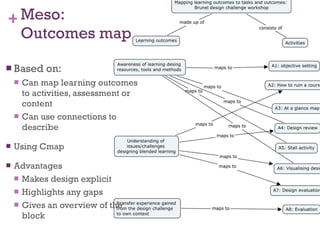
Meso:  Outcomes map Based on: Can map learning outcomes to activities, assessment or content Can use connections to describe Using Cmap Advantages Makes design explicit Highlights any gaps Gives an overview of the block
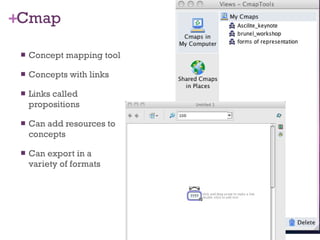
Cmap Concept mapping tool Concepts with links Links called propositions Can add resources to concepts Can export in a variety of formats
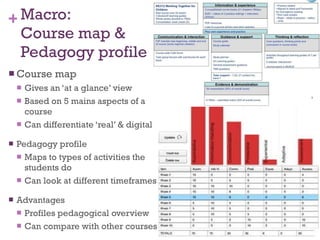
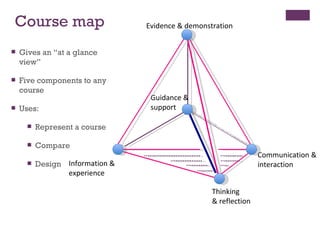
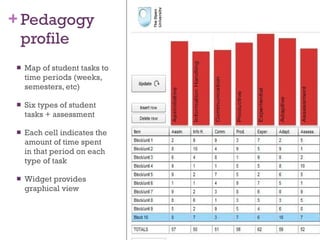
Macro:  Course map & Pedagogy profile Course map Gives an ‘at a glance’ view Based on 5 mains aspects of a course Can differentiate ‘real’ & digital Pedagogy profile Maps to types of activities the students do Can look at different timeframes Advantages Profiles pedagogical overview Can compare with other courses
Guidance & support Evidence & demonstration Information &  experience Communication & interaction Thinking  & reflection Course map Gives an “at a glance view” Five components to any course Uses: Represent a course Compare Design
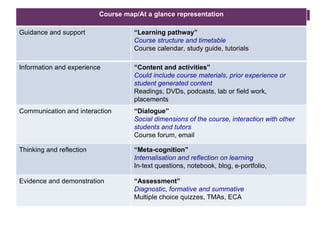
Course map/At a glance representation Guidance and support “ Learning pathway” Course structure and timetable Course calendar, study guide, tutorials Information and experience “ Content and activities” Could include course materials, prior experience or student generated content Readings, DVDs, podcasts, lab or field work,  placements  Communication and interaction “ Dialogue” Social dimensions of the course, interaction with other students and tutors Course forum, email Thinking and reflection “ Meta-cognition” Internalisation and reflection on learning In-text questions, notebook, blog, e-portfolio,  Evidence and demonstration “ Assessment” Diagnostic, formative and summative Multiple choice quizzes, TMAs, ECA
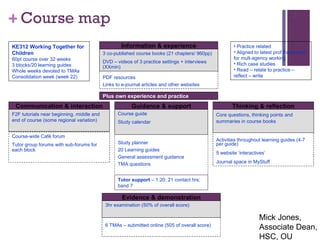
Course map Information & experience PDF resources Links to e-journal articles and other websites Evidence & demonstration 6 TMAs – submitted online (505 of overall score) 3hr examination (50% of overall score) Thinking & reflection Activities throughout learning guides (4-7 per guide) 5 website ‘interactives’ Journal space in MyStuff Core questions, thinking points and summaries in course books Communication & interaction Course-wide Café forum Tutor group forums with sub-forums for each block F2F tutorials near beginning, middle and end of course (some regional variation) Guidance & support Study planner 20 Learning guides General assessment guidance TMA questions Course guide Study calendar KE312 Working Together for Children 60pt course over 32 weeks 3 blocks/20 learning guides Whole weeks devoted to TMAs Consolidation week (week 22) Practice related Aligned to latest prof framework for mult-agency working Rich case studies Read – relate to practice – reflect – write  3 co-published course books (21 chapters/ 960pp) DVD – videos of 3 practice settings + interviews (XXmin) Plus own experience and practice Tutor support  – 1:20; 21 contact hrs; band 7 Mick Jones, Associate Dean, HSC, OU
Pedagogy profile Map of student tasks to time periods (weeks, semesters, etc) Six types of student tasks + assessment Each cell indicates the amount of time spent in that period on each type of task Widget provides graphical view
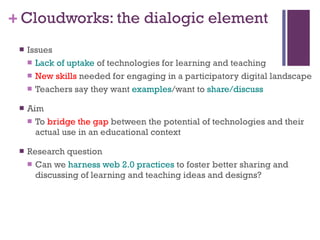
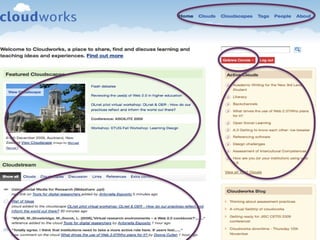
Cloudworks: the dialogic element Issues Lack of uptake  of technologies for learning and teaching New skills  needed for engaging in a participatory digital landscape Teachers say they want  examples /want to  share/discuss Aim To  bridge the gap  between the potential of technologies and their actual use in an educational context Research question Can we  harness web 2.0 practices  to foster better sharing and discussing of learning and teaching ideas and designs?
 
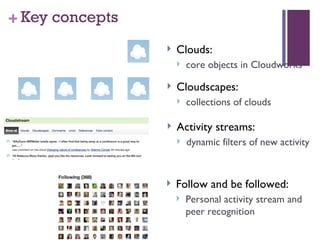
Key concepts Clouds:  core objects in Cloudworks Cloudscapes:  collections of clouds Activity streams:  dynamic filters of new activity Follow and be followed: Personal activity stream and peer recognition
Putting it all together The learning design toolbox Pick and mix of tools, resources, activities, methods and templates Tailored workshops and events Working with new MBA programme at OU Brunel Blended Learning Design Challenge Reading and Southbank events in development Educational Technology User Group (Canada) Workshops Integration with other research
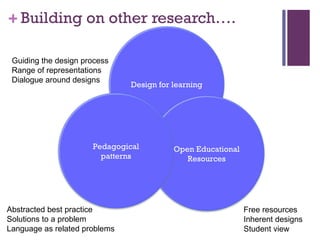
Building on other research…. Guiding the design process Range of representations Dialogue around designs Free resources Inherent designs Student view Abstracted best practice Solutions to a problem Language as related problems Design for learning Open Educational Resources Pedagogical patterns
OLnet: Open Learning network Network Research Fellowships From  producing  open resources to  use  of open resources Build capacity Find evidence Refine the issues
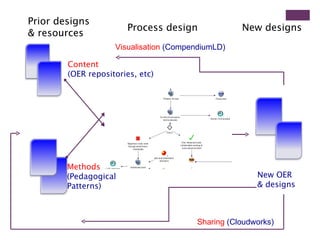
Process design Prior designs  & resources New designs Visualisation  (CompendiumLD) Sharing  (Cloudworks) Content  (OER repositories, etc) Methods   (Pedagogical  Patterns)  New OER  & designs
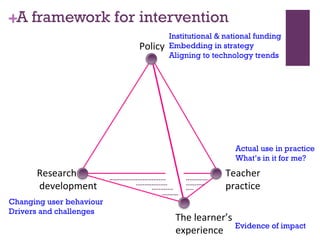
A framework for intervention Policy Research & development Teacher  practice The learner’s  experience Institutional & national funding Embedding in strategy Aligning to technology trends Changing user behaviour Drivers and challenges Actual use in practice What’s in it for me? Evidence of impact
Final thoughts Students  increasingly digital  – demands on institutions?  Students and teachers -  personalised  environment of tools vs.  institutional  tools?  What new forms of  blended learning spaces  are needed? How do we support  new approaches to design and delivery  of courses to make more effective use of technologies and lead to an enhance student learning experience? How do we take account of a  digital divide  that is ever narrower but deeper? What  new digital literacy skills  will learners and teachers need ?  What  new pedagogical models  are needed to marry the affordances of personalisation with the best affordances of technologies? How do we account for  blurring boundaries  (real/virtual, formal/informal, etc)?
Grand challenges Digital divide  is ever increasing. How do we deal with this?  Are we seeing Jenkin’s 12  digital literacies  skills? How can we help those in education develop these more?  How can we study these complex, fast evolving technological systems ?  New methodologies ?  What  theoretical insights  should we draw on?  Is there evidence of  new pedagogies  emerging?  Are we capable (and willing) to rise to the challenge?
Flickr images Treasure island 1  http://www.flickr.com/photos/tontoncopt/2075310775/   Web 2.0 city  http://www.flickr.com/photos/4everyoung/313308360/ Grand challenges http://www.kamaelia.org/GrandChallengesCover.png

Conole_Massey_University

  • 1.
    Embracing change, wheremight daring to think differently take us? Gráinne Conole, Open University, UK The Blended Learning Event Massey University, 10 th - 14 th December 2009 More info, slides and references: http://cloudworks.ac.uk/
  • 2.
    Outline Context Recentkey reports and research Convergence of technology and pedagogy? Paradoxes created by ‘digital’ and educational dilemmas The gap between the promise and the reality Daring to think differently Designing for learning Representing and guiding design Discussing and sharing Drawing on related research A framework for intervention Research evidence Policy direction The learner voice Academic practice Grand challenges The landscape of the web 2.0 world…. Exploring new digital territories
  • 3.
  • 4.
    Technologies: changing, evolving…Ubiquitous & networked Context and location aware Mobile technologies Cloud computing
  • 5.
    On the horizon:Learning in the Cloud Sclater, N. (2009) Clouds are a large pool of easily usable and accessible virtualized resources (such as hardware, development platforms and/or services). These resources can be dynamically re-configured to adjust to a variable load (scale), allowing also for an optimum resource utilization. This pool of resources is typically exploited by a pay-per-use model in which guarantees are offered by the Infrastructure Provider by means of customized SLAs.
  • 6.
  • 7.
    Redefining content Content,tools & designs free New tools for sense-making & dialogue Barriers to sharing & reuse
  • 8.
    Education for free:CCK08 & discourse ltc.umanitoba.ca/blogs/futurecourse/
  • 9.
    Did we changethe world? No. Not yet. But we (and I mean all course participants, not just Stephen and I) managed to explore what is possible online. People self-organized in their preferred spaces. They etched away at the hallowed plaque of “what it means to be an expert”. They learned in transparent environments, and in the process, became teachers to others. Those that observed (or lurked as is the more common term), hopefully found value in the course as well. Perhaps life circumstances, personal schedule, motivation for participating, confidence, familiarity with the online environment, or numerous other factors, impacted their ability to contribute. While we can’t “measure them” the way I’ve tried to do with blog and moodle participants, their continued subscription to The Daily and the comments encountered in F2F conferences suggest they also found some value in the course.
  • 10.
    The learner voiceTechnologically immersed Learning processes Task orientated, experiential, cummulative Attitudes and approaches group orientated, experiential, able to multi-task, just in time mindset, comfortable with multiple representations Disconnect between student & institutional approaches Caution re: net gen claims, importance of taking account of student differences Do seem to be age related changes taking place and these are strongly linked to social networking and the use of a range of new Netgeneration, Digital Natives.... (Oblinger, Prensky, etc.), Ecar reports, Kennedy survey, Chris Jones, Mary Thorpe, JISC LEX projects, Sharpe and Beetham (forthcoming)
  • 11.
    Personalised and mobileIndividualised Personal Learning Environment Synchronised information across devices Location and context aware Have we crossed a threshold? The i-phone as truly transformative … .but what’s next?
  • 12.
  • 13.
    New learning spacesCombining the affordances of new technologies with good pedagogy Taking account of context, location and time SKG: Learning Spaces project, Australia
  • 14.
    Inspire by Pea&Wallis, 2008 We can now interact at a distance, accessing complex & useful resources in ways unimaginable in early eras What’s the next stage of the co-evolution? Phases of development Tool-user co-evolution 1 2 3 b a c + Internet Mobile devices TV Radio Smart tools Phone
  • 15.
    Converging practices Moderntechnologies Modern pedagogy Web 2.0 practices Location aware technologies Adaptation & customisation Second life/ immersive worlds Google it! “ Expert badges” , World of warcraft User- generated content Blogging, peer critiquing Cloud computing From individual to social Contextualised and situated learning Personalised learning Experiential learning Inquiry learning Peer learning Open Educational Resources Reflection Distributed cognition
  • 16.
    Paradoxes created bythe digital Expansive knowledge domain Hierarchy & control less meaningful Increasingly complex digital landscape Content distributed, everything is miscellaneous Collective intelligence Free content & tools, open APIs and mash ups Death of expertise / everyone an expert Multiple pathways / lost in cyberspace Beyond ‘digital space’/ New metaphors Multiple (co-)locations / loss of content integrity Social collective/digital individualism Issues re: ownership , value, business models
  • 17.
    Educational dilemmas Expansiveknowledge domain Hierarchy & control less meaningful Increasingly complex digital landscape Content distributed, everything is miscellaneous Collective intelligence Free content & tools, open APIs and mash ups Challenges the role of the teacher Need for new learner pathways Widening skills gap between ‘tech savy’/others Need to rethink the design process Potential for new forms of learning Lack of uptake
  • 18.
    Digital literacies Jenkinstwelve skills for participatory culture Play – experimentation/problem solving Performance – alternative identities Simulation – construct models of real-world processes Appropriation – sample and remix of media content Multitasking – scanning and then focusing on salient details Distributed cognition – interaction to expand mental capacities Collective intelligence - to pool knowledge with others Judgment – evaluation reliability of different information Transmedia navigation – follow the flow of stories across modalities Networking – search for, synthesize and dissemination information Negotiation – travel diverse communities, multiple perspectives Visualisation – different data representations for ideas, patterns, trends Digital literacies Seely Brown Jenkins Lea and Goodfellow Lankshear
  • 19.
    The gap betweenpromise & reality Common reactions: “ I haven’t got time ” “ My research is more important” “ What’s in it for me ?” “ Where is my reward ?” “ I don’t have the skills to do this” “ I don’t believe in this, it won’t work” Common resistance strategies: I’ll say yes (and do nothing ) Undermine the initiative Undermine the person involved Do it badly Classic mistakes : Emphasis on the technologies , not the people and processes Funding for technology developments but not use and support Free resources Little reuse Array of technologies Not fully exploited
  • 20.
    Daring to thinkdifferently Can we develop new technology-enabled approaches to support ‘core’ learning and teaching? Finding (resources, information, tools, expertise) Creating and adapting (resources) Designing/aggregating (learning activities or pathways) Communicating (peer-peer, learner-teacher) Reflectio n (assessment, professional development)
  • 21.
    Designing for learning Representing pedagogy and designs Guiding practice Discussing and sharing Empirical evidence: Interviews, surveys, web stats, workshops
  • 22.
    OULDI…. Design methods:schema & patterns Tools: Visualisation & guidance Events: Cloudworks: sharing & discussing
  • 23.
    Representation and guidanceSeeing curriculum differently Not content focused Different views to foreground different aspects Recognising design at different levels – from activity to whole course Levels Micro : Individual learning activity (Task swim line) Meso: A ‘block of learning’ (mapping outcomes to assessment/activities etc.) Macro: Whole course level (Course map and Pedagogy profile)
  • 24.
    Micro: Taskswim line Based on: Roles – student, tutor, etc. Tasks – read, discuss, etc. Tools and resources Outputs Using CompendiumLD Advantages Makes design explicit Maps out design Sharable with others Good at activity level
  • 25.
    CompendiumLD Visual mapswith icons + connections The method is an important as the tool Multiple layers, maps within maps Drag and drop different file formats (images, videos etc.) In-situ design help
  • 26.
    Meso: Outcomesmap Based on: Can map learning outcomes to activities, assessment or content Can use connections to describe Using Cmap Advantages Makes design explicit Highlights any gaps Gives an overview of the block
  • 27.
    Cmap Concept mappingtool Concepts with links Links called propositions Can add resources to concepts Can export in a variety of formats
  • 28.
    Macro: Coursemap & Pedagogy profile Course map Gives an ‘at a glance’ view Based on 5 mains aspects of a course Can differentiate ‘real’ & digital Pedagogy profile Maps to types of activities the students do Can look at different timeframes Advantages Profiles pedagogical overview Can compare with other courses
  • 29.
    Guidance & supportEvidence & demonstration Information & experience Communication & interaction Thinking & reflection Course map Gives an “at a glance view” Five components to any course Uses: Represent a course Compare Design
  • 30.
    Course map/At aglance representation Guidance and support “ Learning pathway” Course structure and timetable Course calendar, study guide, tutorials Information and experience “ Content and activities” Could include course materials, prior experience or student generated content Readings, DVDs, podcasts, lab or field work, placements Communication and interaction “ Dialogue” Social dimensions of the course, interaction with other students and tutors Course forum, email Thinking and reflection “ Meta-cognition” Internalisation and reflection on learning In-text questions, notebook, blog, e-portfolio, Evidence and demonstration “ Assessment” Diagnostic, formative and summative Multiple choice quizzes, TMAs, ECA
  • 31.
    Course map Information& experience PDF resources Links to e-journal articles and other websites Evidence & demonstration 6 TMAs – submitted online (505 of overall score) 3hr examination (50% of overall score) Thinking & reflection Activities throughout learning guides (4-7 per guide) 5 website ‘interactives’ Journal space in MyStuff Core questions, thinking points and summaries in course books Communication & interaction Course-wide Café forum Tutor group forums with sub-forums for each block F2F tutorials near beginning, middle and end of course (some regional variation) Guidance & support Study planner 20 Learning guides General assessment guidance TMA questions Course guide Study calendar KE312 Working Together for Children 60pt course over 32 weeks 3 blocks/20 learning guides Whole weeks devoted to TMAs Consolidation week (week 22) Practice related Aligned to latest prof framework for mult-agency working Rich case studies Read – relate to practice – reflect – write 3 co-published course books (21 chapters/ 960pp) DVD – videos of 3 practice settings + interviews (XXmin) Plus own experience and practice Tutor support – 1:20; 21 contact hrs; band 7 Mick Jones, Associate Dean, HSC, OU
  • 32.
    Pedagogy profile Mapof student tasks to time periods (weeks, semesters, etc) Six types of student tasks + assessment Each cell indicates the amount of time spent in that period on each type of task Widget provides graphical view
  • 33.
    Cloudworks: the dialogicelement Issues Lack of uptake of technologies for learning and teaching New skills needed for engaging in a participatory digital landscape Teachers say they want examples /want to share/discuss Aim To bridge the gap between the potential of technologies and their actual use in an educational context Research question Can we harness web 2.0 practices to foster better sharing and discussing of learning and teaching ideas and designs?
  • 34.
  • 35.
    Key concepts Clouds: core objects in Cloudworks Cloudscapes: collections of clouds Activity streams: dynamic filters of new activity Follow and be followed: Personal activity stream and peer recognition
  • 36.
    Putting it alltogether The learning design toolbox Pick and mix of tools, resources, activities, methods and templates Tailored workshops and events Working with new MBA programme at OU Brunel Blended Learning Design Challenge Reading and Southbank events in development Educational Technology User Group (Canada) Workshops Integration with other research
  • 37.
    Building on otherresearch…. Guiding the design process Range of representations Dialogue around designs Free resources Inherent designs Student view Abstracted best practice Solutions to a problem Language as related problems Design for learning Open Educational Resources Pedagogical patterns
  • 38.
    OLnet: Open Learningnetwork Network Research Fellowships From producing open resources to use of open resources Build capacity Find evidence Refine the issues
  • 39.
    Process design Priordesigns & resources New designs Visualisation (CompendiumLD) Sharing (Cloudworks) Content (OER repositories, etc) Methods (Pedagogical Patterns) New OER & designs
  • 40.
    A framework forintervention Policy Research & development Teacher practice The learner’s experience Institutional & national funding Embedding in strategy Aligning to technology trends Changing user behaviour Drivers and challenges Actual use in practice What’s in it for me? Evidence of impact
  • 41.
    Final thoughts Students increasingly digital – demands on institutions? Students and teachers - personalised environment of tools vs. institutional tools? What new forms of blended learning spaces are needed? How do we support new approaches to design and delivery of courses to make more effective use of technologies and lead to an enhance student learning experience? How do we take account of a digital divide that is ever narrower but deeper? What new digital literacy skills will learners and teachers need ? What new pedagogical models are needed to marry the affordances of personalisation with the best affordances of technologies? How do we account for blurring boundaries (real/virtual, formal/informal, etc)?
  • 42.
    Grand challenges Digitaldivide is ever increasing. How do we deal with this? Are we seeing Jenkin’s 12 digital literacies skills? How can we help those in education develop these more? How can we study these complex, fast evolving technological systems ? New methodologies ? What theoretical insights should we draw on? Is there evidence of new pedagogies emerging? Are we capable (and willing) to rise to the challenge?
  • 43.
    Flickr images Treasureisland 1 http://www.flickr.com/photos/tontoncopt/2075310775/ Web 2.0 city http://www.flickr.com/photos/4everyoung/313308360/ Grand challenges http://www.kamaelia.org/GrandChallengesCover.png

Editor's Notes

  • #6 Our learning systems are increasingly accessible from mobile devices, allowing students for example, to: find out administrative details such as where the tutorial they’re about to attend is read small chunks of course content on the train take a quiz to test their knowledge while on holiday We believe that in the next few years most students will possess a device like this – and many will want to learn using them.
  • #39 What is Olnet? – open learning network – is a 3 year initiative backed by The William and Flora Hewlett Foundation. With $3m of funding it is a partnership between the OU and Carnegie Mellon University building on the experience that they have gained in developing and researching Open Educational Resources (OER). The Hewlett foundation that has invested more than $90m in establishing OER wants to find out more about benefits – what is the evidence? How should people learn with them? What issues does the community still need to solve? OLnet will develop a networked community of researchers and practitioners – offering them support, events and a chance to contribute evidence and questions. OER acts as a unifying theme that will generate sub-issues that need to be considered. Projects will carry out different streams of research looking at such things as design, collaborative learning and the developing world. Funded fellowships will bring in external expertise and offer a programme of exchanges and support for research ideas.