Edmono
The social networking site created specifically with the needs
         of students, parents and teachers in mind.

   “A Basic How-To Guide for First Time Navigators”
Why use edmono in the classroom

• Introduction to social media
• Team project approach
• Integrating technology into traditional teaching
  methods
• Collaboration students, teachers, schools, districts, national
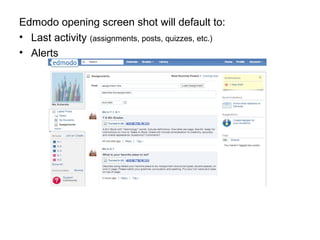
Edmodo opening screen shot will default to:
• Last activity (assignments, posts, quizzes, etc.)
• Alerts
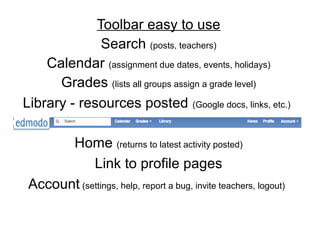
Toolbar easy to use
              Search (posts, teachers)
    Calendar (assignment due dates, events, holidays)
      Grades (lists all groups assign a grade level)
Library - resources posted (Google docs, links, etc.)

       Home (returns to latest activity posted)
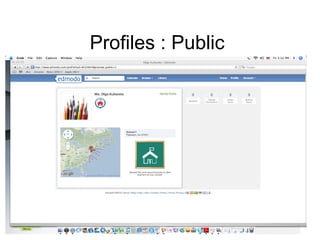
            Link to profile pages
 Account (settings, help, report a bug, invite teachers, logout)
Profiles : Public
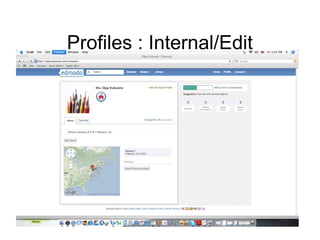
Profile : Internal
•   Students
•   Teacher Connections
•   Library items
•   Sharing score
•   View My Public Profile
•   School and location / address
•   Badges earned
Profiles : Internal/Edit
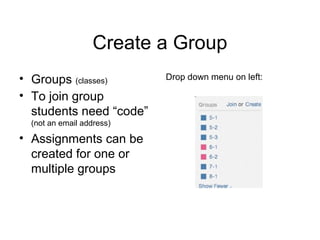
Create a Group
• Groups (classes)         Drop down menu on left:

• To join group
  students need “code”
  (not an email address)

• Assignments can be
  created for one or
  multiple groups
Groups
Categorize by GROUP:
• Posts, assignments, quizzes,
  comments
• Folders (documents, etc)
• Feeds
• Lock / Unlock “Group Code”
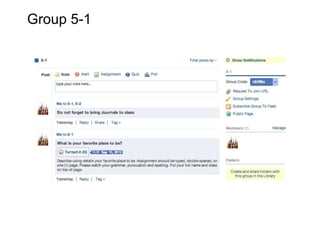
Group 5-1
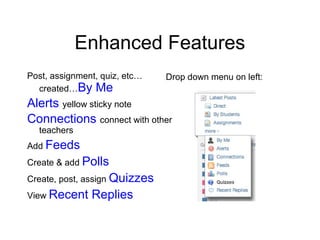
Enhanced Features
Post, assignment, quiz, etc…   Drop down menu on left:
  created…By Me
Alerts yellow sticky note
Connections connect with other
  teachers
Add Feeds
Create & add Polls
Create, post, assign Quizzes
View Recent    Replies
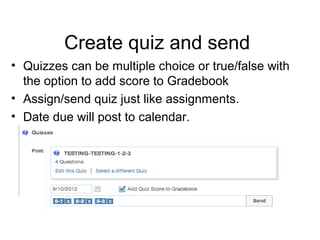
Create quiz and send
• Quizzes can be multiple choice or true/false with
  the option to add score to Gradebook
• Assign/send quiz just like assignments.
• Date due will post to calendar.
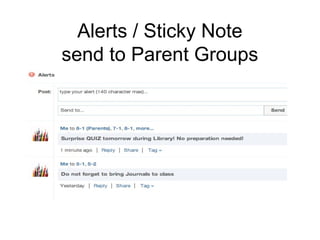
Alerts / Sticky Note
send to Parent Groups
Help Center
• Free webinars
• Mini lessons
• Support Community (blog format)
• Schools and districts (resources)
• FAQ
      Help Topics Include:
  security, Parent Accounts, Co-teaching, grading assignments
Olga Kuharets
okuharets@gmail.com

Edmodo 8-6-12

  • 1.
    Edmono The social networkingsite created specifically with the needs of students, parents and teachers in mind. “A Basic How-To Guide for First Time Navigators”
  • 2.
    Why use edmonoin the classroom • Introduction to social media • Team project approach • Integrating technology into traditional teaching methods • Collaboration students, teachers, schools, districts, national
  • 3.
    Edmodo opening screenshot will default to: • Last activity (assignments, posts, quizzes, etc.) • Alerts
  • 4.
    Toolbar easy touse Search (posts, teachers) Calendar (assignment due dates, events, holidays) Grades (lists all groups assign a grade level) Library - resources posted (Google docs, links, etc.) Home (returns to latest activity posted) Link to profile pages Account (settings, help, report a bug, invite teachers, logout)
  • 5.
  • 6.
    Profile : Internal • Students • Teacher Connections • Library items • Sharing score • View My Public Profile • School and location / address • Badges earned
  • 7.
  • 8.
    Create a Group •Groups (classes) Drop down menu on left: • To join group students need “code” (not an email address) • Assignments can be created for one or multiple groups
  • 9.
    Groups Categorize by GROUP: •Posts, assignments, quizzes, comments • Folders (documents, etc) • Feeds • Lock / Unlock “Group Code”
  • 10.
  • 11.
    Enhanced Features Post, assignment,quiz, etc… Drop down menu on left: created…By Me Alerts yellow sticky note Connections connect with other teachers Add Feeds Create & add Polls Create, post, assign Quizzes View Recent Replies
  • 12.
    Create quiz andsend • Quizzes can be multiple choice or true/false with the option to add score to Gradebook • Assign/send quiz just like assignments. • Date due will post to calendar.
  • 13.
    Alerts / StickyNote send to Parent Groups
  • 14.
    Help Center • Freewebinars • Mini lessons • Support Community (blog format) • Schools and districts (resources) • FAQ Help Topics Include: security, Parent Accounts, Co-teaching, grading assignments
  • 15.