Indus Institute of
Technology &
Management,
Kanpur
TALK FLOW
INTRODUCTION
HISTORY
WORKING
DIFFRENT TOUCH SCREEN TECHNOLOGIES
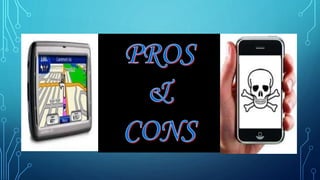
PROS & CONS
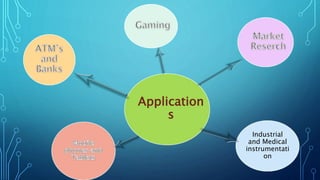
APPLICATION
CONCLUSION
FEATURES OF TOUCH SCREEN
INTRODUCTION
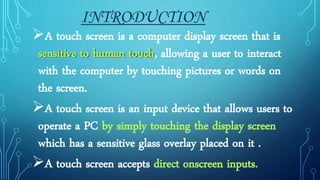
A touch screen is a computer display screen that is
sensitive to human touch, allowing a user to interact
with the computer by touching pictures or words on
the screen.
A touch screen is an input device that allows users to
operate a PC by simply touching the display screen
which has a sensitive glass overlay placed on it .
A touch screen accepts direct onscreen inputs.
HISTORY
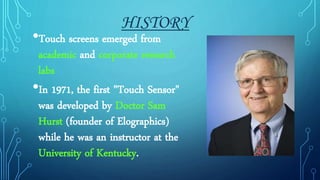
•Touch screens emerged from
academic and corporate research
labs
•In 1971, the first "Touch Sensor"
was developed by Doctor Sam
Hurst (founder of Elographics)
while he was an instructor at the
University of Kentucky.
HOW DOES A TOUCHSCREEN WORKS?
A basic touch screen has three main components:
 Touch sensor
 Controller
 Software driver
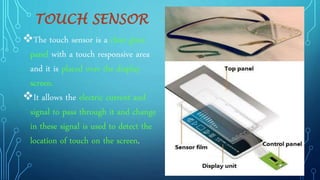
TOUCH SENSOR
The touch sensor is a clear glass
panel with a touch responsive area
and it is placed over the display
screen.
It allows the electric current and
signal to pass through it and change
in these signal is used to detect the
location of touch on the screen.
CONTROLLER
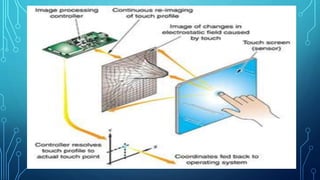
The controller is a small PC
card that connects between the
touch sensor and the PC.
It takes information from the
touch sensor and translates it
into information that PC can
understand.
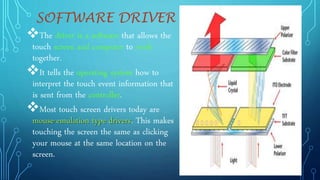
SOFTWARE DRIVER
The driver is a software that allows the
touch screen and computer to work
together.
It tells the operating system how to
interpret the touch event information that
is sent from the controller.
Most touch screen drivers today are
mouse-emulation type drivers. This makes
touching the screen the same as clicking
your mouse at the same location on the
screen.
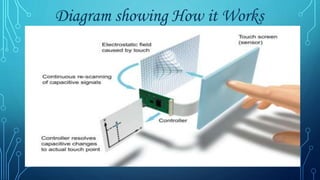
Diagram showing How it Works
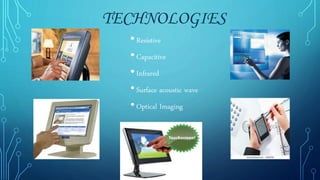
•Resistive
•Capacitive
•Infrared
•Surface acoustic wave
•Optical Imaging
TECHNOLOGIES
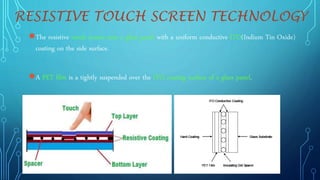
●The resistive touch screen uses a glass panel with a uniform conductive ITO(Indium Tin Oxide)
coating on the side surface.
●A PET film is a tightly suspended over the ITO coating surface of a glass panel.
RESISTIVE TOUCH SCREEN TECHNOLOGY
CAPACITIVE TOUCH SCREEN TECHNOLOGY
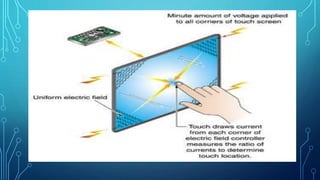
In the capacitive system, a layer that stores electrical charge is placed on the
glass panel.
When a user touches, some of the charge is transferred to the user, so the
charge on the capacitive layer decreases.
This decrease is measured in electrodes located at each corner of the monitor.
The computer then calculates the coordinates, from the relative differences in
charge at each corner.
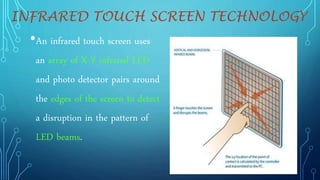
•An infrared touch screen uses
an array of X-Y infrared LED
and photo detector pairs around
the edges of the screen to detect
a disruption in the pattern of
LED beams.
INFRARED TOUCH SCREEN TECHNOLOGY
SURFACE WAVE TECHNOLOGY
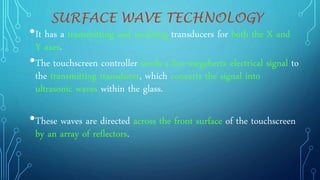
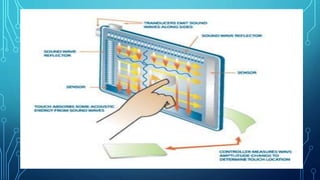
•It has a transmitting and receiving transducers for both the X and
Y axes.
•The touchscreen controller sends a five-megahertz electrical signal to
the transmitting transducer, which converts the signal into
ultrasonic waves within the glass.
•These waves are directed across the front surface of the touchscreen
by an array of reflectors.
OPTICAL IMAGING
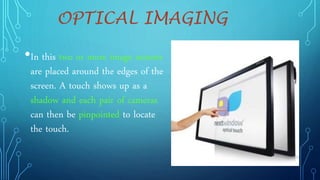
•In this two or more image sensors
are placed around the edges of the
screen. A touch shows up as a
shadow and each pair of cameras
can then be pinpointed to locate
the touch.
COMPARISON
Fast response
Error free input
Use finger , fingernail , gloved
hands , stylus or any soft tip pointer
Easy to clean
Does not interfere mouse and
keyboard
Make computing easy , powerful
and fun
It benefits children
Fingerprints
Finger stress
Screen has to be really big
not to miss things when pressing
them with your finger
big screen leads to low battery
life
touch screen means screen
can’t be read too well in direct
sunlight
Industrial
and Medical
instrumentati
on
Application
s
Though the touch screen technology contains some limitations it’s very
user friendly, fast, accurate, easy for the novices & fun to operate. It has
been widely accepted. And now by just modifying a little it can replace
the mouse and key board completely in near future
•Designers are trying to use touch screen to simplify input commands
•Today , touch screen has becomes adopted by computers users of all abilities because it
is simple, fast and innovative.
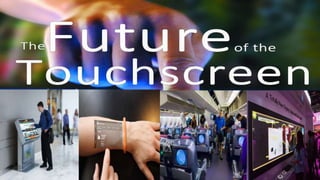
•In future there is no usage of mouse and keyboards as they will be replaced by touch
screen.
TOUCH SCREEN  TECHNOLOGY

TOUCH SCREEN TECHNOLOGY

  • 1.
    Indus Institute of Technology& Management, Kanpur
  • 2.
    TALK FLOW INTRODUCTION HISTORY WORKING DIFFRENT TOUCHSCREEN TECHNOLOGIES PROS & CONS APPLICATION CONCLUSION FEATURES OF TOUCH SCREEN
  • 3.
    INTRODUCTION A touch screenis a computer display screen that is sensitive to human touch, allowing a user to interact with the computer by touching pictures or words on the screen. A touch screen is an input device that allows users to operate a PC by simply touching the display screen which has a sensitive glass overlay placed on it . A touch screen accepts direct onscreen inputs.
  • 5.
    HISTORY •Touch screens emergedfrom academic and corporate research labs •In 1971, the first "Touch Sensor" was developed by Doctor Sam Hurst (founder of Elographics) while he was an instructor at the University of Kentucky.
  • 6.
    HOW DOES ATOUCHSCREEN WORKS? A basic touch screen has three main components:  Touch sensor  Controller  Software driver
  • 7.
    TOUCH SENSOR The touchsensor is a clear glass panel with a touch responsive area and it is placed over the display screen. It allows the electric current and signal to pass through it and change in these signal is used to detect the location of touch on the screen.
  • 8.
    CONTROLLER The controller isa small PC card that connects between the touch sensor and the PC. It takes information from the touch sensor and translates it into information that PC can understand.
  • 9.
    SOFTWARE DRIVER The driveris a software that allows the touch screen and computer to work together. It tells the operating system how to interpret the touch event information that is sent from the controller. Most touch screen drivers today are mouse-emulation type drivers. This makes touching the screen the same as clicking your mouse at the same location on the screen.
  • 11.
  • 12.
  • 13.
    ●The resistive touchscreen uses a glass panel with a uniform conductive ITO(Indium Tin Oxide) coating on the side surface. ●A PET film is a tightly suspended over the ITO coating surface of a glass panel. RESISTIVE TOUCH SCREEN TECHNOLOGY
  • 14.
    CAPACITIVE TOUCH SCREENTECHNOLOGY In the capacitive system, a layer that stores electrical charge is placed on the glass panel. When a user touches, some of the charge is transferred to the user, so the charge on the capacitive layer decreases. This decrease is measured in electrodes located at each corner of the monitor. The computer then calculates the coordinates, from the relative differences in charge at each corner.
  • 17.
    •An infrared touchscreen uses an array of X-Y infrared LED and photo detector pairs around the edges of the screen to detect a disruption in the pattern of LED beams. INFRARED TOUCH SCREEN TECHNOLOGY
  • 18.
    SURFACE WAVE TECHNOLOGY •Ithas a transmitting and receiving transducers for both the X and Y axes. •The touchscreen controller sends a five-megahertz electrical signal to the transmitting transducer, which converts the signal into ultrasonic waves within the glass. •These waves are directed across the front surface of the touchscreen by an array of reflectors.
  • 20.
    OPTICAL IMAGING •In thistwo or more image sensors are placed around the edges of the screen. A touch shows up as a shadow and each pair of cameras can then be pinpointed to locate the touch.
  • 21.
  • 23.
    Fast response Error freeinput Use finger , fingernail , gloved hands , stylus or any soft tip pointer Easy to clean Does not interfere mouse and keyboard Make computing easy , powerful and fun It benefits children Fingerprints Finger stress Screen has to be really big not to miss things when pressing them with your finger big screen leads to low battery life touch screen means screen can’t be read too well in direct sunlight
  • 24.
  • 25.
    Though the touchscreen technology contains some limitations it’s very user friendly, fast, accurate, easy for the novices & fun to operate. It has been widely accepted. And now by just modifying a little it can replace the mouse and key board completely in near future •Designers are trying to use touch screen to simplify input commands •Today , touch screen has becomes adopted by computers users of all abilities because it is simple, fast and innovative. •In future there is no usage of mouse and keyboards as they will be replaced by touch screen.