MALAVIYA NATIONAL INSTITUTE OF TECHNOLOGY
JAIPUR
Department of Electronics and Communication
Engineering
SEMINAR PRESENTATION
ON
TOUCH SCREENS
Submitted By: Guided By: Submitted To:
Bhavyadeep Kaur M. Ravi Kumar Dr. Mohd. Samar Ansari
2010UEC189 Assistant Professor Assistant Professor
CONTENTS:
 What are touch screens?
 Touchscreens and HMI
 How do touchscreens work?
 Types of touchscreen technology
 How the Touch screen Controller Interprets Screen Measurement
 Architecture of touchscreen
 Applications
 Advantages
 Conclusion
 References
TOUCH SCREENS
 What are touch screens?
 A type of display screen that has a touch-sensitive
transparent panel covering the screen.
 Instead of using a pointing device such as a mouse or light
pen, you can use your finger to point directly to objects on
the screen.
 It is an electronic visual display that the user can control
through simple or multi-touch gestures by touching the
screen with a special stylus/pen and-or one or more fingers.
 Most user friendly interface.
 Communicates with the PC, cell phones, tabs, etc.
 The user touches the screen to select options
presented on the screen. Associated hardware and
software are used to determine the location of the
press.
 The easiest to learn and use of any available interface.
 Businesses both large and small are using touch
technology to create new products, reach new markets,
increase productivity, and ease the flow of information.
Touchscreens or Human Machine
Interface (HMI)
 Just move the hand or walk your fingers over a thing
and it works.
 Yes, it is the interactive gesture based technology.
 Ability of Direct manipulation inside the screen.
 A device which works on touchscreen technology is
coined as Touchscreen.
 A touchscreen is an electronic visual display capable of
‘detecting’ and effectively ‘locating’ a touch over its
display area.
HOw DOES a TOuCH SCrEEN
wOrk?
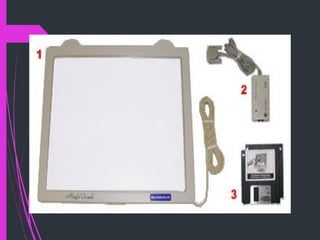
A basic touch screen hasthreemain
components: atouch sensor, acontroller, and a
softwaredriver. Thetouch screen isan input
device, so it needsto becombined with a
display and someelectronic deviceto makea
completetouch input system.
Touch Sensor
 Is a panel with a touch responsive surface.
 Systems are built based on different types of sensors.
However, in general sensors have an electrical current running
through them and touching the screen causes a voltage
change. The voltage change signals the location of the
touching.
Controller AND SOFTWARE
DRIVER
 The controller, is the hardware that converts the voltage
changes on the sensor into signals the computer or other
device can receive.
 Software tells the computer, smartphone, game device,
etc, what's happening on the sensor and the information
coming from the controller. Who's touching what where;
and allows the computer or smart phone to react
accordingly.
Types of Touchscreen
Technology
A touchscreen is a 2 dimensional sensing device made of
2 sheets of material separated by spacers. There are four
main touchscreen technologies:
   Resistive
  Capacitive
  Surface Acoustic Wave
   Infrared
Resistive
Touchscreen
Technology
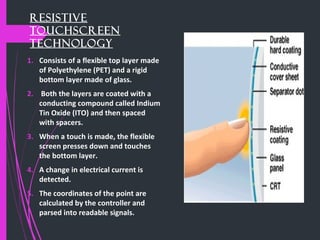
1. Consists of a flexible top layer made
of Polyethylene (PET) and a rigid
bottom layer made of glass.
2. Both the layers are coated with a
conducting compound called Indium
Tin Oxide (ITO) and then spaced
with spacers.
3. When a touch is made, the flexible
screen presses down and touches
the bottom layer.
4. A change in electrical current is
detected.
5. The coordinates of the point are
calculated by the controller and
parsed into readable signals.
Capacitive
Touchscreen
Technology The Capacitive Touchscreen Technology is the most
popular and durable touchscreen technology used all over
the world at most.
 It consists of a glass panel coated with a capacitive
(conductive) material Indium Tin Oxide (ITO). The
capacitive systems transmit almost 90% of light from the
monitor.
 Some of the devices using capacitive touchscreen are
Motorola Xoom, Samsung Galaxy Tab, Samsung Galaxy
SII, Apple’s iPad.
There are two different types of capacitve touch screens such
as:
1. Surface-capacitive touchscreen
2. Projected-capacitive touchscreen
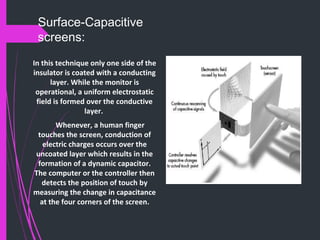
Surface-Capacitive
screens:
In this technique only one side of the
insulator is coated with a conducting
layer. While the monitor is
operational, a uniform electrostatic
field is formed over the conductive
layer.
Whenever, a human finger
touches the screen, conduction of
electric charges occurs over the
uncoated layer which results in the
formation of a dynamic capacitor.
The computer or the controller then
detects the position of touch by
measuring the change in capacitance
at the four corners of the screen.
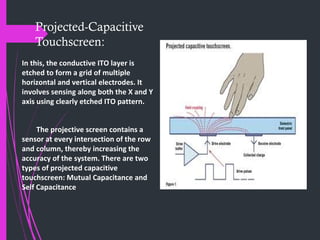
Projected-Capacitive
Touchscreen:
In this, the conductive ITO layer is
etched to form a grid of multiple
horizontal and vertical electrodes. It
involves sensing along both the X and Y
axis using clearly etched ITO pattern.
The projective screen contains a
sensor at every intersection of the row
and column, thereby increasing the
accuracy of the system. There are two
types of projected capacitive
touchscreen: Mutual Capacitance and
Self Capacitance
Surface Acoustic
Wave
Touchscreen
technology
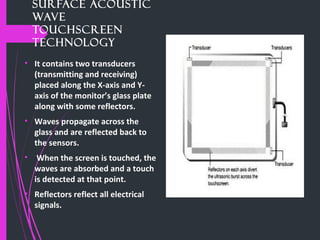
• It contains two transducers
(transmitting and receiving)
placed along the X-axis and Y-
axis of the monitor’s glass plate
along with some reflectors.
• Waves propagate across the
glass and are reflected back to
the sensors.
• When the screen is touched, the
waves are absorbed and a touch
is detected at that point.
• Reflectors reflect all electrical
signals.
Infrared Touchscreen Technology:
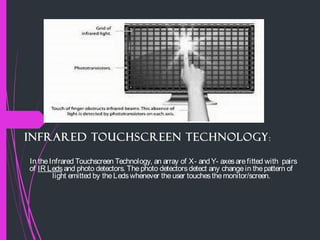
In theInfrared Touchscreen Technology, an array of X- and Y- axesarefitted with pairs
of IR Leds and photo detectors. Thephoto detectorsdetect any changein thepattern of
light emitted by theLedswhenever theuser touchesthemonitor/screen.
How the Touch screen
Controller Interprets Screen
Measurement:
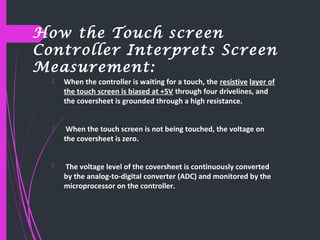
 When the controller is waiting for a touch, the resistive layer of
the touch screen is biased at +5V through four drivelines, and
the coversheet is grounded through a high resistance.
 When the touch screen is not being touched, the voltage on
the coversheet is zero.
 The voltage level of the coversheet is continuously converted
by the analog-to-digital converter (ADC) and monitored by the
microprocessor on the controller.
ARCHITECTURE OF TOUCHSCREEN
TECHNOLOGY
4-WIRE RESISTIVE SCREENS :
(MOSTLY USED)
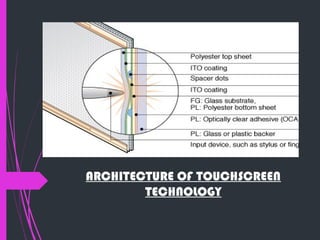
 Consists of a conductive bottom layer of either glass or film and a
conductive top film layer, separated by extremely small, transparent
spacer dots.
 A voltage is applied across the conductive surface. Any type of probe
can be used to apply pressure against the top film will activate the
screen.
 When ample touch pressure is applied to the top layer, the film flexes
inward and makes contact with the bottom layer resulting in a voltage
drop.
 This change in voltage is detected by the controller. By alternating the
voltage signal between the top and bottom layer, the X and Y
coordinates of the user’s touch are computed.
 In a Film on Glass (FG) construction, the bottom layer is an ITO coated
glass. In a Polyester Laminated (PL) or film-film-glass construction the
bottom conductive layer is polyester.
 An additional layer of Optically Clear Adhesive (OCA) bonds the bottom
polyester layer to a backer typically made of glass or poly material.
Application of Touch screen
 Gaming/Entertainment/Multimedia
 Industrial and Medical Instrumentation
 ATMs and Banks
 Automobile Industry and Market Research
Now a days most of the old techniques of using
electronic switches are replacing with computer
enabled touch screen based controls. This gives great
flexibility in working and operations.
ADVANTAGES :
 More reliable. Keyboards can have over 100 switches. The touch screen has
no moving parts.
 Less space. This is particularly important in places where space is limited,
such as the driver’s cab or the pilot’s cockpit.
 More portable
 With no need to print on or around any keys or switches, it is much easier to
make the system multi-lingual.
 With a keypad or keyboard, the switches are in a fixed position but the
touch screen can have any shape and size of ‘key’.
 Resistant to contamination. They are impervious to dust, chemicals, fluids
and the weather.
 Will not contaminate. Especially important in the food processing industry
or silicon foundries.
 Combined with RFID for security tag or credit card processing as required,
the system can be completely sealed.
 Can be used in hazardous areas like mining or petro-chemical industries
CONCLUSION
 Improved experience – Touchscreens provide end users an opportunity to interact with the
computer, improving the human-computer interface and improving the user’s experience.
This may seem like a small thing to many, but this simple idea is one of the reasons that the
iPad from Apple has been so successful with users. The device provides a pleasurable
experience for the end user secondary to the intuitive touchscreen interface.
 Easy access – Touchscreens provide an easy to understand, intuitive interface for the
human brain. Touch is a natural way for us to interact with the world around us and
pointing at something with our finger is as natural as breathing air.
 Saves time – Fumbling with a mouse and keyboard isn’t always the easiest thing to do and
touchscreen technology can help. I sometimes use my finger to navigate the touchscreen
on my laptop instead of a mouse. I find that using my finger often works better than a
mouse to reposition my cursor, access an open application or scroll through a web page.
It’s not a big thing, but it improves my experience and makes things easier to access.
 Sanitary – Often overlook, but never out of the mind of healthcare
providers, is the unsanitary conditions created by a mouse and a keyboard.
They’re a great place to harbor germs collected on the hands of everyone
that’s touches them. Washing one’s hands before and after using them is a
successful strategy for fighting the spread of germs, but this simple solution
isn’t always utilized to its logical end. On the other hand, touchscreens can be
easily cleaned as part of a routine schedule.
 Potential to save money – Full touchscreen technology requires no
keyboard or mouse, which both cost money and have to be replaced. Of
course this only makes sense if the touchscreen technology does not exceed
the cost of a typical monitor. We’re not there yet, but we’re headed in the
right direction.
REFERENCES:
o Webopedia.com
o Inventorsabout.com
o Engineersgarage.com
o Computerworld.com
THANK YOU!

Phonegap ppt

  • 1.
    MALAVIYA NATIONAL INSTITUTEOF TECHNOLOGY JAIPUR Department of Electronics and Communication Engineering SEMINAR PRESENTATION ON TOUCH SCREENS Submitted By: Guided By: Submitted To: Bhavyadeep Kaur M. Ravi Kumar Dr. Mohd. Samar Ansari 2010UEC189 Assistant Professor Assistant Professor
  • 2.
    CONTENTS:  What aretouch screens?  Touchscreens and HMI  How do touchscreens work?  Types of touchscreen technology  How the Touch screen Controller Interprets Screen Measurement  Architecture of touchscreen  Applications  Advantages  Conclusion  References
  • 3.
    TOUCH SCREENS  Whatare touch screens?  A type of display screen that has a touch-sensitive transparent panel covering the screen.  Instead of using a pointing device such as a mouse or light pen, you can use your finger to point directly to objects on the screen.  It is an electronic visual display that the user can control through simple or multi-touch gestures by touching the screen with a special stylus/pen and-or one or more fingers.
  • 4.
     Most userfriendly interface.  Communicates with the PC, cell phones, tabs, etc.  The user touches the screen to select options presented on the screen. Associated hardware and software are used to determine the location of the press.  The easiest to learn and use of any available interface.  Businesses both large and small are using touch technology to create new products, reach new markets, increase productivity, and ease the flow of information.
  • 5.
    Touchscreens or HumanMachine Interface (HMI)  Just move the hand or walk your fingers over a thing and it works.  Yes, it is the interactive gesture based technology.  Ability of Direct manipulation inside the screen.  A device which works on touchscreen technology is coined as Touchscreen.  A touchscreen is an electronic visual display capable of ‘detecting’ and effectively ‘locating’ a touch over its display area.
  • 6.
    HOw DOES aTOuCH SCrEEN wOrk? A basic touch screen hasthreemain components: atouch sensor, acontroller, and a softwaredriver. Thetouch screen isan input device, so it needsto becombined with a display and someelectronic deviceto makea completetouch input system.
  • 8.
    Touch Sensor  Isa panel with a touch responsive surface.  Systems are built based on different types of sensors. However, in general sensors have an electrical current running through them and touching the screen causes a voltage change. The voltage change signals the location of the touching.
  • 9.
    Controller AND SOFTWARE DRIVER The controller, is the hardware that converts the voltage changes on the sensor into signals the computer or other device can receive.  Software tells the computer, smartphone, game device, etc, what's happening on the sensor and the information coming from the controller. Who's touching what where; and allows the computer or smart phone to react accordingly.
  • 10.
    Types of Touchscreen Technology Atouchscreen is a 2 dimensional sensing device made of 2 sheets of material separated by spacers. There are four main touchscreen technologies:    Resistive   Capacitive   Surface Acoustic Wave    Infrared
  • 11.
    Resistive Touchscreen Technology 1. Consists ofa flexible top layer made of Polyethylene (PET) and a rigid bottom layer made of glass. 2. Both the layers are coated with a conducting compound called Indium Tin Oxide (ITO) and then spaced with spacers. 3. When a touch is made, the flexible screen presses down and touches the bottom layer. 4. A change in electrical current is detected. 5. The coordinates of the point are calculated by the controller and parsed into readable signals.
  • 12.
    Capacitive Touchscreen Technology The CapacitiveTouchscreen Technology is the most popular and durable touchscreen technology used all over the world at most.  It consists of a glass panel coated with a capacitive (conductive) material Indium Tin Oxide (ITO). The capacitive systems transmit almost 90% of light from the monitor.  Some of the devices using capacitive touchscreen are Motorola Xoom, Samsung Galaxy Tab, Samsung Galaxy SII, Apple’s iPad. There are two different types of capacitve touch screens such as: 1. Surface-capacitive touchscreen 2. Projected-capacitive touchscreen
  • 13.
    Surface-Capacitive screens: In this techniqueonly one side of the insulator is coated with a conducting layer. While the monitor is operational, a uniform electrostatic field is formed over the conductive layer. Whenever, a human finger touches the screen, conduction of electric charges occurs over the uncoated layer which results in the formation of a dynamic capacitor. The computer or the controller then detects the position of touch by measuring the change in capacitance at the four corners of the screen.
  • 14.
    Projected-Capacitive Touchscreen: In this, theconductive ITO layer is etched to form a grid of multiple horizontal and vertical electrodes. It involves sensing along both the X and Y axis using clearly etched ITO pattern. The projective screen contains a sensor at every intersection of the row and column, thereby increasing the accuracy of the system. There are two types of projected capacitive touchscreen: Mutual Capacitance and Self Capacitance
  • 15.
    Surface Acoustic Wave Touchscreen technology • Itcontains two transducers (transmitting and receiving) placed along the X-axis and Y- axis of the monitor’s glass plate along with some reflectors. • Waves propagate across the glass and are reflected back to the sensors. • When the screen is touched, the waves are absorbed and a touch is detected at that point. • Reflectors reflect all electrical signals.
  • 16.
    Infrared Touchscreen Technology: IntheInfrared Touchscreen Technology, an array of X- and Y- axesarefitted with pairs of IR Leds and photo detectors. Thephoto detectorsdetect any changein thepattern of light emitted by theLedswhenever theuser touchesthemonitor/screen.
  • 17.
    How the Touchscreen Controller Interprets Screen Measurement:  When the controller is waiting for a touch, the resistive layer of the touch screen is biased at +5V through four drivelines, and the coversheet is grounded through a high resistance.  When the touch screen is not being touched, the voltage on the coversheet is zero.  The voltage level of the coversheet is continuously converted by the analog-to-digital converter (ADC) and monitored by the microprocessor on the controller.
  • 18.
  • 19.
    4-WIRE RESISTIVE SCREENS : (MOSTLYUSED)  Consists of a conductive bottom layer of either glass or film and a conductive top film layer, separated by extremely small, transparent spacer dots.  A voltage is applied across the conductive surface. Any type of probe can be used to apply pressure against the top film will activate the screen.  When ample touch pressure is applied to the top layer, the film flexes inward and makes contact with the bottom layer resulting in a voltage drop.  This change in voltage is detected by the controller. By alternating the voltage signal between the top and bottom layer, the X and Y coordinates of the user’s touch are computed.  In a Film on Glass (FG) construction, the bottom layer is an ITO coated glass. In a Polyester Laminated (PL) or film-film-glass construction the bottom conductive layer is polyester.  An additional layer of Optically Clear Adhesive (OCA) bonds the bottom polyester layer to a backer typically made of glass or poly material.
  • 20.
    Application of Touchscreen  Gaming/Entertainment/Multimedia  Industrial and Medical Instrumentation  ATMs and Banks  Automobile Industry and Market Research Now a days most of the old techniques of using electronic switches are replacing with computer enabled touch screen based controls. This gives great flexibility in working and operations.
  • 21.
    ADVANTAGES :  Morereliable. Keyboards can have over 100 switches. The touch screen has no moving parts.  Less space. This is particularly important in places where space is limited, such as the driver’s cab or the pilot’s cockpit.  More portable  With no need to print on or around any keys or switches, it is much easier to make the system multi-lingual.  With a keypad or keyboard, the switches are in a fixed position but the touch screen can have any shape and size of ‘key’.  Resistant to contamination. They are impervious to dust, chemicals, fluids and the weather.  Will not contaminate. Especially important in the food processing industry or silicon foundries.  Combined with RFID for security tag or credit card processing as required, the system can be completely sealed.  Can be used in hazardous areas like mining or petro-chemical industries
  • 22.
    CONCLUSION  Improved experience– Touchscreens provide end users an opportunity to interact with the computer, improving the human-computer interface and improving the user’s experience. This may seem like a small thing to many, but this simple idea is one of the reasons that the iPad from Apple has been so successful with users. The device provides a pleasurable experience for the end user secondary to the intuitive touchscreen interface.  Easy access – Touchscreens provide an easy to understand, intuitive interface for the human brain. Touch is a natural way for us to interact with the world around us and pointing at something with our finger is as natural as breathing air.  Saves time – Fumbling with a mouse and keyboard isn’t always the easiest thing to do and touchscreen technology can help. I sometimes use my finger to navigate the touchscreen on my laptop instead of a mouse. I find that using my finger often works better than a mouse to reposition my cursor, access an open application or scroll through a web page. It’s not a big thing, but it improves my experience and makes things easier to access.
  • 23.
     Sanitary – Oftenoverlook, but never out of the mind of healthcare providers, is the unsanitary conditions created by a mouse and a keyboard. They’re a great place to harbor germs collected on the hands of everyone that’s touches them. Washing one’s hands before and after using them is a successful strategy for fighting the spread of germs, but this simple solution isn’t always utilized to its logical end. On the other hand, touchscreens can be easily cleaned as part of a routine schedule.  Potential to save money – Full touchscreen technology requires no keyboard or mouse, which both cost money and have to be replaced. Of course this only makes sense if the touchscreen technology does not exceed the cost of a typical monitor. We’re not there yet, but we’re headed in the right direction.
  • 24.
    REFERENCES: o Webopedia.com o Inventorsabout.com oEngineersgarage.com o Computerworld.com
  • 25.