
SEMINAR TOPIC:SEMINAR TOPIC:
TOUCH SCREEN SENSORTOUCH SCREEN SENSOR
COARSE FACULTY:COARSE FACULTY: SUBMITTED BY:SUBMITTED BY:
DR. SUGUMARANDR. SUGUMARAN AKSHAY DHOLEAKSHAY DHOLE
(SMBS)(SMBS) (13MMT1013)(13MMT1013)
 INTRODUCTION
 HISTORY
 FUNCTIONS
 WORKING
 DIFFRENT TOUCH SCREEN
TECHNOLOGIES
 APPLICATION
 CONCLUSION
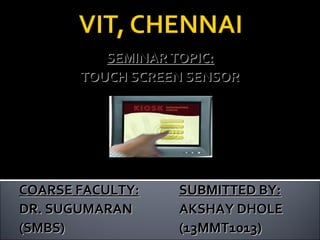
 A touch screen is a computer display
screen that is sensitive to human touchsensitive to human touch,
allowing a user to interact with the
computer by touching pictures or words
on the screen.
 A touch screen is an input device that
allows users to operate a PC by simply
touching the display screen which has a
sensitive glass overlay placed on it .
 A touch screen accepts direct onscreen
inputs.
 In 1971, the first "touch sensor" was
developed by Doctor Sam Hurst (founder
of Elographics) while he was an instructor at
the University of Kentucky.
 The University of Kentucky Research
Foundation named it as “Elograph”.
 The "Elograph" was not transparent like
modern touch screens.
 In 1974, the first true touch screen
incorporating a transparent surface came.
 Pressure sensitive activation-by finger or
stylus.
 Emulates mouse functions-click, double click,
& drag.
 Touch screen & mouse can be used
concurrently.
 Durable & scratch resistant coated surface.
 Compatible with OS-Windows
XP,7,8,Macintosh,Linux.
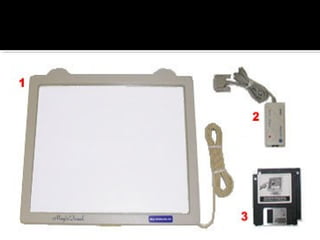
A basic touch screen has three main
components:
touch sensor
 controller
 software driver
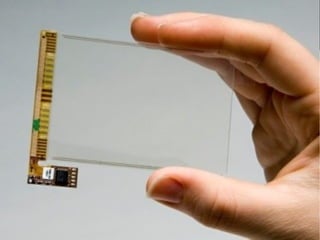
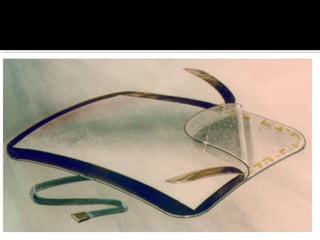
 A touch screen sensor is a clear glass panel
with a touch responsive surface which is
placed over a display screen.
 The sensor generally has an electrical current
or signal going through it and touching the
screen causes a voltage or signal change. This
voltage change is used to determine the
location of the touch to the screen.
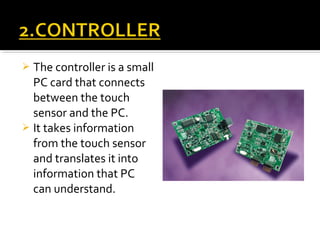
 The controller is a small
PC card that connects
between the touch
sensor and the PC.
 It takes information
from the touch sensor
and translates it into
information that PC
can understand.
 The driver is a software that allows the touch
screen and computer to work together.
 It tells the operating system how to interpret
the touch event information that is sent from
the controller.
 Most touch screen drivers today are mouse-mouse-
emulation type driversemulation type drivers. This makes touching
the screen the same as clicking your mouse at
the same location on the screen.
 There are several principal ways to build a touch screen:
 In the most popular techniques, the capacitive or
resistive approach, manufactures coat the screen with a
thin, transparent metallic layer.
 When a user touches the surface, the system records
the change in the electrical current that flows through
the display.
 Dispersive-signal technology which 3M created in 2002,
measures the piezoelectric effect — the voltage
generated when mechanical force is applied to a
material — that occurs chemically when a strengthened
glass substrate is touched.
WORKINGWORKING
RESISTIVE
CAPACITIVE
SURFACE WAVE
INFRARED
DISPERSIVE SIGNAL TECHNOLOGY
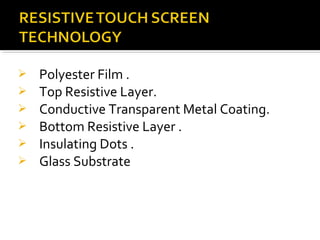
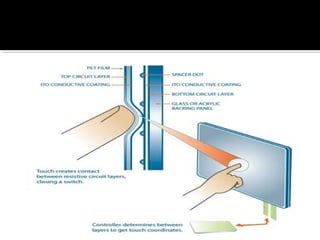
 Polyester Film .
 Top Resistive Layer.
 Conductive Transparent Metal Coating.
 Bottom Resistive Layer .
 Insulating Dots .
 Glass Substrate
 Pressing the flexible top sheet creates
electrical contact with the coating on the
glass.
 The touch screen controller gets the
alternating voltages between the two layers
and converts them into the digital X and Y
coordinates of the activated area.
 Can be activated with any device
 Low cost solution
 Low power consumption
 Poorer durability compared to other
technologies
 Very short life, especially considering
cosmetic wear
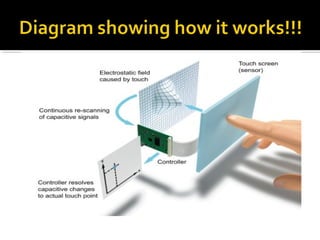
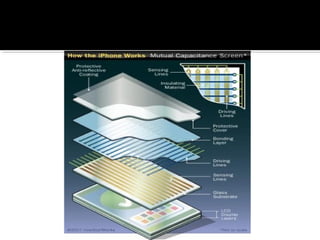
 In the capacitive system, a layer that stores
electrical charge is placed on the glass panel.
 When a user touches, some of the charge is
transferred to the user, so the charge on the
capacitive layer decreases.
 This decrease is measured in electrodes
located at each corner of the monitor.
 The computer then calculates the coordinates,
from the relative differences in charge at each
corner.
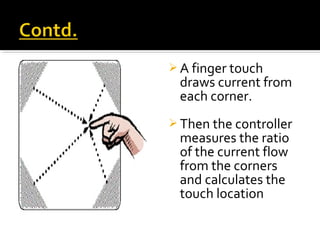
 A finger touch
draws current from
each corner.
 Then the controller
measures the ratio
of the current flow
from the corners
and calculates the
touch location
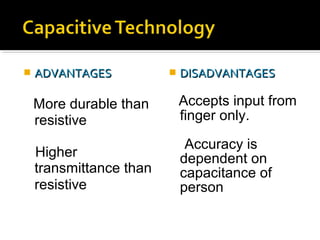
 ADVANTAGESADVANTAGES
More durable than
resistive
Higher
transmittance than
resistive
 DISADVANTAGESDISADVANTAGES
Accepts input from
finger only.
Accuracy is
dependent on
capacitance of
person
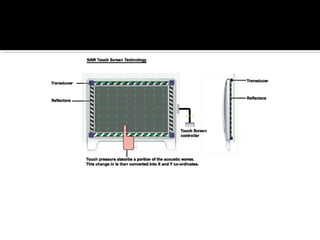
 It has a transmitting and receiving transducers for
both the X and Y axes.
 The touchscreen controller sends a five-megahertz
electrical signal to the transmitting transducer,
which converts the signal into ultrasonic waves
within the glass.
 These waves are directed across the front surface of
the touchscreen by an array of reflectors.
 Reflectors on the opposite side gather and
direct the waves to the receiving transducer,
which reconverts them into an electrical
signal.
 When you touch the screen, you absorb a
portion of the wave travelling across it.
 The receivers can detect a drop in amplitude
and thus coordinate is calculated.
 ADVANTAGESADVANTAGES
Very high
transmittance
Very high durability
 DISADVANTAGESDISADVANTAGES
Requires “soft” input
device
Surface obstructions
can cause a false
touch
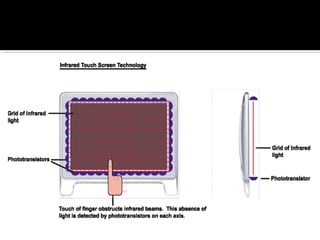
 IR makes use of a “frame” around the
perimeter of the display. On two sides there
are closely spaced IR LEDs and on the
opposing two sides there are matching photo
transistors.
 The LEDs are turned on in sequence and the
signal is read from the matching transistor. If
no signal is read, then that indicates a
blocked IR beam, meaning a touch.
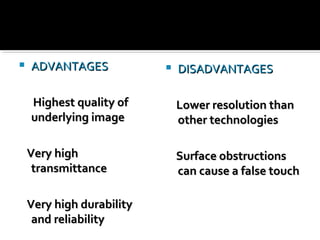
 ADVANTAGESADVANTAGES
Highest quality ofHighest quality of
underlying imageunderlying image
Very highVery high
transmittancetransmittance
Very high durabilityVery high durability
and reliabilityand reliability
 DISADVANTAGESDISADVANTAGES
Lower resolution thanLower resolution than
other technologiesother technologies
Surface obstructionsSurface obstructions
can cause a false touchcan cause a false touch
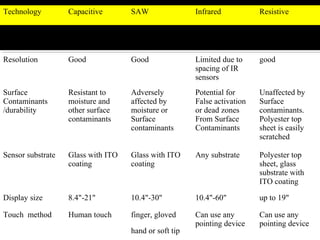
Technology Capacitive SAW Infrared Resistive
Transparence Very good >92% Very good >92% Very good >92% 75%~85%
Resolution Good Good Limited due to
spacing of IR
sensors
good
Surface
Contaminants
/durability
Resistant to
moisture and
other surface
contaminants
Adversely
affected by
moisture or
Surface
contaminants
Potential for
False activation
or dead zones
From Surface
Contaminants
Unaffected by
Surface
contaminants.
Polyester top
sheet is easily
scratched
Sensor substrate Glass with ITO
coating
Glass with ITO
coating
Any substrate Polyester top
sheet, glass
substrate with
ITO coating
Display size 8.4"-21" 10.4"-30" 10.4"-60" up to 19"
Touch method Human touch finger, gloved
hand or soft tip
Can use any
pointing device
Can use any
pointing device
 User friendly.
 Fast response.
 Error free input.
 Easy to install.
 Use finger, fingernail, gloved hand, stylus or any soft-tip
pointer to operate.
 Easy to clean and maintain.
 Compatible with Windows, Macintosh and Linux.
 Does not interfere mouse and keyboard function.
 Make computing easy, powerful and fun.
ADVANTAGES:ADVANTAGES:
 Finger stress: Stress on human fingers when used for
more than a few minutes at a time. (for example,
ATMs).
 Fingerprints: Touchscreens can suffer from the problem
of fingerprints on the display.
 User has to sit closer to the screen as compared to
external keyboard.
 The screen may be covered more by using hand.
DISADVANTAGES:DISADVANTAGES:
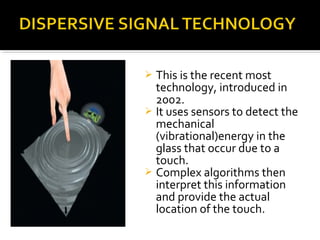
 This is the recent most
technology, introduced in
2002.
 It uses sensors to detect the
mechanical
(vibrational)energy in the
glass that occur due to a
touch.
 Complex algorithms then
interpret this information
and provide the actual
location of the touch.
PUBLIC ACCESS:
 Mobile Phones
 Library resource guides
 Computers
 Public Transportation Schedule / Status
 Airport terminal passenger internet and
email systems
 Automated travel and entertainment ticket
dispensers
 Shopping mall directory
COMMERICAL
 Gas stations
 Point of sales
 Restaurants
 Grocery stores
 Hospital and hotel directories (check-in,
registration)
 Banks and Financial Reporting
 Bank cash advance and teller machines
 Touch screens, touch panels or touch screen
panels are display overlays which have the
ability to display and receive information on
the same screen.
 Touch screens also have assisted in recent
changes in the PDAs, making these devices
more usable.
 In future there is no usage of mouse and
keyboards as they will be replaced by touch
screens.
Touch Screen Sensor presentation

Touch Screen Sensor presentation

  • 1.
    SEMINAR TOPIC:SEMINAR TOPIC: TOUCHSCREEN SENSORTOUCH SCREEN SENSOR COARSE FACULTY:COARSE FACULTY: SUBMITTED BY:SUBMITTED BY: DR. SUGUMARANDR. SUGUMARAN AKSHAY DHOLEAKSHAY DHOLE (SMBS)(SMBS) (13MMT1013)(13MMT1013)
  • 2.
     INTRODUCTION  HISTORY FUNCTIONS  WORKING  DIFFRENT TOUCH SCREEN TECHNOLOGIES  APPLICATION  CONCLUSION
  • 3.
     A touchscreen is a computer display screen that is sensitive to human touchsensitive to human touch, allowing a user to interact with the computer by touching pictures or words on the screen.  A touch screen is an input device that allows users to operate a PC by simply touching the display screen which has a sensitive glass overlay placed on it .  A touch screen accepts direct onscreen inputs.
  • 4.
     In 1971,the first "touch sensor" was developed by Doctor Sam Hurst (founder of Elographics) while he was an instructor at the University of Kentucky.  The University of Kentucky Research Foundation named it as “Elograph”.  The "Elograph" was not transparent like modern touch screens.  In 1974, the first true touch screen incorporating a transparent surface came.
  • 5.
     Pressure sensitiveactivation-by finger or stylus.  Emulates mouse functions-click, double click, & drag.  Touch screen & mouse can be used concurrently.  Durable & scratch resistant coated surface.  Compatible with OS-Windows XP,7,8,Macintosh,Linux.
  • 6.
    A basic touchscreen has three main components: touch sensor  controller  software driver
  • 7.
     A touchscreen sensor is a clear glass panel with a touch responsive surface which is placed over a display screen.  The sensor generally has an electrical current or signal going through it and touching the screen causes a voltage or signal change. This voltage change is used to determine the location of the touch to the screen.
  • 10.
     The controlleris a small PC card that connects between the touch sensor and the PC.  It takes information from the touch sensor and translates it into information that PC can understand.
  • 11.
     The driveris a software that allows the touch screen and computer to work together.  It tells the operating system how to interpret the touch event information that is sent from the controller.  Most touch screen drivers today are mouse-mouse- emulation type driversemulation type drivers. This makes touching the screen the same as clicking your mouse at the same location on the screen.
  • 13.
     There areseveral principal ways to build a touch screen:  In the most popular techniques, the capacitive or resistive approach, manufactures coat the screen with a thin, transparent metallic layer.  When a user touches the surface, the system records the change in the electrical current that flows through the display.  Dispersive-signal technology which 3M created in 2002, measures the piezoelectric effect — the voltage generated when mechanical force is applied to a material — that occurs chemically when a strengthened glass substrate is touched. WORKINGWORKING
  • 15.
  • 16.
     Polyester Film.  Top Resistive Layer.  Conductive Transparent Metal Coating.  Bottom Resistive Layer .  Insulating Dots .  Glass Substrate
  • 18.
     Pressing theflexible top sheet creates electrical contact with the coating on the glass.  The touch screen controller gets the alternating voltages between the two layers and converts them into the digital X and Y coordinates of the activated area.
  • 19.
     Can beactivated with any device  Low cost solution  Low power consumption
  • 20.
     Poorer durabilitycompared to other technologies  Very short life, especially considering cosmetic wear
  • 21.
     In thecapacitive system, a layer that stores electrical charge is placed on the glass panel.  When a user touches, some of the charge is transferred to the user, so the charge on the capacitive layer decreases.  This decrease is measured in electrodes located at each corner of the monitor.  The computer then calculates the coordinates, from the relative differences in charge at each corner.
  • 23.
     A fingertouch draws current from each corner.  Then the controller measures the ratio of the current flow from the corners and calculates the touch location
  • 24.
     ADVANTAGESADVANTAGES More durablethan resistive Higher transmittance than resistive  DISADVANTAGESDISADVANTAGES Accepts input from finger only. Accuracy is dependent on capacitance of person
  • 25.
     It hasa transmitting and receiving transducers for both the X and Y axes.  The touchscreen controller sends a five-megahertz electrical signal to the transmitting transducer, which converts the signal into ultrasonic waves within the glass.  These waves are directed across the front surface of the touchscreen by an array of reflectors.
  • 27.
     Reflectors onthe opposite side gather and direct the waves to the receiving transducer, which reconverts them into an electrical signal.  When you touch the screen, you absorb a portion of the wave travelling across it.  The receivers can detect a drop in amplitude and thus coordinate is calculated.
  • 28.
     ADVANTAGESADVANTAGES Very high transmittance Veryhigh durability  DISADVANTAGESDISADVANTAGES Requires “soft” input device Surface obstructions can cause a false touch
  • 29.
     IR makesuse of a “frame” around the perimeter of the display. On two sides there are closely spaced IR LEDs and on the opposing two sides there are matching photo transistors.  The LEDs are turned on in sequence and the signal is read from the matching transistor. If no signal is read, then that indicates a blocked IR beam, meaning a touch.
  • 31.
     ADVANTAGESADVANTAGES Highest qualityofHighest quality of underlying imageunderlying image Very highVery high transmittancetransmittance Very high durabilityVery high durability and reliabilityand reliability  DISADVANTAGESDISADVANTAGES Lower resolution thanLower resolution than other technologiesother technologies Surface obstructionsSurface obstructions can cause a false touchcan cause a false touch
  • 32.
    Technology Capacitive SAWInfrared Resistive Transparence Very good >92% Very good >92% Very good >92% 75%~85% Resolution Good Good Limited due to spacing of IR sensors good Surface Contaminants /durability Resistant to moisture and other surface contaminants Adversely affected by moisture or Surface contaminants Potential for False activation or dead zones From Surface Contaminants Unaffected by Surface contaminants. Polyester top sheet is easily scratched Sensor substrate Glass with ITO coating Glass with ITO coating Any substrate Polyester top sheet, glass substrate with ITO coating Display size 8.4"-21" 10.4"-30" 10.4"-60" up to 19" Touch method Human touch finger, gloved hand or soft tip Can use any pointing device Can use any pointing device
  • 33.
     User friendly. Fast response.  Error free input.  Easy to install.  Use finger, fingernail, gloved hand, stylus or any soft-tip pointer to operate.  Easy to clean and maintain.  Compatible with Windows, Macintosh and Linux.  Does not interfere mouse and keyboard function.  Make computing easy, powerful and fun. ADVANTAGES:ADVANTAGES:
  • 34.
     Finger stress:Stress on human fingers when used for more than a few minutes at a time. (for example, ATMs).  Fingerprints: Touchscreens can suffer from the problem of fingerprints on the display.  User has to sit closer to the screen as compared to external keyboard.  The screen may be covered more by using hand. DISADVANTAGES:DISADVANTAGES:
  • 35.
     This isthe recent most technology, introduced in 2002.  It uses sensors to detect the mechanical (vibrational)energy in the glass that occur due to a touch.  Complex algorithms then interpret this information and provide the actual location of the touch.
  • 36.
    PUBLIC ACCESS:  MobilePhones  Library resource guides  Computers  Public Transportation Schedule / Status  Airport terminal passenger internet and email systems  Automated travel and entertainment ticket dispensers  Shopping mall directory
  • 37.
    COMMERICAL  Gas stations Point of sales  Restaurants  Grocery stores  Hospital and hotel directories (check-in, registration)  Banks and Financial Reporting  Bank cash advance and teller machines
  • 38.
     Touch screens,touch panels or touch screen panels are display overlays which have the ability to display and receive information on the same screen.  Touch screens also have assisted in recent changes in the PDAs, making these devices more usable.  In future there is no usage of mouse and keyboards as they will be replaced by touch screens.