
Study of Various Touch Screen
Technologies
Santosh Ankam
 Introduction
 History
 Functions
 Different Touch Screen Technologies & Working
 Components of Touch Screen
 Applications
Future Scope
Conclusion
Outline:
Introduction
A touch screen is a computer display screen that is sensitive
to human touch, allowing a user to interact with the
computer by touching pictures or words on the screen.
 A touch screen is an input device that allows users to
operate a PC by simply touching the display screen which has
a sensitive glass overlay placed on it.
 A touch screen accepts direct onscreen inputs.
History
 In 1971, the first "touch sensor" was developed by Doctor
Sam Hurst (founder of Elographics) while he was an instructor
at the University of Kentucky.
 The University of Kentucky Research Foundation named it as
“Elograph”.
 The "Elograph" was not transparent like modern touch
screens.
 In 1974, the first true touch screen incorporating a
transparent surface came.
Functions of Touch Screen
 Pressure sensitive activation-by finger or stylus.
 Emulates mouse functions-click, double click, &
drag.
 Touch screen & mouse can be used concurrently.
 Durable & scratch resistant coated surface.
 Compatible with
Windows95, 98, NT, 2000, XP, Macintosh, Linux.
Different Touch Screen Technologies
 Infrared
1. Standard Grid
2. Internal Reflection System
 Resistive
 Capacitive
1. Projected Capacitive Technology
2. Surface Capacitive Technology
 Surface Wave
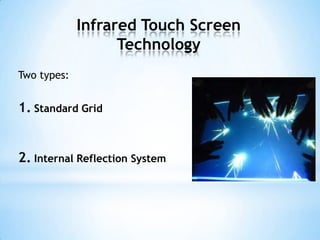
Infrared Touch Screen
Technology
Two types:
1. Standard Grid
2. Internal Reflection System
1. Standard Grid
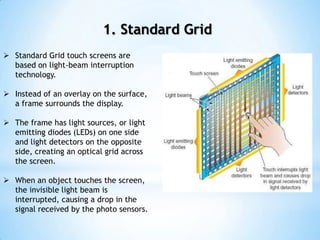
 Standard Grid touch screens are
based on light-beam interruption
technology.
 Instead of an overlay on the surface,
a frame surrounds the display.
 The frame has light sources, or light
emitting diodes (LEDs) on one side
and light detectors on the opposite
side, creating an optical grid across
the screen.
 When an object touches the screen,
the invisible light beam is
interrupted, causing a drop in the
signal received by the photo sensors.
2. Internal Refection System
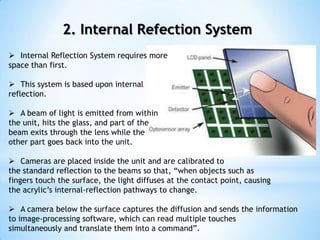
 Internal Reflection System requires more
space than first.
 This system is based upon internal
reflection.
 A beam of light is emitted from within
the unit, hits the glass, and part of the
beam exits through the lens while the
other part goes back into the unit.
 Cameras are placed inside the unit and are calibrated to
the standard reflection to the beams so that, “when objects such as
fingers touch the surface, the light diffuses at the contact point, causing
the acrylic’s internal-reflection pathways to change.
 A camera below the surface captures the diffusion and sends the information
to image-processing software, which can read multiple touches
simultaneously and translate them into a command”.
ADVANTAGES
 Highest quality of
underlying image.
 Very high transmittance.
 Very high durability and
reliability.
DISADVANTAGES
 Lower resolution than
other technologies.
 Surface obstructions can
cause a false touch.
Advantages & Disadvantages of
Infrared Technology
Resistive Touch Screen
Technology
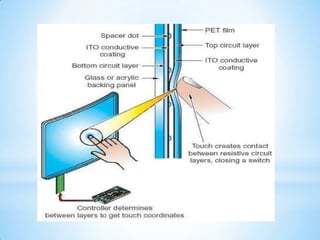
 Polyester Film
 Top Resistive Layer
 Conductive Transparent Metal Coating
 Bottom Resistive Layer
 Insulating Dots
 Glass Substrate
Contd.
 Pressing the flexible top sheet creates
electrical contact with the coating on the
glass.
 The touch screen controller gets the
alternating voltages between the two layers
and converts them into the digital X and Y
coordinates of the activated area.
Advantages & Disadvantages of
Resistive Technology
Advantages
Can be activated with
any device.
 Low cost solution.
 Low power
consumption.
Disadvantages
 Poorer durability
compared to other
technologies.
 Very short life,
especially considering
cosmetic wear.
Capacitive Touchscreens
Two types:
1. Projected Capacitive Touchscreens.
2. Surface Capacitive Touchscreens.
1. Projected Capacitive Touchscreen
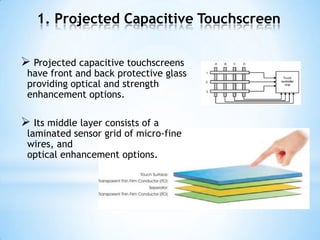
 Projected capacitive touchscreens
have front and back protective glass
providing optical and strength
enhancement options.
 Its middle layer consists of a
laminated sensor grid of micro-fine
wires, and
optical enhancement options.
Contd.
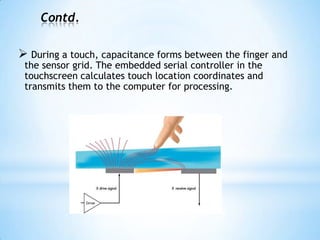
 During a touch, capacitance forms between the finger and
the sensor grid. The embedded serial controller in the
touchscreen calculates touch location coordinates and
transmits them to the computer for processing.
2. Surface Capacitive Touch
Screen Technology
In the capacitive system, a layer that stores electrical
charge is placed on the glass panel.
 When a user touches, some of the charge is transferred to
the user, so the charge on the capacitive layer decreases.
 This decrease is measured in electrodes located at each
corner of the monitor.
The computer then calculates the coordinates, from the relative
differences in charge at each corner.
Contd.
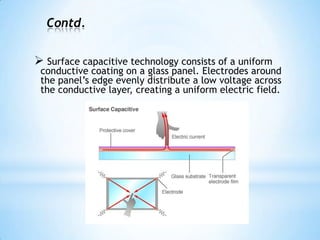
 Surface capacitive technology consists of a uniform
conductive coating on a glass panel. Electrodes around
the panel’s edge evenly distribute a low voltage across
the conductive layer, creating a uniform electric field.
Contd.
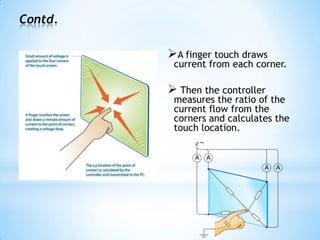
A finger touch draws
current from each corner.
 Then the controller
measures the ratio of the
current flow from the
corners and calculates the
touch location.
Advantages & Disadvantages of
Capacitive Technology
Advantages
 More durable than
resistive.
 Higher
transmittance than
resistive.
Disadvantages
 Accepts input from
finger
only.
 Accuracy is
dependent on
capacitance of person
Surface Wave Technology
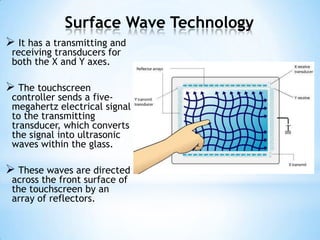
 It has a transmitting and
receiving transducers for
both the X and Y axes.
 The touchscreen
controller sends a five-
megahertz electrical signal
to the transmitting
transducer, which converts
the signal into ultrasonic
waves within the glass.
 These waves are directed
across the front surface of
the touchscreen by an
array of reflectors.
Contd.
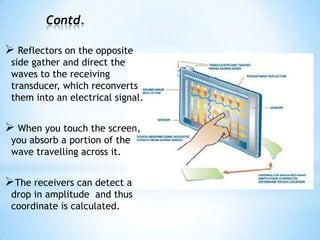
 Reflectors on the opposite
side gather and direct the
waves to the receiving
transducer, which reconverts
them into an electrical signal.
 When you touch the screen,
you absorb a portion of the
wave travelling across it.
The receivers can detect a
drop in amplitude and thus
coordinate is calculated.
ADVANTAGES
 Very high transmittance.
 Very high durability.
DISADVANTAGES
 Requires “soft” input
device.
 Surface obstructions can
cause a false touch.
Advantages & Disadvantages of
Surface Acoustic Wave Technology
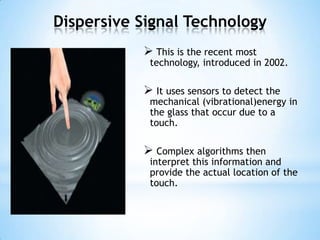
Dispersive Signal Technology
 This is the recent most
technology, introduced in 2002.
 It uses sensors to detect the
mechanical (vibrational)energy in
the glass that occur due to a
touch.
 Complex algorithms then
interpret this information and
provide the actual location of the
touch.
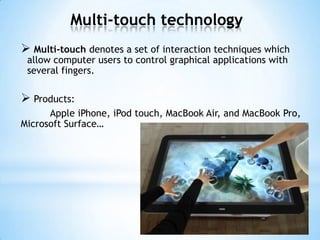
Multi-touch technology
 Multi-touch denotes a set of interaction techniques which
allow computer users to control graphical applications with
several fingers.
 Products:
Apple iPhone, iPod touch, MacBook Air, and MacBook Pro,
Microsoft Surface…
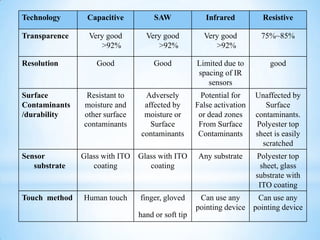
Technology Capacitive SAW Infrared Resistive
Transparence Very good
>92%
Very good
>92%
Very good
>92%
75%~85%
Resolution Good Good Limited due to
spacing of IR
sensors
good
Surface
Contaminants
/durability
Resistant to
moisture and
other surface
contaminants
Adversely
affected by
moisture or
Surface
contaminants
Potential for
False activation
or dead zones
From Surface
Contaminants
Unaffected by
Surface
contaminants.
Polyester top
sheet is easily
scratched
Sensor
substrate
Glass with ITO
coating
Glass with ITO
coating
Any substrate Polyester top
sheet, glass
substrate with
ITO coating
Touch method Human touch finger, gloved
hand or soft tip
Can use any
pointing device
Can use any
pointing device
Components of Touchscreen
(How Does A Touchscreen Works?)
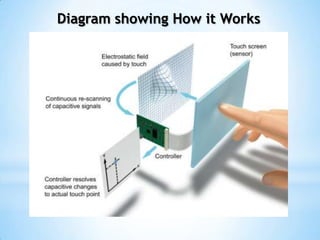
A basic touch screen has three main
components:
 Touch Sensor
 Controller
 Software Driver
1. Touch Sensor
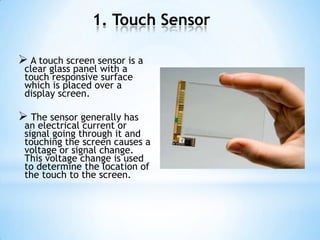
 A touch screen sensor is a
clear glass panel with a
touch responsive surface
which is placed over a
display screen.
 The sensor generally has
an electrical current or
signal going through it and
touching the screen causes a
voltage or signal change.
This voltage change is used
to determine the location of
the touch to the screen.
2. Controller
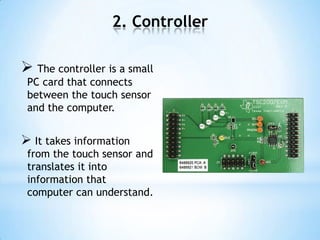
 The controller is a small
PC card that connects
between the touch sensor
and the computer.
 It takes information
from the touch sensor and
translates it into
information that
computer can understand.
3. Software Driver
 The driver is a software that allows the touch
screen and computer to work together.
 It tells the operating system how to interpret
the touch event information that is sent from
the controller.
 Most touch screen drivers today are mouse-
emulation type drivers. This makes touching
the screen the same as clicking your mouse at
the same location on the screen.
Diagram showing How it Works
Applications
 Public Information Displays:
Tourism Displays, Trade Show Displays,
Information Kiosk, Museum Displays.
 Customer Self-Service:
Stores, Retail, Restaurants, Transportation hubs, ATM &
Airline e-ticket Terminals.
 And Many More Uses...
Home Automation Systems, Digital Juke Boxes,
Computerized Gaming, Student Registration Systems,
Multimedia Software, Financial & Scientific Applications,
Employee Time Clocks, Point-Of-Sale Terminals, Industrial
Process Controls, And More…
Pros & Cons
 Easy to use.
 Direct pointing to the
objects.
 Fastest pointing devices.
 Finger or pen is usable (No
cable required).
 Saves space, no
keyboard(buttons) necessary.
 Easier hand eye
coordination than buttons.
 Suited to: novices,
application for information
retrieval etc.
 Low precision by using
finger.
Big screen leads to low
battery life.
 User has to sit or stand
closer to the screen.
 The screen may be
covered more by using hand.
 Require massive
computing power which
leads to slow devices.
Screens get dirty.
Future Scope
 Minimal power requirements.
 High inherent accuracy & precession.
 Allow 100% display light output, picture
definition and colour clarity.
 Low-cost & excellent durability.
 3-dimensional IR interactive displays.
 Touchscreen Video Projectors.
Conclusion
 Though the touch screen technology contains some
limitations it’s very user friendly, fast, accurate, easy for
the novices & fun to operate. It has been widely accepted.
 And now by just modifying a little it can replace the
mouse and key board completely in near future.
 Touchscreens, touch panels or touchscreen panels are
display overlays which have the ability to display and
receive information on the same screen.
 Touchscreens also have assisted in recent changes in the
PDAs, making these devices more usable.
Thank You

Study of Various Touch Screen Technologies

  • 1.
    Study of VariousTouch Screen Technologies Santosh Ankam
  • 2.
     Introduction  History Functions  Different Touch Screen Technologies & Working  Components of Touch Screen  Applications Future Scope Conclusion Outline:
  • 3.
    Introduction A touch screenis a computer display screen that is sensitive to human touch, allowing a user to interact with the computer by touching pictures or words on the screen.  A touch screen is an input device that allows users to operate a PC by simply touching the display screen which has a sensitive glass overlay placed on it.  A touch screen accepts direct onscreen inputs.
  • 4.
    History  In 1971,the first "touch sensor" was developed by Doctor Sam Hurst (founder of Elographics) while he was an instructor at the University of Kentucky.  The University of Kentucky Research Foundation named it as “Elograph”.  The "Elograph" was not transparent like modern touch screens.  In 1974, the first true touch screen incorporating a transparent surface came.
  • 5.
    Functions of TouchScreen  Pressure sensitive activation-by finger or stylus.  Emulates mouse functions-click, double click, & drag.  Touch screen & mouse can be used concurrently.  Durable & scratch resistant coated surface.  Compatible with Windows95, 98, NT, 2000, XP, Macintosh, Linux.
  • 7.
    Different Touch ScreenTechnologies  Infrared 1. Standard Grid 2. Internal Reflection System  Resistive  Capacitive 1. Projected Capacitive Technology 2. Surface Capacitive Technology  Surface Wave
  • 8.
    Infrared Touch Screen Technology Twotypes: 1. Standard Grid 2. Internal Reflection System
  • 9.
    1. Standard Grid Standard Grid touch screens are based on light-beam interruption technology.  Instead of an overlay on the surface, a frame surrounds the display.  The frame has light sources, or light emitting diodes (LEDs) on one side and light detectors on the opposite side, creating an optical grid across the screen.  When an object touches the screen, the invisible light beam is interrupted, causing a drop in the signal received by the photo sensors.
  • 10.
    2. Internal RefectionSystem  Internal Reflection System requires more space than first.  This system is based upon internal reflection.  A beam of light is emitted from within the unit, hits the glass, and part of the beam exits through the lens while the other part goes back into the unit.  Cameras are placed inside the unit and are calibrated to the standard reflection to the beams so that, “when objects such as fingers touch the surface, the light diffuses at the contact point, causing the acrylic’s internal-reflection pathways to change.  A camera below the surface captures the diffusion and sends the information to image-processing software, which can read multiple touches simultaneously and translate them into a command”.
  • 11.
    ADVANTAGES  Highest qualityof underlying image.  Very high transmittance.  Very high durability and reliability. DISADVANTAGES  Lower resolution than other technologies.  Surface obstructions can cause a false touch. Advantages & Disadvantages of Infrared Technology
  • 12.
    Resistive Touch Screen Technology Polyester Film  Top Resistive Layer  Conductive Transparent Metal Coating  Bottom Resistive Layer  Insulating Dots  Glass Substrate
  • 14.
    Contd.  Pressing theflexible top sheet creates electrical contact with the coating on the glass.  The touch screen controller gets the alternating voltages between the two layers and converts them into the digital X and Y coordinates of the activated area.
  • 15.
    Advantages & Disadvantagesof Resistive Technology Advantages Can be activated with any device.  Low cost solution.  Low power consumption. Disadvantages  Poorer durability compared to other technologies.  Very short life, especially considering cosmetic wear.
  • 16.
    Capacitive Touchscreens Two types: 1.Projected Capacitive Touchscreens. 2. Surface Capacitive Touchscreens.
  • 17.
    1. Projected CapacitiveTouchscreen  Projected capacitive touchscreens have front and back protective glass providing optical and strength enhancement options.  Its middle layer consists of a laminated sensor grid of micro-fine wires, and optical enhancement options.
  • 18.
    Contd.  During atouch, capacitance forms between the finger and the sensor grid. The embedded serial controller in the touchscreen calculates touch location coordinates and transmits them to the computer for processing.
  • 19.
    2. Surface CapacitiveTouch Screen Technology In the capacitive system, a layer that stores electrical charge is placed on the glass panel.  When a user touches, some of the charge is transferred to the user, so the charge on the capacitive layer decreases.  This decrease is measured in electrodes located at each corner of the monitor. The computer then calculates the coordinates, from the relative differences in charge at each corner.
  • 20.
    Contd.  Surface capacitivetechnology consists of a uniform conductive coating on a glass panel. Electrodes around the panel’s edge evenly distribute a low voltage across the conductive layer, creating a uniform electric field.
  • 21.
    Contd. A finger touchdraws current from each corner.  Then the controller measures the ratio of the current flow from the corners and calculates the touch location.
  • 22.
    Advantages & Disadvantagesof Capacitive Technology Advantages  More durable than resistive.  Higher transmittance than resistive. Disadvantages  Accepts input from finger only.  Accuracy is dependent on capacitance of person
  • 23.
    Surface Wave Technology It has a transmitting and receiving transducers for both the X and Y axes.  The touchscreen controller sends a five- megahertz electrical signal to the transmitting transducer, which converts the signal into ultrasonic waves within the glass.  These waves are directed across the front surface of the touchscreen by an array of reflectors.
  • 24.
    Contd.  Reflectors onthe opposite side gather and direct the waves to the receiving transducer, which reconverts them into an electrical signal.  When you touch the screen, you absorb a portion of the wave travelling across it. The receivers can detect a drop in amplitude and thus coordinate is calculated.
  • 25.
    ADVANTAGES  Very hightransmittance.  Very high durability. DISADVANTAGES  Requires “soft” input device.  Surface obstructions can cause a false touch. Advantages & Disadvantages of Surface Acoustic Wave Technology
  • 26.
    Dispersive Signal Technology This is the recent most technology, introduced in 2002.  It uses sensors to detect the mechanical (vibrational)energy in the glass that occur due to a touch.  Complex algorithms then interpret this information and provide the actual location of the touch.
  • 27.
    Multi-touch technology  Multi-touchdenotes a set of interaction techniques which allow computer users to control graphical applications with several fingers.  Products: Apple iPhone, iPod touch, MacBook Air, and MacBook Pro, Microsoft Surface…
  • 28.
    Technology Capacitive SAWInfrared Resistive Transparence Very good >92% Very good >92% Very good >92% 75%~85% Resolution Good Good Limited due to spacing of IR sensors good Surface Contaminants /durability Resistant to moisture and other surface contaminants Adversely affected by moisture or Surface contaminants Potential for False activation or dead zones From Surface Contaminants Unaffected by Surface contaminants. Polyester top sheet is easily scratched Sensor substrate Glass with ITO coating Glass with ITO coating Any substrate Polyester top sheet, glass substrate with ITO coating Touch method Human touch finger, gloved hand or soft tip Can use any pointing device Can use any pointing device
  • 29.
    Components of Touchscreen (HowDoes A Touchscreen Works?) A basic touch screen has three main components:  Touch Sensor  Controller  Software Driver
  • 30.
    1. Touch Sensor A touch screen sensor is a clear glass panel with a touch responsive surface which is placed over a display screen.  The sensor generally has an electrical current or signal going through it and touching the screen causes a voltage or signal change. This voltage change is used to determine the location of the touch to the screen.
  • 31.
    2. Controller  Thecontroller is a small PC card that connects between the touch sensor and the computer.  It takes information from the touch sensor and translates it into information that computer can understand.
  • 32.
    3. Software Driver The driver is a software that allows the touch screen and computer to work together.  It tells the operating system how to interpret the touch event information that is sent from the controller.  Most touch screen drivers today are mouse- emulation type drivers. This makes touching the screen the same as clicking your mouse at the same location on the screen.
  • 33.
  • 34.
    Applications  Public InformationDisplays: Tourism Displays, Trade Show Displays, Information Kiosk, Museum Displays.  Customer Self-Service: Stores, Retail, Restaurants, Transportation hubs, ATM & Airline e-ticket Terminals.  And Many More Uses... Home Automation Systems, Digital Juke Boxes, Computerized Gaming, Student Registration Systems, Multimedia Software, Financial & Scientific Applications, Employee Time Clocks, Point-Of-Sale Terminals, Industrial Process Controls, And More…
  • 35.
    Pros & Cons Easy to use.  Direct pointing to the objects.  Fastest pointing devices.  Finger or pen is usable (No cable required).  Saves space, no keyboard(buttons) necessary.  Easier hand eye coordination than buttons.  Suited to: novices, application for information retrieval etc.  Low precision by using finger. Big screen leads to low battery life.  User has to sit or stand closer to the screen.  The screen may be covered more by using hand.  Require massive computing power which leads to slow devices. Screens get dirty.
  • 36.
    Future Scope  Minimalpower requirements.  High inherent accuracy & precession.  Allow 100% display light output, picture definition and colour clarity.  Low-cost & excellent durability.  3-dimensional IR interactive displays.  Touchscreen Video Projectors.
  • 37.
    Conclusion  Though thetouch screen technology contains some limitations it’s very user friendly, fast, accurate, easy for the novices & fun to operate. It has been widely accepted.  And now by just modifying a little it can replace the mouse and key board completely in near future.  Touchscreens, touch panels or touchscreen panels are display overlays which have the ability to display and receive information on the same screen.  Touchscreens also have assisted in recent changes in the PDAs, making these devices more usable.
  • 38.