TOUCH
SCREEN
TECHNOLOGY
Introduction
 A touch screen is electronic visual display that can
detect the presence & location of touch within the
display area.
 The display screen has a sensitive glass overlay
placed on it and we could give the desired input by
touching it.
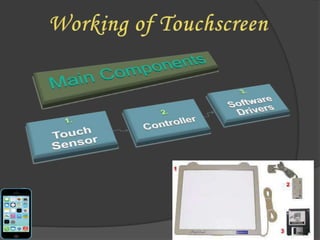
 A touch screen kit includes a touch screen panel,
a controller and a software driver.
Brief History
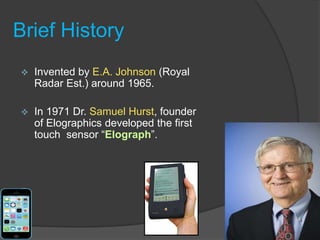
 Invented by E.A. Johnson (Royal
Radar Est.) around 1965.
 In 1971 Dr. Samuel Hurst, founder
of Elographics developed the first
touch sensor “Elograph”.
Touch Sensor
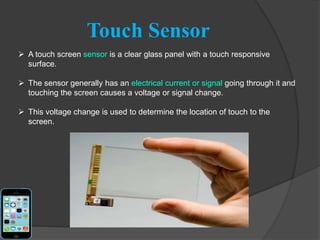
 A touch screen sensor is a clear glass panel with a touch responsive
surface.
 The sensor generally has an electrical current or signal going through it and
touching the screen causes a voltage or signal change.
 This voltage change is used to determine the location of touch to the
screen.
Controller
 The controller is a small PC card that connects between the touch sensor and
the PC
 The controller determines what type of interface/connection you will need
on the PC
Software Driver
 The driver is a software that allows the touch screen
and computer to work together. It tells the operating
system how to interpret the touch event information that
is sent from the controller.
 Most touch screen drivers today are a mouse-emulation
type driver. This makes touching the screen the same as
clicking your mouse at the same location on the screen.
Diagram showing How it Works
Working of touch screen in an
integrated circuit
* Resistive Touch Screen
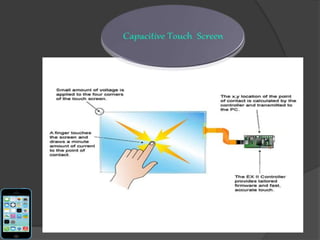
* Capacitive Touch Screen
* Surface Acoustic Wave Touchscreen
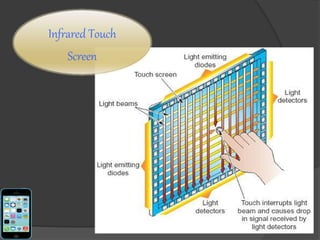
* Infrared Touch Screen
Types of Touch Screen Technologies:
Resistive
Touch
Screen
Surface Capacitive Projected Capacitive
Surface Acoustic Wave
Touch screen
Infrared Touch
Screen
Resistive Infrared SAW Capacitive
Touch
Resolution
High High Average High
Clarity Average Good Good Good
Operation Finger or
Stylus
Finger or
Stylus
Finger or
Soft-tipped
Stylus
Finger only
Durability Can be
Damaged by
Sharp Objects
Highly
Durable
Susceptible
to Dirt and
Moisture
Highly durable
Advantages of all Touch Technology
 A touch screen is easy to use.
 Save space as no buttons are required.
 Touching a visual display of choices requires
little thinking and is a form of direct
manipulation that is easy to learn.
 Touch screens are the fastest pointing devices.
 Touch screens have easier hand eye coordination
than buttons.
Disadvantages
 Screen has to be really big not to miss things when
pressing them with finger.
 Big screen leads to low battery life.
 Touch screen means screen can’t be read too well
in direct sunlight as it applies an additional not
100% transparent.
 Touch screen devices usually has no additional
keys.
 Screens get very dirty.
Public Information Displays:
Tourism displays, Trade show display.
Customer Self-Services:
Stores, Restaurants, ATMs, Airline ticket terminals
and Transportation hubs.
More uses...
Smart Pjones,Computerized gaming, Student
Registration systems, Multimedia software ,
Scientific applications etc.
Though the touch screen technology contains some limitations it’s
very user friendly, fast, accurate, easy for the novices & fun to
operate. It has been widely accepted. And now by just modifying
a little it can replace the mouse and key board completely in near
future.
Any Questions ????

Touch Screen Technology

  • 1.
  • 2.
    Introduction  A touchscreen is electronic visual display that can detect the presence & location of touch within the display area.  The display screen has a sensitive glass overlay placed on it and we could give the desired input by touching it.  A touch screen kit includes a touch screen panel, a controller and a software driver.
  • 3.
    Brief History  Inventedby E.A. Johnson (Royal Radar Est.) around 1965.  In 1971 Dr. Samuel Hurst, founder of Elographics developed the first touch sensor “Elograph”.
  • 5.
    Touch Sensor  Atouch screen sensor is a clear glass panel with a touch responsive surface.  The sensor generally has an electrical current or signal going through it and touching the screen causes a voltage or signal change.  This voltage change is used to determine the location of touch to the screen.
  • 6.
    Controller  The controlleris a small PC card that connects between the touch sensor and the PC  The controller determines what type of interface/connection you will need on the PC
  • 7.
    Software Driver  Thedriver is a software that allows the touch screen and computer to work together. It tells the operating system how to interpret the touch event information that is sent from the controller.  Most touch screen drivers today are a mouse-emulation type driver. This makes touching the screen the same as clicking your mouse at the same location on the screen.
  • 8.
  • 9.
    Working of touchscreen in an integrated circuit
  • 10.
    * Resistive TouchScreen * Capacitive Touch Screen * Surface Acoustic Wave Touchscreen * Infrared Touch Screen Types of Touch Screen Technologies:
  • 11.
  • 13.
  • 14.
  • 15.
  • 16.
    Resistive Infrared SAWCapacitive Touch Resolution High High Average High Clarity Average Good Good Good Operation Finger or Stylus Finger or Stylus Finger or Soft-tipped Stylus Finger only Durability Can be Damaged by Sharp Objects Highly Durable Susceptible to Dirt and Moisture Highly durable
  • 17.
    Advantages of allTouch Technology  A touch screen is easy to use.  Save space as no buttons are required.  Touching a visual display of choices requires little thinking and is a form of direct manipulation that is easy to learn.  Touch screens are the fastest pointing devices.  Touch screens have easier hand eye coordination than buttons.
  • 18.
    Disadvantages  Screen hasto be really big not to miss things when pressing them with finger.  Big screen leads to low battery life.  Touch screen means screen can’t be read too well in direct sunlight as it applies an additional not 100% transparent.  Touch screen devices usually has no additional keys.  Screens get very dirty.
  • 19.
    Public Information Displays: Tourismdisplays, Trade show display. Customer Self-Services: Stores, Restaurants, ATMs, Airline ticket terminals and Transportation hubs. More uses... Smart Pjones,Computerized gaming, Student Registration systems, Multimedia software , Scientific applications etc.
  • 20.
    Though the touchscreen technology contains some limitations it’s very user friendly, fast, accurate, easy for the novices & fun to operate. It has been widely accepted. And now by just modifying a little it can replace the mouse and key board completely in near future.
  • 22.