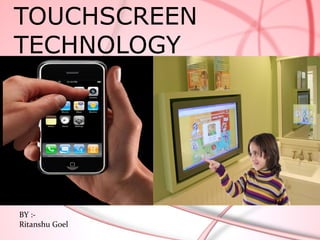
TOUCHSCREEN
TECHNOLOGY


BY :-
Ritanshu Goel
INTRODUCTION


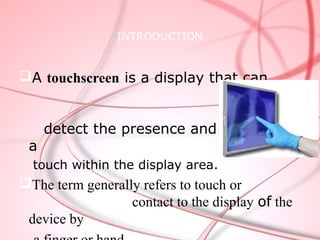
A touchscreen is a display that can


     detect the presence and location of
 a
  touch within the display area.
The term generally refers to touch or
                  contact to the display of the
 device by
The touchscreen has two main attributes:

1.  It enables one to interact with what is
  displayed directly on the screen, where it
  is displayed, rather than indirectly with a
  mouse or touchpad.
2. It lets one do so without requiring any
  intermediate device, again, such as a
  stylus that needs to be held in the hand.
  Such displays can be attached to
  computers or, as terminals, to networks.
History

 The first touch screen was a capacitive
  touch screen developed by E.A. Johnson at
  the Royal Radar Establishment, Malvern, UK.
  The inventor briefly described his work in a
  short article published in 1965 and then
  more fully - along with photographs and
  diagrams - in an article published in 1967.
 One of the first places where they gained
  some visibility was in the terminal of a
  computer-assisted learning terminal that
  came out in 1972 as part of the PLATO
  project.
 The HP-150 from 1983 was probably the
  world's earliest commercial touchscreen
  computer.
Development


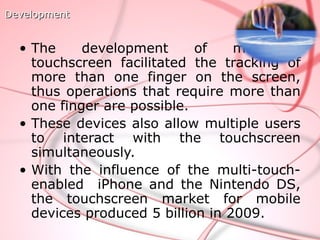
  • The     development      of    multipoint
    touchscreen facilitated the tracking of
    more than one finger on the screen,
    thus operations that require more than
    one finger are possible.
  • These devices also allow multiple users
    to interact with the touchscreen
    simultaneously.
  • With the influence of the multi-touch-
    enabled iPhone and the Nintendo DS,
    the touchscreen market for mobile
    devices produced 5 billion in 2009.
Touch screen technology

Main touch screen components:
1 Touch sensor
2 Controller
3 Software driver


                                7
TOUCH SENSOR .
A touch sensor is a clear glass panel with a touch    responsive
 surface .
The sensor generally has an electrical signal going through it and
touching the screen causing a signal change.
The signal change is used to determine the location of the touch to the
screen.
CONTROLLER
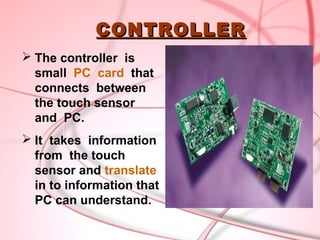
 The controller is
  small PC card that
  connects between
  the touch sensor
  and PC.
 It takes information
  from the touch
  sensor and translate
  in to information that
  PC can understand.
SOFTWARE DRIVER
The driver is a software that allows the
touch screen and computer to work
together.
It tells the operating system how to
interpret the touch event information that
sent from the controller.
Most of the touch screen drivers today
are mouse emulation type driver .
Construction


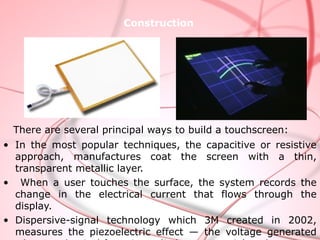
 There are several principal ways to build a touchscreen:
• In the most popular techniques, the capacitive or resistive
  approach, manufactures coat the screen with a thin,
  transparent metallic layer.
• When a user touches the surface, the system records the
  change in the electrical current that flows through the
  display.
• Dispersive-signal technology which 3M created in 2002,
  measures the piezoelectric effect — the voltage generated
TYPES OF TOUCHSCREEN
  Resistive Touch screen
  Surface wave Touch screen
  Capacitive Touch screen
         *Surface capacitive
         *Projected capacitive
  Near Field Imaging Touch screen
  Infrared Touch screen


                                     12
Technologies

   The types of technologies that can be found are as
   follows:

Resistive:

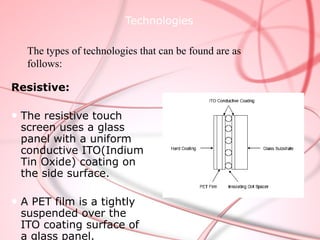
● The resistive touch
  screen uses a glass
  panel with a uniform
  conductive ITO(Indium
  Tin Oxide) coating on
  the side surface.

● A PET film is a tightly
  suspended over the
  ITO coating surface of
  a glass panel.
Working Principle:


● When the screen is touched, it pushes the conductive ITO
coating on the PET film. That results the electrical contact,
producing the voltages. It presents the position touched.

● Resistive touchscreen deliver cost-effective, consistent and
durable performance
• On the pure glass substrate,
Surface Acoustic Wave:
 there are four piezoelectric
 transmitting and receiving
 transducers on the three
 corners for both the X and Y
 axes.


  • The SAW controller sends a 5
  MHz electrical signal to the X-
  axis and Y-axis transmitting
  transducers.


• When the touchscreen is touched, the finger absorbs a
  portion of the wave passing across the surface of the
  panel.


• SAW can be used in any and all applications for the
  best possible image clarity an unlimited life.
Capacitive:


• Capacitive touchscreen is a four multi-layer glass.
• Small amount of voltage is applied to the electrodes on
  the four corners
• A human body is an electric conductor, so when
  touched the screen with a finger, a slight amount of
  current is drawn, creating a voltage drop. The current
  respectively drifts to the electrodes on the four corners.
• The capacitive system has very long life (about 225
Infrare
    d:
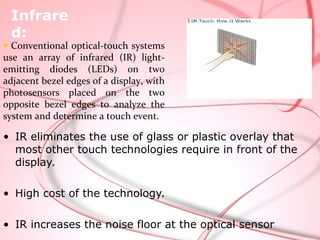
● Conventional optical-touch systems
use an array of infrared (IR) light-
emitting diodes (LEDs) on two
adjacent bezel edges of a display, with
photosensors placed on the two
opposite bezel edges to analyze the
system and determine a touch event.

• IR eliminates the use of glass or plastic overlay that
  most other touch technologies require in front of the
  display.

• High cost of the technology.

• IR increases the noise floor at the optical sensor
Technology      Capacitive      SAW                Infrared           Resistive

Transparence    Very good       Very good          Very good          75%~85%
                   >92%            >92%               >92%

Resolution      Good            Good               Limited due to     good
                                                   spacing of IR
                                                   sensors
Surface         Resistant to    Adversely          Potential for      Unaffected by
Contaminants    moisture and    affected by        False activation   Surface
/durability     other surface   moisture or        or dead zones      contaminants.
                contaminants    Surface            From Surface       Polyester top
                                contaminants       Contaminants       sheet is easily
                                                                      scratched

Sensor substrate Glass with ITO Glass with ITO     Any substrate      Polyester top
                 coating        coating                               sheet, glass
                                                                      substrate with
                                                                      ITO coating
Display size    8.4"-21"        10.4"-30"          10.4"-60"          up to 19"

Touch method    Human touch     finger, gloved     Can use any        Can use any
                                                   pointing device    pointing device
                                hand or soft tip
Advantages &
Disadvantages:
 Advantages:
•   User friendly.
•   Fast response.
•   Error free input.
•   Easy to install.
•   Use finger, fingernail, gloved hand, stylus or any
    soft-tip pointer to operate.
•   Easy to clean and maintain.
•   Compatible with Windows, Macintosh and Linux.
•   Does not interfere mouse and keyboard function.
•   Make computing easy, powerful and fun.
Disadvantages:

1)Finger stress: Stress on human fingers when used
  for more than a few minutes at a time. (for example,
  ATMs).


2)Fingerprints: Touchscreens can suffer from the
  problem of fingerprints on the display.


3)User has to sit closer to the screen as compared to
  external keyboard.

4) The screen may be covered more by using hand.
Applications
Public Access:
•  Mobile Phones
•  Library resource guides
•  Computers
•  Public Transportation Schedule /
  Status
• Airport terminal passenger internet
  and email systems
• Automated travel and entertainment
  ticket dispensers
Business


• Gas stations
• Point of sales
• Restaurants
• Grocery stores
• Hospital and hotel directories
 (check-in, registration)
• Banks and Financial Reporting
• Bank cash advance and teller
 machines
Conclusion:


• Designers are trying to use touchscreen to
  simplify input commands for largely
  unsophisticated computer users.

• Today, a larger share of population is PC literate,
  yet the touchscreen has become adopted by
  computer users of all abilities because it is
  simple, fast, and innovative.

• In future there is no usage of mouse and
  keyboards as they will be replaced by
  touchscreens.
Touchscreen technology

Touchscreen technology

  • 1.
  • 3.
    INTRODUCTION A touchscreen isa display that can detect the presence and location of a touch within the display area. The term generally refers to touch or contact to the display of the device by
  • 4.
    The touchscreen hastwo main attributes: 1. It enables one to interact with what is displayed directly on the screen, where it is displayed, rather than indirectly with a mouse or touchpad. 2. It lets one do so without requiring any intermediate device, again, such as a stylus that needs to be held in the hand. Such displays can be attached to computers or, as terminals, to networks.
  • 5.
    History  The firsttouch screen was a capacitive touch screen developed by E.A. Johnson at the Royal Radar Establishment, Malvern, UK. The inventor briefly described his work in a short article published in 1965 and then more fully - along with photographs and diagrams - in an article published in 1967.  One of the first places where they gained some visibility was in the terminal of a computer-assisted learning terminal that came out in 1972 as part of the PLATO project.  The HP-150 from 1983 was probably the world's earliest commercial touchscreen computer.
  • 6.
    Development •The development of multipoint touchscreen facilitated the tracking of more than one finger on the screen, thus operations that require more than one finger are possible. • These devices also allow multiple users to interact with the touchscreen simultaneously. • With the influence of the multi-touch- enabled iPhone and the Nintendo DS, the touchscreen market for mobile devices produced 5 billion in 2009.
  • 7.
    Touch screen technology Maintouch screen components: 1 Touch sensor 2 Controller 3 Software driver 7
  • 8.
    TOUCH SENSOR . Atouch sensor is a clear glass panel with a touch responsive surface . The sensor generally has an electrical signal going through it and touching the screen causing a signal change. The signal change is used to determine the location of the touch to the screen.
  • 9.
    CONTROLLER  The controlleris small PC card that connects between the touch sensor and PC.  It takes information from the touch sensor and translate in to information that PC can understand.
  • 10.
    SOFTWARE DRIVER The driveris a software that allows the touch screen and computer to work together. It tells the operating system how to interpret the touch event information that sent from the controller. Most of the touch screen drivers today are mouse emulation type driver .
  • 11.
    Construction There areseveral principal ways to build a touchscreen: • In the most popular techniques, the capacitive or resistive approach, manufactures coat the screen with a thin, transparent metallic layer. • When a user touches the surface, the system records the change in the electrical current that flows through the display. • Dispersive-signal technology which 3M created in 2002, measures the piezoelectric effect — the voltage generated
  • 12.
    TYPES OF TOUCHSCREEN  Resistive Touch screen  Surface wave Touch screen  Capacitive Touch screen *Surface capacitive *Projected capacitive  Near Field Imaging Touch screen  Infrared Touch screen 12
  • 13.
    Technologies The types of technologies that can be found are as follows: Resistive: ● The resistive touch screen uses a glass panel with a uniform conductive ITO(Indium Tin Oxide) coating on the side surface. ● A PET film is a tightly suspended over the ITO coating surface of a glass panel.
  • 14.
    Working Principle: ● Whenthe screen is touched, it pushes the conductive ITO coating on the PET film. That results the electrical contact, producing the voltages. It presents the position touched. ● Resistive touchscreen deliver cost-effective, consistent and durable performance
  • 15.
    • On thepure glass substrate, Surface Acoustic Wave: there are four piezoelectric transmitting and receiving transducers on the three corners for both the X and Y axes. • The SAW controller sends a 5 MHz electrical signal to the X- axis and Y-axis transmitting transducers. • When the touchscreen is touched, the finger absorbs a portion of the wave passing across the surface of the panel. • SAW can be used in any and all applications for the best possible image clarity an unlimited life.
  • 16.
    Capacitive: • Capacitive touchscreenis a four multi-layer glass. • Small amount of voltage is applied to the electrodes on the four corners • A human body is an electric conductor, so when touched the screen with a finger, a slight amount of current is drawn, creating a voltage drop. The current respectively drifts to the electrodes on the four corners. • The capacitive system has very long life (about 225
  • 17.
    Infrare d: ● Conventional optical-touch systems use an array of infrared (IR) light- emitting diodes (LEDs) on two adjacent bezel edges of a display, with photosensors placed on the two opposite bezel edges to analyze the system and determine a touch event. • IR eliminates the use of glass or plastic overlay that most other touch technologies require in front of the display. • High cost of the technology. • IR increases the noise floor at the optical sensor
  • 18.
    Technology Capacitive SAW Infrared Resistive Transparence Very good Very good Very good 75%~85% >92% >92% >92% Resolution Good Good Limited due to good spacing of IR sensors Surface Resistant to Adversely Potential for Unaffected by Contaminants moisture and affected by False activation Surface /durability other surface moisture or or dead zones contaminants. contaminants Surface From Surface Polyester top contaminants Contaminants sheet is easily scratched Sensor substrate Glass with ITO Glass with ITO Any substrate Polyester top coating coating sheet, glass substrate with ITO coating Display size 8.4"-21" 10.4"-30" 10.4"-60" up to 19" Touch method Human touch finger, gloved Can use any Can use any pointing device pointing device hand or soft tip
  • 19.
    Advantages & Disadvantages: Advantages: • User friendly. • Fast response. • Error free input. • Easy to install. • Use finger, fingernail, gloved hand, stylus or any soft-tip pointer to operate. • Easy to clean and maintain. • Compatible with Windows, Macintosh and Linux. • Does not interfere mouse and keyboard function. • Make computing easy, powerful and fun.
  • 20.
    Disadvantages: 1)Finger stress: Stresson human fingers when used for more than a few minutes at a time. (for example, ATMs). 2)Fingerprints: Touchscreens can suffer from the problem of fingerprints on the display. 3)User has to sit closer to the screen as compared to external keyboard. 4) The screen may be covered more by using hand.
  • 21.
    Applications Public Access: • Mobile Phones • Library resource guides • Computers • Public Transportation Schedule / Status • Airport terminal passenger internet and email systems • Automated travel and entertainment ticket dispensers
  • 22.
    Business • Gas stations •Point of sales • Restaurants • Grocery stores • Hospital and hotel directories (check-in, registration) • Banks and Financial Reporting • Bank cash advance and teller machines
  • 23.
    Conclusion: • Designers aretrying to use touchscreen to simplify input commands for largely unsophisticated computer users. • Today, a larger share of population is PC literate, yet the touchscreen has become adopted by computer users of all abilities because it is simple, fast, and innovative. • In future there is no usage of mouse and keyboards as they will be replaced by touchscreens.