ANIMESH LOCHAN
E.C , 6th
Sem.
ROLL NO.- 1104331011
SUBMITTED BY:
Touchscreen
1
Touchscreen
2
INTRODUCTIONINTRODUCTION
CONTENT
Touchscreen
3
Touchscreen
4
Touchscreen
5
A touch screen sensor is a clear glass panel with a touch
responsive surface
The sensor generally has an electrical current or signal going
through it and touching the screen causes a voltage or signal
change
Touchscreen
6
 The controller is a small PC card that connects between
the touch sensor and the PC
 The controller determines what type of
interface/connection you will need on the PC
Touchscreen
7
 The driver is a software that allows the
touch screen and computer to work together
 Most touch screen drivers today are a
mouse-emulation type driver
Touchscreen
8
* Resistive Touch Screen
* Capacitive Touch Screen
* Surface Acoustic Wave Touchscreen
* Infrared Touch Screen
Types of Touch Screen
Technologies:
Touchscreen
9
Resistive Touch Screen
Touchscreen
10
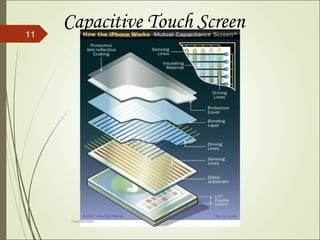
Capacitive Touch Screen
Touchscreen
11
Diagram showing How it Works
Surface Acoustic Wave Touchscreen
Touchscreen
13
Infrared Touch Screen
Touchscreen
14
Public Information Displays:::
Tourism displays, Trade show display
Customer Self-Services:::
Stores, Restaurants, ATMs, Airline ticket
terminals and Transportation hubs.
More uses...
Computerized gaming, Multimedia software ,
Scientific applications , mobile phones etc.
Touchscreen
15
ADVANTAGES
User friendly
Fast response
Use finger, fingernail , stylus or any soft tip
pointer
Easy to clean
Does not interfere mouse and keyboard
Make computing easy, powerful and fun
Touchscreen
16
 DISADVANTAGES
Having a big bright screen and needing massive
computing power to run this means a very low
battery life
In direct sunlight it is much less efficient and most
of the time very difficult to read the screen
If a touchscreen device are to crash the whole
screen would be unresponsive, and because of the
lack of buttons recovering it would be very
difficult.
 Fingerprints of the user obscure the screen if not
handled carefully.Touchscreen
17
Though the touch screen technology contains some
limitations but it’s very user friendly, fast, accurate, easy
for the novices & fun to operate. It has been widely
accepted. And now by just modifying a little it can replace
the mouse and key board completely in near future
Touchscreen
18
References
 http://www.engineersgarage.com/articles/touc
hscreen-technology-working
 http://en.wikipedia.org/wiki/Touchscreen
 http://whatis.techtarget.com/definition/touch-
screen
Touchscreen
19
Touchscreen
20

Touchscreen working and Types... (y)