TOUCH SCREEN TECHNOLOGY
Name : K.Ravi Chandu
Branch: ECE-C
Roll No: 20895A0420
Co-ordinator:
(Dr.Khaja Mujeebuddin Quadry)
(Mr.M Rajan)
❑CONTENTS
◈Introduction
◈History and Development
◈Components of Touch screen
◈Types of Touch Screens
◈Advantages and Disadvantages
◈Applications
◈Future scope
◈Conclusion
◈Reference
❑INTRODUCTION
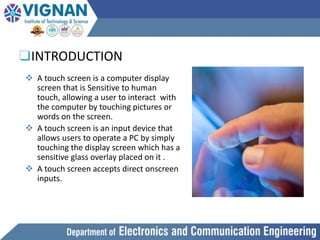
 A touch screen is a computer display
screen that is Sensitive to human
touch, allowing a user to interact with
the computer by touching pictures or
words on the screen.
 A touch screen is an input device that
allows users to operate a PC by simply
touching the display screen which has a
sensitive glass overlay placed on it .
 A touch screen accepts direct onscreen
inputs.
❑History and Development
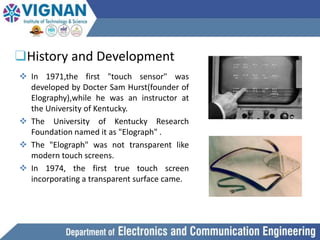
 In 1971,the first "touch sensor" was
developed by Docter Sam Hurst(founder of
Elography),while he was an instructor at
the University of Kentucky.
 The University of Kentucky Research
Foundation named it as "Elograph" .
 The "Elograph" was not transparent like
modern touch screens.
 In 1974, the first true touch screen
incorporating a transparent surface came.
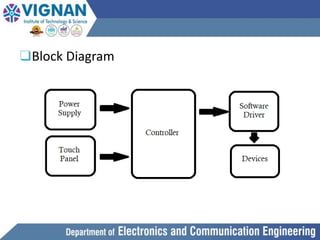
❑Block Diagram
❑Components of Touch Screen
A basic Touch screen has three main components:
1.Touch Sensor
2.Controller
3.Software Driver
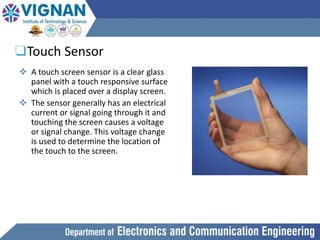
❑Touch Sensor
 A touch screen sensor is a clear glass
panel with a touch responsive surface
which is placed over a display screen.
 The sensor generally has an electrical
current or signal going through it and
touching the screen causes a voltage
or signal change. This voltage change
is used to determine the location of
the touch to the screen.
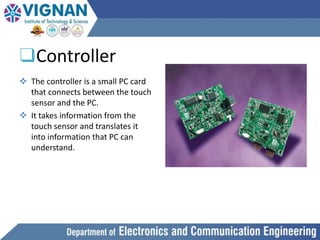
❑Controller
 The controller is a small PC card
that connects between the touch
sensor and the PC.
 It takes information from the
touch sensor and translates it
into information that PC can
understand.
❑Software Driver
 The driver is a software that allows the touch screen and computer to
work together.
 It tells the operating system how to interpret the touch event information
that is sent from the controller.
 Most touch screen drivers today are mouse-emulation type drivers. This
makes touching the screen the same as clicking your mouse at the same
location on the screen.
❑Typers of Touch Screens
 RESISTIVE
 CAPACITIVE
 SURFACE WAVE
 INFRARED
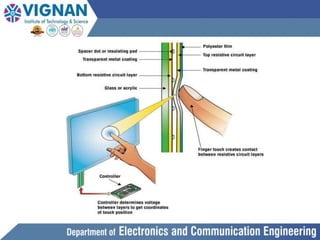
❑Resistive Touch Screen
 Resistive touchscreens are pressure sensitive, so they can be
operated with any input device, including a gloved hand or
stylus.
 easily damaged by sharp objects.
 they offer only 75% clarity.
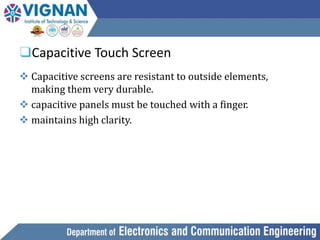
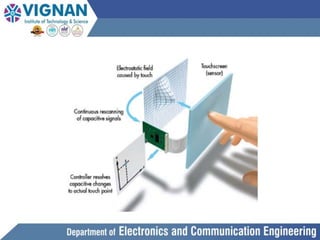
❑Capacitive Touch Screen
 Capacitive screens are resistant to outside elements,
making them very durable.
 capacitive panels must be touched with a finger.
 maintains high clarity.
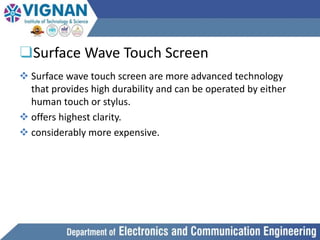
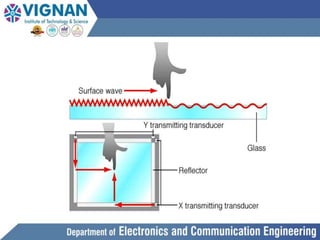
❑Surface Wave Touch Screen
 Surface wave touch screen are more advanced technology
that provides high durability and can be operated by either
human touch or stylus.
 offers highest clarity.
 considerably more expensive.
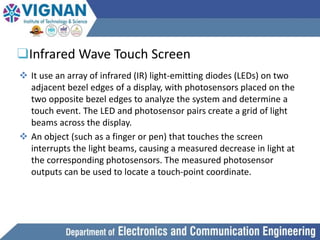
❑Infrared Wave Touch Screen
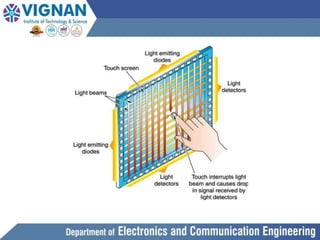
 It use an array of infrared (IR) light-emitting diodes (LEDs) on two
adjacent bezel edges of a display, with photosensors placed on the
two opposite bezel edges to analyze the system and determine a
touch event. The LED and photosensor pairs create a grid of light
beams across the display.
 An object (such as a finger or pen) that touches the screen
interrupts the light beams, causing a measured decrease in light at
the corresponding photosensors. The measured photosensor
outputs can be used to locate a touch-point coordinate.
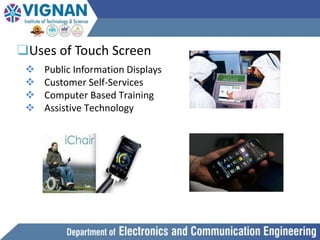
❑Uses of Touch Screen
 Public Information Displays
 Customer Self-Services
 Computer Based Training
 Assistive Technology
❑Advantages
 Ideal for web browsing, picture and movies.
 Simple user interfaces, which are more intuitive (iPhone
once again is a good example).
 Touchscreen devices have fewer buttons .
❑Diadvantages
 Big screen leads to low battery life.
 These devices require massive computing power which
leads to slow devices and low battery life.
❑Future Scope
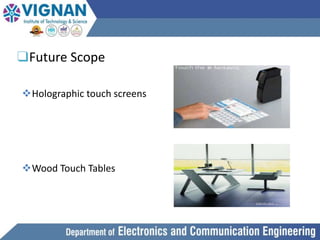
Holographic touch screens
Wood Touch Tables
❑References
 Sandbach, David Lee: Position detector constructed
from fabric, European patent EP 0989509A2
 Microtouch Systems, Inc.: Frontally Shielded Capacitive
touch sensor system, United States Patent US5457289
 Microtouch Systems, Inc.: Touchscreen controller with pen
andor finger inputs, United States Patent US5457289

20895A0420 SEMINAR PPT.pptx

  • 1.
    TOUCH SCREEN TECHNOLOGY Name: K.Ravi Chandu Branch: ECE-C Roll No: 20895A0420 Co-ordinator: (Dr.Khaja Mujeebuddin Quadry) (Mr.M Rajan)
  • 2.
    ❑CONTENTS ◈Introduction ◈History and Development ◈Componentsof Touch screen ◈Types of Touch Screens ◈Advantages and Disadvantages ◈Applications ◈Future scope ◈Conclusion ◈Reference
  • 3.
    ❑INTRODUCTION  A touchscreen is a computer display screen that is Sensitive to human touch, allowing a user to interact with the computer by touching pictures or words on the screen.  A touch screen is an input device that allows users to operate a PC by simply touching the display screen which has a sensitive glass overlay placed on it .  A touch screen accepts direct onscreen inputs.
  • 4.
    ❑History and Development In 1971,the first "touch sensor" was developed by Docter Sam Hurst(founder of Elography),while he was an instructor at the University of Kentucky.  The University of Kentucky Research Foundation named it as "Elograph" .  The "Elograph" was not transparent like modern touch screens.  In 1974, the first true touch screen incorporating a transparent surface came.
  • 5.
  • 6.
    ❑Components of TouchScreen A basic Touch screen has three main components: 1.Touch Sensor 2.Controller 3.Software Driver
  • 7.
    ❑Touch Sensor  Atouch screen sensor is a clear glass panel with a touch responsive surface which is placed over a display screen.  The sensor generally has an electrical current or signal going through it and touching the screen causes a voltage or signal change. This voltage change is used to determine the location of the touch to the screen.
  • 8.
    ❑Controller  The controlleris a small PC card that connects between the touch sensor and the PC.  It takes information from the touch sensor and translates it into information that PC can understand.
  • 9.
    ❑Software Driver  Thedriver is a software that allows the touch screen and computer to work together.  It tells the operating system how to interpret the touch event information that is sent from the controller.  Most touch screen drivers today are mouse-emulation type drivers. This makes touching the screen the same as clicking your mouse at the same location on the screen.
  • 10.
    ❑Typers of TouchScreens  RESISTIVE  CAPACITIVE  SURFACE WAVE  INFRARED
  • 11.
    ❑Resistive Touch Screen Resistive touchscreens are pressure sensitive, so they can be operated with any input device, including a gloved hand or stylus.  easily damaged by sharp objects.  they offer only 75% clarity.
  • 13.
    ❑Capacitive Touch Screen Capacitive screens are resistant to outside elements, making them very durable.  capacitive panels must be touched with a finger.  maintains high clarity.
  • 15.
    ❑Surface Wave TouchScreen  Surface wave touch screen are more advanced technology that provides high durability and can be operated by either human touch or stylus.  offers highest clarity.  considerably more expensive.
  • 17.
    ❑Infrared Wave TouchScreen  It use an array of infrared (IR) light-emitting diodes (LEDs) on two adjacent bezel edges of a display, with photosensors placed on the two opposite bezel edges to analyze the system and determine a touch event. The LED and photosensor pairs create a grid of light beams across the display.  An object (such as a finger or pen) that touches the screen interrupts the light beams, causing a measured decrease in light at the corresponding photosensors. The measured photosensor outputs can be used to locate a touch-point coordinate.
  • 19.
    ❑Uses of TouchScreen  Public Information Displays  Customer Self-Services  Computer Based Training  Assistive Technology
  • 20.
    ❑Advantages  Ideal forweb browsing, picture and movies.  Simple user interfaces, which are more intuitive (iPhone once again is a good example).  Touchscreen devices have fewer buttons . ❑Diadvantages  Big screen leads to low battery life.  These devices require massive computing power which leads to slow devices and low battery life.
  • 21.
    ❑Future Scope Holographic touchscreens Wood Touch Tables
  • 22.
    ❑References  Sandbach, DavidLee: Position detector constructed from fabric, European patent EP 0989509A2  Microtouch Systems, Inc.: Frontally Shielded Capacitive touch sensor system, United States Patent US5457289  Microtouch Systems, Inc.: Touchscreen controller with pen andor finger inputs, United States Patent US5457289