Submitted by: Mamta
Information technology
3rd year (6th semester)
Table of contents:
Introduction
History and Development
Working and Main components
Types of Touchscreens
Pros and cons
Application
Conclusion
Introduction:
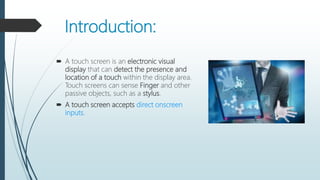
 A touch screen is an electronic visual
display that can detect the presence and
location of a touch within the display area.
Touch screens can sense Finger and other
passive objects, such as a stylus.
 A touch screen accepts direct onscreen
inputs.
History & Development:
 In 1971 Dr. Sam Hurst, founder of Elographics developed
the first touch opaque sensor “Elograph” at the
University of Kentucky.
 In 1974 He developed the first real touch screen.
 In 1977, Elographics developed the five-wire resistive
technology then with the backing of Siemens
Corporation, developed a curved glass sensor called the
touch screen.
 The new transparent technology, AccuTouch, was later
developed by the founders of Elographics, Dr. Hurst and
Bill Colwell.
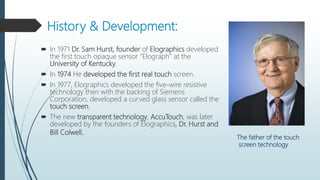
The father of the touch
screen technology
Touch sensor:
 A touch screen sensor is a clear glass panel
with a touch responsive surface.
 The sensor generally has an electrical
current or signal going through it.
 Voltage change determine the point of
touch.
Main components:
 Touch sensor
 Controller
 Software Driver
Controller:
 The controller is a small PC card that connects between the touch sensor and the
PC..
 The controller determines what type of interface/connection you will need on the
PC
 It takes information from the touch sensor and translates it into information that
PC can understand.
Software Drivers:
 The driver is a software that allows the touch screen and
computer to work together
 Most touch screen drivers today are a mouse-emulation
type driver.
 It tells the operating system how to interpret the touch
event information that is sent from the controller.
Types of touch screen technology:
Resistive
Capacitive
These are of 2 types:-
Surface Capacitive
Projected Capacitive
Infrared
Resistive Touchscreen:
 A resistive touch screen panel is composed of several layers,
the most important of which are two thin, metallic, electrically
conductive layers separated by a narrow gap.
 The resistive touch screen uses a glass panel with a uniform
conductive ITO(Indium Tin Oxide) coating on the side surface.
 A PET film is a tightly suspended over the ITO coating surface
of a glass pane
 When an object, such as a finger, presses down on a point on
the panel's outer surface the two metallic layers become
connected at that point.
 This causes a change in the electrical current, which is
registered as a touch event and sent to the controller for
processing.
Advantages: Disadvantages:
 Works well with nails or
stylus input.
 Generally most affordable
touchscreen technology.
 Rugged/Durable
 Tolerates dust/dirt, rain
and insects.
 Liquids won't affect touch
screen performance.
 Not as accurate
 Multi-touch much more
complex.
 Usually no discretion
between stylus and hand.
 More pressure needed
 Conductive coating
reduces display
brightness.
Capacitive Touchscreen:
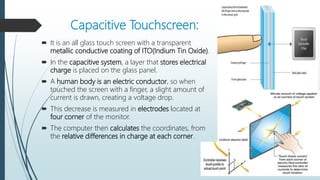
 It is an all glass touch screen with a transparent
metallic conductive coating of ITO(Indium Tin Oxide).
 In the capacitive system, a layer that stores electrical
charge is placed on the glass panel.
 A human body is an electric conductor, so when
touched the screen with a finger, a slight amount of
current is drawn, creating a voltage drop.
 This decrease is measured in electrodes located at
four corner of the monitor.
 The computer then calculates the coordinates, from
the relative differences in charge at each corner.
Surface capacitive :
 It consists of uniform conductive coating
on one side of the glass panel.
 Electrodes around the panel edge evenly
distribute a low voltage around the
conducting layer.
Projected capacitive touch
 Two parallel ITO layers
 Two sheets of glass
 It have front and protective glass to provide
additional optical and strength enhancements
options.
Advantages: Disadvantages:
 It has high resolution and
Image clarity.
 Immune to surface
contaminants like dirt,
grease or moisture.
 Durable and resistant to
scratches.
 Will work only when
touched by a conductive
device.
 Some capacitive touches
can have erratic behavior
when touched by more
than one input.
Infrared Touchscreen :
 An infrared touch screen uses an array
of X-Y infrared LED and photo
detector pairs around the edges of the
screen to detect a disruption in the
pattern of LED beams.
 A process by which light is trapped
within a medium and can be interrupted
by a third medium of higher reflective
index to cause light to escape.
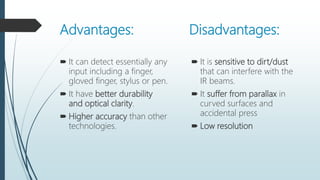
Advantages: Disadvantages:
 It can detect essentially any
input including a finger,
gloved finger, stylus or pen.
 It have better durability
and optical clarity.
 Higher accuracy than other
technologies.
 It is sensitive to dirt/dust
that can interfere with the
IR beams.
 It suffer from parallax in
curved surfaces and
accidental press
 Low resolution
Over All pros and cons of Touchscreen:
Advantages:
 Direct pointing to the objects.
 Fast response
 Use finger, fingernail, gloved hands,
stylus or any soft tip pointer.
 Easy to clean
 Does not require mouse and
keyboard
 Make computing easy , powerful
and fun.
Disadvantages:
 Low precision by using finger
 User has to sit or stand closer to the
screen
 The screen may be covered more by
using hand.
 Fingerprints
 Screen has to be really big not to miss
things when pressing them with your
finger.
 Big screen leads to low battery life
 Touch screen means screen can’t be
read too well in direct sunlight.
Application:
Mobile phones ,tablets & Laptops, Tourism displays, Trade show display,
Stores, Market research Restaurants, ATMs, Banks, Airline ticket terminals and
Transportation hubs. Computerized gaming, Student Registration systems,
Multimedia software , Scientific applications, Industrial and Medical
instrumentation etc.
Conclusion:
Though the touch screen technology contains some limitations it’s very
user friendly, fast, accurate, easy for the novices & fun to operate. It has
been widely accepted. And now by just modifying a little it can replace
the mouse and key board completely in near future.
Touchscreen technology by Mamta

Touchscreen technology by Mamta

  • 1.
    Submitted by: Mamta Informationtechnology 3rd year (6th semester)
  • 2.
    Table of contents: Introduction Historyand Development Working and Main components Types of Touchscreens Pros and cons Application Conclusion
  • 3.
    Introduction:  A touchscreen is an electronic visual display that can detect the presence and location of a touch within the display area. Touch screens can sense Finger and other passive objects, such as a stylus.  A touch screen accepts direct onscreen inputs.
  • 4.
    History & Development: In 1971 Dr. Sam Hurst, founder of Elographics developed the first touch opaque sensor “Elograph” at the University of Kentucky.  In 1974 He developed the first real touch screen.  In 1977, Elographics developed the five-wire resistive technology then with the backing of Siemens Corporation, developed a curved glass sensor called the touch screen.  The new transparent technology, AccuTouch, was later developed by the founders of Elographics, Dr. Hurst and Bill Colwell. The father of the touch screen technology
  • 5.
    Touch sensor:  Atouch screen sensor is a clear glass panel with a touch responsive surface.  The sensor generally has an electrical current or signal going through it.  Voltage change determine the point of touch. Main components:  Touch sensor  Controller  Software Driver
  • 6.
    Controller:  The controlleris a small PC card that connects between the touch sensor and the PC..  The controller determines what type of interface/connection you will need on the PC  It takes information from the touch sensor and translates it into information that PC can understand.
  • 7.
    Software Drivers:  Thedriver is a software that allows the touch screen and computer to work together  Most touch screen drivers today are a mouse-emulation type driver.  It tells the operating system how to interpret the touch event information that is sent from the controller.
  • 8.
    Types of touchscreen technology: Resistive Capacitive These are of 2 types:- Surface Capacitive Projected Capacitive Infrared
  • 9.
    Resistive Touchscreen:  Aresistive touch screen panel is composed of several layers, the most important of which are two thin, metallic, electrically conductive layers separated by a narrow gap.  The resistive touch screen uses a glass panel with a uniform conductive ITO(Indium Tin Oxide) coating on the side surface.  A PET film is a tightly suspended over the ITO coating surface of a glass pane  When an object, such as a finger, presses down on a point on the panel's outer surface the two metallic layers become connected at that point.  This causes a change in the electrical current, which is registered as a touch event and sent to the controller for processing.
  • 10.
    Advantages: Disadvantages:  Workswell with nails or stylus input.  Generally most affordable touchscreen technology.  Rugged/Durable  Tolerates dust/dirt, rain and insects.  Liquids won't affect touch screen performance.  Not as accurate  Multi-touch much more complex.  Usually no discretion between stylus and hand.  More pressure needed  Conductive coating reduces display brightness.
  • 11.
    Capacitive Touchscreen:  Itis an all glass touch screen with a transparent metallic conductive coating of ITO(Indium Tin Oxide).  In the capacitive system, a layer that stores electrical charge is placed on the glass panel.  A human body is an electric conductor, so when touched the screen with a finger, a slight amount of current is drawn, creating a voltage drop.  This decrease is measured in electrodes located at four corner of the monitor.  The computer then calculates the coordinates, from the relative differences in charge at each corner.
  • 12.
    Surface capacitive : It consists of uniform conductive coating on one side of the glass panel.  Electrodes around the panel edge evenly distribute a low voltage around the conducting layer. Projected capacitive touch  Two parallel ITO layers  Two sheets of glass  It have front and protective glass to provide additional optical and strength enhancements options.
  • 13.
    Advantages: Disadvantages:  Ithas high resolution and Image clarity.  Immune to surface contaminants like dirt, grease or moisture.  Durable and resistant to scratches.  Will work only when touched by a conductive device.  Some capacitive touches can have erratic behavior when touched by more than one input.
  • 14.
    Infrared Touchscreen : An infrared touch screen uses an array of X-Y infrared LED and photo detector pairs around the edges of the screen to detect a disruption in the pattern of LED beams.  A process by which light is trapped within a medium and can be interrupted by a third medium of higher reflective index to cause light to escape.
  • 15.
    Advantages: Disadvantages:  Itcan detect essentially any input including a finger, gloved finger, stylus or pen.  It have better durability and optical clarity.  Higher accuracy than other technologies.  It is sensitive to dirt/dust that can interfere with the IR beams.  It suffer from parallax in curved surfaces and accidental press  Low resolution
  • 16.
    Over All prosand cons of Touchscreen: Advantages:  Direct pointing to the objects.  Fast response  Use finger, fingernail, gloved hands, stylus or any soft tip pointer.  Easy to clean  Does not require mouse and keyboard  Make computing easy , powerful and fun. Disadvantages:  Low precision by using finger  User has to sit or stand closer to the screen  The screen may be covered more by using hand.  Fingerprints  Screen has to be really big not to miss things when pressing them with your finger.  Big screen leads to low battery life  Touch screen means screen can’t be read too well in direct sunlight.
  • 17.
    Application: Mobile phones ,tablets& Laptops, Tourism displays, Trade show display, Stores, Market research Restaurants, ATMs, Banks, Airline ticket terminals and Transportation hubs. Computerized gaming, Student Registration systems, Multimedia software , Scientific applications, Industrial and Medical instrumentation etc. Conclusion: Though the touch screen technology contains some limitations it’s very user friendly, fast, accurate, easy for the novices & fun to operate. It has been widely accepted. And now by just modifying a little it can replace the mouse and key board completely in near future.