

MGM’S COLLEGE OF ENGINEERING AND TECHNOLOGY
UNDER THE GUIDEDANCE OF
MRS. SARIKA RAUT
ASST.PROFESSOR (EC department)
RAVI ARORA
1109531045
INTRODUCTION TO THE TECHNOLOGYINTRODUCTION TO THE TECHNOLOGY
History & Development
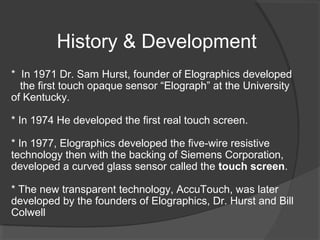
* In 1971 Dr. Sam Hurst, founder of Elographics developed
the first touch opaque sensor “Elograph” at the University
of Kentucky.
* In 1974 He developed the first real touch screen.
* In 1977, Elographics developed the five-wire resistive
technology then with the backing of Siemens Corporation,
developed a curved glass sensor called the touch screen.
* The new transparent technology, AccuTouch, was later
developed by the founders of Elographics, Dr. Hurst and Bill
Colwell
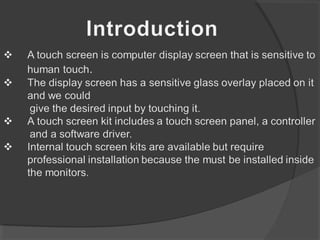
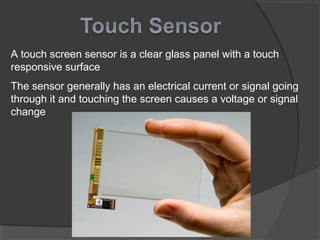
A touch screen sensor is a clear glass panel with a touch
responsive surface
The sensor generally has an electrical current or signal going
through it and touching the screen causes a voltage or signal
change
The controller is a small PC card that connects between the
touch sensor and the PC
The controller determines what type of interface/connection
you will need on the PC
The driver is a software that allows the touch
screen and computer to work together. It tells the
operating system how to interpret the touch event
information that is sent from the controller.
Most touch screen drivers today are a mouse-
emulation type driver. This makes touching the
screen the same as clicking your mouse at the
same location on the screen.
Diagram showing How it Works
* Resistive Touch Screen
* Capacitive Touch Screen
* Surface Acoustic Wave Touchscreen
* Infrared Touch Screen
Types of Touch Screen Technologies:
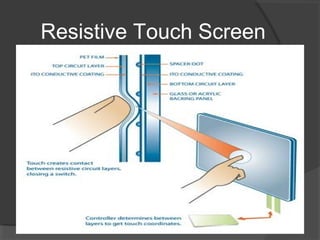
Resistive Touch Screen
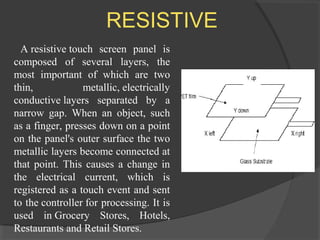
RESISTIVE
A resistive touch screen panel is
composed of several layers, the
most important of which are two
thin, metallic, electrically
conductive layers separated by a
narrow gap. When an object, such
as a finger, presses down on a point
on the panel's outer surface the two
metallic layers become connected at
that point. This causes a change in
the electrical current, which is
registered as a touch event and sent
to the controller for processing. It is
used in Grocery Stores, Hotels,
Restaurants and Retail Stores.
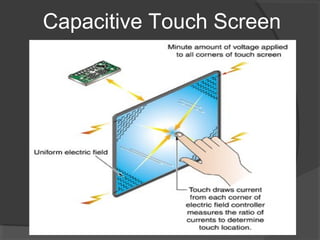
Capacitive Touch Screen
CAPACITIVE
A capacitive touch screen panel
consists of an insulator such
as glass, coated with a
transparent conductor such
as indium tin oxide (ITO). As the
human body is also a conductor,
touching the surface of the screen
results in a distortion of the
body's electrostatic field,
measurable as a change
in capacitance.
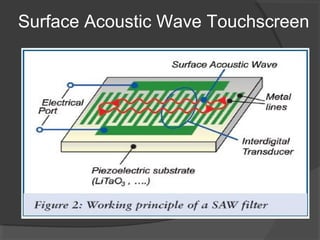
Surface Acoustic Wave Touchscreen
Surface Acoustic Wave
Surface acoustic wave (SAW) technology
uses ultrasonic waves that pass over the touch screen
panel. When the panel is touched, a portion of the
wave is absorbed. This change in the ultrasonic
waves registers the position of the touch event and
sends this information to the controller for processing.
SAW touch screen technology is suggested for use in
ATMs, Amusement Parks, Gaming Environments,
Industrial Control Rooms etc.
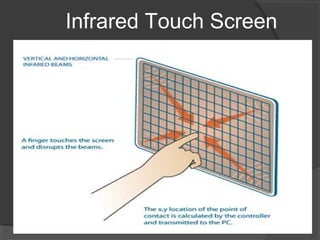
Infrared Touch Screen
An infrared touch screen uses an array of X-Y
infrared LED and photo detector pairs around the
edges of the screen to detect a disruption in the
pattern of LED beams. Infra-red bezels have
proven to be a very reliable technology for use in
ATMs,Medical Instrumentation and
Transportation Tracking applications.
INFRARED
Touch Screen Technology Comparison Chart
Public Information Displays:::
Tourism displays, Trade show display
Customer Self-Services:::
Stores, Restaurants, ATMs, Airline ticket
terminals and Transportation hubs.
More uses...
Digital jukeboxes, Computerized gaming,
Student Registration systems, Multimedia
software , Scientific applications etc.
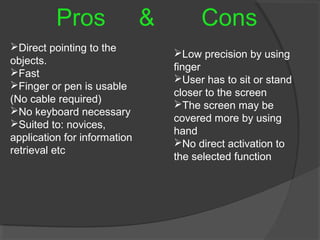
Pros & Cons
Direct pointing to the
objects.
Fast
Finger or pen is usable
(No cable required)
No keyboard necessary
Suited to: novices,
application for information
retrieval etc
Low precision by using
finger
User has to sit or stand
closer to the screen
The screen may be
covered more by using
hand
No direct activation to
the selected function
Though the touch screen technology contains some
limitations it’s very user friendly, fast, accurate, easy
for the novices & fun to operate. It has been widely
accepted. And now by just modifying a little it can
replace the mouse and key board completely in
near future
Touchscreen 111203140434-phpapp01

Touchscreen 111203140434-phpapp01

  • 1.
    MGM’S COLLEGE OFENGINEERING AND TECHNOLOGY UNDER THE GUIDEDANCE OF MRS. SARIKA RAUT ASST.PROFESSOR (EC department) RAVI ARORA 1109531045
  • 2.
    INTRODUCTION TO THETECHNOLOGYINTRODUCTION TO THE TECHNOLOGY
  • 4.
    History & Development *In 1971 Dr. Sam Hurst, founder of Elographics developed the first touch opaque sensor “Elograph” at the University of Kentucky. * In 1974 He developed the first real touch screen. * In 1977, Elographics developed the five-wire resistive technology then with the backing of Siemens Corporation, developed a curved glass sensor called the touch screen. * The new transparent technology, AccuTouch, was later developed by the founders of Elographics, Dr. Hurst and Bill Colwell
  • 6.
    A touch screensensor is a clear glass panel with a touch responsive surface The sensor generally has an electrical current or signal going through it and touching the screen causes a voltage or signal change
  • 7.
    The controller isa small PC card that connects between the touch sensor and the PC The controller determines what type of interface/connection you will need on the PC
  • 8.
    The driver isa software that allows the touch screen and computer to work together. It tells the operating system how to interpret the touch event information that is sent from the controller. Most touch screen drivers today are a mouse- emulation type driver. This makes touching the screen the same as clicking your mouse at the same location on the screen.
  • 9.
  • 10.
    * Resistive TouchScreen * Capacitive Touch Screen * Surface Acoustic Wave Touchscreen * Infrared Touch Screen Types of Touch Screen Technologies:
  • 11.
  • 12.
    RESISTIVE A resistive touchscreen panel is composed of several layers, the most important of which are two thin, metallic, electrically conductive layers separated by a narrow gap. When an object, such as a finger, presses down on a point on the panel's outer surface the two metallic layers become connected at that point. This causes a change in the electrical current, which is registered as a touch event and sent to the controller for processing. It is used in Grocery Stores, Hotels, Restaurants and Retail Stores.
  • 13.
  • 14.
    CAPACITIVE A capacitive touchscreen panel consists of an insulator such as glass, coated with a transparent conductor such as indium tin oxide (ITO). As the human body is also a conductor, touching the surface of the screen results in a distortion of the body's electrostatic field, measurable as a change in capacitance.
  • 15.
  • 16.
    Surface Acoustic Wave Surfaceacoustic wave (SAW) technology uses ultrasonic waves that pass over the touch screen panel. When the panel is touched, a portion of the wave is absorbed. This change in the ultrasonic waves registers the position of the touch event and sends this information to the controller for processing. SAW touch screen technology is suggested for use in ATMs, Amusement Parks, Gaming Environments, Industrial Control Rooms etc.
  • 17.
  • 18.
    An infrared touchscreen uses an array of X-Y infrared LED and photo detector pairs around the edges of the screen to detect a disruption in the pattern of LED beams. Infra-red bezels have proven to be a very reliable technology for use in ATMs,Medical Instrumentation and Transportation Tracking applications. INFRARED
  • 19.
    Touch Screen TechnologyComparison Chart
  • 20.
    Public Information Displays::: Tourismdisplays, Trade show display Customer Self-Services::: Stores, Restaurants, ATMs, Airline ticket terminals and Transportation hubs. More uses... Digital jukeboxes, Computerized gaming, Student Registration systems, Multimedia software , Scientific applications etc.
  • 21.
    Pros & Cons Directpointing to the objects. Fast Finger or pen is usable (No cable required) No keyboard necessary Suited to: novices, application for information retrieval etc Low precision by using finger User has to sit or stand closer to the screen The screen may be covered more by using hand No direct activation to the selected function
  • 22.
    Though the touchscreen technology contains some limitations it’s very user friendly, fast, accurate, easy for the novices & fun to operate. It has been widely accepted. And now by just modifying a little it can replace the mouse and key board completely in near future