INTRODUCTION TO THE TECHNOLOGY


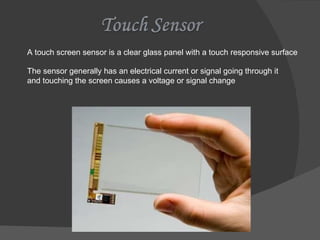
A touch screen sensor is a clear glass panel with a touch responsive surface The sensor generally has an electrical current or signal going through it and touching the screen causes a voltage or signal change
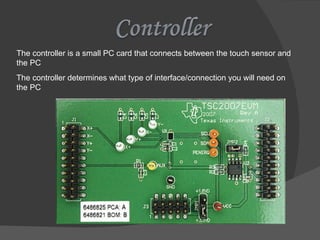
The controller is a small PC card that connects between the touch sensor and the PC The controller determines what type of interface/connection you will need on the PC
The driver is a software that allows the touch screen and computer to work together Most touch screen drivers today are a mouse-emulation type driver.
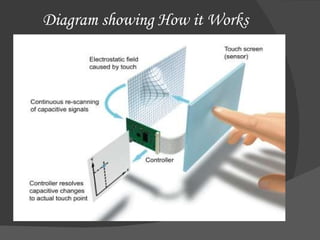
Diagram showing How it Works
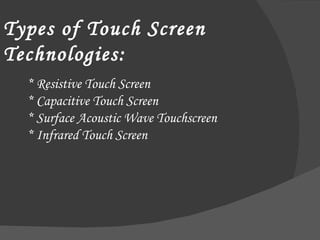
* Resistive Touch Screen * Capacitive Touch Screen * Surface Acoustic Wave Touchscreen * Infrared Touch Screen Types of Touch Screen Technologies:
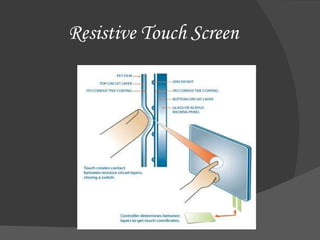
Resistive Touch Screen
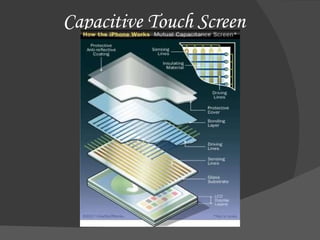
Capacitive Touch Screen
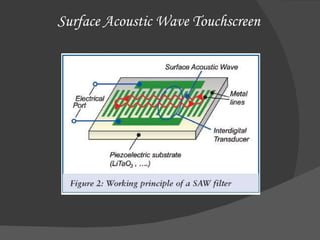
Surface Acoustic Wave Touchscreen
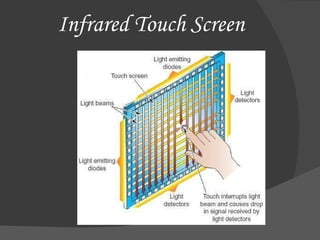
Infrared Touch Screen
Public Information Displays:::   Tourism displays, Trade show display Customer Self-Services:::    Stores,  Restaurants, ATMs, Airline ticket terminals and Transportation hubs.  More uses...    Digital jukeboxes, Computerized gaming, Student Registration systems, Multimedia software ,  Scientific applications etc.
Pros  &  Cons Direct pointing to the  objects. Fast Finger or pen is usable (No cable required) No keyboard necessary Suited to: novices, application for information retrieval etc Low precision by using finger User has to sit or stand closer to the screen The screen may be covered more by using hand No direct activation to the selected function
Though the touch screen technology contains some limitations it’s very user friendly, fast, accurate, easy for the novices & fun to operate. It has been widely accepted. And now by just modifying a little it can replace the mouse and key board completely in near future
 

Touchscreen PPT

  • 1.
  • 2.
  • 3.
  • 4.
  • 5.
  • 6.
    A touch screensensor is a clear glass panel with a touch responsive surface The sensor generally has an electrical current or signal going through it and touching the screen causes a voltage or signal change
  • 7.
    The controller isa small PC card that connects between the touch sensor and the PC The controller determines what type of interface/connection you will need on the PC
  • 8.
    The driver isa software that allows the touch screen and computer to work together Most touch screen drivers today are a mouse-emulation type driver.
  • 9.
  • 10.
    * Resistive TouchScreen * Capacitive Touch Screen * Surface Acoustic Wave Touchscreen * Infrared Touch Screen Types of Touch Screen Technologies:
  • 11.
  • 12.
  • 13.
  • 14.
  • 15.
    Public Information Displays::: Tourism displays, Trade show display Customer Self-Services::: Stores, Restaurants, ATMs, Airline ticket terminals and Transportation hubs. More uses... Digital jukeboxes, Computerized gaming, Student Registration systems, Multimedia software , Scientific applications etc.
  • 16.
    Pros & Cons Direct pointing to the objects. Fast Finger or pen is usable (No cable required) No keyboard necessary Suited to: novices, application for information retrieval etc Low precision by using finger User has to sit or stand closer to the screen The screen may be covered more by using hand No direct activation to the selected function
  • 17.
    Though the touchscreen technology contains some limitations it’s very user friendly, fast, accurate, easy for the novices & fun to operate. It has been widely accepted. And now by just modifying a little it can replace the mouse and key board completely in near future
  • 18.