Touchless Touchscreen Technology
UNDER THE GUIDANCE OF, PRESENTED BY,
TISSA TOM MATHEW JOSEPH
ASST. PROF. EEE DEPT. ROLL NO: 30
REG. NO:14018771
CONTENTS
• INTRODUCTION
• TECHNOLOGY BEHIND TOUCHLESS TOUCHSCREEN
• WORKING OF
1.GBUI
2.TOUCH-LESS UI
3.TOUCH-LESS SDK
4.TOUCH WALL
• MINORITY REPORT
• APPLICATION
• ADVANTAGE
• CONCLUSION
INTRODUCTION
• This unique screen is made by TouchKo, White Electronics Designs,
and Group 3D.
• Touch less control of electrically operated equipment is being
developed by Elliptic Labs.
• This innovative technology lets you control your gadgets like
Computers, MP3 players or mobile phones without touching them.
Cont…
• This system depends on hand or finger motions, a hand wave in a
certain direction
• The sensor can be placed either on the screen or near the screen.
Technology Used
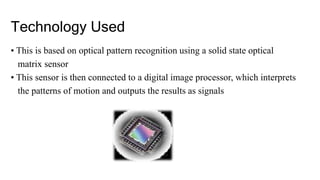
• This is based on optical pattern recognition using a solid state optical
matrix sensor
• This sensor is then connected to a digital image processor, which interprets
the patterns of motion and outputs the results as signals
Optical Matrix Sensor
• In each of these sensors there is a matrix of pixels.
• Each pixel is coupled to photodiodes incorporating charge
storage regions.
Workflow
Moving image
infront of the
sensor
Detected by the
sensor
Light enters to the
sensors and hit the
pixels matrix
Signals are
processed by a DIP
to provide output
to the device
The sensor
generates electric
signal
The photodiodes
inside the pixel
converts the
incoming light into
electric charge
WORKING
• The system is capable of detecting movements in 3-dimensions
without ever having to put your finger on the screen.
• Sensors are mounted around the screen that is be used, by
interacting in the line-of-sight of these sensors the motion is detected
and interpreted into on-screen movements
• The device is based on optical pattern recognition using a solid state
optical matrix sensor with a lens to detect hand motions.
.
• This sensor is then connected to a digital image processor, which
interprets the patterns of motion and outputs the results as signals
to control fixtures, appliances, machinery, or any device controllable
through electrical signals.
• You just point at the screen (from as far as 5 feet away), and you can
manipulate objects in 3D.
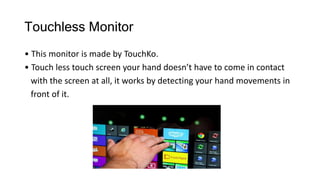
Touchless Monitor
• This monitor is made by TouchKo.
• Touch less touch screen your hand doesn’t have to come in contact
with the screen at all, it works by detecting your hand movements in
front of it.
Cont……
• point your finger in the air towards the device and move it accordingly to
control the navigation in the device
• Designed for applications where touch may be difficult, such as for
doctors who might be wearing surgical gloves
GBUI(gesture-based graphical user
Interface)
• A movement of part of the body, especially a hand or the head, to
express an idea or meaning Based graphical user interphase
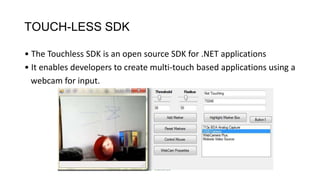
TOUCH-LESS SDK
• The Touchless SDK is an open source SDK for .NET applications
• It enables developers to create multi-touch based applications using a
webcam for input.
Touch Wall
• TouchWall it is the first multi touch product.
• It refers to the touch screen hardware setup itself and software is
plex .
.
• Touch Wall consists of three infrared lasers that scan a surface.
• By using a projector entire walls can easily be turned into
a multi touch user interface.
TOUCH-LESS UI
• Sensors arrayed around the perimeter of the device capable of
sensing finger movements in 3-D space.
9 Minority Report
Inspired Touchless Technology:
1. Tobii Rex
Tobii Rex is an eye-tracking device from Sweden which works with any
computer running on Windows-8. The device has a pair of infrared
sensors built in that will track the user’s eyes.
2. Elliptic Labs
Elliptic Labs allows you to operate your computer without touching it
with the Windows 8 Gesture Suite.
.3. Airwriting
Airwriting is a technology that allows you to write text messages or
compose emails by writing in the air.
4. EyeSight
EyeSight is a gesture technology which allows you to navigate through
your devices by just pointing at it.
5. Mauz
Mauz is a third party device that turns your iPhone into a trackpad or
mouse.
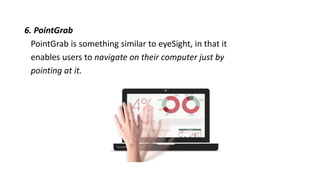
.6. PointGrab
PointGrab is something similar to eyeSight, in that it
enables users to navigate on their computer just by
pointing at it.
.7. Leap Motion
LeapMotion is a motion sensor device that
recognizes the user’s fingers with its infrared LEDs
and cameras.
.
8. Myoelectric Armband
Myoelectric armband or MYO armband is a
gadget that allows you to control your other bluetooth
enabled devices using your finger or your hands.
9. Microsoft Kinect
It detects and recognizes a user’s body movement
and reproduces it within the video game that is being played.
Applications
• Touchless Monitor
• Glimpses of GBUI
• 3D Navigation of Hand Movements
in Touchless Screen
Advantages
• Easier and satisfactory experience
• Touchless Screen
• Controlling objects
• Gesturing and cursor positioning
• No drivers required
Conclusions
• The Touch less touch screen user interface can be
used effectively in computers, cell phones, webcams
and laptops.
• May be few years down the line, our body can be
transformed into a virtual mouse, virtual keyboard
,Our body may be turned in to an input device!
THANK YOU

Touchless touchscreen technology

  • 1.
    Touchless Touchscreen Technology UNDERTHE GUIDANCE OF, PRESENTED BY, TISSA TOM MATHEW JOSEPH ASST. PROF. EEE DEPT. ROLL NO: 30 REG. NO:14018771
  • 2.
    CONTENTS • INTRODUCTION • TECHNOLOGYBEHIND TOUCHLESS TOUCHSCREEN • WORKING OF 1.GBUI 2.TOUCH-LESS UI 3.TOUCH-LESS SDK 4.TOUCH WALL • MINORITY REPORT • APPLICATION • ADVANTAGE • CONCLUSION
  • 3.
    INTRODUCTION • This uniquescreen is made by TouchKo, White Electronics Designs, and Group 3D. • Touch less control of electrically operated equipment is being developed by Elliptic Labs. • This innovative technology lets you control your gadgets like Computers, MP3 players or mobile phones without touching them.
  • 4.
    Cont… • This systemdepends on hand or finger motions, a hand wave in a certain direction • The sensor can be placed either on the screen or near the screen.
  • 5.
    Technology Used • Thisis based on optical pattern recognition using a solid state optical matrix sensor • This sensor is then connected to a digital image processor, which interprets the patterns of motion and outputs the results as signals
  • 6.
    Optical Matrix Sensor •In each of these sensors there is a matrix of pixels. • Each pixel is coupled to photodiodes incorporating charge storage regions.
  • 7.
    Workflow Moving image infront ofthe sensor Detected by the sensor Light enters to the sensors and hit the pixels matrix Signals are processed by a DIP to provide output to the device The sensor generates electric signal The photodiodes inside the pixel converts the incoming light into electric charge
  • 8.
    WORKING • The systemis capable of detecting movements in 3-dimensions without ever having to put your finger on the screen. • Sensors are mounted around the screen that is be used, by interacting in the line-of-sight of these sensors the motion is detected and interpreted into on-screen movements • The device is based on optical pattern recognition using a solid state optical matrix sensor with a lens to detect hand motions.
  • 9.
    . • This sensoris then connected to a digital image processor, which interprets the patterns of motion and outputs the results as signals to control fixtures, appliances, machinery, or any device controllable through electrical signals. • You just point at the screen (from as far as 5 feet away), and you can manipulate objects in 3D.
  • 10.
    Touchless Monitor • Thismonitor is made by TouchKo. • Touch less touch screen your hand doesn’t have to come in contact with the screen at all, it works by detecting your hand movements in front of it.
  • 11.
    Cont…… • point yourfinger in the air towards the device and move it accordingly to control the navigation in the device • Designed for applications where touch may be difficult, such as for doctors who might be wearing surgical gloves
  • 12.
    GBUI(gesture-based graphical user Interface) •A movement of part of the body, especially a hand or the head, to express an idea or meaning Based graphical user interphase
  • 13.
    TOUCH-LESS SDK • TheTouchless SDK is an open source SDK for .NET applications • It enables developers to create multi-touch based applications using a webcam for input.
  • 14.
    Touch Wall • TouchWallit is the first multi touch product. • It refers to the touch screen hardware setup itself and software is plex .
  • 15.
    . • Touch Wallconsists of three infrared lasers that scan a surface. • By using a projector entire walls can easily be turned into a multi touch user interface. TOUCH-LESS UI • Sensors arrayed around the perimeter of the device capable of sensing finger movements in 3-D space.
  • 16.
    9 Minority Report InspiredTouchless Technology: 1. Tobii Rex Tobii Rex is an eye-tracking device from Sweden which works with any computer running on Windows-8. The device has a pair of infrared sensors built in that will track the user’s eyes. 2. Elliptic Labs Elliptic Labs allows you to operate your computer without touching it with the Windows 8 Gesture Suite.
  • 17.
    .3. Airwriting Airwriting isa technology that allows you to write text messages or compose emails by writing in the air. 4. EyeSight EyeSight is a gesture technology which allows you to navigate through your devices by just pointing at it. 5. Mauz Mauz is a third party device that turns your iPhone into a trackpad or mouse.
  • 18.
    .6. PointGrab PointGrab issomething similar to eyeSight, in that it enables users to navigate on their computer just by pointing at it.
  • 19.
    .7. Leap Motion LeapMotionis a motion sensor device that recognizes the user’s fingers with its infrared LEDs and cameras.
  • 20.
    . 8. Myoelectric Armband Myoelectricarmband or MYO armband is a gadget that allows you to control your other bluetooth enabled devices using your finger or your hands. 9. Microsoft Kinect It detects and recognizes a user’s body movement and reproduces it within the video game that is being played.
  • 21.
    Applications • Touchless Monitor •Glimpses of GBUI • 3D Navigation of Hand Movements in Touchless Screen
  • 22.
    Advantages • Easier andsatisfactory experience • Touchless Screen • Controlling objects • Gesturing and cursor positioning • No drivers required
  • 23.
    Conclusions • The Touchless touch screen user interface can be used effectively in computers, cell phones, webcams and laptops. • May be few years down the line, our body can be transformed into a virtual mouse, virtual keyboard ,Our body may be turned in to an input device!
  • 24.