TOUCHSCREEN TECHNOLOGY
By
G. PUNEETH
SR Engineering College
JNTUH
Touchscreen Technology
• A Touchscreen is an electronic visual display that the user can control
through simple or multi-touch gestures by touching the screen with a
special stylus/pen and-or one or more fingers.
• The user can use the touchscreen to react to what is displayed and to
control how it is displayed (for example by zooming the text size).
• They are common in devices such as game consoles, computers,
tablet PCs, and smartphones.
• Touchscreen technology is the direct manipulation type gesture based
technology.
Touchscreen Technology
History:
• The first ever touchscreen was developed by E.A Johnson at the Royal Radar
Establishment, Malvern, UK in the late 1960s.
• In 1971, a milestone to touchscreen technology was developed by Doctor Sam Hurst, an instructor at
the University of Kentucky Research Foundation. It was a touch sensor named ‘Elograph’.
• In 1977, Siemens Corporation financed an effort by Elographics to produce the first curved glass touch
sensor interface, which became the first device to have the name "touch screen" attached to it.

• In 1983, the computer manufacturing company, Hewlett-Packard introduced the HP-150, a home
computer with touch screen technology.
• In 1993, Apple released the Newton PDA, equipped with handwriting recognition.
• In 2002, Microsoft introduced the Windows XP Tablet edition and started its entry into touch
technology.
• In 2007, Apple introduced the king of smart phones, the iPhone, with nothing but touch screen
technology.
Touchscreen Technology
A Touchscreen consists of three main components:
 Touchscreen Sensor: It is a clear glass panel with touch responsive surface. It
is placed over the display screen so that the responsive area of the panel
covers the viewable area of the video screen.
 Controller: It is a small PC card that connects the touch sensor and the
PC, takes information from the touch sensor and translates into information
that the PC can understand.
 Software Driver: The Driver is a software update for the PC system that
allows the touchscreen and computer to work together. It tells the Operating
System how to interpret the touch event information that is sent from the
controller.
Touchscreen Technology
Types of Touchscreen Technology:

 Resistive
 Capacitive
 Surface Acoustic Wave
 Infrared
Touchscreen Technology
Resistive Touch:
• A resistive touchscreen panel comprises several layers, the most important
of which are two thin, transparent electrically-resistive layers separated by
a thin space.
• It consists of a flexible top layer made of
Polyethylene (PET) and a rigid bottom layer made
of glass.
• An electric current flows between the two layers.
When a touch is made, the flexible screen presses
down and touches the bottom layer.
Touchscreen Technology
Resistive Touch

• A change in electrical current is hence detected and the coordinates
of the point of touch is calculated by the controller and parsed into
readable signals for the operating system to react accordingly.
• One layer has conductive connections along its sides, the other along
top and bottom. A voltage is applied to one layer, and sensed by the
other.
• Some of the popular devices that use Resistive Touchscreen are
Nintendo DS, Nokia N97, HTC Touch Pro2, HTC Tattoo, Sony Ericsson
Satio, etc.
Touchscreen Technology
Resistive Touch
Pros and Cons:
• Resistive touch is used in restaurants, factories and hospitals due to
its high resistance to liquids and contaminants.
• low cost
• Additionally, as only sufficient pressure is necessary for the touch to
be sensed, they may be used with gloves on, or by using anything
rigid as a finger/stylus substitute.
• The need to press down, and a risk of damage by sharp objects.
• They suffer from poorer contrast, due to having additional reflections
from the extra layer of material placed over the screen.
Touchscreen Technology
Capacitive Touch:

• A capacitive touchscreen panel consists of an insulator such as glass,
coated with a transparent conductor such as indium tin oxide (ITO).
• As the human body is also an electrical conductor, touching the
surface of the screen results in a distortion of the screen's
electrostatic field.
• The location is then sent to the controller for processing.
Touchscreen Technology
Capacitive Touch

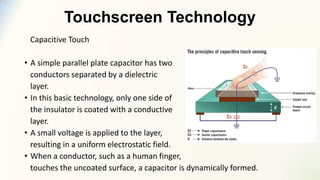
• A simple parallel plate capacitor has two
conductors separated by a dielectric
layer.
• In this basic technology, only one side of
the insulator is coated with a conductive
layer.
• A small voltage is applied to the layer,
resulting in a uniform electrostatic field.
• When a conductor, such as a human finger,
touches the uncoated surface, a capacitor is dynamically formed.
Touchscreen Technology
Capacitive Touch

• The capacitive systems transmit almost 90% of light from the monitor.
• Some of the devices using capacitive touchscreen are Motorola
Xoom, Samsung Galaxy Tab, Samsung Galaxy SII, Apple’s iPad.
• Two types of Capacitive Touch:
• Surface Capacitive Touch
• Projected Capacitive Touch
Touchscreen Technology
Capacitive Touch

Pros and Cons:
• The surface capacitive touchscreen is moderately durable and needs
calibration during manufacture.
• Since a conductive material is required to operate this screen, passive
stylus cannot be used for surface capacitive touchscreen.
Touchscreen Technology
Surface Acoustic Wave Touch:
• This technology uses ultrasonic waves that pass over the touchscreen panel.
• This Touchscreen technology contains two
transducers(transmitting and receiving)
placed along the X-axis and Y-axis of the
monitor’s glass plate along with some
reflectors.
• The waves propagate across the glass and
are reflected back to the sensors.
• This change in the ultrasonic waves
registers the position of the touch event
and sends this information to the controller for processing.
Touchscreen Technology
Surface Acoustic Wave Touch

• This change in the ultrasonic waves registers the position of the touch
event and sends this information to the controller for processing.
• These reflectors reflect all electrical signals sent from one transducer
to another.
• This technology provides excellent throughput and image clarity.
• It is used in gaming, computer based training, public pay
phones, point-of-information kiosks etc.
Touchscreen Technology
Surface Acoustic Wave Touch
Pros and Cons:
• Almost 100% clarity is obtained as no metallic layers are present on
the screen.
• It can be operated using passive devices like stylus, glove or finger
nail.
• Scratch resistant, faster response.
• Surface Acoustic Wave touchscreen panels can be damaged by
outside elements.
• Contaminants on the surface can also interfere with the functionality
of the touchscreen.
Touchscreen Technology
Infrared Touch:
• An infrared touchscreen uses an array of X-Y infrared LED and photo detector
pairs around the edges of the screen to detect a disruption in the pattern of
LED beams.
• These LED beams cross each other in vertical
and horizontal patterns.
• A translucent acrylic sheet is used as a rear
projection screen to display information. The
edges of the acrylic sheet are illuminated by
infrared LEDs, and infrared cameras are
focused on the back of the sheet.
Touchscreen Technology
Infrared Touch
Pros and Cons:
• Unlike capacitive touchscreens, infrared touchscreens do not require
any patterning on the glass which increases durability and optical
clarity of the overall system.
• It can detect essentially any input including a finger, gloved finger,
stylus or pen.
• It is generally used in outdoor applications and point of sale systems
which cannot rely on a conductor (such as a bare finger) to activate
the touchscreen.
Touchscreen Technology
Infrared Touch

• These are sensitive to dirt/dust that can interfere with the IR beams,
and suffer from parallax in curved surfaces and accidental press when
the user hovers his/her finger over the screen while searching for the
item to be selected.
Thankyou

Touchscreen Technology

  • 1.
    TOUCHSCREEN TECHNOLOGY By G. PUNEETH SREngineering College JNTUH
  • 2.
    Touchscreen Technology • ATouchscreen is an electronic visual display that the user can control through simple or multi-touch gestures by touching the screen with a special stylus/pen and-or one or more fingers. • The user can use the touchscreen to react to what is displayed and to control how it is displayed (for example by zooming the text size). • They are common in devices such as game consoles, computers, tablet PCs, and smartphones. • Touchscreen technology is the direct manipulation type gesture based technology.
  • 3.
    Touchscreen Technology History: • Thefirst ever touchscreen was developed by E.A Johnson at the Royal Radar Establishment, Malvern, UK in the late 1960s. • In 1971, a milestone to touchscreen technology was developed by Doctor Sam Hurst, an instructor at the University of Kentucky Research Foundation. It was a touch sensor named ‘Elograph’. • In 1977, Siemens Corporation financed an effort by Elographics to produce the first curved glass touch sensor interface, which became the first device to have the name "touch screen" attached to it. • In 1983, the computer manufacturing company, Hewlett-Packard introduced the HP-150, a home computer with touch screen technology. • In 1993, Apple released the Newton PDA, equipped with handwriting recognition. • In 2002, Microsoft introduced the Windows XP Tablet edition and started its entry into touch technology. • In 2007, Apple introduced the king of smart phones, the iPhone, with nothing but touch screen technology.
  • 4.
    Touchscreen Technology A Touchscreenconsists of three main components:  Touchscreen Sensor: It is a clear glass panel with touch responsive surface. It is placed over the display screen so that the responsive area of the panel covers the viewable area of the video screen.  Controller: It is a small PC card that connects the touch sensor and the PC, takes information from the touch sensor and translates into information that the PC can understand.  Software Driver: The Driver is a software update for the PC system that allows the touchscreen and computer to work together. It tells the Operating System how to interpret the touch event information that is sent from the controller.
  • 5.
    Touchscreen Technology Types ofTouchscreen Technology:  Resistive  Capacitive  Surface Acoustic Wave  Infrared
  • 6.
    Touchscreen Technology Resistive Touch: •A resistive touchscreen panel comprises several layers, the most important of which are two thin, transparent electrically-resistive layers separated by a thin space. • It consists of a flexible top layer made of Polyethylene (PET) and a rigid bottom layer made of glass. • An electric current flows between the two layers. When a touch is made, the flexible screen presses down and touches the bottom layer.
  • 7.
    Touchscreen Technology Resistive Touch •A change in electrical current is hence detected and the coordinates of the point of touch is calculated by the controller and parsed into readable signals for the operating system to react accordingly. • One layer has conductive connections along its sides, the other along top and bottom. A voltage is applied to one layer, and sensed by the other. • Some of the popular devices that use Resistive Touchscreen are Nintendo DS, Nokia N97, HTC Touch Pro2, HTC Tattoo, Sony Ericsson Satio, etc.
  • 8.
    Touchscreen Technology Resistive Touch Prosand Cons: • Resistive touch is used in restaurants, factories and hospitals due to its high resistance to liquids and contaminants. • low cost • Additionally, as only sufficient pressure is necessary for the touch to be sensed, they may be used with gloves on, or by using anything rigid as a finger/stylus substitute. • The need to press down, and a risk of damage by sharp objects. • They suffer from poorer contrast, due to having additional reflections from the extra layer of material placed over the screen.
  • 9.
    Touchscreen Technology Capacitive Touch: •A capacitive touchscreen panel consists of an insulator such as glass, coated with a transparent conductor such as indium tin oxide (ITO). • As the human body is also an electrical conductor, touching the surface of the screen results in a distortion of the screen's electrostatic field. • The location is then sent to the controller for processing.
  • 10.
    Touchscreen Technology Capacitive Touch •A simple parallel plate capacitor has two conductors separated by a dielectric layer. • In this basic technology, only one side of the insulator is coated with a conductive layer. • A small voltage is applied to the layer, resulting in a uniform electrostatic field. • When a conductor, such as a human finger, touches the uncoated surface, a capacitor is dynamically formed.
  • 11.
    Touchscreen Technology Capacitive Touch •The capacitive systems transmit almost 90% of light from the monitor. • Some of the devices using capacitive touchscreen are Motorola Xoom, Samsung Galaxy Tab, Samsung Galaxy SII, Apple’s iPad. • Two types of Capacitive Touch: • Surface Capacitive Touch • Projected Capacitive Touch
  • 12.
    Touchscreen Technology Capacitive Touch Prosand Cons: • The surface capacitive touchscreen is moderately durable and needs calibration during manufacture. • Since a conductive material is required to operate this screen, passive stylus cannot be used for surface capacitive touchscreen.
  • 13.
    Touchscreen Technology Surface AcousticWave Touch: • This technology uses ultrasonic waves that pass over the touchscreen panel. • This Touchscreen technology contains two transducers(transmitting and receiving) placed along the X-axis and Y-axis of the monitor’s glass plate along with some reflectors. • The waves propagate across the glass and are reflected back to the sensors. • This change in the ultrasonic waves registers the position of the touch event and sends this information to the controller for processing.
  • 14.
    Touchscreen Technology Surface AcousticWave Touch • This change in the ultrasonic waves registers the position of the touch event and sends this information to the controller for processing. • These reflectors reflect all electrical signals sent from one transducer to another. • This technology provides excellent throughput and image clarity. • It is used in gaming, computer based training, public pay phones, point-of-information kiosks etc.
  • 15.
    Touchscreen Technology Surface AcousticWave Touch Pros and Cons: • Almost 100% clarity is obtained as no metallic layers are present on the screen. • It can be operated using passive devices like stylus, glove or finger nail. • Scratch resistant, faster response. • Surface Acoustic Wave touchscreen panels can be damaged by outside elements. • Contaminants on the surface can also interfere with the functionality of the touchscreen.
  • 16.
    Touchscreen Technology Infrared Touch: •An infrared touchscreen uses an array of X-Y infrared LED and photo detector pairs around the edges of the screen to detect a disruption in the pattern of LED beams. • These LED beams cross each other in vertical and horizontal patterns. • A translucent acrylic sheet is used as a rear projection screen to display information. The edges of the acrylic sheet are illuminated by infrared LEDs, and infrared cameras are focused on the back of the sheet.
  • 17.
    Touchscreen Technology Infrared Touch Prosand Cons: • Unlike capacitive touchscreens, infrared touchscreens do not require any patterning on the glass which increases durability and optical clarity of the overall system. • It can detect essentially any input including a finger, gloved finger, stylus or pen. • It is generally used in outdoor applications and point of sale systems which cannot rely on a conductor (such as a bare finger) to activate the touchscreen.
  • 18.
    Touchscreen Technology Infrared Touch •These are sensitive to dirt/dust that can interfere with the IR beams, and suffer from parallax in curved surfaces and accidental press when the user hovers his/her finger over the screen while searching for the item to be selected.
  • 19.