Touch-less
Touchscreen
Technology
Presented by,
Sayantony dey
Sanjit sadhukhan
saiyam lunia
Sanika dhar
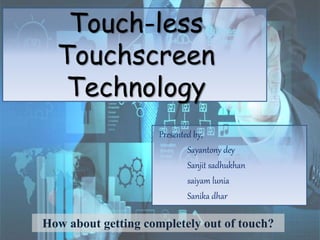
How about getting completely out of touch?
CONTENTS :
Introduction
Why TouchLESS
Types of Touchless sensors
Workflow
Optical Matrix sensor
Touch-less SDK
GBUI
Applications
Advantages
What’s Next
Conclusion
Bibliography
• A simple user interface for Touchless control of electrically operated
equipment is being developed by Elliptic Labs.
• This technology lets you control our gadgets like Computers, MP3 players
or mobile phones without touching them.
• This unique screen is made by TouchKo, White Electronics Designs, and
Groupe 3D.
• It works by detecting your hand movements in front of it.
• This system depends on hand and or finger motions, a hand wave in a
certain direction.
• The sensor can be placed either on the screen or near the screen
Introduction :
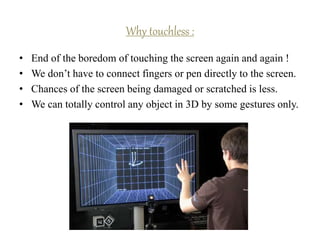
• End of the boredom of touching the screen again and again !
• We don’t have to connect fingers or pen directly to the screen.
• Chances of the screen being damaged or scratched is less.
• We can totally control any object in 3D by some gestures only.
Why touchless :
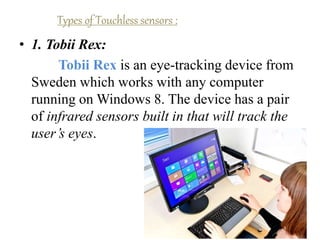
• 1. Tobii Rex:
Tobii Rex is an eye-tracking device from
Sweden which works with any computer
running on Windows 8. The device has a pair
of infrared sensors built in that will track the
user’s eyes.
Types of Touchless sensors :
• 2. Elliptic Labs
Elliptic Labs allows you to operate your
computer without touching it with the
Windows 8 Gesture Suite.
• 3. Airwriting
Airwriting is a technology that allows you
to write text messages or compose emails by
writing in the air.
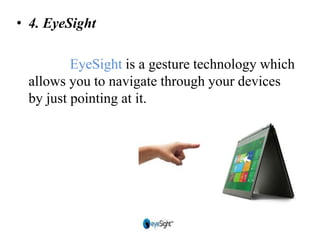
• 4. EyeSight
EyeSight is a gesture technology which
allows you to navigate through your devices
by just pointing at it.
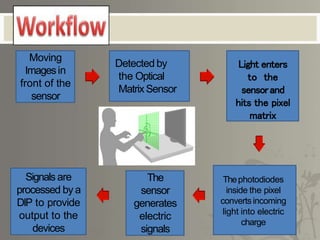
Moving
Imagesin
front of the
sensor
Detected by
the Optical
MatrixSensor
Light enters
to the
sensorand
hits the pixel
matrix
Thephotodiodes
inside the pixel
convertsincoming
light into electric
charge
The
sensor
generates
electric
signals
Signals are
processed by a
DIP to provide
output to the
devices
 In each of these sensors there is amatrix of pixels
 Each pixel is coupled to photodiodes incorporating
charge storage regions.
 The sensor is based on Optical Pattern Recognition
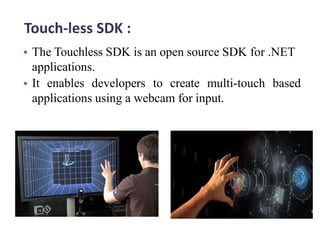
Touch-less SDK :
• The Touchless SDK is an open source SDK for .NET
applications.
• It enables developers to create multi-touch based
applications using a webcam for input.
Glimpse of GBUI
(Gesture Based User Interface)
• The basic idea described is that there would be sensors
arrayed around the perimeter of the device capable of sensing
finger movements in 3-D space where people wave their hand
in 3 dimensions and the computer understands what the user
wants and shifts and sorts data with precision.
• 1. Mauz
Mauz is a third party device that turns your iPhone
into a trackpad or mouse.
Applications
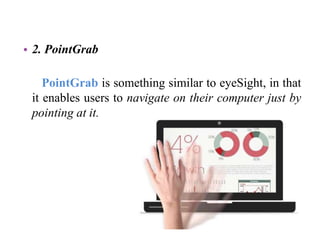
• 2. PointGrab
PointGrab is something similar to eyeSight, in that
it enables users to navigate on their computer just by
pointing at it.
• 3. Leap Motion
LeapMotion is a motion sensor device that
recognizes the user’s fingers with its infrared LEDs
and cameras.
• 4. Myoelectric Armband
Myoelectric armband or MYO armband is a
gadget that allows you to control your other bluetooth
enabled devices using your finger or your hands.
• 5. Microsoft Kinect
It detects and recognizes a user’s body movement
and reproduces it within the video game that is being
played.
Advantages
• Easier and satisfactory experience.
• Touchless screen.
• Controlling objects.
• Gesturing and cursor positioning.
• No drives required.
What’s Next?
Many personal computers will likely have similar screens in the
near future. But touch interfaces are nothing new -- witness
ATM machines.
How about getting completely out of touch? A startup called
LM3Labs says it's working with major computer makers in Japan,
Taiwan and the US to incorporate touch less navigation into
their laptops, Called Airstrike; the system uses tiny charge-
coupled device (CCD) cameras integrated into each side of the
keyboard to detect user movements.
Bibliography
• https://www.wikipedia.org/
• https://www.google.com/
• http://www.comogy.com/concepts/170-
universal-remote-concept.html
• http://www.touchuserinterface.com/tou
chless- touch-screen-that-senses-
your.html
• http://www.etre.com/blog/elliptic_lab
touch less_user_interface/
Any Queries?
Thank You.

Touchless touch screen

  • 1.
    Touch-less Touchscreen Technology Presented by, Sayantony dey Sanjitsadhukhan saiyam lunia Sanika dhar How about getting completely out of touch?
  • 2.
    CONTENTS : Introduction Why TouchLESS Typesof Touchless sensors Workflow Optical Matrix sensor Touch-less SDK GBUI Applications Advantages What’s Next Conclusion Bibliography
  • 3.
    • A simpleuser interface for Touchless control of electrically operated equipment is being developed by Elliptic Labs. • This technology lets you control our gadgets like Computers, MP3 players or mobile phones without touching them. • This unique screen is made by TouchKo, White Electronics Designs, and Groupe 3D. • It works by detecting your hand movements in front of it. • This system depends on hand and or finger motions, a hand wave in a certain direction. • The sensor can be placed either on the screen or near the screen Introduction :
  • 4.
    • End ofthe boredom of touching the screen again and again ! • We don’t have to connect fingers or pen directly to the screen. • Chances of the screen being damaged or scratched is less. • We can totally control any object in 3D by some gestures only. Why touchless :
  • 5.
    • 1. TobiiRex: Tobii Rex is an eye-tracking device from Sweden which works with any computer running on Windows 8. The device has a pair of infrared sensors built in that will track the user’s eyes. Types of Touchless sensors :
  • 6.
    • 2. EllipticLabs Elliptic Labs allows you to operate your computer without touching it with the Windows 8 Gesture Suite.
  • 7.
    • 3. Airwriting Airwritingis a technology that allows you to write text messages or compose emails by writing in the air.
  • 8.
    • 4. EyeSight EyeSightis a gesture technology which allows you to navigate through your devices by just pointing at it.
  • 9.
    Moving Imagesin front of the sensor Detectedby the Optical MatrixSensor Light enters to the sensorand hits the pixel matrix Thephotodiodes inside the pixel convertsincoming light into electric charge The sensor generates electric signals Signals are processed by a DIP to provide output to the devices
  • 10.
     In eachof these sensors there is amatrix of pixels  Each pixel is coupled to photodiodes incorporating charge storage regions.  The sensor is based on Optical Pattern Recognition
  • 11.
    Touch-less SDK : •The Touchless SDK is an open source SDK for .NET applications. • It enables developers to create multi-touch based applications using a webcam for input.
  • 12.
    Glimpse of GBUI (GestureBased User Interface) • The basic idea described is that there would be sensors arrayed around the perimeter of the device capable of sensing finger movements in 3-D space where people wave their hand in 3 dimensions and the computer understands what the user wants and shifts and sorts data with precision.
  • 13.
    • 1. Mauz Mauzis a third party device that turns your iPhone into a trackpad or mouse. Applications
  • 14.
    • 2. PointGrab PointGrabis something similar to eyeSight, in that it enables users to navigate on their computer just by pointing at it.
  • 15.
    • 3. LeapMotion LeapMotion is a motion sensor device that recognizes the user’s fingers with its infrared LEDs and cameras.
  • 16.
    • 4. MyoelectricArmband Myoelectric armband or MYO armband is a gadget that allows you to control your other bluetooth enabled devices using your finger or your hands.
  • 17.
    • 5. MicrosoftKinect It detects and recognizes a user’s body movement and reproduces it within the video game that is being played.
  • 18.
    Advantages • Easier andsatisfactory experience. • Touchless screen. • Controlling objects. • Gesturing and cursor positioning. • No drives required.
  • 20.
    What’s Next? Many personalcomputers will likely have similar screens in the near future. But touch interfaces are nothing new -- witness ATM machines. How about getting completely out of touch? A startup called LM3Labs says it's working with major computer makers in Japan, Taiwan and the US to incorporate touch less navigation into their laptops, Called Airstrike; the system uses tiny charge- coupled device (CCD) cameras integrated into each side of the keyboard to detect user movements.
  • 22.
    Bibliography • https://www.wikipedia.org/ • https://www.google.com/ •http://www.comogy.com/concepts/170- universal-remote-concept.html • http://www.touchuserinterface.com/tou chless- touch-screen-that-senses- your.html • http://www.etre.com/blog/elliptic_lab touch less_user_interface/
  • 23.
  • 24.

Editor's Notes

  • #10 DIP – Dual In-line Package